


Willow is an MCP gateway and identity layer for the AI agents employees use at work.
Agents connect to one Willow endpoint, and every tool call is checked for identity, permissions and risky content before it reaches a company system.
It belongs to the AI security category as agent access control. Willow was called Webrix until a 2026 rebrand, and a free plan covers up to 15 users.
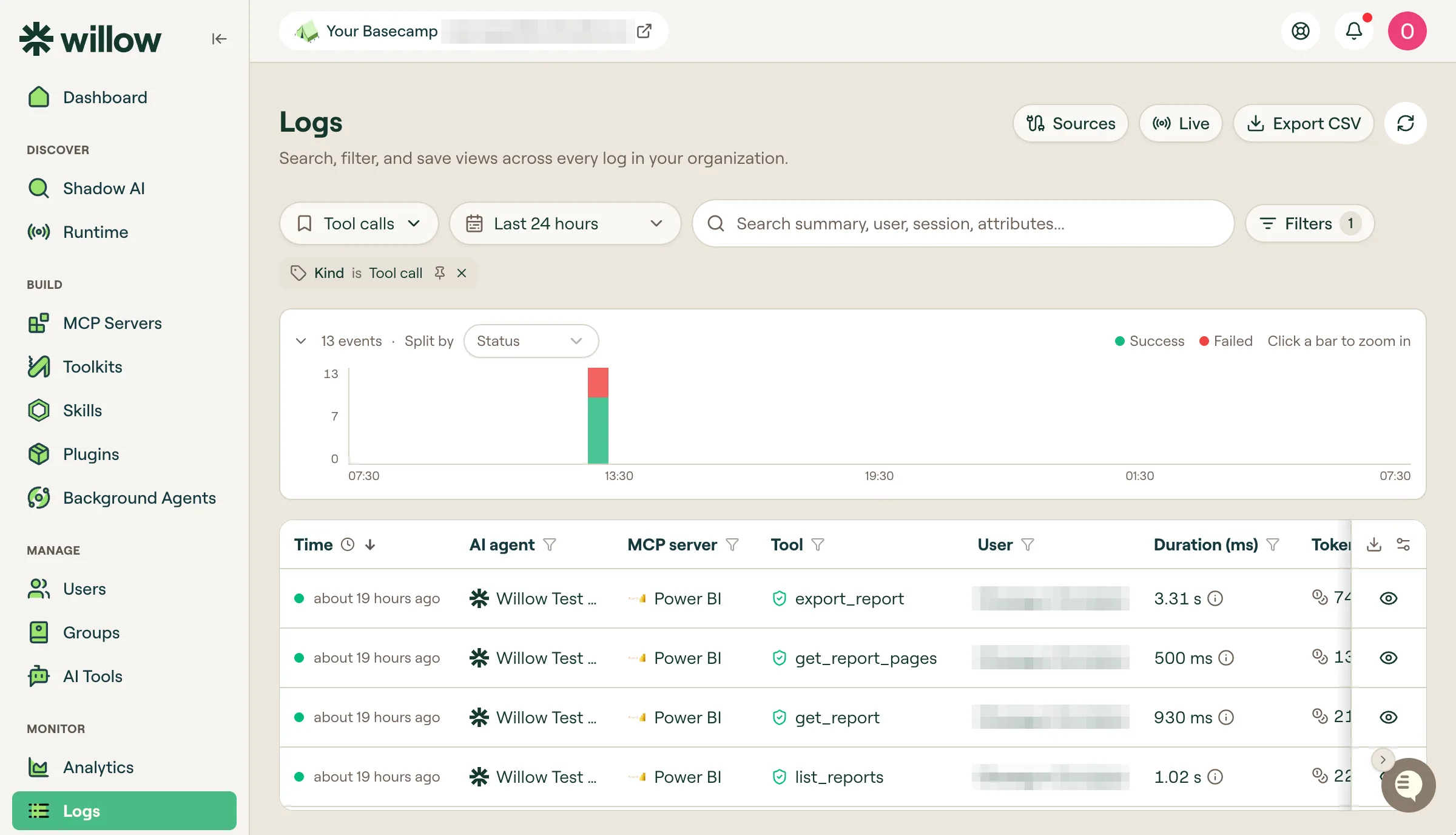 The Logs explorer ties each tool call to an agent, an MCP server and a user.
What is Willow?
Willow is a governed MCP gateway between employees’ AI agents and company tools. Employees already run Claude, Cursor, ChatGPT, Codex and Copilot against those tools, often on personal API keys.
Each agent gets an identity tied to a human owner. Group membership decides which servers and tools it can see, and conditions decide what it can do inside each tool.
Willow calls the setup a Basecamp. An admin connects the identity provider and tools once, and employees then self-serve the agents and tools they are allowed to use.
Beyond the gateway, Willow discovers unmanaged AI on laptops and in browsers, scores MCP servers for risk and runs background agents. Willow lists Wix, Agora, Innovid, Lansweeper and Riskified as customers.
I based this review on Willow’s website, pricing page, trust center and documentation, checked on November 6, 2026.
What are Willow’s key features?
| Capability | Details |
|---|---|
| Gateway | One governed MCP endpoint for Claude, Cursor, ChatGPT, Codex and Copilot; proxy, built-in and on-premises MCP |
| Identity | Okta, Entra ID, JumpCloud or Google; SCIM; IdP groups become agent RBAC; machine users for agent-to-agent work |
| Permissions | Per tool, per action, per condition; blocked by default when a check fails |
| Runtime guards | Prompt injection, secrets and PII on requests; PII and credential masking on responses; base64 and hex decoding |
| Discovery | MDM-deployed scan agent for macOS and Windows, browser extension for web AI |
| Risk scoring | 0 to 10 per MCP server across authentication, tools and guards |
| Connectors | 1,000+ pre-built, plus API-to-MCP conversion |
| Audit | Immutable, queryable trail streamed to Splunk, Loki, Grafana, CrowdStrike, Panther, S3 or a webhook |
| Deployment | SaaS, EU cluster, self-hosted on AWS, GCP or Azure, on-premises and air-gapped, hybrid gateway |
Six checks on every tool call
AI clients connect to a Willow MCP URL instead of the tool directly. On the Enterprise plan, Willow runs the same checks on each request, in order:
- Identity. A real identity from Okta, Entra ID, JumpCloud or Google. Agents and machine users get their own, tied to a human owner.
- Access. Group membership decides which servers and tools this user and agent can see.
- Actions and conditions. Only allowed tools and actions run, and conditions check live context such as channel, repository or data label.
- Request guards. Guards scan the request for prompt injection, secrets and PII before it leaves Willow.
- Vaulted credentials. Willow proxies the call with credentials from an encrypted vault, so long-lived tool credentials do not sit in a client config file.
- Response guards. PII and credentials are masked before the response reaches the model.
The call is then logged with the policy that allowed or blocked it and streamed to your SIEM.
Least privilege at the action level
Conditions go below the tool level. Willow’s examples include allowing posts in eng-* Slack channels while blocking exec-*, and allowing Drive reads while blocking files labeled Confidential.
The Dynamic MCP endpoint shows each conversation only the tools it needs. Willow’s reasoning is that an agent cannot misuse a tool it never sees. The smaller tool list also cuts context size.
Willow reports that one customer cut token use on certain tool operations by as much as 95%. That is a vendor figure from a single customer.
MCP server risk assessment
Willow scores every MCP server from 0 to 10, where lower is safer, before you publish it to users. The score sits on the server’s overview tab and in a sortable Risk column.
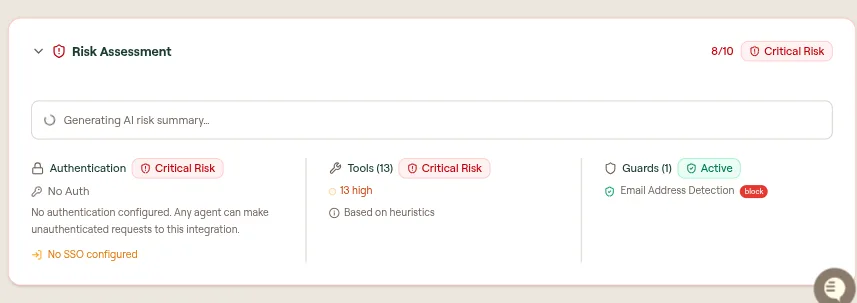 An MCP server with no authentication and 13 high-risk tools scores 8/10, Critical Risk.
| Dimension | What it evaluates |
|---|---|
| Authentication | The upstream auth method and whether SSO is configured; no authentication scores Critical Risk |
| Tools | Discovered tools scored by heuristics; write and delete tools weigh more than read-only ones |
| Guards | Runtime guards applied to the server; active guards lower the risk |
An AI summary explains the score, but only when you connect your own AI provider under AI Settings. The numeric score works without it.
Shadow AI discovery
A gateway only sees the traffic routed through it. Willow also checks what is installed on endpoints and in browsers.
A scan agent deploys through Jamf, Intune, JumpCloud, Mosyle or GPO on macOS and Windows. It finds MCP servers in Cursor, Claude Desktop, VS Code and Windsurf, plus skills, CLAUDE.md and AGENTS.md files.
The Willow Guard browser extension covers ChatGPT, claude.ai, Gemini and M365 Copilot. Local and stdio MCP servers show up alongside remote ones.
A separate free extension acts as a policy layer for Claude in Chrome.
It holds send, submit, post, pay, delete, publish and upload actions for one-click approval and scans for AWS keys, GitHub tokens, Stripe live keys and JWTs before they leave the browser.
Enforcement inside the client
Guard Hooks enforce policy inside Claude Code, Cursor and Codex, outside the gateway.
Unmanaged MCP servers and skills can be blocked in the client, and high-risk skills are held until they clear a risk threshold.
Willow can also take CrowdStrike’s identity risk score as a guard condition. Approvals run in Slack or interactively in the AI client.
What does Willow integrate with?
 Okta
 Entra ID
 JumpCloud
 Splunk
 Grafana
 CrowdStrike
 Amazon S3
Willow’s docs list Cursor, Claude Code, VS Code, Claude Web, Claude Desktop, ChatGPT, OpenCode, Codex and Devin Desktop as supported clients.
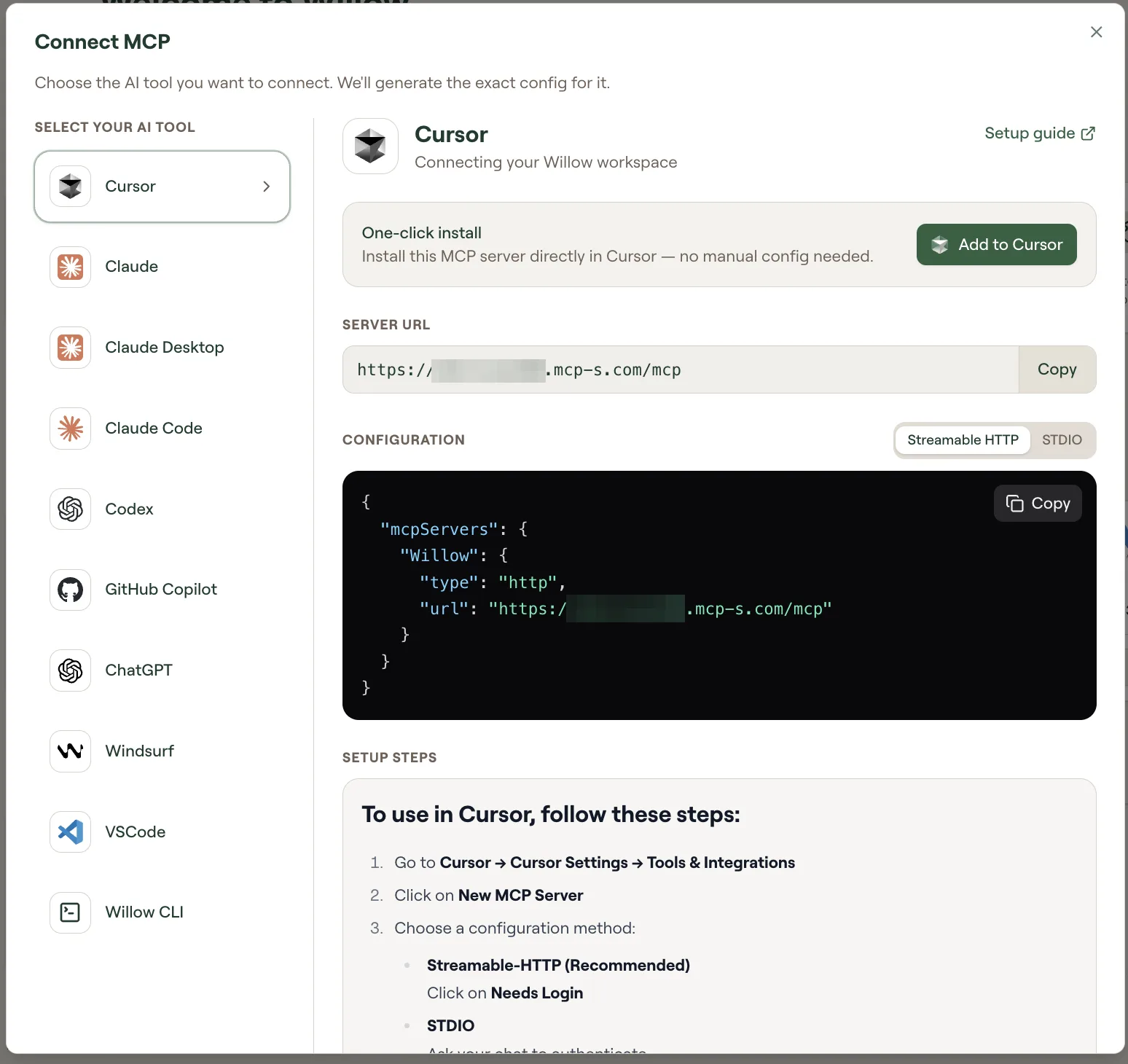 The Connect MCP dialog generates the config for each AI client.
The connector library has 1,000+ entries, including Snowflake, Wiz, Slack, Jira, Salesforce, GitHub, Datadog and AWS. On Enterprise, any internal API can be wrapped as an MCP server.
Background agents fire on Slack messages, webhooks, schedules or alerts.
They run on Claude Managed Agents, AWS AgentCore, Cursor Cloud Agents, kagent or your own harness, each with its own scoped tools and audit trail.
Willow vs Runlayer
Runlayer is a commercial AI control plane built around a governed MCP gateway. It attaches identity, policy, runtime scanning and audit to agent tool calls, and it records full session traces of agent activity.
Both products discover shadow AI across endpoints. Willow adds a published 0-to-10 risk score per MCP server and token spend analysis per user, tool and device.
The buying path differs. Runlayer lists no public prices, while Willow publishes a free plan for up to 15 users and prices Enterprise per seat on request.
Pick Runlayer if full session traces of agent activity are the control you need most. Pick Willow if you want to start free and add discovery and token analytics as you grow.
Willow vs Alter
Alter is an authorization layer for AI agents. It combines a credential vault, per-agent identity, approvals for sensitive calls and a default-deny policy down to the parameter.
Willow also keeps credentials in a vault and checks conditions per action. Its scope is wider: a connector marketplace, shadow AI discovery, a browser policy layer and background agents.
Pick Alter if fine-grained authorization of agent requests is the whole job. Pick Willow if you want gateway, discovery and self-serve enablement in one platform.
Willow vs HOL Guard
HOL Guard is an Apache-2.0 runtime guard for AI coding agents on a developer’s machine. It checks shell commands, secret reads, MCP calls and package installs locally, without a gateway.
Willow governs the company side: which tools an agent can reach and what it can do inside them. HOL Guard governs what a coding agent does on one machine.
The two overlap little. Pick HOL Guard for free, local protection of developer laptops. Pick Willow for central identity, permissions and audit across many employees and tools.
How much does Willow cost?
Willow publishes a free plan. Enterprise is priced per human seat, billed annually, with volume tiers that step down as seat count rises.
| Plan | Price | What it includes |
|---|---|---|
| Free | $0 forever | Up to 15 users, proxy MCP support, basic self-serve portal, limited audit trail, SaaS only, standard support |
| Enterprise | On request | Unlimited seats, SSO and SCIM, action-level permissions, runtime guards, shadow AI discovery, background agents, token analysis, log streaming, all deployment options |
The free plan card lists up to 15 integrations, while the plan comparison table lists connected integrations as unlimited. Confirm the limit before you plan a rollout around it.
Willow offers a 14-day proof of value at no cost, and annual terms are also sold through AWS Marketplace.
| Deployment | Free | Enterprise |
|---|---|---|
| SaaS | Yes | Yes |
| EU cluster, fully EU-managed | No | Yes |
| Self-hosted in AWS, GCP or Azure | No | Yes |
| On-premises and air-gapped | No | Yes |
| Hybrid gateway | No | Yes |
How do you get started with Willow?
- Set up the Basecamp. An admin signs up for the free plan and connects the tools the team uses.
- Accept the invite. Each user gets an email titled “Welcome to Your Secure AI Basecamp” and lands on the dashboard.
- Connect an AI client. Click Connect MCP, pick the client, and use the one-click install or copy the generated config.
- Run a first tool call. Ask the client to list the tools it can access.
Clients connect over streamable HTTP to https://yourorg.withwillow.ai/mcp. Clients that need STDIO start a local npx process that connects to the gateway:
{
  "mcpServers": {
    "Willow": {
      "type": "stdio",
      "command": "npx",
      "args": ["-y", "@mcp-s/mcp"],
      "env": {
        "ORG": "yourorg",
        "BASE_URL": "https://yourorg.withwillow.ai/mcp"
      }
    }
  }
}
When should you use Willow?
Willow fits companies where many employees already use several AI clients against shared tools such as Jira, GitHub, Slack and Snowflake. Security gets identity and audit, and employees keep their choice of client.
It also fits security teams that first need to see what AI is running. Shadow AI discovery covers local MCP servers and skills that a gateway alone would never see.
It is a weak fit for testing your own AI product for vulnerabilities. That is a red teaming job for tools such as Enoki Labs or garak .
What are alternatives to Willow?
- Runlayer : a commercial AI control plane and MCP gateway with full session traces.
- Alter : default-deny, parameter-level authorization with a credential vault for AI agents.
- HOL Guard : an open-source local runtime guard for AI coding agents.
- Lasso Security : a GenAI security platform spanning discovery, testing and runtime protection.
For the full catalog, see the AI security tools hub .
What are Willow’s limitations?
- Most controls are Enterprise-only. Runtime guards, action-level permissions, SSO, shadow AI discovery and log streaming are not in the free plan.
- No public Enterprise price. Seat pricing is quoted after a demo.
- Discovery needs installed software. Shadow AI discovery requires a browser extension and an endpoint agent deployed through MDM.
- The AI risk summary needs your own model. It works only after you connect an AI provider.
- Compliance paperwork still carries the old name. The SOC 2 report is issued to Webrix Ltd., and US contracts are with Webrix INC d/b/a Willow.
- It is a gateway, not a tester. Willow governs agent access but does not attack your own AI application to find vulnerabilities.