
What RASP actually does
Runtime Application Self-Protection is a security agent that lives inside your application and blocks attacks as they happen. Not before they reach the application (that is a WAF).
Not after the fact (that is a SIEM). During execution, in real-time, with full visibility into what the application is doing with each request.
The difference from other security tools matters. SAST and DAST find vulnerabilities. They tell you where the problems are so you can fix them.
RASP does not find vulnerabilities. It blocks their exploitation, whether you know about them or not.
If an attacker discovers a SQL injection in your application before you do, a RASP agent can block the exploit because it sees untrusted input reaching a SQL query at runtime. No prior knowledge of the vulnerability required.
I have deployed RASP at financial services companies where false positive rates are unacceptable. A blocked legitimate request means a failed transaction.
The context-aware detection that RASP provides, seeing what the application is actually doing with each input, makes it far more accurate than perimeter defenses.
Mordor Intelligence estimates the RASP market reached $2.02 billion in 2025, forecast to grow to $7.17 billion by 2030 at a 28.82% CAGR (Mordor Intelligence, RASP Market Report, 2025).
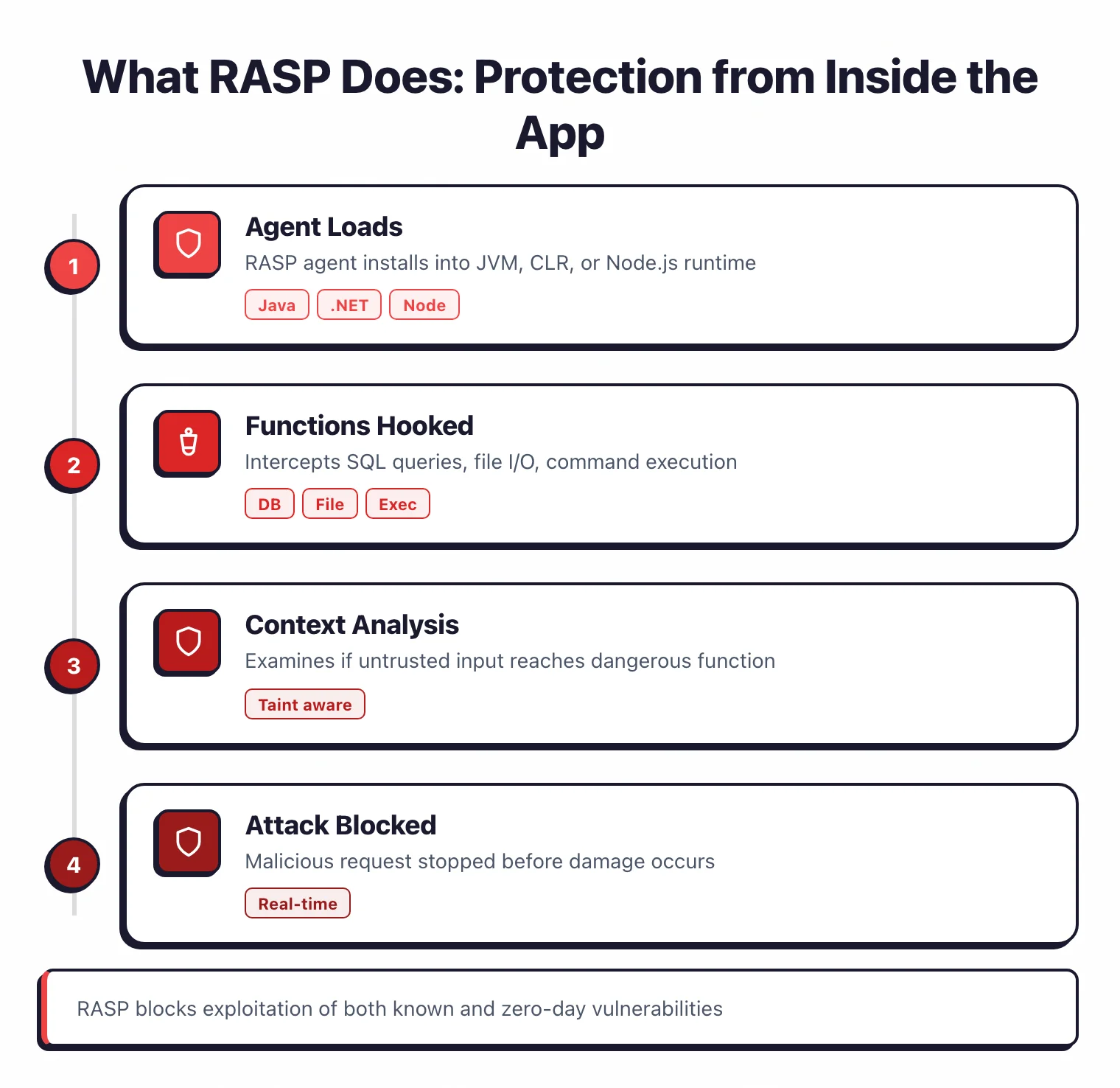
How RASP works
RASP uses runtime instrumentation to observe application behavior and intervene when an attack is detected.
Agent installation
The RASP agent loads into the application runtime. For Java, this means a JVM agent in your startup configuration.
For .NET, a CLR profiler. For Node.js, an npm module loaded at application startup.
One-time setup during deployment, either by modifying startup scripts or baking it into container images.
Function hooking
The agent hooks into security-sensitive functions: SQL query execution, file I/O, command execution, network calls, deserialization. These hooks sit between the application code and the dangerous operation, intercepting data before it reaches the underlying function.
Context-aware detection
When a hooked function is called, the agent examines the input in context. A WAF sees an HTTP request containing ' OR 1=1-- and blocks it based on the pattern.
The RASP agent sees that this string arrived from user input, passed through the application code without sanitization, and is about to be concatenated into a SQL query string. The WAF guesses. RASP knows.
This is why RASP has dramatically lower false positive rates than WAFs.
A WAF might block a legitimate request that happens to contain SQL-like syntax (a blog post about SQL injection, for example).
RASP would not block it because it can see the input is going to a text field, not a SQL query.
Block or monitor
Depending on configuration, RASP either blocks the malicious request immediately or logs it for review. Every vendor recommends starting in monitor mode.
Run the agent for a few weeks, review what it would have blocked, verify there are no false positives, then switch to blocking mode. Do not skip this step.
Blocking legitimate requests in production is worse than the vulnerability you are trying to protect against.
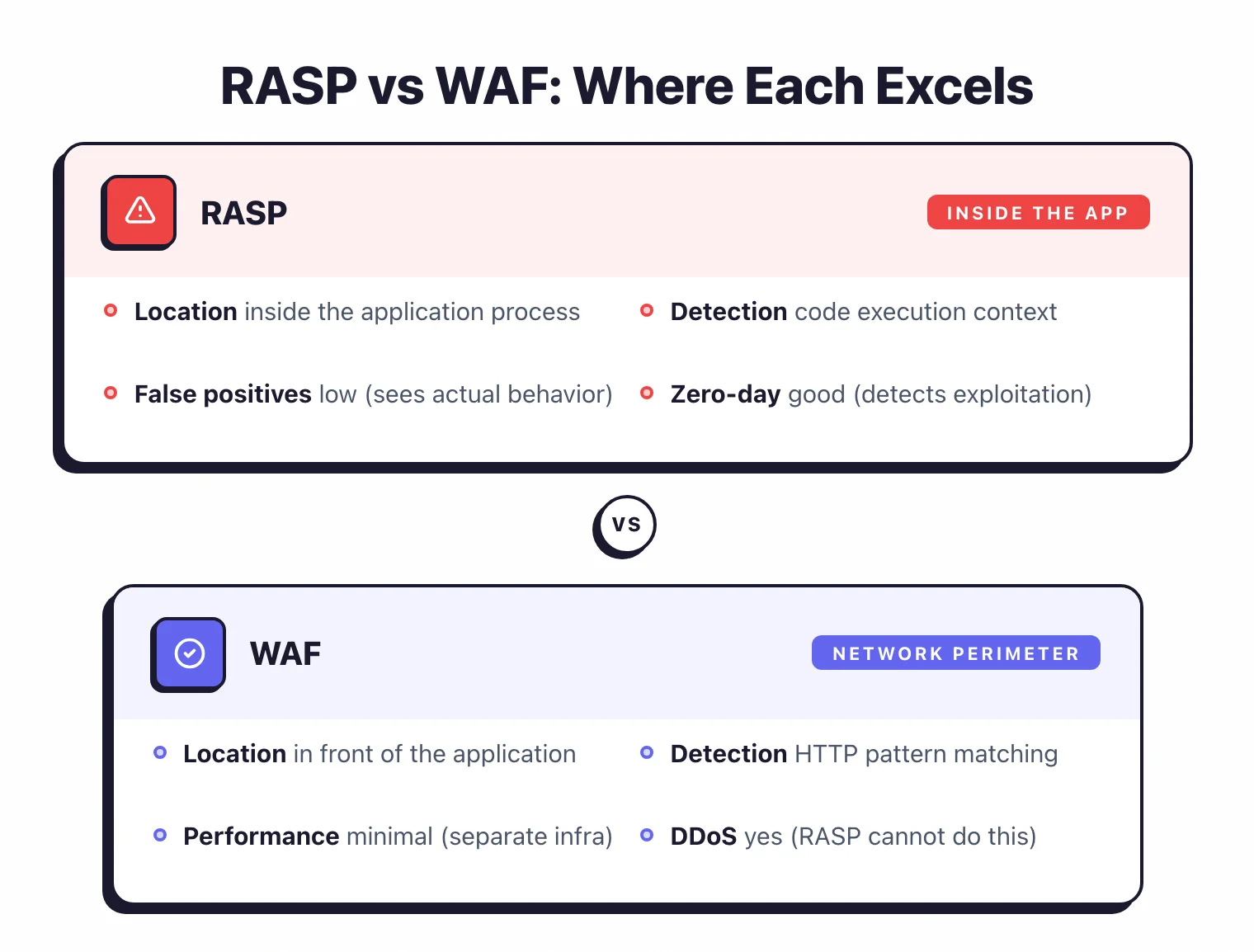
RASP vs WAF
RASP and WAFs both protect running applications, but they work differently enough that the comparison is worth spelling out.
| RASP | WAF | |
|---|---|---|
| Location | Inside the application process | In front of the application (network perimeter) |
| Detection method | Code execution context | HTTP traffic pattern matching |
| False positives | Low (sees actual code behavior) | Higher (pattern matching only) |
| Performance impact | 2-10% latency added to the application | Minimal (separate infrastructure) |
| Deployment | Per-application agent install | Network-level, covers all apps at once |
| Zero-day protection | Good (detects exploitation behavior) | Limited (needs rules for known patterns) |
| DDoS protection | No | Yes |
| Cost per application | Higher (agent per app) | Lower (one WAF for many apps) |
My take: if you can afford both, use both. WAFs give you perimeter defense and DDoS protection.
RASP gives you accurate, context-aware protection for your most critical applications. If you must choose one, a WAF is the safer starting point because it requires no application changes and covers all your applications at once.
RASP makes the most sense for high-value applications where false positives are unacceptable: payment processing, authentication services, anything handling PII or financial data. You do not need RASP on every application.
You need it on the ones where a blocked legitimate request or a missed attack has real consequences.
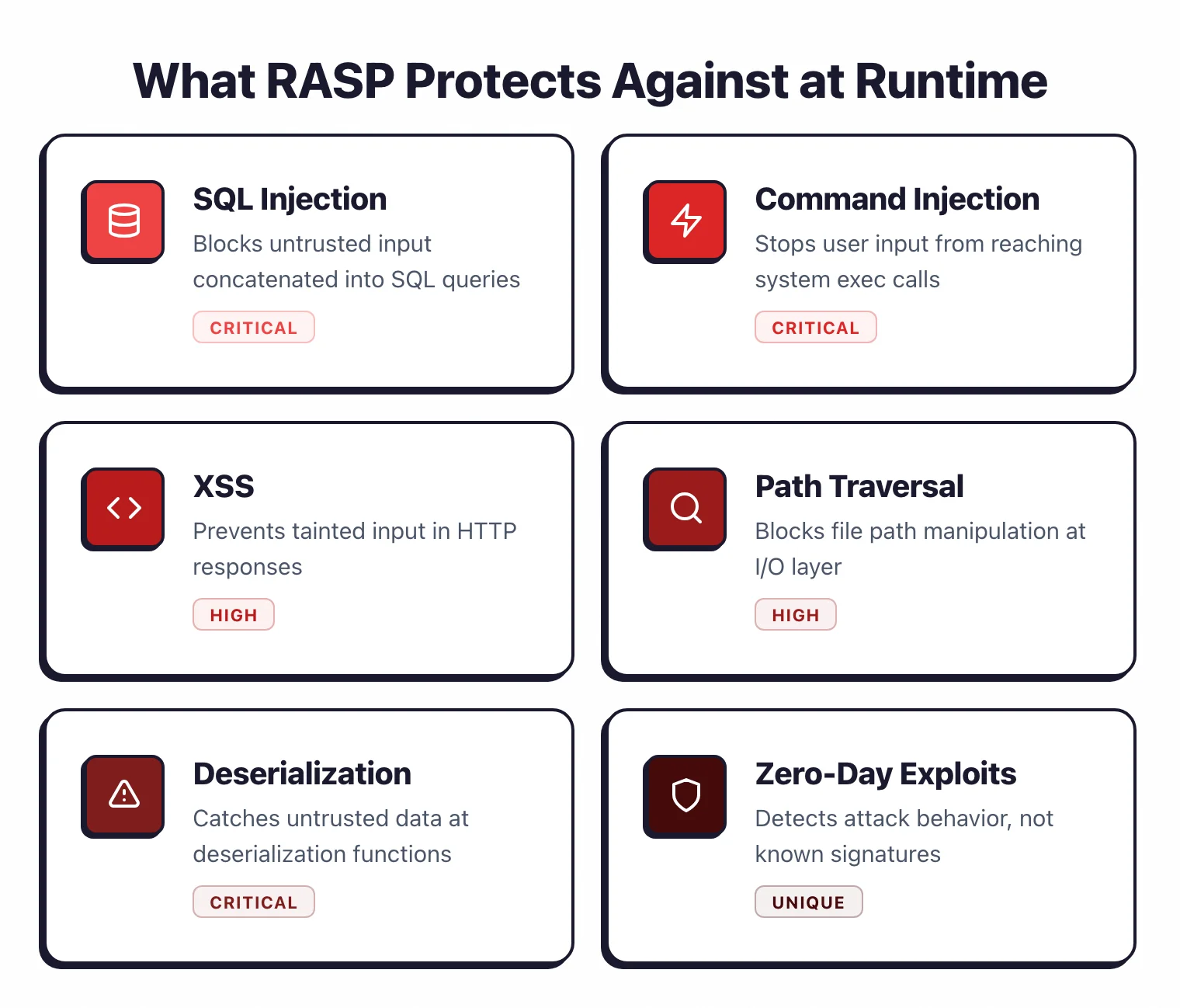
What does RASP protect against?
RASP is effective against attacks where untrusted input reaches dangerous functions:
- SQL injection — The agent sees untrusted input being concatenated into a SQL query and blocks it before execution.
- Command injection — User input reaching system command execution functions.
- Cross-site scripting (XSS) — Tainted input being rendered in HTTP responses without encoding.
- Path traversal — User input used to construct file paths that escape the intended directory.
- Insecure deserialization — Untrusted data being deserialized without type validation.
- Zero-day exploitation — Because RASP detects attack behavior rather than known signatures, it can block exploits for vulnerabilities that have not been publicly disclosed yet.
RASP is less effective against DDoS, network-level attacks, and attacks targeting infrastructure rather than the application. That is WAF and network security territory.
What is the performance impact?
Every RASP conversation eventually gets to performance. The honest answer: yes, it adds overhead.
How much depends on the tool, the application, and the configuration.
Typical latency overhead ranges from 2% to 10%. Waratek claims minimal overhead due to its virtualization-based architecture. Contrast Protect and Datadog ASM report overhead in the 2-5% range for most applications.
For a web application with 200ms average response time, 5% overhead means 10ms added per request. Most users will not notice. For a high-frequency trading system or real-time gaming backend, 10ms might be unacceptable.
The practical approach: deploy the agent in a staging environment identical to production. Run your load tests with and without the agent.
Measure the actual latency difference for your specific application and traffic patterns. Then decide whether the protection is worth the overhead.
Do not rely on vendor benchmarks. Every application has different call patterns, and the overhead varies with how many security-sensitive function calls your code makes.
Deployment considerations
How hard RASP is to deploy depends on your infrastructure.
Traditional VMs and bare metal. Add the agent to your application server startup configuration.
For Tomcat, add the Java agent to CATALINA_OPTS. For IIS, install the .NET profiler. One-time setup.
Docker and Kubernetes. Modify your Dockerfile to include the agent, or use init containers.
Every image rebuild needs the agent, which adds a CI/CD step and increases image size.
Some teams use admission controllers to inject the agent automatically.
Serverless (Lambda, Cloud Functions). Most RASP tools do not support serverless.
Functions are ephemeral, start from scratch on each invocation, and the startup overhead of loading a RASP agent is too high.
If you run serverless, use SAST and DAST for security testing and your cloud provider’s WAF for runtime protection.
Why has the RASP market consolidated?
The standalone RASP market has consolidated heavily since 2020. Knowing what happened helps you make sense of the current product landscape.
Sqreen was acquired by Datadog (2021). Sqreen’s RASP engine became Datadog Application Security Management (ASM).
If you already use Datadog for APM, their RASP is a natural add.
Signal Sciences was acquired by Fastly (2020). Signal Sciences became the foundation of Fastly’s Next-Gen WAF.
It is still available but not sold as a standalone RASP product anymore.
K2 Cyber Security was acquired by New Relic (2022). The technology was integrated into New Relic’s security monitoring.
Hdiv Security was acquired by Datadog (2022). Integrated into Datadog Code Security. The standalone product is no longer maintained.
The pattern: RASP is being absorbed into APM and observability platforms. Datadog, New Relic, and Dynatrace all have RASP capabilities now.
RASP agents are architecturally similar to APM agents — both instrument the application runtime — so bundling them reduces deployment complexity.
For buyers, this means your RASP choice may come down to which observability platform you already use.
Getting started
RASP is not the first security tool you should adopt. It makes the most sense after you have SAST and DAST in place and need runtime protection for critical applications.
Identify your highest-value applications. RASP is deployed per-application, so start with the ones where a successful attack would cause the most damage: payment processing, user authentication, anything handling PII or financial data.
Check language support. Java and .NET have the most options.
Node.js and Python are covered by fewer tools. Go and Rust have almost no RASP support.
Deploy in monitor mode first. Install the agent on staging.
Let it run alongside normal testing for a few weeks. Review what it flags. Verify there are no false positives.
Validate performance. Run load tests with and without the agent. Measure the actual latency impact.
Move to blocking mode. Once you trust the agent and the performance impact is acceptable, enable blocking on staging.
Test thoroughly. Then move to production.
Do not stop fixing vulnerabilities. RASP is a safety net, not a patch.
If RASP catches a SQL injection, fix the code. RASP protects you while the fix is in progress and catches zero-days that no patch exists for yet.
But the goal is always to fix the root cause.