


Wapiti is a free, open-source web vulnerability scanner written in Python. It crawls web applications and injects payloads through HTTP parameters to find injection vulnerabilities, misconfigurations, and known CVEs.
With 1,800+ GitHub stars, 247 forks, and 31 contributors, Wapiti has maintained active development since 2006. Version 3.3.0 was released in May 2026. The project is included in Kali Linux.
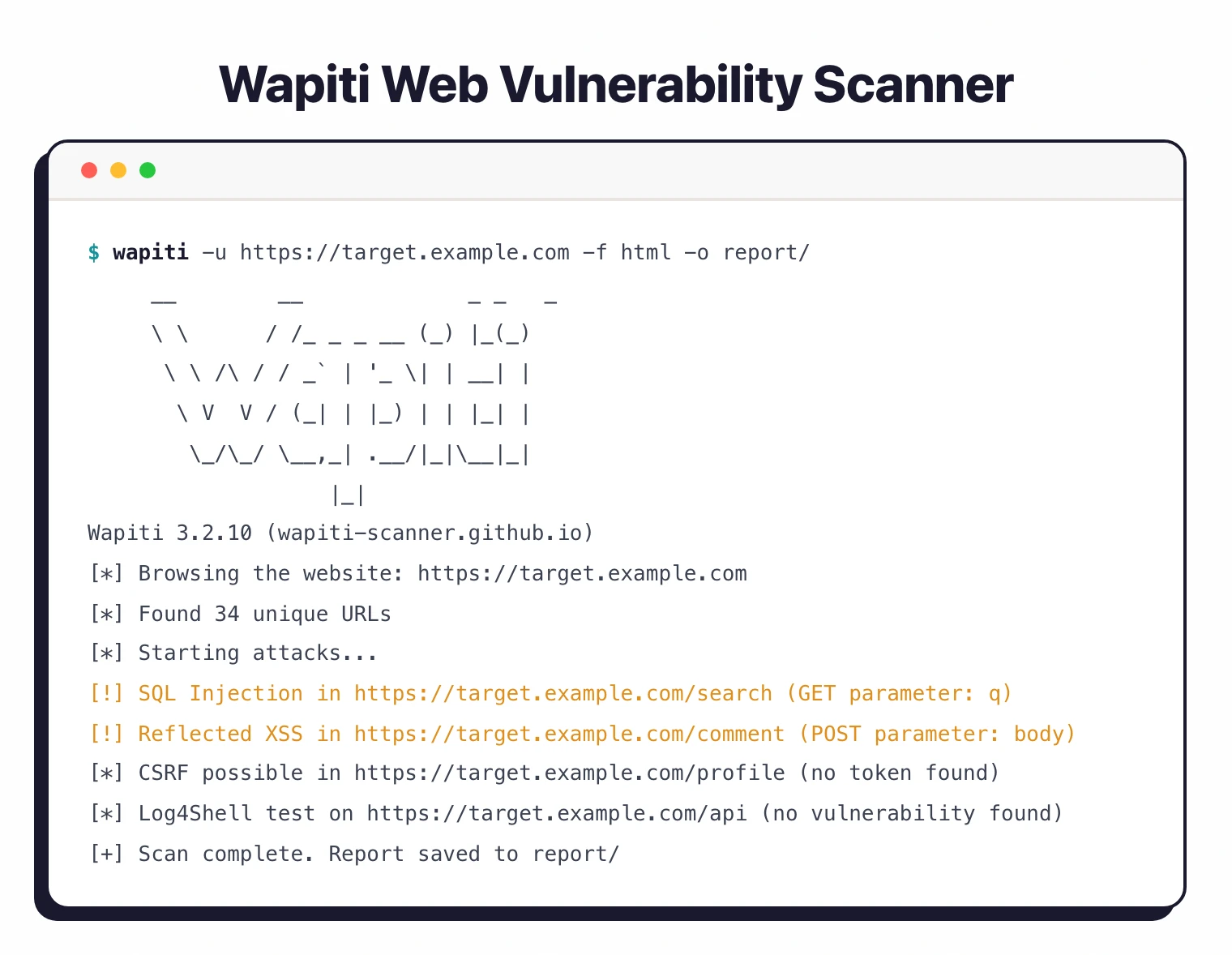
I use Wapiti when I want a scriptable black-box web scanner that does not require a paid license. It crawls a target and runs attack modules for SQL injection, XSS, command injection, and file inclusion, then outputs an HTML or JSON report. The false-positive rate is higher than commercial DAST tools, but for quick scans on internal apps it is fast to spin up.
What is Wapiti?
Wapiti is a command-line black-box fuzzer. It does not read source code.
Instead, it crawls a deployed web application, extracts links and forms, then sends attack payloads through GET and POST parameters, cookies, and HTTP headers.
This approach aligns with the OWASP Testing Guide’s recommendation for runtime testing of deployed applications to complement static analysis.
It analyzes responses to identify vulnerabilities. When it injects an XSS payload into a form field and that payload shows up in the response HTML, it flags it.
When a time-based SQL injection payload causes a delayed response, it reports that too.
The scanner ships 30+ attack modules covering injection flaws, known CVEs (Log4Shell, Spring4Shell, Shellshock), server misconfigurations, and more. It also supports Swagger/OpenAPI specs for API testing.
Written in Python 3, Wapiti requires version 3.12, 3.13, or 3.14. It runs on Linux and macOS natively, and on Windows through WSL.
| Feature | Details |
|---|---|
| Language | Python 3.12 / 3.13 / 3.14 |
| License | GPL v2 |
| Attack modules | 30+ |
| GitHub stars | 1,800+ |
| Latest version | 3.3.0 (May 2026) |
| Report formats | HTML, JSON, XML, CSV, TXT |
| Authentication | Basic, Digest, NTLM, form-based, browser cookie import |
| Proxy support | HTTP, HTTPS, SOCKS5 |
| Session management | SQLite3 database (suspend/resume) |
| API testing | Swagger/OpenAPI |
| JS rendering | Headless Firefox |
| Platforms | Linux, macOS, Windows (WSL) |
What are Wapiti’s key features?
| Capability | Details |
|---|---|
| 30+ Attack Modules | SQL injection, XSS, file inclusion, command execution, XXE, SSRF, CRLF, Log4Shell, Spring4Shell, Shellshock, CSRF detection, subdomain takeover, CMS fingerprinting, and more. |
| Stored XSS Detection | Wapiti injects payloads into forms, then crawls other pages to check if the payload persists. When it finds the injected payload on a different page, it reports stored XSS — catching vulnerabilities that affect other users. |
| Session Suspend/Resume | Scans are backed by SQLite3 databases. You can stop a long-running scan and resume it later without losing progress. Useful for large applications that take hours to scan. |
Vulnerability Coverage
Wapiti’s 30+ modules cover a wide range of DAST tools vulnerability categories:
- SQL Injection: Error-based, boolean-based, and time-based for MySQL, PostgreSQL, MSSQL, Oracle
- XSS: Both reflected and stored/persistent — Wapiti actually differentiates between them
- File Inclusion: Local and remote file inclusion
- Command Execution: OS command injection
- XXE: XML External Entity injection
- SSRF: Server-Side Request Forgery
- CRLF Injection: HTTP header injection
- Log4Shell: CVE-2021-44228 detection (tracked in the NIST National Vulnerability Database as a critical severity 10.0 flaw)
- Spring4Shell: Spring Framework RCE detection
- Shellshock: Bash vulnerability testing
- CSRF: Cross-Site Request Forgery detection
- Subdomain Takeover: Dangling DNS record detection
- CMS Fingerprinting: WordPress, Drupal, Joomla detection
- Security Headers: CSP evaluation, cookie flags, missing headers
Authentication
Wapiti supports several authentication methods:
- HTTP Basic and Digest
- NTLM
- Form-based login with custom parameters
- Cookie import from Chrome or Firefox browsers
- Session token handling
The browser cookie import is handy — authenticate manually in your browser, export cookies, and Wapiti uses them to crawl protected pages.
Swagger/OpenAPI Support
Feed Wapiti a Swagger or OpenAPI specification file and it will test each defined endpoint for vulnerabilities. This extends Wapiti beyond traditional page crawling into API security testing.
Installation
# pip (recommended)
pip install wapiti3

# Kali Linux
sudo apt update && sudo apt install wapiti

# From source
git clone https://github.com/wapiti-scanner/wapiti.git
cd wapiti && pip install .

# Docker
docker build -t wapiti .
docker run --rm wapiti -u https://example.com

# Verify
wapiti --version
How do I get started with Wapiti?
- Install Wapiti —
pip install wapiti3requires Python 3.12, 3.13, or 3.14. Also available on Kali Linux via apt or as a Docker container. - Run a basic scan —
wapiti -u https://example.comcrawls the target and runs all attack modules. Add-v 2for verbose output. - Focus on specific modules —
wapiti -u https://example.com --module sql,xss,xxeruns only the modules you care about. Use--list-modulesto see all available modules. - Generate reports —
wapiti -u https://example.com -f html -o reportgenerates an HTML report. Also supports JSON, XML, CSV, and TXT formats.
Usage Examples
# Basic scan with all modules
wapiti -u https://example.com

# Target specific vulnerability types
wapiti -u https://example.com --module sql,xss,xxe,ssrf

# Authenticated scan with form login
wapiti -u https://example.com \
  --form-url https://example.com/login \
  --form-data "username=admin&password=secret" \
  --form-enctype application/x-www-form-urlencoded

# Import cookies from Firefox
wapiti -u https://example.com -c firefox

# Limit crawl depth and scope
wapiti -u https://example.com --depth 3 --scope domain

# Use through a proxy (useful with Burp Suite)
wapiti -u https://example.com --proxy http://localhost:8080

# Generate JSON report for automation
wapiti -u https://example.com -f json -o results.json

# Run only XXE, SQL, and XSS modules with verbose output
wapiti -u https://example.com --modules xxe,sql,xss -v 2

# Resume an interrupted scan from its SQLite checkpoint
wapiti -u https://example.com --resume-crawl

# Test a Swagger / OpenAPI spec instead of crawling
wapiti -u https://example.com --swagger ./openapi.yaml

# Tighter scan: timeout, request rate, max URLs per directory
wapiti -u https://example.com --timeout 10 --max-files-per-dir 50
The --modules flag is the workhorse for CI scans — narrow it to the OWASP-Top-10 categories your team actually triages, and Wapiti finishes a small site in minutes rather than running every module against every form.
What does Wapiti integrate with?
 DefectDojo
 GitHub Actions
 GitLab CI
CI/CD Integration
# GitHub Actions example
name: Wapiti Security Scan
on:
  push:
    branches: [main]

jobs:
  wapiti-scan:
    runs-on: ubuntu-latest
    steps:
      - uses: actions/checkout@v4
      - name: Start application
        run: docker-compose up -d && sleep 30
      - name: Install and run Wapiti
        run: |
          pip install wapiti3
          wapiti -u http://localhost:8080 \
            --module sql,xss,xxe,ssrf \
            --depth 3 \
            -f json -o wapiti-results.json
        continue-on-error: true
      - uses: actions/upload-artifact@v4
        with:
          name: wapiti-report
          path: wapiti-results.json
How much does Wapiti cost?
Wapiti is free. The scanner is licensed under GPL v2 and distributed through pypi (pip install wapiti3), the official Kali Linux repositories, the wapiti-scanner Docker image, and source on github.com/wapiti-scanner/wapiti.
There is no commercial tier, no paid add-on, and no vendor behind the project — Wapiti is volunteer-maintained open source. Teams use it without licensing cost in CI / CD, in pentesting workflows, and inside Kali distributions. The trade-off is no SLA, no support contract, and no enterprise dashboard. Pay nothing, run anywhere.
When to Use Wapiti
Wapiti fills a specific niche: a free, command-line injection fuzzer that’s easy to script and automate. It’s not trying to be a full DAST platform.
Good fit for:
- Teams needing a free scanner for CI/CD pipelines without licensing costs
- Security researchers who want to extend modules in Python
- Pentesters wanting a quick injection fuzzer alongside manual testing
- Organizations on Kali Linux that want an included DAST tool
- Scanning traditional server-rendered web applications
For a full list of free scanners, see the free DAST tools guide. To understand how Wapiti’s black-box approach compares with other testing methods, read SAST vs DAST vs IAST .
Not the best fit for:
- Modern JavaScript SPAs — Wapiti has headless Firefox support but it’s limited compared to ZAP or commercial tools like Burp Suite
- API-first architectures — Swagger/OpenAPI support exists but dedicated API scanners go deeper
- Enterprise portfolio management — no scheduling, dashboards, or multi-user features
- Business logic testing — Wapiti tests injection points, not application workflows
What are alternatives to Wapiti?
Wapiti is one of several free DAST tools, and each peer solves a slightly different problem.
OWASP ZAP is the closest free alternative. ZAP includes a GUI, an intercepting proxy, an active scanner, and a much richer plugin ecosystem. ZAP also handles modern JavaScript SPAs better than Wapiti’s headless Firefox path. The trade-off: ZAP is heavier to learn and slower in pure CLI mode.
Nuclei takes a different angle. It runs YAML templates against targets rather than a crawl-and-fuzz model, which makes it faster and tighter for CI but weaker for unguided exploration. Pair Nuclei with Wapiti for layered scanning.
Nikto is the legacy server-misconfiguration scanner — useful for outdated software, default credentials, and dangerous files, but not a real injection fuzzer. Run it alongside Wapiti, not instead of it.
Burp Suite Professional is the paid alternative when manual pentesting is part of the workflow. Burp’s intercepting proxy, fuzzer, and extension marketplace dwarf anything in the free tier.
For a curated list of free options, see free DAST tools or browse the full DAST tools hub.