

Wallarm is an API security platform that protects over 160,000 APIs and processes billions of requests daily. It pairs a web application firewall with ML-based API protection, automatic API discovery, and bot management in a single product.
The company is headquartered in Austin, TX with an additional office in San Francisco. Customers include Panasonic, Victoria’s Secret, Miro, Samsung, Dropbox, and Semrush.
Wallarm also maintains several open-source projects: API Firewall, GoTestWAF, and the libDetection library.
What is Wallarm?
Wallarm started as a WAF and expanded into API security tools as API traffic outgrew traditional web application traffic. The platform treats API protection as the primary concern rather than a bolt-on to WAF rules, putting Wallarm alongside WAF-heritage peers like Imperva API Security but with stronger emphasis on developer-controlled deployment.
It works in two modes. Inline mode sits in the request path and blocks attacks before they reach your backend.
Out-of-band mode mirrors traffic for analysis without touching the live request flow. Both feed the same Wallarm Console for visibility.
The platform organizes into four product areas:
| Capability | Details |
|---|---|
| Advanced API Security | Bundles API Discovery, API Security Testing, API Abuse Prevention, and credential stuffing detection. Discovers your full API inventory from real traffic and blocks OWASP API Top 10 attacks. |
| Cloud-Native WAAP | Web application and API protection that deploys across cloud, Kubernetes, and on-premise environments. Handles injection attacks, XSS, and L7 DDoS alongside API-specific threats. |
| Security Edge | DNS-based edge deployment that puts API protection in front of your infrastructure. Wallarm claims deployment in as little as 15 minutes by redirecting DNS. Multi-cloud and multi-CDN compatible. |
| API Attack Surface Management | Agentless detection of external-facing APIs and hosts. Finds API leaks and exposed endpoints you may not know about. |
What are Wallarm’s key features?
| Feature | Details |
|---|---|
| APIs protected | 160,000+ |
| Requests processed | Billions daily |
| API Discovery | Automatic inventory from live traffic, shadow/zombie/orphan API detection |
| Threat detection | ML-based anomaly detection + signature matching |
| OWASP coverage | Full OWASP API Security Top 10 |
| Bot management | Credential stuffing, ATO, L7 DDoS, scraping detection |
| GraphQL | Query depth limits, complexity analysis, introspection blocking |
| Deployment options | Docker, Kubernetes, NGINX, cloud connectors, DNS edge, eBPF |
| Integrations | Slack, Teams, PagerDuty, Jira, Splunk, Datadog, Sumo Logic, and more |
API Discovery
Wallarm builds your API inventory by analyzing real traffic rather than relying on uploaded specs. The API Discovery module identifies endpoints, request methods, parameters, data types, and authentication patterns.
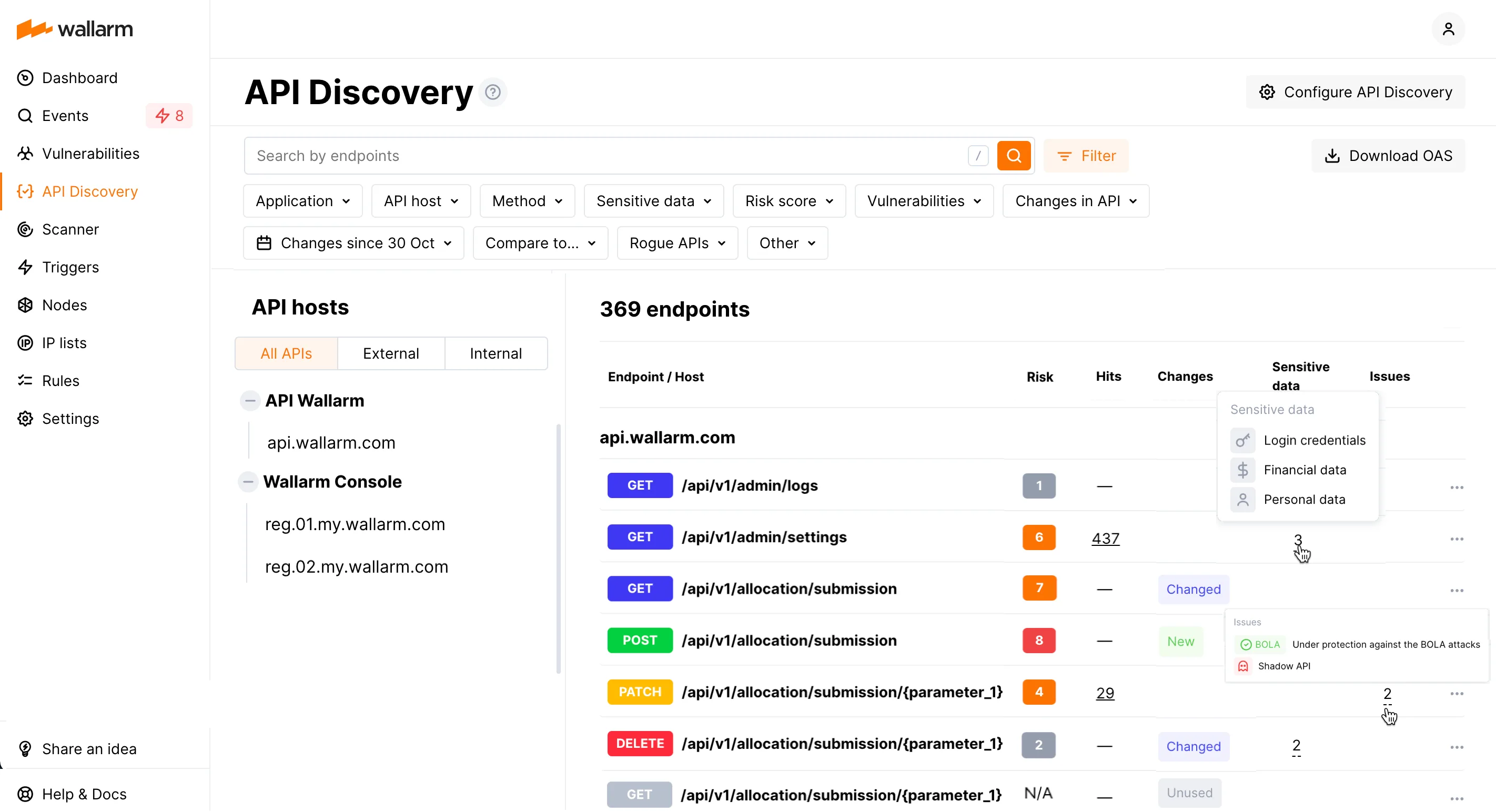
It flags shadow APIs (undocumented endpoints handling live traffic), zombie APIs (deprecated endpoints still accessible), and orphan APIs (endpoints with no owner). Sensitive data detection picks up PII, financial data, credentials, and health information flowing through your APIs.
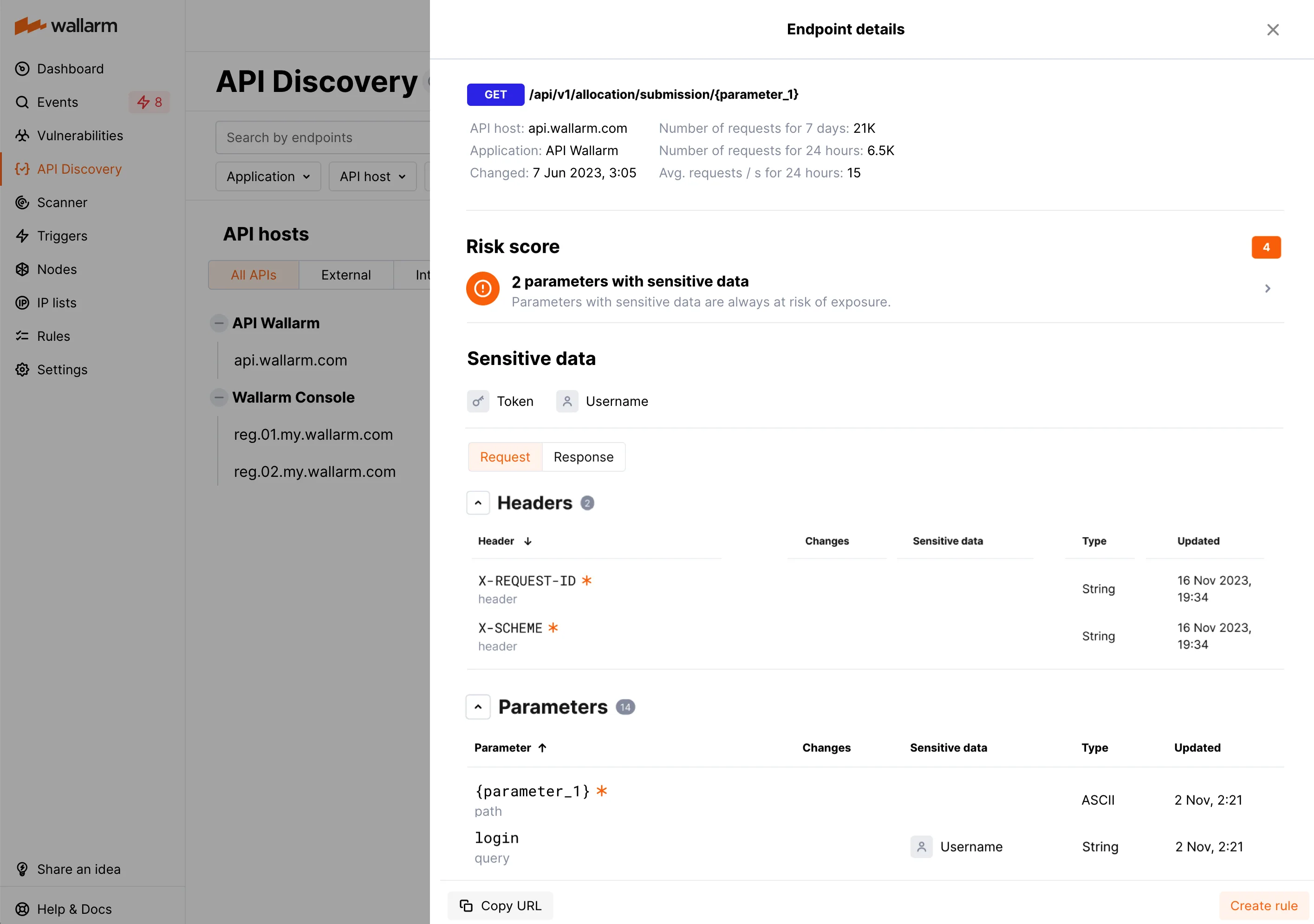
Risk scoring ranks endpoints by attack likelihood. Business-critical flows like authentication, billing, and account management are tagged automatically.
Threat Detection and WAAP
ML models establish baselines of normal API behavior and flag deviations. This catches zero-day attacks and business logic abuse that signature-only tools miss.
Wallarm also uses traditional signature matching for known attack patterns, so the two approaches cover different ground.
Protection covers the OWASP API Security Top 10:
- BOLA (Broken Object Level Authorization) with automatic protection rules
- Broken Authentication detection
- Excessive Data Exposure monitoring
- Rate Limiting enforcement
- Broken Function Level Authorization detection
- Mass Assignment blocking
- Injection attacks (SQLi, XSS, RCE)
- Security Misconfiguration identification
API Abuse Prevention
The API Abuse Prevention module targets automated attacks that traditional WAFs miss. It uses specialized detectors for:
- Account takeover and credential stuffing — identifies automated login attempts by analyzing request patterns and timing
- L7 DDoS — detects high-volume API abuse that overwhelms application logic
- Scraping — blocks automated data extraction across API endpoints
- Security crawlers — identifies scanning tools probing your API surface
Each detector has adjustable weighting and thresholds. Session-level blocking lets you stop a specific malicious session without affecting legitimate users sharing the same IP.
GraphQL Security
Wallarm includes protections specific to GraphQL APIs:
- Query depth limiting to prevent deeply nested queries
- Query complexity analysis
- Introspection blocking in production
- Batching attack prevention
Bot Management
The platform distinguishes legitimate automation (monitoring tools, partner integrations) from malicious bots. Policies can allow, challenge, or block different bot categories based on signatures, behavioral patterns, and client fingerprints.
API runtime protection
Wallarm’s WAAP is API runtime protection by design — the inline filtering node enforces policies on live API traffic, blocking attacks (injection, BOLA, BFLA, OWASP API Top 10) at the request layer rather than at scan-time. This runtime-first stance is what separates Wallarm from spec-only tools and from detection-only behavioral platforms; the same node that enforces WAF rules also runs the API-specific detectors against the live request and response.
Deployment
Wallarm offers several deployment paths depending on your infrastructure. All installation commands below come from the official documentation .
Docker
The NGINX-based Docker image runs on both x86_64 and ARM64. The current image is wallarm/node:6.10.1 based on Alpine Linux 3.22 with NGINX stable 1.28.0.
docker run -d \
  -e WALLARM_API_TOKEN='<YOUR_TOKEN>' \
  -e WALLARM_LABELS='group=<GROUP>' \
  -e NGINX_BACKEND='your-backend.example.com' \
  -e WALLARM_API_HOST='us1.api.wallarm.com' \
  -p 80:80 \
  wallarm/node:6.10.1
Set WALLARM_MODE to block, safe_blocking, monitoring, or off to control filtering behavior. Omit WALLARM_API_HOST if using the EU cloud.
Kubernetes (Helm)
Wallarm provides a Helm chart that wraps the community NGINX Ingress Controller (v1.11.8) with Wallarm filtering built in. The chart supports Kubernetes 1.26 through 1.30.
helm repo add wallarm https://charts.wallarm.com
helm repo update wallarm

helm install --version 6.10.1 wallarm-ingress wallarm/wallarm-ingress \
  -n wallarm-system \
  -f values.yaml
The values.yaml requires at minimum:
controller:
  wallarm:
    enabled: "true"
    token: "<NODE_TOKEN>"
    apiHost: "us1.api.wallarm.com" # omit for EU cloud
Enable traffic analysis per ingress with annotations:
kubectl annotate ingress <YOUR_INGRESS> \
  nginx.ingress.kubernetes.io/wallarm-mode=monitoring
Additional Kubernetes options include sidecar proxy injection and eBPF-based out-of-band analysis.
All-in-One Installer (NGINX)
For compute instances running NGINX, the all-in-one installer auto-detects your OS and NGINX version:
curl -O https://meganode.wallarm.com/6.10/wallarm-6.10.1.x86_64-glibc.sh

sudo env WALLARM_LABELS='group=<GROUP>' \
  sh wallarm-6.10.1.x86_64-glibc.sh -- \
  --batch -t <YOUR_TOKEN> -c US
ARM64 builds are available at the same path with aarch64-glibc in the filename.
Cloud Connectors
Native connectors are available for:
- AWS — ALB, API Gateway, CloudFront
- Azure — Application Gateway, Front Door
- GCP — Cloud Armor, Load Balancer
- Cloudflare — Workers integration
- CDN/Gateway — Kong, MuleSoft, Fastly, Akamai
Security Edge
Security Edge is the fastest deployment option. Point your DNS at Wallarm’s edge network and traffic is filtered before reaching your origin.
No infrastructure changes, no agents to install. Wallarm claims setup in 15 minutes.
What does Wallarm integrate with?
 AWS
AWS Azure
Azure GCP
GCP Alibaba Cloud
 PagerDuty
 Jira
Jira OpsGenie
 ServiceNow
 Splunk
 Sumo Logic
 Datadog
 Microsoft Sentinel
 Slack
Slack Microsoft Teams
 Telegram
How do I get started with Wallarm?
- Choose a deployment method — Security Edge (DNS redirect, 15 minutes), Docker container, Kubernetes Helm chart, all-in-one NGINX installer, or a cloud connector.
- Create a Wallarm Console account — Sign up at us1.my.wallarm.com (US) or my.wallarm.com (EU). Generate an API token for your node.
- Deploy the node — Run the Docker image, install the Helm chart, or execute the all-in-one script with your token. The node registers with Wallarm Cloud automatically.
- Enable API Discovery and protection — Toggle API Discovery in the Console to start building your API inventory. Set filtering mode to monitoring first, then switch to blocking once you’ve reviewed the baseline.
When to Use Wallarm
Wallarm is a good fit if:
- You need API-specific protection beyond what a standard WAF provides
- You want automatic API inventory built from live traffic, not manual spec uploads
- Your APIs face bot abuse, credential stuffing, or scraping attacks
- You run GraphQL endpoints that need query-level controls
- You deploy across multiple clouds and need consistent API protection
- You want the option of DNS-based deployment without infrastructure changes
It’s probably not the right pick if:
- You only need a basic WAF for static web pages without significant API traffic
- You already use a dedicated API security tool like 42Crunch for spec-driven security and want a different approach
- Your environment requires all security tooling to run entirely on-premise with no cloud component (though Wallarm does support on-premise Wallarm Cloud)
Wallarm also offers a Terraform provider for infrastructure-as-code management and a free API Security Certification program through Wallarm University.
How to use Wallarm
The Deployment section above covers the infrastructure choice; this is the operational workflow once a node is running.
- Deploy the filtering node in the shape that matches the existing stack — Security Edge for DNS-based deployments, an NGINX module or Helm chart for Kubernetes ingress, the all-in-one installer for compute instances, or a cloud connector for AWS/Azure/GCP/Cloudflare.
- Configure protection profiles. Start in monitoring mode so the WAAP rules and API-specific detectors observe traffic without blocking, then graduate to safe-blocking and full blocking as the false-positive rate stabilizes.
- Review the API inventory and risk score. The API Discovery module builds the inventory from live traffic; each endpoint carries methods, parameters, data classification, and a per-endpoint risk score that drives policy attachment.
- Tune detection rules against the production baseline. ML-driven anomaly detection runs alongside signature matching, and per-detector weighting lets you raise sensitivity for credential stuffing, account takeover, or scraping without retuning the underlying WAAP rules.
- Integrate alerts into the SOC stack. Native connectors push to Splunk, Datadog, Sumo Logic, Microsoft Sentinel, PagerDuty, Jira, ServiceNow, Slack, and Teams so the same incident view drives the security and platform teams.
How much does Wallarm cost?
Wallarm publishes Security Edge as a free entry tier for getting started, with the full Advanced API Security product and Cloud-Native WAAP sold through enterprise sales rather than a public rate card. The wallarm.com pricing page directs paid prospects to a contact-sales flow, and the public site keeps Security Edge as the only listed self-serve option.
Three signals consistently move the quote: API call volume across the protected estate, the deployment topology (Security Edge edge nodes, Kubernetes ingress, all-in-one NGINX, or hybrid combinations), and which WAAP features are in scope — Advanced API Security includes API Discovery, API Security Testing, API Abuse Prevention, and credential stuffing detection, while Cloud-Native WAAP layers in WAF and L7 DDoS coverage. API Attack Surface Management is sold as a separate module. New buyers typically run a 30–60 day procurement cycle that starts with a Security Edge or monitoring-mode deployment to size the eventual production tier.
What are alternatives to Wallarm?
Wallarm sits at the WAAP-plus-API-security intersection, so the closest alternatives split by which heritage you want.
- Imperva API Security is the closest WAF-heritage peer. It extends an established WAF platform with API discovery and runtime checks, which makes it the obvious comparison for buyers consolidating into a single Imperva or Thales agreement.
- Akamai API Security , formerly Noname Security before the June 2024 acquisition, pairs runtime detection with Akamai’s edge. Pick it when multi-CDN coverage or an existing Akamai relationship matters more than developer-friendly deployment.
- Salt Security is the pure-play API behavioral runtime alternative. It runs continuous detection against live traffic without a WAF dependency and suits teams that already have a WAF in place and want behavioral runtime as a separate discipline.
- 42Crunch takes the contract-first stance. Every check ties back to the OpenAPI spec and a runtime micro API firewall enforces the same contract in production — the right choice when the security model has to live and die with the spec.
- Cequence leads with a unified API protection platform tuned for bot abuse and business-logic attacks, with native inline blocking that overlaps Wallarm’s WAAP positioning but with a stronger ML bot-defense angle.
The buying signal that consistently favors Wallarm is wanting WAF and API security in one node, deployed by the platform team rather than the security team, with the option to run on-premise or at the DNS edge depending on infrastructure constraints.
Wallarm FAQ
Is Wallarm a WAF or an API security platform? Both. The Cloud-Native WAAP product combines them in a single filtering node, and Advanced API Security adds API Discovery, API Security Testing, API Abuse Prevention, and credential stuffing detection on top of the WAF surface. Most customers buy Wallarm precisely because the same node covers both layers.
Does Wallarm cover OWASP API Top 10? Yes. The platform runs runtime detection across the full OWASP API Security Top 10 — BOLA, broken authentication, excessive data exposure, lack of resources and rate limiting, broken function-level authorization, mass assignment, security misconfiguration, injection, improper asset management, and insufficient logging — through the same WAAP node that enforces the WAF rules.
Can Wallarm run inline at the gateway? Yes. The filtering node deploys as an NGINX-based Docker image, a Kubernetes Helm chart wrapping the community NGINX Ingress Controller, an all-in-one NGINX installer for compute instances, a Security Edge DNS deployment, or a sidecar proxy. eBPF-based out-of-band analysis is also available for environments where inline deployment is not on the table.
Does Wallarm have an open-source component? Yes. Wallarm maintains several open-source projects — API Firewall, GoTestWAF, and the libDetection library — and the historical NGINX module heritage means much of the deployment story is built on open-source infrastructure that platform teams can audit. The commercial product layers cloud analytics, ML models, and management on top of that base.
How does Wallarm compare to Imperva API Security? Both extend a WAF heritage with API security, but Wallarm leans developer-first with self-serve deployment paths (NGINX, Kubernetes, Security Edge) while Imperva’s commercial model anchors around the broader Cloud Application Security suite. If the existing WAF is already Imperva, the API Security module is the path of least resistance; if the platform team owns the WAF and wants direct control of the filtering node, Wallarm is the better fit.