
Veracode is a SAST , SCA , and DAST platform owned by Thoma Bravo. Its differentiator is binary analysis — the SAST scanner reads compiled bytecode rather than requiring source code access.
The platform consolidates four scanners (SAST, SCA, DAST, manual pen testing) plus an AI Fix service into one dashboard. Veracode reports 420 trillion lines of code scanned across customer applications in 2025.
Platform components
Veracode bundles four scanners and an AI remediation layer that share one dashboard, customer base, and compliance reporting:
Veracode Static Analysis — SAST scanner that analyzes compiled binaries without source code access. Pipeline Scan returns results in under 90 seconds for CI/CD feedback.
Veracode SCA — Software composition analysis enhanced by the January 2025 Phylum acquisition. Adds ML-powered malicious package detection with package firewall for npm and PyPI.
Veracode Dynamic Analysis (DAST) — Enterprise DAST that scales to hundreds of web applications. Crashtest Security acquisition (2022) added JavaScript SPA support for React, Angular, and Vue.
Veracode Fix — AI-powered code remediation that produces fixes for vulnerabilities Veracode detects. Integrates into IDEs and pull requests.
Manual Penetration Testing — Veracode also offers human-led pen testing as an add-on service for applications that benefit from expert manual review.
Components in detail
Veracode Static Analysis (SAST)
Veracode SAST is one of very few scanners that operates on compiled bytecode rather than source code. Customers upload JAR files, .NET assemblies, COBOL binaries, or Visual Basic 6 builds — the source never leaves the developer’s machine.
The trade-off cuts both ways. Binary analysis catches issues introduced by compilers or bundled third-party libraries that source-only scanners miss. It also requires a successful build for every scan, so broken builds mean missed scans.
Pipeline Scan returns results in under 90 seconds for CI/CD feedback; full Platform Scan handles compliance reporting. Coverage spans 100+ languages including enterprise legacy (COBOL, Visual Basic 6, RPG) that most modern scanners skip.
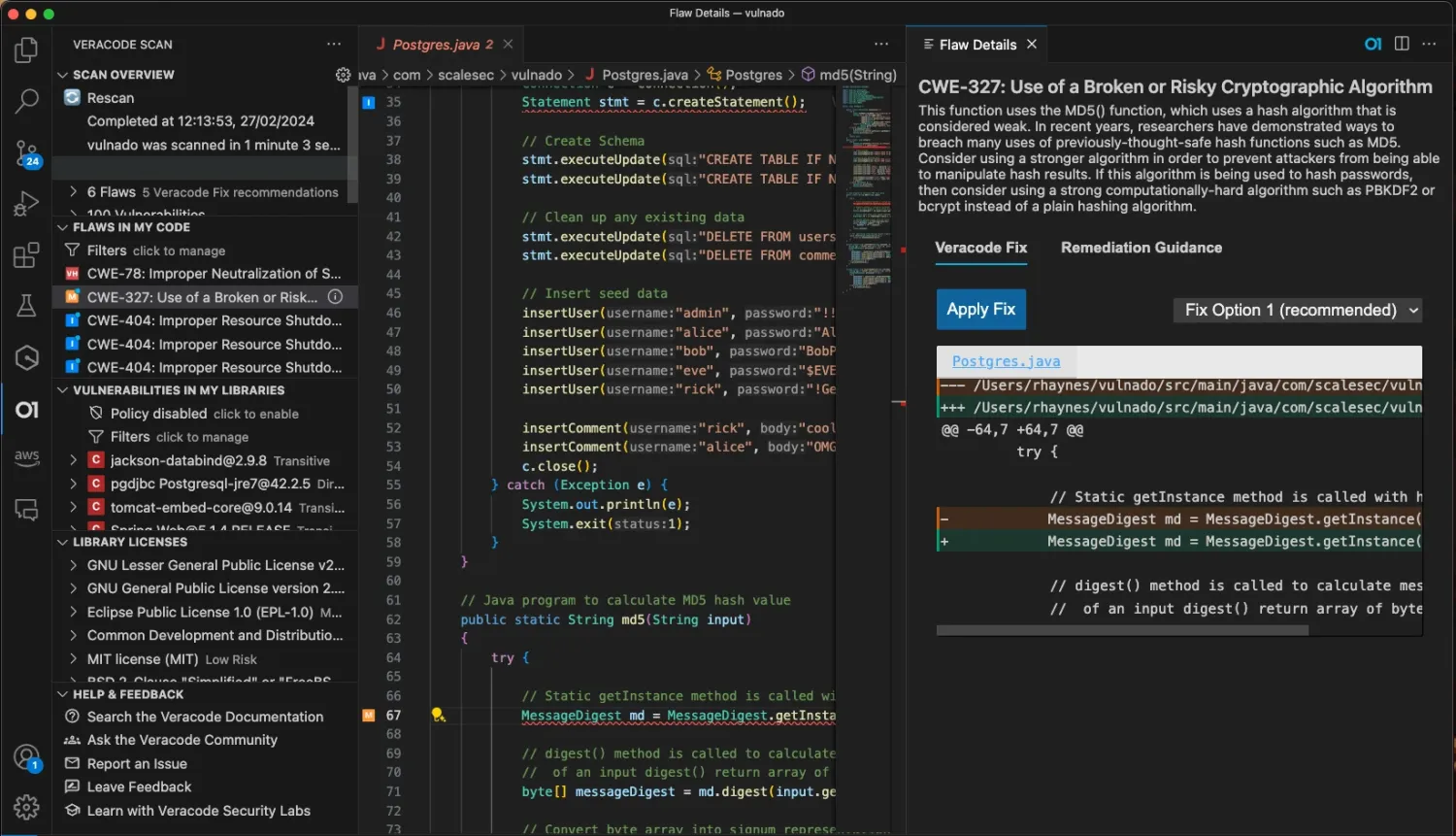 Veracode SAST findings inline in VS Code — IDE plugin surfaces vulnerabilities and remediation guidance without a separate scan window.
Veracode SCA
Veracode SCA combines traditional CVE scanning with Phylum’s ML-powered behavioral analysis (acquired January 2025). Veracode reports 60% more accurate malicious package detection after the integration.
Detection covers typosquatting, dependency confusion, compromised maintainer accounts, and malicious code injection. The Package Firewall blocks compromised packages on npm and PyPI before installation.
Reachability analysis traces code paths to determine if vulnerable functions are actually called by your application — cutting noise from theoretical-only risks. SBOM generation supports CycloneDX and SPDX formats.
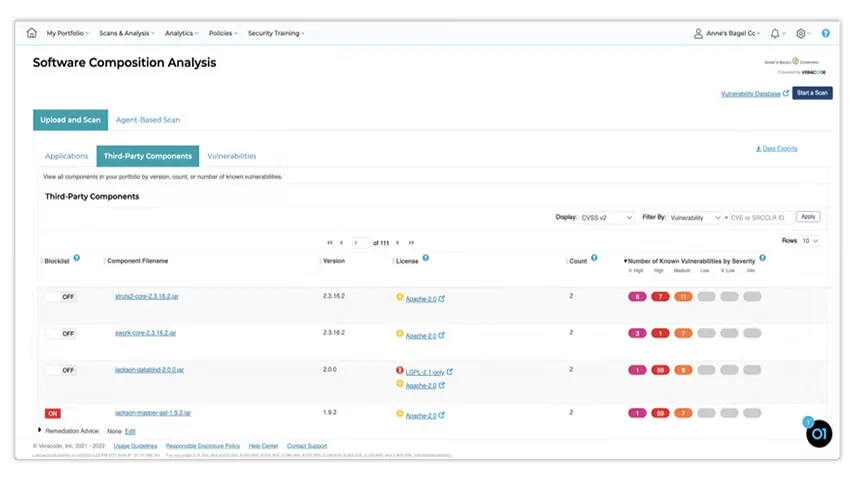 Veracode SCA dashboard — third-party components ranked by severity with license compliance status and remediation queue.
Veracode Dynamic Analysis (DAST)
Veracode DAST is built around portfolio-scale management. The SaaS architecture runs parallel scans across hundreds of applications without managing scanning infrastructure.
The 2022 Crashtest Security acquisition added JavaScript SPA support for React, Angular, and Vue with full browser rendering. API testing covers REST, SOAP, and GraphQL via OpenAPI import.
Internal Scanning Management (ISM) uses a lightweight Java agent with outbound-only connections for firewalled apps — no inbound firewall rules or VPNs required. Findings feed the same dashboard as Veracode SAST and SCA.
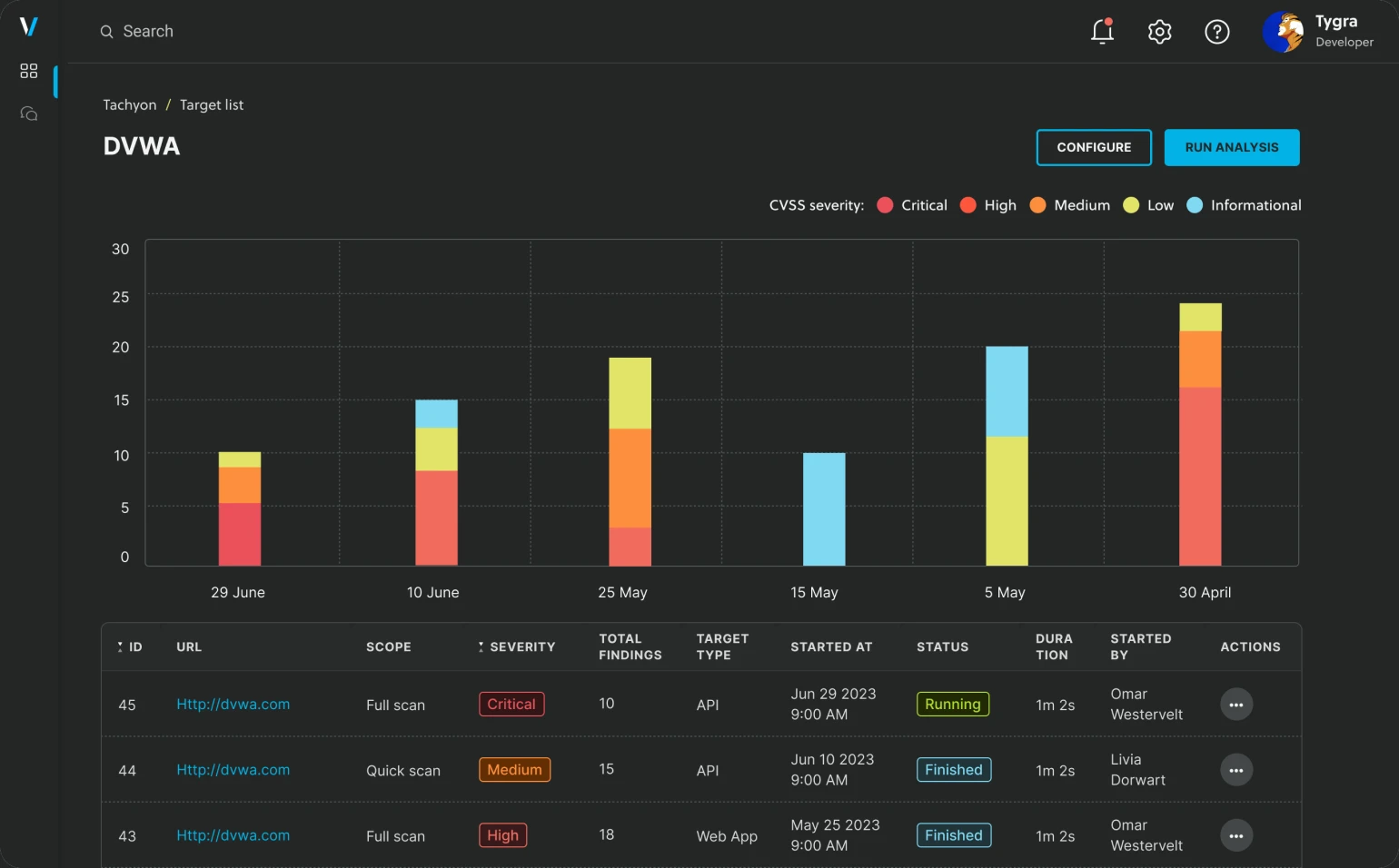 Veracode DAST scan results dashboard — portfolio-wide vulnerabilities grouped by URL, severity, and CWE classification.
Why teams choose Veracode
The binary analysis approach is the platform’s defining feature. Veracode customers upload compiled .jar files, .NET assemblies, COBOL binaries, or Visual Basic 6 builds — the source code never leaves the developer’s machine.
This matters for two reasons. Regulated industries (banking, healthcare, defense) often have policies against sharing source code with third-party SaaS vendors. Binary analysis also catches vulnerabilities introduced by the compiler or third-party libraries bundled into the build, not just what’s in the visible source.
Language coverage is wider than most competitors. Java, .NET, JavaScript, Python, Go, Ruby, PHP, Swift, and Kotlin are standard.
Veracode also covers enterprise legacy: COBOL, Visual Basic 6, RPG, and PL/SQL. This matters for financial services and government workloads still running mainframe and AS/400 codebases.
Pricing context
Veracode does not publish pricing on its website — pricing is contact-sales for all editions. Quotes vary with the number of applications scanned, product mix (SAST + SCA + DAST + manual pen test), and deployment scope.
Pipeline Scan and Pen Testing are commonly priced separately from the core SAST/SCA/DAST bundle. For a buyer-side view of typical AppSec contract sizes across vendors, see the AppSec tools pricing guide .
Recent moves
Veracode has been active on acquisitions to fill platform gaps:
- January 2025: Phylum — ML-powered supply chain threat detection. Brought behavioral analysis for malicious packages, typosquatting, and dependency confusion attacks.
- 2022: Crashtest Security — JavaScript SPA DAST support. Added full browser rendering and DOM-based XSS detection for React, Angular, and Vue applications.
- November 2018: Thoma Bravo acquisition — The private equity firm bought Veracode from Broadcom for $950M, taking the company private.
The Spring 2026 GenAI Code Security Report (Veracode research) found roughly 45% of AI-generated code contained at least one known security vulnerability when no explicit security guidance was provided to the model. This is the kind of research Veracode publishes to position itself in the AI security conversation.
When Veracode fits
Veracode is the right call when binary analysis is a hard requirement. Banks, government agencies, and other regulated organizations that cannot upload source code to third-party SaaS often shortlist Veracode by default for that reason alone.
The platform also fits enterprise teams managing 50+ applications across multiple languages — particularly when legacy stack coverage (COBOL, Visual Basic 6) matters. The unified dashboard reduces the operational burden of running separate SAST, SCA, and DAST tools.
For developer-first workflows where IDE feedback and PR-level remediation matter most, the comparison swings toward modern competitors. See Snyk vs Veracode , Checkmarx vs Veracode , or the broader Veracode alternatives guide for side-by-side scoring.
What are alternatives to Veracode?
Common Veracode comparisons split along two axes — binary analysis approach and enterprise positioning:
- Checkmarx — Direct enterprise SAST competitor; source-based analysis with deeper line-level findings. See Checkmarx vs Veracode for head-to-head.
- Snyk — Developer-first platform with stronger IDE integration and free tier. See Snyk vs Veracode .
- Fortify Static Code Analyzer — Another enterprise binary-analysis option, owned by OpenText. See Fortify vs Veracode .
- SonarQube — Code quality + security; cheaper for organizations that already use SonarQube for code health. See SonarQube vs Veracode .
For the full alternatives breakdown, see Veracode alternatives .