


What is TruffleHog?
TruffleHog is an open-source secret scanner built by Truffle Security that finds and verifies leaked credentials across git repositories, cloud storage, chat platforms, and container images. The project has over 26,800 GitHub stars and handles more than 250,000 scans per day across production environments.
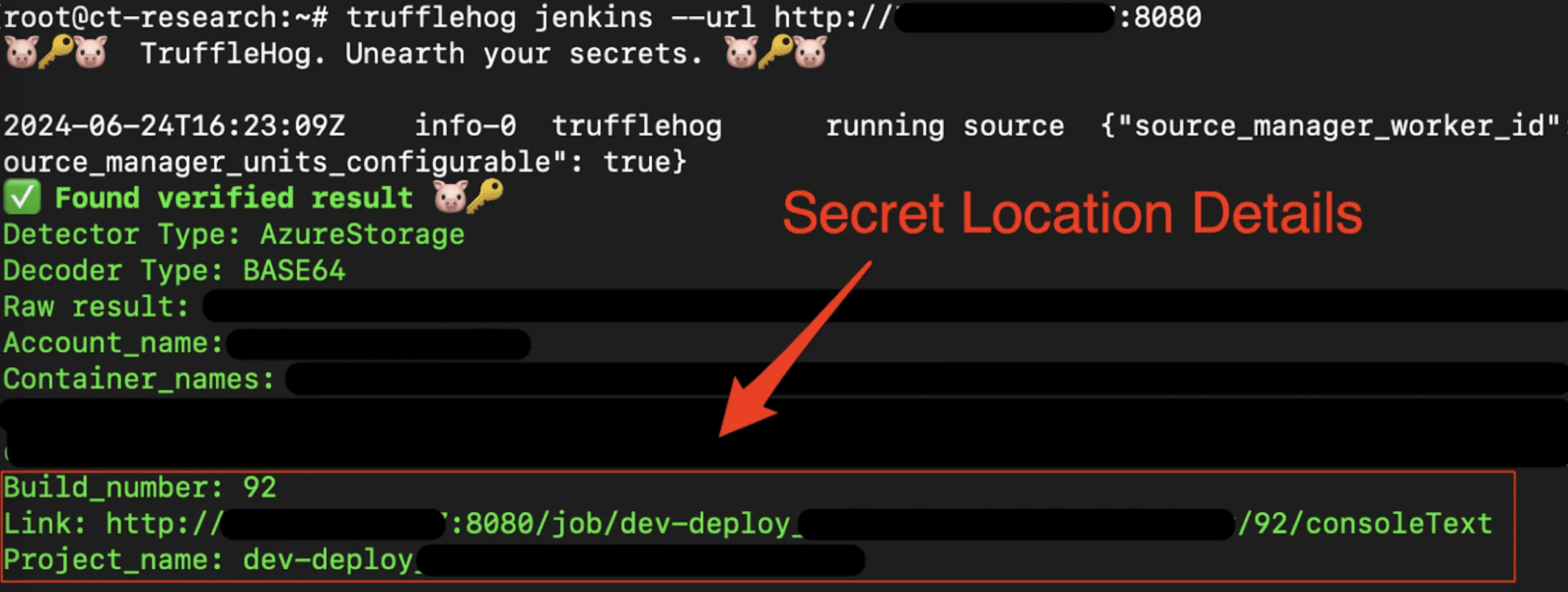
What separates TruffleHog from other SAST tools is live verification. Instead of listing regex matches and leaving you to triage, the scanner logs in to AWS, GitHub, Slack, and hundreds of other services to confirm whether each discovered secret still works.
I run TruffleHog against every repo I inherit. It walks git history, flags the 800+ credential types it knows how to detect, and tells me which ones are live right now. The result is a much shorter list of real incidents to fix.
Maintainer: Truffle Security
Repo: github.com/trufflesecurity/trufflehog — 26,800+ stars
Detectors: 800+ credential types with live verification
Scan sources: Git, GitHub, GitLab, Docker, S3, GCS, Slack, Jenkins, Elasticsearch, Postman, filesystem
TruffleHog classifies over 800 credential types including AWS keys, GitHub tokens, database passwords, API keys, and service account credentials. For every secret it identifies, it attempts verification by logging into the associated service.
This distinguishes active threats (credentials that still work) from historical leaks (revoked credentials). Security teams can prioritize remediation based on which secrets pose immediate risk.
TruffleHog maps each discovered secret to the specific identity or account it belongs to. This context helps you understand the scope of exposure and decide which owner to contact.
| Capability | Details |
|---|---|
| Multi-Source Scanning | Scan Git repos, GitHub orgs, GitLab, S3, GCS, Docker images, Slack, wikis, Circle CI, Travis CI, and filesystem directories |
| Live Verification | Automatically test discovered secrets by logging in to verify if credentials are still active and pose immediate risk |
| 800+ Secret Types | Detect and classify credentials for AWS, GitHub, Google Cloud, databases, SaaS platforms, and hundreds of other services |
What are TruffleHog’s key features?
| Feature | Details |
|---|---|
| Secret types | 800+ credential detectors with classification |
| Verification | Live credential testing for 20+ common credential types |
| Scan sources | Git, GitHub, GitLab, S3, GCS, Docker, Jenkins, Elasticsearch, Postman, filesystem |
| Output | JSON structured output, human-readable text |
| CI integration | --results=verified filter, --fail exit code (183), --since-commit for incremental scans |
| Installation | Homebrew, Docker, binary releases, from source (Go) |
| License | AGPL-3.0 (open-source), commercial plans available |
| Binary verification | cosign signature verification for releases |
GitHub organization scanning
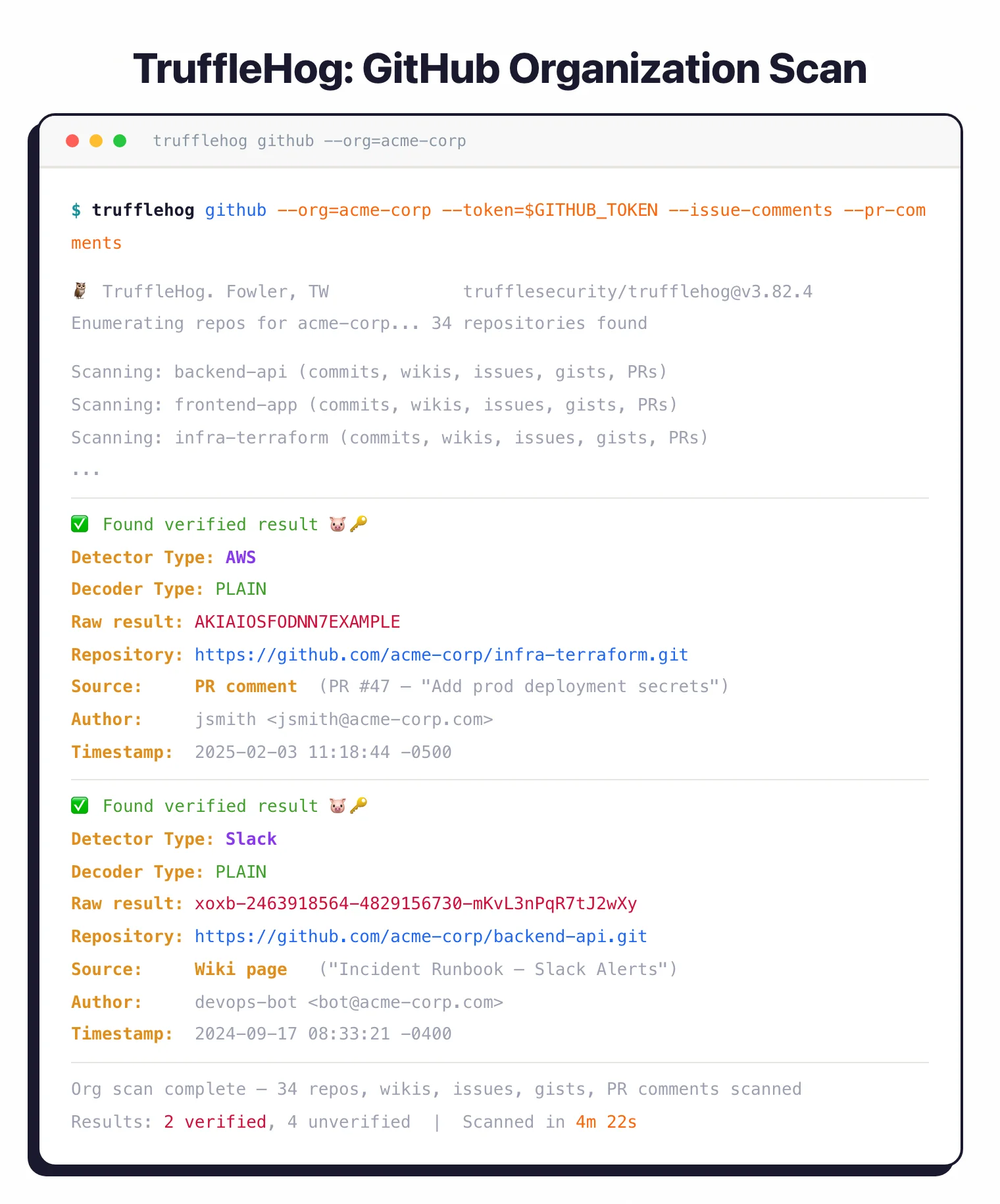
TruffleHog scans entire GitHub organizations including member repositories, GitHub Wikis, issue comments, gist comments, and pull request comments. Use --issue-comments and --pr-comments flags to include these often-overlooked sources.
The tool handles GitHub API rate limits automatically and scans both public and private repositories with appropriate authentication. For AWS-hosted infrastructure, pass --role-arn to authenticate via IAM roles.
Active credential verification
After finding potential secrets, TruffleHog attempts authentication using those credentials. If it finds an AWS access key, it makes an API call to AWS to verify the key works.
For 20+ common credential types, the tool goes further with deep analysis that maps permissions and access scope.
Filter output to only verified (active) credentials with --results=verified. This separates active security incidents from historical artifacts that have already been revoked.
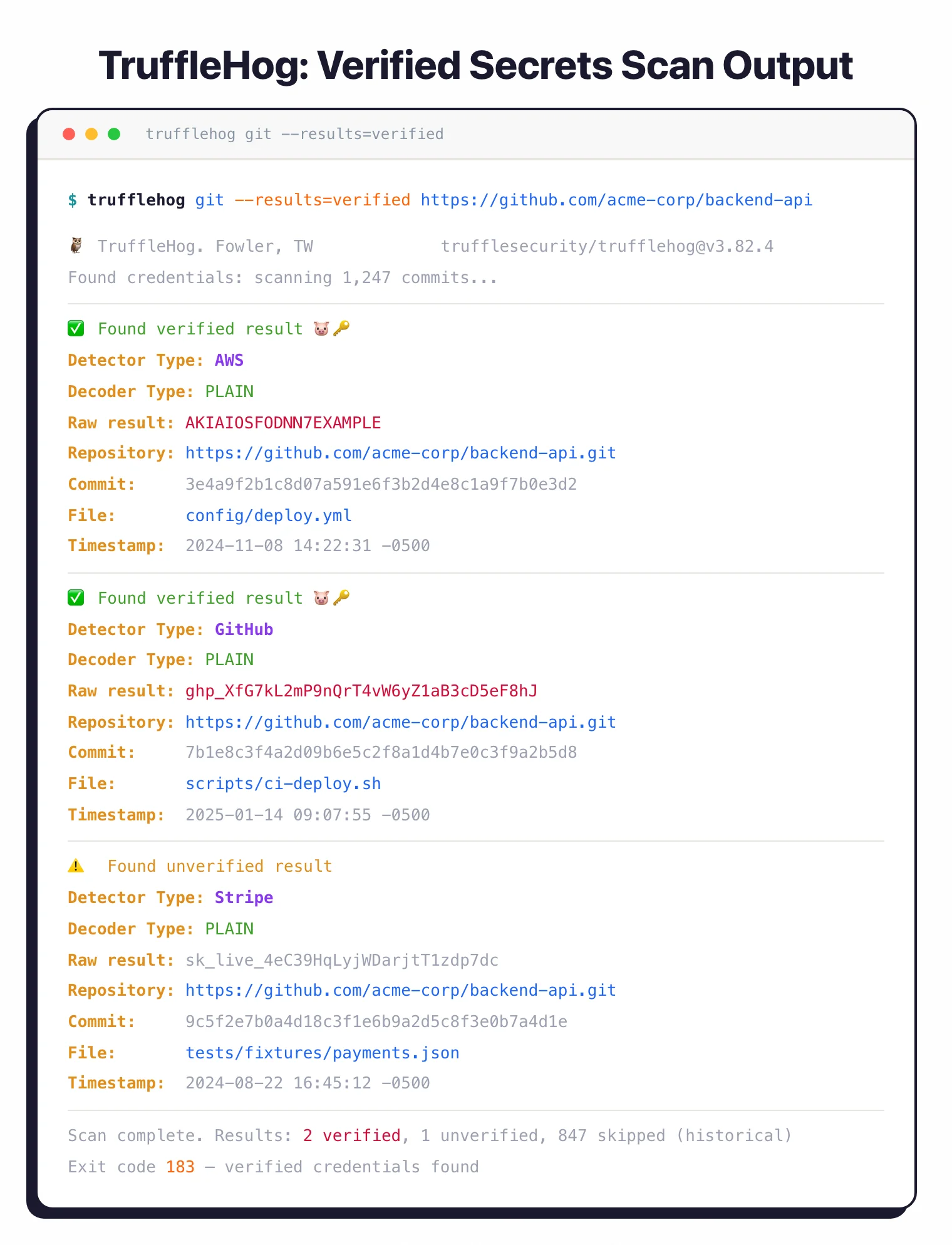
--results=verified flag filters output to only live credentials — AWS and GitHub tokens confirmed active, a Stripe key unverified. Exit code 183 signals verified credentials found.Multi-source scanning
TruffleHog goes well beyond Git. It scans S3 buckets, Google Cloud Storage, Docker images, Jenkins servers, Elasticsearch clusters, and Postman workspaces.
Docker scanning extracts image layers and analyzes filesystem contents, catching secrets baked into container builds.
Identity mapping
Each discovered secret gets mapped to a specific user account, service account, or API key. This context shows who owns the credential, what permissions it has, and which systems it can access.
Security teams use this to assess blast radius and contact credential owners.
How to install TruffleHog
TruffleHog is distributed as a single Go binary with first-class packages for macOS, Linux, and Docker. I use Homebrew on my laptop and the official Docker image in CI.
# macOS / Linux via Homebrew
brew install trufflehog

# Docker (no local install needed)
docker run --rm -it -v "$PWD:/pwd" trufflesecurity/trufflehog:latest \
  git file:///pwd

# Go toolchain (latest main)
go install github.com/trufflesecurity/trufflehog/v3@latest

# One-line installer script (binary release)
curl -sSfL https://raw.githubusercontent.com/trufflesecurity/trufflehog/main/scripts/install.sh \
  | sh -s -- -b /usr/local/bin
Binary releases on GitHub are signed with cosign, so you can verify the signature before running the tool in production.
How to use TruffleHog
The CLI organizes scans by source. You pick a source (git, github, docker, s3, filesystem, etc.) and TruffleHog handles the rest.
# Scan a remote git repository
trufflehog git https://github.com/your-org/your-repo

# Scan an entire GitHub organization (with token in env)
trufflehog github --org=your-org --token=$GITHUB_TOKEN \
  --issue-comments --pr-comments

# Scan a Docker image for baked-in secrets
trufflehog docker --image alpine:latest

# Scan the local filesystem
trufflehog filesystem /path/to/project

# CI-friendly: only show verified live credentials, fail the build
trufflehog git file://. --results=verified --fail
The --results=verified flag is the one to reach for first on noisy repos. It drops every regex match that didn’t authenticate successfully, so the output is a list of credentials that work right now.
Exit code 183 signals “verified credentials found” — wire that into your CI to break the build without confusing it with normal failures. Add --since-commit=<sha> in pull-request pipelines to only scan new commits.
How does TruffleHog compare to Gitleaks and GitGuardian?
TruffleHog has two main competitors in secret scanning: Gitleaks (faster, lighter, regex-based) and GitGuardian (managed SaaS with dashboards and workflow). I run all three in different contexts depending on whether speed, ownership, or operations support is the priority.
For the full side-by-side on the open-source pair, see my Gitleaks vs TruffleHog comparison . The GitGuardian comparison below covers the managed-platform angle.
TruffleHog vs GitGuardian (detail)
TruffleHog and GitGuardian approach secret scanning from opposite ends. TruffleHog is open-source software you run yourself; GitGuardian is a managed SaaS platform with its own detection engine, dashboards, and incident workflow.
Deployment shape is the first decision. TruffleHog’s AGPL-3.0 CLI runs on your laptop, in CI, or as part of an Enterprise self-hosted install. GitGuardian monitors your GitHub org continuously from its cloud and alerts developers the moment a secret hits a public commit.
Verification is where TruffleHog pulls ahead on raw feature count. Its 800+ detectors include active credential testing that confirms whether a key still works. GitGuardian validates a subset of detectors too, but its real advantage is the layer above detection — enterprise workflows, assignment, remediation tracking, and honeytoken features.
For teams that want to own the tooling and tune it themselves, TruffleHog wins. For teams that want a managed platform with SLAs and a vendor on the hook, GitGuardian wins.
TruffleHog Enterprise
Truffle Security sells TruffleHog Enterprise as a commercial platform on top of the open-source engine. It layers centralized scanning, dashboards, SSO, role-based access, and long-term historical analysis onto the same detectors the CLI ships with.
Enterprise adds organization-wide monitoring of GitHub, GitLab, Jira, Slack, and Confluence with alerting and assignment workflows. You also get the paid detectors that aren’t in the OSS build, plus support from the team that maintains the scanner.
Pricing isn’t published on the Truffle Security site — plans are quoted based on developer seats and data sources. I stay on the free CLI for personal work and recommend Enterprise when a team needs centralized visibility and audit logs across many repos.
How do I get started with TruffleHog?
- Install — Run
brew install trufflehogon macOS, or pull the Docker image. Binary releases with cosign signature verification are available on GitHub. - Scan a repository — Run
trufflehog git https://github.com/your-org/your-repoto scan git history. Add--results=verifiedto see only live credentials. - Scan a GitHub organization — Run
trufflehog github --org=your-org --token=$GITHUB_TOKENto scan all repositories, wikis, issues, and gists in your org. - Integrate with CI — Use
--failto exit with code 183 when credentials are found. Combine with--since-committo scan only new commits in pull requests.
When to use TruffleHog
TruffleHog is the right tool when you need to scan beyond git repositories. If your secrets could be in Slack, S3 buckets, Docker images, or CI/CD logs, TruffleHog covers those sources.
The verification feature is what sets it apart. Instead of a list of potential secrets, you get a list of confirmed active credentials ranked by risk. This saves significant triage time on large scans.
For git-only scanning where speed matters most, Gitleaks is lighter and faster. For enterprise environments with legacy codebases, detect-secrets offers a baseline approach that lets you adopt scanning without fixing everything upfront.
Frequently Asked Questions
What is TruffleHog?
What is TruffleHog used for?
Is TruffleHog free?
What does credential verification mean in TruffleHog?
How many secret types does TruffleHog detect?
Does TruffleHog scan Docker images?
trufflehog docker --image <name> pulls the image, extracts each layer, and scans the filesystem for secrets baked into builds. This catches keys developers copied into Dockerfiles or ENV instructions.