

Syft is Anchore’s open-source SBOM generation tool that catalogs all software components in container images and filesystems.
With 9.1k GitHub stars and 219 contributors, it is among the most-starred open-source SCA tools for generating Software Bills of Materials in SPDX and CycloneDX formats.
The demand for SBOM tooling grew sharply after Executive Order 14028 mandated SBOMs for federal software suppliers.
The current version is 1.42.0 (released February 10, 2026). Syft operates entirely offline with no cloud services or external API calls.
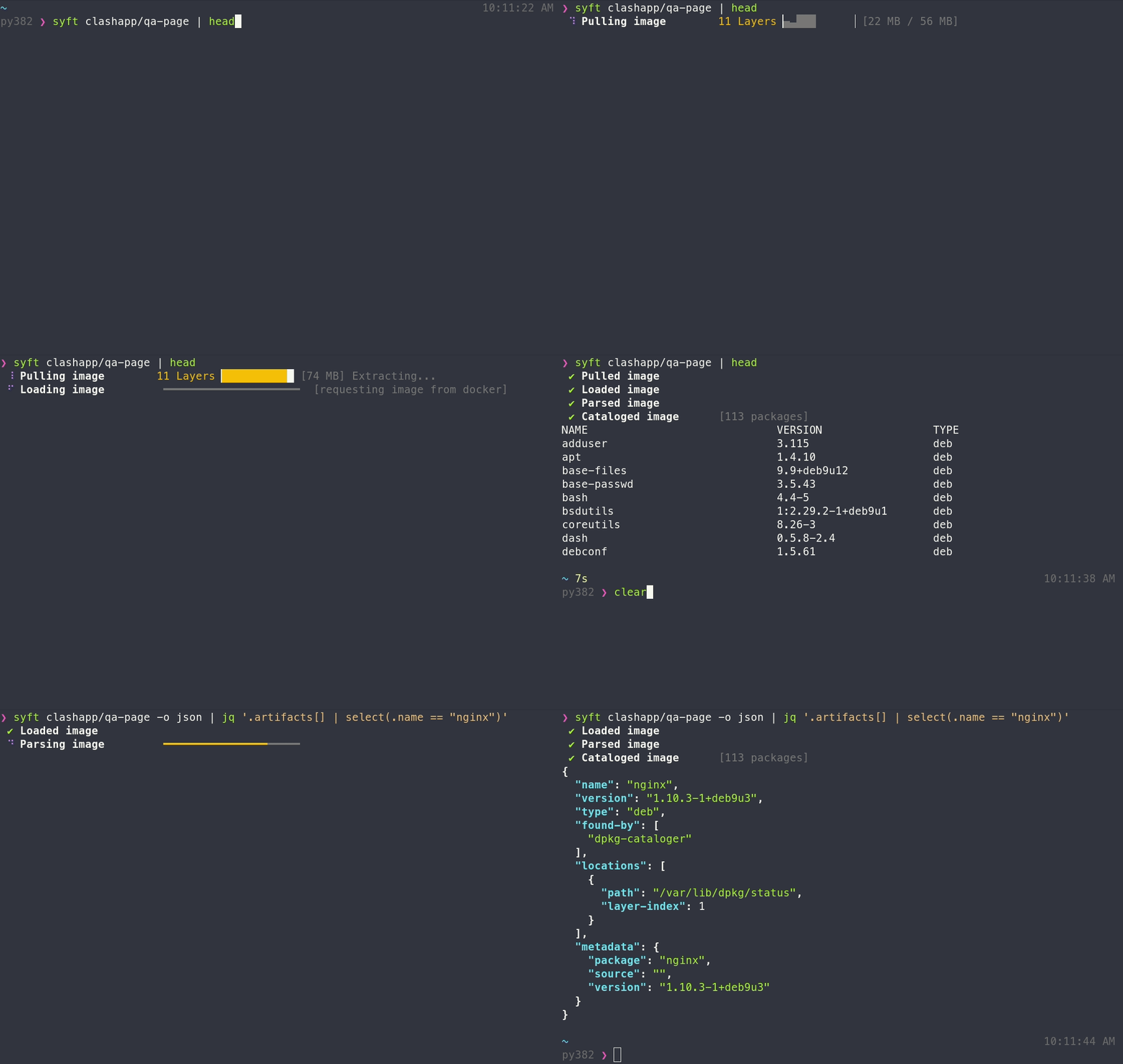
Point it at a container image or directory, and it returns a complete SBOM in seconds.
What is Syft?
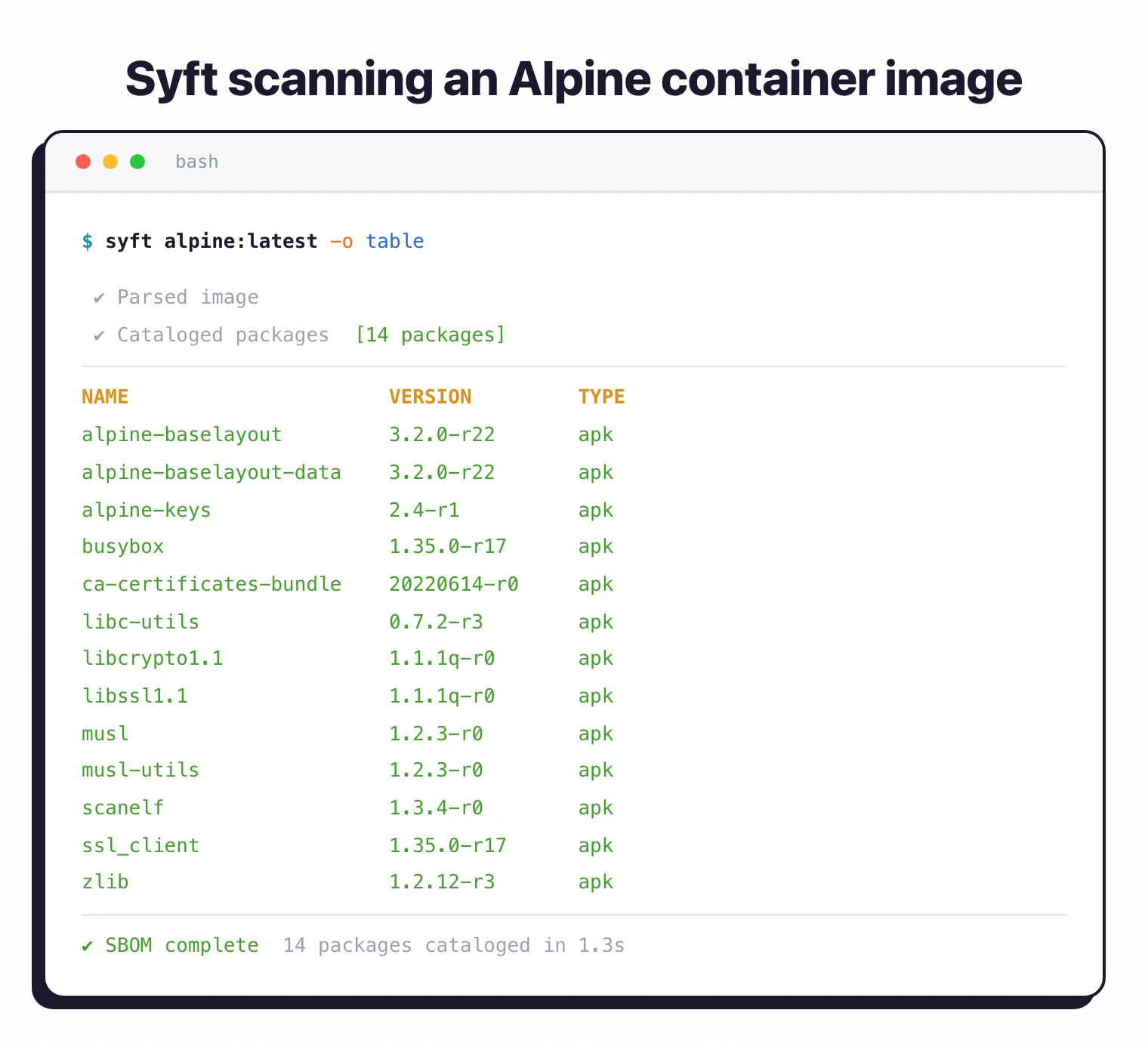
Syft scans container images, directory trees, and archive files to identify all software packages and their versions. It detects packages installed via system package managers (apk, dpkg, rpm) and language-specific dependency managers (npm, pip, Maven, Go modules, and more).
The tool generates SBOMs in SPDX and CycloneDX formats, the two industry-standard schemas. These machine-readable inventories list every component in your software, including direct dependencies, transitive dependencies, and operating system packages.
| Capability | Details |
|---|---|
| Multi-Source Scanning | Analyze container images (local or from registries), directory trees, and archive files. Supports OCI, Docker, and Singularity image formats. |
| Standard Formats | Output SBOMs in SPDX, CycloneDX, and Syft JSON formats. Convert between formats. Create signed attestations using in-toto specification. |
| Ecosystem Coverage | Detect packages from Alpine, Debian, RPM, npm, pip, Maven, Go, Ruby, Rust, PHP, .NET, and dozens more ecosystems automatically. |
Syft is also referred to as Anchore Syft (the anchore/syft repository) to distinguish it from Syft Analytics (a financial-reporting tool acquired by Xero) and Syft Technologies (a trace gas analyzer). It is commonly run alongside Grype
, Anchore’s sister project, in an “SBOM-first” pattern: Syft generates the inventory once, Grype scans it repeatedly as new CVEs are disclosed.
What are Syft’s key features?
| Feature | Details |
|---|---|
| Current version | 1.42.0 (February 10, 2026) |
| GitHub stats | 9.1k stars, 219 contributors, 765 forks |
| License | Apache 2.0 |
| Output formats | SPDX JSON, CycloneDX JSON, Syft JSON, text, table |
| Image formats | OCI, Docker, Singularity |
| Installation | curl script, Homebrew, Docker, Scoop, Chocolatey, Nix |
| Attestations | Signed SBOM attestations via in-toto specification |
| Cloud dependencies | None; runs entirely offline |
| Grype integration | Pipe SBOMs directly to Grype for vulnerability scanning |
Container image analysis
Syft scans Docker images, OCI images, and Singularity containers by analyzing each layer. It extracts package manager databases, language dependency manifests (package.json, requirements.txt, pom.xml), and binary metadata.
Scan local images already pulled to your machine, or fetch images directly from remote registries like Docker Hub, ECR, GCR, and private registries. Syft handles authentication and downloads only the necessary layers to minimize bandwidth.
Package ecosystem support
Syft automatically identifies which package managers were used in a project by detecting manifest files. When it finds package.json, it parses npm dependencies.
When it finds go.mod, it extracts Go module information. When it finds /var/lib/dpkg/status, it catalogs Debian packages.
This automatic detection means you do not need to configure Syft for specific projects. It adapts to whatever package ecosystems it encounters.
SPDX and CycloneDX output
Generate SBOMs in SPDX format for government compliance (NTIA, Executive Order 14028) or CycloneDX for security-focused workflows. Syft also supports human-readable table and text formats for quick inspection.
SBOM attestations
Syft can create signed SBOM attestations using the in-toto specification. This adds cryptographic proof that the SBOM was generated from a specific source, supporting supply chain verification workflows.
Grype integration
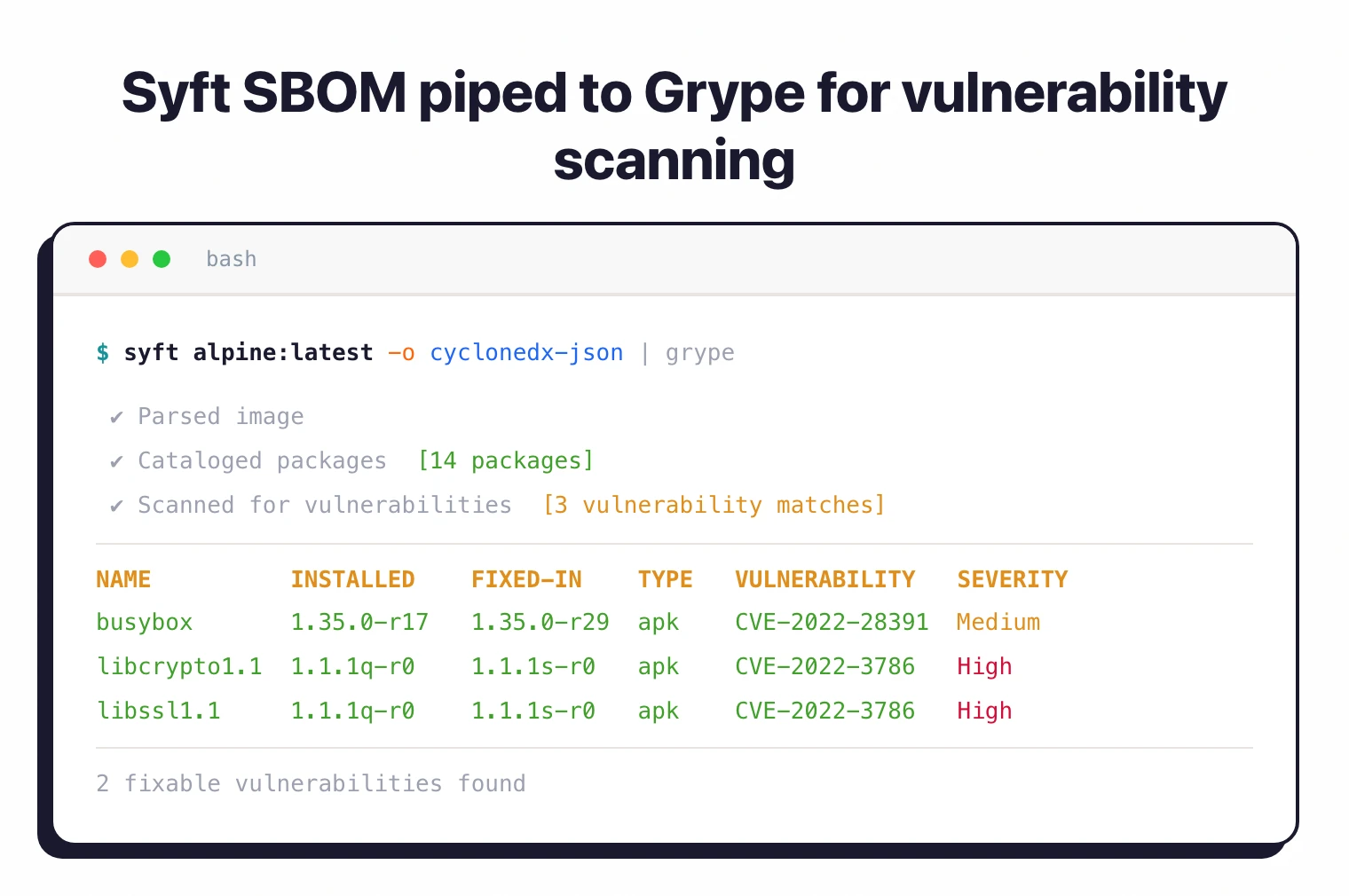
Pair Syft with Grype for complete software composition analysis. Syft generates the SBOM, Grype scans it for known vulnerabilities.
This two-tool approach separates inventory generation from vulnerability detection, letting you cache SBOMs and scan them multiple times as new CVEs are disclosed.
# Generate SBOM and pipe to Grype for vulnerability scanning
syft alpine:latest -o cyclonedx-json | grype
What Syft does not do
Syft is a pure SBOM generator. It does not detect CVEs in the packages it catalogs — that work is Grype ’s job, which consumes the SBOM and matches it against vulnerability databases. Syft also does not perform malicious-package detection (analyzing package behavior for supply-chain attacks), which is the domain of behavioral-analysis tools such as Socket and Phylum.
For a broader view of how Syft’s output formats compare against other generators, see the SBOM tools comparison .
How do I get started with Syft?
- Install Syft — Run
curl -sSfL https://raw.githubusercontent.com/anchore/syft/main/install.sh | sh -s -- -b /usr/local/binorbrew install syfton macOS. - Scan a container image — Run
syft alpine:latestto generate an SBOM for any container image. Use-o cyclonedx-jsonfor CycloneDX or-o spdx-jsonfor SPDX format. - Scan a directory — Run
syft ./my-projectto catalog all packages in a local directory tree. - Add to CI/CD — Use the official
anchore/sbom-actionGitHub Action to generate SBOMs for every build and upload them as workflow artifacts.
Installing Syft
Anchore publishes prebuilt binaries for Linux, macOS, and Windows on the Syft releases page , plus an official install script that detects your platform and drops the binary in a target directory.
Official install paths
Use the install script on Linux or macOS:
curl -sSfL https://get.anchore.io/syft | sudo sh -s -- -b /usr/local/bin
Pull the container image if you prefer running Syft in a sandbox:
docker pull anchore/syft
Package managers
- Homebrew (macOS, Linux):
brew tap anchore/syft && brew install syft - Nix:
nix-env -i syft(ornix-shell -p syft) - WinGet (Windows):
winget install Anchore.syft - Scoop (Windows):
scoop install main/syft - Snapcraft:
snap install syft - Alpine Linux:
apk add syft - Kali Linux:
sudo apt install syft
Anchore’s installation docs list Homebrew, Nix, WinGet, Scoop, Snap, Alpine, and Kali as community-maintained builds. Ubuntu and Debian users typically use the install script or the Docker image rather than a dedicated APT repository.
CI/CD (GitHub Actions)
For GitHub Actions workflows, use the official anchore/sbom-action , which wraps Syft and uploads the SBOM as a workflow artifact:
- name: Generate SBOM
  uses: anchore/sbom-action@v0
  with:
    image: my-registry/my-app:latest
    format: spdx-json
The action supports directory scans, file scans, and image scans, and can attach the generated SBOM to a GitHub Release automatically.
When to use Syft
Syft is the right choice when you need SBOM generation without vulnerability scanning overhead. It does one thing well: cataloging software components across container images and filesystems.
Pair it with Grype for vulnerability scanning. This separation lets you generate SBOMs once, store them, and scan them repeatedly as new vulnerabilities are disclosed.
The tool runs entirely offline, making it suitable for air-gapped environments and CI/CD pipelines where external API calls are restricted.
Further reading: What is SBOM? | What is SCA? | Container Image Security
What are alternatives to Syft?
Syft is narrowly scoped to SBOM generation. Several other tools produce SBOMs, but most bundle vulnerability scanning or compliance reporting on top.
Trivy
Trivy is an all-in-one scanner from Aqua Security that generates SBOMs in both SPDX and CycloneDX formats, and also scans for CVEs in one pass. Teams that want a single binary covering both inventory and vulnerability detection usually pick Trivy over the Syft + Grype pair.
cdxgen
cdxgen is the OWASP CycloneDX project’s reference generator. It focuses exclusively on CycloneDX and emphasizes deeper analysis techniques such as AST parsing and class-name resolution for language projects. Pick cdxgen when CycloneDX-only output and richer evidence metadata matter more than multi-format support.
microsoft/sbom-tool
microsoft/sbom-tool generates SPDX 2.2 and 3.0 SBOMs and is the default generator inside Microsoft’s own build systems. It is SPDX-only and does not match Syft’s CycloneDX or container-native coverage.
Tern
Tern is a Python-based container SBOM tool from the tern-tools organization. Development has slowed — the last release (v2.12.1) shipped in July 2023 — so teams evaluating new tooling in 2026 more often start with Syft or Trivy.
Docker Scout
Docker Scout is Docker’s first-party supply chain tool and is built into Docker Desktop, Docker Hub, and the Docker CLI. It generates SBOMs and runs CVE scans, but it is tied to the Docker ecosystem and is not the right pick for non-Docker workflows.
For a side-by-side feature matrix, see the SBOM tools comparison .
Syft FAQ
Is Syft free and open source?
Yes. Syft is released under the Apache 2.0 license and is free for commercial and non-commercial use. The full source lives at github.com/anchore/syft , with no paid tier and no telemetry phone-home.
Does Syft detect vulnerabilities?
No. Syft only generates SBOMs. For CVE scanning, pipe the SBOM into Grype
, Anchore’s sister project — the documented pattern is syft alpine:latest -o cyclonedx-json | grype. This “SBOM-first” split lets you generate the inventory once and re-scan it as new CVEs are disclosed.
SPDX or CycloneDX — which format should I use?
Use SPDX if your compliance requirements reference NTIA minimum elements or Executive Order 14028; SPDX is the format most government programs expect. Use CycloneDX if your downstream tooling is security-focused — it carries richer vulnerability and license metadata. Syft can output both from the same scan and convert between them after the fact.
Does Syft scan Windows container images?
Yes. Syft supports OCI and Docker images regardless of the base OS, including Windows containers, and detects Windows-native package metadata where available. Native Linux ecosystems (apk, dpkg, rpm) still have the deepest cataloger coverage.
Does Syft work offline or in air-gapped environments?
Yes. Syft runs entirely offline with no cloud services, external APIs, or phone-home calls. It only needs the image or filesystem it is asked to scan, which makes it a common fit for air-gapped CI pipelines and regulated environments.