Why does SCA belong in CI/CD?#
Running SCA manually or periodically leaves a gap. Dependencies change with every pull request, and a vulnerability disclosed on Monday should not wait until Friday’s scheduled scan to be caught.
CI/CD integration closes that gap. Every pull request gets scanned before merge.
Every build is checked against current vulnerability data. New vulnerable dependencies are flagged when the developer who introduced them is still in context and can fix the issue immediately.
The alternative, running SCA as a periodic audit, produces reports that land in someone’s inbox days or weeks after the vulnerable dependency was added. By then, it is buried under other changes and fixing it takes longer.
Most SCA tools are designed for CI/CD. They run in seconds, exit with non-zero codes when findings exceed your threshold, and produce machine-readable output that integrates with GitHub checks, GitLab merge request widgets, and Slack notifications.
Choosing the right SCA tool for your pipeline#
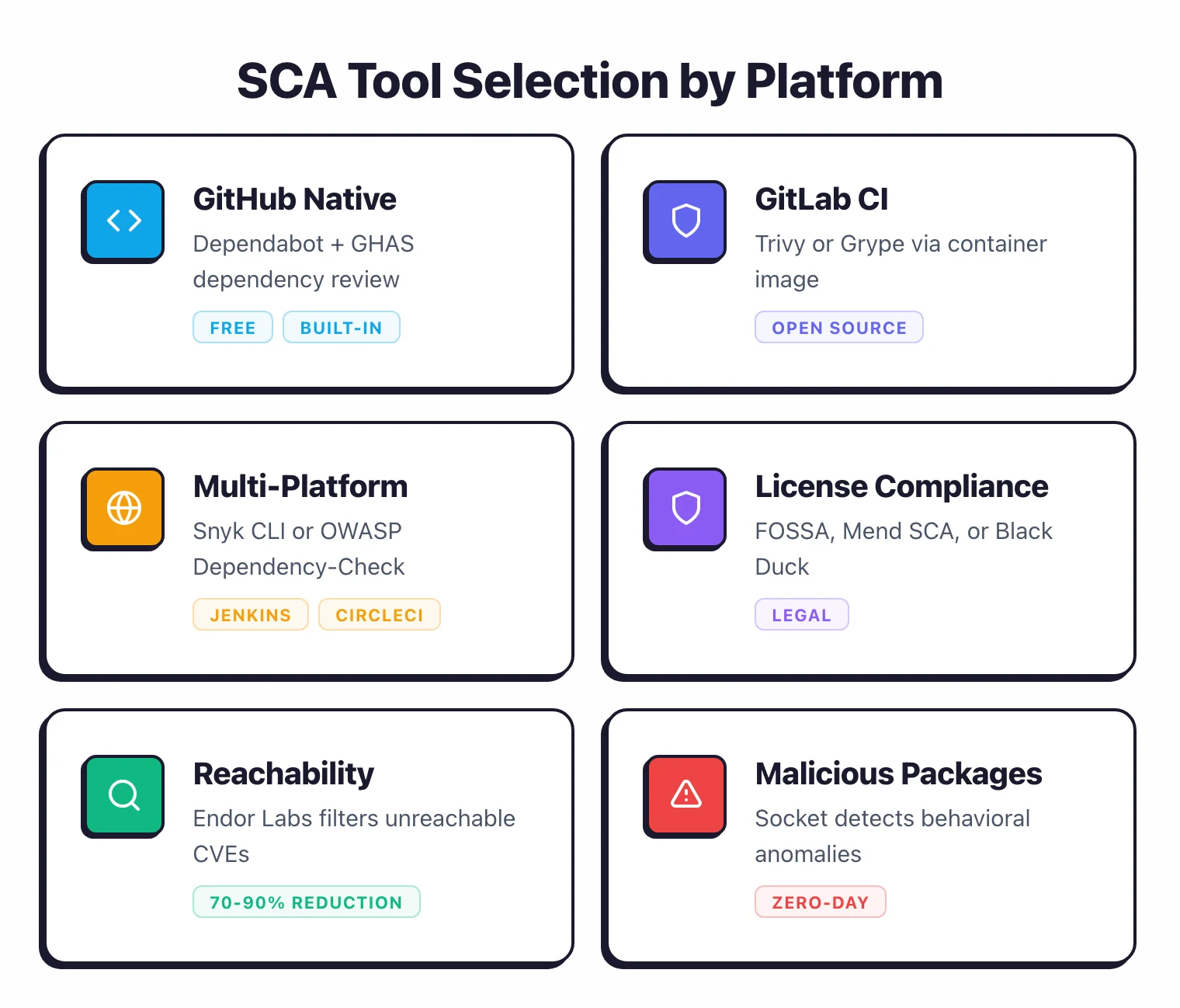
Your choice depends on three things: where your code lives, what languages you use, and whether you need license compliance.
| Criterion | Options |
|---|---|
| GitHub-native | Dependabot (built-in), GitHub Advanced Security (GHAS) |
| GitLab-native | GitLab Dependency Scanning (Ultimate tier), Trivy or Grype via CI |
| Multi-platform CI | Snyk CLI , OWASP Dependency-Check , Trivy |
| License compliance needed | FOSSA , Mend SCA , Black Duck |
| Reachability analysis | Endor Labs |
| Malicious package detection | Socket |
For detailed reviews, check the AppSec Santa SCA tools category. For small teams on GitHub, start with Dependabot.
It is free, requires no infrastructure, and handles the basics well. If you need deeper vulnerability intelligence, faster database updates, or license scanning, add Snyk or Mend SCA .
For teams on GitLab or using Jenkins, CircleCI, or other CI systems, Trivy is a good open-source option to start with. It covers vulnerabilities, licenses, and container images in a single tool.
GitHub: Dependabot + GitHub Advanced Security setup#
GitHub offers two layers of SCA built into the platform.
Dependabot alerts and updates#
Enable Dependabot in your repository settings under “Code security and analysis.” No configuration file is needed for basic vulnerability alerts. GitHub automatically detects your manifest files and alerts you when a dependency has a known vulnerability.
For automated update PRs, add a .github/dependabot.yml file:
version: 2
updates:
  - package-ecosystem: "npm"
    directory: "/"
    schedule:
      interval: "weekly"
    open-pull-requests-limit: 10
    reviewers:
      - "your-team"
This creates weekly PRs that bump vulnerable or outdated dependencies. Dependabot supports npm, pip, Maven, Gradle, NuGet, Bundler, Go modules, Cargo, Composer, and more.
GitHub Advanced Security (GHAS)#
GHAS adds dependency review to pull requests. When a PR changes your lockfile, GHAS shows a diff of added and removed dependencies with their vulnerability status directly in the PR timeline. This gives reviewers visibility into dependency changes before merging.
GHAS is free for public repositories. For private repositories, it requires a GitHub Enterprise license.
GitLab CI: Trivy and Grype integration#
GitLab Ultimate includes built-in dependency scanning, but if you are on Free or Premium, you can get equivalent coverage using open-source tools.
Trivy in GitLab CI#
Add a scanning job to your .gitlab-ci.yml:
sca-scan:
  stage: test
  image:
    name: aquasec/trivy:latest
    entrypoint: [""]
  script:
    - trivy fs --severity HIGH,CRITICAL --exit-code 1 --format table .
  allow_failure: false
This scans your project’s filesystem for vulnerable dependencies and fails the pipeline on HIGH or CRITICAL findings. Trivy automatically detects manifest files for most languages.
For JSON output that integrates with GitLab’s security dashboard (Ultimate only):
script:
  - trivy fs --format json --output gl-dependency-scanning-report.json .
artifacts:
  reports:
    dependency_scanning: gl-dependency-scanning-report.json
Grype as an alternative#
Grype by Anchore is another open-source option:
sca-scan:
  stage: test
  image:
    name: anchore/grype:latest
    entrypoint: [""]
  script:
    - grype dir:. --fail-on high
Grype uses the same vulnerability database as Anchore Enterprise and updates frequently. It supports the same range of ecosystems as Trivy.
General CI: Snyk CLI and OWASP Dependency-Check#
For Jenkins, CircleCI, Azure DevOps, Bitbucket Pipelines, or any CI system that runs shell commands, the Snyk CLI and OWASP Dependency-Check both work.
Snyk CLI#
Install and authenticate, then add to your pipeline:
snyk test --severity-threshold=high
This scans your project and fails the build if any HIGH or CRITICAL vulnerabilities are found. Snyk monitors 20+ package ecosystems and its vulnerability database updates within hours of disclosure.
Snyk
also offers snyk monitor
, which takes a snapshot of your dependencies and monitors them continuously. If a new vulnerability is disclosed that affects a previously scanned project, Snyk notifies you even between CI runs.
The free tier covers up to 5 projects with 200 tests per month. Paid plans remove limits and add features like license compliance, fix PRs, and custom policies.
OWASP Dependency-Check#
OWASP Dependency-Check is fully open source, free, and scans against the NVD database:
dependency-check --project "my-app" --scan . --failOnCVSS 7
This fails the build if any dependency has a CVSS score of 7 or higher. The tool supports Java, .NET, JavaScript, Python, Ruby, and more.
One trade-off: OWASP Dependency-Check uses the NVD directly, which can be slow to update and sometimes produces false positives due to CPE matching.
Commercial tools like Snyk and Mend maintain curated databases that are faster and more accurate. For teams on a budget, Dependency-Check is a reasonable place to start.
How do you handle vulnerability alerts without drowning in noise?#
The biggest failure mode of SCA in CI/CD is alert fatigue. A typical enterprise application has hundreds of dependencies, and a first scan often reports dozens or hundreds of findings.
If developers learn to ignore SCA results, the tool becomes useless.
Triage by severity and exploitability#
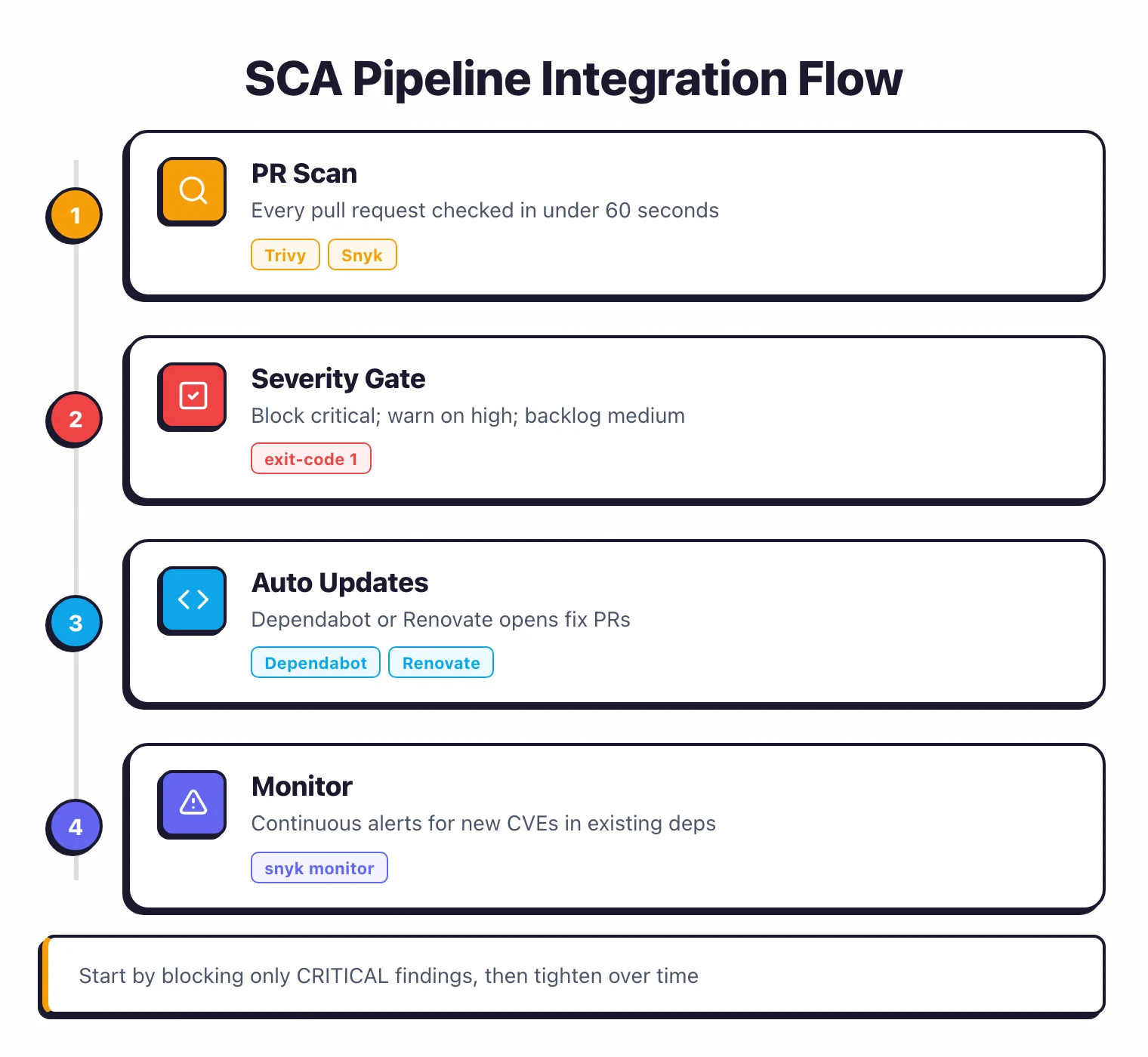
Start by failing builds only on CRITICAL findings. Once those are cleaned up, lower the threshold to HIGH.
Do not start at MEDIUM. You will overwhelm the team before building any habit.
Reachability analysis#
A vulnerability in a library function your code never calls is real but lower priority.
Tools like Endor Labs perform reachability analysis to check whether the vulnerable code path is actually callable from your application. According to Endor Labs, this typically reduces actionable alerts by 70-90%.
Suppression with accountability#
When a finding is a genuine false positive or accepted risk, suppress it with a documented justification and an expiration date. Review all suppressions quarterly.
Most tools support inline suppression comments or configuration file entries.
Fix windows, not fire drills#
Set a policy: CRITICAL findings block the build immediately. HIGH findings must be resolved within 7 days.
MEDIUM within 30 days. LOW at the next convenient opportunity. This prevents constant interruption while still enforcing resolution.
Automating dependency updates: Renovate vs Dependabot#
Automated update tools open pull requests when new versions of your dependencies are available. This keeps dependencies fresh and reduces the backlog of outdated libraries.
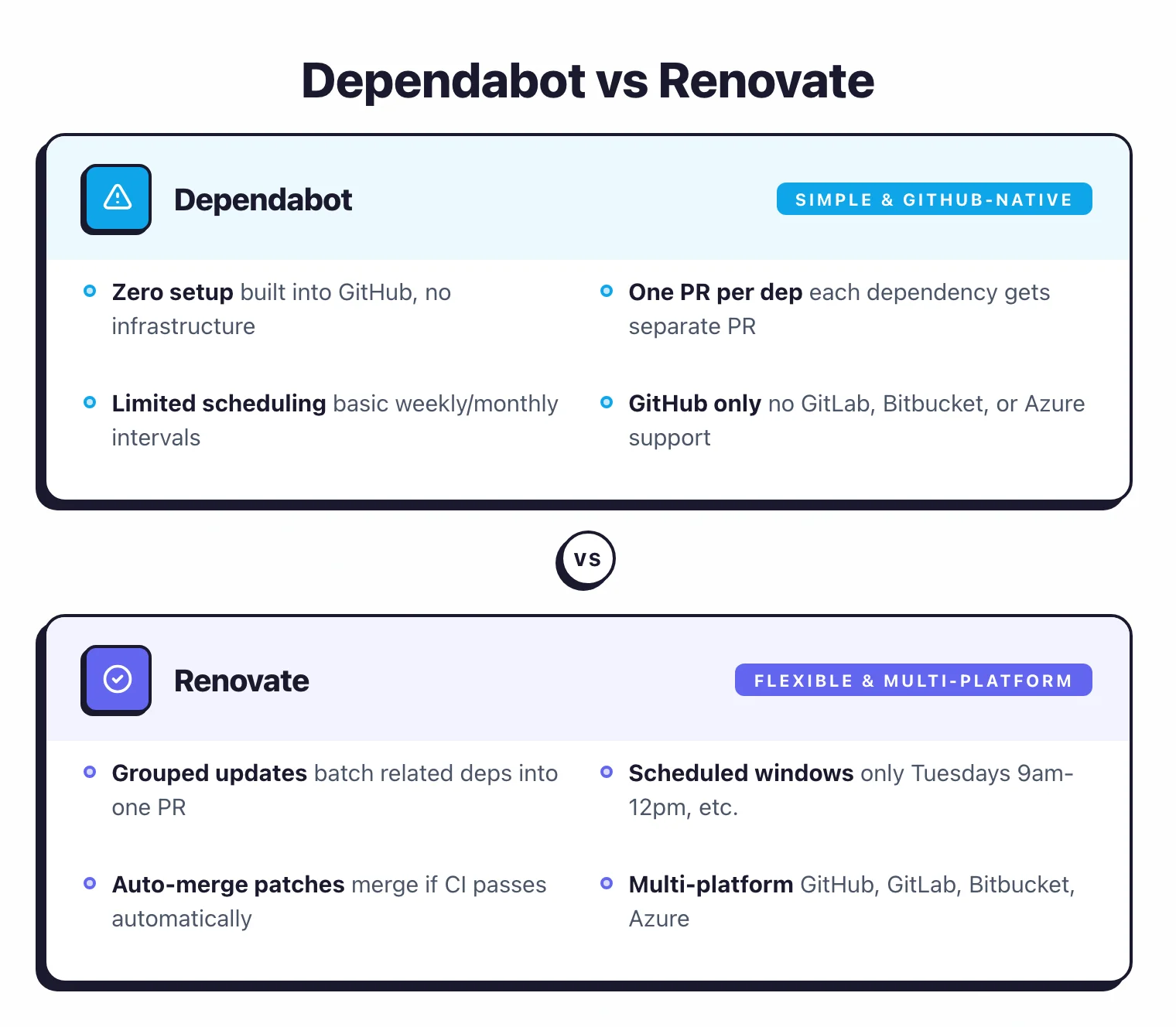
Dependabot#
Built into GitHub. Zero infrastructure required. Supports 20+ ecosystems.
Creates one PR per dependency update. Configuration is simple and lives in .github/dependabot.yml.
Strengths: No setup cost. Tight GitHub integration. Security updates are prioritized automatically.
Limitations: No update grouping (each dependency gets a separate PR). Limited scheduling options. No auto-merge based on test results. GitHub-only.
See our full comparison: Snyk vs Dependabot
Renovate#
Self-hosted or available through the Mend-hosted GitHub/GitLab app. Supports GitHub, GitLab, Bitbucket, and Azure DevOps.
Strengths: Group related updates
into a single PR (e.g., all @babel/* packages together). Schedule update windows (“only Tuesdays, 9am-12pm”). Auto-merge patches that pass CI. Regex-based package matching. Configurable down to individual package rules.
Limitations: Configuration can be complex. Self-hosting requires maintenance. The learning curve is steeper than Dependabot.
See our full comparison: Dependabot vs Renovate
Which one?#
If you are on GitHub and want something running in five minutes, use Dependabot . If you need grouping, auto-merge, multi-platform support, or fine-grained control, use Renovate .
Many teams start with Dependabot and switch to Renovate when the PR volume from individual dependency updates becomes unmanageable.
Measuring SCA effectiveness#
Running a tool is not the same as reducing risk. Track these metrics to know whether your SCA program is working.
Mean time to remediate (MTTR). How long between a vulnerability being flagged and the fix being deployed?
MTTR under 7 days for CRITICAL findings is a reasonable target. Track this by severity level.
Vulnerability backlog. How many open findings exist across all projects? A growing backlog means you are finding more than you are fixing.
Investigate whether the backlog is growing due to alert noise or genuine under-resourcing.
Fix rate by source. Are developers fixing SCA findings from PR checks, or are they being deferred to periodic cleanup sprints?
Higher fix rates from PR checks indicate better integration into the workflow.
False positive rate. Track the percentage of findings that are suppressed as false positives.
If this exceeds 20-30%, your tool may need better configuration, or you may benefit from reachability analysis.
Dependency freshness. What percentage of your dependencies are on the latest major or minor version?
Stale dependencies accumulate known vulnerabilities. Automated update tools directly improve this metric.
Coverage. How many repositories have SCA enabled? If you have 200 repositories but only 50 have scanning, your coverage is 25%.
The repositories you are not scanning are the ones most likely to have problems.