Why does license compliance matter?#
Open-source does not mean “free to use however you want.” Every open-source library comes with a license that defines what you can and cannot do with the code. Ignoring those terms creates legal risk.
The risk is not theoretical. The Software Freedom Conservancy has pursued GPL enforcement cases against companies shipping products with GPL code without complying with the license terms.
In 2024, SFC v. Vizio survived Vizio’s motion for summary judgment, with the judge ruling that consumers have standing to enforce the GPL as third-party beneficiaries.
The BusyBox project filed multiple lawsuits against consumer electronics manufacturers in the late 2000s and early 2010s.
Beyond litigation, license compliance shows up in due diligence. If your company is being acquired, the buyer’s legal team will audit your open-source usage.
If they find undisclosed copyleft dependencies in your commercial product, it can affect the valuation or kill the deal.
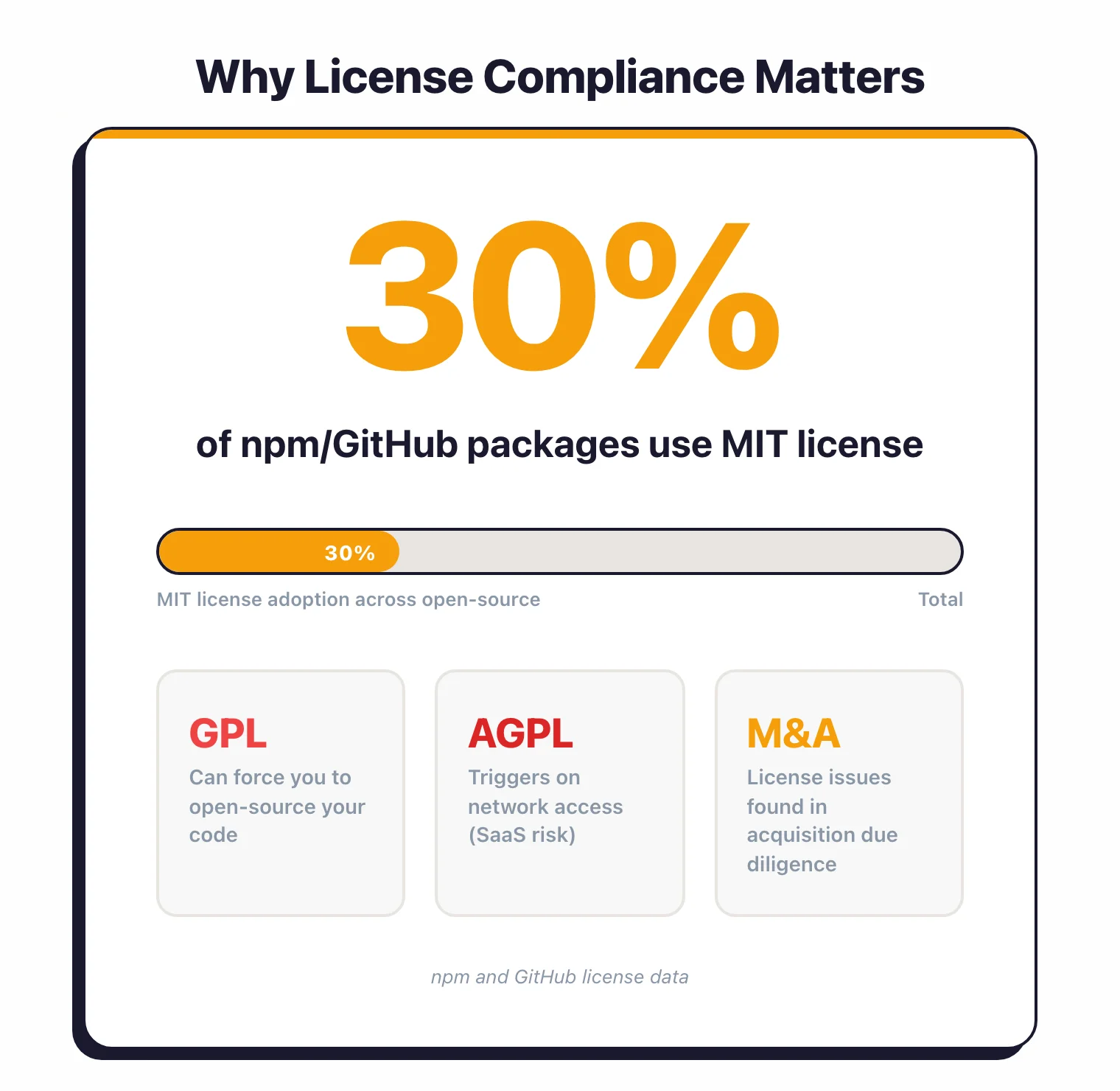
For SaaS companies, the AGPL license deserves special attention. Unlike most licenses that trigger on distribution, AGPL triggers when software is made available over a network.
Running an AGPL library in your backend that users access through a web browser can require you to release your entire server-side source code.
Most license compliance issues are avoidable. They happen because no one checked.
Automating license scanning through SCA tools eliminates this blind spot. AppSec Santa’s SCA tools page reviews all major options for automated license compliance.
What license compliance scanners do#
A license compliance scanner reads your dependency manifests and lockfiles, walks the full transitive tree, and attaches a licence to every package it finds. The detection usually combines three signals: SPDX identifier matching against short-form names like MIT or GPL-3.0-only, full-text pattern matching against bundled LICENSE files (the technique ScanCode Toolkit is built around), and package-registry metadata where npm, PyPI, or Maven Central expose a declared licence.
Once every dependency has a licence, the scanner evaluates each one against an organisational policy — allow, review, deny — and surfaces violations. Most tools also export the result as an SPDX or CycloneDX SBOM so legal, procurement, and customer-facing audit workflows can consume it without a second scan.
The job is distinct from vulnerability scanning. Licence detection answers a legal question (what am I obligated to do?), not a security one (what could an attacker exploit?), and the data sources are different — licence identifiers and bundled text, not CVE feeds.
License types explained#
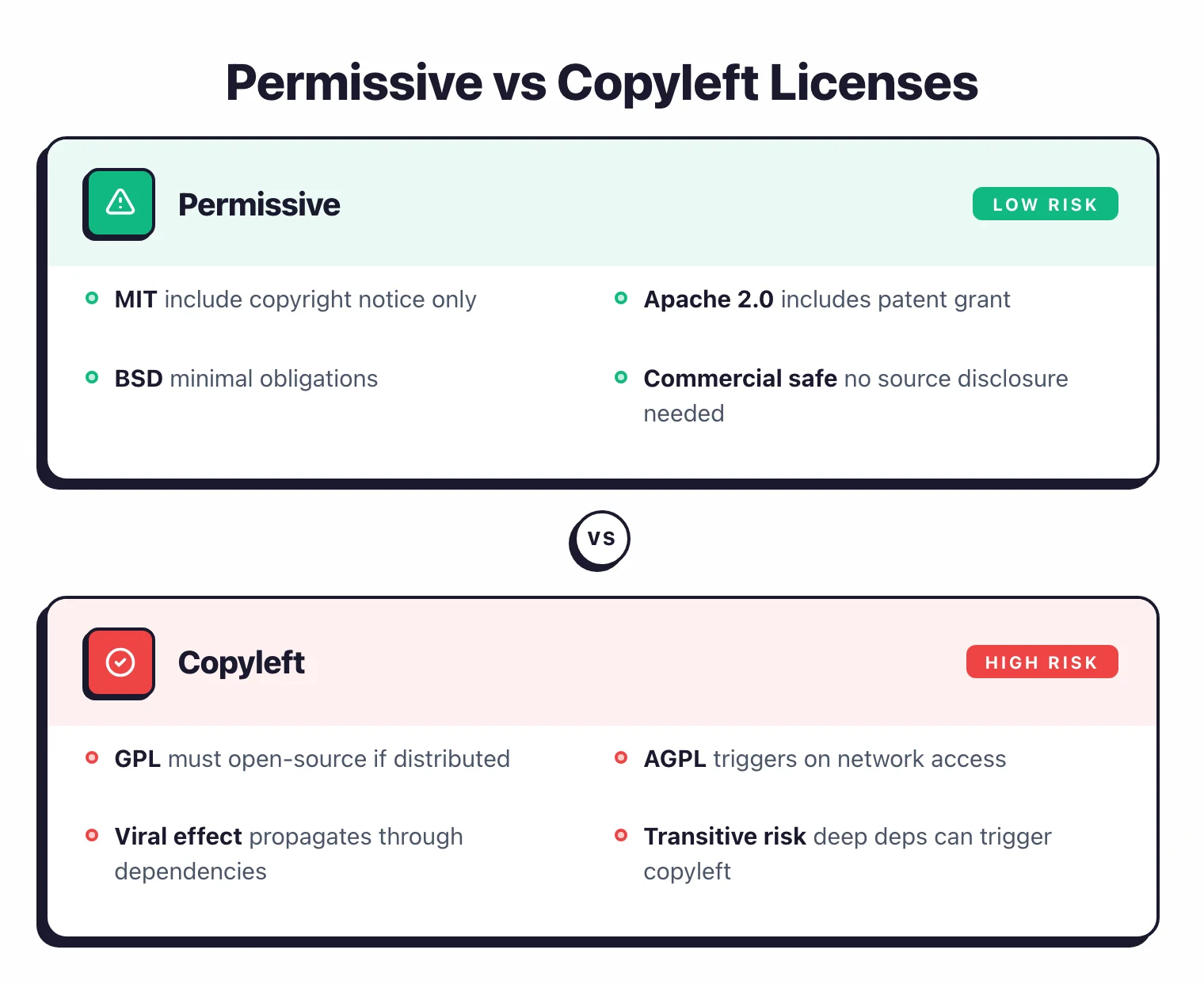
Open-source licenses fall into three categories based on what they require from you.
Permissive licenses#
Permissive licenses let you do nearly anything with the code – use it commercially, modify it, redistribute it. Your main obligation is to include the original copyright notice and license text.
Examples: MIT, Apache 2.0, BSD (2-clause and 3-clause), ISC.
These are the lowest-risk licenses for commercial software. Most companies approve them by default.
Copyleft licenses#
Copyleft licenses require that if you distribute software containing copyleft code, you must also distribute the source code of the combined work under the same license. This is the “viral” effect – the license spreads to code that includes it.
Examples: GPL v2, GPL v3, AGPL v3.
Copyleft licenses create real problems for commercial software. If your proprietary application links against a GPL library and you distribute the application, GPL requires you to release your application’s source code under GPL.
Weak copyleft licenses#
Weak copyleft is a middle ground. The copyleft requirement applies to modifications of the library itself, but not to software that merely uses the library through its public API.
Examples: LGPL v2.1, LGPL v3, MPL 2.0 (Mozilla Public License), EPL 2.0 (Eclipse Public License).
If you use an LGPL library as a shared library (dynamic linking), your proprietary code does not need to be open-sourced. If you modify the LGPL library itself, those modifications must be shared.
The most common licenses and what they require#
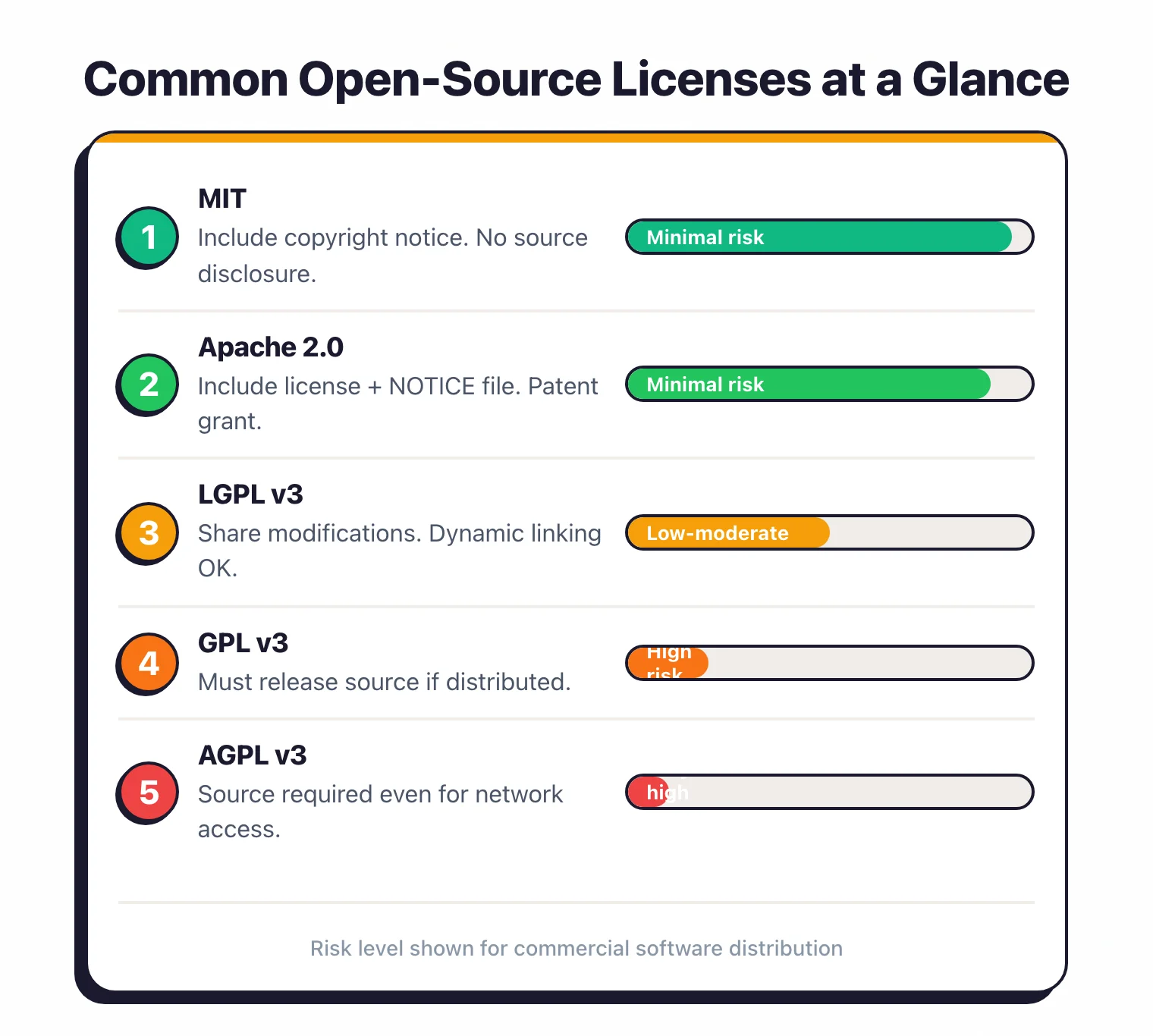
Here is what each license actually requires from you in practice.
MIT License#
The most popular open-source license. Roughly 30% of packages on npm and GitHub use it.
Requirements: Include the copyright notice and license text in your distribution. Allows: Commercial use, modification, distribution, private use. Risk level: Minimal.
Apache License 2.0#
Used by many Apache Software Foundation projects, Kubernetes, Android, and TensorFlow.
Requirements: Include the license text, state changes you made, and include a NOTICE file if one exists. Allows: Commercial use, modification, distribution, patent use. Includes: An explicit patent grant.
Users receive a license to any patents the contributor holds that cover their contribution. This is a real advantage over MIT. Risk level: Minimal.
BSD Licenses (2-clause, 3-clause)#
Common in older projects, FreeBSD, and networking libraries.
Requirements: Include the copyright notice. The 3-clause version adds a restriction against using the contributor’s name for endorsement. Risk level: Minimal.
GPL v2 / GPL v3#
Used by the Linux kernel (v2), GCC, WordPress, and many GNU tools.
Requirements: If you distribute software that includes GPL code , you must make the complete source code of the combined work available under GPL.
Users must be able to build and run their own version. The key distinction: This applies to distribution.
If you use GPL software purely internally and never distribute the binary or source, the requirement does not trigger. Risk level: High for commercial distribution. Manageable for internal-only use.
LGPL v2.1 / LGPL v3#
Used by glibc, GTK, and many C/C++ libraries.
Requirements: If you modify the LGPL library itself, you must share those modifications under LGPL.
If you use the library as-is via dynamic linking, your proprietary code is not affected. Practical impact: Link against the LGPL library as a shared library (.so, .dll).
Do not statically link it into your binary or you may trigger the full copyleft requirement. Risk level: Low if used correctly via dynamic linking. Moderate if statically linked.
AGPL v3#
Used by MongoDB (before their SSPL switch), Grafana (prior to Apache relicense), and some SaaS-focused projects.
Requirements: If users interact with the software over a network , you must provide the complete source code, including your modifications.
This is the network-triggered copyleft. Why it matters for SaaS: Most open-source licenses only trigger on distribution of binaries. AGPL triggers when you run the software as a service.
If your SaaS backend includes an AGPL library, you may need to release your server-side code. Risk level: High for SaaS companies. Many organizations ban AGPL dependencies entirely.
License comparison summary#
| License | Commercial Use | Must Share Source | Patent Grant | Copyleft Trigger |
|---|---|---|---|---|
| MIT | Yes | No | No | None |
| Apache 2.0 | Yes | No | Yes | None |
| BSD | Yes | No | No | None |
| GPL v3 | Yes | Yes (if distributed) | Yes | Distribution |
| LGPL v3 | Yes | Only modifications | Yes | Distribution (static linking) |
| AGPL v3 | Yes | Yes (network access) | Yes | Network access |
| MPL 2.0 | Yes | Only modified files | Yes | File-level |
When does using GPL code force your hand?#
Copyleft risk is the scenario where using a single GPL dependency forces you to release your entire application as open source. Understanding where this line is helps you avoid crossing it.
When copyleft triggers#
The GPL copyleft obligation triggers when you distribute a binary or source code that includes GPL code. “Distribution” means giving the software to someone outside your organization: shipping a product, publishing a download, or handing an executable to a client.
The 2024 SFC v. Vizio ruling matters here. In January 2024, Judge Sandy Leal denied Vizio’s motion for summary judgment, allowing the Software Freedom Conservancy’s breach-of-contract claim to proceed in California state court. The court’s reasoning explicitly recognised that third parties who receive GPL-licensed software have a genuine interest in enforcing the source-code-availability obligation, even without action from the original copyright holder.
For compliance scanning, the practical shift is who can bring a complaint. Before the ruling, GPL enforcement was essentially something copyright holders did. After, a downstream recipient — a customer, a researcher, a consumer-rights group — has a plausible path to standing. The case is still headed to trial as of the most recent filings, so the final doctrine is not settled, but the summary-judgment result alone has changed how legal teams think about licence risk in distributed products.
Running GPL software on your own servers for internal use does not trigger the copyleft requirement (except AGPL, which triggers on network access).
The transitive dependency problem#
Here is where it gets tricky. Your application might not directly depend on a GPL library.
But if a dependency three levels deep in your tree uses a GPL library, and it is statically linked, the copyleft obligation can propagate up to your application.
This is why automated scanning matters. Manually checking the license of every transitive dependency in a project with 500+ packages is not realistic. SCA tools resolve the full dependency tree and flag license conflicts automatically.
Real-world scenarios#
Scenario 1: Node.js backend using a GPL utility. You deploy this as a SaaS application. Users interact with it over HTTP.
Since you are not distributing the binary, GPL does not trigger. But if you switch to AGPL, it does.
Scenario 2: Mobile app using a GPL library. You distribute the app through the App Store. You are distributing a binary that contains GPL code.
GPL requires you to make the source code available to users under the same license.
Scenario 3: Docker image containing GPL tools. You publish the Docker image to a registry for customers to pull.
This is distribution. GPL obligations apply to everything in the image.
Mitigation#
Flag GPL and AGPL dependencies during CI/CD builds. Configure your SCA tool to block merges that introduce copyleft licenses into commercial projects.
Maintain a list of approved licenses and review exceptions before they ship.
Automating license scanning with SCA tools#
Manual license audits do not scale. They are slow and easy to get wrong.
A single developer adding a dependency can introduce a license conflict that nobody catches until legal review months later.
How SCA tools handle licensing#
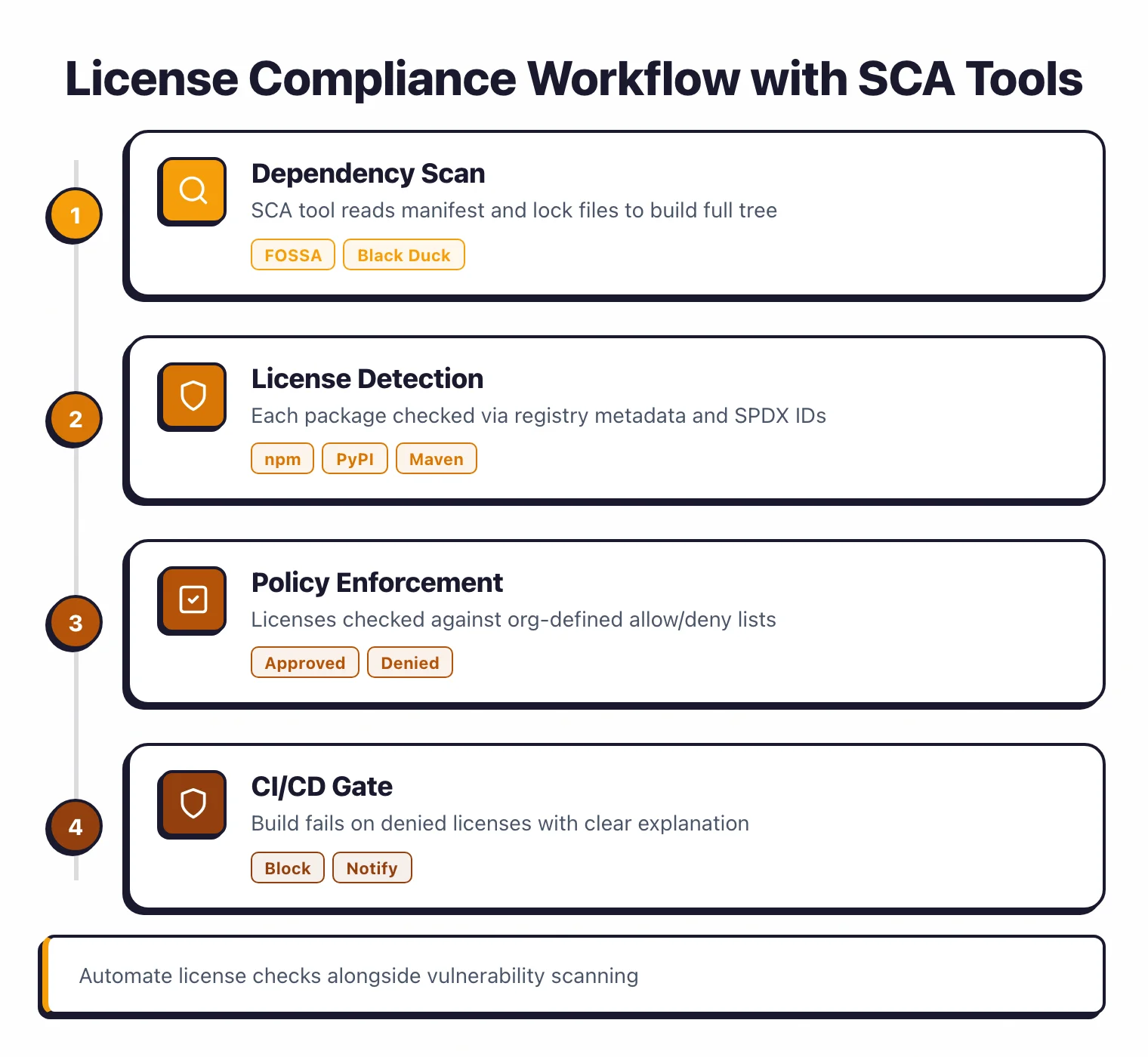
SCA tools read your manifest and lockfiles, resolve the full dependency tree, and check the license of every direct and transitive dependency against your organization’s policy. Findings are reported alongside vulnerability results.
Most tools detect licenses through a combination of:
- Package registry metadata (npm, PyPI, Maven Central publish license fields)
- License file detection (scanning for LICENSE, COPYING, or NOTICE files in the package)
- SPDX identifiers (standardized short-form license names)
8 license compliance scanners compared#
The eight tools below cover the full range — commercial platforms built for audit-grade accuracy (FOSSA, Black Duck, Mend SCA), developer-first SaaS with license checks bolted on (Snyk Open Source, Aikido), and pure open-source scanners teams assemble into custom toolchains (FOSSology, ScanCode Toolkit, OWASP Dependency-Check).
| Tool | License DB | Policy Engine | Dual-license Detection | Report Formats |
|---|---|---|---|---|
| FOSSA | Extensive, manually curated | Yes, custom policies | Yes | SPDX, custom |
| Black Duck | KnowledgeBase (largest) | Yes, with approval workflows | Yes | SPDX, CycloneDX |
| Mend SCA | Curated | Yes, with auto-remediation | Yes | Multiple formats |
| Snyk Open Source | Good coverage | Basic policy support | Partial | CycloneDX |
| FOSSology | SPDX-aligned, community | Rule-based, agent-driven | Yes | SPDX, text |
| ScanCode Toolkit | AboutCode project | No (scanner only) | Yes | SPDX, JSON, YAML |
| Aikido | Aggregated + NVD | Yes, in SaaS console | Partial | CycloneDX, JSON |
| OWASP Dep-Check | NVD-based | No built-in policy | No | HTML, JSON, XML |
FOSSA and Black Duck are the strongest options if license compliance is a primary concern. Their databases cover edge cases like custom licenses, dual-licensing, and license changes between versions that lighter tools miss.
For M&A due diligence and IP audits, Revenera Code Insight goes one step further. It detects copy-pasted snippets and embedded libraries that manifest-based scanners skip, and adds legal review workflows on top.
For the SBOM side of the same scan — generating and comparing CycloneDX and SPDX outputs — see SBOM tools comparison and the dedicated Syft and Trivy pages. The wider category sits on the open-source SCA tools hub.
For teams that primarily need vulnerability scanning with basic license checks, Snyk or Mend SCA cover both in a single tool. Fully open-source shops that need to avoid SaaS telemetry typically land on FOSSology (full license workflow) or ScanCode Toolkit (fast scanner, BYO policy).
CI/CD integration#
Add license checks to the same CI pipeline where you run vulnerability scans. Most tools support a configuration file that specifies allowed and denied licenses:
# Example: Snyk policy
license:
  deny:
    - GPL-2.0
    - GPL-3.0
    - AGPL-3.0
  allow:
    - MIT
    - Apache-2.0
    - BSD-2-Clause
    - BSD-3-Clause
    - ISC
When a developer adds a dependency with a denied license, the build fails with a clear explanation of which dependency introduced the violation and what license it uses. The developer can then find an alternative library or request a policy exception.
Building a license policy for your organization#
A license policy defines which licenses are approved, which are banned, and how exceptions are handled. Without one, every license decision is ad hoc and inconsistent.
Start with three tiers#
Approved (green). Permissive licenses that require no legal review: MIT, Apache 2.0, BSD (2-clause, 3-clause), ISC, Unlicense, CC0.
Review required (yellow). Licenses that need case-by-case evaluation: LGPL, MPL 2.0, EPL, CC-BY, artistic licenses.
The risk depends on how the library is used (dynamic vs static linking, distribution model).
Denied (red). Licenses incompatible with your distribution model: GPL, AGPL, SSPL, proprietary licenses with conflicting terms. Developers cannot add these without explicit approval from legal.
Handle exceptions#
Some GPL libraries have “classpath” or “linking” exceptions that relax the copyleft requirement. For example, the GCC Runtime Library Exception allows proprietary code compiled with GCC.
OpenJDK uses the “Classpath Exception” that permits proprietary code to use standard Java APIs without triggering GPL.
Document each exception with the specific library, the exception clause, and the approved usage pattern.
Maintain an inventory#
Track which licenses are in use across all projects. A Software Bill of Materials generated by your SCA tool provides this automatically.
Review the inventory quarterly to catch new patterns. If a popular internal framework starts pulling in LGPL dependencies, you want to know early.
Communicate the policy#
Put the policy where developers will actually see it: in the CI/CD failure message when a denied license is detected.
“Build failed: dependency libfoo@2.3 uses GPL-3.0, which is not permitted for commercial distribution. See [link to internal policy] for alternatives or to request an exception.”
The policy is only useful if it is enforced automatically. Manual compliance audits find problems too late. Automated checks in CI/CD catch them before merge.
Malicious packages vs license risk#
Licence compliance and malicious-package detection live in the same category (SCA) but solve different problems. Licence scanning is deterministic — the scanner reads a published licence identifier or bundled text and returns a legally meaningful label. Malicious-package detection is behavioural — it asks whether a dependency does something unexpected, like posting to a credential-exfiltration endpoint or spawning a miner, and the signal comes from registry telemetry, install-script analysis, and typosquat proximity scoring rather than an SPDX string.
A tool can do one job well and still miss the other. OSV-Scanner has excellent licence coverage but limited behavioural analysis. Socket built its product around behavioural detection but does not compete as an audit-grade licence workflow. When a team says ‘we need SCA,’ it is worth asking which of these two surfaces is the actual priority — the answer changes the tool shortlist.
For the malicious-package side of the category, the open-source SCA tools hub tracks the current options.
FAQ#
What exactly does a license compliance scanner detect?
It attaches a licence to every direct and transitive dependency in your project by matching SPDX identifiers, inspecting bundled LICENSE files, and reading package-registry metadata. The better scanners also flag missing licences, custom text that does not match any known template, and dual-licensed packages where you have to pick a path.
Can a scanner tell GPL-compatible from GPL-incompatible licences?
The mature platforms (FOSSA, Black Duck, Mend, FOSSology) ship compatibility matrices that evaluate combinations against GPL, LGPL, and AGPL. Lighter scanners (ScanCode, OSV-Scanner’s licence module) surface the licence identifier but leave compatibility decisions to a policy file or a human. If compatibility analysis is the job, choose a tool that advertises it explicitly.
Is the SFC v. Vizio ruling enforceable today?
The January 2024 denial of Vizio’s motion for summary judgment is a procedural win — it allowed the case to keep moving. The court’s reasoning recognised that downstream recipients have a real interest in enforcing GPL source-code obligations, but final doctrine awaits trial. In practice, it has already shifted how enterprise legal teams weigh copyleft risk in products they ship to customers.
Does a scanner replace a lawyer?
No. A scanner gives you an accurate inventory of licences and flags the policy breaches, which is the part legal teams could not reasonably do by hand at 500 dependencies. The judgment calls — whether a particular use case triggers copyleft, whether a dual-licence choice is sound, whether a custom licence is acceptable — still sit with counsel.
Which open-source scanners are audit-grade?
FOSSology is the long-standing reference for formal compliance workflows and is used by many OEMs for SPDX-aligned audit output. ScanCode Toolkit is the detection engine of choice when you need high-fidelity licence data and are willing to assemble the policy pipeline around it. For developer-facing gating without a full audit workflow, Trivy and OSV-Scanner cover the fast path.