


Strix is an open-source AI penetration testing tool. Instead of matching patterns like a traditional DAST scanner, it runs autonomous AI agents that exploit your app the way a real tester would.
My read is that Strix’s real differentiator is validation: findings ship with a working proof-of-concept, not just static alerts.
The project is Apache 2.0 licensed and has passed 66,000 GitHub stars.
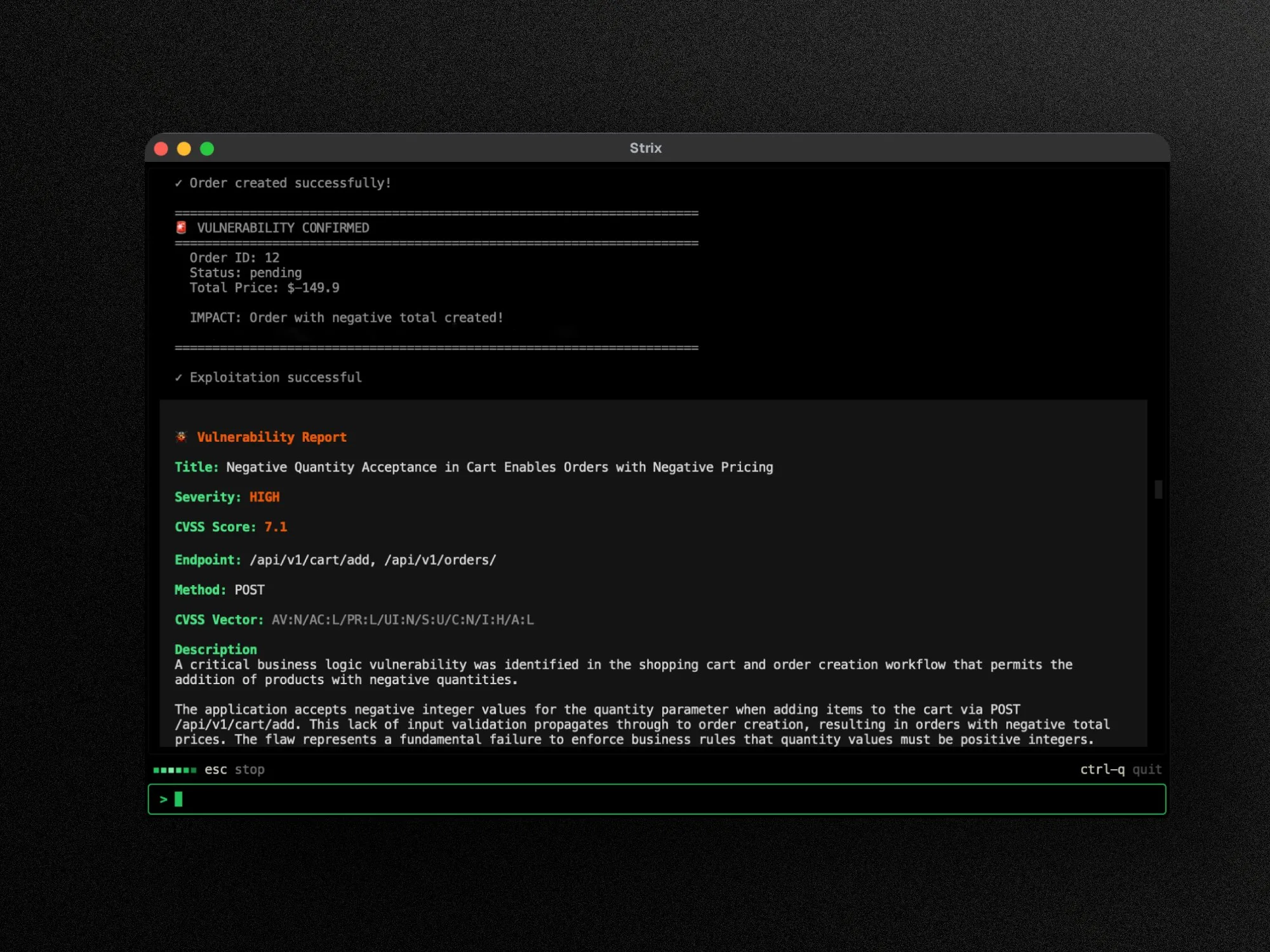 Strix confirms a finding by exploiting it, then writes a full report with severity, CVSS score, and the affected endpoint.
What is Strix?
Strix orchestrates multiple AI agents that collaborate on a single target. They handle reconnaissance, exploitation, and validation without separate configuration steps.
You point it at a local directory, a git repository, or a live URL. The agents run the app dynamically, so results reflect what happens at runtime rather than what static analysis infers.
The CLI works with any major LLM provider. You set STRIX_LLM and LLM_API_KEY, and it supports OpenAI, Anthropic, Google, Vertex AI, Bedrock, Azure, and local models.
Key Features
| Feature | Details |
|---|---|
| Testing approach | Autonomous multi-agent, dynamic code execution against the running app |
| Validation | Real proof-of-concept per finding, not static pattern matches |
| Coverage | OWASP Top 10 and beyond, including business logic and API flaws |
| Targets | Local directory, git repository, or live URL |
| LLM providers | OpenAI, Anthropic, Google, Vertex AI, Bedrock, Azure, or local models |
| Automation | Headless mode (-n), GitHub Actions, pull-request diff scoping |
| Scan modes | Standard or quick (--scan-mode) |
| License | Apache 2.0, 67,000+ GitHub stars |
Vulnerability coverage
Strix targets the OWASP Top 10 and a range of classes beyond it. The list below comes from the project’s documentation.
- Injection: SQL, NoSQL, OS command, and server-side template injection (SSTI)
- Server-side: SSRF, XXE, and remote code execution (RCE)
- Access control: IDOR and privilege escalation
- Authentication and session weaknesses
- XSS, CSRF, and prototype pollution
- Business logic vulnerabilities
- API security issues
- Cloud and infrastructure misconfigurations
Test scoping and CI
The CLI reads plain instructions through --instruction or --instruction-file, so you can direct agents at specific flows. Diff scoping (--scope-mode diff with --diff-base) limits a run to changed code.
Headless mode (-n) and a published GitHub Actions workflow let Strix run on every pull request without an interactive session.
Getting Started
Strix installs with a single command. Docker must be running and you need an LLM API key from a supported provider.
curl -sSL https://strix.ai/install | bash
Set your model and key, then point Strix at a target:
export STRIX_LLM="openai/gpt-5.4"
export LLM_API_KEY="your-api-key"
strix --target ./app-directory
You can also pass a repository (--target https://github.com/org/repo) or a live URL. Add -n for headless CI runs, and the CLI reports each validated vulnerability with a proof-of-concept and remediation guidance.
Strix Platform (hosted)
Beyond the open-source CLI, the vendor (OmniSecure, Inc.) runs a hosted Strix Platform for continuous testing. It adds PR security reviews, one-click autofix with merge-ready pull requests, attack-surface monitoring, and scheduled pentesting.
The Platform Pro plan is $29 per seat per month and includes Jira, Linear, and Slack integrations plus a 7-day free trial. An Enterprise plan adds VPC or on-prem deployment, bring-your-own-key model support, SSO and SCIM, and a dedicated SLA at custom pricing.
The platform is SOC 2 and ISO 27001 certified. The open-source CLI stays free, and your only running cost there is the LLM usage.
When to Use Strix
Strix suits developers and security teams who want exploit-validated testing wired into the workflow, not a separate scanning step. Diff scoping makes it practical to run on every pull request.
Because it needs an LLM API key, the running cost scales with model usage. For signature-based scanning without that dependency, Nuclei and OWASP ZAP remain the open-source references.
If an auditor needs a report with a named tester and a signed attestation letter, a vendor-run whitebox service such as Trace fits that job better.
How does Strix fit into a pipeline?
The Strix README includes a GitHub Actions workflow and headless mode. Pull-request runs can use quick mode and scope testing to files changed from a chosen base branch.
I would keep the first pipeline non-blocking:
- Run a quick, diff-scoped test on pull requests.
- Save the local run artifacts and review every proof-of-concept.
- Add authenticated test credentials through the CI secret store.
- Gate merges only after runtime, cost, and failure behavior are predictable.
Longer standard scans fit a release candidate or scheduled environment better than every commit. Live targets should use isolated data and explicit rules for destructive actions.
How is Strix released and deployed?
Strix 1.4.1 was released on July 27, 2026. The CLI runs locally but pulls a Docker sandbox image on its first run.
The project is Apache 2.0 licensed. Its provider documentation covers hosted model APIs and local models, so inference can be chosen separately from the scanner.
The hosted platform adds managed testing and enterprise deployment options. The open-source dashboard reads local run files, while model requests follow the selected provider.
What are Strix’s limitations?
Strix needs Docker, compute, and an LLM. That makes runs less deterministic and usually more expensive than a fixed-rule scanner, especially on large targets or broad instructions.
Exploit validation reduces unconfirmed alerts, but it does not prove complete coverage. Agent exploration can miss routes, roles, state transitions, or business rules it was not given enough context to discover.
Live exploitation also raises safety questions. I would avoid production targets until rate limits, test accounts, data mutation, outbound requests, and cleanup behavior have been demonstrated.
The CLI is not a replacement for SAST or SCA. It tests behavior it can execute; dormant code and vulnerable dependencies that never surface during a run still need separate controls.