
- SonarQube has 6,000+ rules covering code quality and security with mature quality gates; Semgrep has 2,000+ community rules (20,000+ Pro) focused primarily on security.
- Semgrep scans in a 10-second median CI time; SonarQube scan times range from minutes to tens of minutes depending on project size and server configuration.
- Semgrep custom rules use YAML patterns writable in minutes; SonarQube custom rules require Java plugins or XPath expressions with a steeper learning curve.
- SonarQube Community Build is free (LGPL-3.0) covering 21 languages; Semgrep Community Edition (CE) is free (LGPL-2.1) for 35+ languages with no usage limits.
- SonarQube tracks bugs, code smells, duplication, coverage, and tech debt; Semgrep focuses on security and adds SCA (Supply Chain) and Secrets detection.
Which Is Better: SonarQube or Semgrep?#
SonarQube is the right choice if you want both code quality and security in one platform, with mature quality gates that can block deployments.
Semgrep is the right choice if security-focused static analysis, fast CI scans, and easy custom rule writing are your priorities. SonarQube gives you the broader view; Semgrep gives you speed and security depth.
What Are the Key Differences?#
| Feature | SonarQube | Semgrep |
|---|---|---|
| License | LGPL-3.0 (Community Build); Commercial (paid tiers) | LGPL-2.1 (CE); Commercial (Platform) |
| Languages | 35+ (21 in Community Build) | 35+ |
| Built-in Rules | 6,000+ | 2,000+ community; 20,000+ pro |
| Focus | Code quality + security | Security-focused |
| Code Quality Analysis | Bugs, code smells, duplication, coverage | No |
| Quality Gates | Yes (pass/fail CI gating) | No |
| Custom Rule Authoring | Java plugins or XPath, steeper learning curve | Code-like YAML syntax, simple |
| Cross-File Dataflow | Taint analysis (Enterprise tier) | Semgrep Code (Platform) |
| AI Features | AI CodeFix, MCP Server | Semgrep Assistant (AI triage and fixes) |
| SCA | Yes (paid tiers) | Semgrep Supply Chain (reachability analysis) |
| Secrets Detection | Yes (paid tiers) | Semgrep Secrets (semantic analysis) |
| CI Scan Speed | Minutes (depends on project/server) | 10-second median |
| PR Decoration | Yes (Developer+ tiers) | Yes (platform) |
| IDE Plugins | SonarQube for IDE (VS Code, IntelliJ, Eclipse, Visual Studio) | VS Code, IntelliJ |
| Self-Hosted Option | Yes (all tiers) | CE CLI runs anywhere; platform is cloud |
| GitHub Stars | 10,700+ | 15,600+ |
| SaaS Option | SonarQube Cloud | Semgrep AppSec Platform |
SonarQube vs Semgrep: How Do They Compare?#
Scope and Philosophy#
SonarQube is a code quality platform that includes security analysis. It tracks four dimensions: reliability (bugs), security (vulnerabilities and security hotspots), maintainability (code smells and technical debt), and test coverage.
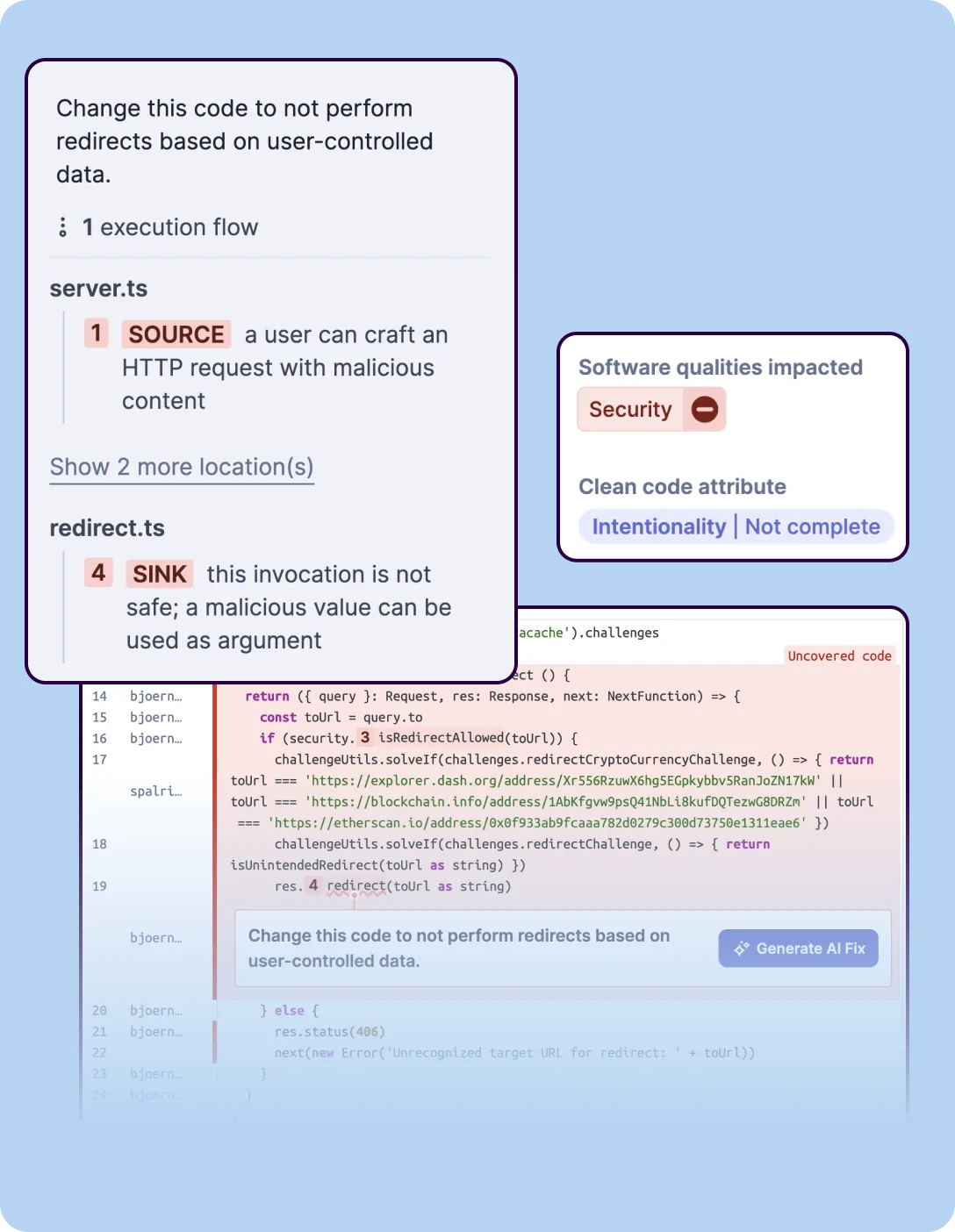 SonarQube’s SAST analysis tracing a security vulnerability from an HTTP request source to an unsafe redirect sink, with execution flow steps and software quality impact classification.
The quality gate system blocks deployments that do not meet configured thresholds across all these dimensions. If your team cares about code health beyond just security, SonarQube gives you one dashboard for everything.
Semgrep started as a security-focused pattern-matching engine. Semgrep CE does static analysis for bugs and security issues.
The commercial platform adds SCA (Semgrep Supply Chain) and secrets detection. There is no code smell tracking, duplication analysis, or test coverage measurement.
Semgrep does security well and leaves code quality to other tools.
Rule Systems and Custom Rules#
This is where Semgrep has a distinct advantage. Semgrep rules are written in YAML and look like the source code they match.
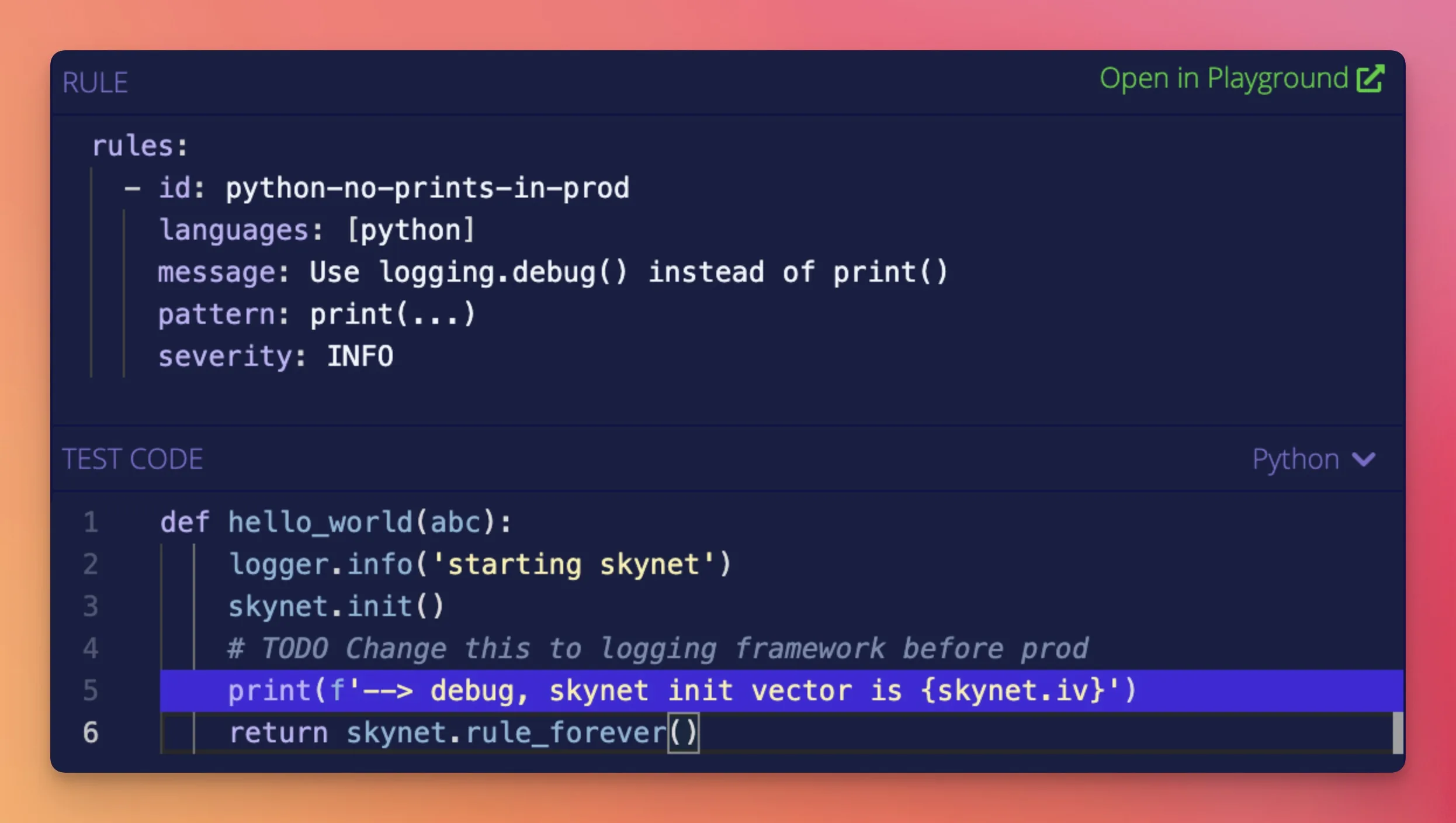 Semgrep’s interactive rules editor: a YAML rule matching Python
 print() calls (left) applied against test code (right) with the matching line highlighted in blue.
To find insecure YAML loading in Python, you write a pattern that resembles yaml.load(...). Developers can write and review security rules without learning a separate language. Creating a new custom rule takes minutes.
SonarQube’s rule system is more complex. Custom rules require writing Java plugins that use the SonarQube Server API, or XPath expressions for a limited set of languages.
The learning curve is steeper, and rule development takes longer. In practice, most teams rely on the 6,000+ built-in rules rather than writing their own.
For organizations with specific security patterns they want to enforce — internal coding standards, framework-specific checks, banned function calls — Semgrep’s rule syntax is a significant productivity advantage.
Performance#
Semgrep is fast. The company reports a 10-second median CI scan time.
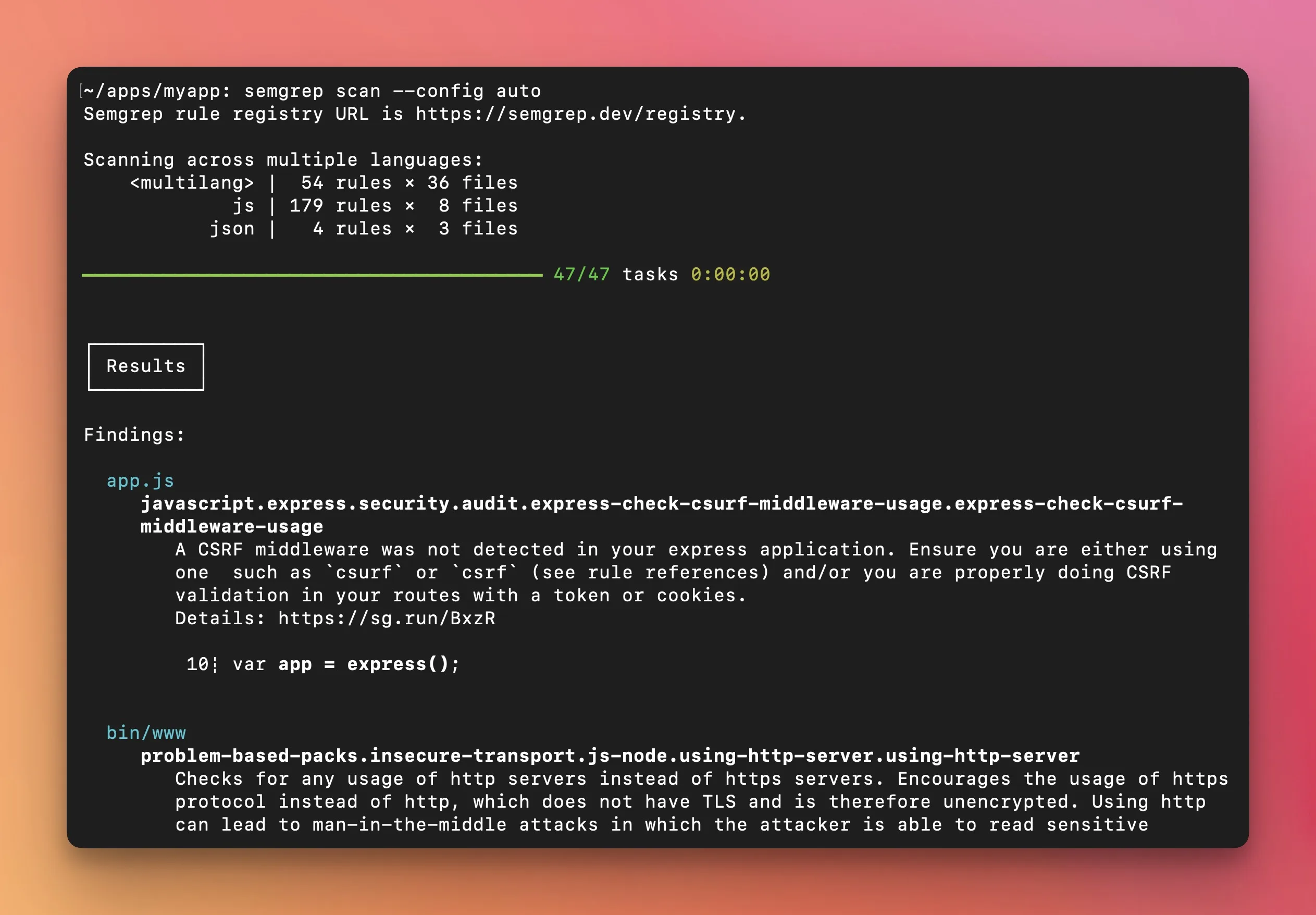 Semgrep’s CLI output running
 semgrep scan --config auto — scanning JavaScript, JSON, and multilang files with 237 rules, completing 47 tasks in under a second, and displaying CSRF middleware and insecure transport findings.
The tool parses source code into ASTs and runs pattern matching locally, without requiring a server. This speed makes it practical to run on every PR without slowing down developer workflows.
SonarQube runs analysis through the SonarScanner, which sends results to a SonarQube server for processing. Scan times depend on project size, server resources, and which rules are enabled.
A large codebase can take minutes to analyze. The server-based architecture adds infrastructure overhead but also provides persistent dashboards, historical trends, and quality gate management.
Security Depth#
SonarQube’s security analysis improves with paid tiers. The Community Build has basic security rules.
The Enterprise Edition adds taint analysis that traces data flow from user input to dangerous operations, which is critical for detecting injection vulnerabilities.
The security rule set covers OWASP Top 10 , CWE Top 25 , and SANS Top 25.
Semgrep Code adds cross-file and cross-function dataflow analysis. The company claims it reduces false positives in high/critical findings by up to 98%.
The commercial platform includes 20,000+ proprietary rules on top of the 2,000+ community rules. Semgrep Supply Chain adds SCA with reachability analysis, and Semgrep Secrets adds credential detection with semantic analysis.
Both tools offer serious security analysis at their commercial tiers. SonarQube’s advantage is that security analysis comes packaged with code quality.
Semgrep’s advantage is that security-specific features are more deeply developed.
CI/CD and Developer Workflow#
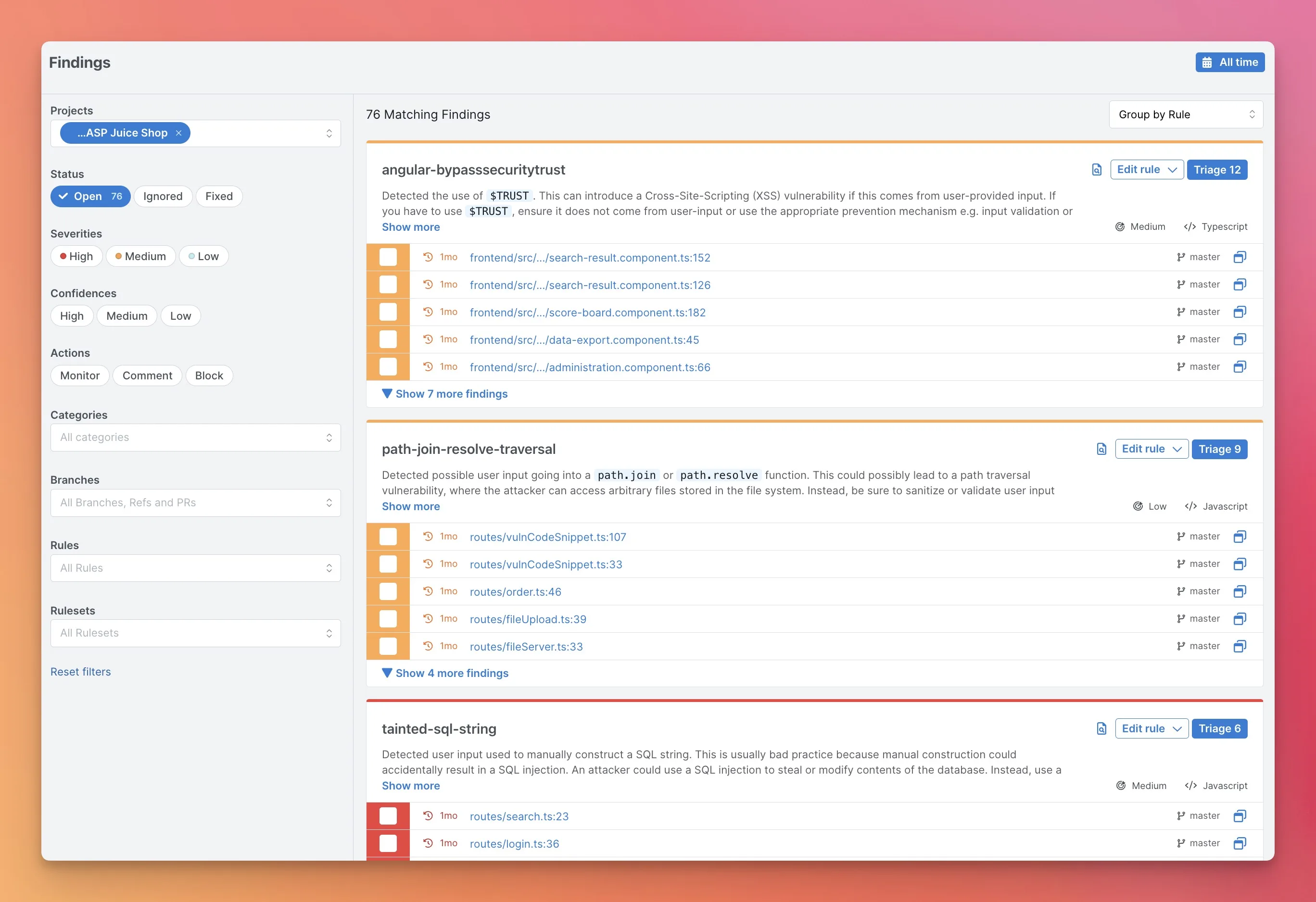 Semgrep’s AppSec Platform Findings view showing 76 findings grouped by rule — XSS, path traversal, and SQL injection — with severity levels, file locations across branches, and triage controls.
SonarQube’s quality gates are among the most mature in the industry. Configure pass/fail conditions on coverage, duplication, reliability, security, and maintainability.
PR decoration shows new findings directly on pull requests in GitHub, GitLab, Bitbucket, and Azure DevOps. SonarQube for IDE (formerly SonarLint) provides real-time feedback in VS Code, IntelliJ, Eclipse, and Visual Studio.
Semgrep integrates with GitHub Actions, GitLab CI, Jenkins, Buildkite, and CircleCI. The semgrep ci command handles pipeline scanning.
The platform provides PR comments with findings and remediation guidance. Semgrep Assistant adds AI-powered context to findings.
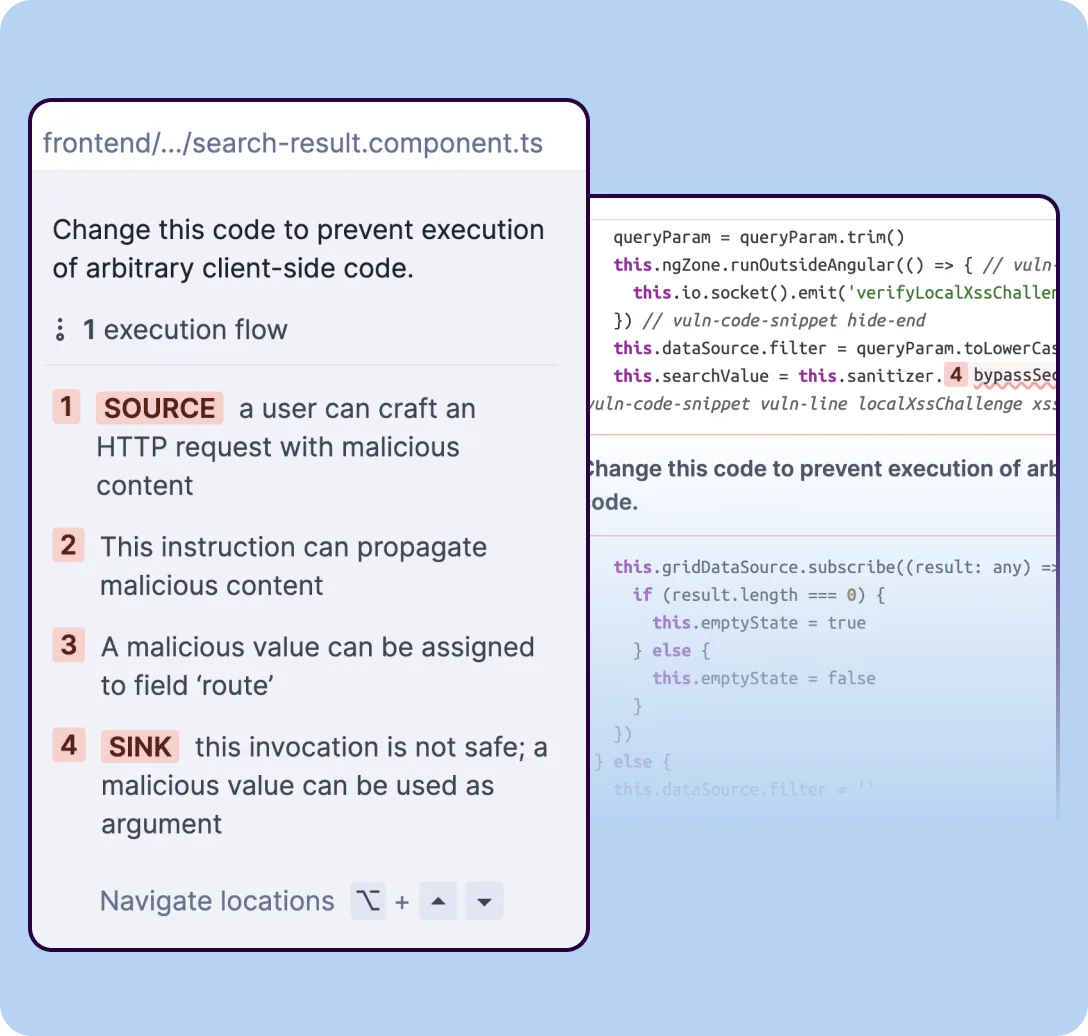 SonarQube’s taint analysis tracing user input from an HTTP request source through multiple code locations to an unsafe sink, with inline code context at each step.
Both tools work well in CI/CD. SonarQube’s quality gates add a dimension that Semgrep does not cover — blocking deployments based on code quality metrics, not just security findings.
Pricing#
SonarQube Community Build is free. Paid tiers (Developer, Enterprise, Data Center) are priced per-instance per year based on lines of code — contact SonarSource for current rates.
Enterprise includes taint analysis and additional security features. SonarQube Cloud (SaaS) is free for public projects.
Semgrep CE is free with no usage limits. The commercial platform is free for up to 10 contributors, with the Teams plan starting at $30/month per contributor.
Enterprise pricing is custom. Semgrep Code, proprietary rules, and team management require the Platform.
For small teams, both tools have viable free tiers. For larger organizations, pricing depends on which features you need and how much code you scan.
Pricing comparison#
Both vendors offer free tiers and contact-sales upgrades, but the free-vs-paid line sits in a different place for each tool.
SonarQube ships in two main forms. SonarQube Community Edition is free, open-source, and self-hosted — the full code-quality engine and a substantial chunk of the security rules. SonarQube Server (Developer / Enterprise / Data Center editions) is the commercial self-hosted line; SonarQube Cloud (formerly SonarCloud) is the SaaS option.
The Sonar pricing page publishes per-line-of-code tiers for SonarQube Cloud and contact-sales for the Enterprise / Data Center commercial editions. Seat-count is not the primary lever — analyzed-LOC is.
Semgrep sits at the most accessible end of the SAST market. Semgrep CE is free and open-source.
Semgrep Platform is free for up to 10 contributors, then the Team plan publishes per-contributor pricing on semgrep.dev/pricing , and Enterprise is contact-sales for SSO/SAML, custom rule registries, and SLA-backed support. Contributor-count is the primary pricing lever; analyzed-LOC is incidental.
The practical implication: SonarQube’s free Community Edition is unusually generous for a self-hosted deployment, but the cloud / commercial tiers shift to per-LOC billing that scales with monorepo size.
Semgrep’s free Platform tier covers small teams without procurement involvement, and the per-contributor model is predictable as the team grows. Neither tool publishes the full Enterprise rate card, so confirm the current numbers on the vendor pricing page before procurement.
When Should You Choose SonarQube?#
Choose SonarQube if:
- You want code quality and security analysis in a single platform — SonarQube’s rule-based pattern matching for CWEs is bundled alongside maintainability and reliability checks, which is unusual at this depth
- Quality gates that block deployments on coverage, reliability, and security thresholds matter to your workflow — SonarQube’s quality-gate model is the canonical implementation of this pattern
- Historical trend tracking and technical debt measurement are priorities — SonarQube’s database tracks issue lifecycle across years, not just current scan state
- Self-hosted deployment is a requirement — SonarQube Server runs entirely on your infrastructure, with no cloud egress required
- Your team already uses SonarLint in their IDEs — IDE-server result pairing is one of SonarQube’s signature features
- You need broad language coverage with 6,000+ built-in rules across 30+ languages, including the legacy enterprise stack (COBOL, ABAP, RPG via the commercial editions)
When Should You Choose Semgrep?#
Choose Semgrep if:
- Speed matters — 10-second CI scans make it practical for every PR
- You want to write custom security rules that look like source code
- Security-focused analysis is your primary goal (not code quality tracking)
- Semgrep Code’s cross-file dataflow analysis delivers low false positives
- You also need SCA (Semgrep Supply Chain) and secrets detection in one platform
- Your team wants to enforce security patterns without complex plugin development
Both tools are strong choices in AppSec Santa’s SAST category. The decision often comes down to whether you need a unified code quality and security platform (SonarQube) or a fast, security-focused scanner with exceptional custom rule capabilities (Semgrep).
Related Comparisons#
- OpenGrep vs Semgrep — the fork-vs-original comparison if you want the rule engine without the commercial tier.
- Semgrep vs CodeQL — rule-writing flexibility vs deep dataflow analysis.
- SonarQube Alternatives — the full alternatives list if SonarQube isn’t the right fit.
- Semgrep Alternatives — options if you want Semgrep-style scanning from a different vendor.
- Open-Source SAST Tools — the broader OSS SAST landscape if both tools feel too opinionated.
- SAST Tools — every SAST scanner I’ve reviewed, filterable by licensing and language coverage.
Frequently Asked Questions
Is SonarQube better than Semgrep?
Is SonarQube free?
Is Semgrep free?
Can I use SonarQube and Semgrep together?
Which tool is faster in CI/CD?

Written & maintained by
Suphi CankurtEight years on the vendor side of application-security sales — thousands of evaluations and demos. I started AppSec Santa in 2022 to put that insider view to work for buyers. Independent of any vendor, paid by none, and honest about what fits whom.