
- Checkmarx covers 300+ Java security vulnerability patterns vs SonarQube's ~89; Checkmarx has consistently deeper security rules across 35+ languages and 80+ frameworks.
- SonarQube Community Edition is free with quality gates for bugs, smells, duplication, and coverage; Checkmarx is enterprise-only with custom pricing and no free tier.
- Checkmarx One bundles SAST, SCA, DAST, IaC, container, API security, and secrets detection with correlated findings; SonarQube is SAST and code quality only.
- Checkmarx maps findings to PCI DSS, HIPAA, SOX, OWASP, and SANS 25 for audit compliance; SonarQube reporting is developer-focused on code health trends.
- Many enterprises run both: SonarQube for daily code quality gates in developer workflows, Checkmarx for deep security scans and compliance audits.
Which Is Better: SonarQube or Checkmarx?
SonarQube and Checkmarx approach static analysis from opposite directions. SonarQube started as a code quality and maintainability platform, adding security rules over time.
Checkmarx was built from the ground up as a security testing tool, with deep vulnerability analysis as its core competency.
This origin story shapes everything about how these tools work, what they prioritize, and who they serve best.
If your team needs a developer-friendly quality gate that catches bugs, code smells, duplications, and basic security issues in every pull request, SonarQube delivers that at a fraction of Checkmarx’s cost — with a free Community Edition to start. If your organization needs enterprise-grade security analysis with deep taint tracking, broad CWE coverage, and compliance reporting that satisfies auditors, Checkmarx is purpose-built for that job.
Many enterprises run both: SonarQube in the daily developer workflow for code quality, and Checkmarx for periodic deep security scans and compliance audits.
What Are the Key Differences?
| Feature | SonarQube | Checkmarx |
|---|---|---|
| License | Open-source (Community) + commercial tiers | Commercial only |
| Pricing | Free Community Edition; paid Server editions | Custom enterprise pricing |
| Primary Focus | Code quality + security | Security testing |
| Vulnerability Detection Depth | Basic to moderate | Deep (taint analysis, dataflow tracking) |
| Java Security Rules | ~89 patterns | 300+ patterns |
| Language Support | 30+ languages | 35+ languages, 80+ frameworks |
| Code Quality Rules | Yes (bugs, smells, duplications, complexity) | Limited |
| Quality Gates | Yes (pass/fail on code quality + security) | No (security-focused thresholds) |
| Taint Analysis | Yes (limited) | Yes (deep cross-function tracking) |
| OWASP Top 10 Coverage | Yes | Yes (comprehensive) |
| CWE Coverage | Partial | Broad |
| Compliance Reporting | Basic | PCI DSS, HIPAA, SOX, OWASP, SANS 25 |
| Deployment Options | Self-hosted, Cloud (SonarCloud) | Cloud (Checkmarx One), On-premise |
| CI/CD Integration | GitHub, GitLab, Bitbucket, Azure DevOps, Jenkins | GitHub, GitLab, Bitbucket, Azure DevOps, Jenkins |
| IDE Plugins | SonarLint (VS Code, JetBrains, Eclipse, Visual Studio) | VS Code, JetBrains, Eclipse, Visual Studio |
| PR Decoration | Yes (inline annotations) | Yes (inline annotations) |
| Platform Scope | SAST, code quality | SAST, SCA, DAST, API security, IaC, container |
| Self-Hosted | Yes (all editions) | Yes (legacy SAST), Cloud preferred |
| AI Features | AI-generated code detection | AI-powered remediation guidance |
SonarQube vs Checkmarx: How Do They Compare?
Code Quality vs Security Focus
This is the fundamental difference between the two tools. SonarQube analyzes code across multiple dimensions: bugs, code smells, security vulnerabilities, code duplications, cognitive complexity, and test coverage.
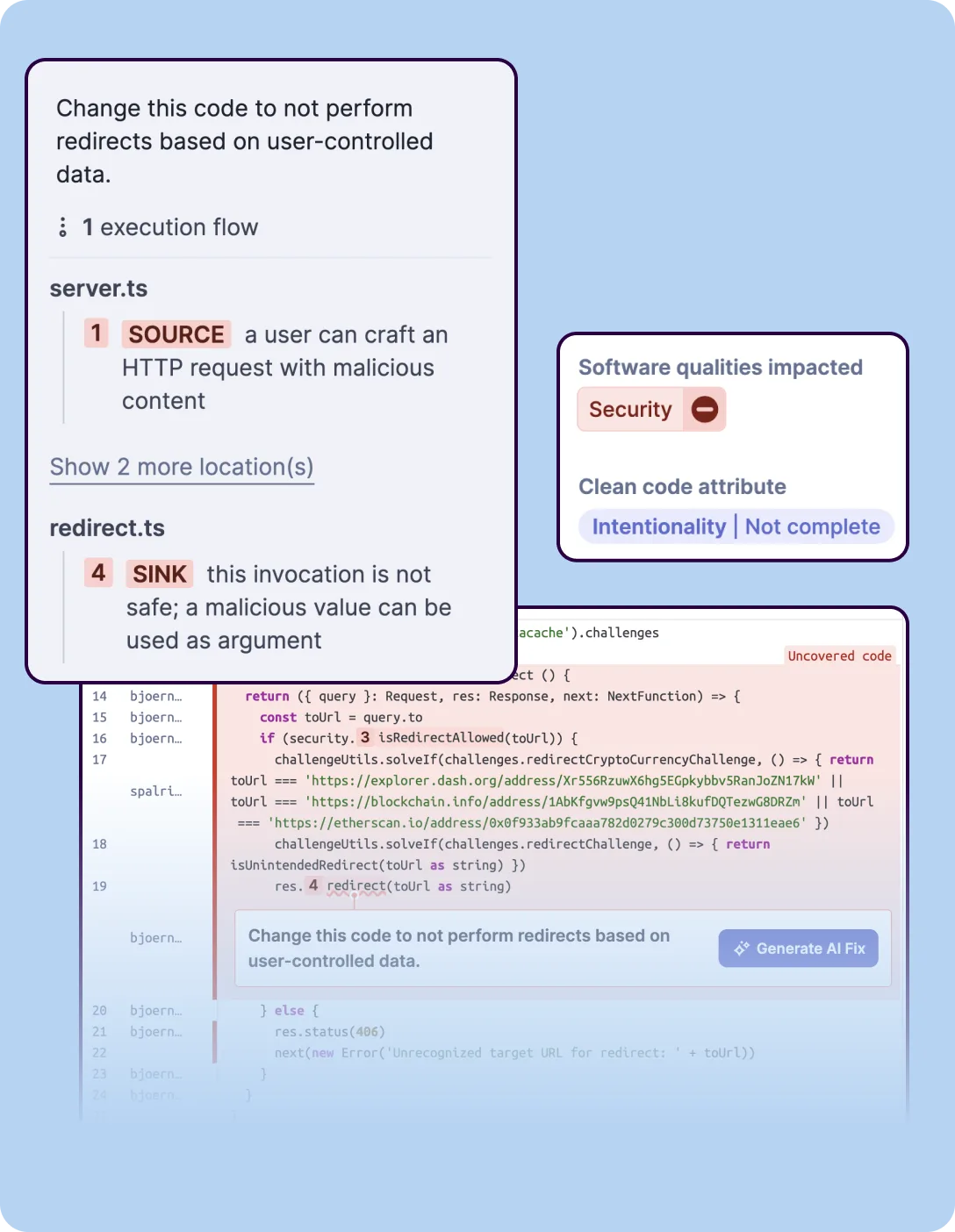 SonarQube’s SAST analysis tracing a redirect vulnerability from HTTP request source to unsafe sink, with execution flow steps and clean code attribute classification.
Its quality gates enforce thresholds on all of these metrics, making it a comprehensive code health tool. Security is one dimension of that broader analysis.
Checkmarx is a security-first platform. Its SAST engine performs deep taint analysis, tracing user-controlled input through complex code paths to identify where it reaches a sensitive sink — a database query, a system command, an HTTP response.
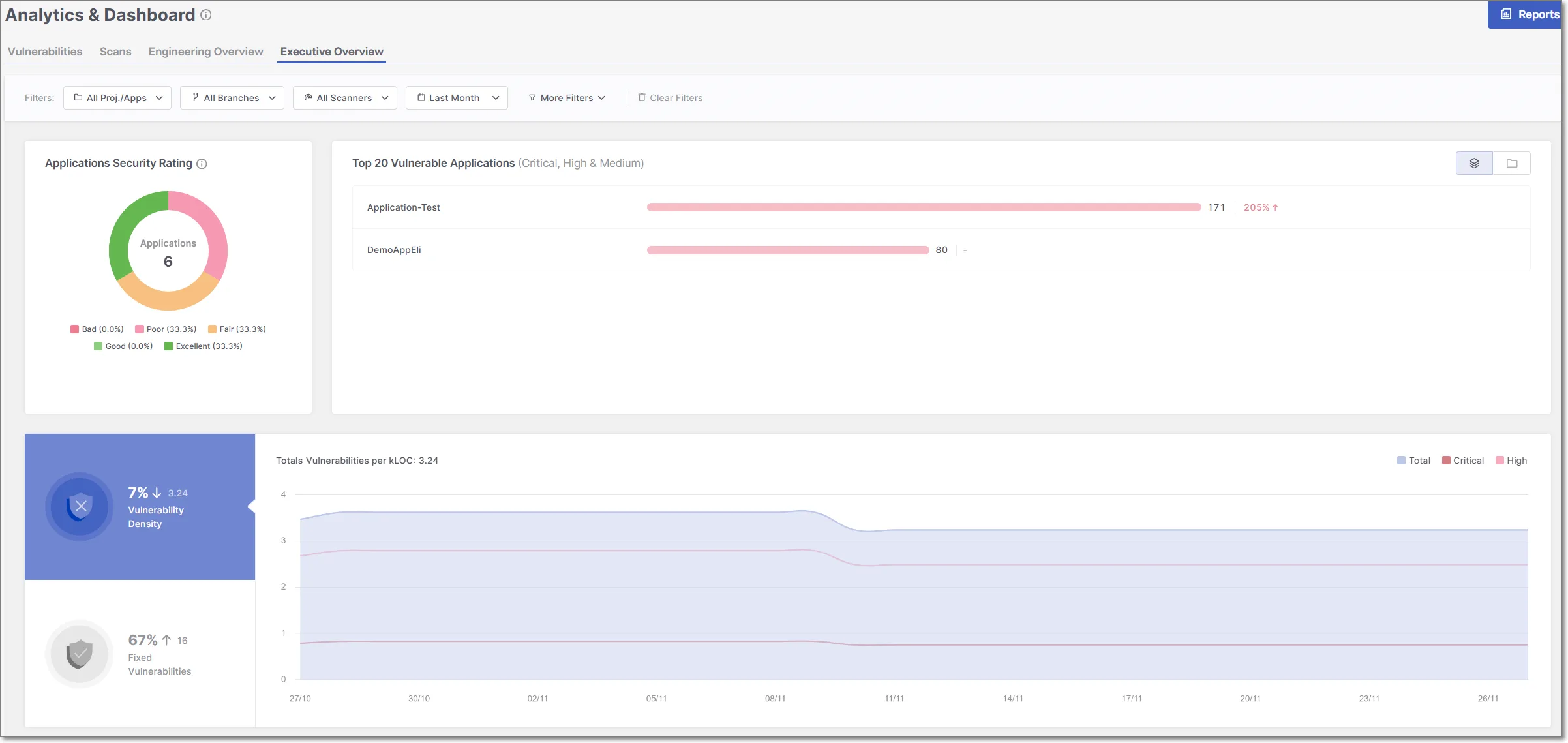 Checkmarx One’s Executive Overview dashboard displaying application security ratings, top vulnerable applications with severity breakdowns, vulnerability density trends over time, and fixed vulnerability metrics.
This depth of analysis catches vulnerabilities that simpler pattern-matching tools miss, particularly for injection attacks, cross-site scripting, and access control issues.
For Java, the gap in security coverage is measurable: according to Checkmarx, their engine covers 300+ known vulnerability patterns versus SonarQube’s approximately 89.
This pattern extends to other languages — Checkmarx consistently goes deeper on security rules while SonarQube goes wider on code quality rules.
Teams that need both code quality and basic security analysis in a single scan will lean toward SonarQube. Teams whose primary mandate is finding and remediating security vulnerabilities will lean toward Checkmarx.
Language and Framework Support
SonarQube supports 30+ programming languages across all editions (21 in the Community Build) for code quality analysis.
Its security rule coverage varies by language — Java and JavaScript have the deepest security rule sets, while languages like C++, Kotlin, and Swift have fewer security-specific rules.
The code quality rules, however, are consistently strong across all supported languages.
Checkmarx SAST supports 35+ languages and 80+ frameworks, with security analysis depth that is more uniform across the supported stack.
Checkmarx has invested heavily in framework-specific analysis — understanding how Spring Boot handles request routing, how Django processes templates, how React renders user input.
This framework awareness reduces false positives because the tool understands the security implications of each framework’s patterns.
For polyglot organizations working across many languages and frameworks, Checkmarx provides more consistent security coverage. For organizations primarily working in Java or JavaScript where SonarQube’s security rules are strongest, the gap narrows.
Deployment and Administration
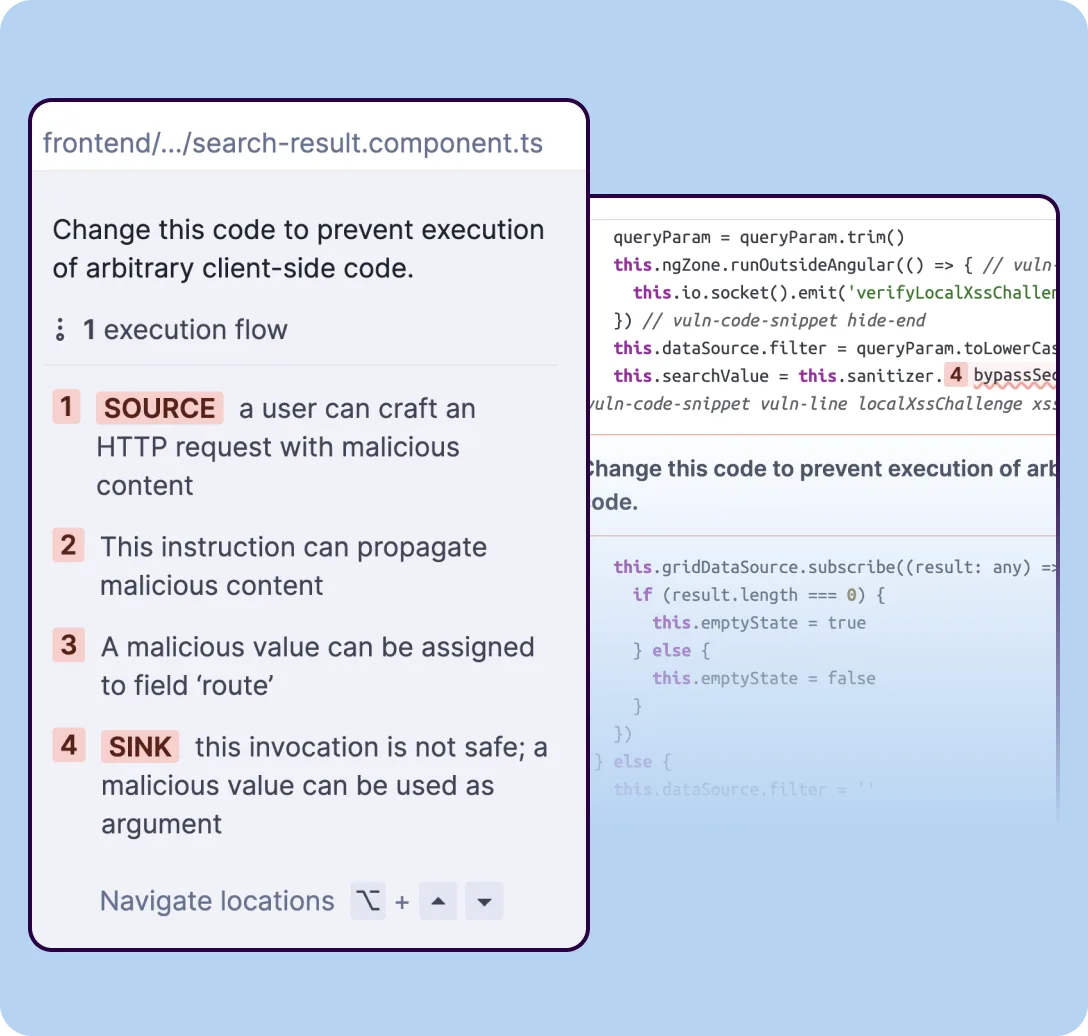 SonarQube’s taint analysis tracing user input across files — from an HTTP request source through propagation steps to an unsafe sink where client-side code execution could occur.
SonarQube is easier to get running. The Community Edition is a single Java application that runs on any machine with JDK 17+.
You can have it scanning your first project in under an hour. SonarCloud offers a fully managed cloud alternative with a free tier for public projects.
SonarLint connects the IDE directly to the server for pre-commit feedback.
Checkmarx One is a cloud-native platform that handles infrastructure for you but requires a sales process and onboarding to get started.
The legacy on-premise Checkmarx SAST deployment requires more infrastructure planning — dedicated servers, database configuration, and capacity planning for scan queues.
Administration is more complex because the tool offers more configuration: custom queries, scan policies, compliance mappings, and role-based access control.
For teams that value fast setup and low operational overhead, SonarQube is more accessible. For enterprises with dedicated AppSec teams that can invest in configuration and maintenance, Checkmarx’s additional complexity comes with additional capability.
Compliance and Reporting
Checkmarx was built for enterprise compliance requirements. It maps findings directly to regulatory frameworks — PCI DSS, HIPAA, SOX, OWASP Top 10, and SANS 25.
Reports can be generated in formats that auditors expect, with vulnerability trending, remediation timelines, and policy compliance dashboards. This matters in regulated industries where the security testing tool’s output feeds directly into audit evidence.
SonarQube provides security reports and OWASP Top 10 mapping, but its reporting capabilities are focused more on developer metrics — code quality trends, technical debt tracking, coverage trends. Enterprise editions add security reports and compliance views, but these are less comprehensive than what Checkmarx offers for audit-oriented use cases.
If your security testing program needs to produce evidence for compliance audits, Checkmarx is the stronger choice. If your reporting needs are developer-oriented — tracking code health, quality trends, and technical debt — SonarQube covers that ground better.
Platform Breadth
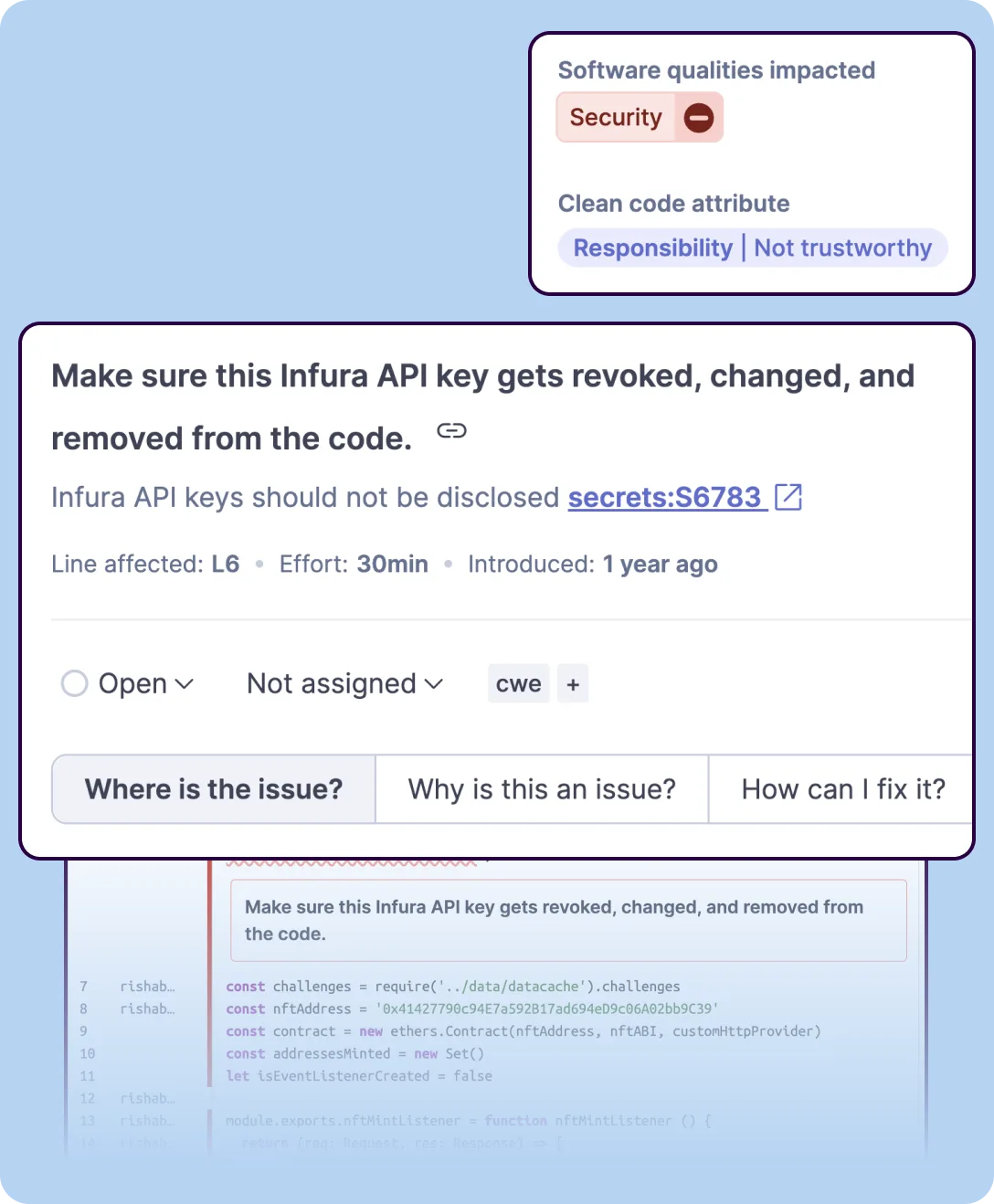 SonarQube’s secrets detection identifying hardcoded credentials in source code with inline highlighting and remediation guidance.
Checkmarx One has expanded well beyond SAST to include SCA, DAST, API security, IaC security, container security, and secure code training (Codebashing). The platform provides correlated findings across all these scanning types, helping teams prioritize issues that appear in multiple analysis dimensions.
SonarQube focuses on static analysis — code quality and SAST. It does not include SCA, DAST, container scanning, or IaC security.
Teams using SonarQube for SAST will need separate tools for other security testing categories.
For organizations looking to consolidate application security under one platform, Checkmarx One reduces tool sprawl. For teams that already have SCA and DAST covered and need a focused SAST and code quality tool, SonarQube does that job without paying for capabilities they do not need.
Pricing
The pricing gap between these tools is substantial. SonarQube Community Edition is free and covers the core code quality and basic security analysis use case.
The Developer Edition adds branch analysis and PR decoration, scaling with lines of code. Enterprise and Data Center editions add more governance features but remain far cheaper than Checkmarx.
Checkmarx uses custom enterprise pricing with no published price list. This is fundamentally an enterprise purchasing decision that requires a sales conversation and budget approval.
For teams with limited budgets, SonarQube provides meaningful static analysis at a fraction of the cost. For organizations with dedicated AppSec budgets that need deep security analysis and compliance reporting, Checkmarx’s pricing reflects the enterprise capabilities it delivers.
When Should You Choose SonarQube vs Checkmarx?
Choose SonarQube if:
- Code quality and security in a single tool is the goal — you want to catch bugs, smells, and vulnerabilities in one scan
- Budget matters — the free Community Edition or low-cost Developer Edition covers your needs
- Fast setup and low maintenance overhead are priorities — SonarQube runs in under an hour
- Your team works primarily in Java or JavaScript where SonarQube’s security rules are deepest
- SonarLint IDE integration for pre-commit code quality feedback fits your developer workflow
- You already have dedicated security tools and need SonarQube primarily for code quality gates
Choose Checkmarx if:
- Deep security vulnerability detection is the primary requirement — taint analysis, dataflow tracking, broad CWE coverage
- Compliance reporting for PCI DSS, HIPAA, SOX, or other regulatory frameworks is mandatory
- You need consistent security analysis depth across 35+ languages and 80+ frameworks
- Your organization wants to consolidate SAST, SCA, DAST, API security, and IaC security under one platform
- A dedicated AppSec team can invest in configuring and maintaining an enterprise security platform
- Security testing output needs to satisfy external auditors and compliance teams
For more options, see AppSec Santa’s full SAST tools category comparison.
Frequently Asked Questions
Is SonarQube better than Checkmarx?
How much does SonarQube cost compared to Checkmarx?
Can I use both SonarQube and Checkmarx?
Which tool detects more security vulnerabilities?
Does SonarQube support as many languages as Checkmarx?

+7 Years in AppSec
10+ years in application security. Reviews and compares 208 AppSec tools across 11 categories to help teams pick the right solution. More about me →