


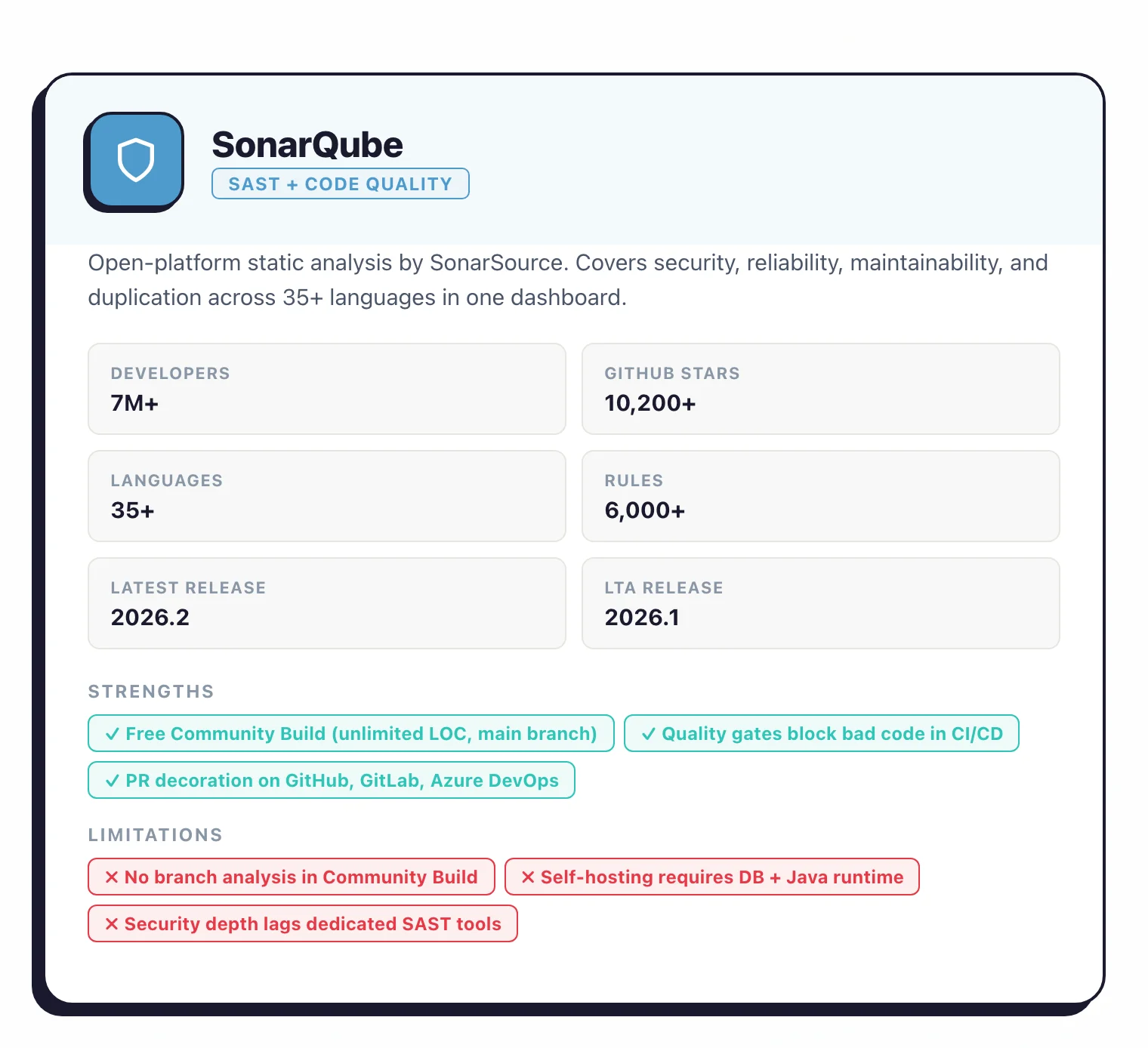
SonarQube is a code quality and security analysis platform built by SonarSource. Sonar reports over 7 million developers on the platform and names customers including Snowflake, Deutsche Bank, and Ford — vendor figures from its own marketing, not an independent tally.
It’s a SAST tool, but unlike most SAST tools that focus purely on security, SonarQube also tracks bugs, code smells, duplication, and maintainability. It covers 35+ languages with over 6,000 built-in rules. (Sometimes misspelled as SonarCube or Sonar Qube.)
SonarSource switched to calendar versioning in 2025. The Long-Term Active (LTA) release is SonarQube Server 2026.1, and the latest release is SonarQube Server 2026.2 (March 2026).
The free tier, now called Community Build (renamed from Community Edition), is on GitHub under LGPL-3.0 with 10,687 stars. Commercial Server editions add branch analysis, taint tracking, and AI CodeFix.
SonarQube Cloud is the managed SaaS option, with a free tier covering up to 50k lines of code.
I see SonarQube deployed more often as a code-quality tool than a security tool, but the security hotspot category catches enough real issues that I keep it in my list. The free Community Edition scans Java, JavaScript, Python, and a few other languages; paid editions add taint analysis and branch scanning. I treat it as a complement to a dedicated SAST rather than a replacement.
What is SonarQube?
SonarQube is a static code analysis platform developed by Sonar (formerly SonarSource) that scans source code for bugs, security vulnerabilities, and code smells across 35+ programming languages.
It combines code quality tracking (reliability, maintainability, duplication, test coverage) with security analysis (vulnerability detection, security hotspots, taint analysis in paid editions) in a single dashboard.
Sonar reports over 7 million developers on the platform and more than 6,000 built-in analysis rules — vendor figures. SonarQube runs as a self-hosted server (SonarQube Server) or as a managed SaaS service (SonarQube Cloud).
The free Community Build supports 20+ languages on a single branch, while commercial editions add multi-branch analysis, PR decoration, and deeper security scanning.
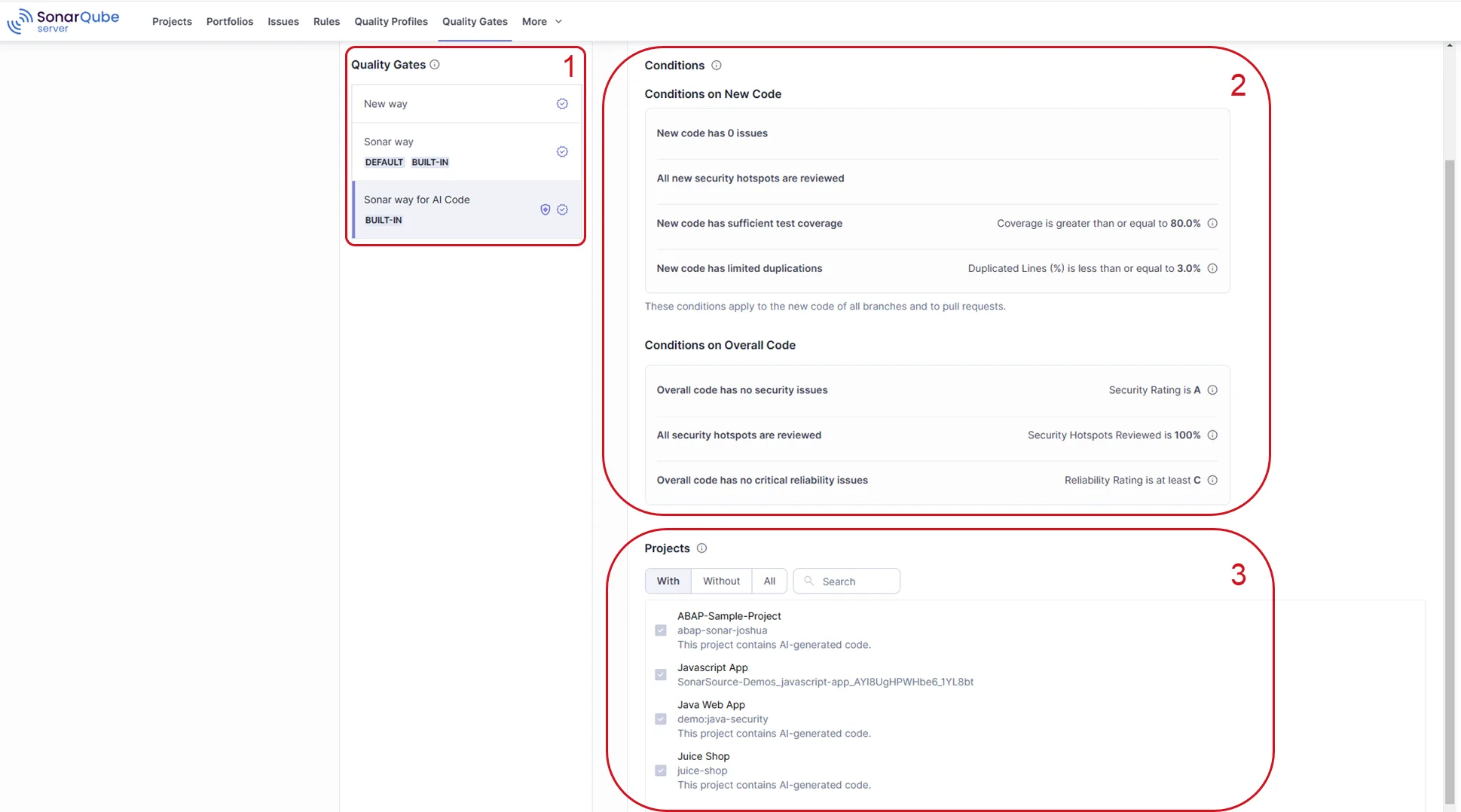
Quality gates let teams set pass/fail thresholds for metrics like coverage, duplication, and vulnerability count, then enforce those thresholds automatically in CI/CD pipelines.
PR decoration shows findings directly on pull requests in GitHub, GitLab, Bitbucket, and Azure DevOps.
| Capability | What it covers |
|---|---|
| 35+ languages, 6,000+ rules | Java, JavaScript, TypeScript, Python, C#, C++, PHP, Kotlin, Go, Rust, COBOL, and Apex. Rules span security, reliability, and maintainability. |
| Quality gates | Pass/fail thresholds on coverage, duplication, reliability, security, and maintainability, wired into CI/CD to block releases that miss them. |
| AI CodeFix | LLM-generated fix suggestions for detected issues. MCP Server integration lets AI coding assistants read SonarQube findings and draft fixes. |
What are SonarQube’s key features?
Security analysis
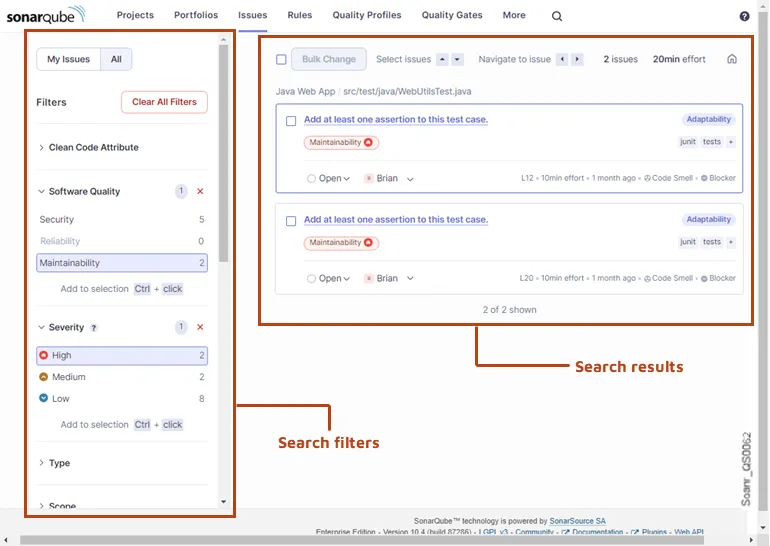
SonarQube detects security vulnerabilities and security hotspots. OWASP’s Source Code Analysis Tools page lists SonarQube among established SAST tools in the industry.
Paid tiers add taint analysis that traces data flow from user input to dangerous operations for injection detection. The security rules cover OWASP Top 10, CWE Top 25, and SANS Top 25.
Code quality
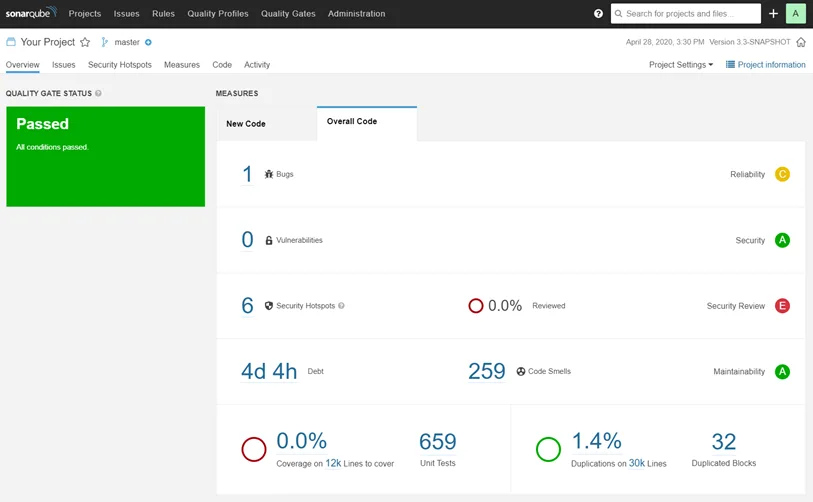
Beyond security, SonarQube tracks code reliability (bugs), maintainability (code smells), and test coverage. Technical debt is quantified as estimated remediation time. Duplication detection identifies copy-pasted code across the project.
CI/CD integration
SonarQube integrates with Jenkins, GitHub Actions, GitLab CI, Azure DevOps, and Bitbucket Pipelines. The SonarScanner CLI handles the analysis, while quality gates provide pass/fail decisions for CI/CD gates. PR decoration shows new findings directly on pull requests.
Which SonarQube edition do you need?
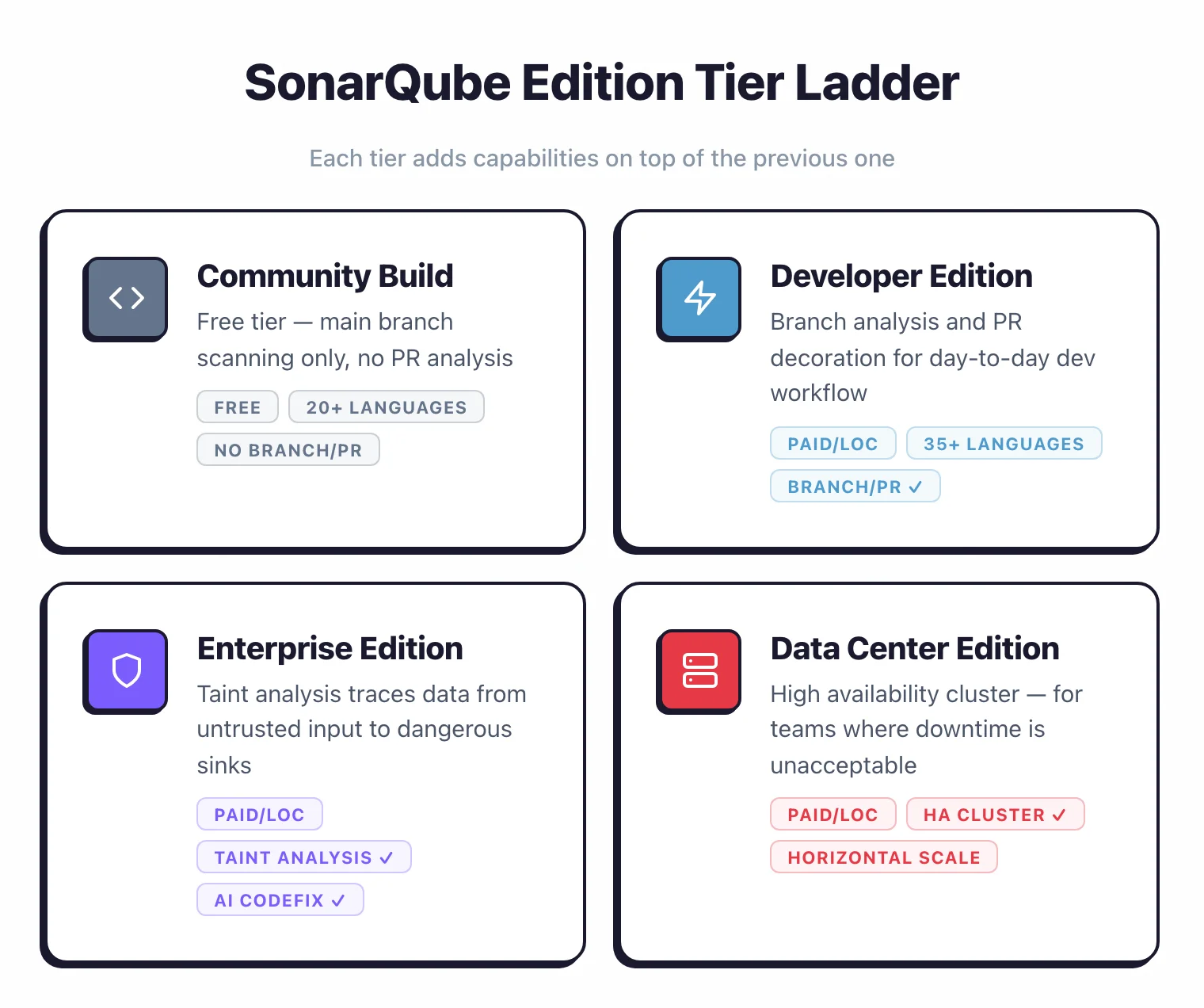
SonarQube Server comes in four tiers. Each adds capabilities on top of the previous one.
| Feature | Community Build | Developer | Enterprise | Data Center |
|---|---|---|---|---|
| Price | Free | Paid (per LOC) | Paid (per LOC) | Paid (per LOC) |
| License | LGPL-3.0 (analyzers: SSALv1) | Commercial | Commercial | Commercial |
| Languages | 20+ | 35+ | 35+ | 35+ |
| Branch analysis | Main branch only | Yes | Yes | Yes |
| PR decoration | No | Yes | Yes | Yes |
| Taint analysis | No | No | Yes | Yes |
| OWASP/CWE reporting | Basic | Full | Full | Full |
| Portfolio management | No | No | Yes | Yes |
| AI CodeFix | No | No | Yes | Yes |
| High availability | No | No | No | Yes |
SonarQube Cloud also has a free tier: up to 50,000 lines of code, 5 users, PR analysis, and 30 language support. Above that, Cloud has paid plans priced by LOC.
Community Build works well for single-branch projects. You get quality gates, 6,000+ rules across 20+ languages (including IaC scanning), and the full dashboard.
The catch: no branch analysis. You can only scan your main branch, so there’s no PR-level feedback.
Most teams start with Developer Edition. Branch analysis and PR decoration are what make SonarQube practical for day-to-day development.
Without them, developers don’t see findings until code hits main, which defeats the point of shift-left scanning .
Enterprise Edition adds taint analysis, which traces data from untrusted sources (user input, API calls) through code to dangerous sinks (SQL queries, file operations, command execution). This catches injection vulnerabilities that pattern-matching rules miss.
Enterprise also adds portfolio management for organizations running SonarQube across dozens or hundreds of projects.
Data Center Edition adds high availability and horizontal scaling across a cluster of SonarQube nodes. Most organizations don’t need this unless downtime on their code quality server is unacceptable.
Commercial Server editions are priced per instance based on lines of code analyzed — contact SonarSource for a quote.
AI CodeFix and MCP Server
AI CodeFix uses LLMs to generate fix suggestions for detected issues. When SonarQube flags a vulnerability or code smell, AI CodeFix proposes a specific code change that the developer reviews before merging.
It currently supports Java, JavaScript, TypeScript, Python, C#, and C++, with more languages planned.
As of SonarQube Server 2026.2 (released March 25, 2026), AI CodeFix is model-agnostic — organizations can connect multiple LLM providers instead of being locked to a single one. The “bring your own model” approach means code stays within your infrastructure. AI CodeFix is available in Enterprise and Data Center editions.
2026.2 also added more AI-specific bug detection rules and expanded language support: Java 25 compatibility, Python web framework analysis covering FastAPI, Flask, and Django, Groovy with 20+ new rules, and Apex analysis that Sonar reports at a sub-5% false-positive rate (a vendor claim, not an independent benchmark).
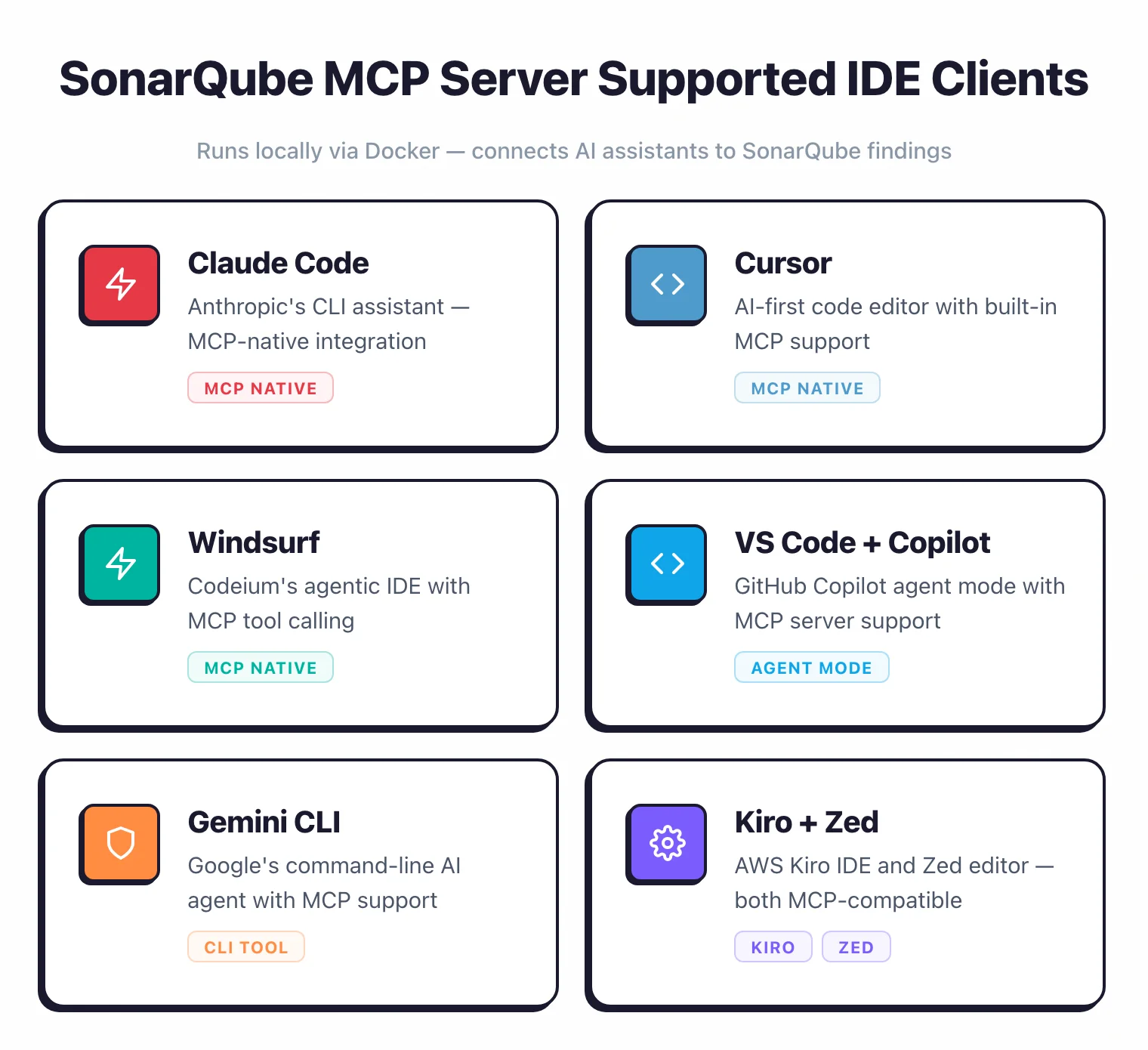
SonarSource also provides an MCP (Model Context Protocol) server that connects AI coding assistants to SonarQube findings.
It runs locally via Docker (or any OCI-compatible runtime like Podman) and works with Claude Code, Cursor, Windsurf, VS Code with GitHub Copilot, Gemini CLI, Kiro, and Zed.
AI agents can pull issues, quality gate status, and hotspots directly into the coding workflow to generate context-aware fixes.
Should you use SonarQube Server or SonarQube Cloud?
SonarQube Cloud (formerly SonarCloud) is the SaaS version hosted by SonarSource. The analysis engine is the same, but the deployment model differs.
| SonarQube Server | SonarQube Cloud | |
|---|---|---|
| Hosting | Self-hosted on your infrastructure | SonarSource-managed cloud |
| Setup | Install, configure database, maintain | Sign up, connect repository |
| Free tier | Community Build (unlimited LOC, main branch only) | 50k LOC, 5 users, PR analysis, 30 languages |
| Custom plugins | Yes | No |
| Data residency | Your infrastructure | SonarSource cloud |
| Maintenance | You manage upgrades and backups | SonarSource manages everything |
Choose SonarQube Cloud if you want zero infrastructure management and work primarily with GitHub, GitLab, or Bitbucket Cloud repositories. The free tier now covers private repositories (up to 50k LOC), not just open-source projects.
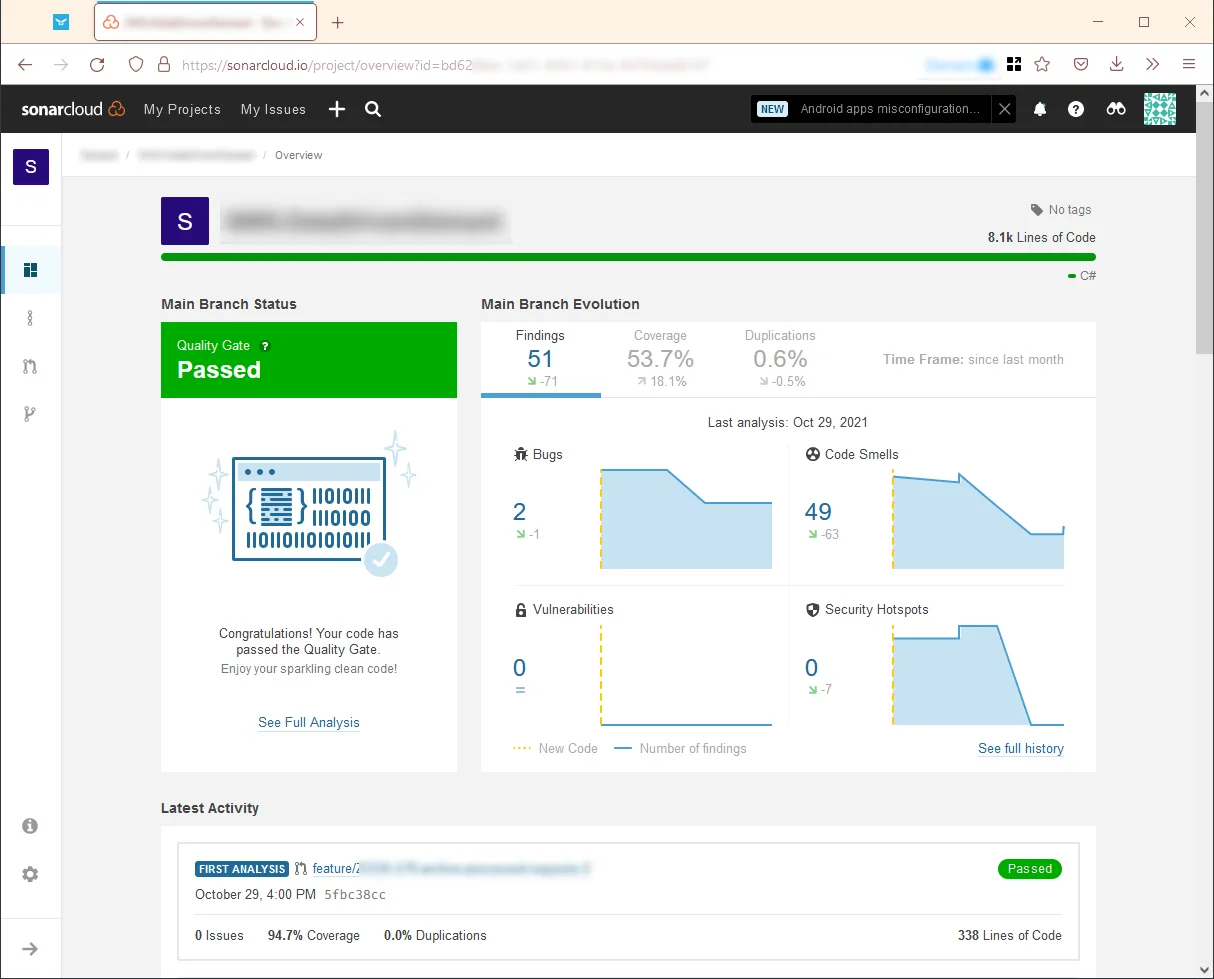
Choose SonarQube Server if you need on-premises control, custom plugins, or compliance requirements that mandate data stays on your infrastructure.
For open-source projects, SonarQube Cloud is free and the most practical choice. Many popular open-source projects display SonarQube Cloud quality badges on their READMEs.
SonarQube vs SonarLint vs SonarCloud: what is the difference?
The three names confuse new users because the product has been renamed twice. Here is the short version.
SonarQube (now officially “SonarQube Server”) is the server platform that analyzes code in CI/CD, stores findings in a database, and renders dashboards. SonarLint was renamed to “SonarQube for IDE” in late 2024. SonarCloud was renamed to “SonarQube Cloud” around the same time.
SonarQube for IDE is the editor plugin that runs analysis locally in VS Code, IntelliJ, Eclipse, or Visual Studio as you type. It flags issues before you commit. In Connected Mode, the IDE plugin syncs rules and quality profiles from a SonarQube Server or Cloud instance, so team standards apply locally.
SonarQube Cloud is the managed SaaS version of SonarQube Server. Same analysis engine, same rules, same quality gates — Sonar hosts it. You connect a GitHub, GitLab, Bitbucket, or Azure DevOps account and scans run on the SaaS backend.
In practice, most teams use two of the three together: SonarQube for IDE on each developer laptop for real-time feedback, plus either SonarQube Server or SonarQube Cloud as the central system of record that drives quality gates in CI.
SonarQube pricing: what does each edition cost?
Sonar publishes pricing for SonarQube Server Developer Edition on its plans and pricing page . Enterprise Edition and Data Center Edition pricing is not published publicly — those require a sales quote.
Here is what I could verify from the vendor site at the time of writing.
| Edition | Published price | Recommended LOC | What you get |
|---|---|---|---|
| Community Build | Free | Any | 20+ languages, main branch only, no PR decoration |
| Developer (Server) | $750/year starting | 100K+ LOC | 34 languages, branch analysis, PR decoration, secrets detection |
| Enterprise (Server) | Contact sales | 1M+ LOC | 40 languages, AI CodeFix, taint analysis, portfolio management |
| Data Center (Server) | Contact sales | 20M+ LOC | Everything in Enterprise plus high availability cluster |
| SonarQube Cloud Free | Free | 50K LOC, 5 users | PR analysis, 30 languages, main branch only |
| SonarQube Cloud Team | Paid (per LOC) | Up to 1.9M LOC | PR + branch analysis, advanced rules |
| SonarQube Cloud Enterprise | Contact sales | Unlimited LOC | Enterprise hierarchy, advanced security add-ons |
Server editions are priced per instance per year and scale with the number of lines of code analyzed. Cloud Team pricing scales more gradually with LOC and bills monthly. The $750/year Developer Edition starting price is the only published number on the Server side — larger LOC tiers require a quote.
Community Build is fully free and has no LOC ceiling. If your team is fine with main-branch-only scans and does not need PR decoration, Community Build covers a lot of ground.
How to install SonarQube with Docker
The fastest way to try SonarQube Server is the official Docker image. The Community Build image ships with an embedded H2 database suitable only for evaluation, so treat this as a kick-the-tyres setup — not a production deployment.
docker run -d --name sonarqube \
  -p 9000:9000 \
  sonarqube:community
Wait about a minute for startup, then open http://localhost:9000 and sign in with the default admin / admin credentials. SonarQube will immediately prompt you to change the password.
For a realistic install you want PostgreSQL instead of H2, plus a volume for data persistence. Here is a minimal Docker Compose setup.
services:
  sonarqube:
    image: sonarqube:community
    depends_on:
      - db
    environment:
      SONAR_JDBC_URL: jdbc:postgresql://db:5432/sonar
      SONAR_JDBC_USERNAME: sonar
      SONAR_JDBC_PASSWORD: sonar
    ports:
      - "9000:9000"
    volumes:
      - sonarqube_data:/opt/sonarqube/data
      - sonarqube_extensions:/opt/sonarqube/extensions
      - sonarqube_logs:/opt/sonarqube/logs
  db:
    image: postgres:15
    environment:
      POSTGRES_USER: sonar
      POSTGRES_PASSWORD: sonar
      POSTGRES_DB: sonar
    volumes:
      - postgres_data:/var/lib/postgresql/data

volumes:
  sonarqube_data:
  sonarqube_extensions:
  sonarqube_logs:
  postgres_data:
Bring it up with docker compose up -d. The Sonar documentation also covers Kubernetes (Helm chart), ZIP-based install on a plain VM, and managed bundles for Azure and AWS.
Host requirements are modest for a small team: 2 CPU cores, 4 GB RAM, and a Java 17 runtime (already inside the Docker image). Commercial editions and larger projects need more memory — Sonar’s sizing guide breaks this down by LOC.
SonarQube supported languages
SonarQube Server ships with 40 analyzers in Enterprise Edition, 34 in Developer Edition, and 20+ in Community Build. The table below lists the languages I see used most often across the 292 tools I track.
| Language | Community Build | Developer Edition | Enterprise Edition |
|---|---|---|---|
| Java | Yes | Yes | Yes (taint analysis) |
| C# | Yes | Yes | Yes (taint analysis) |
| JavaScript / TypeScript | Yes | Yes | Yes (taint analysis) |
| Python | Yes | Yes | Yes (taint analysis) |
| Go | Yes | Yes | Yes |
| PHP | Yes | Yes | Yes (taint analysis) |
| Kotlin | Yes | Yes | Yes |
| Ruby | Yes | Yes | Yes |
| Scala | Yes | Yes | Yes |
| Swift | Yes | Yes | Yes |
| Objective-C | Yes | Yes | Yes |
| C / C++ | No | Yes | Yes |
| Apex | No | Yes | Yes |
| COBOL | No | Yes | Yes |
| ABAP | No | Yes | Yes |
| PL/SQL / T-SQL | No | Yes | Yes |
| VB.NET | Yes | Yes | Yes |
| HTML / CSS / XML | Yes | Yes | Yes |
| Terraform / CloudFormation / Docker / Kubernetes | Yes | Yes | Yes |
| Rust | No | Yes | Yes |
| Dart | No | Yes | Yes |
IaC scanning (Terraform, Kubernetes manifests, Dockerfiles, CloudFormation) is included in Community Build — one of the better free-tier inclusions in the static analysis space. Secrets detection also runs in Community Build, with expanded rule coverage in paid tiers.
How does SonarQube stack up against Checkmarx and Snyk Code?
The short version: Checkmarx goes deeper on pure security, Snyk Code is faster and more developer-first, and SonarQube wins on language breadth plus the same quality-gate workflow applied to both quality and security issues. Each tool optimises for a different buyer.
For the full head-to-head breakdowns, see the dedicated SonarQube vs Checkmarx and Snyk Code vs SonarQube comparison pages.
How do you get started with SonarQube?
Stand the server up first — the Docker setup above is the quickest route, or take SonarQube Cloud if you would rather not host it. From there:
- Configure SonarScanner — install the SonarScanner CLI or a build-tool scanner (Maven, Gradle, .NET), then set your project key and server URL in
sonar-project.properties. - Run your first analysis — execute
sonar-scannerin the project directory. Results reach the dashboard in seconds to minutes depending on project size. - Set up quality gates — define pass/fail conditions for coverage, duplication, reliability, security, and maintainability, then wire the gate into your CI/CD pipeline.
What are SonarQube’s strengths and limitations?
Where SonarQube excels
You set pass/fail thresholds for coverage, duplication, reliability, and security, then enforce them in CI/CD. That’s the main reason thousands of organizations adopt SonarQube.
Language coverage is broad. 35+ languages in commercial editions means most polyglot teams can standardize on one tool. Java, JavaScript, TypeScript, Python, C#, C++, Go, PHP, Kotlin, Ruby, Swift, COBOL, Apex, and more all have dedicated rule sets.
The developer feedback loop works well. PR decoration, SonarQube for IDE (formerly SonarLint), and the web dashboard mean developers see findings while coding, during code review, and in the project overview. Everything stays in one ecosystem.
Where SonarQube falls short
Security depth lags dedicated SAST tools. Semgrep , Checkmarx , and Snyk Code all detect more vulnerability types and do deeper inter-procedural and cross-file analysis. SonarQube’s security scanning works as a solid baseline, but security-critical applications benefit from a dedicated SAST tool alongside it.
Community Build is too limited for teams. No branch analysis and no PR decoration in the free tier pushes most teams toward paid editions quickly. Semgrep offers more generous free-tier capabilities for security-focused scanning, including branch and PR scanning at no cost.
Self-hosting adds operational overhead. SonarQube Server requires a database (PostgreSQL, Microsoft SQL Server, or Oracle), Java runtime, and regular upgrades.
For smaller teams, this maintenance burden can outweigh the benefits.
SonarCloud or lighter tools like Semgrep that run directly in CI without a persistent server may be better fits.
How does SonarQube compare to other SAST tools?
I maintain detailed comparison pages for the most common matchups:
- SonarQube vs Semgrep — Quality-first platform vs security-first pattern matching
- SonarQube vs Checkmarx — Free Community Build vs enterprise-grade SAST
- SonarQube vs Veracode — Self-hosted flexibility vs managed AppSec platform
- Snyk vs SonarQube — Developer-first SCA+SAST vs quality-gate-driven analysis
- Snyk Code vs SonarQube — Real-time IDE scanning vs server-based analysis
- SonarQube Alternatives — Full list of competing tools
When should you use SonarQube?
SonarQube makes the most sense when you want code quality and security analysis in a single platform. If enforcing quality standards across a large codebase with automated gating is the priority, nothing else covers as much ground.
If you’re an individual developer or working on a small open-source project, start with Community Build (free, unlimited LOC on main branch) or SonarQube Cloud’s free tier (50k LOC with PR analysis). Community Build works if you already self-host; Cloud is simpler if you just want to connect a GitHub repo and go.
For teams doing PR-based development, you need at minimum Developer Edition for branch analysis and PR decoration. Without those, developers only see findings after code hits main, which is too late.
SonarQube Cloud’s paid plans also include these features without the self-hosting overhead.
Larger organizations with compliance requirements get the most from Enterprise Edition: taint analysis, portfolio management, and OWASP/CWE reporting cover audit needs. Data Center Edition adds high availability on top of that.
If your focus is purely security vulnerability detection, dedicated SAST tools like Semgrep , Checkmarx , or Snyk Code go deeper. SonarQube’s strength is breadth (quality and security together), not depth in either one alone.
For a comparison of testing approaches, see the guide on SAST vs DAST vs IAST . For a broader view of SAST tools , see the full category page.