
- Snyk is a multi-product security platform (Open Source, Code, Container, IaC); SonarQube is a code quality platform with security built in — they cover different layers and pair well.
- Snyk’s proprietary vulnerability database is reported to be 3× larger than the NVD, with 92% of JavaScript vulnerabilities reaching Snyk before NVD listing and a 47-day average lead.
- SonarQube’s quality gates enforce five dimensions simultaneously — reliability, security, maintainability, duplication, and coverage — in a way Snyk does not.
- Snyk generates automated fix PRs and SBOM reports (SPDX, CycloneDX) and performs reachability analysis; SonarQube has no auto-remediation or SBOM capabilities.
- Most mature engineering teams run both: SonarQube for code quality gates, Snyk for dependency and supply chain security.
Snyk vs SonarQube: Quick Verdict#
Snyk and SonarQube are both used in developer security pipelines, but they solve different problems.
Snyk is a multi-product developer security platform covering dependency scanning (SCA via Snyk Open Source), source code security (SAST via Snyk Code), container image scanning, IaC security, and application security posture management.
SonarQube is a code quality and security platform built around static analysis of the code your team writes, enforcing quality gates across five dimensions: reliability, security, maintainability, duplication, and test coverage.
The two tools overlap only in SAST — both scan source code for security vulnerabilities — but cover entirely different ground everywhere else.
Snyk leads on supply chain security, automated fix PRs, container scanning, and SBOM generation. SonarQube leads on code quality governance, free self-hosted deployment, and language breadth in paid tiers.
Most mature engineering teams run both tools in the same pipeline, treating them as complementary rather than competing.
Snyk and SonarQube are not direct competitors. They are different platforms built for different jobs, and the most common answer to “which should I use?” is both.
Pick Snyk if supply chain security is your priority. You need deep dependency scanning across npm, Maven, PyPI, and 17+ other ecosystems, automated fix PRs, container and IaC coverage, or SBOM generation for compliance.
Pick SonarQube if code quality enforcement is as important as security. You need quality gates that fail builds on coverage regressions, duplication, or maintainability debt — not just vulnerability severity — or you want a free self-hosted platform with no scan limits.
Use both if you want to cover supply chain security and code quality gates in the same pipeline. This is the standard pattern in teams that have moved past initial AppSec adoption.
Snyk vs SonarQube at a Glance#
| Feature | Snyk | SonarQube |
|---|---|---|
| Primary purpose | Multi-product developer security platform | Code quality + security platform |
| SCA (dependency scanning) | ✅ Core strength — Snyk Open Source | ⚠️ Available in advanced tiers, not core |
| SAST (code scanning) | ✅ Snyk Code, ML-based | ✅ Core strength — rule-based + taint analysis |
| Container scanning | ✅ Snyk Container | ❌ Not available |
| IaC scanning | ✅ Snyk IaC | ❌ Not available |
| Code quality metrics | ❌ Security focus only | ✅ Bugs, smells, duplication, coverage, tech debt |
| Quality gates | ❌ | ✅ 5-dimension enforcement |
| Automated fix PRs | ✅ | ❌ |
| SBOM generation | ✅ SPDX, CycloneDX | ❌ |
| Reachability analysis | ✅ Primarily Java and JavaScript | ❌ |
| Real-time IDE scanning | ✅ Snyk Code | ✅ SonarQube for IDE (connected mode) |
| PR decoration | ✅ All tiers | ✅ Developer Edition and above |
| Self-hosted | ⚠️ Enterprise only | ✅ All editions, Community is free |
| Languages (SAST) | 19+ | 21 Community / 34 Developer / 40 Enterprise |
| Languages (SCA) | 13 languages, 20+ package managers | Limited |
| License compliance | ✅ | ❌ |
Why This Comparison Is Confusing#
When people search “Snyk vs SonarQube,” they picture two single tools going head-to-head. The reality is more nuanced: “Snyk” is a multi-product security platform with five separate products, while “SonarQube” is a single platform available in multiple editions.
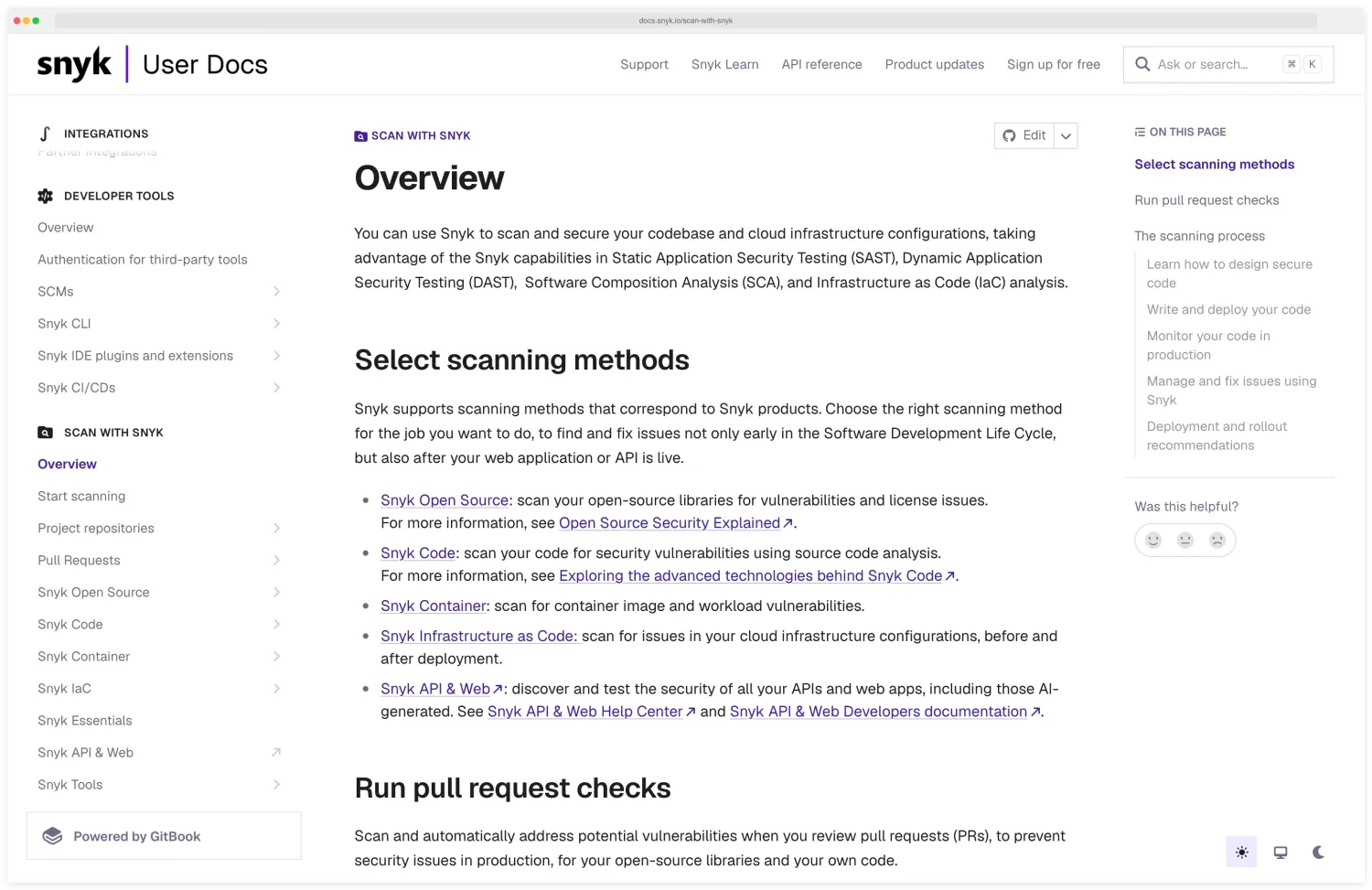 Snyk’s own documentation enumerates the five products as distinct scanning methods — Open Source, Code, IaC, Container, and API & Web — which is the breakdown that distinguishes “the Snyk platform” from “Snyk Code” in this comparison.
What Snyk includes:
| Snyk Product | What It Scans |
|---|---|
| Snyk Open Source | Third-party dependencies — npm, Maven, PyPI, Go modules, and 17+ other ecosystems |
| Snyk Code | Your source code — ML-based SAST with real-time IDE scanning |
| Snyk Container | Container images — vulnerability scanning against CVE databases |
| Snyk IaC | Infrastructure as code — Terraform, Helm, CloudFormation, Kubernetes |
| Snyk AppRisk | Application security posture management across all Snyk products |
What SonarQube includes:
SonarQube is a single platform for static code analysis covering bugs, code smells, security vulnerabilities, test coverage, and duplication. SonarCloud is its SaaS equivalent.
SonarQube for IDE (formerly SonarLint) syncs org rules into editors. The Advanced Security tier adds limited SCA and container capabilities, but code quality analysis is its historical core.
The comparison most teams actually want is: which platform covers what, and do they overlap enough that I can avoid running both? They overlap in SAST — both scan source code for security issues — but cover entirely different ground in every other layer.
Coverage: What Each Platform Actually Scans#
| Security Layer | Snyk | SonarQube | Recommended |
|---|---|---|---|
| Open-source dependencies (SCA) | ✅ Native, full-featured | ⚠️ Advanced tiers only | Snyk |
| Source code security (SAST) | ✅ Snyk Code, ML-based | ✅ Rule-based, 6,000+ rules | Both (different strengths) |
| Code quality (bugs, smells, coverage) | ❌ | ✅ Core capability | SonarQube |
| Container image scanning | ✅ Snyk Container | ❌ | Snyk |
| Infrastructure as code | ✅ Snyk IaC | ❌ | Snyk |
| License compliance | ✅ | ❌ | Snyk |
| SBOM generation | ✅ SPDX, CycloneDX | ❌ | Snyk |
| Quality gates (multi-dimension) | ❌ | ✅ | SonarQube |
If you’re wondering why “use both” keeps coming up in DevSecOps discussions, this table explains it. Snyk and SonarQube cover almost entirely different ground — the SAST row is the only meaningful overlap.
The language and ecosystem coverage gap matters more in some stacks than others.
Teams working in niche languages — COBOL, ABAP, Apex, PL/SQL, or T-SQL — need SonarQube Enterprise or its Advanced Security tier, which support 40+ languages; Snyk’s SCA and SAST capabilities don’t cover those ecosystems.
On the other side, teams running polyglot microservices across npm, PyPI, Go modules, Maven, NuGet, Composer, CocoaPods, and other modern package ecosystems benefit from Snyk Open Source’s breadth across 20+ package managers — SonarQube’s SCA covers a narrower slice.
If your stack is a standard Java or Node.js monolith, either tool’s language support is adequate. If you’re running polyglot services or have legacy language components, the ecosystem column becomes a deciding factor rather than a tiebreaker.
Dependency Security: Where Snyk Leads#
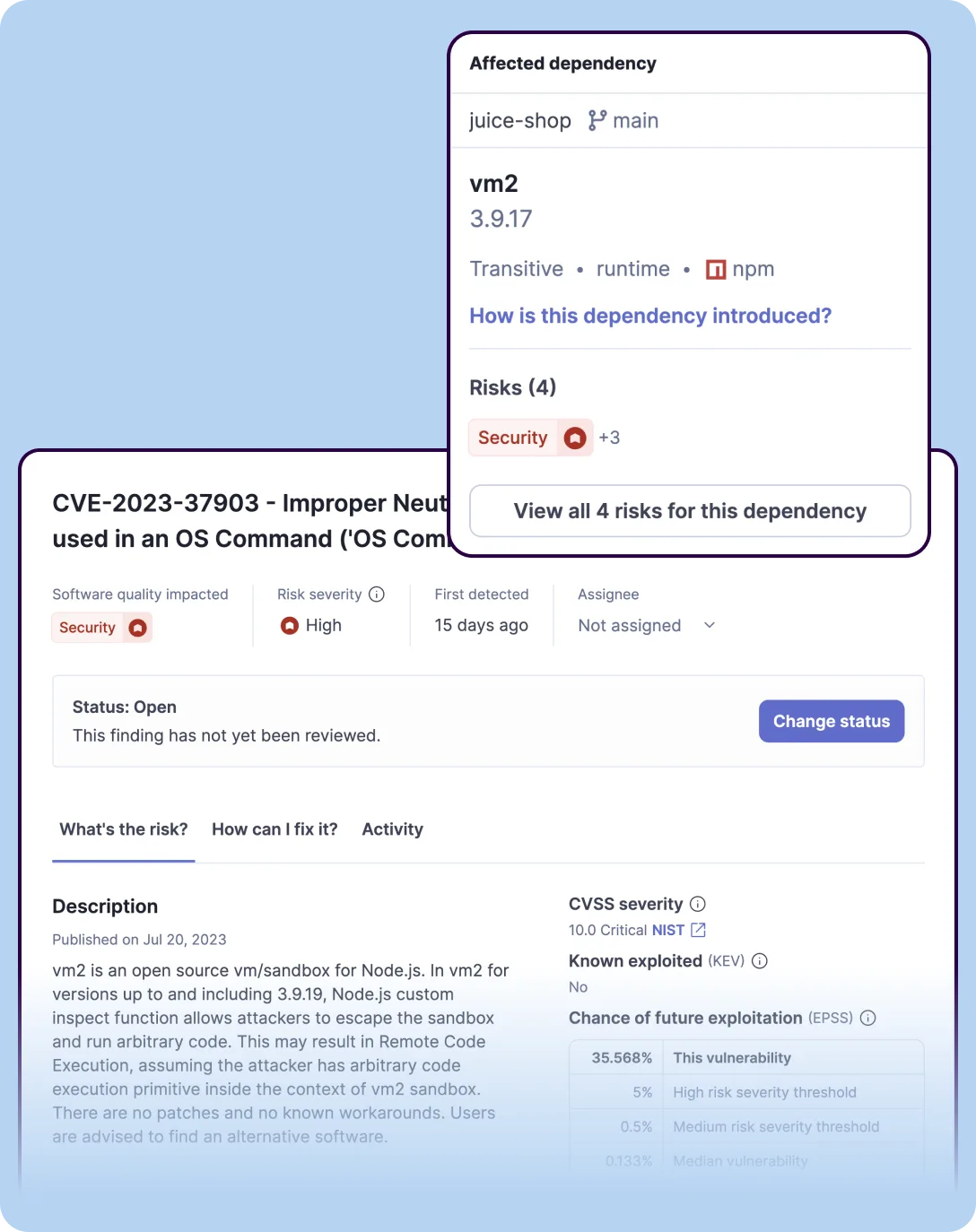 SonarQube’s Software Composition Analysis view showing a transitive dependency vulnerability with CVE details and remediation options — available in advanced tiers.
Snyk Open Source is purpose-built for dependency scanning. According to Snyk, its proprietary vulnerability database is 3× larger than the NVD. For JavaScript specifically, Snyk reports that 92% of vulnerabilities reach its database before the NVD, with a 47-day average lead based on the company’s own published benchmarks.
When Snyk finds a vulnerability, it maps the complete dependency graph — including transitive dependencies — and shows exactly how the vulnerable package enters your project. If a patched version exists, Snyk opens an automated fix PR to upgrade the package directly.
A few things Snyk does here that SonarQube doesn’t come close to matching.
Automated fix PRs that upgrade vulnerable packages directly. When a patched version exists, Snyk groups vulnerabilities by upgrade target and proposes a single bumped version that resolves multiple issues at once — then opens a pull request against the repo with that diff already applied.
SonarQube reports the finding; Snyk does the upgrade.
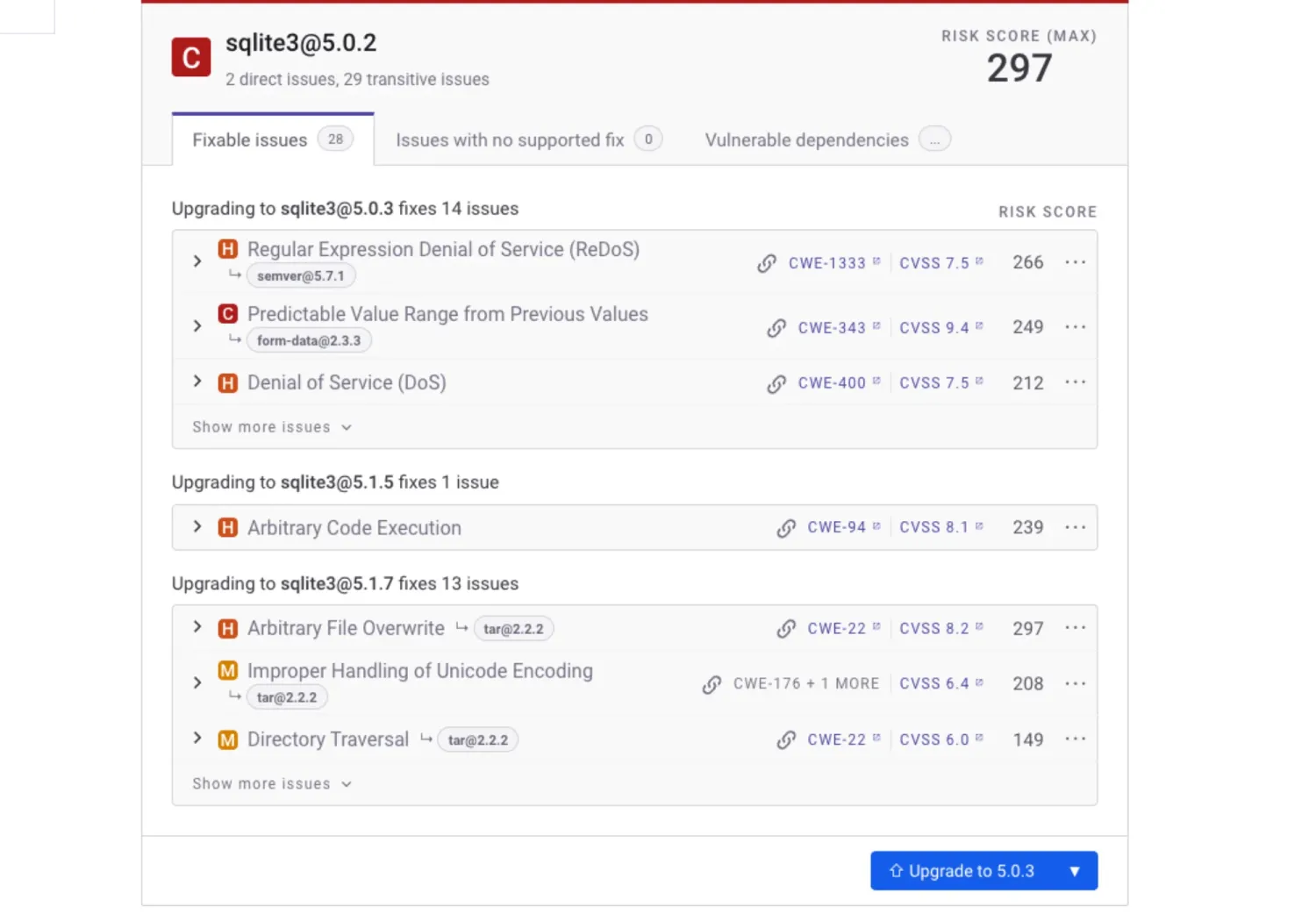 Snyk’s fix-PR creation panel groups 14 vulnerabilities (ReDoS, predictable value range, denial of service) under a single proposed upgrade to sqlite3 5.0.3 — one click opens the upgrade PR against the repo.
Reachability analysis that filters out vulnerabilities in code your app never actually calls. Snyk traces the call graph from your application code into the dependency tree and tags each finding REACHABLE, NO PATH FOUND, or NOT APPLICABLE.
The same panel exposes a Reachable / Potentially reachable / No info filter, so a triage queue that started at hundreds of CVEs collapses to the dozens that actually matter.
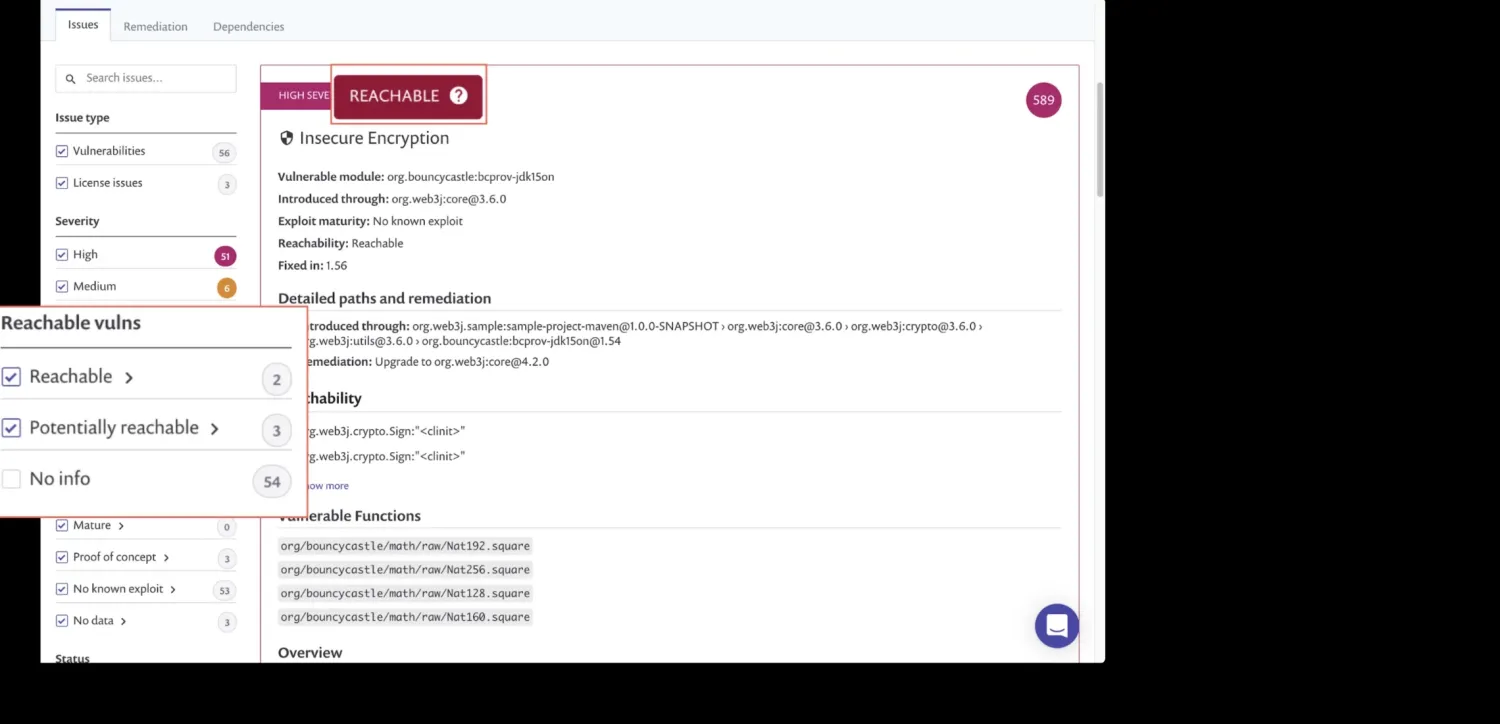 The REACHABLE badge sits next to the severity badge on each issue card; the left sidebar filter shrinks the queue to vulnerabilities the application actually calls.
SBOM export in SPDX and CycloneDX. The snyk sbom CLI command (Enterprise plans) generates SBOM documents for a project in CycloneDX 1.4 / 1.5 / 1.6 (JSON or XML) and SPDX 2.3 (JSON), which is the format set most procurement and compliance reviews ask for.
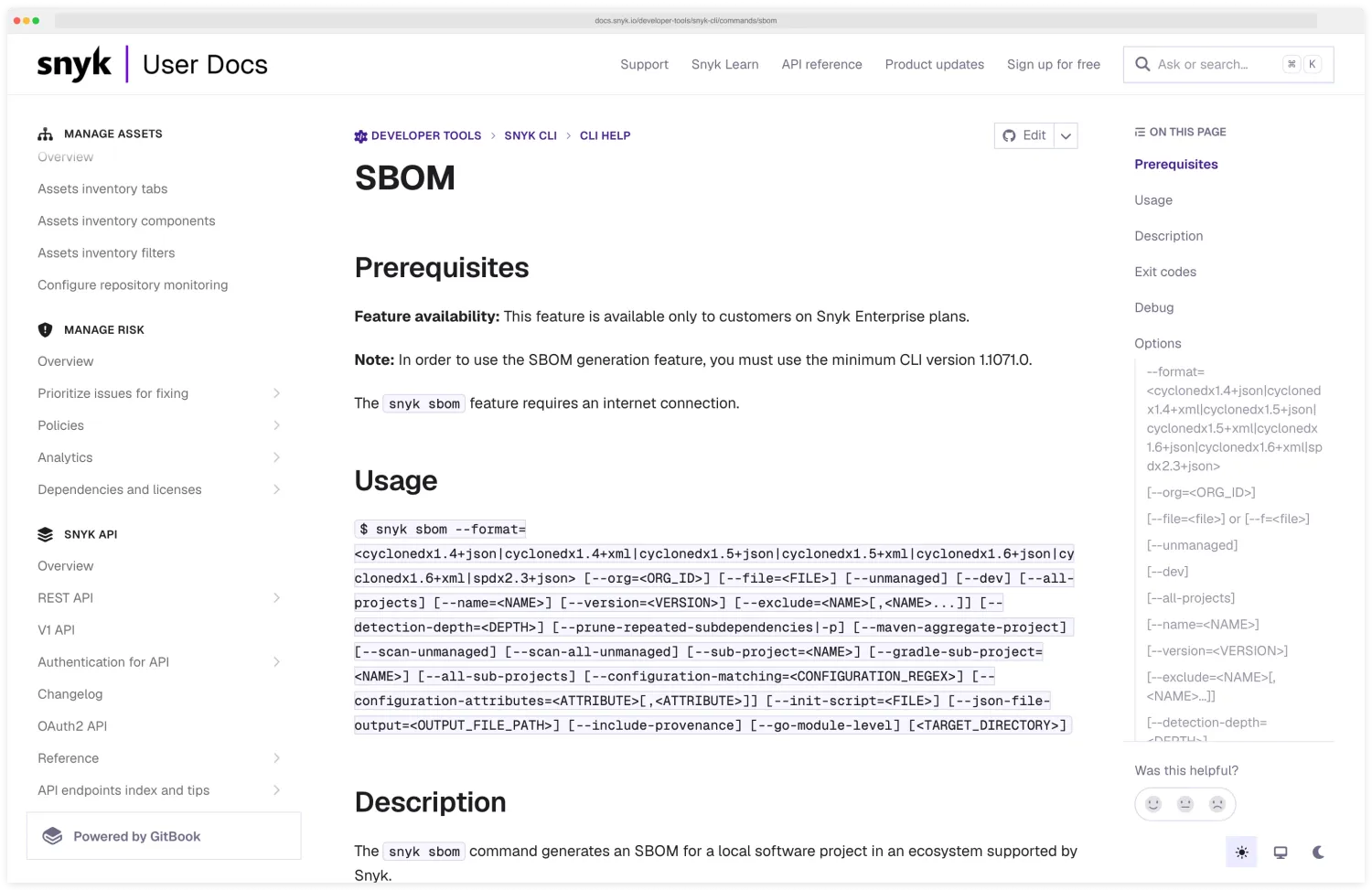 The
The snyk sbom command emits both CycloneDX (multiple versions, JSON or XML) and SPDX 2.3 — the two formats the U.S. Executive Order 14028 SBOM guidance and most enterprise procurement checklists accept.
License policy enforcement. Snyk Open Source flags license violations the same way it flags CVEs — with severity, instructions, and the package that introduced the license — so legal/OSS-compliance review is part of the same gate as security review, not a parallel manual workflow.
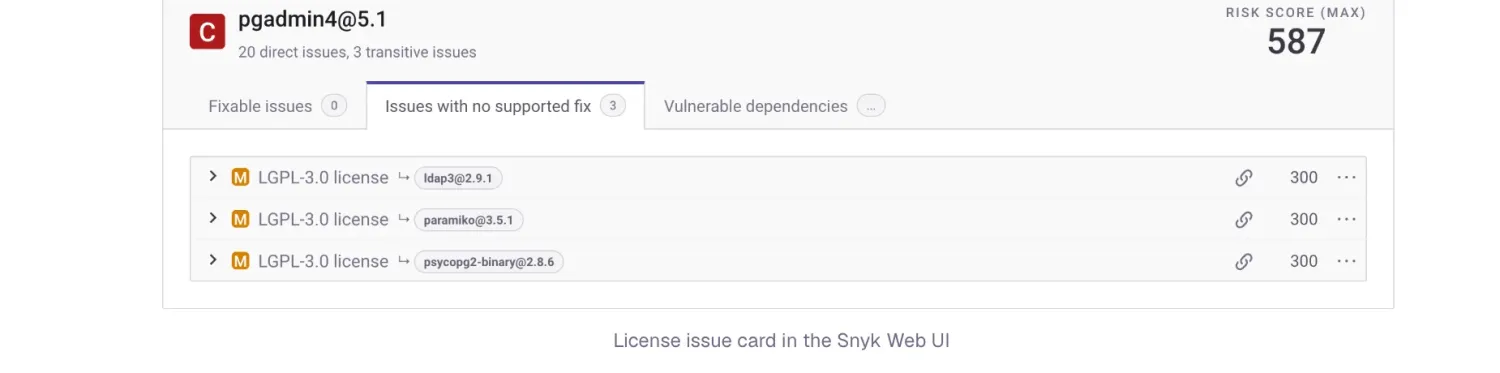 Snyk Open Source surfaces LGPL-3.0 (and other policy-flagged) licenses as first-class issues on the same Project page as CVEs — one queue for security and license review.
snyk monitor for continuous alerting between builds. A monitored project keeps re-checking against the vulnerability database after the build finishes; when a new CVE drops affecting your dependencies, Snyk alerts you the same day rather than waiting for your next CI run.
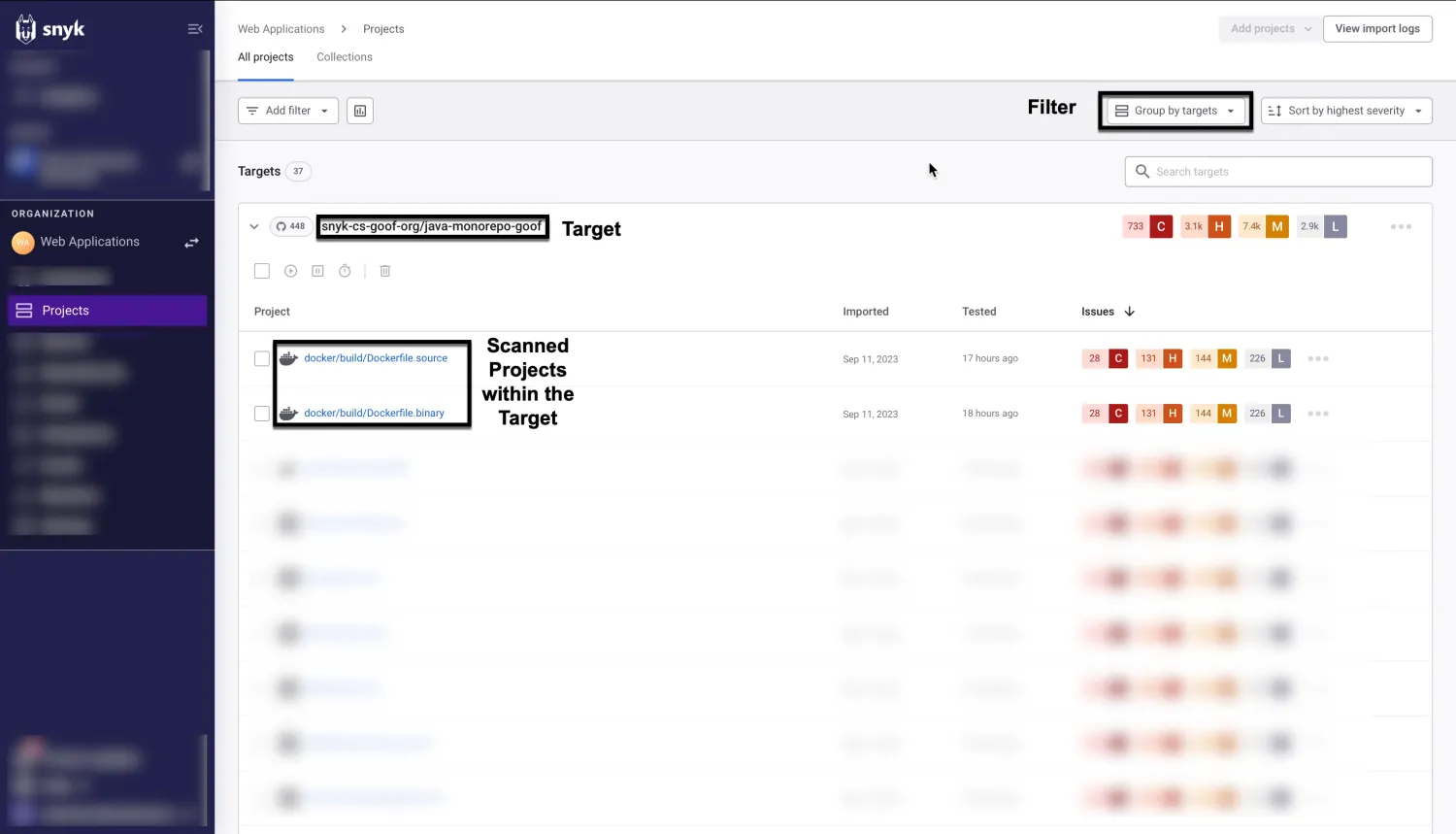 Snyk Projects view groups monitored projects under their parent Target and shows per-project severity counts — the surface that updates between CI runs as new CVEs land.
SonarQube has added SCA capabilities in its Advanced Security tier, but it picked up dependency scanning relatively late. If supply chain security is what you’re actually buying for, Snyk Open Source is the more mature choice — and most teams run it alongside SonarQube rather than instead of it.
Code Security: Snyk Code vs SonarQube SAST#
Both tools scan source code for security vulnerabilities, but their approach and scope differ in ways that matter for adoption.
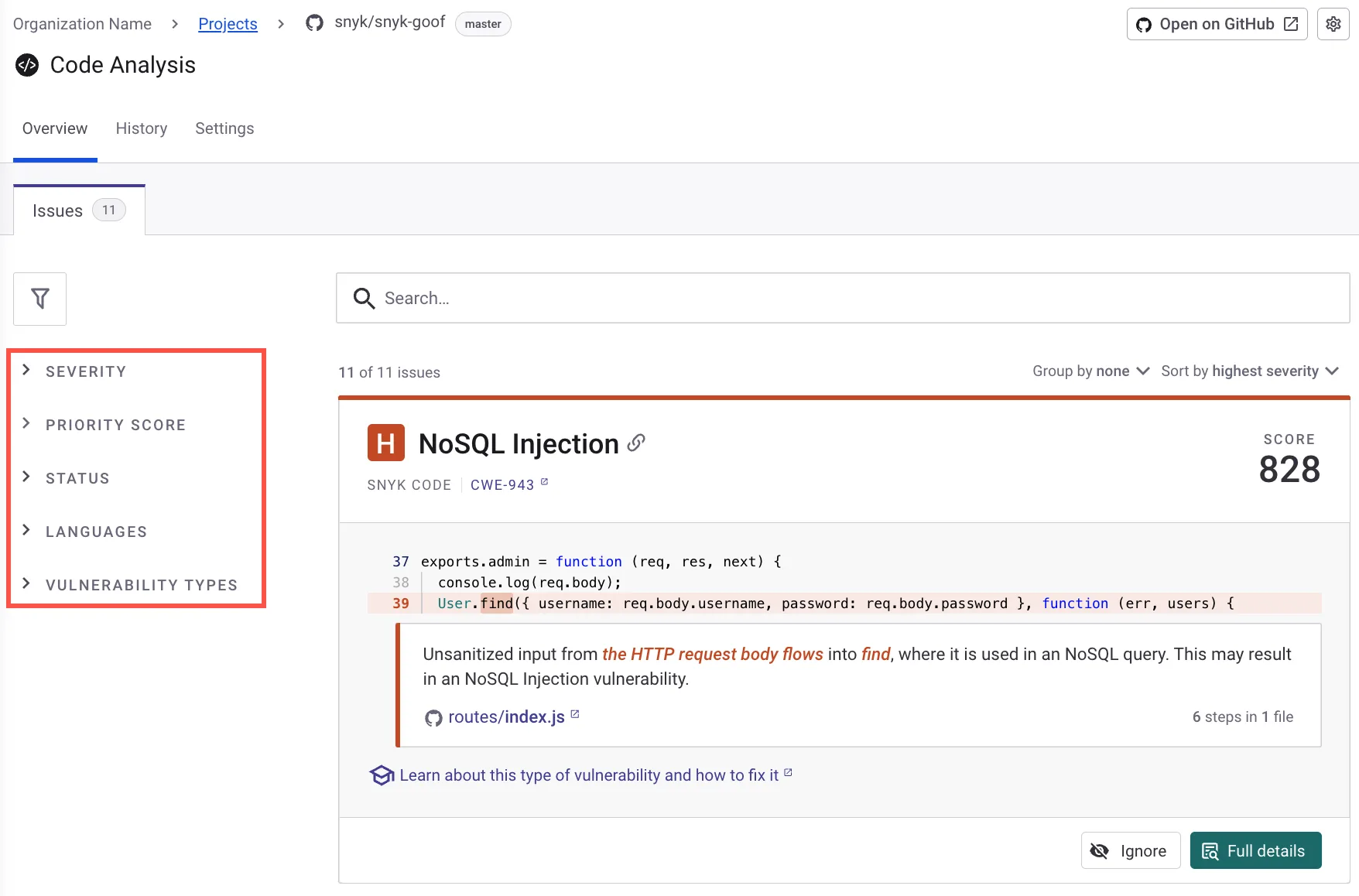 Snyk Code’s findings view with inline code context, data flow explanation, and severity filtering.
Snyk Code uses DeepCode AI, a machine learning engine trained on large-scale open-source repositories and real-world code fixes. It builds a semantic model of your codebase, tracing how data flows across functions and files.
This catches complex vulnerability patterns — second-order injection where user input passes through multiple functions before reaching a dangerous sink — that pure rule-based tools can miss. Snyk Code performs taint analysis across all tiers with no paywall.
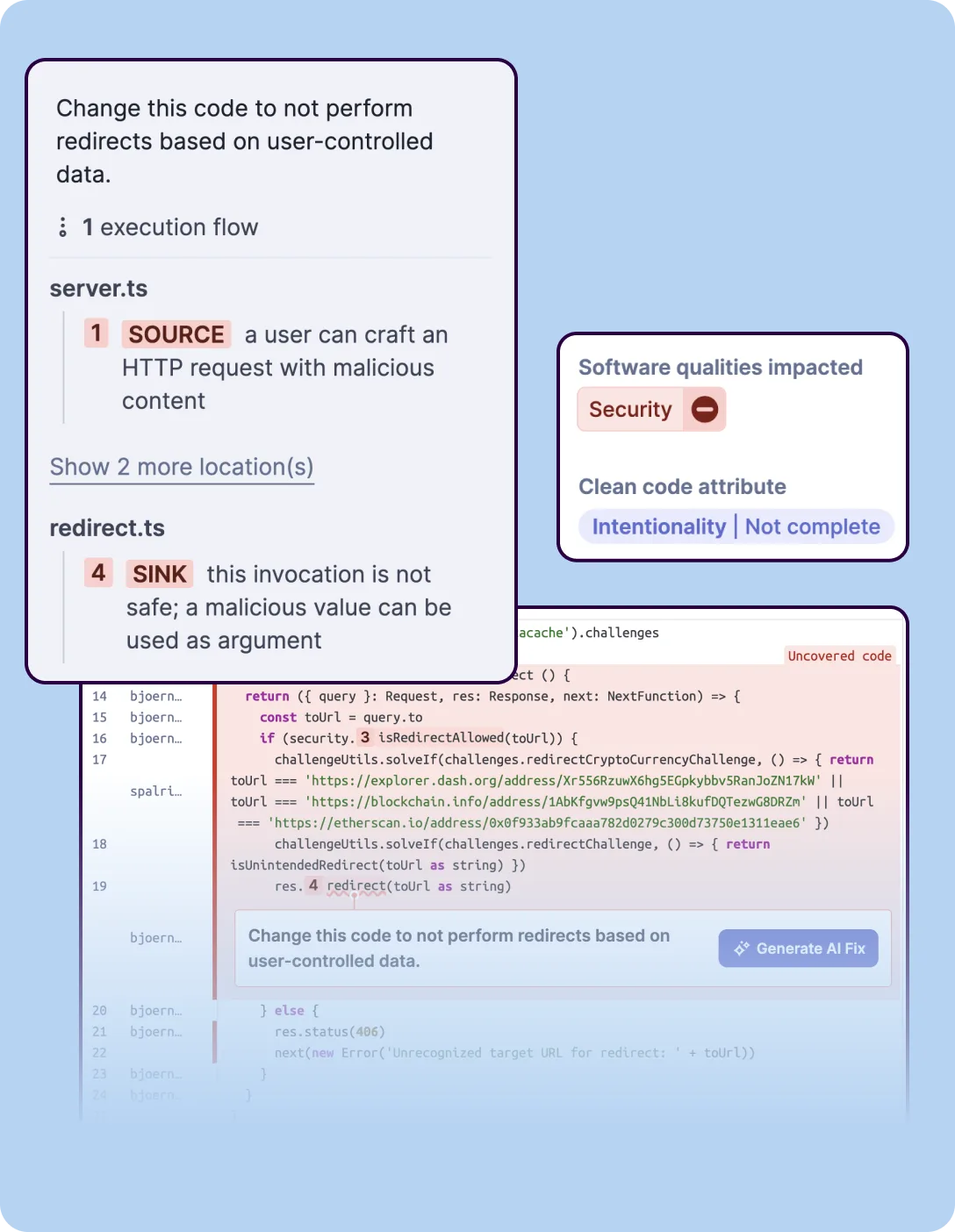 SonarQube’s SAST analysis tracing a vulnerability from source to sink, with execution flow steps.
SonarQube uses rule-based static analysis with over 6,000 built-in rules covering security vulnerabilities, reliability, maintainability, and code style.
Paid tiers add taint analysis that traces user-controlled data from input sources to dangerous sinks like SQL queries or file paths. The Community Edition has basic security rules without taint analysis, which limits its ability to catch injection vulnerabilities.
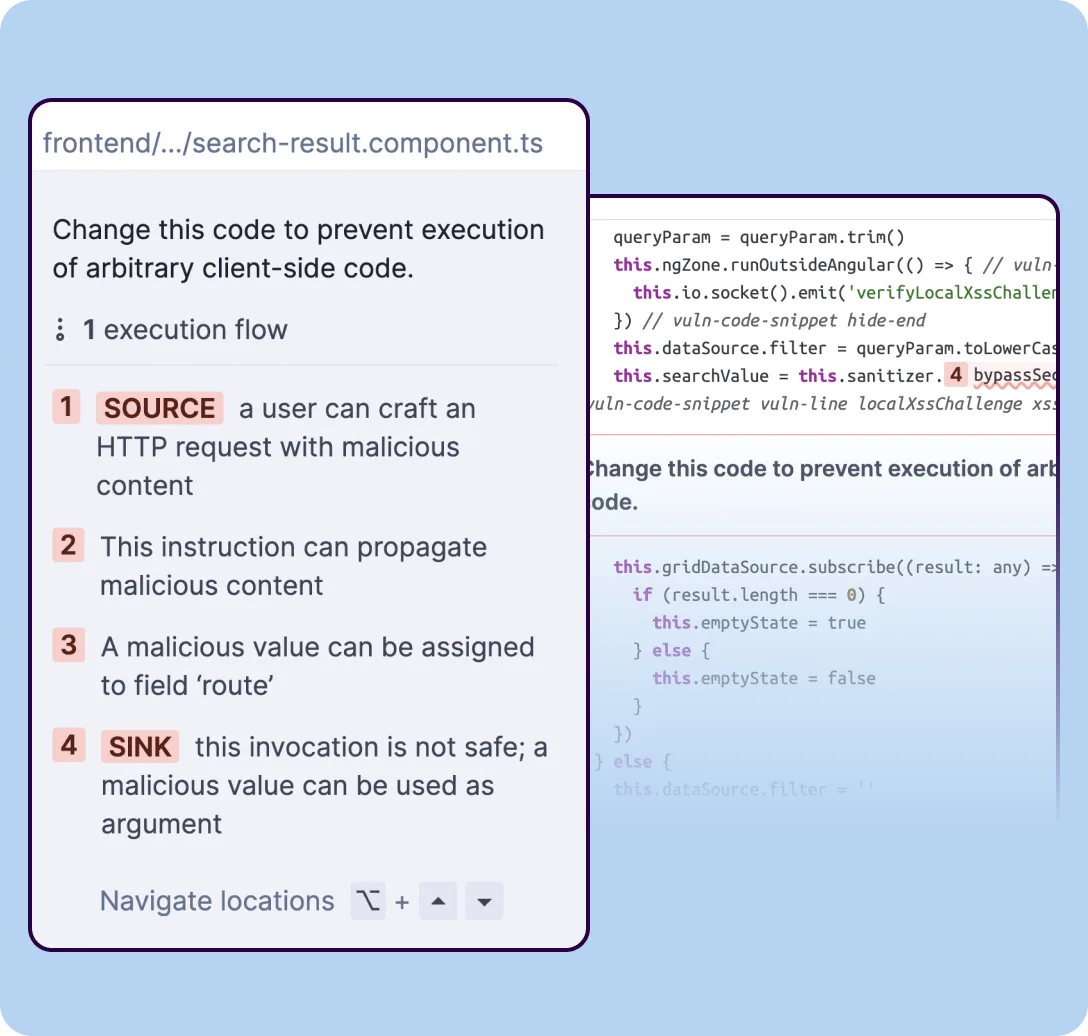 SonarQube’s taint analysis tracing client-controlled input through multiple assignment steps to an unsafe sink — available in paid tiers.
SAST comparison:
| Dimension | Snyk Code | SonarQube |
|---|---|---|
| Analysis method | ML-based semantic analysis | Rule-based + taint analysis (paid) |
| Languages | 19+ | 21 Community / 34 Developer / 40 Enterprise |
| Taint analysis | ✅ All tiers | ⚠️ Developer Edition and above |
| Code quality tracking | ❌ Security only | ✅ Bugs, smells, duplication, coverage, tech debt |
| Quality gates | ❌ | ✅ |
| Free self-hosted | ❌ | ✅ Community Edition |
| AI fix suggestions | ✅ DeepCode AI, all tiers | ✅ AI CodeFix, paid tiers |
| SARIF output | ✅ | ❌ (proprietary format) |
| GitHub code scanning integration | ✅ via SARIF | ❌ |
For SAST: if you already have code quality covered elsewhere and just need a fast security scanner with good IDE integration, Snyk Code wins on developer experience. If you want coverage, duplication, and security all gated in one place, SonarQube’s quality gate is hard to replicate with a second tool.
Detection accuracy: what independent data shows#
The accuracy claims you’ll see in most Snyk-vs-SonarQube comparisons come directly from the vendors: Snyk’s “47-day NVD lead” and “3× database size” figures are Snyk-published benchmarks. Getting independent signal requires looking at external test suites — and that picture is more nuanced.
The OWASP Benchmark is the most widely cited public reference for SAST accuracy. It measures true positive rate and false positive rate against a labeled dataset of Java web application vulnerabilities — SQL injection, XSS, path traversal, and others.
Results vary significantly by language, ruleset configuration, and the tool version tested. Neither Snyk nor SonarQube consistently dominates across all vulnerability categories in published runs.
Industry benchmark suites like NIST SARD offer additional reference points. SARD spans more than 450,000 test cases ranging from small synthetic programs (such as the Juliet suites) to larger applications, so coverage there is broader than a pure synthetic dataset.
Any benchmark result should be interpreted in context — the same tool can vary widely across language, framework, and ruleset configuration dimensions.
Two caveats. First, benchmark scores don’t reflect the false-positive rate you’ll encounter on your actual codebase; that varies by language, framework, and tuning.
Second, detection rate is one dimension of tool quality. Fix guidance, triage tooling, and workflow integration matter just as much for daily developer experience.
I’d treat benchmark data as a starting point, not a buying signal.
Custom rules: extending Snyk and SonarQube#
Both tools support custom rule authoring, but the mechanism and tier availability differ.
SonarQube’s customization model centers on Quality Profiles — per-language collections of active rules. Administrators can activate, deactivate, and configure parameters for any built-in rule per profile.
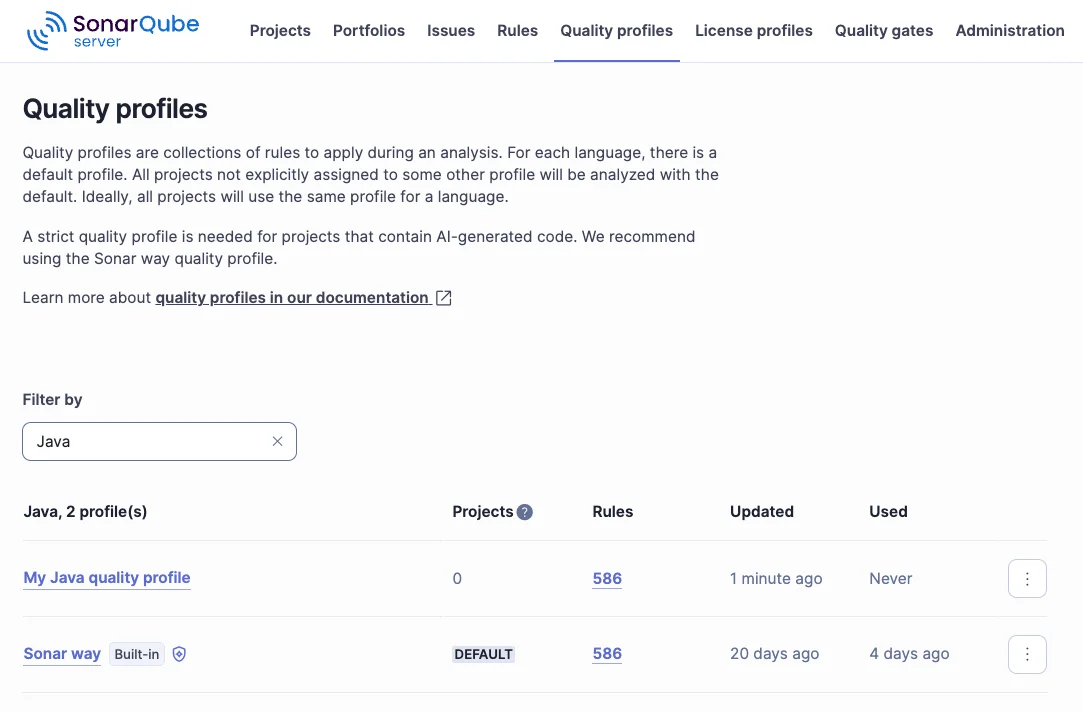 SonarQube Quality Profiles for Java — the built-in
 Sonar way profile sits next to a custom profile with the same 586-rule starting point that admins then trim or extend.
Writing net-new custom detection logic requires a Java plugin that implements the SonarQube API; the plugin can walk the AST and define new rule classes. This approach gives full control over detection logic but requires Java development skills.
Snyk Code supports custom rules for matching internal framework patterns, custom validators, or business-specific risk behavior. Custom rules are defined through the Snyk platform’s rule editor using a declarative query language based on Datalog.
Check your plan tier for current availability — this is an advanced feature not included in all plans.
On interoperability: Snyk Code exports SARIF, making findings compatible with GitHub Advanced Security’s code scanning view and other SARIF consumers. SonarQube imports SARIF from external tools but does not natively export its own findings in SARIF format — community workarounds exist via third-party GitHub Actions.
Developer Workflow: IDE, Pull Requests, and CI/CD#
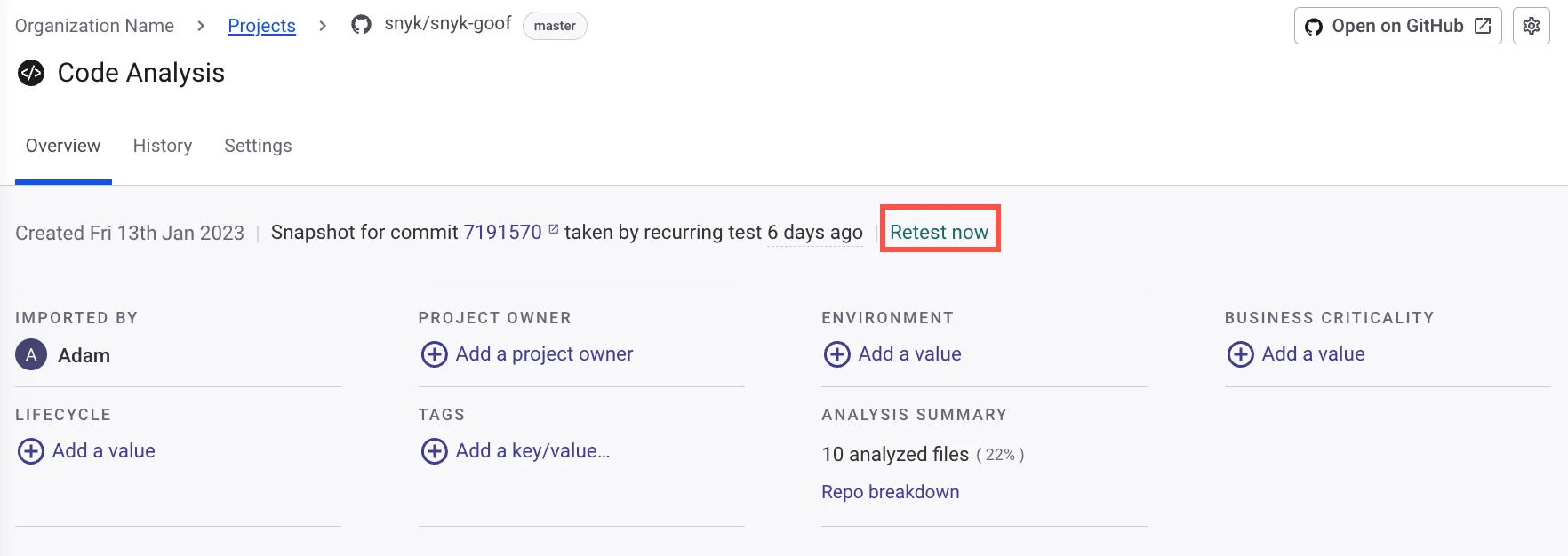 Snyk’s project-level analysis view showing scan metadata, project ownership, and summary for a connected repository.
In the IDE, Snyk Code scans as you type and surfaces findings inline with fix suggestions.
SonarQube for IDE (formerly SonarLint) in connected mode syncs your team’s configured rules into the editor — less about real-time security remediation, more about keeping local code consistent with what the server will check. Both work; they just have different focal points.
On pull requests, both tools leave comments. Snyk covers dependency vulnerabilities, container issues, and code findings across GitHub, GitLab, Bitbucket, and Azure DevOps.
SonarQube shows quality gate status, new issues, and coverage changes. SonarQube’s PR decoration requires the Developer Edition (priced per instance per year, scaled by lines of code).
In CI/CD, Snyk fails a build when findings exceed your configured severity threshold. snyk monitor runs separately and alerts on new CVEs between builds without waiting for a pipeline run.
SonarQube fails a build when code misses a quality gate — one threshold combining coverage, duplication, reliability, and security into a single pass/fail. That’s a meaningfully broader gate than Snyk’s security-only check, which matters if you care about test coverage or technical debt regressions.
Governance: Quality Gates vs Security Policies#
SonarQube’s quality gate is one of the reasons it’s hard to fully replace with a security-only tool. A quality gate fails a build when any combination of five dimensions falls below your configured thresholds: reliability (bugs), security (vulnerabilities), maintainability (code smells and debt ratio), test coverage, and duplication.
One gate, five dimensions, one pass/fail answer. That’s what makes it an engineering governance tool, not just a scanner.
Snyk’s policy model is narrower but more automated on the security side — set severity thresholds, filter by reachability, configure license rules, and let fix PRs handle remediation. If enforcing coverage minimums or tracking maintainability trends matters to your engineering org, there’s nothing equivalent in Snyk for that.
Pricing and Deployment#
SonarQube
The Community Edition (Community Build) is free and open-source, supporting 21 languages with quality gates and single-branch analysis on your own infrastructure with no scan limits.
The Developer Edition is priced per instance per year (scaled by lines of code) and adds branch analysis, PR decoration, taint analysis, secrets detection, and 34 total languages. Enterprise adds 40 languages, AI CodeFix, and compliance reporting.
SonarQube Cloud (formerly SonarCloud) is the SaaS option — free for public repositories, paid for private.
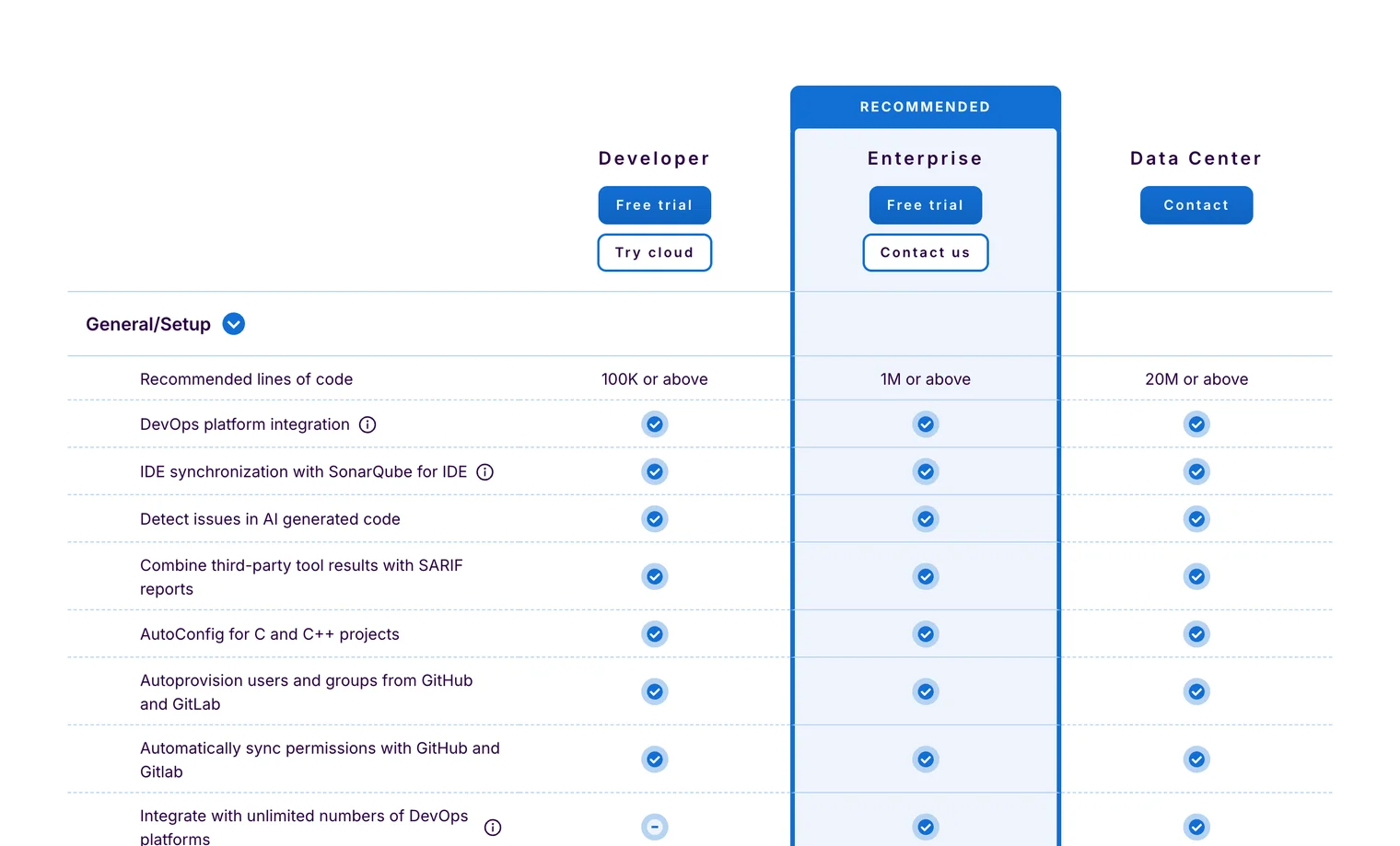 SonarQube editions side-by-side — Developer starts at 100K LOC and above, Enterprise at 1M+, Data Center at 20M+; advanced governance and synced CI features are gated behind Enterprise.
Snyk
Snyk’s pricing is not publicly listed. A free tier exists for individual developers with limited monthly scans across products.
Team and Enterprise plans remove scan limits and unlock advanced features including custom rules, reporting, and priority support. Pricing is structured around contributing developers or product bundles — contact Snyk for current rates.
Deployment model
SonarQube can be self-hosted at all editions, including free. Snyk is a SaaS-first platform; self-hosted deployment is available at Enterprise tier only.
For teams with data residency requirements, air-gapped environments, or tight infrastructure budgets, SonarQube’s self-hosted options are more accessible without a procurement process.
Enterprise readiness: SSO, audit logs, and compliance#
Both tools support enterprise identity federation. Snyk supports SAML 2.0 SSO and SCIM provisioning in Team and Enterprise plans.
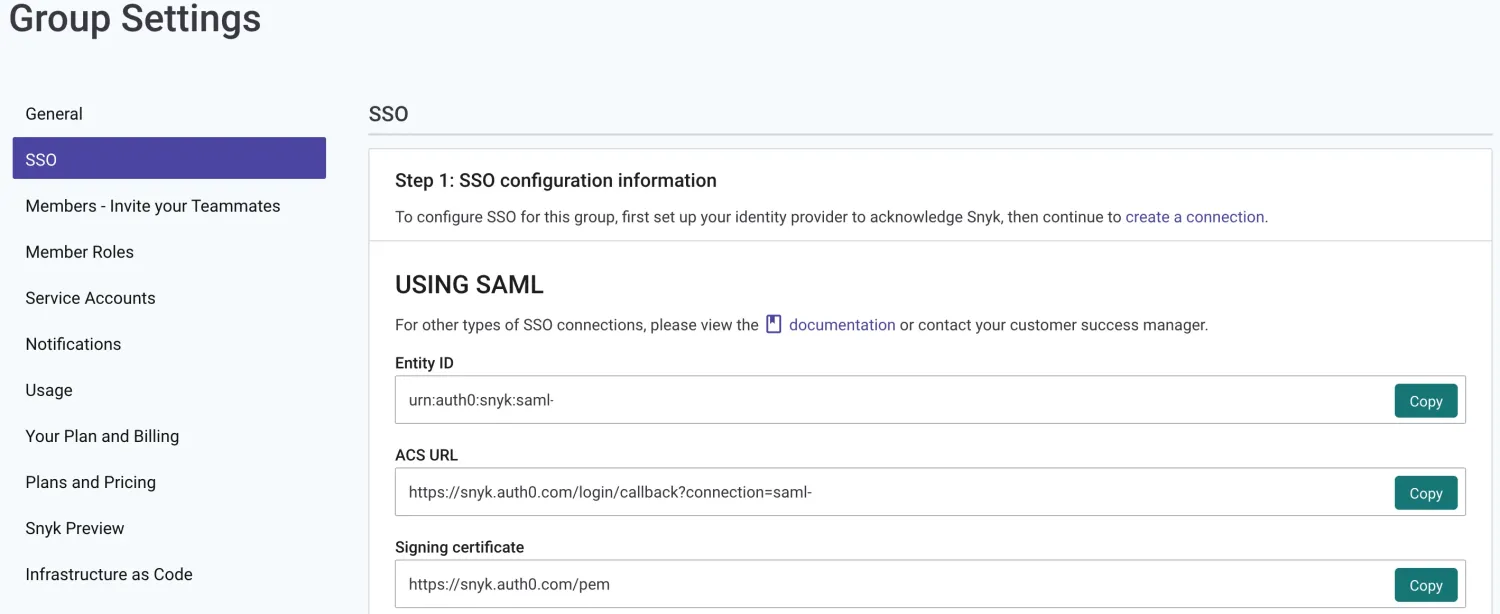 Snyk Group Settings → SSO surfaces the Entity ID, ACS URL, and signing certificate that an admin pastes into Okta, Entra ID, or another SAML 2.0 IdP to complete the federation.
SonarQube supports SAML SSO in the Developer Edition and above; SonarQube Cloud supports GitHub, GitLab, Bitbucket, and Azure DevOps SSO natively. Both integrate with major identity providers — Okta, Azure AD, and Google Workspace.
Audit log availability differs by tier. SonarQube Server’s audit log is available in Enterprise Edition and above — it records project-level events and admin actions with a configurable retention schedule.
Developer and Community editions do not include audit logs. Snyk’s audit log is accessible to organization and group admins on paid plans via the REST API.
On compliance certifications: Snyk holds SOC 2 Type II attestation and ISO 27001 certification (alongside ISO 27017), audited annually by Schellman. SonarSource holds ISO 27001:2022 certification and SOC 2 Type II.
Both publish documentation through their respective trust centers. These certifications are relevant to enterprise procurement checklists, but neither replaces an internal review of your data handling requirements — particularly relevant when running self-hosted SonarQube where your own infrastructure handles all data.
When to Choose Snyk#
Choose Snyk if:
- Dependency vulnerabilities are your primary concern and you need mature SCA across npm, Maven, PyPI, Go modules, NuGet, Composer, CocoaPods, and 13+ other ecosystems
- Automated fix PRs matter — you want the tool to open upgrade pull requests automatically, not just report findings
- Container and IaC security coverage are required alongside code scanning in a single platform
- SBOM generation in SPDX or CycloneDX format is needed for compliance
- Reachability analysis to prioritize exploitable vulnerabilities (primarily Java and JavaScript) is valuable
- Your team prefers SaaS with minimal infrastructure management
- You already use Snyk for one product (SCA, containers, or IaC) and want unified cross-stack coverage
When to Choose SonarQube#
Choose SonarQube if:
- Code quality enforcement is as important as security — you need gates on coverage, duplication, and maintainability alongside vulnerability detection
- A free self-hosted platform with no scan limits is a requirement (Community Edition)
- Your codebase includes legacy or niche languages outside Snyk’s 13 ecosystems: COBOL, ABAP, Apex, PL/SQL, T-SQL
- Taint analysis for injection and data flow vulnerabilities is a priority and you need it in paid tiers
- On-premise deployment without an enterprise contract is mandatory
- Engineering governance — tracking technical debt, enforcing test coverage standards, measuring reliability trends — is a first-class goal
When to Use Both#
Running both tools in the same pipeline is the standard answer in most mature AppSec programs — not because teams can’t make a decision, but because the tools genuinely cover different things. A typical setup:
- SonarQube quality gate on PR — enforces coverage, duplication, reliability, and security thresholds on new code
- Snyk dependency scan in CI/CD — blocks on critical or high-severity dependency vulnerabilities
- Snyk Container and Snyk IaC on container builds and infrastructure changes
- Snyk Monitor running continuously, alerting on new CVEs between builds
# Pipeline structure: quality gate (SonarQube) + security scan (Snyk)
build:
  steps:
    - run: snyk test --severity-threshold=high
      # Blocks on critical/high dependency vulnerabilities

    - run: sonar-scanner
      # Quality gate: coverage, duplication, reliability, security — one pass/fail

    - run: snyk container test $IMAGE --severity-threshold=critical
      # Container scan runs separately from code analysis
Three team profiles where this pairing works especially well:
- Small teams on a budget: SonarQube Community Build (free, self-hosted) plus Snyk’s free tier. Full coverage, zero cost for core functionality.
- Regulated enterprises: SonarQube Enterprise self-hosted for compliance reporting alongside Snyk Enterprise for SCA, SBOM, and container coverage.
- Centralized AppSec teams: both tools managed centrally, findings routed to developer dashboards through ASPM tooling.
There is real overlap in SAST — both scan source code for security issues. Running both will produce some duplicate findings there. In practice, most teams treat this as acceptable noise given the coverage gain from Snyk’s supply chain and infrastructure layers.
Known Weaknesses#
Snyk’s real limitations
Pricing is opaque. Team and Enterprise plans require a sales conversation, and cost at scale is hard to predict before you’ve signed.
Self-hosted deployment is Enterprise-only, so teams with strict data residency can’t access it cheaply.
Snyk also does nothing for code quality — no coverage, no duplication, no technical debt tracking — so it doesn’t reduce your need for SonarQube on the quality side.
On the SAST front, independent third-party benchmarks covering Snyk Code are less extensive than for legacy SAST tools; I’d be cautious about generalizing from any single benchmark result across languages.
SonarQube’s real limitations
It is not a security platform in the way Snyk is. No container scanning, no IaC security, no serious SCA history — you’ll need dedicated tools for all of those.
The Community Build’s security scanning relies on pattern matching; taint analysis, which matters for catching injection vulnerabilities, requires the paid Developer Edition (priced per instance per year, scaled by lines of code).
Self-hosted deployments also require real infrastructure work — hardware, maintenance, version upgrades. And SonarQube’s dependency scanning, while functional now, lags behind Snyk on vulnerability intelligence, automated fix PRs, and SBOM generation.
If you’re evaluating more options, see the full list of SonarQube alternatives .
For detailed reviews, see Snyk and SonarQube . Related comparisons: SonarCloud vs Snyk for the SaaS variant of each tool. For more options in each category, see the SCA tools and SAST tools hubs.
Frequently Asked Questions
What is the main difference between Snyk and SonarQube?
Is Snyk the same as Snyk Code?
Does Snyk replace SonarQube?
Does SonarQube replace Snyk?
Which is better for dependency scanning (SCA)?
Which is better for SAST?
Can I use Snyk and SonarQube together?
How should teams run Snyk and SonarQube together in CI/CD?
Which tool produces SBOMs?
Which is better for containers and IaC?
Which is better for self-hosted or regulated environments?
Is SonarQube SCA good enough?
Which tool is free?

Written & maintained by
Suphi CankurtEight years on the vendor side of application-security sales — thousands of evaluations and demos. I started AppSec Santa in 2022 to put that insider view to work for buyers. Independent of any vendor, paid by none, and honest about what fits whom.