
Semgrep Alternatives
Top Semgrep Alternatives

Binary Analysis AppSec Platform
AI-native SAST with automatic vulnerability detection and code fix generation

Compliance-first SAST for automotive, aerospace & medical device software

Meta's Inter-Procedural Static Analyzer
- OpenGrep is the most direct alternative: a 2025 community fork of Semgrep CE that restores cross-file taint analysis under a permissive LGPL-2.1 license, with drop-in rule compatibility.
- Semgrep Community Edition (CE) is single-file only; cross-file taint tracking requires Semgrep Code on the paid AppSec Platform, which is the main reason teams explore alternatives.
- SonarQube covers 35+ languages with 6,000+ rules spanning code quality and security, plus quality gates that Semgrep does not offer.
- Aikido and Endor Labs compete on noise reduction, cutting alert volume up to 95-97% through reachability analysis rather than custom rules.
- Checkmarx One covers 35+ languages and bundles SAST, SCA, DAST, IaC, container, API security, and secrets detection with ASPM prioritization.
Why Look for Semgrep Alternatives?#
Semgrep has built a solid reputation in the SAST space. With 14,100+ GitHub stars, 30+ language support, and a rule syntax that reads like the code it matches, it has become a go-to for security teams that want fast, customizable static analysis.
The Semgrep Community Edition (CE) CLI is useful on its own, and the Semgrep AppSec Platform adds real capabilities on top. So why would anyone look elsewhere?
The biggest gap is Semgrep CE’s scope. CE performs single-file, single-function analysis only.
It will not trace data from a user-controlled HTTP parameter in one file through a service layer in another file to a SQL query in a third.
That kind of cross-file taint tracking is essential for catching injection vulnerabilities in real applications, and it requires Semgrep Code on the AppSec Platform .
Teams that start with the CE CLI often hit this wall within months of deploying it against production codebases.
In 2025 a community fork called OpenGrep appeared, restoring cross-file taint analysis to the open-source engine. It leads the list of alternatives below.
Beyond the analysis depth issue, Semgrep does not try to be a code quality tool. There is no duplication detection, no complexity scoring, no technical debt tracking, and no quality gates.
Organizations that want a single platform covering both code quality and security need to pair Semgrep with something else or pick a tool that handles both.
Custom rule authoring, while simpler than CodeQL, still requires learning Semgrep’s YAML-based rule format.
IDE integration exists but is not as seamless as tools like Snyk Code that scan in real time as you type.
And once you move beyond the CE CLI, the Semgrep AppSec Platform is required for team dashboards, SSO, role-based access, and centralized policy management.
The Platform is free for up to 10 contributors, with the Teams plan starting at $30/month per contributor.
Top Semgrep Alternatives#
The best Semgrep alternative depends on the gap you are filling:
- Open-source engine with cross-file taint analysis: OpenGrep, the community fork of Semgrep CE
- Code quality plus security in one tool: SonarQube
- Real-time IDE scanning with AI fixes: Snyk Code
- Deep semantic analysis on GitHub: GitHub CodeQL
- All-in-one platform with aggressive noise reduction: Aikido or Endor Labs
- Enterprise governance across SAST, SCA, and DAST: Checkmarx One
Each option is detailed below, followed by a feature comparison table.
1. OpenGrep#
OpenGrep is a community-maintained fork of Semgrep’s Community Edition, created in 2025 after Semgrep Inc. relicensed parts of the CE engine.
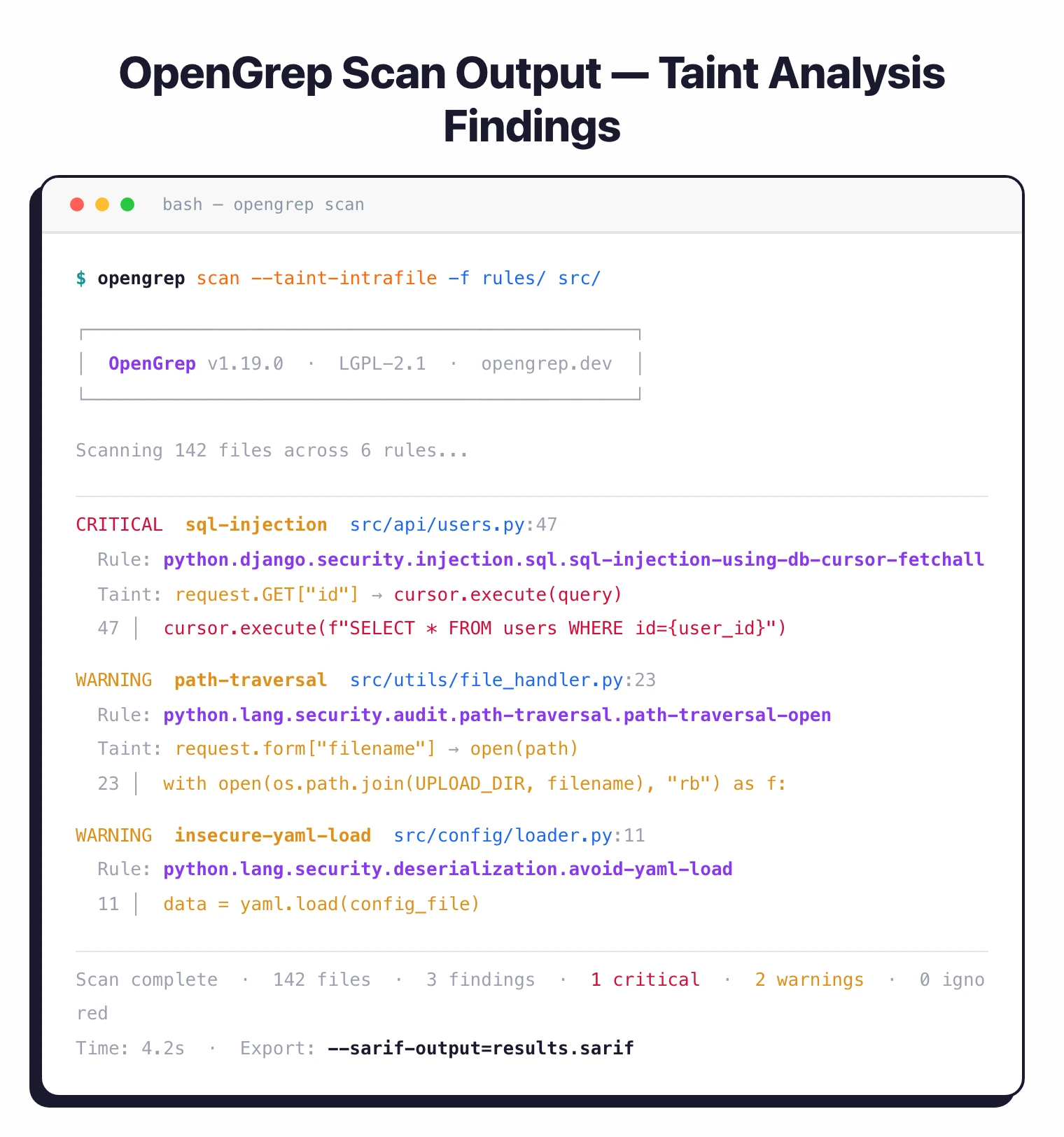
It is the most direct answer to Semgrep CE’s biggest limitation. OpenGrep restores the cross-file taint analysis, inter-procedural scanning, and fingerprinting that Semgrep removed from CE and moved behind its paid Platform.
Existing Semgrep rules and CI pipelines keep working . OpenGrep stays backward compatible with Semgrep’s rule format, JSON, and SARIF output, so migrating is low-friction.
It covers 30+ languages with taint tracking across 12, and adds Visual Basic support that Semgrep lacks.
Governance is the other difference. Rather than a single vendor, OpenGrep is maintained by a consortium of 10+ AppSec companies (Aikido, Endor Labs, Jit, Orca Security, and others), so no one company can restrict features again.
Best for: Teams that want Semgrep CE’s workflow plus cross-file taint analysis under a permissive license, with no platform upsell. License: Free (LGPL-2.1) Key difference: Open-source fork that restores the taint analysis Semgrep moved to its paid Platform. Drop-in compatible with existing Semgrep rules.
2. SonarQube#
SonarQube is the most widely deployed code analysis platform in the industry, with over 10,200 GitHub stars and installations across thousands of organizations.
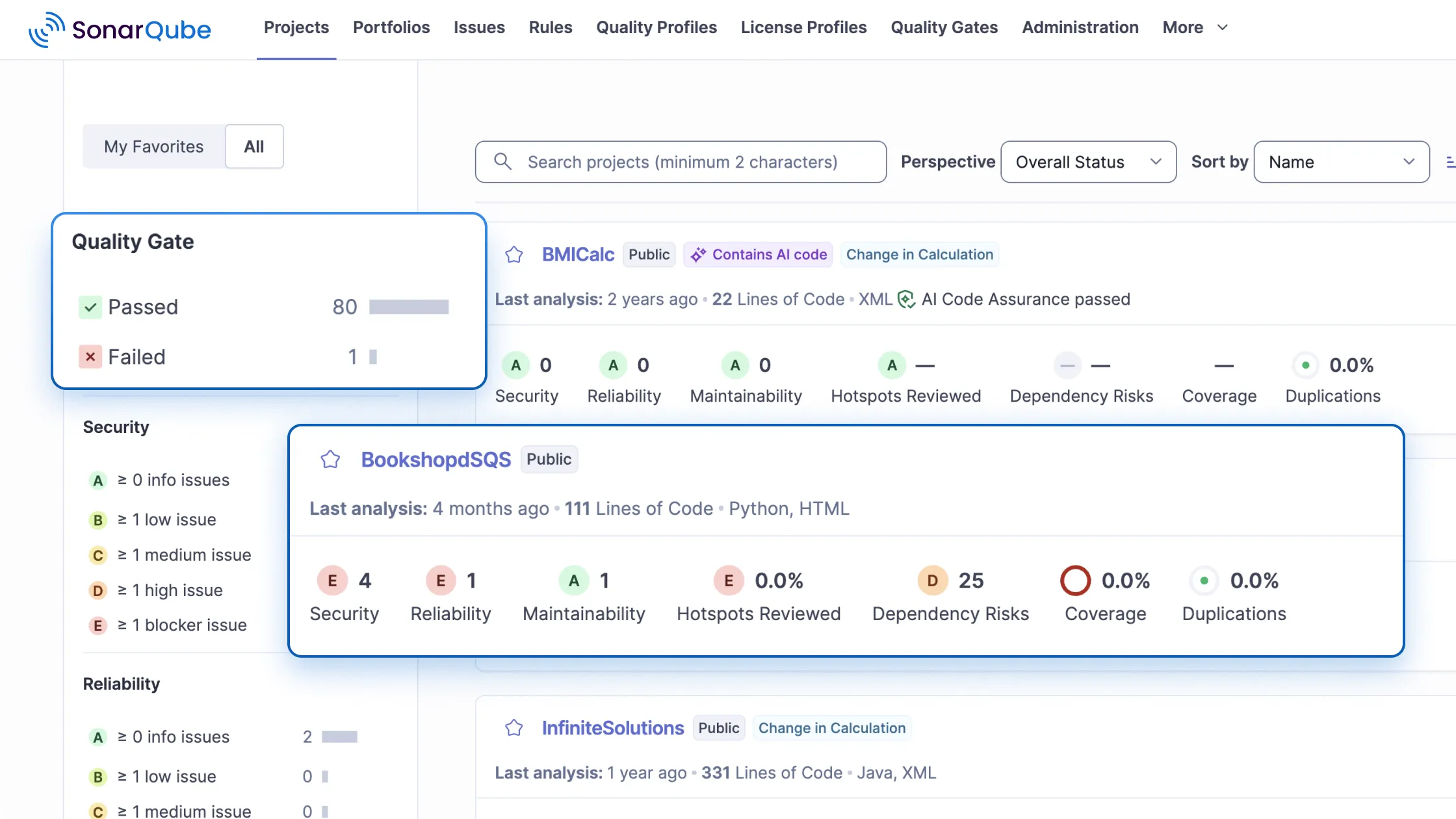
It covers 35+ languages with 6,000+ rules spanning both code quality and security.
Where Semgrep focuses on finding security issues, SonarQube tracks bugs, code smells, duplication, test coverage, and technical debt alongside vulnerability detection.
The quality gate system is what separates SonarQube from most SAST tools.
You can define pass/fail conditions on metrics like coverage percentage, duplication ratio, and security rating, then enforce those conditions as PR checks or deployment gates.
This gives engineering leadership visibility into code health trends that Semgrep simply does not provide. SonarQube’s AI CodeFix feature generates fix suggestions for detected issues.
The Community Edition is free but limited. It lacks taint analysis, multi-branch analysis, and advanced security rules.
These are available in the Developer Edition (priced per instance per year, scaled by lines of code) and higher tiers. Self-hosting requires a Java server and a database, which adds operational overhead compared to Semgrep’s CLI-first approach.
Best for: Teams that want code quality and security analysis together with quality gates and technical debt tracking. License: Free Community Edition / Commercial Key difference: Combines code quality metrics (bugs, smells, duplication, debt) with security scanning. Quality gates enforce standards across the organization.
3. Snyk Code#
Snyk Code is a developer-focused SAST tool powered by the DeepCode AI engine .
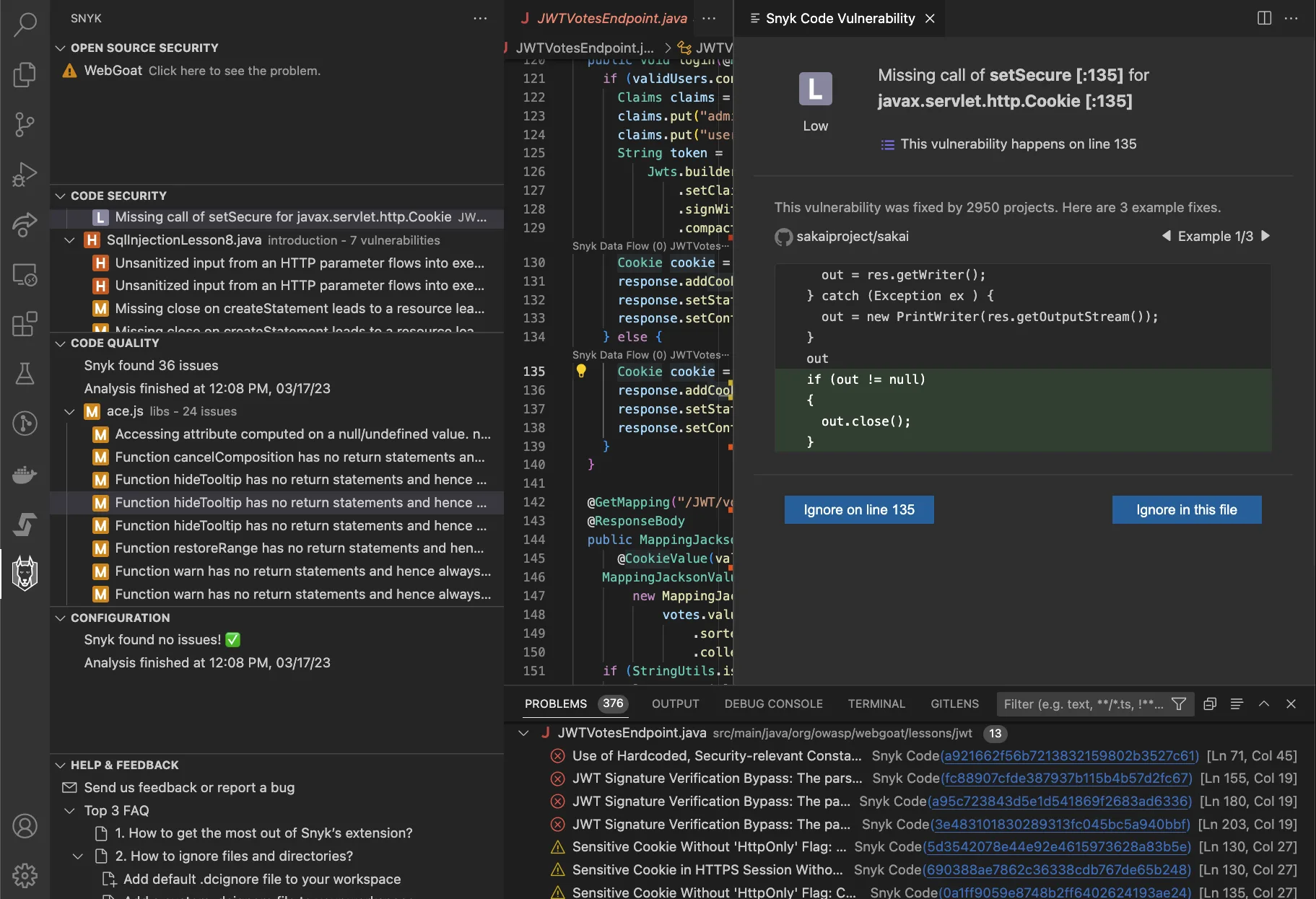
It scans code in real time inside IDEs like VS Code, JetBrains, and Eclipse, showing security issues as you write code rather than after you push it.
The tool supports 20+ languages and performs semantic analysis that goes deeper than simple pattern matching.
The AI fix suggestion feature is the standout. When Snyk Code identifies a vulnerability, it proposes concrete code changes trained on millions of real-world fixes.
This is different from Semgrep’s approach, which flags issues and provides rule metadata but leaves the remediation to the developer.
Snyk Code is part of the broader Snyk platform, so teams already using Snyk for SCA, container scanning, or IaC get unified reporting.
Snyk has over 2.5 million developers on its platform. The free tier is limited but functional for individual developers.
Commercial pricing scales with contributors and projects. There is no self-hosted deployment option outside of enterprise agreements.
Best for: Developer teams that want real-time IDE security feedback with AI-powered fix suggestions. License: Commercial (free tier available) Key difference: Real-time IDE scanning and AI fix suggestions. Part of the broader Snyk platform for SCA, containers, and IaC.
4. GitHub CodeQL#
CodeQL takes a very different approach to static analysis. It compiles your source code into a relational database, then lets you write queries against that database to find vulnerability patterns.
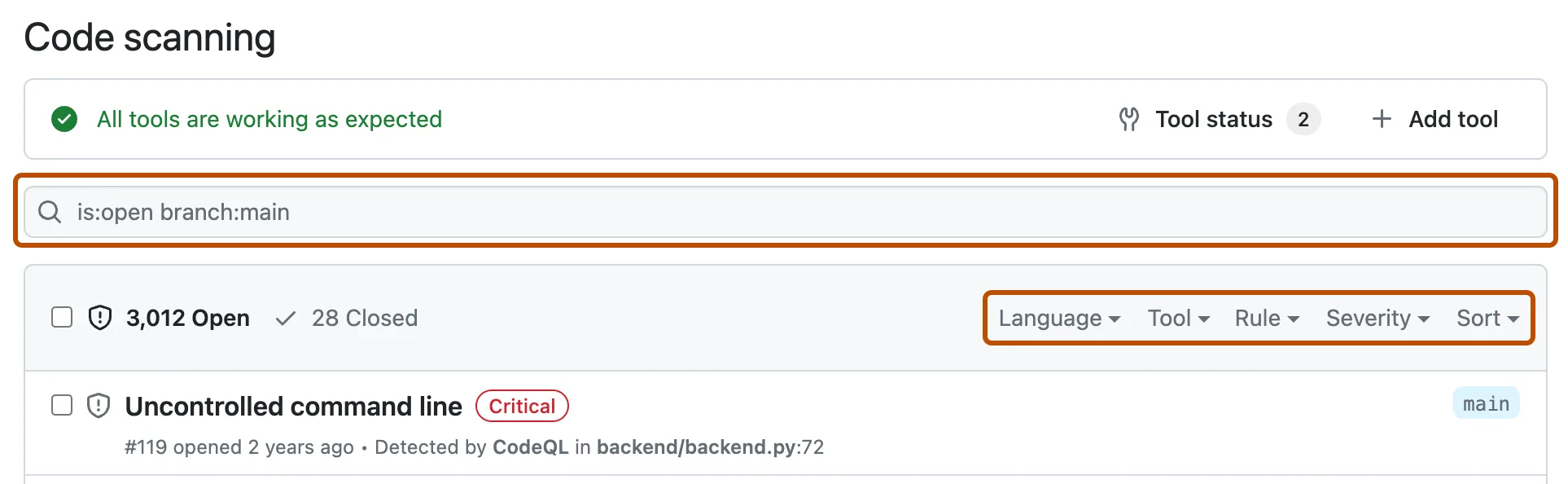
This “code as data” model enables deep interprocedural analysis, including taint tracking across function boundaries and module imports. The query language is expressive enough to encode complex vulnerability patterns that pattern-matching tools would miss.
CodeQL supports 12 languages . That is narrower than Semgrep’s 30+, but for the languages it does cover (Java, JavaScript, Python, C/C++, C#, Go, Ruby, Swift, and others), the analysis depth is significantly greater.
It integrates natively with GitHub Actions and surfaces findings directly in the Security tab and as PR annotations.
The catch is performance and accessibility. CodeQL scans take minutes, sometimes longer, compared to Semgrep’s 10-second median.
Writing custom queries requires learning a purpose-built query language (QL), which has a steeper learning curve than Semgrep’s pattern syntax.
CodeQL is free for public repositories and requires GitHub Advanced Security for private repos.
Best for: Teams on GitHub that need deep semantic analysis and custom vulnerability queries. License: Free (public repos), commercial (private repos via GHAS) Key difference: Code-as-database approach with a custom query language. Deeper interprocedural analysis than Semgrep CE.
5. Checkmarx#
Checkmarx One is a full application security platform. Its SAST engine covers 35+ languages and 100+ frameworks , far exceeding Semgrep’s 30+ languages.
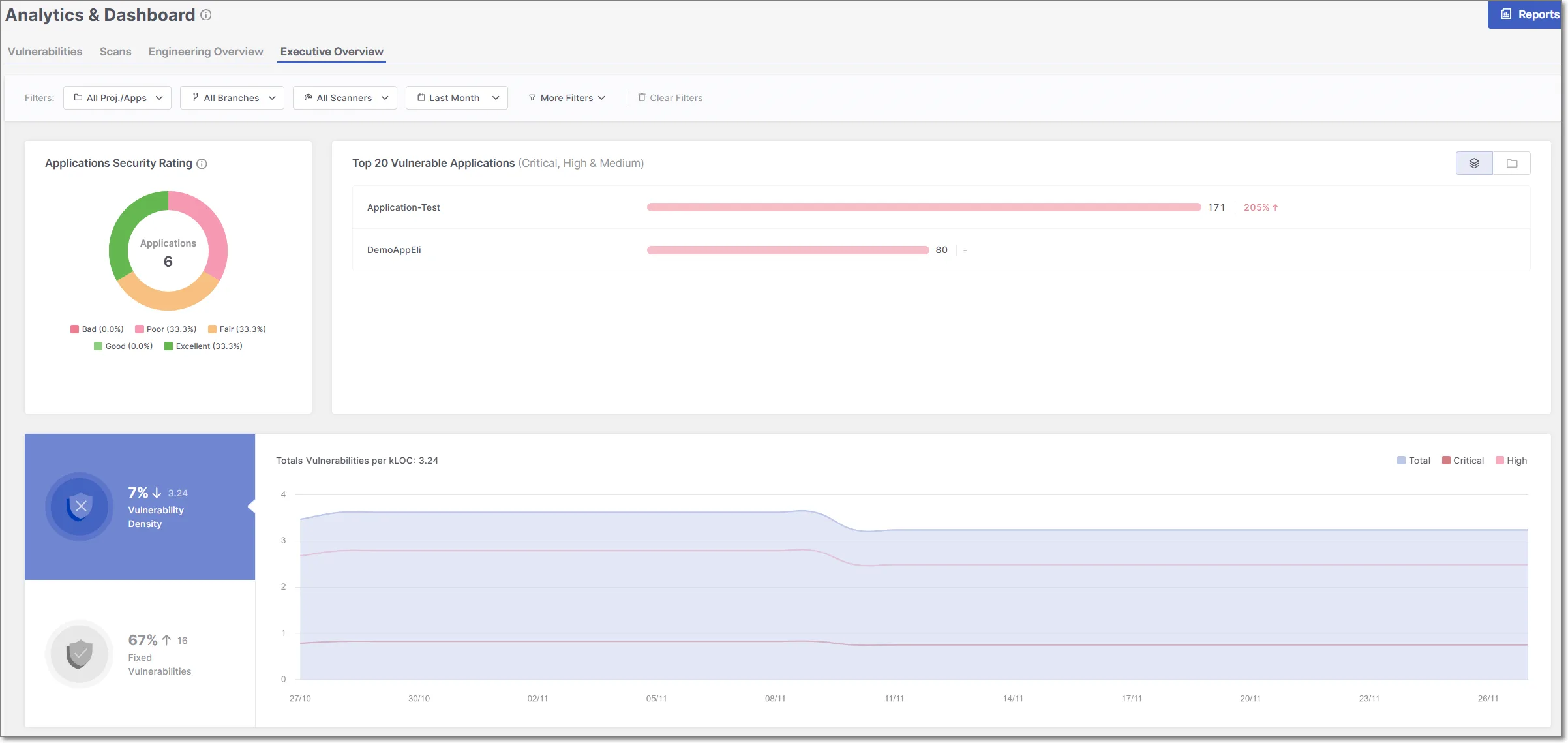
Beyond SAST, the platform bundles SCA, DAST, IaC security, container scanning, API security, and secrets detection into a single product.
Checkmarx counts Apple, Salesforce, and Walmart among its customers and is widely deployed at large enterprises with complex governance needs.
The platform’s ASPM layer aggregates findings from all scanning engines and prioritizes them based on application context, exploitability, and business criticality.
This means the team looking at results does not have to manually triage thousands of findings. Checkmarx also supports custom queries through its proprietary language, though the authoring experience is less accessible than Semgrep’s.
The tradeoff is cost and complexity. Checkmarx is an enterprise product with enterprise pricing.
It requires more setup and configuration than Semgrep, and the platform is heavier to operate. Teams that only need SAST will find Checkmarx offers far more than they need.
Best for: Enterprise teams that need a unified AppSec platform across SAST, SCA, DAST, and more. License: Commercial Key difference: 35+ language support and full application security suite. Enterprise prioritization through ASPM.
6. Fortify SCA#
Fortify Static Code Analyzer, now under OpenText, is one of the longest-running commercial SAST tools on the market. It supports 33+ languages and 1,700+ vulnerability categories.
Where Fortify really differs is legacy language support. If your organization maintains COBOL, ABAP, or PL/SQL codebases, Fortify is one of the few tools that will scan them.
Fortify offers flexible deployment options: on-premises, SaaS (Fortify on Demand), and hybrid models. The on-premises option matters for organizations in regulated industries that cannot send source code to third-party clouds.
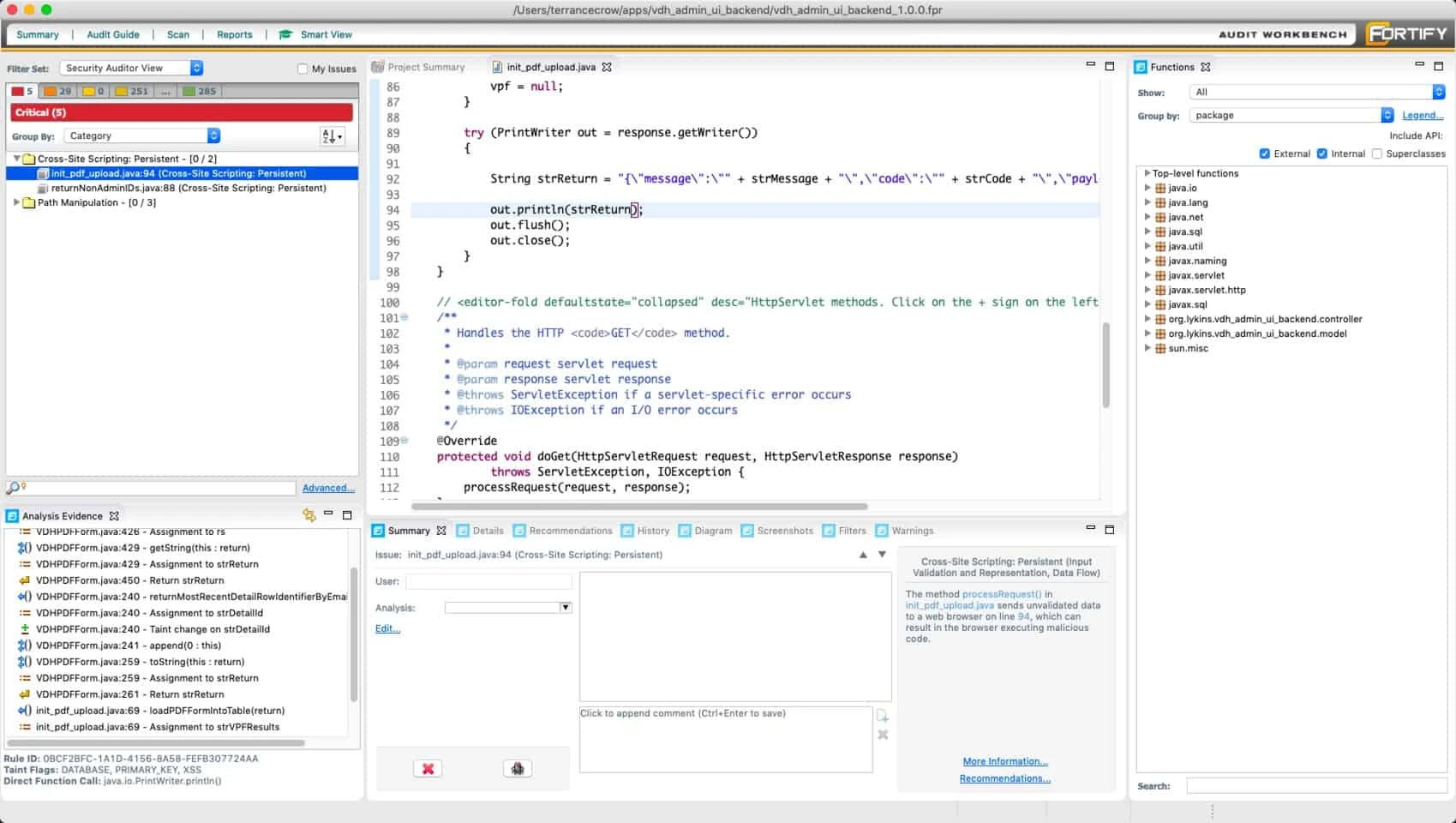
Audit Workbench, the desktop review tool, lets security analysts triage and manage findings with detailed trace information.
Scan performance is slower than Semgrep. Deep interprocedural analysis across large codebases can take hours, not seconds.
The rule set is not user-editable in the same way as Semgrep’s community rules. Fortify’s strength is thoroughness and enterprise features, not speed or developer experience.
Best for: Enterprises needing broad language coverage including legacy languages with flexible deployment.
License: Commercial Key difference: 33+ languages including COBOL and ABAP. On-premises, SaaS, and hybrid deployment. Longest market tenure in commercial SAST.
7. DeepSource#
DeepSource combines static analysis with AI-powered code fixes. When the platform detects an issue, its Autofix feature can generate a pull request with the corrected code.
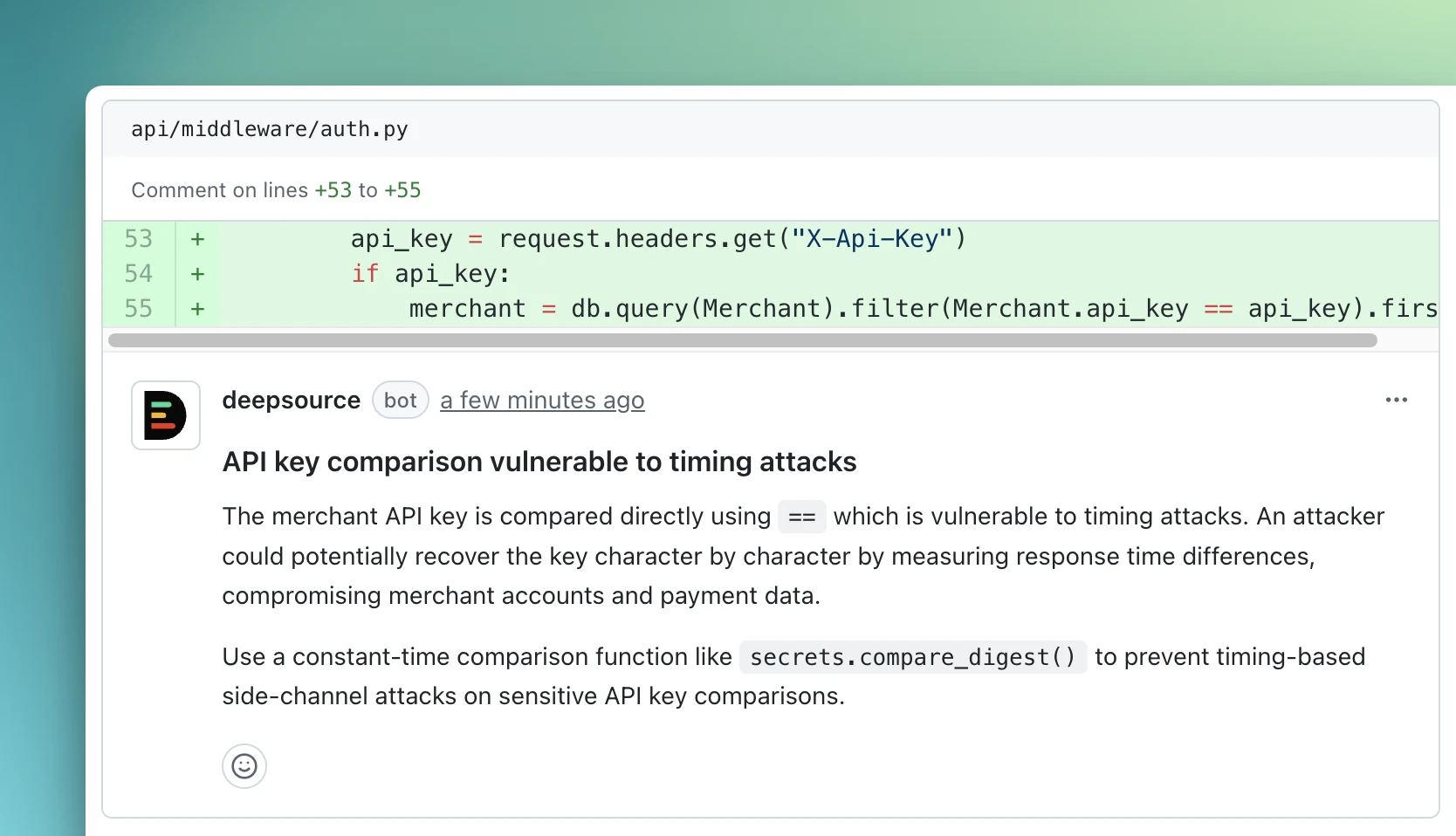
That is more useful than showing a warning and leaving the developer to figure it out. DeepSource covers 20+ analyzers, spanning both code quality metrics and security vulnerabilities.
The platform includes secrets detection and code coverage tracking. Its dashboard provides metrics on code health trends over time, similar to SonarQube but with a cleaner, more modern interface.
DeepSource is used by organizations including NASA and counts strong adoption in the open-source community. A self-hosted deployment option is available for teams that need it.
Compared to Semgrep, DeepSource offers broader code quality coverage but less flexibility for custom rules. You cannot write your own analysis patterns the way you can with Semgrep.
The tool is more of a “batteries included” platform where you use the built-in analyzers rather than authoring your own. The free tier covers public repositories.
Best for: Teams wanting modern code quality and security analysis with AI-powered autofix. License: Commercial (free tier available) Key difference: AI Autofix generates pull requests with code fixes. Covers both code quality and security like SonarQube but with a more modern interface.
8. Codacy#
Codacy uses an aggregation approach: it bundles 30+ analysis engines (including Semgrep itself) behind a single dashboard. This means you get broad language coverage across 40+ languages without configuring individual tools.
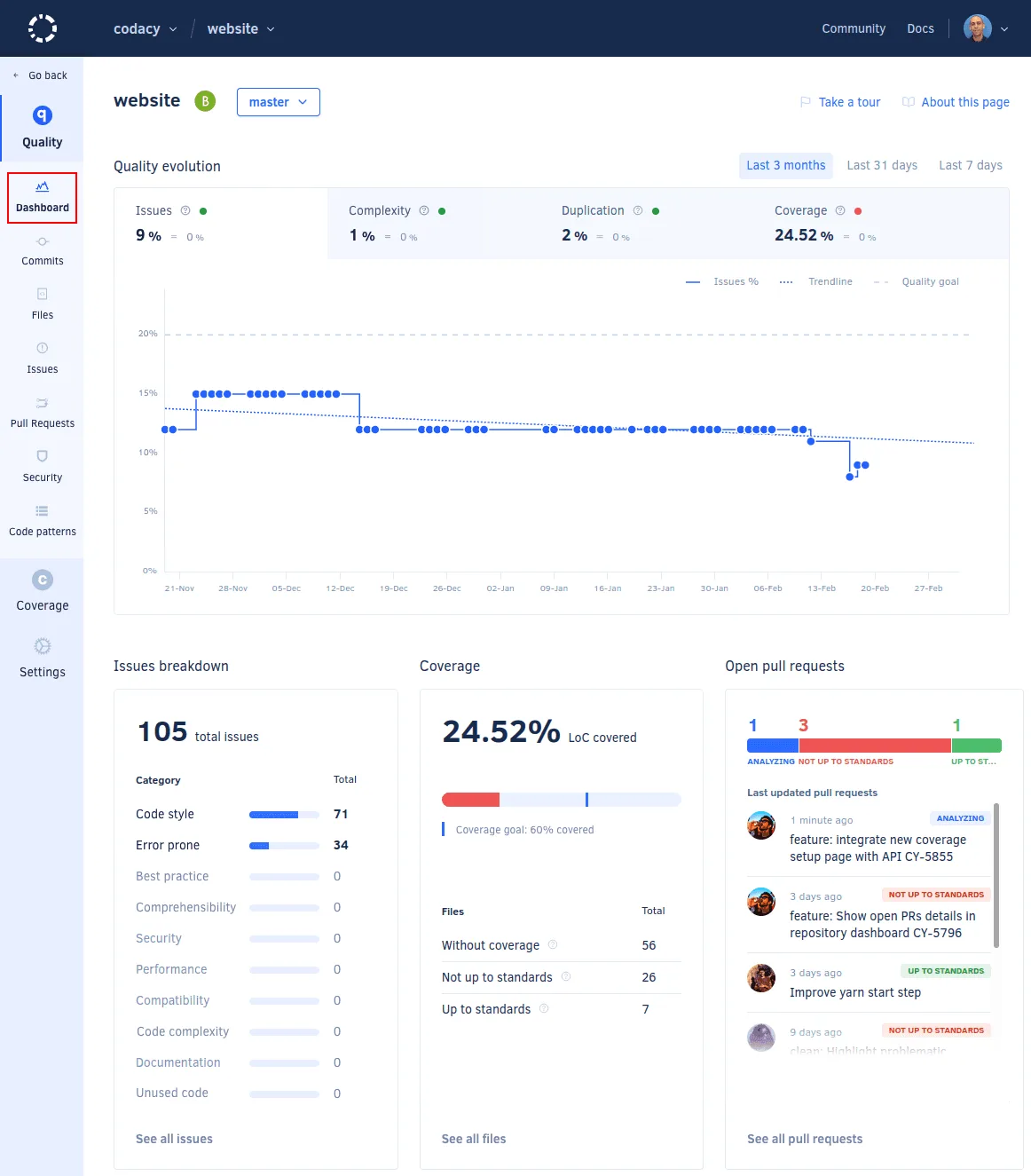
Setup takes minutes through direct Git provider integration with GitHub, GitLab, and Bitbucket.
The platform tracks code quality, security, duplication, complexity, and test coverage. Its AI Reviewer provides automated code review comments on pull requests, and AI guardrails flag potential issues in AI-generated code. Codacy is free for open-source projects.
The aggregation model has a downside. Because Codacy wraps other tools, the depth of analysis depends on which underlying engine handles a given language.
You sometimes get shallower results than you would from running a specialized tool directly. Custom rule authoring is limited compared to what Semgrep offers natively.
But for teams that want a single dashboard without managing multiple tool configurations, Codacy reduces operational friction.
Best for: Teams wanting broad code analysis without configuring multiple individual tools. License: Commercial (free for open-source) Key difference: Aggregates 30+ analysis engines including Semgrep itself. Broader coverage but sometimes shallower than running tools directly.
9. Mend SAST#
Mend SAST is a newer entrant that leans heavily into AI-driven workflows.
Its dual-phase scanning model runs a fast, lightweight scan in the IDE for immediate feedback and a deeper analysis in CI/CD pipelines for thoroughness.
The tool supports 30+ languages and claims 38% better precision than competitors, with a focus on reducing false positives.
The most distinctive feature is agentic SAST via the MCP (Model Context Protocol) . This lets Mend SAST integrate directly with AI-powered development tools like Cursor, Windsurf, GitHub Copilot, and Claude Code.
Findings surface inside the AI coding assistant’s workflow, and remediation happens through the same agentic loop. For teams already working with AI pair programmers, this fits well.
Mend SAST is commercial with no free tier or open-source component. It is part of the broader Mend platform that includes SCA (formerly WhiteSource).
Compared to Semgrep, it offers less transparency in how rules work and no custom rule authoring, but its AI remediation capabilities are more advanced.
Best for: Teams adopting AI-powered development workflows who want SAST integrated into agentic IDEs. License: Commercial Key difference: Agentic SAST via MCP protocol integrates with Cursor, Windsurf, Copilot, and Claude Code. Dual-phase scanning for IDE and CI/CD.
10. Aikido Security#
Aikido bundles SAST, DAST, SCA, CSPM, IaC scanning, secrets detection, and container scanning into one platform used by 50,000+ organizations.

Where Semgrep does security-only SAST, Aikido covers multiple layers of the SDLC behind a single dashboard with flat per-developer pricing that does not scale with team size.
Its AutoTriage reduces alert noise by up to 95% through cross-scanner deduplication, reachability analysis, and context correlation of related findings.
The Zen in-app firewall adds runtime protection in production, blocking attacks without code changes. A free tier is available with no credit card required.
Compared to Semgrep, Aikido trades custom-rule depth for breadth and noise reduction. You cannot author analysis patterns the way you can in Semgrep, but you consolidate many tools into one.
Best for: Teams that want broad SDLC coverage and aggressive noise reduction over custom-rule flexibility. License: Commercial (free tier available) Key difference: All-in-one AppSec platform with 95% noise reduction via AutoTriage and flat per-developer pricing.
11. Endor Labs#
Endor Labs is an AI-native AppSec platform built around function-level reachability analysis.
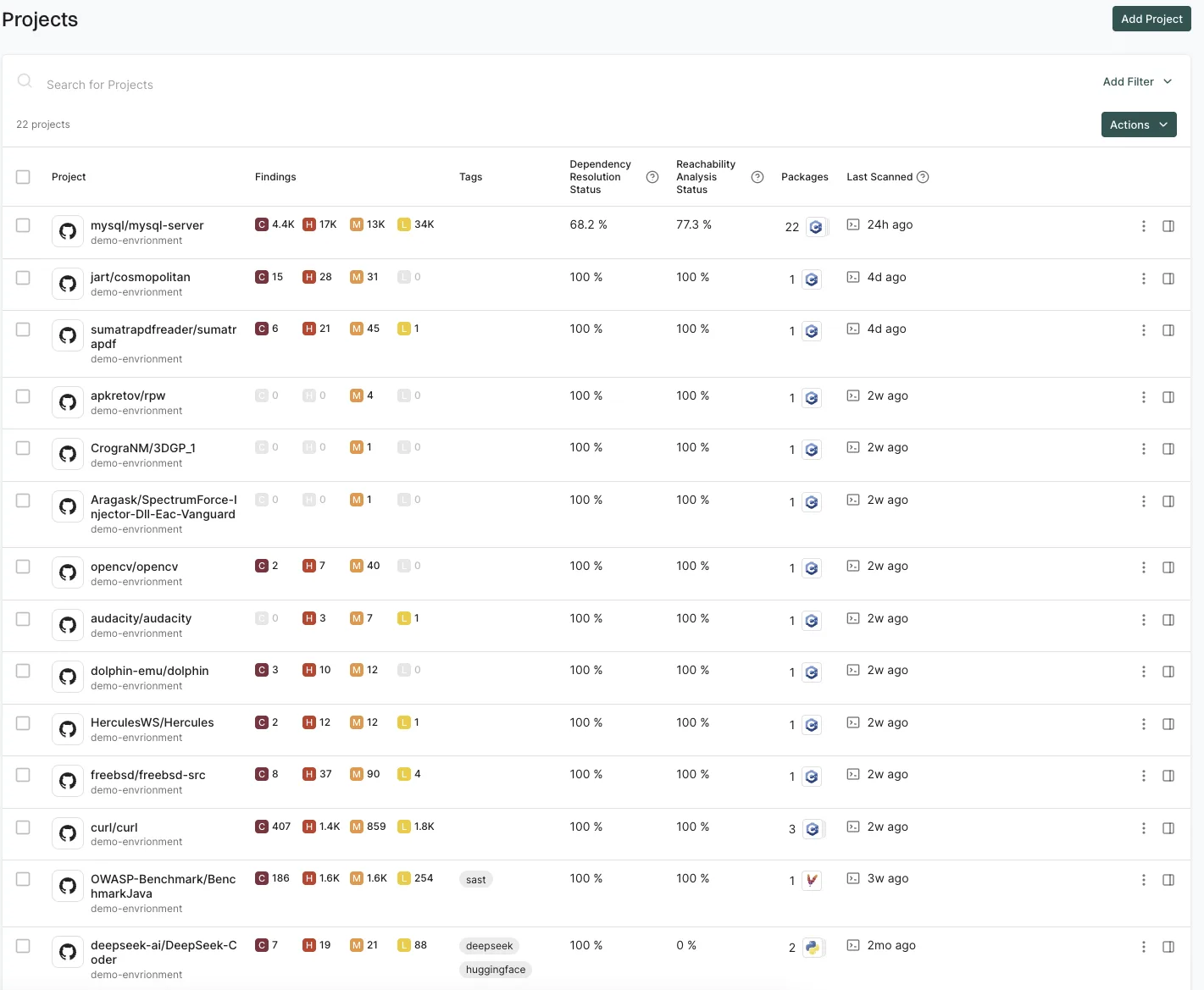
Its core claim is noise reduction. By determining which vulnerabilities in dependencies actually reach running code, it cuts SCA alert noise by up to 97% across 40+ languages.
The platform combines SAST, SCA, container scanning, secrets detection, and malware detection, and counts OpenAI, Cursor, Snowflake, and Atlassian among its users.
For teams whose pain is dependency risk rather than first-party code patterns, Endor Labs solves a different problem than Semgrep. It is strongest where complex dependency graphs make reachability the deciding factor.
Compared to Semgrep, Endor Labs is a broader supply-chain-and-SAST platform rather than a fast pattern-matching engine. It is commercial with no free CLI equivalent.
Best for: Organizations whose primary risk is vulnerable dependencies and who need reachability to prioritize findings. License: Commercial Key difference: Function-level reachability cuts dependency noise up to 97%. Supply-chain-first rather than rule-first.
Feature Comparison#
The table below compares Semgrep against the SAST engines on the same axes. Aikido Security and Endor Labs are broader AppSec platforms covered in their sections above, where the deciding axes are SDLC coverage and noise reduction rather than rule authoring.
| Feature | Semgrep | OpenGrep | SonarQube | Snyk Code | CodeQL | Checkmarx | Fortify | DeepSource | Mend SAST |
|---|---|---|---|---|---|---|---|---|---|
| License | CE (LGPL-2.1) / Commercial Platform | Free (LGPL-2.1) | Free CE/Commercial | Commercial (free tier) | Free (public)/Commercial | Commercial | Commercial | Commercial (free tier) | Commercial |
| Languages | 30+ | 30+ | 35+ | 20+ | 12 | 35+ | 33+ | 20+ | 30+ |
| Custom rules | Core feature | Core feature | Limited | No | Yes (QL) | Yes | Yes | No | No |
| Taint analysis | Semgrep Code (Platform) | Yes (12 langs) | Paid tiers | Yes | Yes | Yes | Yes | No | Yes |
| Code quality | No | No | Core feature | No | No | No | No | Yes | No |
| AI fix suggestions | Assistant | No | AI CodeFix | DeepCode AI | No | Assist | Aviator | Autofix | Agentic SAST |
| Quality gates | No | No | Yes | No | No | No | No | No | No |
| Scan speed | 10s median | 10s median | Minutes | Real-time (IDE) | Minutes | Minutes | Minutes | Fast | IDE fast / CI deep |
| Self-hosted | Yes | Yes | Yes | No | No | Yes | Yes | Yes | No |
When to Stay with Semgrep#
See more comparisons in the AppSec Santa SAST tools hub. Semgrep still makes sense in several scenarios:
- Custom rules are central to your security program. No other tool makes rule authoring this accessible. Rules that look like code mean your developers can write and review security rules without learning a separate query language.
- Scan speed matters most. A 10-second median CI scan means Semgrep fits into pull request pipelines without slowing developers down. Most alternatives take minutes for a full scan.
- You want security-only scanning. Semgrep does not try to be a code quality tool. If your team wants focused security analysis without code smell noise and duplication warnings, Semgrep stays out of the way.
- CE covers your needs. For single-file analysis with community rules , CE is genuinely useful. Many teams run it for years without needing the Platform. And the Platform is free for up to 10 contributors, so small teams can access Semgrep Code’s cross-file analysis at no cost.
- You use Semgrep Supply Chain and Secrets. The Platform’s SCA with reachability analysis and semantic secrets detection create a unified security scanning pipeline that would require multiple separate tools to replicate.
Frequently Asked Questions
What is the best open-source alternative to Semgrep?
What is the best free alternative to Semgrep?
How does Semgrep compare to CodeQL?
Can SonarQube replace Semgrep?
Is Semgrep's AppSec Platform worth paying for?
Which Semgrep alternative has the best AI features?

Written & maintained by
Suphi CankurtEight years on the vendor side of application-security sales — thousands of evaluations and demos. I started AppSec Santa in 2022 to put that insider view to work for buyers. Independent of any vendor, paid by none, and honest about what fits whom.