Security Headers Checker
Analyze any website's HTTP security headers and get an instant grade from A+ to F. Free, fast, and based on OWASP recommendations.
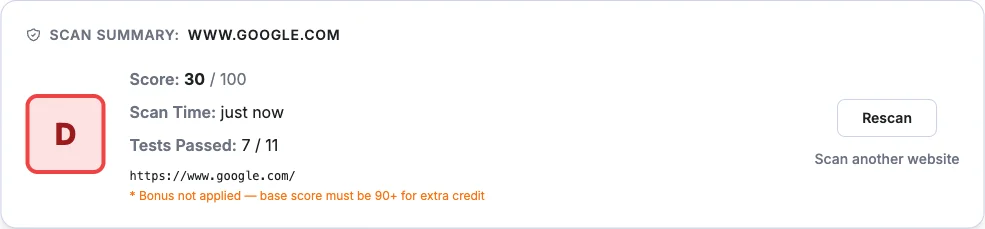
Scan summary: —
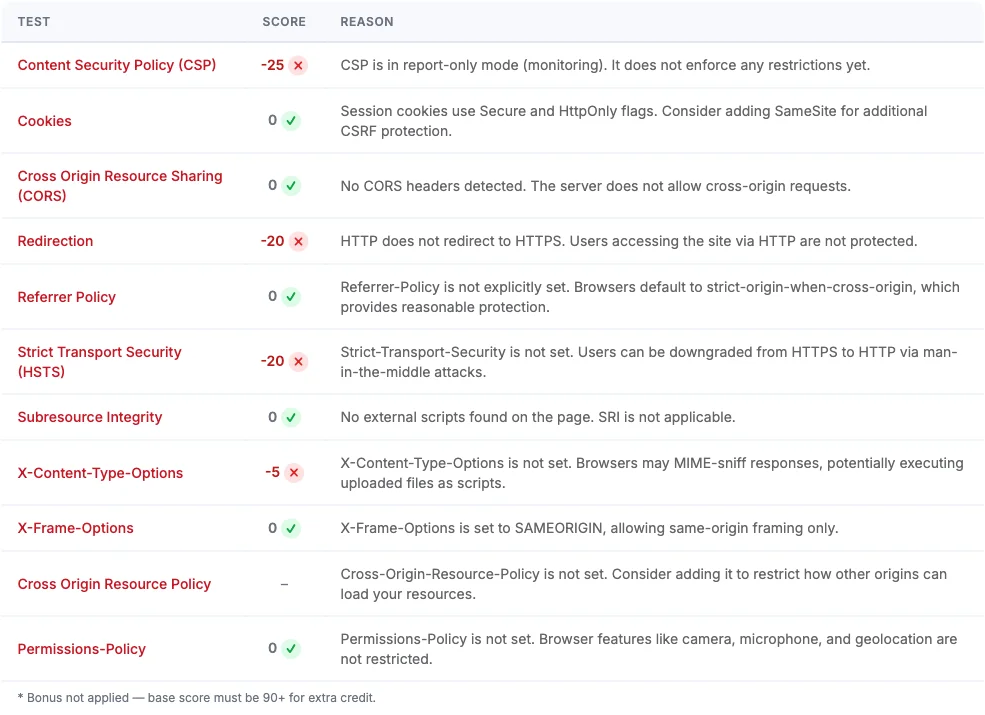
| Test | Score | Reason | Recommendation |
|---|---|---|---|
| * Bonus not applied — base score must be 90+ for extra credit. | |||
What Are HTTP Security Headers?
HTTP security headers are directives sent by a web server that tell browsers how to behave when handling a site's content. They form a critical defense layer against cross-site scripting (XSS), clickjacking, protocol downgrade attacks, and data injection.
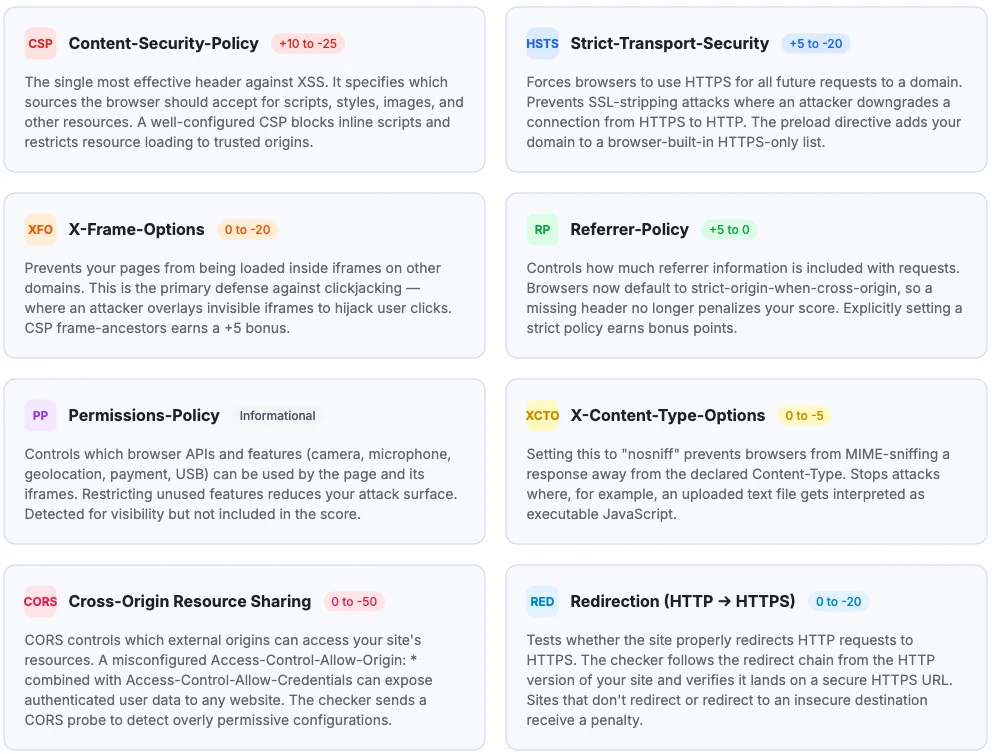
Content-Security-Policy
+10 to -25The single most effective header against XSS. It specifies which sources the browser should accept for scripts, styles, images, and other resources. A well-configured CSP blocks inline scripts and restricts resource loading to trusted origins.
Strict-Transport-Security
+5 to -20Forces browsers to use HTTPS for all future requests to a domain. Prevents SSL-stripping attacks where an attacker downgrades a connection from HTTPS to HTTP. The preload directive adds your domain to a browser-built-in HTTPS-only list.
X-Frame-Options
0 to -20Prevents your pages from being loaded inside iframes on other domains. This is the primary defense against clickjacking — where an attacker overlays invisible iframes to hijack user clicks. CSP frame-ancestors earns a +5 bonus.
Referrer-Policy
+5 to 0Controls how much referrer information is included with requests. Browsers now default to strict-origin-when-cross-origin, so a missing header no longer penalizes your score. Explicitly setting a strict policy earns bonus points.
Permissions-Policy
InformationalControls which browser APIs and features (camera, microphone, geolocation, payment, USB) can be used by the page and its iframes. Restricting unused features reduces your attack surface. Detected for visibility but not included in the score.
X-Content-Type-Options
0 to -5Setting this to "nosniff" prevents browsers from MIME-sniffing a response away from the declared Content-Type. Stops attacks where, for example, an uploaded text file gets interpreted as executable JavaScript.
Cross-Origin Resource Sharing
0 to -50CORS controls which external origins can access your site's resources. A misconfigured Access-Control-Allow-Origin: * combined with Access-Control-Allow-Credentials can expose authenticated user data to any website. The checker sends a CORS probe to detect overly permissive configurations.
Redirection (HTTP → HTTPS)
0 to -20Tests whether the site properly redirects HTTP requests to HTTPS. The checker follows the redirect chain from the HTTP version of your site and verifies it lands on a secure HTTPS URL. Sites that don't redirect or redirect to an insecure destination receive a penalty.
Subresource Integrity
+5 to -50SRI ensures that third-party scripts and stylesheets haven't been tampered with by requiring cryptographic hashes in the integrity attribute. If a CDN or external host is compromised, the browser refuses to execute resources that don't match their expected hash.
Cross-Origin-Resource-Policy
0 to -5Prevents other sites from loading your resources (images, scripts, etc.) without permission. Setting CORP to "same-origin" or "same-site" blocks unauthorized cross-origin embedding, protecting against Spectre-style side-channel attacks and data leaks.
Cross-Origin Isolation (COOP & COEP)
InformationalCOOP (Cross-Origin-Opener-Policy) isolates your window from cross-origin popups. COEP (Cross-Origin-Embedder-Policy) ensures all embedded resources are explicitly shared. Together they enable cross-origin isolation for advanced APIs like SharedArrayBuffer. These are analyzed for visibility but not included in the score.

Scoring Methodology
Scoring follows the Mozilla Observatory algorithm v5. The base score starts at 100 and is adjusted by penalties and bonuses across 11 security tests. Extra credit from well-configured headers (like strict CSP or HSTS preloading) only counts if your base score (before bonuses) is 90 or above.
| Score | Grade | Meaning |
|---|---|---|
| 100+ | A+ | Outstanding — all tests pass with extra credit |
| 95–99 | A | Excellent — near-perfect security headers |
| 90–94 | A | Strong — core headers well configured |
| 85–89 | A- | Very good — minor improvements possible |
| 80–84 | B+ | Good — most headers present |
| 75–79 | B | Above average |
| 70–74 | B | Decent — room for improvement |
| 65–69 | B- | Fair — several improvements needed |
| 60–64 | C+ | Below average |
| 55–59 | C | Mediocre — significant gaps |
| 50–54 | C | Weak — many headers missing |
| 45–49 | C- | Poor configuration |
| 40–44 | D+ | Very poor |
| 35–39 | D | Inadequate security headers |
| 30–34 | D | Bad — most headers missing |
| 25–29 | D- | Very bad |
| 0–24 | F | Critical — virtually no security headers |
Is this security headers checker free?
Yes, completely free with no signup required. You can check as many websites as you want.
How does the security headers checker work?
The checker sends up to 3 requests to the target site: an HTTPS GET to read response headers, an HTTP request to test redirect behavior, and a CORS probe to check cross-origin configuration. It analyzes results against 11 security tests based on the Mozilla Observatory algorithm v5. The scan only reads headers — it does not modify anything on the target site.
Will scanning a website cause any damage?
No. The checker sends up to 3 lightweight HTTP requests — identical to what a normal browser does when visiting a page. It is completely non-intrusive and does not attempt to exploit or modify anything.
What is a good security headers grade?
Grades range from A+ to F across 13 levels. An A+ requires a score of 100 or above, meaning all tests pass with extra credit from well-configured headers. Scores of 90–99 earn an A. Anything below C (under 55) indicates significant gaps that should be addressed.
Why are HTTP security headers important?
HTTP security headers instruct browsers to enable built-in security features like XSS filters, clickjacking protection, and HTTPS enforcement. They are a low-effort, high-impact defense layer that takes minutes to configure but protects against entire categories of attacks.
How does scoring compare to Mozilla Observatory?
Our scoring uses the Observatory algorithm v5, starting at 100 and applying penalties and bonuses for each test. We also include additional checks like SRI, CORS, and cookie security analysis with CSRF token detection. Missing Referrer-Policy no longer penalizes your score (browsers default to a safe policy), X-Frame-Options SAMEORIGIN earns a bonus, and cookie penalties are stricter for missing Secure and HttpOnly flags. The 13-grade scale (A+ through F) matches Observatory's grading system.
Need a Full DAST Scanner?
Security headers are just one piece of the puzzle. Dynamic Application Security Testing (DAST) tools crawl and attack your web app to find vulnerabilities like SQL injection, XSS, and authentication flaws.
Compare DAST Tools