


Seal Security is a remediation platform for open-source vulnerabilities, and a different approach to SCA than the scanners it works alongside. Rather than opening a ticket for each CVE, Seal fixes the vulnerability in place by swapping the affected library for a sealed package.
A sealed package is a drop-in replacement for the public version you already run, built from the same source with the security fix backported in. The API, behavior, and dependencies are preserved, so the vulnerability is gone without a version upgrade or breaking change.
Seal was founded by three software vulnerability experts with more than 30 years of combined experience. It reports customers including PayPal, BigID, Kiteworks, and Censys, and holds SOC 2 Type II and ISO 27001 certifications.
Seal raised a $13M Series A in July 2025 led by Vertex Israel, bringing total funding to $20M.
What is Seal Security?
Seal Security fixes open-source CVEs in place. It replaces a vulnerable library with a sealed package built from the same version with the fix backported in, so no upgrade is needed.
Most SCA tools tell you a dependency is vulnerable and leave the fix to you. The catch is that the fix is often a major-version bump, and the CVE frequently sits in a transitive dependency you do not control directly.
Seal targets that gap. It backports fixes for high and critical vulnerabilities by default, with medium and low coverage available through your account team.
A sealed version can still carry open CVEs. Some are disputed, some were disclosed after it shipped, and some cannot be closed without a behavior change. That last group moves to a private version.
Three ideas hold the platform together:
What are Seal Security’s key features?
Key capabilities
| Feature | Details |
|---|---|
| Remediation approach | Backported sealed packages — drop-in replacements applied in place, no upgrade required |
| Dependency scope | Direct and transitive application dependencies |
| Application ecosystems | JavaScript, Java, Python, Go, Ruby, C/C++, C#, PHP |
| Package managers | npm, pnpm, Yarn, Maven, Gradle, PyPI, Poetry, Composer, Bundler, NuGet |
| OS and container coverage | APK, DEB, RPM packages; Alpine, Debian, Ubuntu, CentOS, RHEL base images, including EOL distros |
| SLA | 72 hours for critical and high CVEs |
| Validation | Vulnerability-research review, automated testing, AI validation, build-time test run |
| Provenance | Cryptographic signatures, PDF and VEX attestations, viewable code diffs; SBOMs (SPDX or CycloneDX) on sealed images |
| Compliance certs | SOC 2 Type II, ISO 27001 |
Backported patching, no upgrade
Seal applies only the minimal changes needed to close a vulnerability, then rebuilds the package from the same origin release. The API and behavior are preserved, so your own code does not change.
The sealed build keeps that base version and adds a suffix. On npm, ejs@2.7.4 becomes ejs@2.7.4-sp1; Maven and PyPI use +sp1. Each iteration is cumulative.
This is aimed at the two cases scanners handle worst: transitive dependencies you cannot upgrade directly, and libraries a scanner marks “no fix available.” Seal patches both in place.
Since remediation happens at build time, your existing test suite runs against the sealed version. That gives you an extra check that the fix did not break anything before it ships.
OS, container, and EOL coverage
Seal does not stop at application dependencies. Seal OS patches Linux packages and language runtimes in place through the Seal CLI, on servers and inside containers.
Seal Base Images delivers clean container bases derived from public images, and Seal My Container produces a sealed copy of your private images pushed back to your own registry. Both cover out-of-support distributions like CentOS and RHEL 6, where upstream fixes have stopped.
Every sealed image ships with an SBOM in SPDX or CycloneDX format and can carry patch attestations and cryptographic signatures for audit workflows.
Review, testing, and provenance
Each sealed package goes through review by Seal’s vulnerability research team, automated testing, and an AI validation step before release. The goal is a fix that closes the CVE without introducing a regression.
Every artifact is cryptographically signed and ships with an attestation listing exactly which vulnerabilities it fixes. You can view the code diff between any sealed package and its origin version, so the change is auditable rather than opaque.
Fits your existing scanners
Seal can act as your primary scanner, or sit behind the ones you already run. It ingests scan results from Snyk, Black Duck, and GitHub Advanced Security, then patches the packages those tools flag.
Fixing is only half of it. After a seal fix run, the Seal CLI syncs state back into eight scanners so they stop alerting on what Seal already closed.
Snyk, Checkmarx, Black Duck, GHAS, Ox Security, and SentinelOne take that update through their APIs, so the dashboard clears immediately.
Grype, Cycode, and Snyk in local mode work differently. The CLI writes an ignore entry into a policy file (.grype.yaml, .cycode/config.yaml, .snyk), which only suppresses the finding once you commit the file and the next scan runs.
For scanners your own customers run against your product, Seal publishes a vulnerability feed and per-package VEX records. Trivy reads the feed natively across ecosystems; Wiz reads it too, but only for OS-layer packages.
For scanners that do not read the feed, a renaming option changes the package name so it no longer matches the scanner’s database.
What does Seal Security integrate with?
Seal connects to source control and CI/CD, and syncs remediation state into the scanners and registries you already run.
 GitHub
 GitLab
 Azure DevOps
 JFrog
JFrog Snyk
Snyk Black Duck
GitHub Advanced Security
Black Duck
GitHub Advanced Security Checkmarx
 Wiz
Wiz Trivy
TrivyHow much does Seal Security cost?
Seal does not publish list prices. Pricing depends on the scope of coverage, the ecosystems you need, deployment requirements, and support level.
Three plans are listed on seal.security without dollar amounts:
- Starter — a scoped pilot with guided setup to validate outcomes on specific apps or packages, with no commitment.
- Business — ongoing remediation for selected apps and environments, with full access to the Seal patch catalogue across supported ecosystems.
- Scale — unlimited coverage across apps, teams, and environments for enterprise standardization, with rollout support and governance options.
Per AppSec Santa policy, I do not publish dollar amounts unless the vendor displays them publicly, and Seal does not. The site does offer five free patches on sign-up if you want to test the mechanics before a sales conversation.
How do I get started with Seal Security?
- Sign in and set up access — Create an account, add users and roles (SAML SSO is supported), and generate tokens. The onboarding wizard walks a new tenant through CLI access and a first project import.
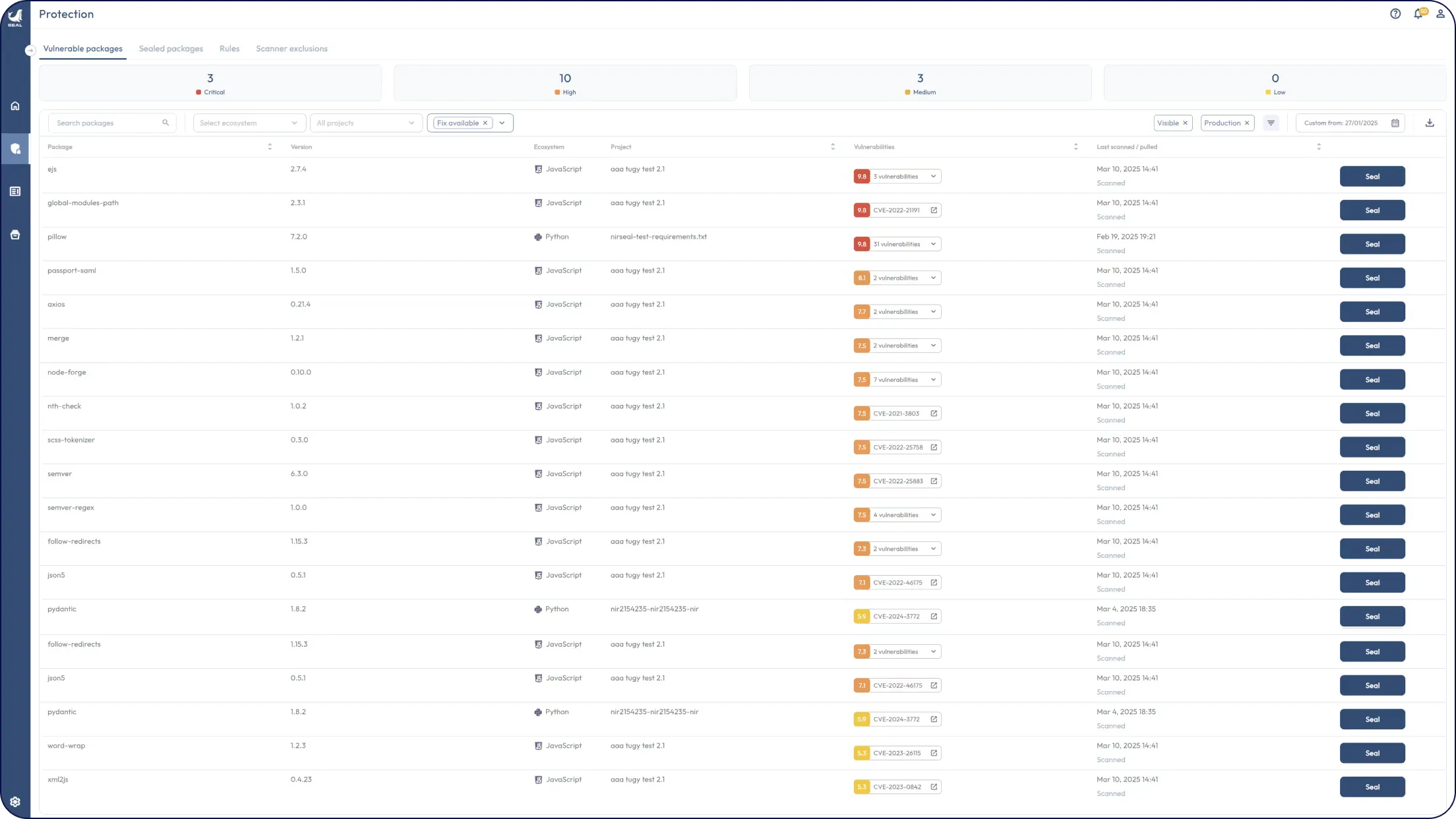
- Connect your environment — Pick one of four discovery modes: the Seal CLI in your CI/CD pipeline, a direct source-control connection, the Seal Artifact Server as a remote, or a one-shot manifest upload. The CLI path works without any source-code access.
- Discover vulnerable packages — Let Seal scan your dependencies, or ingest findings from Snyk, Black Duck, or GitHub Advanced Security into the same view.
- Seal and ship — Apply a sealing rule or CLI flag, and the build swaps vulnerable libraries for their sealed versions. Your existing tests run, then you build, test, and deploy as usual.
Seal also ships an AI agent for natural-language interaction with the platform and a Reports Manager for enterprise reporting, both layered on the same remediation engine.
When to use Seal Security
Seal makes sense when your scanner backlog is full of CVEs you cannot easily fix: transitive dependencies, EOL runtimes, and libraries marked “no fix available.”
It fits teams under a compliance deadline. If a FedRAMP, PCI DSS 4.0, or DORA audit needs a clean scan and the only upstream fix is a risky upgrade, backported patches close the finding without touching your roadmap.
It also suits organizations where security needs to patch independently of engineering. Seal lets a security team remediate open-source risk in parallel, rather than filing upgrade tickets and waiting on developer cycles.
It is a weaker fit if your dependencies are easy to keep current, if you only want scanning and alerting rather than remediation, or if your ecosystems fall outside the supported languages and distributions.
What are alternatives to Seal Security?
Seal occupies a narrower slice than a full SCA platform, so most alternatives overlap on detection rather than in-place patching.
- Snyk — developer-first SCA with automated fix pull requests. Better fit if you want detection plus guided upgrades in one tool; Snyk fixes through upgrades, transitive pinning, or its own precision patches.
- Socket
— supply-chain security built around malicious-package and behavior detection. Its
socket fixcommand does clear CVEs, but by upgrading dependencies locally or through automated pull requests rather than backporting into the version you run. - Endor Labs — SCA built around reachability analysis to cut false positives. Better fit if the goal is prioritizing which CVEs matter before you fix them.
For the full field, browse every active SCA tool reviewed on AppSec Santa.
Disclosure
Seal Security was submitted to AppSec Santa by Amit Agam of Seal Security. I received no compensation and the vendor had no editorial control over this page.