

Three approaches, one goal#
SAST vs DAST: SAST scans source code without running it (white-box, earliest feedback, most false positives); DAST attacks the running app from outside (black-box, proves exploitability); IAST runs an agent inside the app during tests (grey-box, fewest false positives).
Run SAST and DAST as the baseline, and add IAST only with strong test coverage.
No single method catches everything, which is why these three exist. They split along one axis — what each can actually see:
- SAST reads your source code and finds flaws before the application runs.
- DAST attacks the running application from the outside, the way an attacker would.
- IAST runs an agent inside the application during testing, seeing both code and runtime.
The differences are not tuning debt that a better engine will erase; they are fixed properties of each technique. A SQL injection SAST flags in code is one DAST confirms is exploitable, and IAST pins to the exact line. None of them, though, reliably catches a broken access-control flaw.
This guide compares the three head-to-head: how they differ, their strengths and weaknesses, and which to run when. Two adjacent methods round out a full program: SCA for dependency CVEs and RASP for runtime blocking, both linked where they fit.
What is SAST?#
SAST (Static Application Security Testing) reads your source code without running it — white-box analysis. It traces data from untrusted inputs (sources) to dangerous operations (sinks), catching injection, hardcoded secrets, and weak crypto before the app is ever deployed.
Its strength is early, full-codebase coverage: it sees code paths no test ever runs. The weakness is the flip side: with no runtime context it misses configuration, authentication, and business-logic flaws, and carries the highest false-positive rate of the three. See what is SAST for the mechanics.
What is DAST?#
DAST (Dynamic Application Security Testing) attacks the running application from the outside — black-box, no source code. It crawls the app and fires payloads like ' OR 1=1--, so a finding is a behavior it actually reproduced, not a guess.
Its strength is proof of exploitability, plus the runtime and configuration issues SAST cannot see. Its weakness is coverage: it only tests what it can crawl, so SPAs, unlinked endpoints, and authenticated flows slip through unless you feed it the API schema. See what is DAST for the mechanics.
What is IAST?#
IAST (Interactive Application Security Testing) runs an agent inside the application during testing — grey-box. It watches untrusted input flow through the executing code, reporting each finding with the exact file, line, and runtime proof the path is real.
Its strength is precision: code location plus runtime confirmation give it the lowest false-positive rate of the three.
The weakness is that it only sees code your tests exercise, and agents exist only for some runtimes — Java and .NET strong, Go and Rust weak. See what is IAST for the mechanics, or IAST vs DAST for the runtime head-to-head.
Side-by-side comparison#
The table below puts all three methods next to each other across the dimensions that decide how they differ.
| SAST | DAST | IAST | |
|---|---|---|---|
| Approach | White-box code | Black-box app | Grey-box runtime |
| Needs source? | Yes | No | Agent in runtime |
| Needs running app? | No | Yes | Yes, under tests |
| Where it runs | IDE, CI | Staging/prod | QA/integration tests |
| Speed | Minutes | Hours | Test-suite length |
| Points to | File + line | URL + parameter | File + line + stack |
| False positives | Higher | Lower | Lowest |
| Coverage bound | Full codebase | Crawled pages | Tested paths |
| What only it does | Sees un-run code | Proves exploitability | Confirms reachability |
No column is all green. Each owns one job the others cannot do, and that bottom row is why the three exist as separate categories rather than one tool.
What does each approach detect?#
SAST and IAST detect code-level flaws like SQL injection and XSS; DAST owns server misconfiguration and missing headers; none of the three detects vulnerable dependencies or business-logic flaws. The table below maps each vulnerability type to the method that catches it.
| Vulnerability type | SAST | DAST | IAST |
|---|---|---|---|
| SQL injection | Good | Good | Excellent |
| Cross-site scripting | Good | Good | Excellent |
| Stored / second-order XSS | Moderate | If crawled | Good |
| Server misconfiguration | — | Good | Moderate |
| Missing security headers | — | Good | — |
| Broken access control / IDOR | — | Scripted only | Partial |
| Hardcoded secrets | Good | — | Moderate |
| Insecure deserialization | Good | Moderate | Good |
| Vulnerable dependencies | — | — | — |
| Business logic flaws | — | — | — |
| API issues (BOLA) | Moderate | With spec | Good |
Two rows carry the message. None of the three touches a known CVE in a dependency — that is SCA ’s job, run beside SAST in CI (see SAST vs SCA ).
Business logic and broken access control are blank across the board. No scanner reasons about intended behavior, and that gap is the subject of the next section.
The hard row: broken access control#
The weakest row in that table is the one that matters most. Broken access control is the OWASP Top 10’s #1 risk, yet no scanner gives a reliable signal for it — a 200 OK with valid JSON looks identical to a breach.
That is true, but “do threat modeling” is only half the answer. Part of authorization is machine-checkable, and the useful decision is which part you wire into CI versus which part stays human.
Multi-role DAST diffing replays a request as user A and user B, then flags identical or successful cross-user responses — that catches IDOR and BOLA regressions (OWASP WSTG-ATHZ-02/04 ).
Policy-as-code tests (OPA, Cedar, OpenFGA) cover the other slice: they prove your stated authorization rules behave as written, gated in CI. They test the policy you wrote, not whether that policy is the right one.
What stays human is business-context authorization: whether a user should reach an object given role, ownership, and workflow state. No scanner has an oracle for “should,” so that part lives in threat modeling and manual testing — not in a tool you can buy.
How do you handle false positives and noise?#
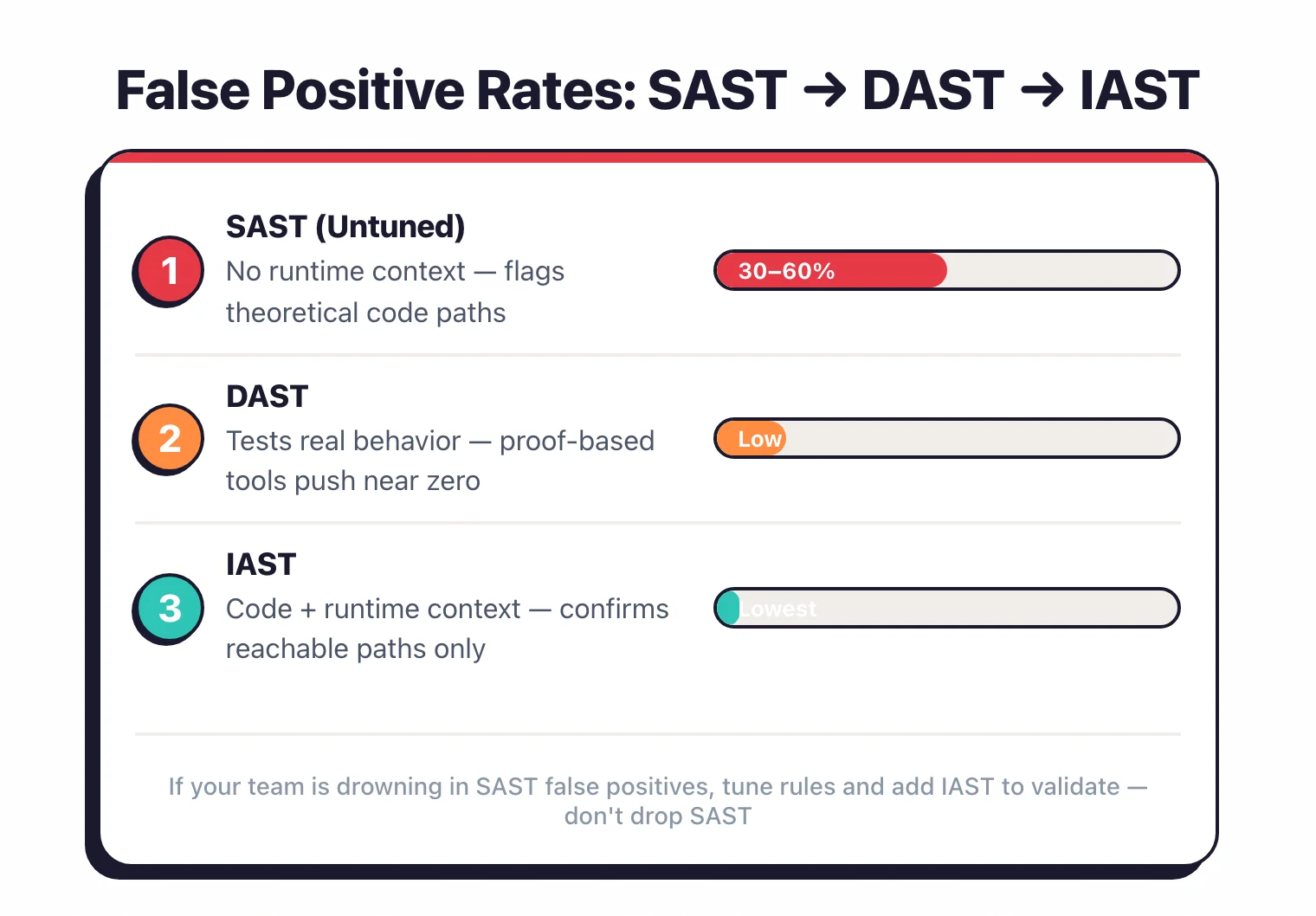
Of the three methods, SAST produces the most false positives, DAST fewer, and IAST the fewest. The reason it matters: developers flooded with noise stop acting on findings.
SAST sits highest because it analyzes code statically, without knowing whether a code path is actually reachable at runtime or whether a framework layer sanitizes the input.
Enterprise SAST tools use deep data flow analysis to reduce this, but tuning is still required.
Untuned SAST false-positive rates run high, often a majority of the raw findings, and vary enormously by tool and language. The number that matters is the tuned rate, which good rule-sets and per-framework customization bring down substantially.
DAST has a lower false positive rate because it tests real application behavior.
If a DAST tool reports a SQL injection, it means the application actually returned a suspicious response to a malicious input.
Some tools, like Invicti , use proof-based scanning to automatically confirm vulnerabilities, which pushes the false positive rate close to zero for confirmed findings (Invicti, vendor-reported).
IAST has the lowest false positive rate. The agent watches untrusted data flow through actual code execution paths, so it knows both that a vulnerability exists in the code and that the vulnerable code path is triggered by real requests.
Contrast Security reports its IAST approach produces materially fewer false positives than traditional SAST or DAST (Contrast, vendor-reported).
If your team is drowning in false positives from SAST, the answer is not to drop SAST. Tune your rules, write custom rules for your frameworks, and consider adding IAST to validate findings.
For specific techniques and workflows, see my guide to reducing SAST false positives .
Which to run when#
Run SAST and DAST as the mandatory baseline, add SCA alongside SAST for dependency CVEs, and treat IAST as a conditional add-on. Sequencing matters as much as selection: which methods are mandatory, which are conditional, and what reorders the list.
Start with SAST and DAST. SAST reads code that never runs in a test; DAST exercises the live system and proves what is actually exploitable. Run SAST in CI on every pull request, DAST against staging.
Run SCA alongside SAST as well — dependency CVEs are its job, not SAST’s or DAST’s.
IAST is a conditional add-on, not a substitute. It earns its agent only when two things hold: strong automated test coverage (its visibility equals your test coverage), and a well-supported runtime — Java and .NET are strong, Go, Rust, and serverless weak.
My rule of thumb: below roughly 60-70% integration-test coverage on the security-relevant paths, the silent false negatives outweigh the low-false-positive benefit. Invest in tests or manual review first.
A few axes reorder it. A server-rendered monolith is DAST’s best case; a SPA, REST, or GraphQL app is its worst — feed the scanner your OpenAPI or GraphQL schema rather than relying on the crawler.
Microservices scale better with per-service SAST and SCA in each repo’s CI than with one monolithic DAST run.
One caution on overlap: two methods finding the same vulnerability class is not redundancy. SAST flags un-executed paths IAST never reaches; IAST confirms the executed ones at near-zero false positives. The productive pattern is SAST-finds, IAST-confirms — wire complementary tools into a pipeline rather than cutting one.
Why findings don’t get fixed: placement beats method#
Most comparisons stop at detection. The harder question is remediation, and there the deciding variable is rarely which method found a flaw — it is where the finding surfaces.
The cleanest evidence: two organizations ran the identical scanner, filters, and critical findings, yet one fixed 63% of them and the other 13%. The tooling was identical; the delivery was not. (Semgrep 2025, 50,000+ repos; vendor data, top-performer cohort.)
A finding raised in the pull request, while the change is still fresh, gets fixed in a mean 4.8 days, versus 43 for the same finding caught in a backlog scan. Left in a dashboard it ages, and findings open past 90 days rarely get closed.
The trap: hard-blocking every pull request on every finding is the noise that gets scanners disabled. The fix is specific. Surface findings in the pull request, but make it diff-aware and non-blocking: comment rather than block, and gate on what the change introduced, not the backlog behind it.
None of it pays off without an owner. Edgescan’s 2025 data put 45.4% of enterprise vulnerabilities still unpatched at 12 months. A scanner upgrade does not move that number; a named owner and an SLA do.
Tool recommendations by category#
The right tool depends on your stack and budget, and I keep the live shortlists on the category pages rather than freezing them here. Browse SAST , DAST , SCA , IAST , and RASP for head-to-head picks, or the open-source SAST and free DAST guides for no-cost stacks.
What it costs#
Pricing tracks deployment shape more than testing technique: SAST spans free open-source engines to enterprise platforms, DAST is mostly commercial because it has to host or proxy traffic, and IAST is almost entirely contact-sales. For the per-category breakdown and budget benchmarks, see the AppSec pricing guide .