
- SonarLint and SonarQube are complementary, not competitors. SonarLint (rebranded as SonarQube for IDE) runs in the developer’s editor; SonarQube Server runs in CI to enforce a quality gate across all branches and pull requests.
- Connected mode links SonarLint to a SonarQube Server or SonarQube Cloud project so the IDE applies the same rules and the same exclusions developers will hit in PR review. This kills ‘works on my machine’ findings before push.
- SonarLint is fully free under LGPL-3.0 and supports VS Code, IntelliJ (and other JetBrains IDEs), Eclipse, and Visual Studio. SonarQube Server has a free Community Build plus paid Developer, Enterprise, and Data Center editions.
- Standalone SonarLint covers 20+ languages with a curated subset of rules. Connected mode unlocks the full SonarQube ruleset, taint analysis (in commercial editions), and project-specific exclusions.
- Most teams run both — SonarLint in every developer IDE, SonarQube Server in CI as the merge gate. Picking ‘one or the other’ is rare and usually a misread of the workflow.
SonarLint vs SonarQube: Which Is Better?#
SonarLint vs SonarQube is not a competitive matchup. SonarLint is the IDE plugin; SonarQube Server is the central CI platform. They work together via connected mode, and most teams run both.
Naming note: Sonar rebranded SonarLint as “SonarQube for IDE” on October 29, 2024. Most marketplaces and developers still call it SonarLint, so I use both names interchangeably below.
The framing matters. SonarLint is the IDE-side scanner that catches issues while developers are still writing the code. SonarQube Server is the CI-side scanner that enforces a quality gate on pull requests across every branch.
Connected mode links the two so a finding that flags in the IDE is the same finding that would block the PR. No surprises on push.
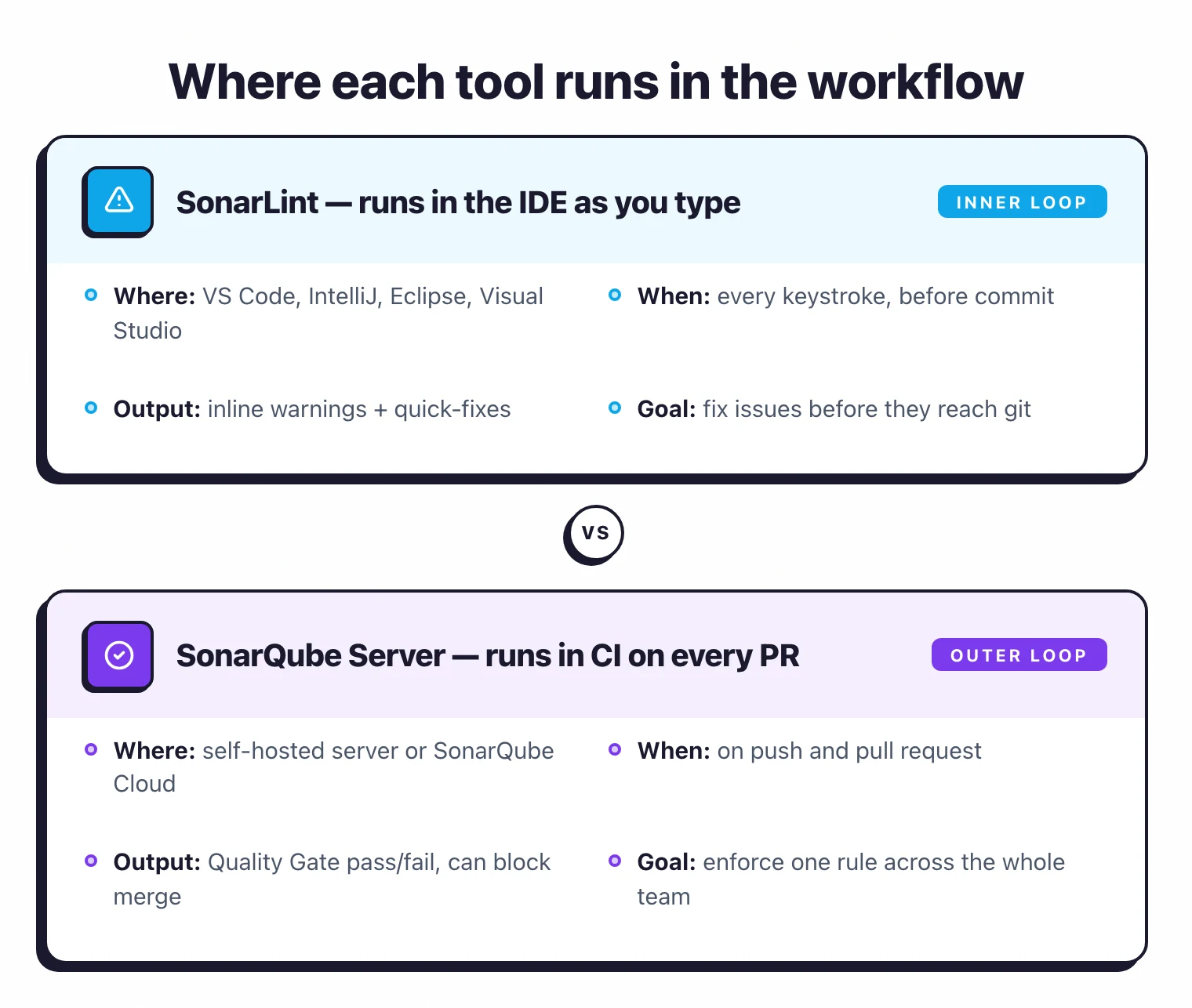 SonarLint and SonarQube cover different positions in the same workflow — inner loop in the IDE, outer loop in CI.
If a team is choosing one and asking which to skip, the answer is almost always to run both. The exception is solo developers or tiny teams without a CI server yet. SonarLint alone is enough there until a CI gate becomes worthwhile.
Key Differences#
| Dimension | SonarLint (SonarQube for IDE) | SonarQube Server |
|---|---|---|
| Where it runs | Inside the developer’s IDE | On a CI server or self-hosted instance |
| License | LGPL-3.0 (fully open source) | LGPL-3.0 Community Build + commercial editions |
| Languages | 20+ | 24 (Community Build); 60+ across all editions (Enterprise unlocks ABAP, Apex, COBOL, PL/I, RPG, VB6) |
| Scope of analysis | File / project as developer types | Whole codebase, all branches, PRs |
| Quality gate | Inline warnings only | Server-side enforced gate that can block PRs |
| Connected mode | Pulls rules from a SonarQube Server / Cloud project | Hosts the rules and quality profile |
| Best for | Inner-loop developer feedback | Outer-loop CI gate, reporting, compliance |
Head-to-Head#
Roles in the workflow#
SonarLint is the inner-loop scanner. It runs inside VS Code, IntelliJ, Eclipse, and Visual Studio, flagging issues as the developer types so most defects get fixed before they reach commit.
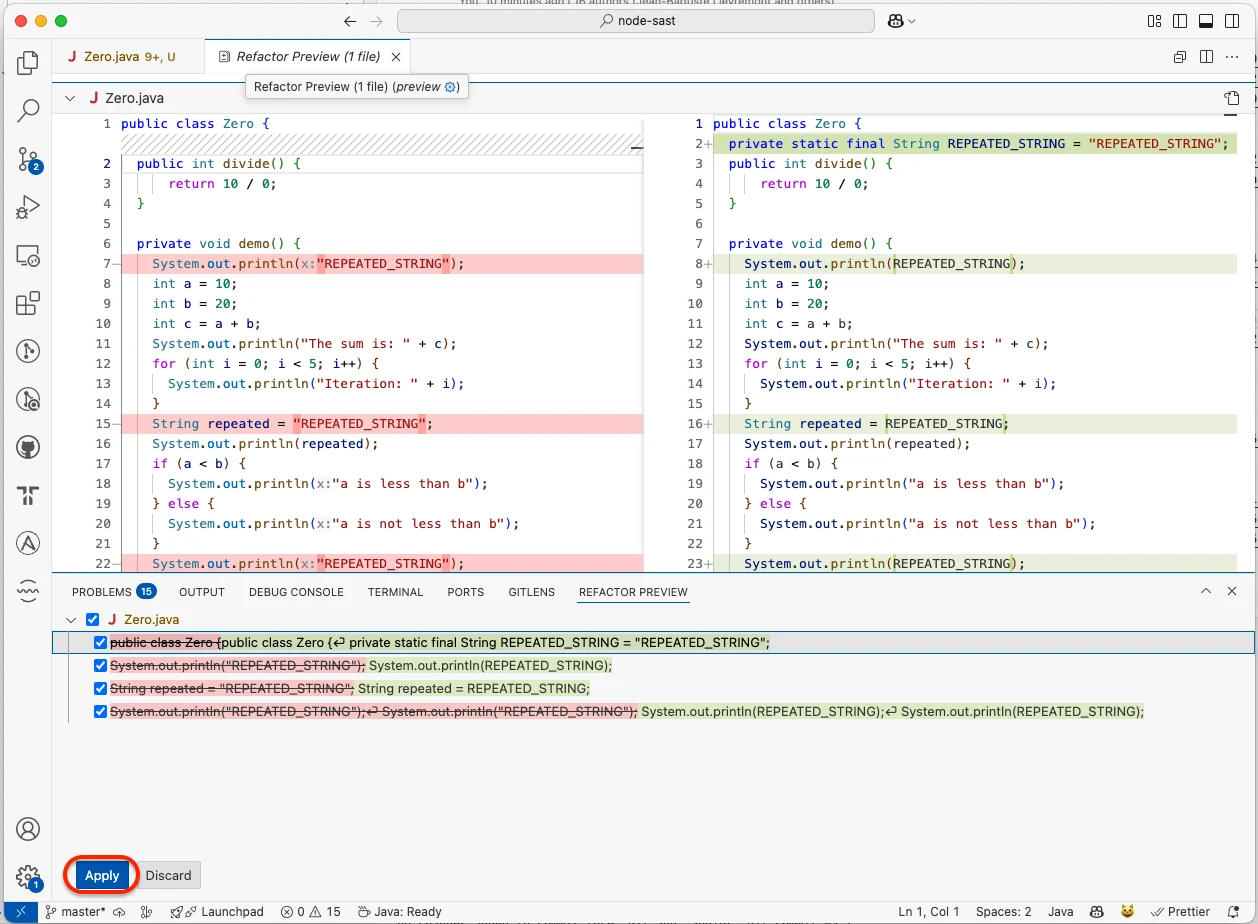 SonarLint surfacing a SonarQube rule violation in VS Code with an Apply quick-fix — the inner-loop feedback developers see before they ever commit.
SonarQube Server is the outer-loop gate. It runs on every push and PR across all branches, producing a pass/fail quality-gate verdict that CI can use to block merges.
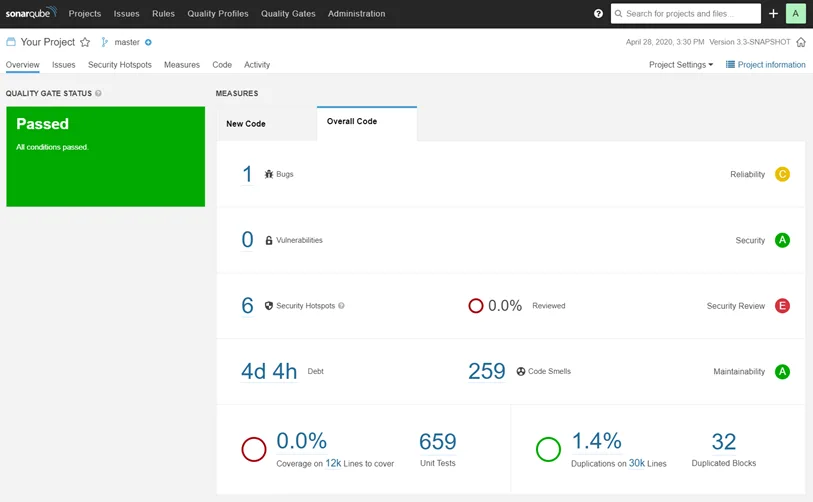 SonarQube Server’s project overview — the Quality Gate badge in the top-left is what CI reads to pass or block the merge.
The two cover different stages of the same workflow. New teams often mistake them for competitors, which is where most of the confusion starts.
Connected mode#
Connected mode is the link that makes running SonarLint and SonarQube together pay off. When the IDE is connected to a SonarQube project:
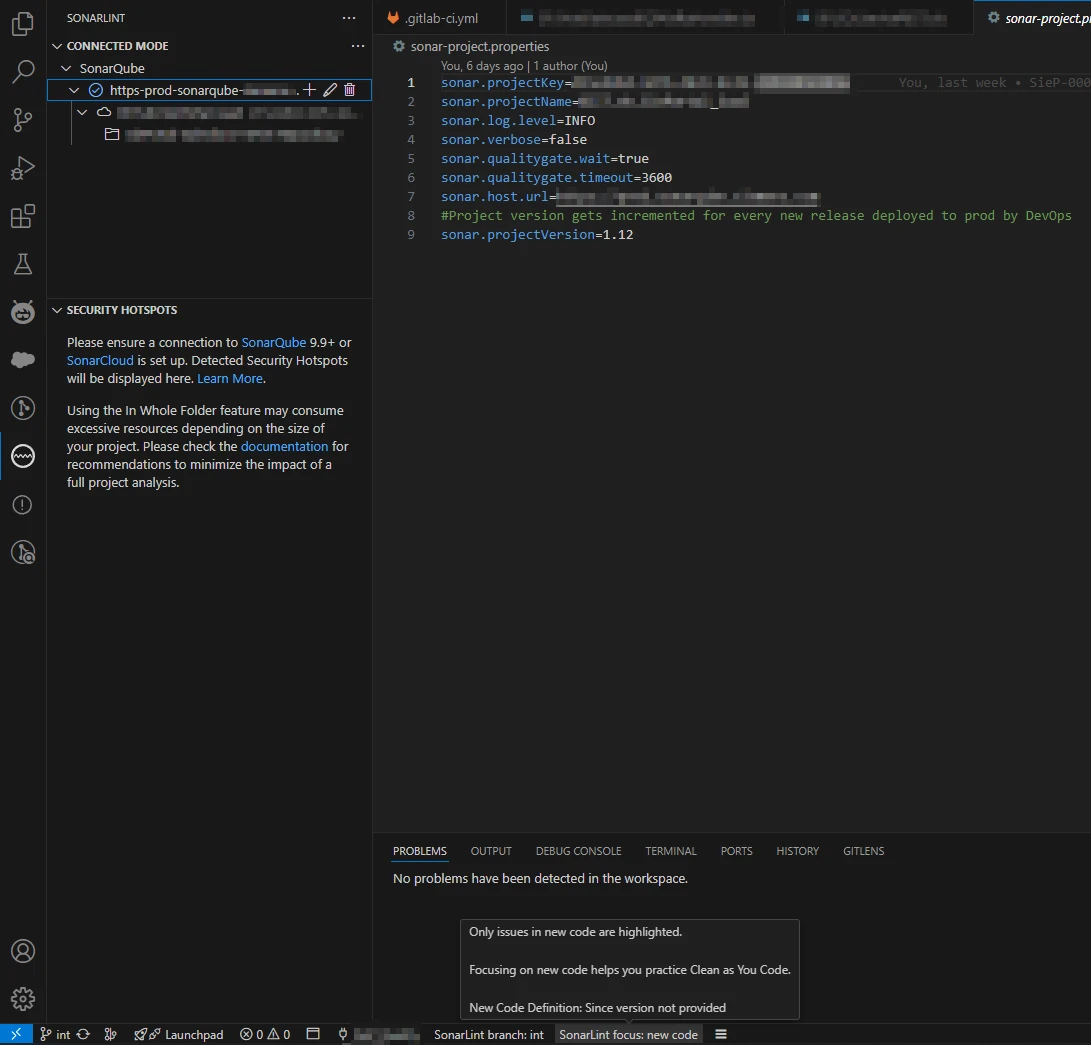 Connected mode in VS Code — the IDE binds to a SonarQube project and pulls its rules and quality profile, so local findings match the server’s.
- The same ruleset (quality profile) applies locally and on the server.
- Exclusions, hotspot disables, and false-positive marks sync between the two.
- Taint analysis findings (security flow analysis) from the server surface inline in the IDE for supported commercial tiers.
- The team gets one source of truth for rules instead of two divergent local configs.
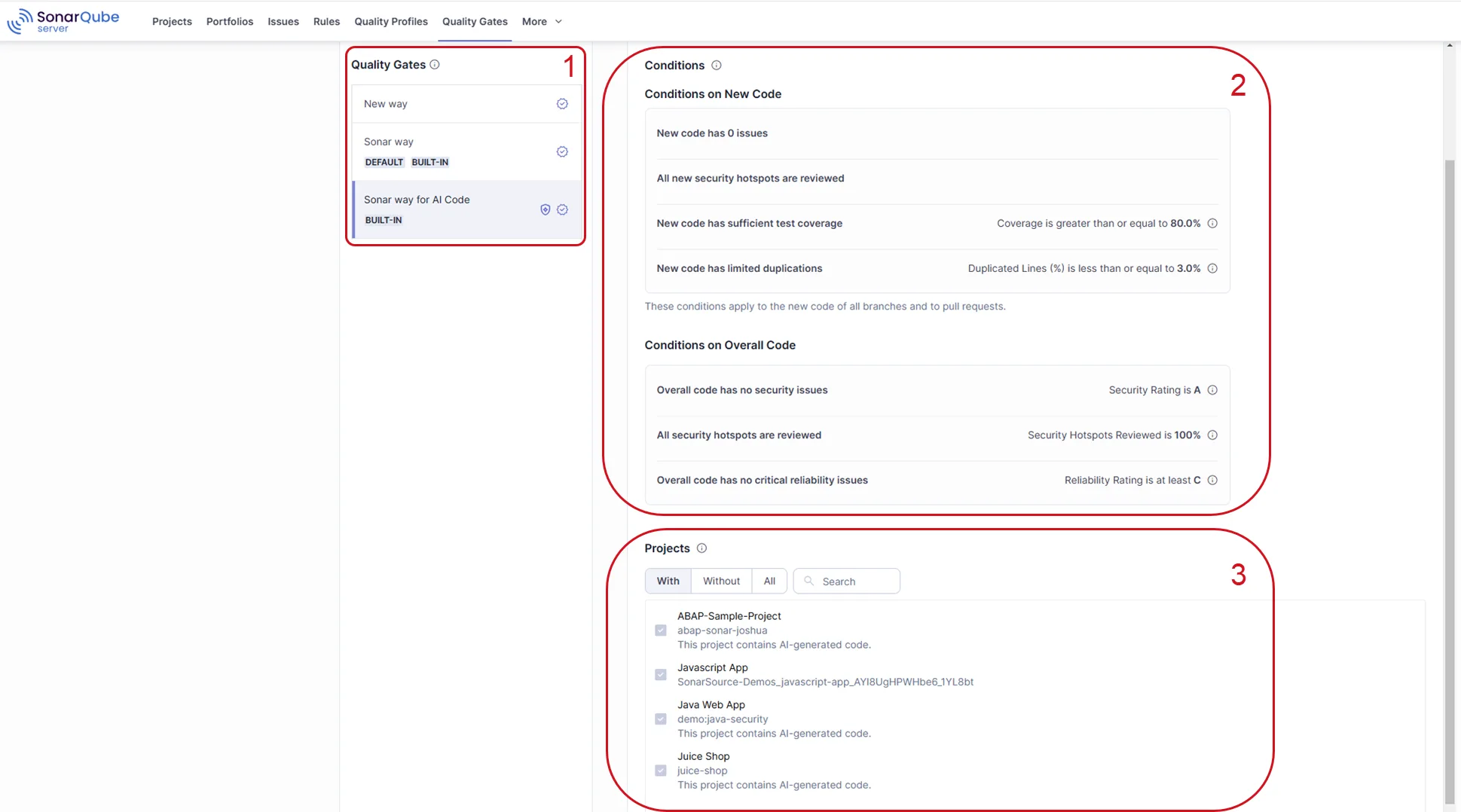 The same Quality Gate definition the server hosts — these conditions are what connected mode pushes back into the IDE.
Without connected mode, SonarLint runs with its built-in default ruleset, which is a curated subset. That works for solo developers but quickly causes drift across teams.
Language coverage#
SonarLint supports 20+ languages — the modern server, web, mobile, and infrastructure stacks. The list covers Java, JS/TS, Python, C++, C#, Go, PHP, and more.
SonarQube Community Build covers 24 languages. The full SonarQube Server catalog spans 60+ languages once you include Enterprise-edition extras like ABAP, Apex, COBOL, JCL, PL/I, RPG, and VB6.
For most product engineering, the SonarLint coverage is enough. Enterprises with legacy stacks need the Enterprise-edition language pack to cover ABAP, COBOL, and the rest.
Pricing#
SonarLint is fully free under the LGPL-3.0. There are no paid tiers and no developer-count limits.
SonarQube Server’s Community Build is also free under the LGPL-3.0. Developer Edition is publicly listed at “starts at $750/year” and scales by lines of code; Enterprise and Data Center are quote-only.
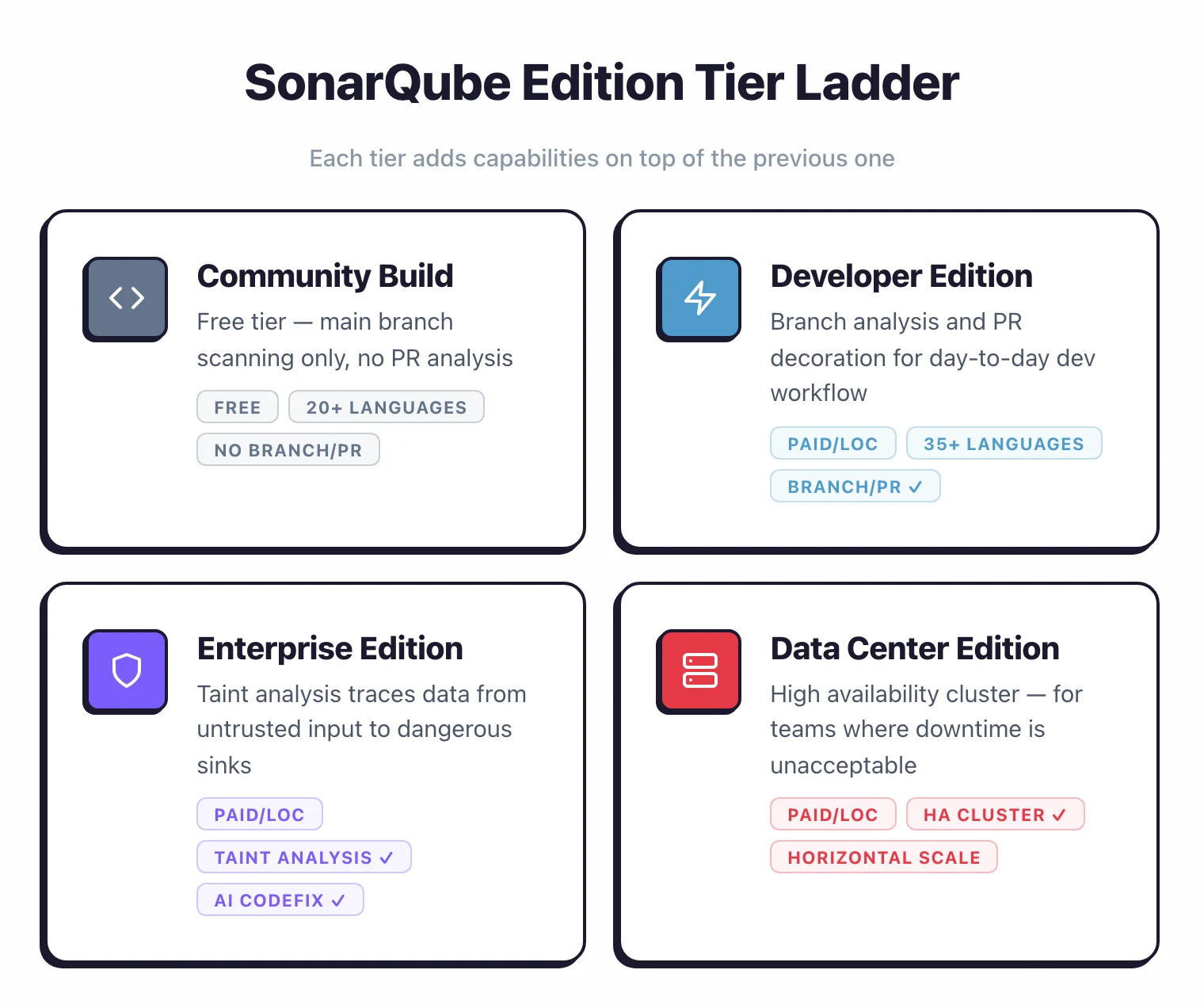 The four SonarQube Server editions — each tier adds capabilities on top of the previous one rather than swapping them out.
The paid editions add branch analysis, taint analysis, AI CodeFix, security hotspots in PR review, project portfolios, and enterprise reporting.
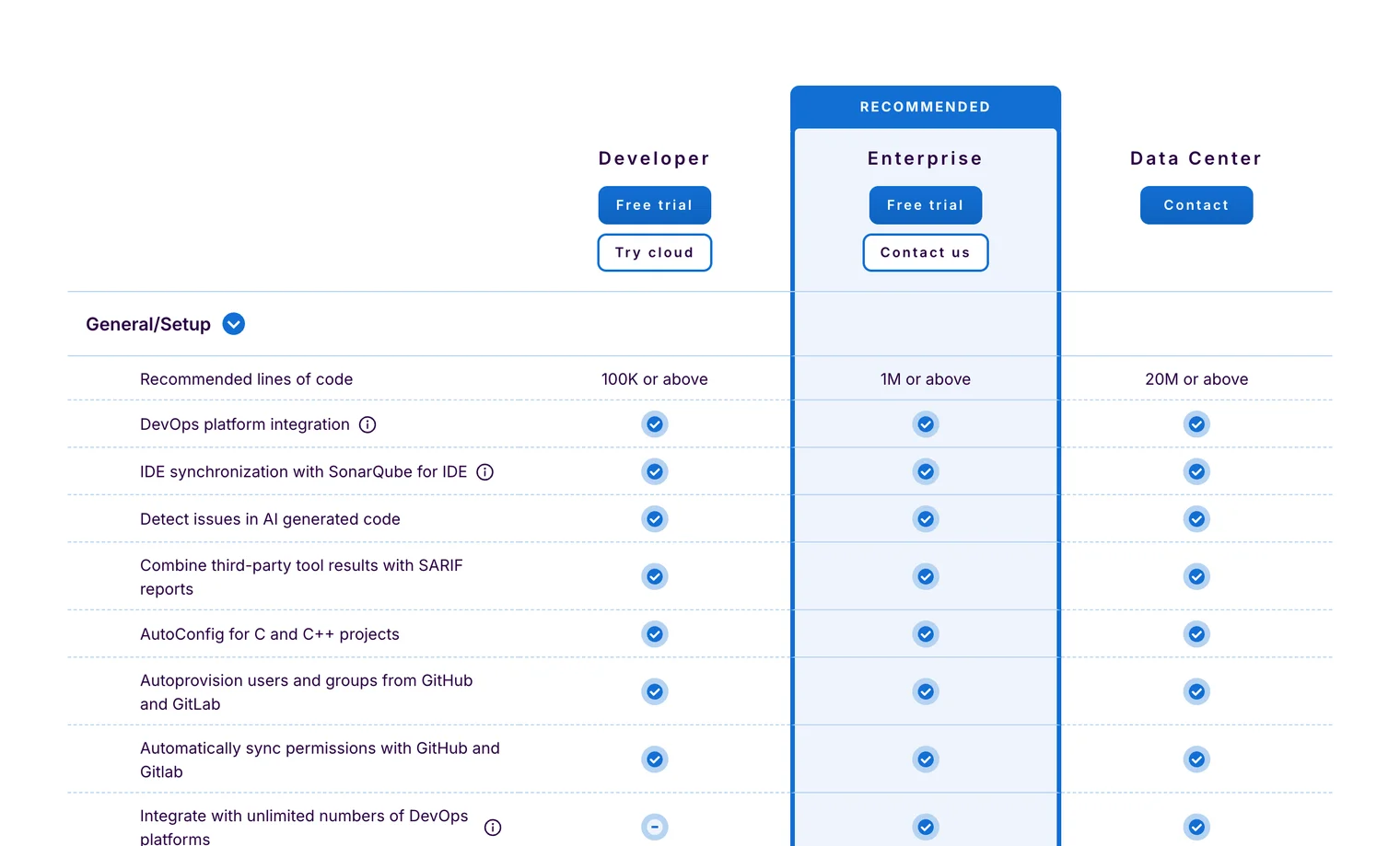 Sonar’s official Developer / Enterprise / Data Center comparison — branch analysis, IDE sync, and AI-code detection are paid-edition features that flow into connected mode for SonarLint users.
Teams considering the commercial edition usually upgrade because they hit a specific need (commonly branch analysis or taint analysis), not because they are replacing the tool.
When SonarLint alone is enough#
Solo developers and very small teams without a CI server can run SonarLint alone for IDE-time feedback. The trade-off is no shared quality gate, no PR-level enforcement, and no central reporting.
Once the team adds a CI step, SonarQube Server (or SonarQube Cloud, the SaaS option) is worth running because it catches whatever slipped past the local IDE checks.
When to Choose Each#
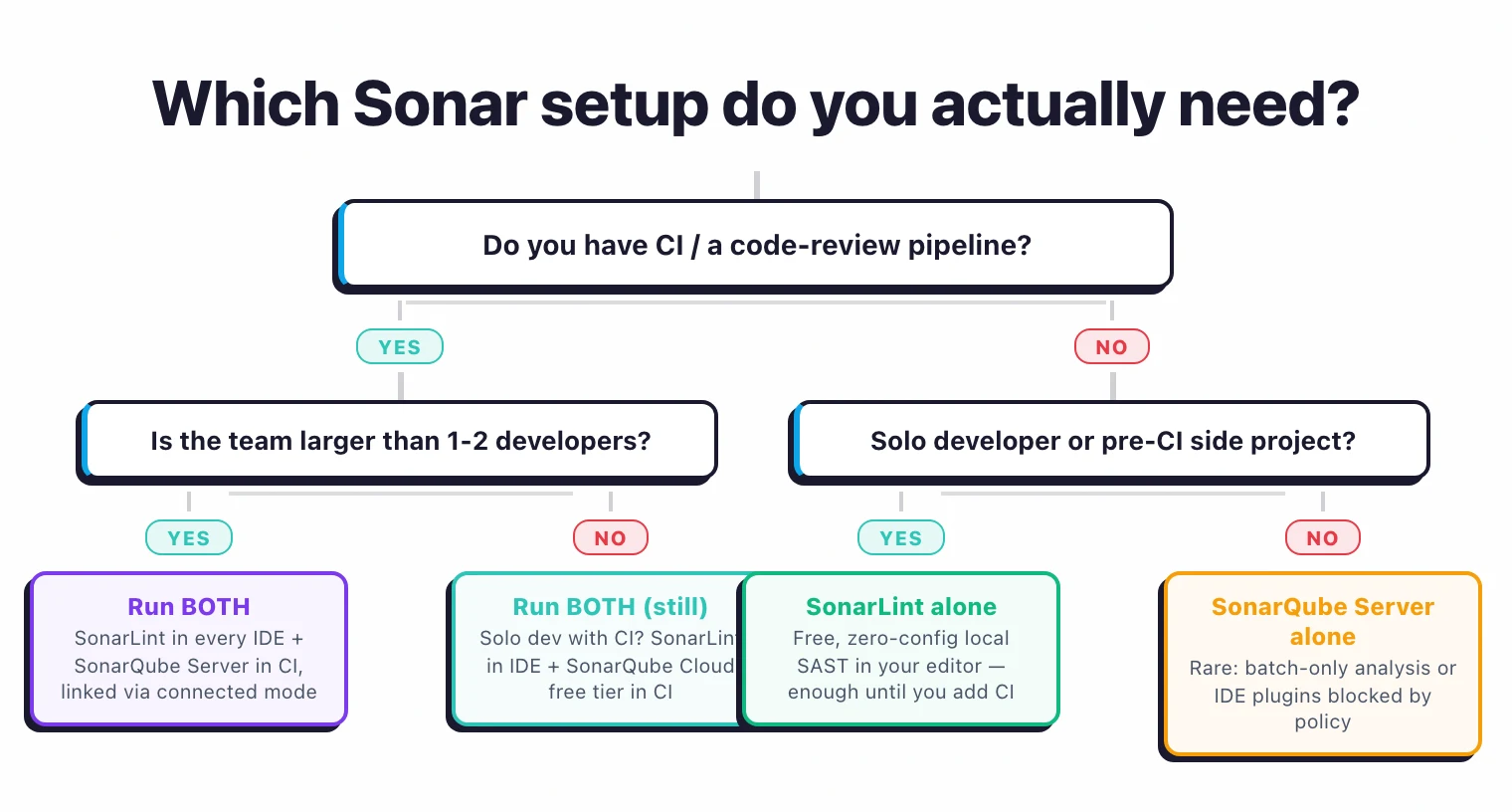 The short answer: if you have any CI pipeline at all, run both. SonarLint alone is reserved for solo developers without a CI gate yet.
Choose SonarLint alone when#
- You are a solo developer or very small team without CI yet.
- IDE-time feedback is the only quality bar you need right now.
- You want a free, zero-config local SAST plugin.
Choose SonarQube Server alone when#
- You need a CI quality gate but cannot install IDE plugins (e.g. policy restrictions on developer machines).
- You are running automated batch analysis without a real-time developer feedback loop.
Choose both (the typical answer) when#
- You want a continuous shift-left workflow where developers see issues before push, and CI catches what the IDE missed.
- You want one central rules-and-quality-profile source of truth via connected mode.
- The team has more than one or two developers — drift between local and CI rules becomes painful at scale.
Related comparisons#
- Coverity vs SonarQube — Open-source platform vs deep commercial SAST engine.
- SonarQube vs Veracode — Open-source plus commercial editions vs Veracode binary analysis.
- Semgrep vs SonarQube — Custom-rule SAST engine vs all-in-one quality platform.
- SonarQube alternatives — Wider field of SAST and code-quality platforms.
Frequently Asked Questions
Is SonarLint a replacement for SonarQube?
What is connected mode?
Is SonarLint free?
How many languages does SonarLint support?
Did SonarLint get renamed?

Written & maintained by
Suphi CankurtEight years on the vendor side of application-security sales — thousands of evaluations and demos. I started AppSec Santa in 2022 to put that insider view to work for buyers. Independent of any vendor, paid by none, and honest about what fits whom.