

Quick comparison#
Before diving into details, here is the fundamental difference:
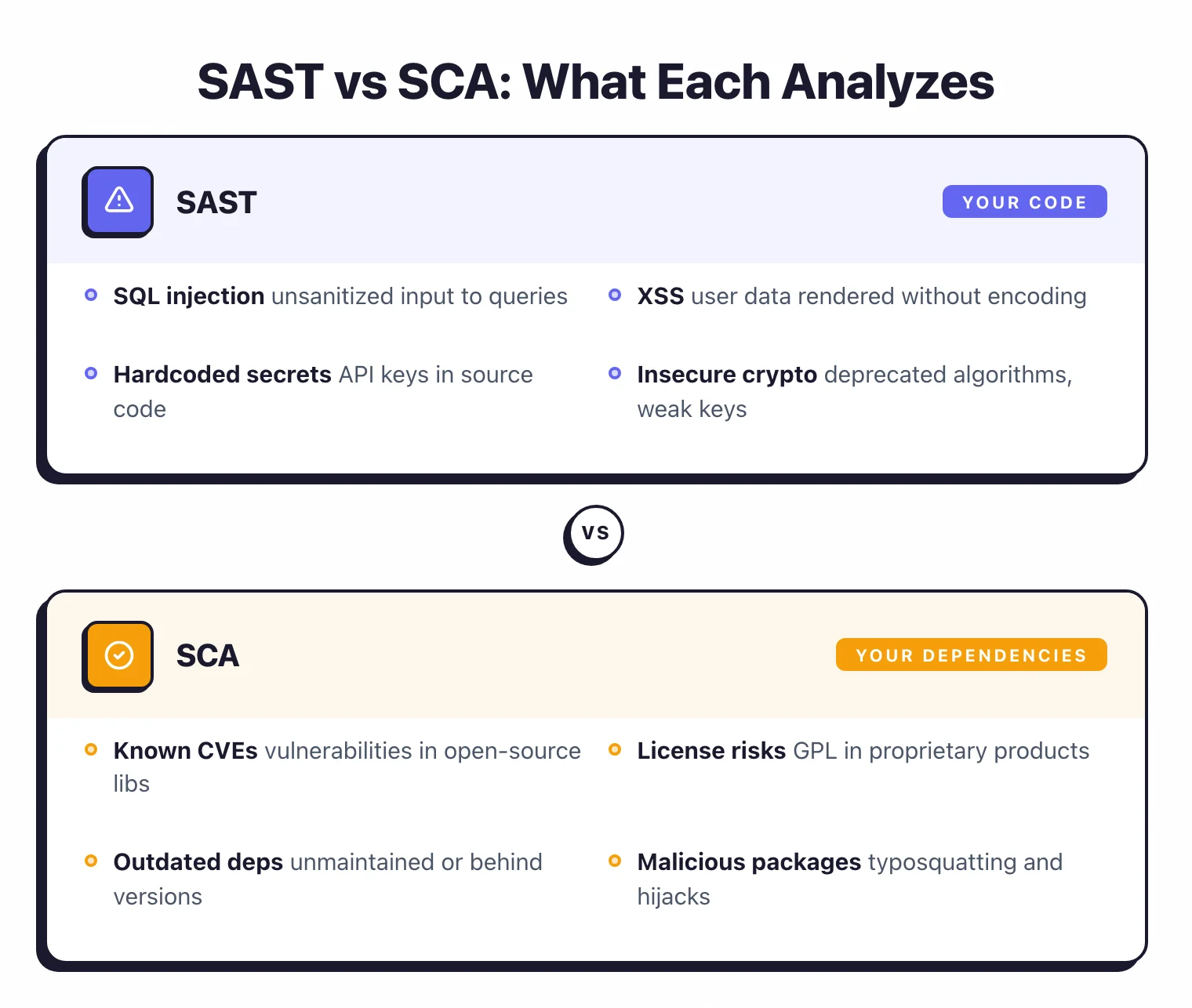
| SAST | SCA | |
|---|---|---|
| Full name | Static Application Security Testing | Software Composition Analysis |
| What it scans | Your proprietary source code | Third-party libraries and dependencies |
| What it finds | Code-level vulnerabilities (SQLi, XSS, hardcoded secrets) | Known CVEs in open-source components, license risks |
| How it works | Analyzes code patterns and data flows | Matches dependency versions against vulnerability databases |
| False positive rate | Moderate to high (requires tuning) | Low (exact version matching) |
| Remediation | Fix your own code | Update the dependency version |
| SDLC phase | Development (IDE, CI/CD) | Development through production |
| Key question answered | “Is the code my team wrote secure?” | “Are the libraries we depend on safe and compliant?” |
Both are essential layers of a broader application security program . They cover almost entirely non-overlapping risks, so running only one leaves a significant blind spot.
What SAST does#
Static Application Security Testing (SAST) analyzes your source code or compiled bytecode to find security vulnerabilities without executing the application. It reads your code, builds an abstract syntax tree, traces how data flows through functions and modules, and flags patterns that indicate security flaws.
SAST catches vulnerabilities that your development team introduces in the code they write:
- Injection flaws — SQL injection, command injection, LDAP injection where user input reaches a dangerous function without sanitization
- Cross-site scripting (XSS) — User-controlled data rendered in HTML without encoding
- Hardcoded secrets — API keys, passwords, and tokens committed to source code
- Insecure cryptography — Deprecated algorithms, weak key lengths, improper use of crypto libraries
- Path traversal — User input used to construct file paths without validation
- Insecure deserialization — Processing untrusted serialized data without type checks
The key characteristic: SAST finds bugs in code that your team wrote. If a developer introduces a SQL injection vulnerability in a new endpoint, SAST catches it.
If a developer hardcodes a database password, SAST catches it.
SAST tools vary in depth. Pattern-matching tools like Semgrep CE are fast and easy to configure.
Deep data-flow analysis tools like SonarQube (with commercial editions) trace user input across function calls and files for more complex vulnerability detection. The trade-off is always speed and simplicity versus depth and accuracy.
For a deep dive, see the full guide: What is SAST?
What SCA does#
Software Composition Analysis (SCA) identifies and tracks all third-party and open-source components in your application, then checks them against known vulnerability databases and license registries.
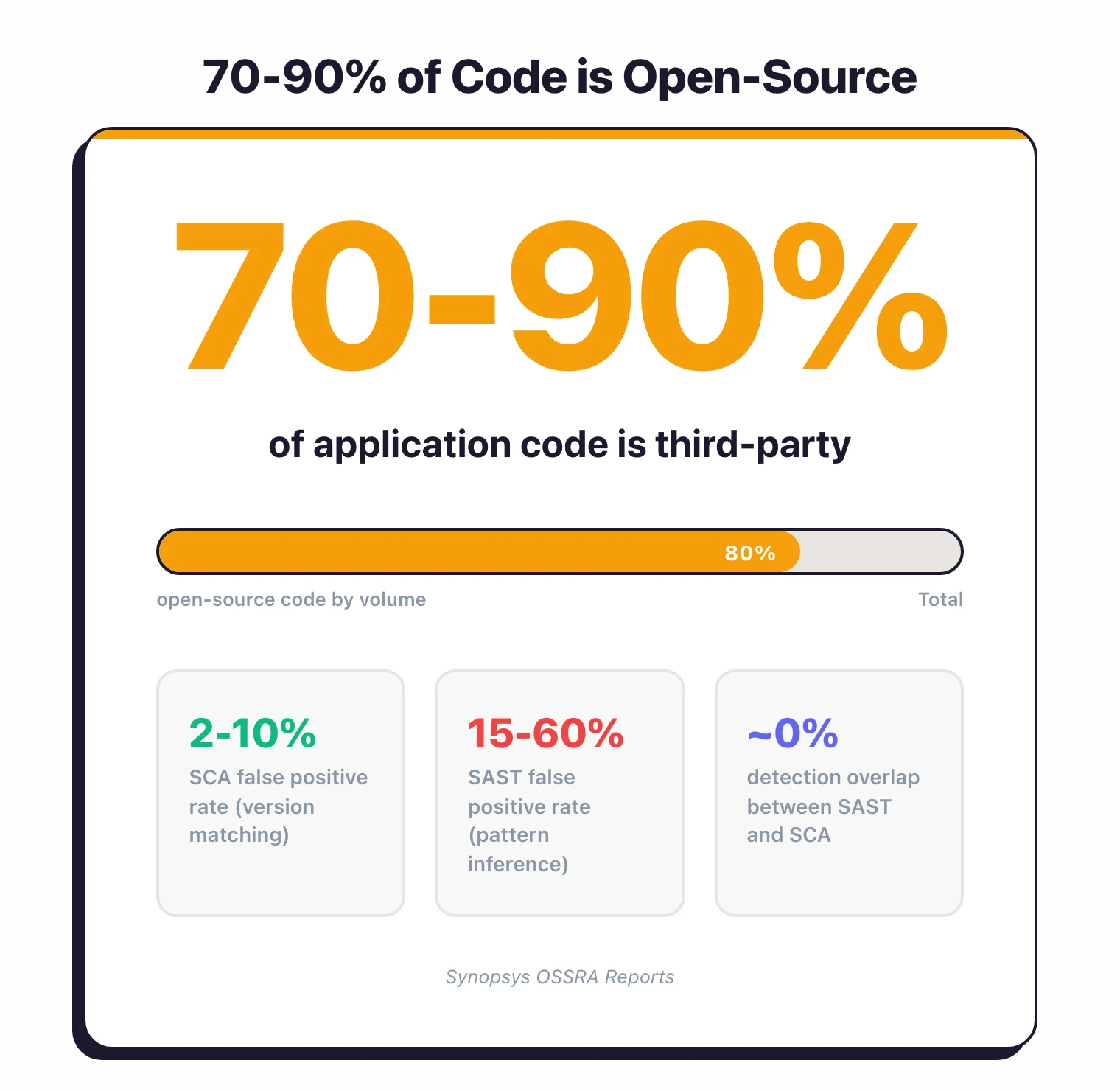
According to Synopsys OSSRA reports, modern applications are 70 to 90 percent open-source code by volume.
Your package.json, pom.xml, go.mod, or requirements.txt pulls in dozens of direct dependencies, each of which pulls in their own dependencies (transitive dependencies).
A typical Node.js application can have over a thousand packages in its dependency tree. SCA makes that invisible supply chain visible.
SCA catches risks that originate outside your codebase:
- Known vulnerabilities (CVEs) — Library versions with publicly disclosed security flaws
- License compliance issues — GPL-licensed code in a proprietary product, or libraries with incompatible license terms
- Outdated dependencies — Libraries that are no longer maintained or have fallen far behind the current version
- Malicious packages — Typosquatting attacks and compromised packages in public registries
The remediation path for SCA findings is usually straightforward: update the library to a patched version. SCA tools like Snyk Open Source and Dependabot can even generate pull requests with the version bump automatically.
More advanced SCA tools add reachability analysis , which checks whether your code actually calls the vulnerable function in the library.
A critical CVE in a library you use might not affect you if you never invoke the vulnerable code path. Reachability analysis reduces noise significantly.
What are the key differences between SAST and SCA?#
Here is a detailed comparison across the dimensions that matter most when choosing and deploying these tools:
| Dimension | SAST | SCA |
|---|---|---|
| Code analyzed | First-party (your team’s code) | Third-party (open-source libraries, dependencies) |
| Detection method | Pattern matching, data flow analysis, control flow analysis | Version matching against CVE databases (NVD, OSV, vendor DBs) |
| Vulnerability types | Injection, XSS, secrets, crypto flaws, logic patterns | Known CVEs, license violations, malicious packages |
| False positive rate | Industry-observed 15-60% depending on tool and tuning | Industry-observed 2-10% (version match is deterministic; reachability is less certain) |
| Remediation effort | Developer must rewrite code | Update dependency version (often automated) |
| Tuning required | Significant (suppress false positives, write custom rules) | Minimal (mostly policy decisions on severity thresholds) |
| Time to first value | Days to weeks (tuning needed) | Hours (connect repo, get results) |
| Language dependency | Heavy (each language needs specific parsers and rules) | Moderate (needs to understand package manifests per ecosystem) |
| Runtime context | None (static analysis only) | Some tools add reachability and runtime dependency tracking |
The key insight: SAST and SCA have almost zero overlap in what they detect. A SQL injection in your code will never appear in an SCA scan.
A known CVE in lodash will never appear in a SAST scan. They are complementary by design.
When should you use SAST vs SCA?#
Start with SCA if you have limited security resources and need quick wins. SCA is faster to deploy, produces fewer false positives, and the remediation path (update the dependency) is clear.
It also covers the largest attack surface, since most of your code is third-party.
Start with SAST if your application handles sensitive data and your team writes significant custom logic (authentication, authorization, payment processing, data transformation). Custom code that processes user input is where injection flaws, XSS, and logic bugs live.
Use both when you are serious about application security. There is no scenario where running only one provides adequate coverage. The question is sequencing, not selection.
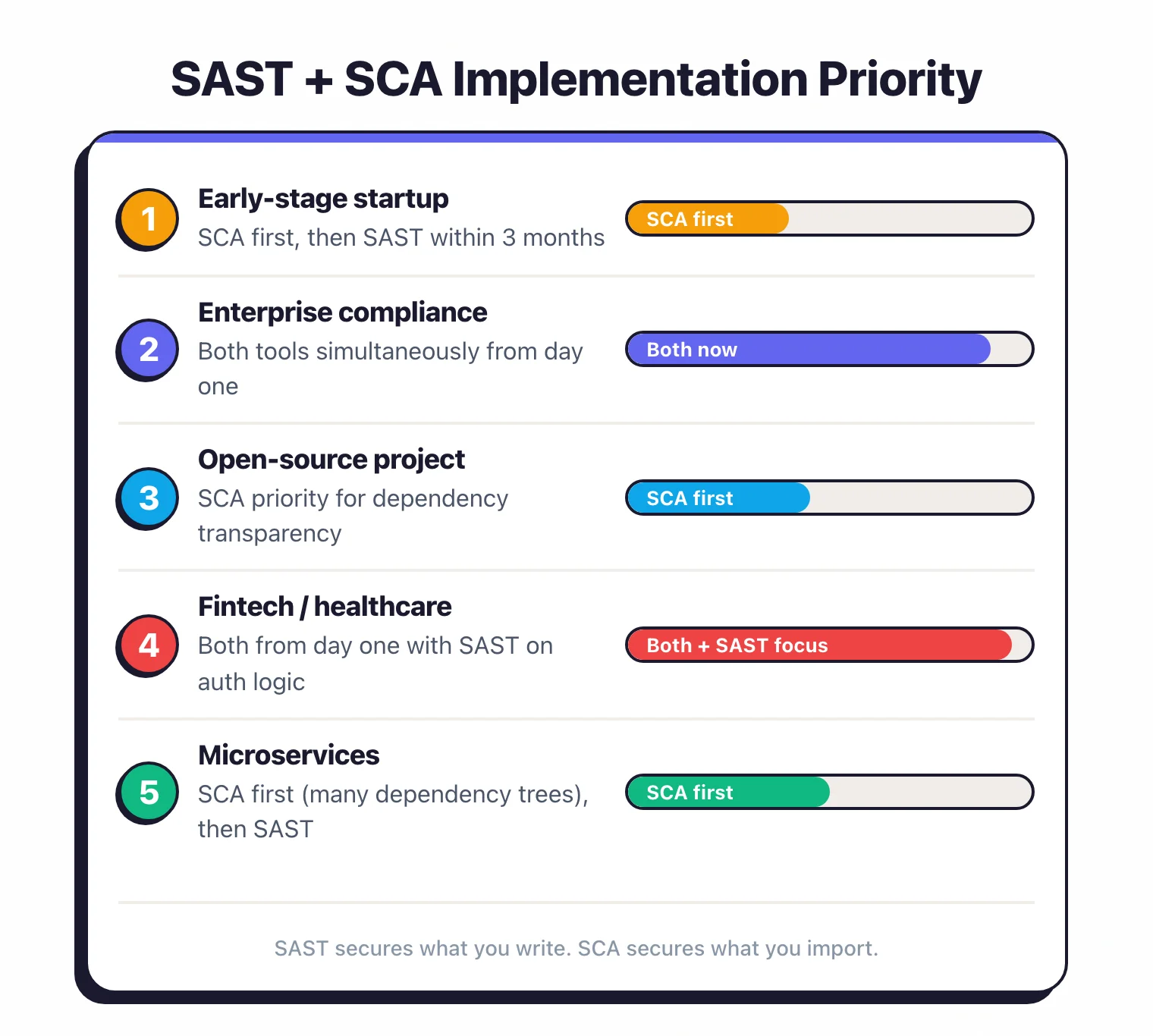
Here is a practical matrix:
| Scenario | Recommended Priority |
|---|---|
| Early-stage startup, small team | SCA first, SAST within 3 months |
| Enterprise with compliance requirements | Both simultaneously |
| Open-source project | SCA (your users need to know your dependencies are safe) |
| Fintech or healthcare application | Both from day one, with SAST emphasis on custom auth/payment logic |
| Microservices architecture | SCA first (many services = many dependency trees), then SAST |
Using both together#
Running SAST and SCA together provides the most value when they are integrated into the same workflow rather than bolted on separately.
Unified CI/CD pipeline. Run both on every pull request, alongside the dynamic and runtime methods compared in SAST vs DAST vs IAST . SCA scans typically complete in seconds; SAST scans take longer but can run in parallel.
Both sets of findings should appear as PR comments so developers see all security issues in one place.
Coordinated severity thresholds. Define consistent policies: block merges on critical findings from either tool, warn on high findings, and track medium findings in a backlog. Inconsistent thresholds between tools lead to confusion.
Single dashboard. If you use a platform that bundles both (Snyk, Checkmarx, Sonar), the unified view helps.
If you use separate tools (for example, Semgrep CE for SAST and Snyk Open Source for SCA), consider an ASPM platform to aggregate findings. See our ASPM guide for more on this.
AppSec Santa maintains detailed reviews of all tools mentioned here.
Complementary tools to consider:
| Tool | Type | Strength |
|---|---|---|
| Semgrep CE | SAST | Custom rules, multi-language, fast CI scans |
| SonarQube | SAST + Code Quality | Deep analysis, quality gates, broad language support |
| Snyk Open Source | SCA | Developer-friendly, auto-fix PRs, reachability analysis |
| Dependabot | SCA (basic) | Free, GitHub-native, automated version updates |
The bottom line: SAST secures what you write. SCA secures what you import.
Together, they cover the full codebase. Neither alone is sufficient.
SAST vs SCA decision framework#
The simplest starting point: if your codebase is mostly first-party logic, start with SAST tools . If your application is dependency-heavy and you’re pulling in hundreds of packages, start with SCA tools . For mature pipelines, run both — sequenced to deliver value quickly without overwhelming the team.
Here are five concrete scenarios that sharpen the decision:
Scenario 1: Early startup, one developer, moving fast. Start with SCA. A single snyk test or enabling Dependabot
on GitHub takes minutes and immediately flags vulnerable packages. Introducing SAST too early creates noise that slows you down before you have the process to handle it.
Scenario 2: Fintech or healthcare team with regulatory requirements. Start both on day one. Compliance frameworks like PCI DSS and HIPAA expect evidence of code-level and dependency-level security controls. Running only one tool creates an audit gap.
Scenario 3: Microservices architecture with 20+ services. Start with SCA. Each service has its own dependency tree, and the surface area for known CVEs grows with every service you add. SAST can be introduced service-by-service based on sensitivity.
Scenario 4: Internal tool with almost no third-party dependencies. Start with SAST. If you’re building custom logic — authentication, authorization, data processing — and keeping external libraries minimal, SAST will find more real issues. SCA will have little to scan.
Scenario 5: Open-source library you’re publishing. Run both. Your users inherit your dependencies (SCA), and they’re trusting your code not to contain injection flaws or secrets (SAST). Both matter equally for library authors.
What each one catches — with code examples#
Understanding the detection difference is clearest with real examples.
SAST example: SQL injection in your code
# SAST catches this — developer-written code
def get_user(username):
    query = "SELECT * FROM users WHERE name = '" + username + "'"
    return db.execute(query)  # ← SAST flags: unsanitized input in SQL
A SAST tool traces username from the function parameter (an untrusted source) into the db.execute() call (a dangerous sink) without sanitization. It reports the file, line number, and the taint path. The fix requires rewriting the code to use parameterized queries.
SCA example: Log4Shell vulnerability in a dependency
<!-- SCA catches this — third-party library in your pom.xml -->
<dependency>
  <groupId>org.apache.logging.log4j</groupId>
  <artifactId>log4j-core</artifactId>
  <version>2.14.1</version>  <!-- ← SCA flags: CVE-2021-44228, CVSS 10.0 -->
</dependency>
An SCA tool reads your pom.xml, identifies log4j-core 2.14.1, and matches it against its vulnerability database. It reports CVE-2021-44228 (Log4Shell)
, the CVSS score, and the patched version (2.17.1). Your code did not introduce this bug — the library did. The fix is a version bump, not a code change.
These two findings require entirely different workflows, involve different teams, and sit in different parts of the codebase. One tool cannot detect the other’s findings.
Comparison matrix#
| Dimension | SAST | SCA |
|---|---|---|
| Coverage | First-party source code | Third-party libraries, package manifests |
| Analysis type | Data flow, control flow, pattern matching | Version matching against CVE/OSV databases |
| Scan speed | Minutes to hours (language-dependent) | Seconds to minutes |
| False positive rate | 15–60% (requires tuning) | 2–10% (deterministic version matching) |
| Remediation effort | Rewrite code (developer time) | Bump dependency version (often automated) |
| Primary tools | Semgrep , Checkmarx , SonarQube | Snyk , Mend , Dependabot |
| Typical cost | $20–$100+/developer/month (commercial) | $10–$50+/developer/month (commercial) |
Do you need both?#
For mature engineering teams: yes, unambiguously. For side projects: probably not yet.
You specifically need both if any of the following apply to your organization:
- More than 100 production dependencies across your services. At that scale, the probability of an actively exploited CVE in at least one package is near-certain. SCA is non-negotiable.
- Regulated industry (finance, healthcare, government). Compliance frameworks like the NIST Secure Software Development Framework (SSDF) expect documented evidence of both code-level and dependency-level security scanning. Running only one creates an audit finding.
- Microservices or polyglot architecture. Each service has its own code patterns (SAST) and its own dependency graph (SCA). Gaps in either layer compound across services.
- Custom business logic handling user input. Any code path where external data reaches a database, filesystem, or shell command is SAST territory. SCA will not find injection flaws you wrote.
For a personal side project or prototype not processing sensitive data, starting with SCA alone is a reasonable pragmatic choice. The moment that project handles real users or sensitive data, add SAST.
2026 reality: ASPM platforms are merging SAST and SCA#
The market is consolidating. Checkmarx One , Snyk , and platforms like Cycode , Wiz Code, and Apiiro now offer SAST, SCA, and IaC security in a single unified product — what the industry calls Application Security Posture Management (ASPM) .
The appeal is real: one agent, one dashboard, one policy engine, one set of integrations. Security teams that previously stitched together five point tools can consolidate. For enterprise buyers especially, the procurement and integration overhead of running separate best-of-breed SAST and SCA tools is often not worth the marginal coverage improvement.
The catch: bundled capabilities are rarely best-in-class on both fronts simultaneously. Snyk’s SCA remains stronger than its SAST. Checkmarx One’s SAST has more depth than some pure-SCA entrants. Evaluate each capability against your specific language stack before assuming the platform covers you adequately on both. See the ASPM tools category for a full comparison.