
- Fortify scans source code for precise line-of-code findings; Veracode scans compiled binaries so source code never leaves the organization.
- Fortify supports on-premises, SaaS (Fortify on Demand), and hybrid deployment; Veracode is cloud-only with zero scanning infrastructure to maintain.
- Veracode’s Pipeline Scan returns results in under 90 seconds for CI/CD; Fortify has no dedicated fast-scan mode and times depend on codebase size and analysis depth.
- Fortify covers 33+ languages with 1,700+ vulnerability categories plus IaC scanning (Terraform, CloudFormation, K8s); Veracode covers 100+ languages but no IaC.
- Fortify is one of the longest-running commercial SAST tools on the market; Veracode offers a unified SAST + DAST + SCA + pen testing platform.
Fortify and Veracode are the two longest-running enterprise SAST platforms, with decades of deployments across regulated industries.
Which Is Better: Fortify or Veracode?#
Fortify and Veracode are two of the longest-established enterprise SAST tools. They differ in analysis approach, deployment model, and platform scope.
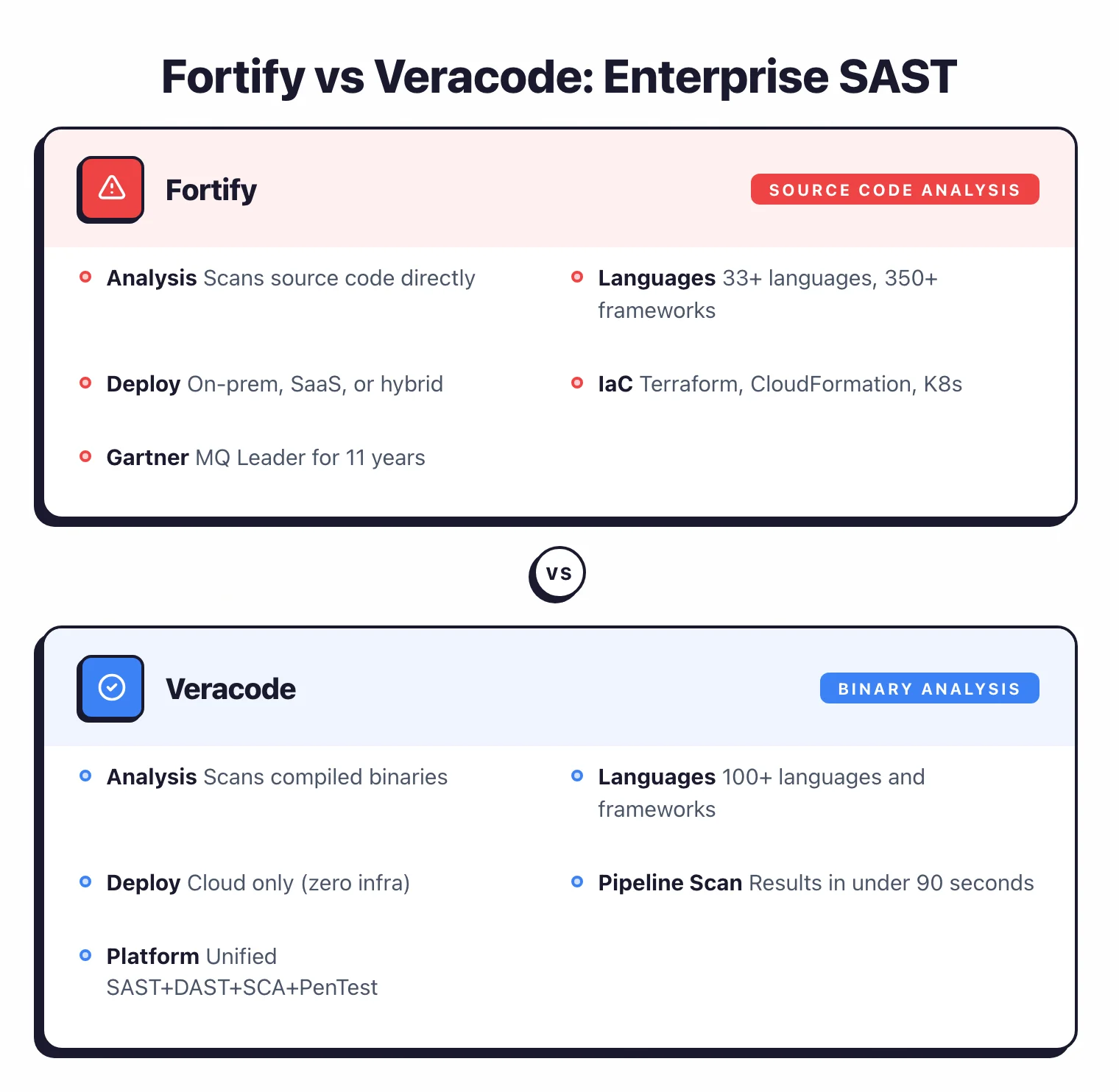
Fortify scans source code directly and supports on-premises deployment, making it a fixture in government, defense, and financial services. Veracode scans compiled binaries so source code never leaves your infrastructure, operates as cloud-only, and offers a Pipeline Scan that returns results in under 90 seconds.
The choice typically comes down to two factors: whether your organization requires on-premises scanning (Fortify) or prefers cloud-only with no source code sharing (Veracode), and whether source-level findings or binary-level analysis matters more for your development workflow.
What Are the Key Differences?#
| Feature | Fortify SCA | Veracode |
|---|---|---|
| License | Commercial | Commercial |
| Analysis approach | Source code | Binary / bytecode |
| Languages | 33+ languages, 350+ frameworks | 100+ languages and frameworks |
| Vulnerability categories | 1,700+ | Broad coverage (count not published) |
| AI remediation | Fortify Aviator | Veracode Fix |
| Fast CI/CD scan | Standard analysis | Pipeline Scan (under 90 seconds) |
| Deployment | On-premises, SaaS (Fortify on Demand), hybrid | Cloud only |
| IaC scanning | Terraform, CloudFormation, K8s, Docker, serverless | No |
| Platform scope | SAST focused (part of OpenText security portfolio) | SAST, DAST, SCA, Pen Testing |
| IDE plugins | Major IDEs | VS Code, IntelliJ, Eclipse |
| CI/CD integrations | Major CI/CD tools | 40+ tools |
| Developer training | N/A | Security Labs |
| Source code upload required | Yes | No (binaries only) |
| Line-of-code findings | Yes | Limited (binary-level mapping) |
| Owner | OpenText (acquired Micro Focus 2023) | Veracode |
Fortify vs Veracode: How Do They Compare?#
Source Code vs Binary Analysis#
Fortify performs source code analysis. Point it at your codebase and it analyzes the code directly, producing findings with specific file paths, line numbers, and data flow traces.
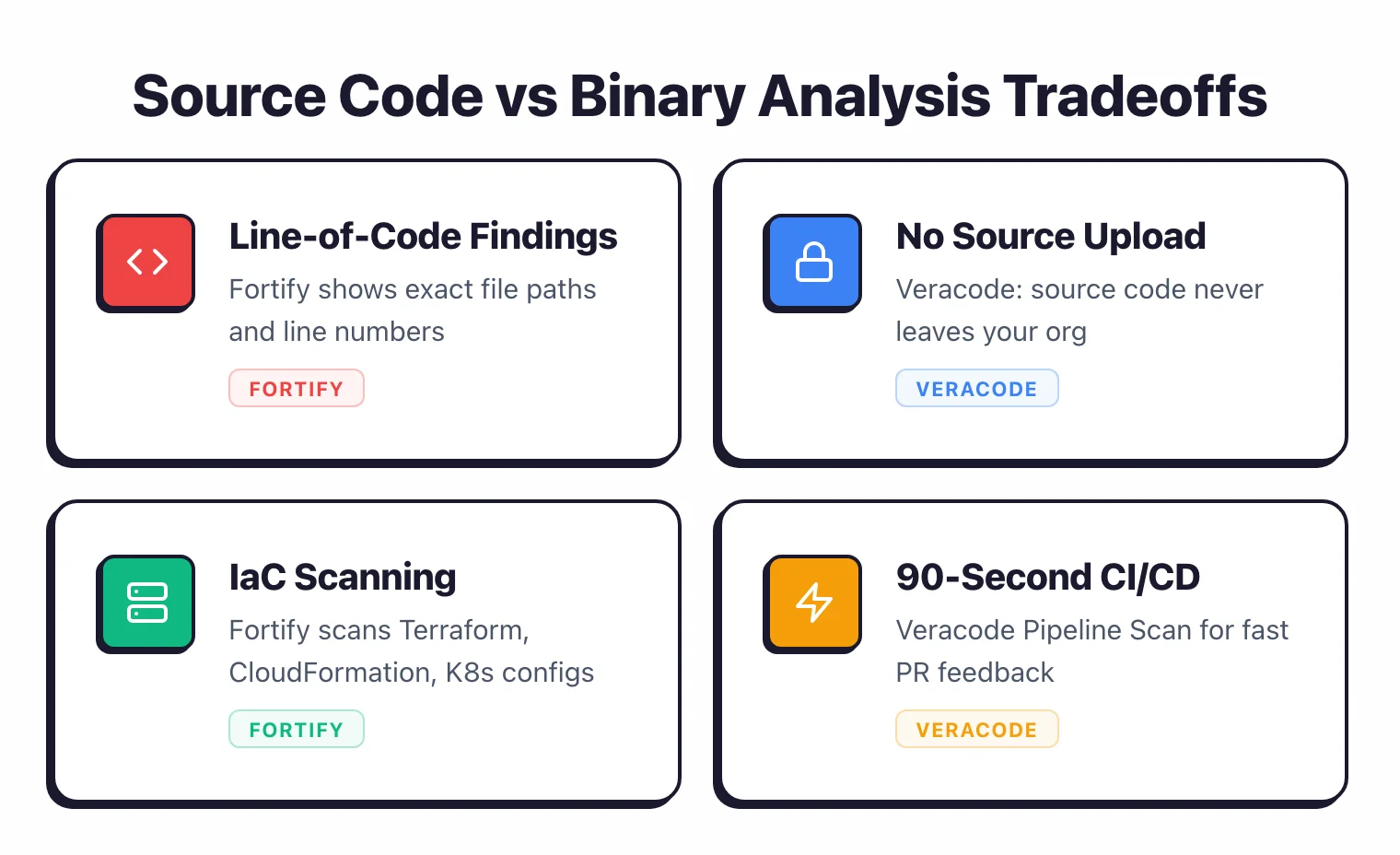
This gives developers precise locations for each vulnerability, making remediation straightforward. The tradeoff is that source code must be accessible to the scanning tool.
Veracode uses binary analysis. Developers compile their application and upload the bytecode, JAR files, .NET assemblies, or other compiled output.
The platform finds security flaws in the binary without seeing the source.
This catches issues introduced by compilers or third-party libraries that source scanners miss, and it means source code never leaves the organization.
For development teams that want the fastest path from finding to fix, source code analysis (Fortify) typically provides better developer experience. For organizations where source code sharing is restricted by policy, regulation, or contract, binary analysis (Veracode) removes that constraint entirely.
Deployment Options#
Fortify offers three deployment models. On-premises Fortify SCA gives organizations full control over the scanning infrastructure.
Fortify on Demand (SaaS) provides a managed cloud service. Hybrid deployment combines both.
This flexibility is relevant for government agencies, defense contractors, and financial institutions that cannot send code to external cloud services.
Veracode is cloud-only. All analysis happens on Veracode’s infrastructure.
Since it processes binaries rather than source code, the data sensitivity concern is reduced compared to uploading source code to a cloud vendor. Cloud-only deployment means zero infrastructure to maintain on your end.
Organizations that require air-gapped or on-premises scanning have only one choice here: Fortify.
Language and Framework Coverage#
Fortify supports 33+ languages and 350+ frameworks with 1,700+ vulnerability categories. Its language coverage includes modern languages (Java, Go, Kotlin, Swift, Python) and legacy languages (COBOL, ABAP, Visual Basic).
It also scans infrastructure as code (Terraform, CloudFormation), Docker images, Kubernetes manifests, and serverless configurations.
Veracode claims 100+ languages and frameworks through binary analysis. The language count differs because binary analysis can cover compiled output generically for certain platforms.
Veracode also covers legacy languages (COBOL, Visual Basic 6, RPG).
Both tools cover the mainstream enterprise languages. Fortify has an edge in IaC scanning, which Veracode does not include.
Veracode’s binary approach means it works with any language that compiles to a supported binary format.
CI/CD Integration and Speed#
Veracode offers two scan modes: Pipeline Scan returns results in under 90 seconds for fast CI/CD feedback on pull requests, while Platform Scan performs deeper analysis for release gates and compliance. This two-tier approach lets teams balance speed and depth.
Note that Pipeline Scan’s fast mode supports Java, JavaScript, Scala, Kotlin, Groovy, and Android — not all 100+ languages available in the full Platform Scan.
Fortify integrates with major CI/CD platforms through plugins and the command-line scanner. Scan times depend on codebase size and analysis depth.
It does not have a dedicated “fast scan” mode comparable to Veracode’s Pipeline Scan.
For teams where CI/CD scan speed is critical, Veracode’s Pipeline Scan provides faster feedback. For teams that prioritize depth and are willing to wait for thorough results, Fortify’s analysis depth is well-established.
AI-Powered Remediation#
Fortify includes Fortify Aviator, an AI feature that generates automated code fix suggestions for detected vulnerabilities. It analyzes the vulnerability context and produces suggested code changes to help developers remediate issues faster.
Veracode offers Veracode Fix, which similarly uses AI to suggest fixes for detected flaws. Both tools have moved in the same direction with AI-assisted remediation, which reduces the time from finding a vulnerability to shipping a fix.
Platform Breadth#
Veracode’s platform extends beyond SAST to include Dynamic Analysis (DAST), Software Composition Analysis (SCA), and manual penetration testing. Findings from all modules are correlated in a single dashboard.
This platform approach reduces tool sprawl for teams that need multiple testing types.
Fortify is primarily a SAST tool, though it is part of OpenText’s broader security portfolio that includes Fortify WebInspect for DAST. However, the integration between Fortify products is not as unified as Veracode’s single-platform approach.
For teams that want SAST, DAST, and SCA from one vendor in one dashboard, Veracode offers a more cohesive platform. For teams that primarily need SAST and are willing to pair it with other tools for DAST and SCA, Fortify’s SAST depth stands on its own.
Market Tenure#
Fortify has been in the enterprise SAST market since 2003, when Fortify Software launched the product before passing through HP, Micro Focus, and now OpenText.
Veracode launched its cloud-based binary analysis service in 2006 and has stayed focused on SAST + DAST + SCA since. Both are well-established enterprise choices with decades of deployments.
Pricing comparison#
Neither OpenText Fortify nor Veracode publishes a public price list. Both vendors gate enterprise licensing behind sales conversations, and both quote on developer count, scanner mix, and deployment model.
Fortify is sold as separate products — Fortify Static Code Analyzer for on-prem SAST, Fortify on Demand for SaaS, and Fortify ScanCentral for orchestration — each with its own seat-based commercial terms. There is no free tier; OpenText offers proof-of-concept programs through opentext.com.
Veracode follows the same contact-sales pattern, with bundled subscriptions covering Static Analysis, Software Composition Analysis, Dynamic Analysis, and Veracode Fix. Veracode has no published per-developer rate; quotes depend on application count and procurement leverage. For a buyer-side view of typical enterprise SAST contract sizes, see the AppSec tools pricing guide . For deeper alternatives lists, see Fortify alternatives and Veracode alternatives .
When Should You Choose Fortify?#
Choose Fortify if:
- On-premises or hybrid deployment is a requirement (government, defense, finance)
- You need precise source-level findings with line numbers and data flow traces
- IaC scanning (Terraform, CloudFormation, Kubernetes, Docker) is part of your SAST program
- Legacy language support (COBOL, ABAP) combined with modern language coverage matters
- A decades-long enterprise track record carries weight with your procurement or compliance teams
- Fortify on Demand (SaaS) provides sufficient flexibility without going cloud-only
When Should You Choose Veracode?#
Choose Veracode if:
- Source code cannot leave your organization due to policy or regulation
- You prefer binary analysis that catches compiler and bundled-library issues
- Cloud-only deployment with zero scanning infrastructure maintenance is preferred
- Pipeline Scan speed (under 90 seconds) is needed for CI/CD pull request checks
- A unified platform covering SAST, DAST, SCA, and pen testing from one vendor reduces tool sprawl
- Developer training through Security Labs is valuable for your team
Both are SAST tools with decades of enterprise deployments. The decision hinges on deployment requirements (on-premises vs cloud-only) and analysis preference (source code vs binary).
Frequently Asked Questions
What is the main difference between Fortify and Veracode?
Which tool supports more languages?
Is either tool free?
Which tool is faster in CI/CD?
Which tool has a longer track record?

Written & maintained by
Suphi CankurtEight years on the vendor side of application-security sales — thousands of evaluations and demos. I started AppSec Santa in 2022 to put that insider view to work for buyers. Independent of any vendor, paid by none, and honest about what fits whom.