
Best SAST Tools 2026: All 38 Static Analysis Tools Compared
Independent ranking — no vendor pays to appear here. See methodology.
I compare SAST tools — Semgrep, Snyk Code, Checkmarx, Veracode, CodeQL — by language coverage, false-positive rate, and CI/CD fit. No vendor paid to appear.
At a glance
The best SAST tools in 2026: Semgrep CE, Snyk Code, Checkmarx One, Veracode, and CodeQL.
- Best free SAST scanner: Semgrep CE — 30+ languages, custom YAML rules, GitHub Actions + GitLab CI integration in minutes
- Best developer experience: Snyk Code — real-time IDE feedback with AI-generated fix suggestions
- Best enterprise platform: Checkmarx One — deep cross-file taint analysis across 35+ languages with PCI DSS / SOC 2 / HIPAA dashboards
- Best for legacy + binary codebases: Veracode — 100+ languages and frameworks including COBOL and Visual Basic 6
- Best for GitHub-native teams: CodeQL — semantic analysis, free for public repositories
No vendor paid to appear — every actively maintained SAST scanner is ranked on publicly verifiable evidence.
SAST tools are static application security testing scanners that analyze source code, bytecode, or compiled binaries for security vulnerabilities before the application runs. They catch SQL injection, cross-site scripting, hardcoded secrets, and insecure deserialization during development, when a fix costs a fraction of what it does in production.
Over a decade in application security, I sat on both sides of the SAST deal — the vendor demo and the buyer’s shortlist. The pitch is always “we find more, with fewer false positives.”
What actually decides the purchase is narrower: does the scanner understand your stack, does it fit your pipeline, and does your team trust the findings enough to fix them?
This page tracks every actively maintained SAST tool across two license tiers — free open-source and commercial — and goes deep on twelve picks. SAST is one layer of application security ; pair it with DAST and SCA for full coverage.
My five headline picks, by buyer profile: Semgrep CE (best free scanner), Snyk Code (best developer experience), Checkmarx One (best enterprise platform), Veracode (best for binary and legacy), and CodeQL (best for GitHub-native teams). No vendor paid to appear here.
Do you actually need one? If your team ships code that touches user input, money, PII, or auth, yes — the only question is whether you start with a free scanner today or a compliance-grade platform next quarter.
A free scanner like Semgrep CE installs in minutes, while PCI DSS, SOC 2, and HIPAA audits expect documented code-level vulnerability management.
The 38 best SAST tools (2026)
Here is how all 38 active SAST tools compare at a glance, grouped by license — free and open-source, freemium, and commercial. Horusec and Reshift are listed separately as historical tools. Dedicated credential scanners are compared in the secret scanning guide .
| Tool | License | Languages | Standout |
|---|---|---|---|
| Free / Open Source | |||
| Bandit | Free (OSS) | Python | Python-specific security checks |
| Brakeman | Free (OSS) | Ruby on Rails | Deep Rails framework awareness |
| DeepAudit | Free (OSS) | Multi-language via LLM analysis | Multi-agent audit with Docker sandbox PoC verification |
| GitHub CodeQL | Free for public repos | Java, Py, JS/TS, C#, Go, C/C++, Ruby, Swift, Kotlin, Rust | Semantic code queries; free for public GitHub repos |
| gosec | Free (OSS) | Go | Go security checker with AI-powered fix suggestions |
| Graudit | Free (OSS) | PHP, Python, Perl, C, ASP, JSP | Lightweight grep-based auditing with custom signatures |
| Infer | Free (OSS) | Java, C, C++, Obj-C, Erlang, Hack | Meta's inter-procedural analyzer for null derefs and memory leaks |
| nodejsscan | Free (OSS) | Node.js, JavaScript | Node.js scanner with web UI and fix guidance |
| OpenGrep | Free (OSS) | 30+ langs incl. Py, Java, Go, TS, Rust | Community Semgrep fork restoring taint analysis + Windows support |
| PHPStan | Free (OSS) | PHP | PHP static analysis with 10 progressive strictness levels |
| PMD | Free (OSS) | Java, JS, Apex, Kotlin, Swift, Scala | 400+ rules; includes CPD for duplicate detection |
| Psalm | Free (OSS) | PHP | Vimeo's PHP type checker with built-in taint analysis |
| Semgrep | Free CE + Comm. | C#, Go, Java, JS, Py, Ruby, Scala, TS | Custom rules + secrets + SCA; strong dev-first workflow |
| SonarLint | Free (OSS) | 20+ langs in IDE | Real-time IDE analysis for VS Code, IntelliJ, Eclipse, Visual Studio |
| SpotBugs | Free (OSS) | Java, Kotlin, Groovy, Scala | FindBugs successor; Find Security Bugs plugin (144 vuln types) |
| Commercial | |||
| Aikido Security | Commercial (free tier) | JS/TS, Python, Go, Ruby, PHP, Java | All-in-one platform; SAST bundled with SCA, DAST, IaC, and secrets; AutoTriage noise reduction |
| Checkmarx One | Commercial | 35+ incl. Java, JS, Python, Swift, Go | Unified SAST + SCA + supply chain platform |
| Codacy | Commercial | 40+ incl. Python, Java, JS, Go, Rust | 40+ langs with AI code protection; free for open-source |
| Corgea | Commercial | 20+ langs | AI-native SAST with auto-fix (BLAST engine); YC-backed |
| Coverity (Black Duck) Leader | Commercial | 22+ incl. C/C++, Java, C#, Go, Kotlin | Deep C/C++ analysis; now under Black Duck (ex-Synopsys) |
| Cycode SAST | Commercial | Java, C#, JS, PHP, Python, Ruby, Go | Cross-file dataflow analysis inside an ASPM platform |
| DeepSource | Commercial | Python, Java, Go, JS/TS, Rust, Ruby, PHP | AI-powered SAST with Autofix AI; free tier for open-source |
| Endor Labs | Commercial | Multi-language (AI-native) | AI-native SAST inside a reachability-first SCA platform |
| GitLab SAST | Commercial | Java, JS/TS, Py, Go, C#, C/C++, Ruby | Built into GitLab CI; Advanced SAST (cross-file taint) in Ultimate |
| HCL AppScan (SAST) | Commercial | 34 langs incl. Dart, Vue.js, React | AppScan 360° 2.0 (2025) with AI-assisted testing |
| Kiuwan | Commercial | 30+ incl. COBOL, Scala, Kotlin | Quality + security combined; owned by Idera |
| Klocwork | Commercial | C, C++, C#, Java, JS, Py, Kotlin | Advanced C/C++ & embedded analysis |
| Mend SAST NEW | Commercial | 25+ langs | Agentic SAST with AI-powered fixes |
| Offensive360 NEW | Commercial (free for OSS) | C#, Java, JS/TS, Py, PHP, Go, Apex, PL/SQL | SAST + DAST in one air-gappable OVA/Azure VHD appliance; no per-developer fee |
| OpenText Fortify SCA | Commercial | 44+ incl. COBOL, ABAP, Fortran | Widest legacy language support (ex-Micro Focus) |
| Parasoft | Commercial | C/C++, Java, .NET | Compliance-first: DO-178C, ISO 26262, MISRA, IEC 62304 |
| PT Application Inspector | Commercial | Java, C#, PHP, JS/TS, Py, Go, C/C++, Kotlin, Swift | SAST+DAST+IAST+SCA with automatic exploit verification |
| Qodana (JetBrains) | Commercial | Java, Kotlin, PHP, Py, JS/TS, C#, Go, C/C++ | JetBrains IDE inspections brought to CI/CD pipelines |
| Snyk Code | Commercial | JS, Java, .NET, Py, Go, Swift, PHP | AI-powered, dev-first with real-time IDE feedback |
| SonarQube | Commercial | 35+ incl. COBOL, Apex, PL/I, RPG | Massive community; CI/CD quality gates |
| Veracode Static Analysis | Commercial | Java, .NET, C/C++, JS, Py, COBOL, RPG | Binary analysis, no source code needed; 100+ languages supported |
| Xygeni | Commercial (free tier) | Multi-language | SAST within a broader application-security platform |
| ZeroPath NEW | Commercial | Multi-language (AI-based) | AI-native SAST; finds business logic flaws + auto-fixes; RSAC 2026 Innovation Sandbox Top 10 |
| Historical tools | |||
| Horusec UNMAINTAINED | Free (OSS) | 18+ langs incl. Java, Go, Py, K8s | No release since June 2022; commits ended August 2023 |
| Reshift DEFUNCT | Was Open Source | Node.js | Company defunct; website no longer active |
Below the table I go deep on twelve picks that cover the main jobs — free CI scanning, developer-first workflows, enterprise compliance, legacy languages, and the AI-native newcomers. They are listed alphabetically, not by rank.
1. Checkmarx One — Best for enterprise compliance and ASPM correlation
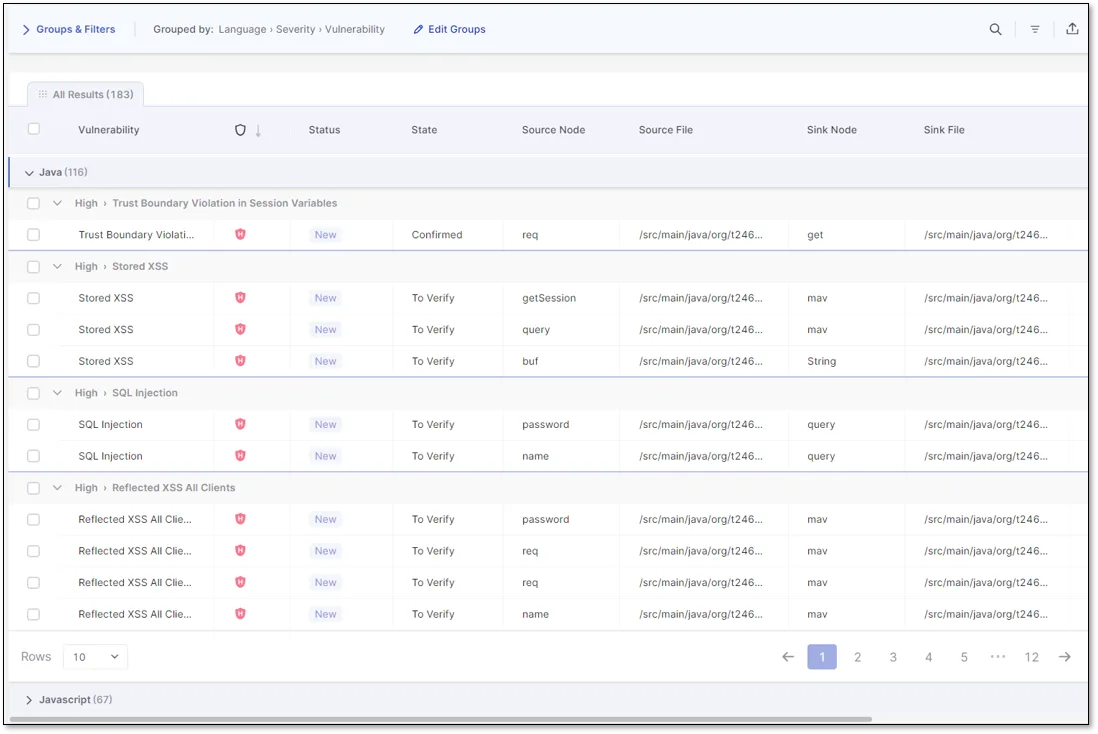
Checkmarx One folds SAST, SCA, IaC, and DAST into one platform with cross-file taint analysis across 35+ languages and compliance dashboards mapped to PCI DSS, SOC 2, and HIPAA. It is built for security teams managing many repositories under audit, not solo developers. Findings correlate across scanners, so you triage one risk instead of four separate alerts.
Pricing is quote-only, and the platform takes real setup effort before it earns its keep.
- License: Commercial
- Languages: 35+ including Java, JavaScript, Python, Swift, Go
- Engine: Cross-file taint analysis with ASPM correlation
- Deployment: SaaS or self-managed
2. Codacy — Best for multi-language PR gating
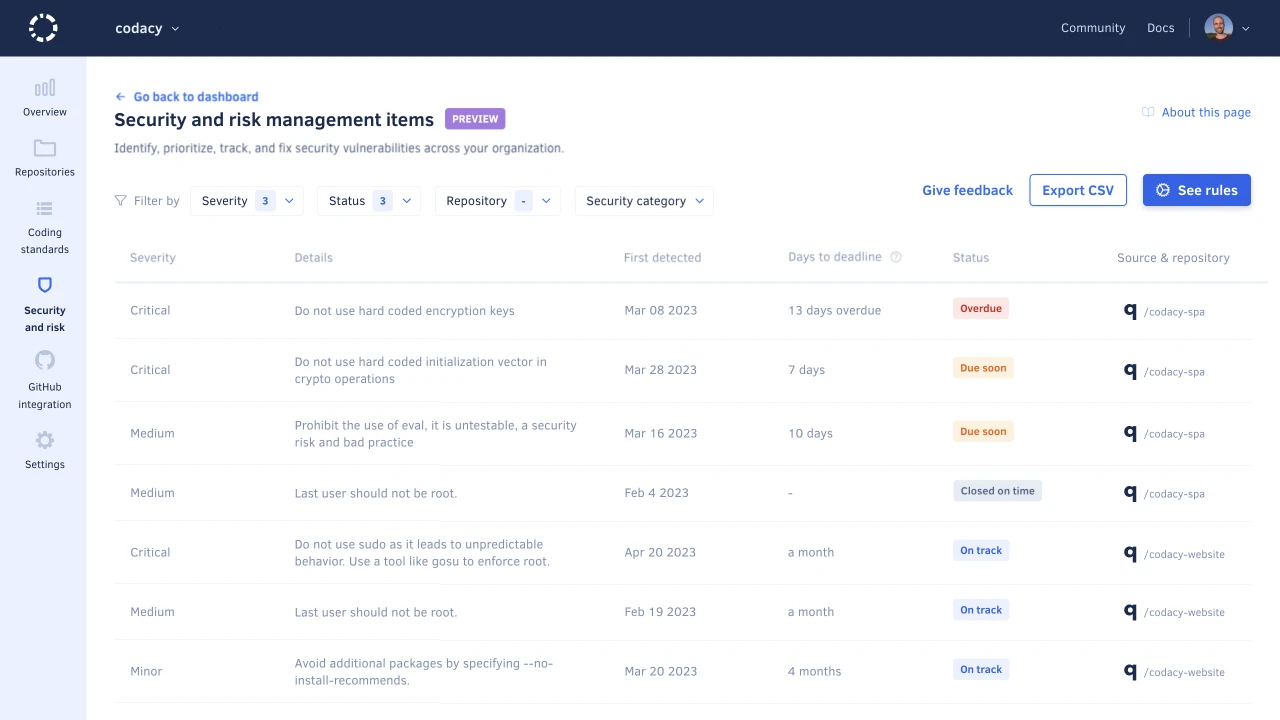
Codacy runs security and code-quality checks on every pull request across 40+ languages, posting findings as inline annotations developers see in review. It is free for open-source and layers AI code protection on top of established analyzers. The appeal is one gate for both quality and security rather than two separate tools.
Its taint analysis is shallower than dedicated enterprise engines, so deep cross-file data flow is not its strength.
- License: Commercial (free for open-source)
- Languages: 40+ including Python, Java, JavaScript, Go, Rust
- Engine: Aggregated analyzers plus AI code protection
- Deployment: SaaS or self-hosted
3. CodeQL (GitHub) — Best for GitHub-native semantic analysis
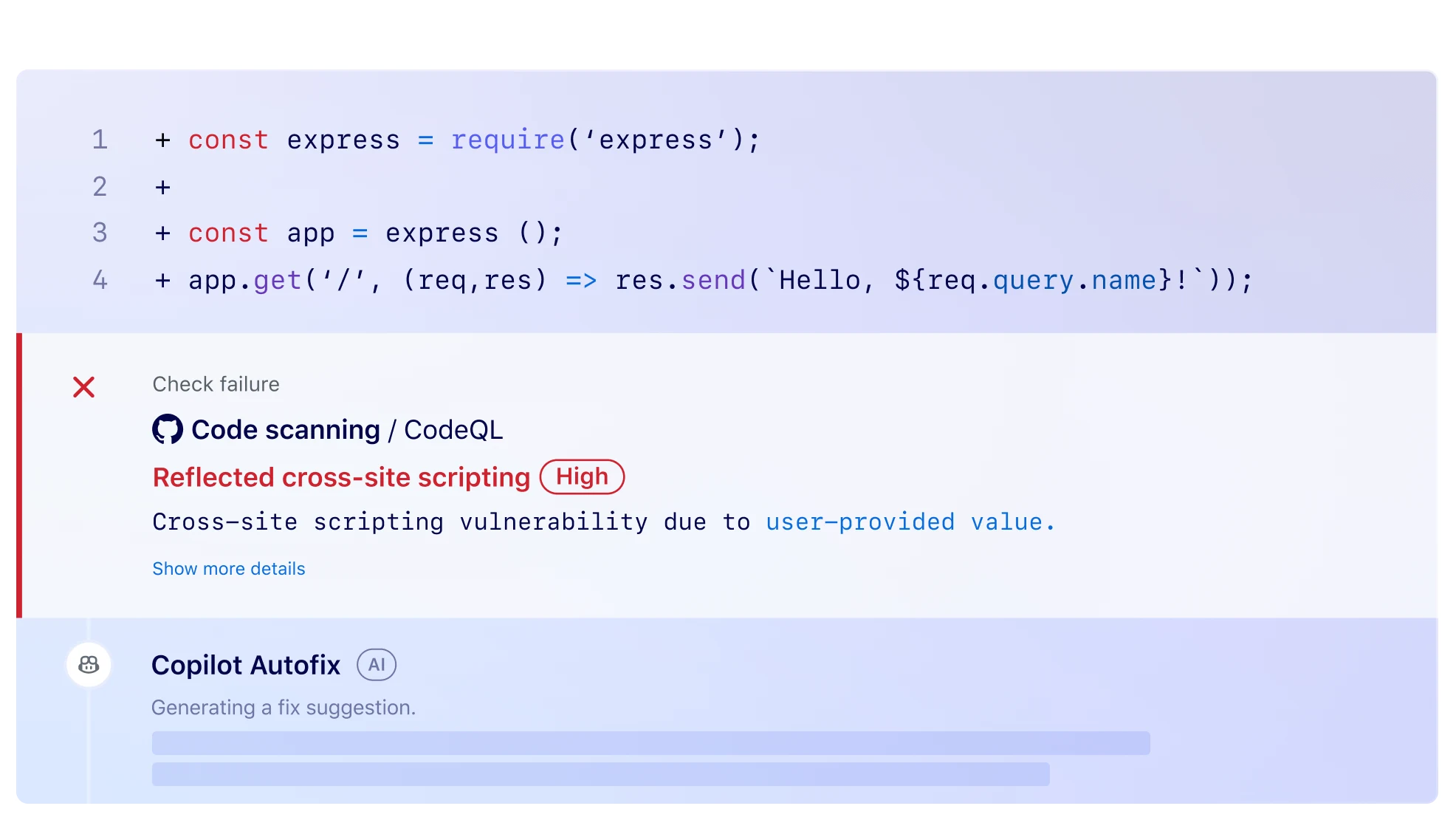
CodeQL compiles your code into a queryable database so you can trace tainted data across functions and files, catching multi-step vulnerabilities pattern matchers miss. It runs as a native GitHub Actions workflow and is free for public repositories. For teams already on GitHub, setup is close to zero.
Writing custom QL queries has a real learning curve, and private repos require paid GitHub Advanced Security.
- License: Free for public repos / GitHub Advanced Security for private
- Languages: Java, Python, JS/TS, C#, Go, C/C++, Ruby, Swift, Kotlin, Rust
- Engine: Semantic query engine (code compiled to a database)
- Deployment: GitHub Actions or CLI
4. Corgea — Best for AI-native auto-fix
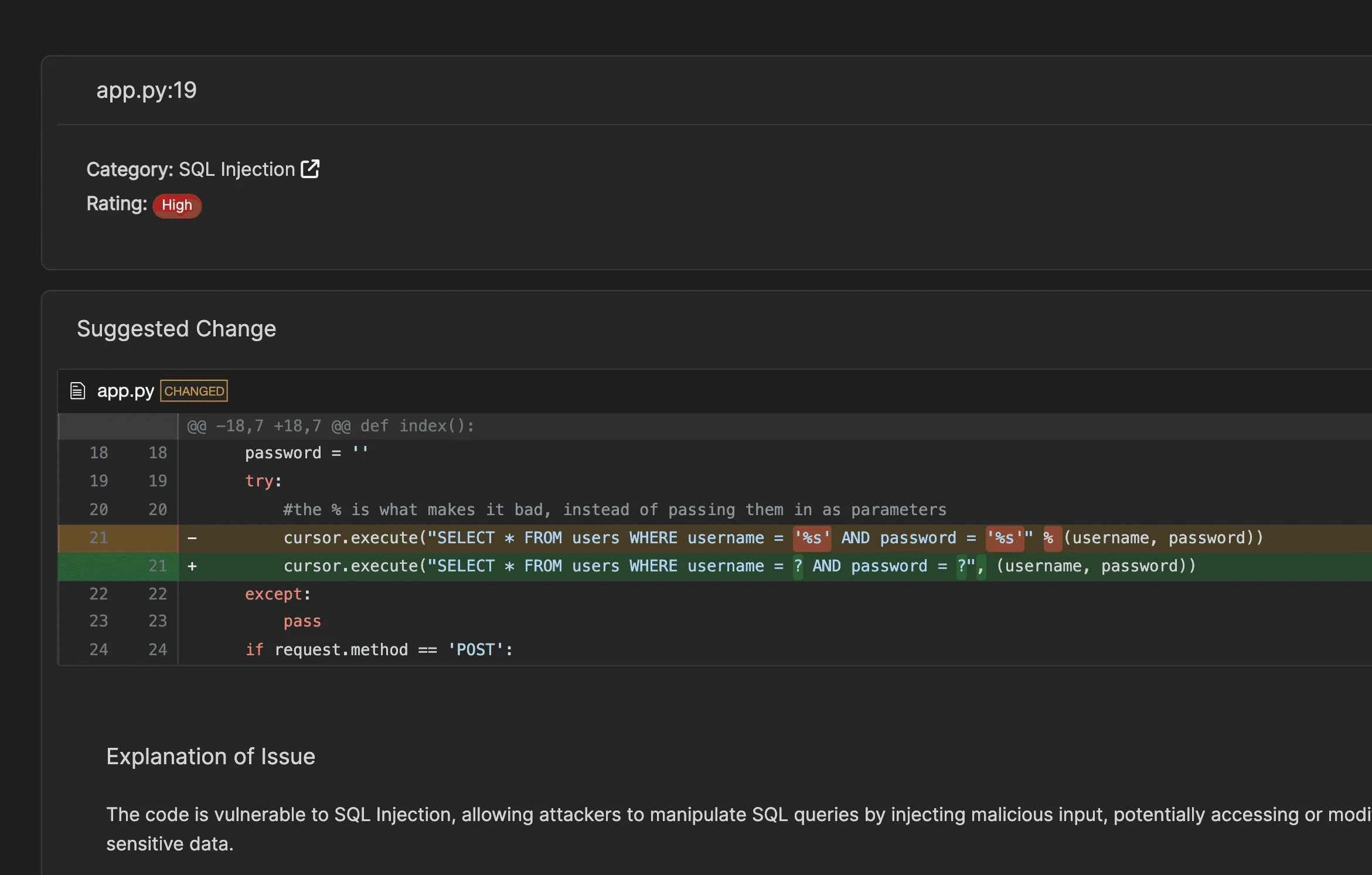
Corgea is an AI-native scanner whose BLAST engine writes the fix, not just the finding, generating patch diffs across 20+ languages. The YC-backed product targets teams drowning in findings nobody has time to remediate. It leans on model reasoning to flag business-logic issues rule scanners struggle with.
It is a newer, smaller vendor, and AI-driven detection is harder to audit than explicit rules.
- License: Commercial
- Languages: 20+
- Engine: AI/LLM detection with automated fix generation
- Deployment: SaaS
5. Coverity (Black Duck) — Best for safety-critical C and C++
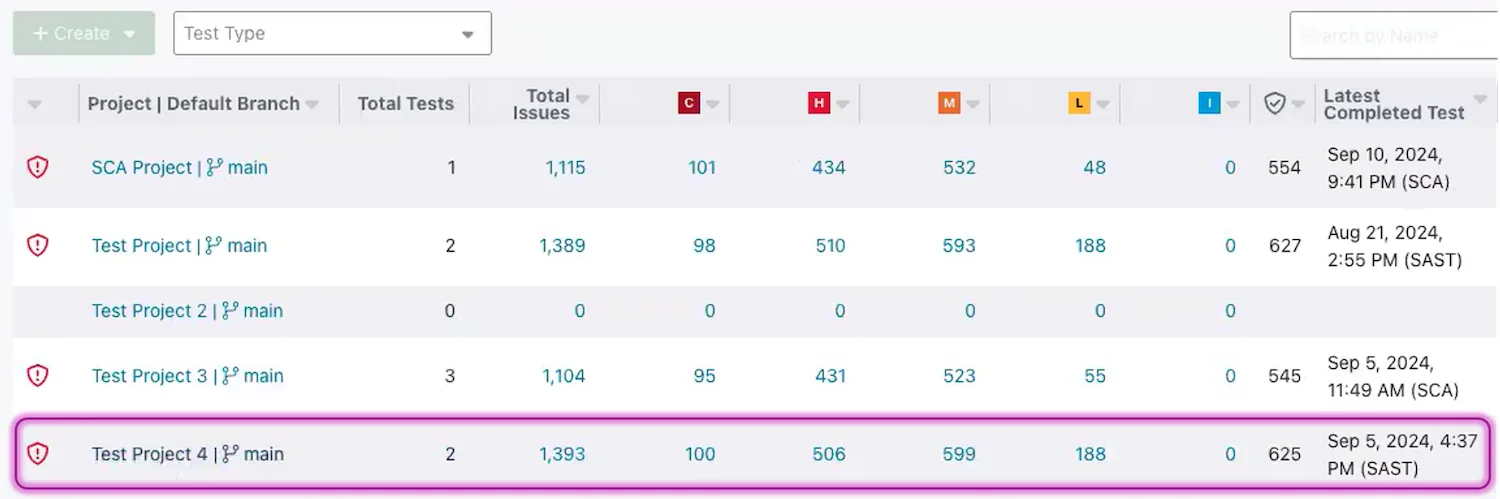
Coverity does deep inter-procedural analysis for C/C++, Java, C#, and 22+ languages, with the memory-safety and concurrency depth automotive, aerospace, and embedded teams need. It maps to MISRA, AUTOSAR, and ISO 26262. It moved from Synopsys to the independent Black Duck in 2024.
Deep scans run from tens of minutes to hours, and pricing is enterprise quote-only.
- License: Commercial
- Languages: 22+ including C/C++, Java, C#, Go, Kotlin
- Engine: Inter-procedural data-flow analysis
- Deployment: Self-hosted or Polaris SaaS
6. Endor Labs — Best for cutting noise with reachability
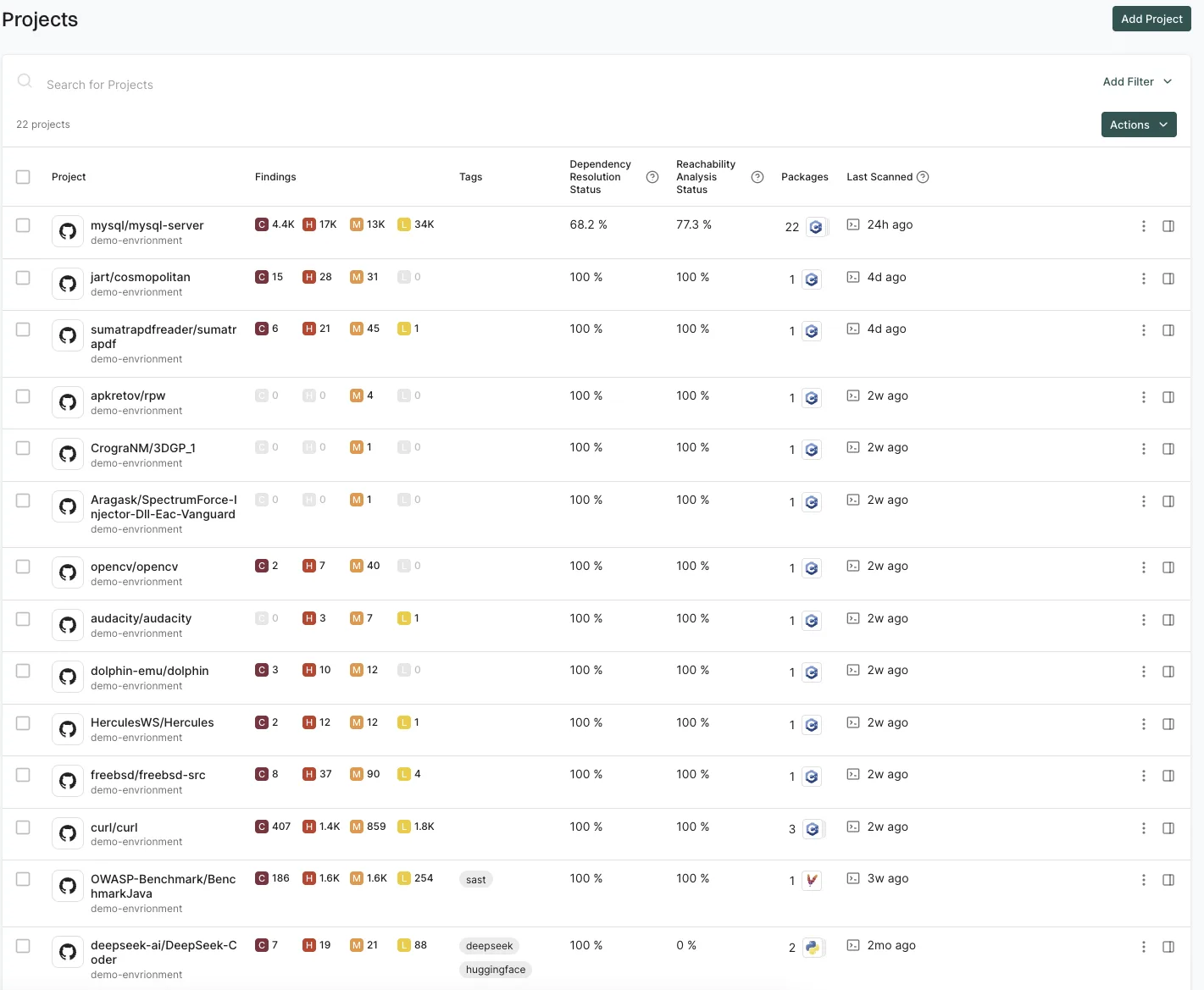
Endor Labs runs AI-native SAST inside a reachability-first platform that filters findings down to the code paths actually reached at runtime. That context strips out the false-positive volume that buries most scanners. Its core strength is dependency reachability, with SAST as a newer complement.
SAST is younger here than its dependency engine, and its canonical home on this site is SCA .
- License: Commercial
- Languages: Multi-language (AI-native)
- Engine: AI-native detection with reachability analysis
- Deployment: SaaS
7. GitLab SAST — Best for GitLab-native pipelines
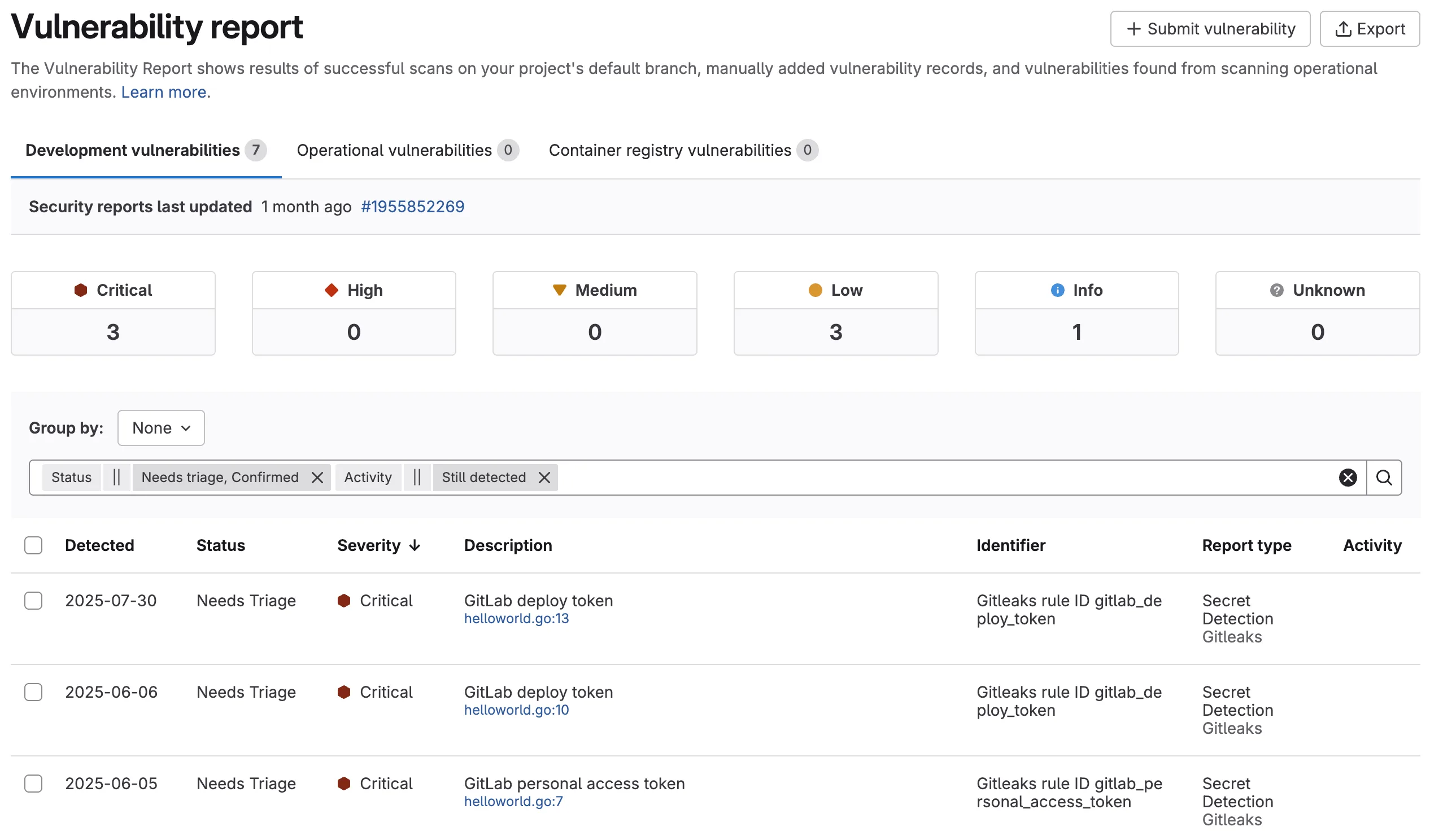
GitLab SAST ships inside GitLab CI on every tier with no external scanner to wire up, covering Java, JavaScript, Python, Go, C#, and more via bundled analyzers. Advanced SAST adds cross-file taint tracking on the Ultimate tier. If your pipeline already lives in GitLab, this is the lowest-friction option.
Cross-file taint analysis is gated behind Ultimate, and it only makes sense if you are already on GitLab.
- License: Included with GitLab (Advanced SAST requires Ultimate)
- Languages: Java, JS/TS, Python, Go, C#, C/C++, Ruby
- Engine: Bundled analyzers plus Advanced SAST (cross-file taint)
- Deployment: GitLab CI (SaaS or self-managed)
8. OpenText Fortify — Best for legacy languages and regulated enterprises
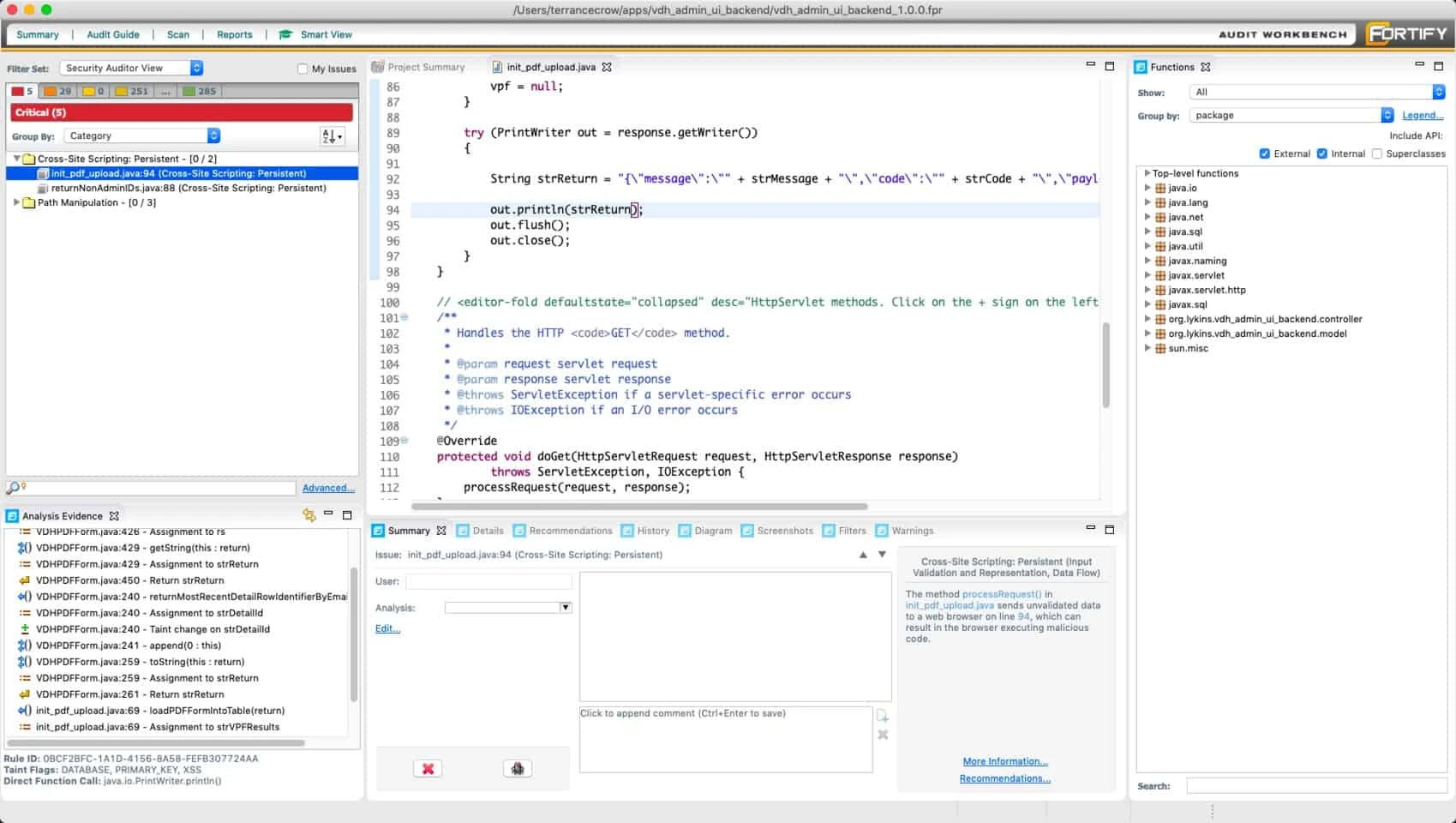
Fortify covers 44+ languages including COBOL, ABAP, and Fortran, the widest legacy support of any scanner, with inter-procedural taint analysis and mature compliance reporting. It is the default in finance, defense, and government codebases. It moved from Micro Focus to OpenText in 2023.
The UX feels dated, deep scans are slow, and licensing is enterprise quote-only.
- License: Commercial
- Languages: 44+ including COBOL, ABAP, Fortran
- Engine: Inter-procedural taint analysis
- Deployment: Self-hosted or Fortify on Demand SaaS
9. Semgrep — Best free, developer-first scanner
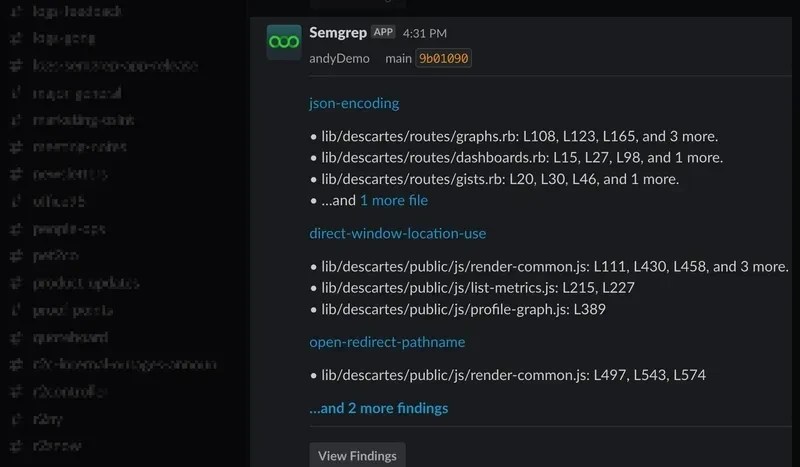
Semgrep CE is free, covers 30+ languages, and lets you write custom rules in a syntax that mirrors the code itself, so security engineers skip the query-DSL learning curve. It scans an average project in seconds, which makes it practical as a pre-commit hook. Semgrep Pro adds cross-file taint analysis and AI-assisted triage.
The free Community Edition does intra-file taint only — cross-file data flow needs the paid Pro tier.
- License: Free CE plus Commercial
- Languages: 30+ including C#, Go, Java, JS, Python, Ruby, Scala, TS
- Engine: Pattern matching plus taint analysis (Pro)
- Deployment: CLI/CI self-hosted or SaaS
10. Snyk Code — Best developer experience
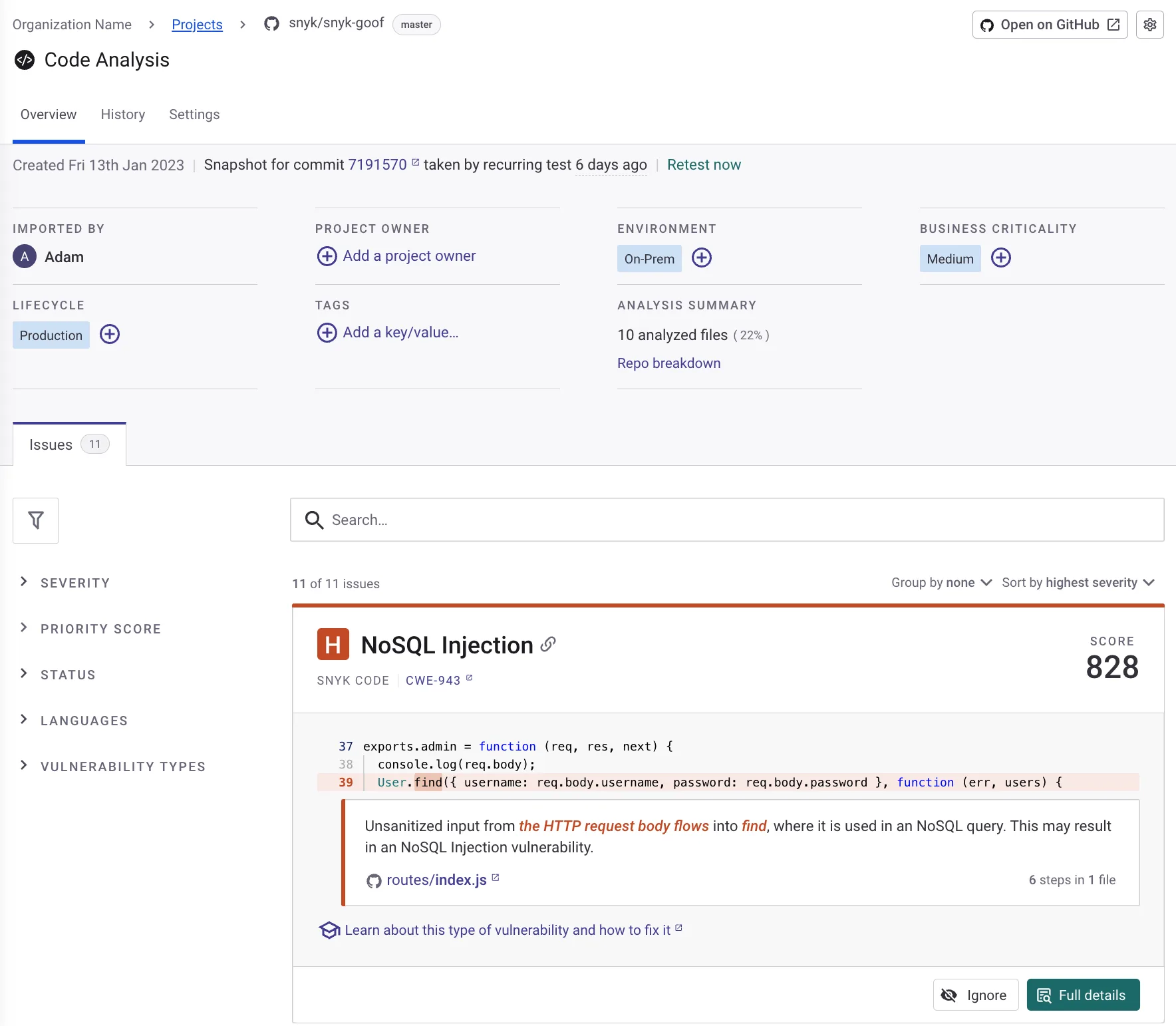
Snyk Code’s DeepCode AI engine delivers real-time findings inside the IDE with one-click fix suggestions, trained on millions of open-source commits to keep noise down. It covers JavaScript, Java, .NET, Python, Go, Swift, and PHP, and posts PR annotations in the review flow. Developer adoption is its clearest advantage.
It is commercial, and the free tier caps how many tests you can run each month.
- License: Commercial (limited free tier)
- Languages: JavaScript, Java, .NET, Python, Go, Swift, PHP
- Engine: DeepCode AI plus data-flow analysis
- Deployment: SaaS with IDE plugins
11. SonarQube — Best for code quality and security in one gate
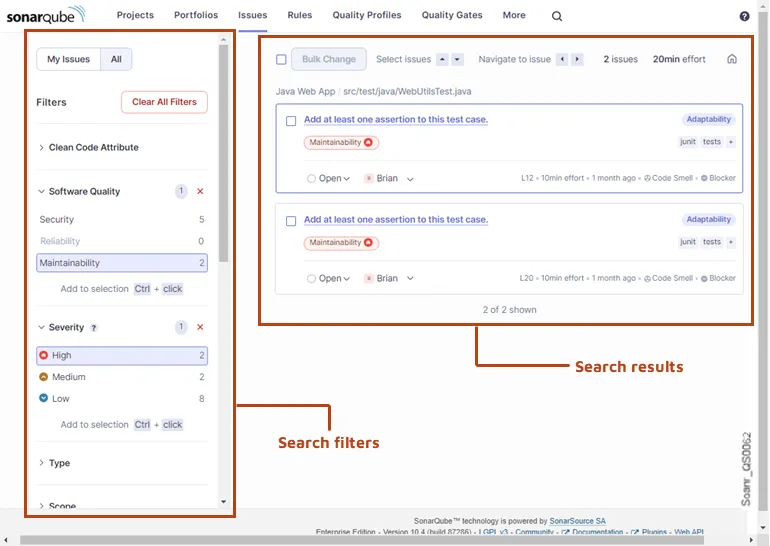
SonarQube grew from a code-quality platform into SAST, covering 35+ languages with CI/CD quality gates that block merges on new security hotspots. Community Build is free across 25 languages; commercial editions add taint analysis plus branch and pull-request scanning. Its huge install base means most teams already know the dashboard.
Deep taint analysis and PR/branch analysis are reserved for the paid editions.
- License: Free CE (LGPL) plus Commercial
- Languages: 35+ including COBOL, Apex, PL/I, RPG
- Engine: Rule engine plus taint analysis (commercial editions)
- Deployment: Self-hosted or SonarQube Cloud
12. Veracode Static Analysis — Best for binary analysis and compliance at scale
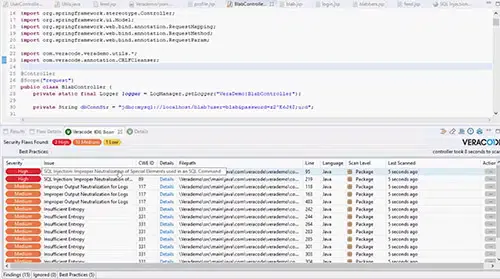
Veracode scans compiled bytecode with no source code required, spanning 100+ languages and frameworks including COBOL and RPG — useful for auditing third-party code. Its Pipeline Scan publishes a 90-second median for CI/CD, and the platform centralizes policy across hundreds of teams. Compliance reporting is a core strength.
It is SaaS-only with an upload-and-scan model, and pricing is enterprise quote-only.
- License: Commercial
- Languages: 100+ languages and frameworks including COBOL, RPG
- Engine: Whole-program binary/bytecode static analysis
- Deployment: SaaS
Best SAST tools by language
The single most important filter is whether a scanner understands your stack — a generic multi-language tool misses the Spring or Rails idioms that decide whether a pattern is actually exploitable. Here is the best free and commercial pick per language.
| Language | Best Free SAST Tool | Best Commercial SAST Tool | Why |
|---|---|---|---|
| Java | SpotBugs + PMD | Checkmarx, Fortify | SpotBugs' Find Security Bugs plugin covers 144 vulnerability types for Java/Kotlin. PMD adds 400+ code quality rules. Checkmarx and Fortify offer deep cross-file taint analysis for enterprise Java apps. |
| Python | Bandit | Snyk Code, Veracode | Bandit is purpose-built for Python with 47 security checks including Django and Flask patterns. Snyk Code adds AI-powered fix suggestions with real-time IDE feedback. |
| JavaScript / TypeScript | Semgrep CE, nodejsscan | Snyk Code, Checkmarx | Semgrep CE handles JS/TS with custom rules. nodejsscan is Node.js-specific with Express and Koa framework awareness. Snyk Code and Checkmarx cover React, Angular, and Vue patterns. |
| Go | gosec | Coverity, Snyk Code | gosec is the standard Go security linter — lightweight, fast, integrates with golangci-lint. Coverity adds deep inter-procedural analysis for larger Go codebases. |
| Ruby on Rails | Brakeman | Checkmarx | Brakeman is the gold standard for Rails security — it understands routing, ActiveRecord, and ERB templates deeply. Hard to beat even with commercial tools for Rails-specific scanning. |
| C / C++ | Infer, Semgrep CE | Coverity, Klocwork, Fortify | C/C++ is where commercial SAST tools justify their cost. Coverity and Klocwork have the deepest memory safety, concurrency, and buffer overflow analysis. Infer (Meta) is the strongest free option for null pointer and memory leak detection. |
| C# / .NET | Semgrep CE, SonarQube CE | Checkmarx, Veracode | Semgrep CE added C# support with framework-aware rules. SonarQube CE covers .NET with quality gates. Checkmarx and Veracode offer deep ASP.NET and Entity Framework analysis. |
| Multi-language | Semgrep CE, CodeQL | Checkmarx (35+), Veracode (100+ with frameworks), Fortify (44+) | For polyglot codebases, Semgrep CE (30+ languages) and CodeQL (12 with deep semantic analysis) are the best free options. Veracode leads in commercial breadth with 100+ languages and frameworks combined. |
| Legacy (COBOL, RPG, ABAP) | — | Fortify, Veracode, Kiuwan | No free SAST tools cover COBOL, ABAP, or RPG. Fortify (44+ languages) has the widest legacy support. Veracode scans compiled bytecode without requiring source code access. |
If you run one primary language, start with the dedicated free tool — Brakeman for Rails or Bandit for Python beat generic scanners on framework coverage. For polyglot teams, Semgrep CE (30+ languages) or CodeQL on GitHub is the practical base, with language-specific tools layered on where depth matters.
Each major language has a dedicated shortlist: Python , JavaScript/TypeScript , Java , Go , C#/.NET , and PHP .
What Are the Major SAST Market Changes?
The SAST market consolidated hard over the last few years, and who owns your scanner matters when you are signing a multi-year contract.
- Synopsys → Black Duck (2024). Synopsys sold its software-integrity business — including Coverity — to private equity; it now operates as the independent Black Duck Software.
- Micro Focus Fortify → OpenText (2023). OpenText Fortify changed hands when OpenText absorbed Micro Focus, putting the widest legacy-language scanner under new ownership.
- IBM AppScan → HCL. HCL AppScan spun out of IBM and now ships as AppScan 360°, with AI-assisted testing added in its 2025 release.
- Bearer → Cycode (2024). The open-source Bearer scanner was acquired by Cycode and folded into its ASPM platform; the standalone project is no longer maintained.
- Checkmarx → Hellman & Friedman. A private-equity majority stake reset Checkmarx as a platform play rather than a point SAST tool.
The second shift is the AI-native wave. A new tier of scanners — Corgea , ZeroPath , Mend SAST , and Endor Labs — uses model reasoning as the detection engine, not just a triage layer, and several now write the fix as a patch.
That matters because AI also writes a growing share of the code being scanned, and it does not write secure code by default. NYU’s 2021 study found roughly 40% of Copilot suggestions vulnerable on security-sensitive prompts (Pearce et al. ), and Stanford’s 2023 study found developers using AI assistants shipped less secure code (Perry et al. ).
How I evaluate SAST tools
I compare SAST tools on publicly verifiable signals — vendor documentation, OWASP Benchmark v1.2 scores, vendor-published false-positive and scan-time numbers, GitHub release history, and customer case studies. No vendor pays to appear, and I do not publish per-tool numeric scores.
I do not run my own fixed-corpus false-positive benchmark. Those numbers are published by vendors and the OWASP Benchmark project, and I cite them directly when I reference a specific figure.
The rubric below is the lens I apply — what I weigh and why. Detection quality carries the most weight because false positives kill adoption faster than anything else.
| Criterion | Weight | Max Score | What I Look At |
|---|---|---|---|
| Detection quality (taint depth) | 30% | 30 pts | Documented engine architecture (intra-file vs. cross-file vs. inter-procedural); second-order injection coverage; OWASP Benchmark v1.2 results where published |
| False positive rate | 25% | 25 pts | Vendor-published FP benchmarks (Cycode, Veracode), OWASP Benchmark v1.2 scores, and customer-reported noise levels in support forums |
| Language and framework coverage | 20% | 20 pts | Language count from vendor docs; framework-specific rule depth (Rails, Spring, Django, React); legacy language support |
| CI/CD speed | 10% | 10 pts | Vendor-published scan times and customer case studies; incremental scan support; pipeline integration complexity |
| Developer experience | 10% | 10 pts | IDE integration; fix suggestion quality; PR annotation support; onboarding time for a new project |
| Compliance and audit trails | 5% | 5 pts | SARIF export; suppression history logging; PCI DSS / SOC 2 / HIPAA / MISRA report templates |
Three patterns hold across the 38 tools I track.
False-positive rates vary by language and framework. In its vendor-run OWASP Benchmark test, Cycode reported a 2.1% false-positive rate. Re-test shortlisted tools on your own stack; rule tuning matters more than one vendor benchmark.
Scan-time spread is even wider. Lightweight scanners finish a 100K-LOC project in seconds; deep commercial engines like Fortify and Coverity run minutes to hours. PR-blocking gates need sub-five-minute scans, or developers disable them.
Cross-file taint tracking is the commercial moat. Only a handful — Semgrep Pro , Snyk Code , CodeQL , Checkmarx , Coverity , Fortify , Veracode , and Infer — trace tainted data across files. If your threat model includes second-order injection where source and sink live in different files, intra-procedural scanners are not enough.
What do SAST tools cost?
SAST pricing splits into three tiers, and the jump between them is where most budgets get decided.
Free open-source scanners — Semgrep CE , Bandit , SonarQube CE , and CodeQL for public repos — cost nothing in license. The trade is setup and tuning time instead of a price tag.
Freemium tools add a paid tier once you pass a usage cap or need team features. The free tier is real but bounded.
Commercial platforms are almost always quote-only — Checkmarx , Veracode , Coverity , and Fortify publish no public price because the number is negotiated per deal.
What drives that quote? Mostly four factors:
- Scale — how many developers or applications you cover
- Languages — legacy COBOL, ABAP, and RPG support costs more
- Compliance — audit trails and PCI DSS / SOC 2 / HIPAA reporting add to the price
- Analysis depth — cross-file taint and deep scans cost more than pattern matching
A team under 50 developers rarely needs to pay for SAST at all. A regulated enterprise past 500K lines is paying for the compliance dashboards and support as much as the scanning itself.
I do not publish specific prices for tools whose vendors keep them behind a sales call.
The bottom line
Match your situation to one row. If you span two, lean toward the harder constraint — compliance always beats convenience.
| Your situation | Pick | Why |
|---|---|---|
| Startup, <50 devs | Semgrep CE + CodeQL | Free and multi-language, GitHub Actions in 10 minutes; CodeQL adds free semantic analysis on public repos |
| Enterprise with legacy code | Fortify or Checkmarx One | 44+ / 35+ languages, COBOL/ABAP/Fortran coverage, ASPM correlation |
| Already on GitHub | CodeQL | Free for public repos, native Actions, 12 languages with semantic analysis. Snyk vs GHAS if private |
| Developer buy-in is the bottleneck | Snyk Code | Real-time IDE feedback, AI fix suggestions, PR annotations inside the review flow |
| Compliance audit (PCI DSS / SOC 2 / HIPAA) | Checkmarx One or Fortify | OOTB compliance report templates; PCI DSS 4.0 §6.2.4 and §6.3.2 require this kind of mapping |
| Safety-critical C / C++ (auto, aero, embedded) | Coverity or Klocwork | Deep inter-procedural analysis; MISRA, AUTOSAR C++14, ISO 26262, DISA STIG mapping |
| Python-only stack | Bandit + Semgrep CE | 47 built-in checks for Django/Flask, plus cross-framework custom rules |
| Ruby on Rails monolith | Brakeman | Only deep Rails-aware free SAST; no commercial competitor for Rails-specific patterns |
| Need binary analysis (no source) | Veracode | Scans compiled bytecode across 100+ languages and frameworks without source access |
A few rules of thumb from the buyer’s seat:
- Under 50 developers on mainstream languages? A free stack of Semgrep CE and SonarQube CE covers most codebases at zero license cost — add CodeQL on GitHub, or a language-specific scanner like Bandit for Python depth. The open-source SAST guide ranks these in depth.
- Regulated, legacy, or 100K+ LOC? The commercial tier earns its price on cross-file taint, compliance dashboards, and COBOL/ABAP coverage. The enterprise SAST guide covers that shortlist.
- Drowning in false positives? That is a tuning problem before it is a tool problem — see reducing SAST false positives .
Whatever you pick, SAST is one layer. It finds code-level flaws but misses runtime and configuration issues (DAST ) and vulnerable dependencies (SCA ) — see how the three compare in SAST vs DAST vs IAST and SAST vs SCA . New to the category? Start with what is SAST .
Frequently Asked Questions
What is SAST (Static Application Security Testing)?
What is the difference between SAST and DAST?
Which SAST tool is best for enterprise codebases?
How do I reduce false positives in SAST?
Can SAST tools be integrated into CI/CD pipelines?
What is the best SAST tool in 2026?
Which SAST tool supports the most programming languages?
How long does a SAST scan take?
Is SAST enough for application security?
What is the best free SAST tool in 2026?
Which SAST tools are open source?
What are the best SAST tools for Python?
Can SAST replace DAST?
How accurate are SAST tools?
Related SAST Resources
Explore Other Categories
SAST covers one aspect of application security tools. Browse other categories below.

Written & maintained by
Suphi CankurtEight years on the vendor side of application-security sales — thousands of evaluations and demos. I started AppSec Santa in 2022 to put that insider view to work for buyers. Independent of the vendors I review, paid by none of them, and honest about what fits whom.