


Runlayer is a commercial AI security platform for controlling how employees and agents reach company tools. It combines an MCP gateway with identity, policy, runtime scanning, session monitoring, and audit records.
The platform covers both approved and unmanaged agent use. Runlayer Watch discovers shadow AI, MCP servers, skills, plugins, and client configurations, while Guard evaluates activity before it reaches company systems.
What is Runlayer?
To me, Runlayer’s differentiator is putting identity, policy, runtime scanning, and audit records between agents and enterprise tools.
The vendor also provides hosted agents and a catalog of more than 18,000 MCP entries. Companies can add internal MCP servers and expose an approved set through the same gateway, according to Runlayer’s platform overview .
Key features
| Capability | Details |
|---|---|
| MCP gateway | Routes agent tool requests through identity, policy, security, and audit controls |
| Shadow AI discovery | Inventories unmanaged clients, MCP servers, skills, plugins, and agent definitions |
| ToolGuard | Scans tool definitions, calls, intent, skill files, PII, credentials, and hidden characters |
| AgentGuard | Monitors behavior across the full agent trajectory |
| Sessions | Records prompts, reasoning, tool activity, permission decisions, and security outcomes |
| Agent IAM | Supports autonomous agent accounts and user-delegated access |
| Policies | Evaluates users, groups, roles, tools, resources, OAuth state, and runtime context |
| Deployment | Hosted or self-hosted on AWS ECS, EKS, or Kubernetes |
MCP gateway and connector catalog
Runlayer’s gateway is the enforcement point for MCP traffic. It connects approved tools to AI clients while keeping identity, policy checks, Guard decisions, and audit data attached to each request.
The catalog includes vendor-provided, third-party, and internal connectors. Runlayer’s site says organizations can begin with more than 18,000 MCP listings and then approve the subset employees should use.
 Claude
 Cursor
 ChatGPT and Codex
 GitHub Copilot
 VS Code
Identity and delegated access
Agent Accounts are registered clients with credentials, policies, lifecycle state, and an operating boundary. Runlayer documents this capability as beta and says access approval is required.
Autonomous agents can use machine-to-machine tokens. Delegated agents use on-behalf-of tokens that preserve the user’s context.
For delegated calls, Runlayer enforces the intersection of agent, user, and server policies. An agent cannot inherit broader access than the user who delegated the action.
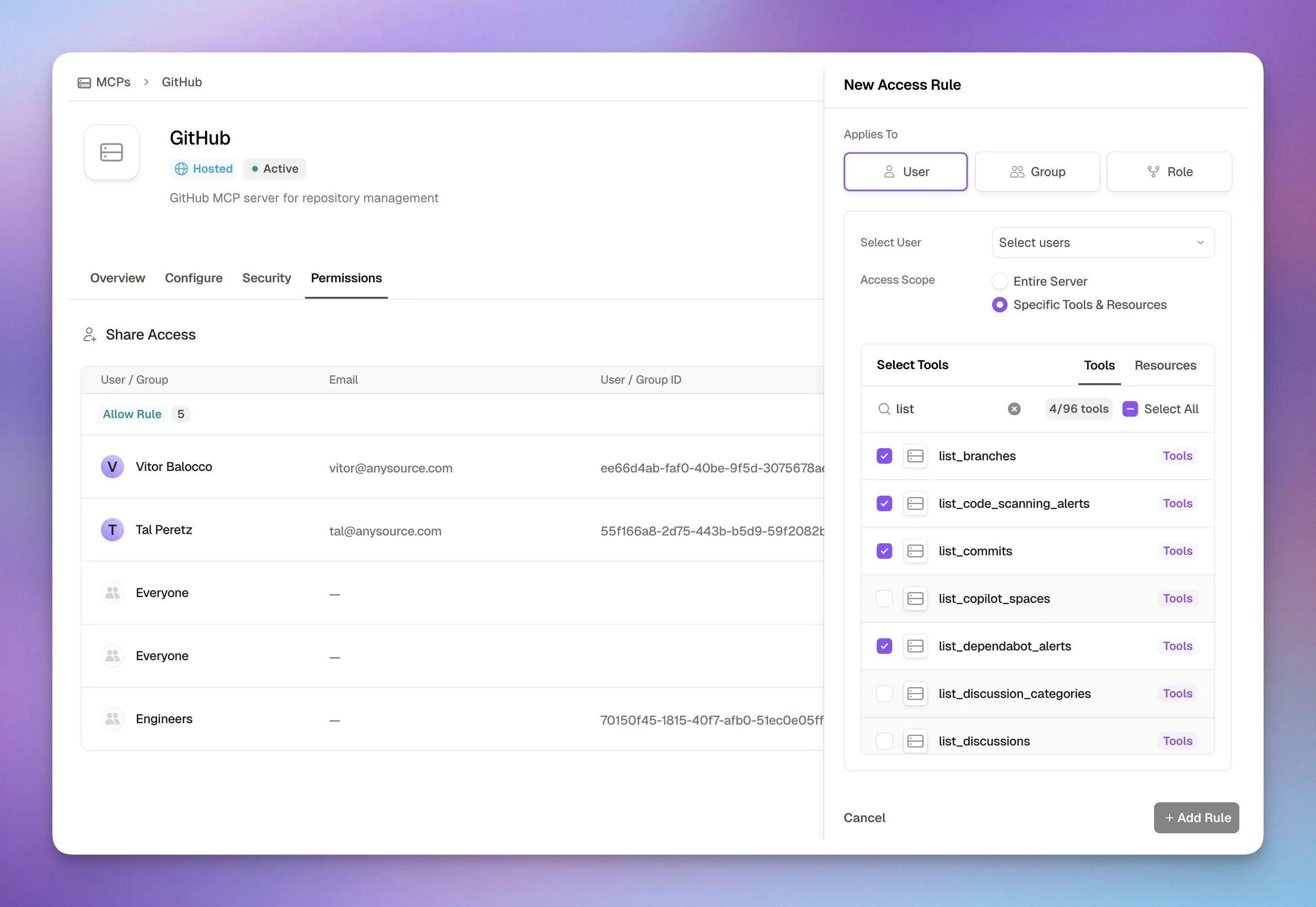
Runlayer has server-level and global policies. Server policies allow or deny access to named MCP servers and tools, while global policies apply organization-wide deny rules.
Human approval rules are a beta layer above access policies. They apply to tool calls and can use principals, connectors, tools, and runtime conditions, but cannot be narrowed to specific resources.
ToolGuard runtime scanning
ToolGuard applies several scanners to MCP traffic. The ML models cover tool definitions, tool calls, intent, and skill files.
Pattern-based scanners detect PII, credentials, and invisible characters. Depending on the scanner, a finding can be allowed, logged, masked, or blocked.
Tool List Guard checks names, descriptions, and schemas when a connector is registered. It looks for prompt injection, hidden instructions, and risky tool definitions.
Tool Call Guard scans outputs before they reach the model. Tool Intent Guard compares inputs and outputs to catch behavior that diverges from the requested action.
Runlayer documents 13 built-in PII types. They include Social Security numbers, card numbers, email addresses, passports, IBANs, medical record numbers, vehicle identifiers, and cryptocurrency addresses.
Tool List Guard assigns four risk tiers. The documented defaults are Minimal below 0.6, Low from 0.6 to 0.7, Medium from 0.7 to 0.9, and High at 0.9 or above.
Each ML scanner has Strict, Balanced, and Moderate sensitivity. Balanced is the default, and admins can override it globally, per connector, or per client.
Skill files are scanned during CLI upload, GitHub import, or API creation. High-risk skills default to Block, Medium defaults to Alert, and Low or Minimal skills are allowed.
ToolGuard findings include a confidence score, risk tier, threat categories, and the excerpt that triggered the classification. Blocked tool outputs retain the specific output section behind the decision.
Runlayer documents typical ToolGuard inference at 50 to 100 milliseconds. That is a vendor-reported range, so measure it against your own tool payloads and deployment before enforcing latency budgets.
Admins can submit false-positive and false-negative feedback through the security API. A successful submission returns an identifier for the correction.
AgentGuard and session monitoring
AgentGuard evaluates the agent’s behavior across a session rather than one tool call. It looks for output-steering injection, abrupt reasoning changes, and gradual drift away from the original task.
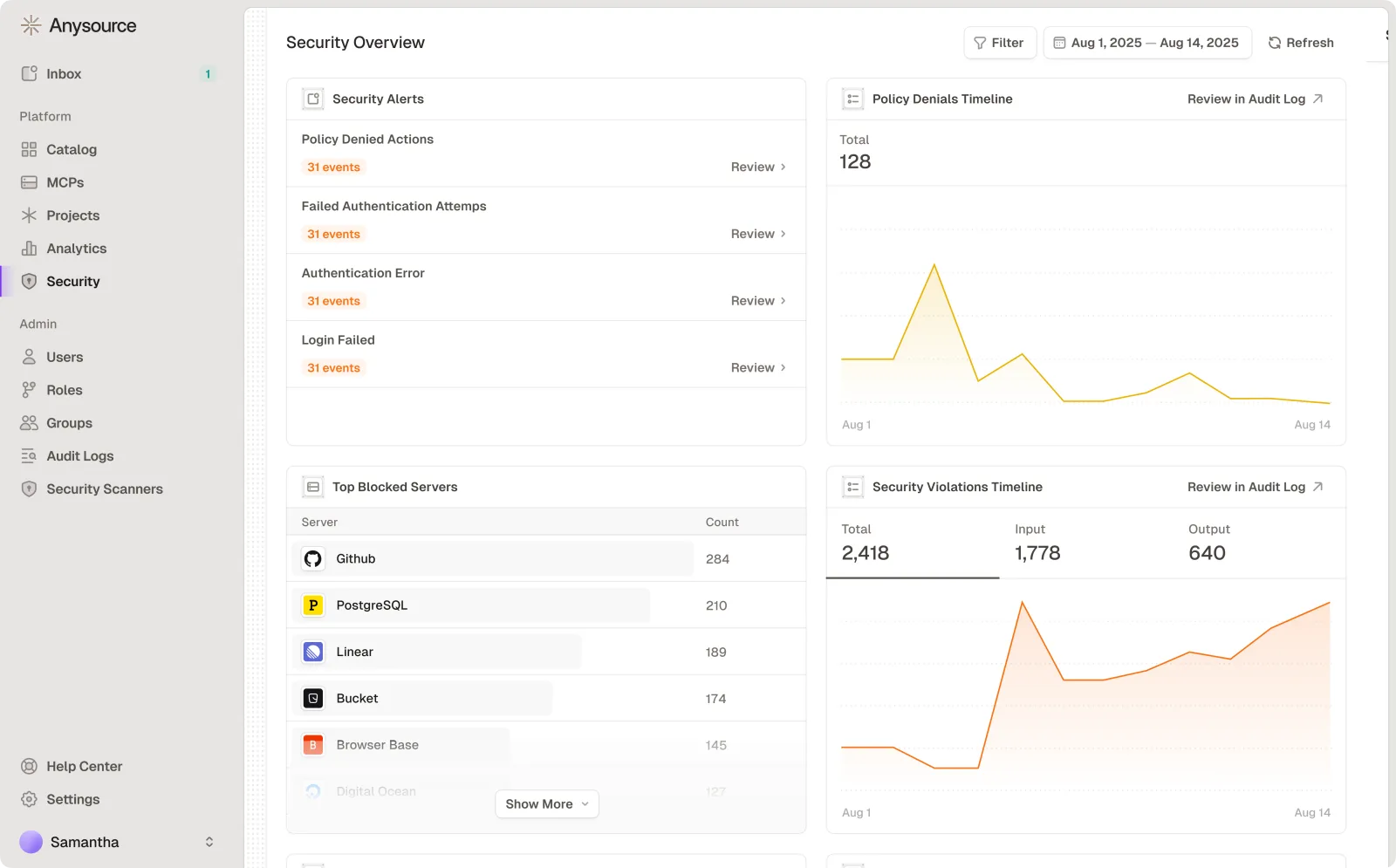
Admins can run AgentGuard in Alert or Block mode. A separate kill switch can stop later tool calls after any scanner blocks an action.
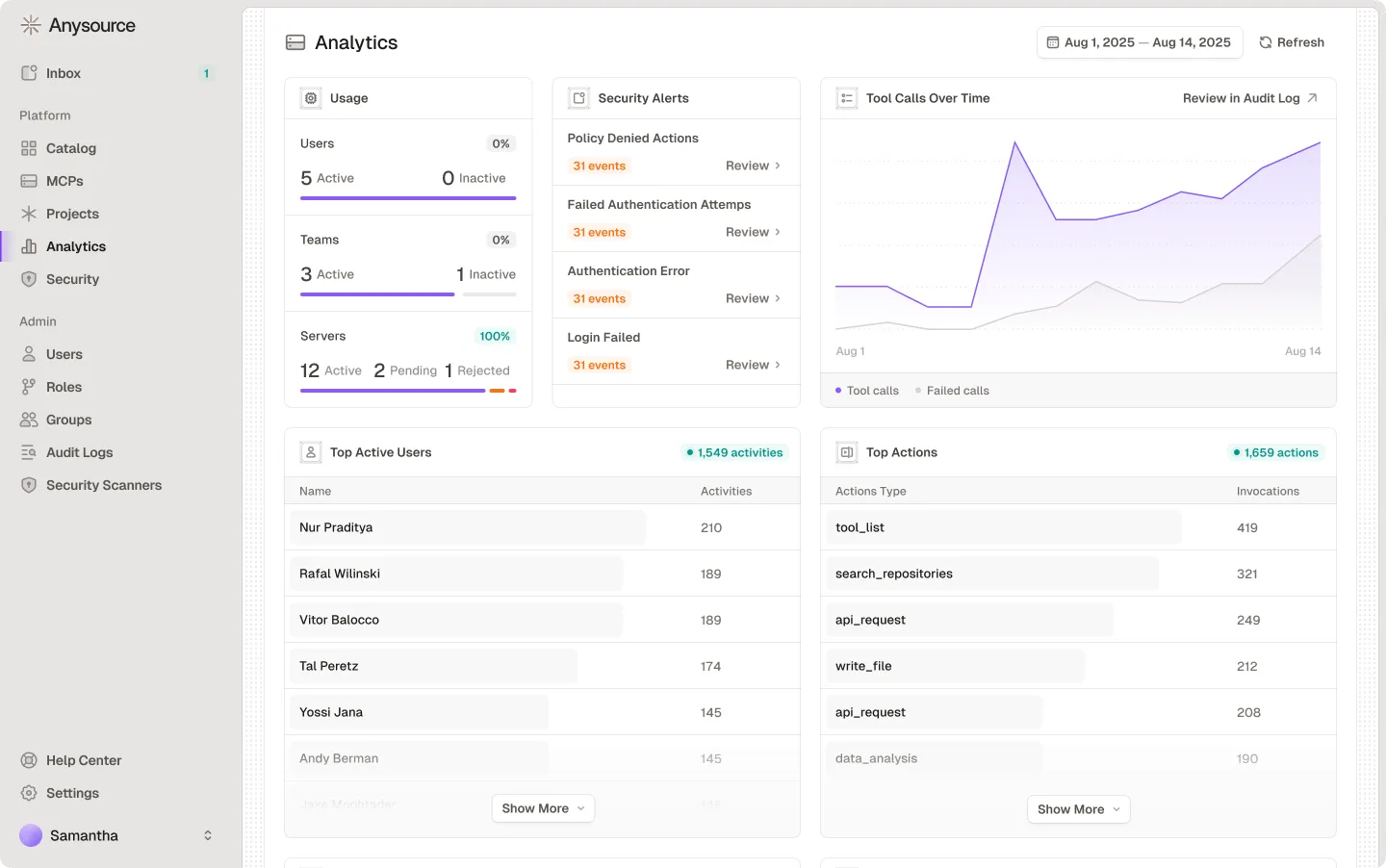
The Sessions view combines prompt context, reasoning, model responses, local tool calls, MCP calls, and scanner results in one timeline. Supported hook sources include Cursor, VS Code, Claude Code, GitHub Copilot CLI, Codex, Hermes, and Goose.
Permission prompts also appear in the timeline when the client emits them. Reviewers can distinguish a user’s allow decision from a later Runlayer policy or scanner verdict.
Runlayer warns that session data can contain prompts, reasoning, tool inputs, and outputs. Workspace privacy settings can redact content for users who cannot view another person’s activity.
Anthropic and OpenAI compliance APIs can import supported web chats into Sessions. Those imports are monitor-only because the conversation has already happened; client hooks are required for real-time enforcement.
Shadow AI discovery
Runlayer Watch scans endpoints for unmanaged AI clients, MCP servers, skills, plugins, and agent definitions. Endpoint modes separate discovery from active enforcement.
Detect remains active in every endpoint mode. Supported clients can run in Monitor, Protect, or Enforce mode, and the documentation recommends observing and tuning before blocking.
Audit logs
Audit logs cover connector, skill, plugin, policy, authentication, tool-call, API, agent, OAuth, and security events. Tool-call records include ToolGuard scanner metadata when scanning is active.
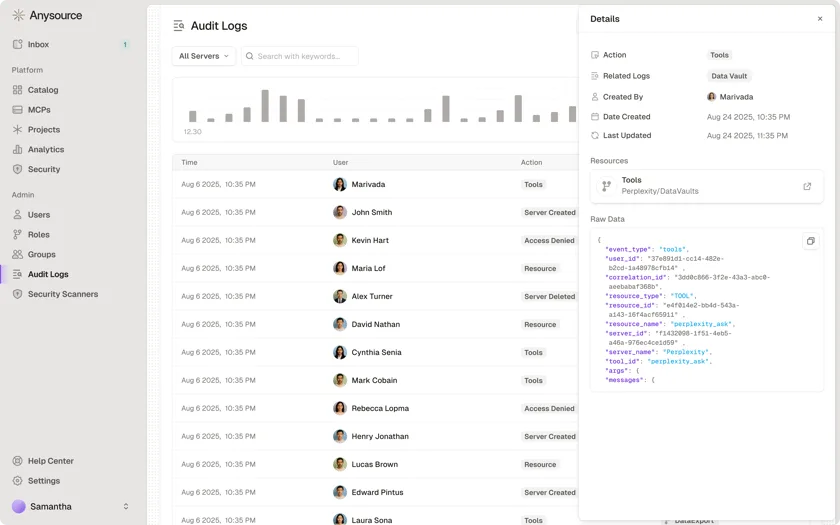
Prompts and model reasoning stay in Sessions rather than the audit log. Runlayer treats the audit log as the longer-term record for policy decisions, security events, and administrative activity.
The default hot window is 90 days. Older events move to S3 and remain exportable through Runlayer MCP, while self-hosted deployments can change the hot-window duration.
Sensitive connectors can hide arguments, results, errors, and scan details from viewers. The metadata still shows the actor, tool, server, and timestamp.
SIEM export delivers audit events to S3. Sessions are not included in that export, so prompt and reasoning timelines remain in the Runlayer application.
Deployment and operations
Runlayer offers a hosted service and self-hosted deployment in a customer’s AWS account or Kubernetes cluster. Documented paths include ECS and EKS with Terraform, Helm, and the Runlayer Operator.
The hosted product is single-tenant in an AWS account operated by Runlayer. A self-hosted deployment places the gateway, application, database, and audit logs in the customer’s account or cluster.
Hosted deployments receive vendor-managed updates. Self-hosted teams apply updates on their own schedule and must operate the database, cache, networking, backups, and observability.
The shared OAuth broker is available to hosted deployments. Self-hosted environments use per-vendor OAuth setup because they cannot reach that shared broker.
ToolGuard on self-hosted infrastructure requires its GPU components to be enabled. The public docs tell administrators to check that deployment layer when ToolGuard options do not appear.
The platform also exposes a Terraform provider, API, command-line client, and telemetry hooks for Python and TypeScript agents. Some components are marked beta in the public documentation.
ECS is the smaller AWS-operated path when a team does not want Kubernetes. EKS and Helm provide more control for organizations already operating clusters.
Air-gapped self-hosted networks can run AI Watch without public internet egress. The endpoint agent still sends data to the organization’s own Runlayer tenant over HTTPS.
Company and pricing
Runlayer announced a $30 million Series A on June 24, 2026, bringing total funding to $42 million. The company named Felicis and Khosla Ventures as the Series A investors.
Public prices are not listed. Teams must book a demo to discuss packaging and deployment.
When to use Runlayer
Runlayer fits organizations adopting several AI clients and MCP servers across multiple teams. The product is built for central governance without forcing employees into one AI interface.