


Revenera FlexNet Code Insight is an enterprise SCA platform focused on open-source license compliance , intellectual property protection, and M&A due diligence.
While most SCA tools lead with security, Code Insight places equal weight on license compliance. I would point organizations at it where license compliance carries legal and financial consequences, not just security exposure.
The Black Duck 2026 OSSRA report found that 68% of audited codebases contained open-source license conflicts — the sharpest surge in the report’s eleven-year history, illustrating why tools like Code Insight exist.
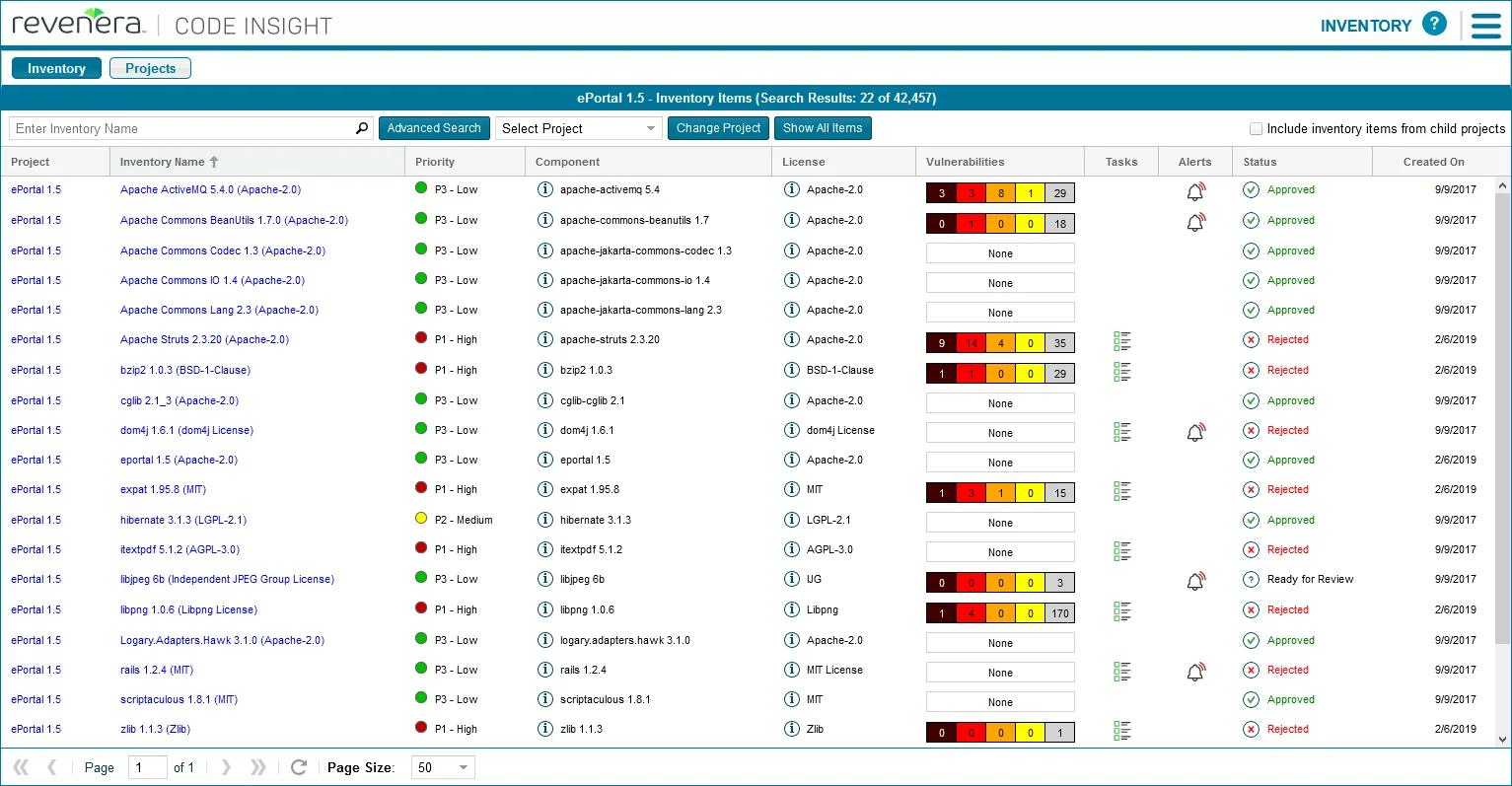
The platform maintains a database of 14M+ open-source components with detailed license information.
It goes beyond identification to provide guidance on license compatibility, attribution requirements, and obligations that may conflict with your business model.
Deep code scanning catches copy-pasted snippets and embedded libraries that dependency-based tools miss.
What is Revenera FlexNet Code Insight?
Code Insight helps software vendors, M&A teams, and regulated enterprises understand what open-source components are in their software, what licenses govern use, and what security vulnerabilities they contain. Workflow features support collaboration between development, legal, and security teams.
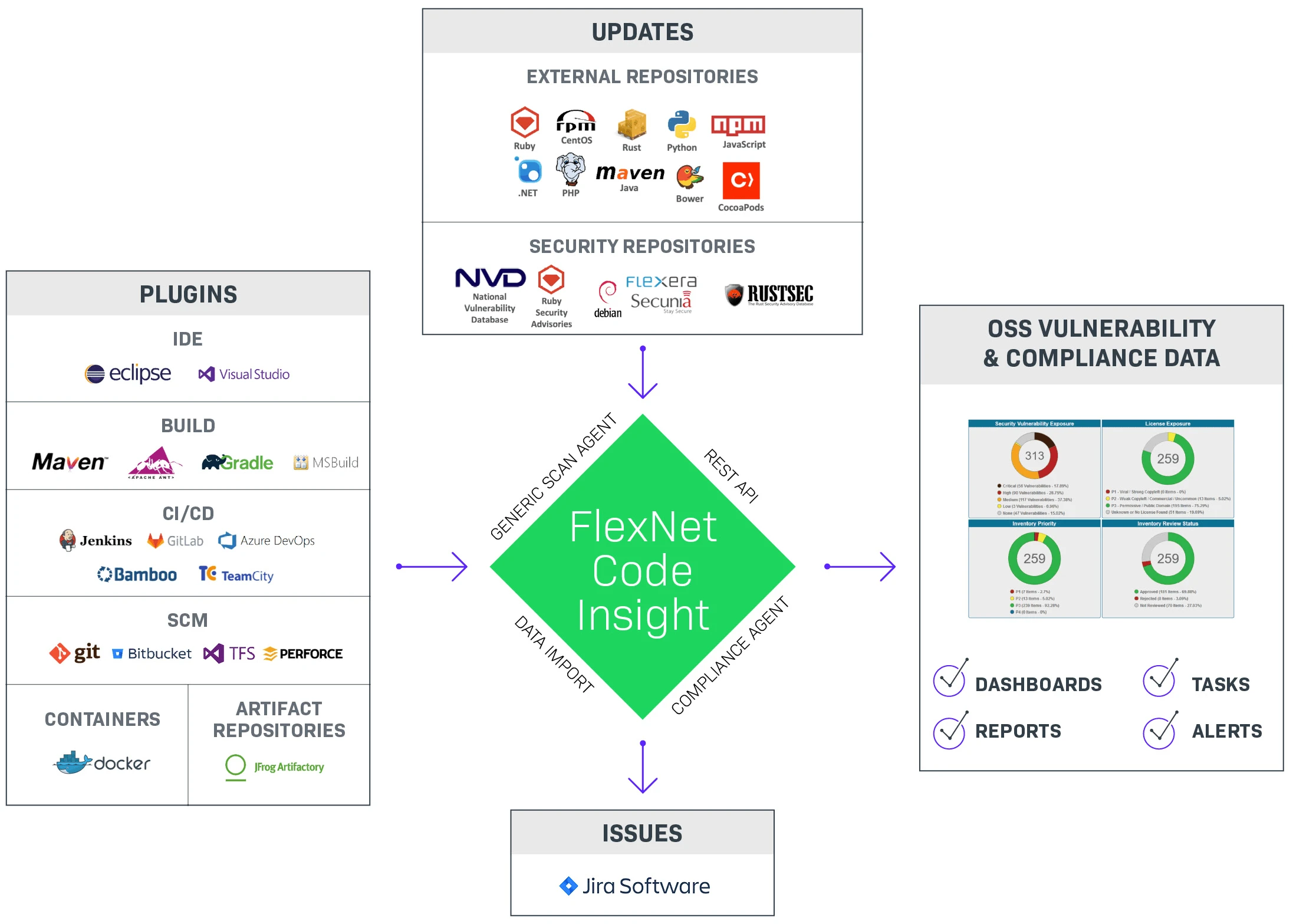
| Capability | Details |
|---|---|
| License Compliance | Identifies licenses through declared files, embedded text, and headers. Analyzes obligations (attribution, source disclosure, patent grants), checks compatibility, and enforces policies. Handles dual-licensing and version-specific terms. |
| Deep Code Scanning | Analyzes actual source code to find copy-pasted snippets, embedded libraries not in package managers, and code matching known open-source projects regardless of modification. Catches what dependency scanners miss. |
| IP Risk Assessment | Identifies code from copyleft-licensed projects, detects potential IP contamination, flags code matching contested projects, and provides evidence for M&A due diligence. |
Revenera vs Flexera: what changed and what didn’t
Revenera is the Flexera-owned division that was rebranded in May 2020. It was not a spinoff or a separate company — Flexera restructured its operations into two divisions in 2018, and in 2020 the supplier-facing division serving technology and IoT companies took on the Revenera name.
FlexNet Code Insight kept its FlexNet family name through the rebrand. Contracts signed under Flexera transitioned to Revenera without product-SKU changes, and legacy documentation still lives on docs.revenera.com alongside the parent-company materials at flexera.com. The Datasheet for FlexNet Code Insight is currently published at resources.flexera.com (parent domain) while the product page sits at revenera.com (division domain) — both references are correct.
If a vendor sales pitch or Reddit thread calls it “Flexera FlexNet Code Insight”, it is the same product as Revenera FlexNet Code Insight. Google’s own search results and PAA block include queries in both forms, and the vendor treats them as interchangeable.
What are Revenera FlexNet Code Insight’s key features?
Supported ecosystems
| Ecosystem | Package managers |
|---|---|
| Java/Kotlin | Maven, Gradle, Ant |
| JavaScript | npm, yarn |
| Python | pip, Poetry |
| C/C++ | CMake, Make, Conan |
| Go | Go modules |
| Ruby | Bundler |
| PHP | Composer |
| Rust | Cargo |
| Scala | sbt |
| Source code | Snippet matching against 14M+ components |
| Binaries | JAR, DLL, EXE fingerprinting |
License compliance management
Code Insight provides comprehensive license analysis: detection through multiple methods (declared, embedded text, headers), obligation analysis (attribution, source disclosure, patent grants), compatibility checking, and policy enforcement. It understands nuances that generic scanners miss, such as dual-licensing, license exceptions, and version-specific terms.
Deep code scanning
Unlike dependency-only scanners, Code Insight analyzes source code to find copy-pasted open-source snippets, embedded libraries outside package managers, code matching known projects regardless of modification, and license text scattered throughout codebases.
IP risk assessment
Identifies code from copyleft-licensed projects, detects IP contamination from improperly attributed code, flags patterns matching competitor or contested projects, and provides evidence for M&A due diligence.
Legal workflow integration
Obligation tracking assigns and monitors license obligation completion. Approval workflows route component decisions through designated approvers.
Legal opinions are recorded and linked to specific components. Attribution notices are auto-generated for distribution.
SBOM generation
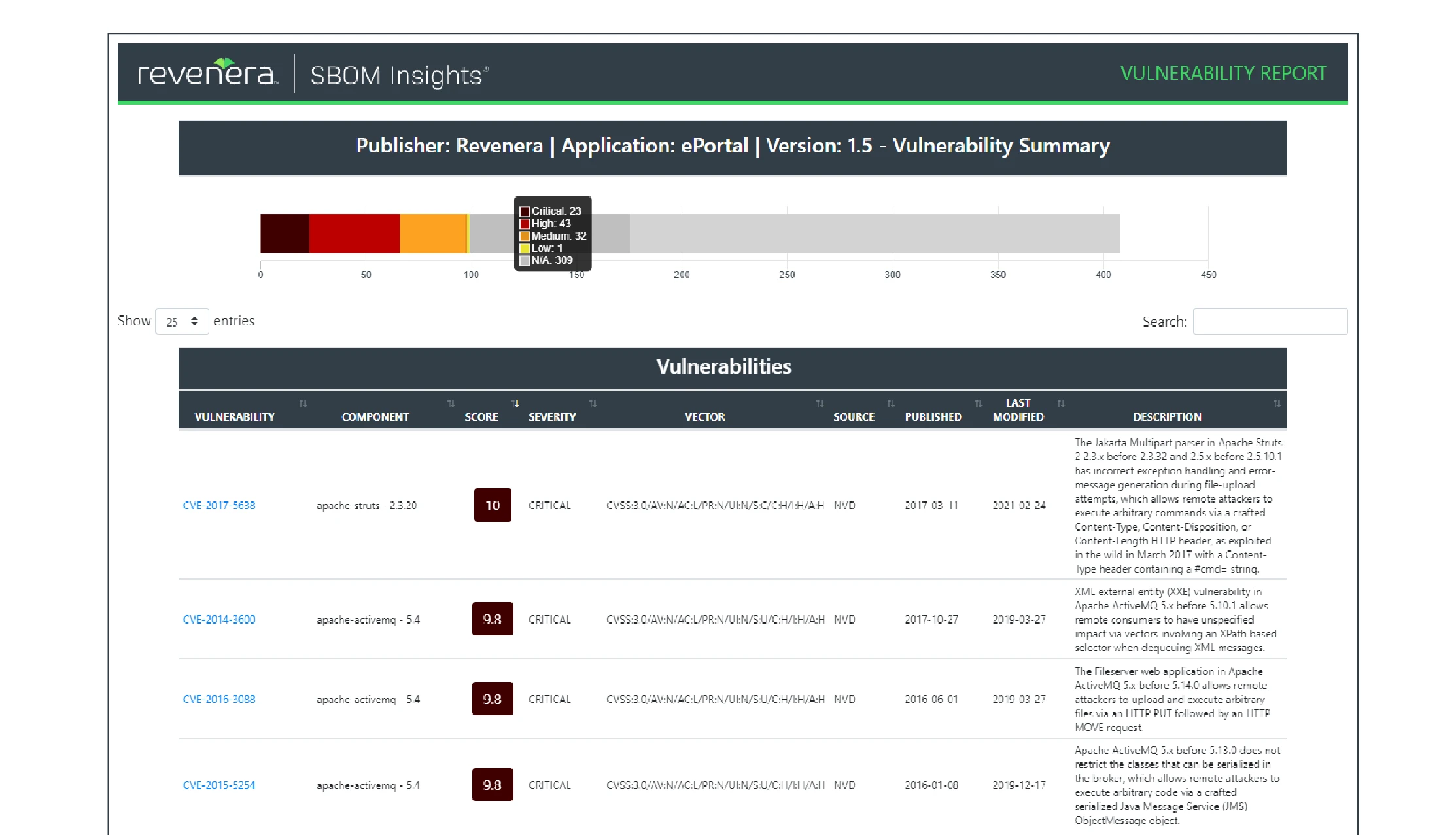
Generates SBOMs in SPDX, CycloneDX, and custom formats. Includes component inventories, license information, and vulnerability status.
Transitive dependencies and reachability
Code Insight’s detector framework resolves both direct and transitive components across the supported build tools — a Maven scan walks the full resolved dependency tree, and the CLI scanner inspects lockfiles or equivalent package-manager state when present.
Reachability analysis is a different story. Code Insight flags vulnerable components in inventory but does not perform the call-graph reachability that tools like Endor Labs or Snyk Open Source offer — “Is this vulnerability reachable from my app’s entry points?” is outside its scope. For teams whose primary need is developer-centric vuln triage with exploitability filtering, that is a meaningful gap; for license-compliance and M&A-audit workflows, reachability typically matters less than complete component inventory. Remediation suggestions surface in the dashboard as recommended upgrade versions, but there is no automated fix-PR workflow equivalent to Dependabot or Snyk’s PR bots.
Installation
FlexNet Code Insight is deployed as an enterprise application with several components.
Getting started follows a predictable shape for an enterprise platform. Download the Code Insight installer from the Revenera Community portal (a customer account is required), run the installation wizard, point it at a Postgres or MySQL database, and start the server. From there, configure your license policies, add build integration through the Maven or Gradle plugin, and run your first scan against a representative project.
The Maven and Gradle code blocks below reference version 2024.1. Revenera publishes roughly annual releases (for example, the 2024 R1 release cycle) — if you are starting fresh, check the Revenera Community portal
release notes for the current major version before copying the snippets. Customers on an active maintenance contract have access to the portal’s downloads and documentation.
Server Installation
Code Insight runs as a server application that can be deployed on-premises or in cloud environments:
# Download the installer from Revenera support portal
# Run the installation wizard
./CodeInsightInstaller.sh

# Configure database connection
vi /opt/codeinsight/config/database.properties

# Start the server
systemctl start codeinsight
Build Integration
Integrate Code Insight into your build process using plugins and CLI tools:
<!-- Maven plugin configuration -->
<plugin>
  <groupId>com.revenera</groupId>
  <artifactId>codeinsight-maven-plugin</artifactId>
  <version>2024.1</version>
  <configuration>
    <serverUrl>https://codeinsight.example.com</serverUrl>
    <apiKey>${CODEINSIGHT_API_KEY}</apiKey>
    <projectName>${project.name}</projectName>
    <failOnPolicyViolation>true</failOnPolicyViolation>
  </configuration>
  <executions>
    <execution>
      <goals>
        <goal>scan</goal>
      </goals>
    </execution>
  </executions>
</plugin>
// Gradle plugin
plugins {
  id 'com.revenera.codeinsight' version '2024.1'
}

codeInsight {
  serverUrl = 'https://codeinsight.example.com'
  apiKey = System.getenv('CODEINSIGHT_API_KEY')
  projectName = project.name
  failOnPolicyViolation = true
}
CLI Scanner
For languages without build plugins, use the command-line scanner:
# Scan a directory
codeinsight-cli scan \
  --server https://codeinsight.example.com \
  --api-key $CODEINSIGHT_API_KEY \
  --project "MyProject" \
  --path /path/to/source

# Scan with specific policies
codeinsight-cli scan \
  --server https://codeinsight.example.com \
  --api-key $CODEINSIGHT_API_KEY \
  --project "MyProject" \
  --path /path/to/source \
  --policy "Copyleft-Prohibited"
What does Revenera FlexNet Code Insight integrate with?
CI/CD Pipeline Integration
# GitHub Actions example
name: License Compliance Check

on:
  pull_request:
    branches: [main]

jobs:
  license-scan:
    runs-on: ubuntu-latest
    steps:
      - uses: actions/checkout@v4
        with:
          fetch-depth: 0  # Full history for better detection

      - name: Download Code Insight CLI
        run: |
          curl -L "$CODEINSIGHT_CLI_URL" -o codeinsight-cli.tar.gz
          tar -xzf codeinsight-cli.tar.gz

      - name: Run compliance scan
        env:
          CODEINSIGHT_API_KEY: ${{ secrets.CODEINSIGHT_API_KEY }}
          CODEINSIGHT_URL: ${{ secrets.CODEINSIGHT_URL }}
        run: |
          ./codeinsight-cli scan \
            --server $CODEINSIGHT_URL \
            --api-key $CODEINSIGHT_API_KEY \
            --project "${{ github.repository }}" \
            --path . \
            --output scan-results.json

      - name: Check for policy violations
        run: |
          VIOLATIONS=$(jq '.policyViolations | length' scan-results.json)
          if [ "$VIOLATIONS" -gt 0 ]; then
            echo "Found $VIOLATIONS policy violations"
            jq '.policyViolations[] | "\(.component): \(.policy)"' scan-results.json
            exit 1
          fi

      - name: Upload SBOM artifact
        uses: actions/upload-artifact@v4
        with:
          name: sbom
          path: scan-results.json
# GitLab CI example
stages:
  - compliance

license-scan:
  stage: compliance
  image: openjdk:17-slim  # Download CLI from Revenera portal
  script:
    - |
      codeinsight-cli scan \
        --server $CODEINSIGHT_URL \
        --api-key $CODEINSIGHT_API_KEY \
        --project "$CI_PROJECT_NAME" \
        --path . \
        --fail-on-policy-violation
  artifacts:
    reports:
      spdx: codeinsight-sbom.spdx
  rules:
    - if: $CI_PIPELINE_SOURCE == "merge_request_event"
IDE Integration
Code Insight provides IDE plugins for early detection:
- VS Code Extension: Real-time license feedback as you add dependencies
- IntelliJ Plugin: License information in dependency views
- Eclipse Plugin: Integration with Java development workflow
Legal System Integration
Export compliance data to legal and procurement systems:
# Generate attribution report
codeinsight-cli report \
  --server $CODEINSIGHT_URL \
  --api-key $CODEINSIGHT_API_KEY \
  --project "MyProject" \
  --type attribution \
  --output attribution-notice.txt

# Export to legal workflow system
codeinsight-cli export \
  --server $CODEINSIGHT_URL \
  --api-key $CODEINSIGHT_API_KEY \
  --project "MyProject" \
  --format csv \
  --output components-for-legal.csv
Setup
- Install the server – Deploy Code Insight on-premises or in a cloud environment. Run the installer and configure database connections.
- Add build integration – Use the Maven/Gradle plugin or CLI scanner to integrate with your build process.
- Configure license policies – Define acceptable licenses, set up obligation tracking, and configure approval workflows for your legal team.
- Review findings – Use the dashboard to review component inventories, license obligations, and vulnerability findings. Generate attribution reports for distribution.
When to use Revenera FlexNet Code Insight
Code Insight fits organizations where license compliance carries legal and financial consequences: software vendors, M&A scenarios, and regulated industries.
Strengths:
- 14M+ component database with detailed license data
- Deep code scanning for snippets and embedded libraries
- IP risk assessment for M&A due diligence
- Legal team collaboration workflows
- Attribution notice generation
Limitations:
- Heavier setup than developer-first tools
- Commercial only, no free tier
- Security features less developed than dedicated security-first SCA tools
- Primarily on-premises deployment
How it compares:
| vs. | Key difference |
|---|---|
| Black Duck | Both strong on license compliance. Black Duck has a larger knowledge base and binary scanning. Code Insight has deeper legal workflow integration and IP risk assessment. |
| FOSSA | FOSSA has a more modern UX and developer-friendly approach. Code Insight has deeper legal workflow features and M&A due diligence capabilities. |
| SCANOSS | SCANOSS also detects code snippets but is lighter-weight and open-source. Code Insight adds legal workflows, obligation tracking, and attribution generation. |
The compact comparison table above surfaces the main rival platforms at a glance. For a deeper line-by-line split between Code Insight and Snyk, Sonatype, or Black Duck, the Revenera vs Snyk, Sonatype, and Black Duck section below covers where each tool wins.
Further reading: Open Source License Compliance | What is SCA? | What is SBOM?
Revenera vs Snyk, Sonatype, and Black Duck
The brand comparisons that matter most for Code Insight are against Snyk Open Source , Sonatype Nexus Lifecycle , and Black Duck .
Against Snyk, the split is developer-first vuln scanning versus legal-first compliance workflows. Snyk Open Source leads with reachability analysis, fix pull requests, and CI-gating that fits an SDLC optimised for fast merge cadences. Code Insight leads with license obligation tracking, attribution generation, and evidence packages that satisfy a legal reviewer. Teams that need both often run Snyk for day-to-day vuln triage and Code Insight as the compliance system of record.
Against Sonatype, the split is repository firewall versus post-hoc audit. Nexus Firewall blocks risky components at the artifact-manager gate before they enter a build; Nexus IQ layers policy enforcement on top. Code Insight focuses on what is already in the codebase and what legal obligations that triggers. Sonatype wins on prevention; Code Insight wins on retrospective audit and M&A-grade evidence.
Against Black Duck, the comparison is the closest match in the market — both are enterprise SCA platforms with deep license compliance, large component databases, and M&A due-diligence positioning. Black Duck’s knowledge base is larger (roughly 9M components at last public tally vs Code Insight’s 14M+ total component count, though the two vendors count differently). Code Insight has historically had tighter legal-workflow integration and obligation-tracking granularity; Black Duck has broader binary scanning. In practice organisations pick one or the other for M&A work, rarely both.
For a single-vendor comparison hub across these tools, see our open-source SCA tools and open-source license compliance guides.