

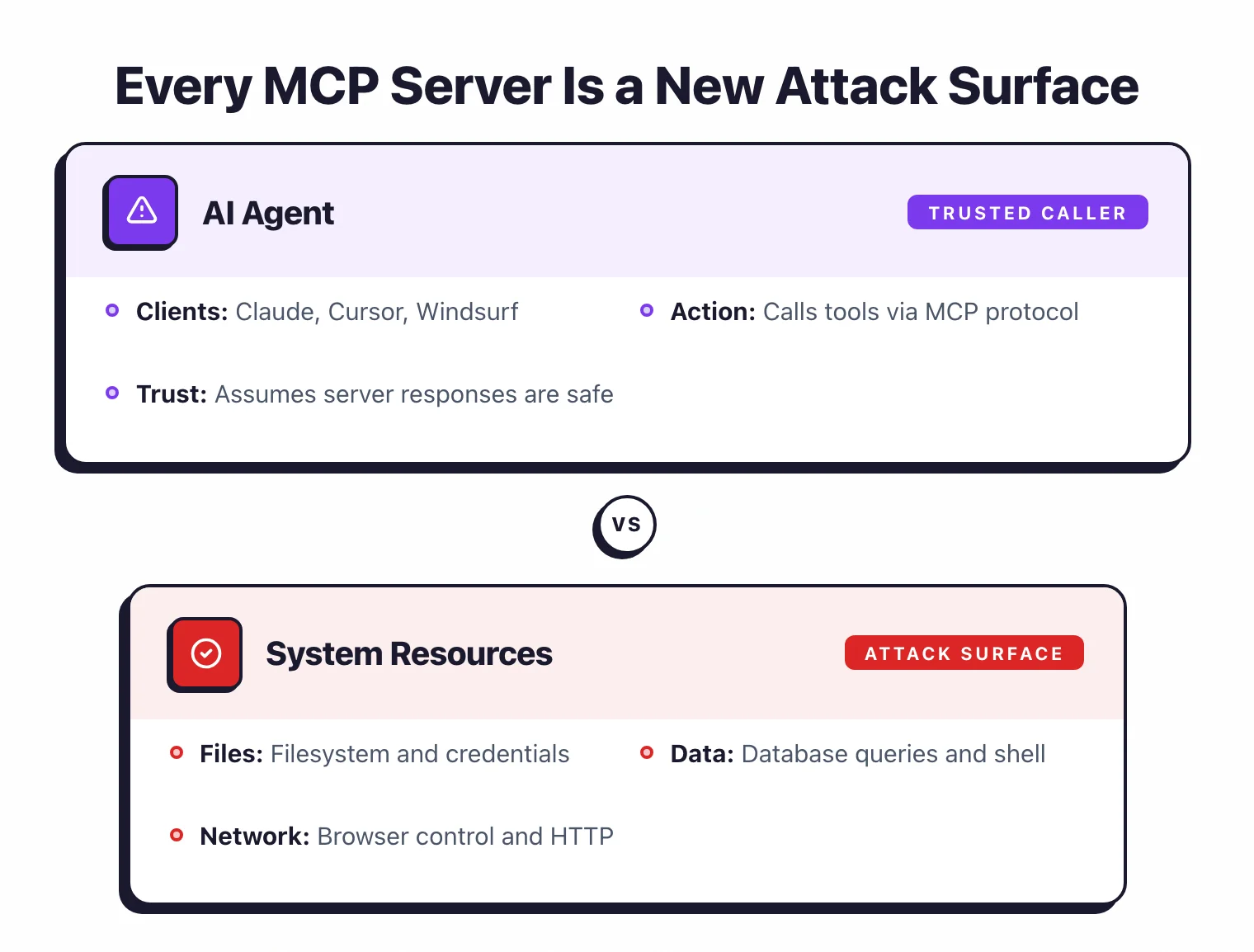
An MCP (Model Context Protocol) server is a local process that exposes tools AI agents can call during conversations. These tools perform real actions on your system — reading files, querying databases, browsing the web, executing code.
Every MCP server you install creates an attack surface between the AI agent and your local machine. A compromised or overly permissive MCP server means an AI agent could be tricked into reading arbitrary files, exfiltrating data, or running malicious commands.
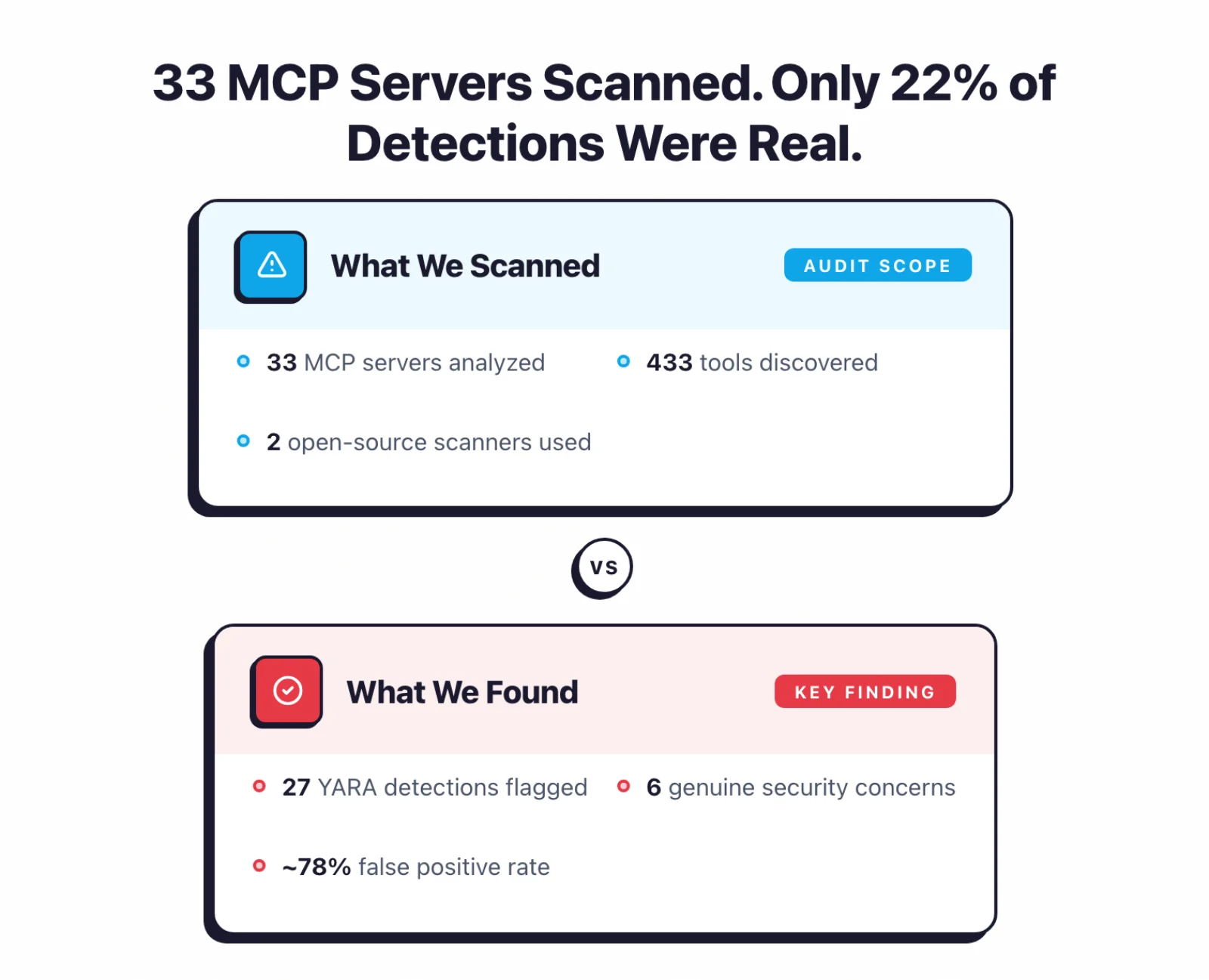
I analyzed 33 MCP servers with two open-source AI security tools: MCP-Scan v0.4.3 and Cisco mcp-scanner v4.3.0 (versions available at time of the April 2026 audit).
Later I added a third scanner, mcp-audit, on a config/supply-chain layer the first two don’t cover — that coverage comparison comes after the pattern-scanning findings.
The goal: find out what pattern-based scanning actually catches when pointed at real Model Context Protocol servers.
Across 33 servers and 433 discovered tools, the pattern-matching scanner flagged 27 patterns in 10 servers.
That sounds alarming.
But after reviewing every detection, it’s not that simple.
Most detections flag standard MCP tool instructions or designed functionality, not exploitable vulnerabilities.
Only 6 of the 27 detections represent genuine security concerns — putting the false positive rate at roughly 78%.
Key Insight
The real story here isn't "MCP servers are insecure." It's that pattern rules flag standard MCP tool descriptions as threats — exposing a gap between pattern matching and semantic understanding.
Key findings#
What are MCP security scanners?#
MCP security scanners are tools that analyze Model Context Protocol servers for vulnerabilities, misconfigurations, and risky capabilities. They work by connecting to MCP servers, discovering exposed tools, and checking tool descriptions and configurations against known threat patterns.
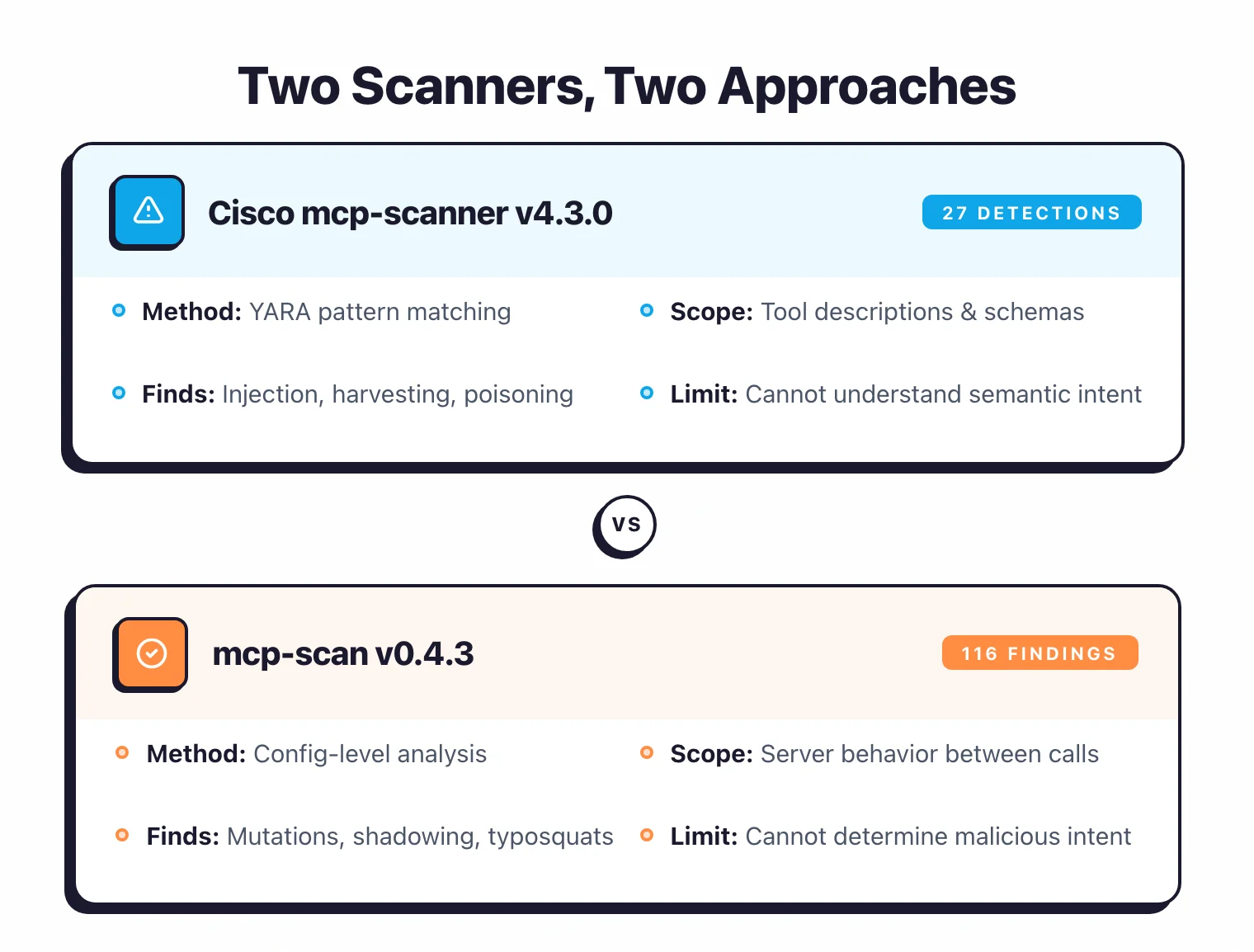
Three open-source scanners now cover three distinct layers: Cisco’s mcp-scanner (pattern layer), Invariant Labs’ mcp-scan (config-drift layer), and mcp-audit (config/supply-chain/auth layer).
I ran the first two in April 2026 on 33 local servers. I added the third later and co-ran the applicable scanners on an expanded corpus — the coverage comparison follows this section.
Connects to servers, discovers tools, and matches tool descriptions and schemas against pattern rules for prompt injection, tool poisoning, and credential harvesting. Flagged 10 of 33 local servers — but many flags reflect intended behavior, not vulnerabilities.
Checks for server mutations (tool definitions changing between calls), tool-name shadowing, typosquatting, and exfiltration risks. On the 33-server set: 33 mutations (mostly benign), 2 tool-name shadows, 2 exfiltration flags. Less actionable — mutations can be routine config changes.
Checks remote-server auth posture, project-config auto-spawn (TrustFall), typosquatting, and cross-tool toxic flows. Structurally can't fire on local stdio servers, so I co-ran it with the other two across 10 remote servers and 2 project-config repos.
Each scanner covers a layer the others miss, so I run all three together.
Cisco mcp-scanner tells you what patterns exist in a server’s tool descriptions — whether they match known injection signatures, credential harvesting patterns, or manipulation indicators.
MCP-Scan tells you about config-level risks — whether a server changes its tool definitions between calls or shadows another tool’s name.
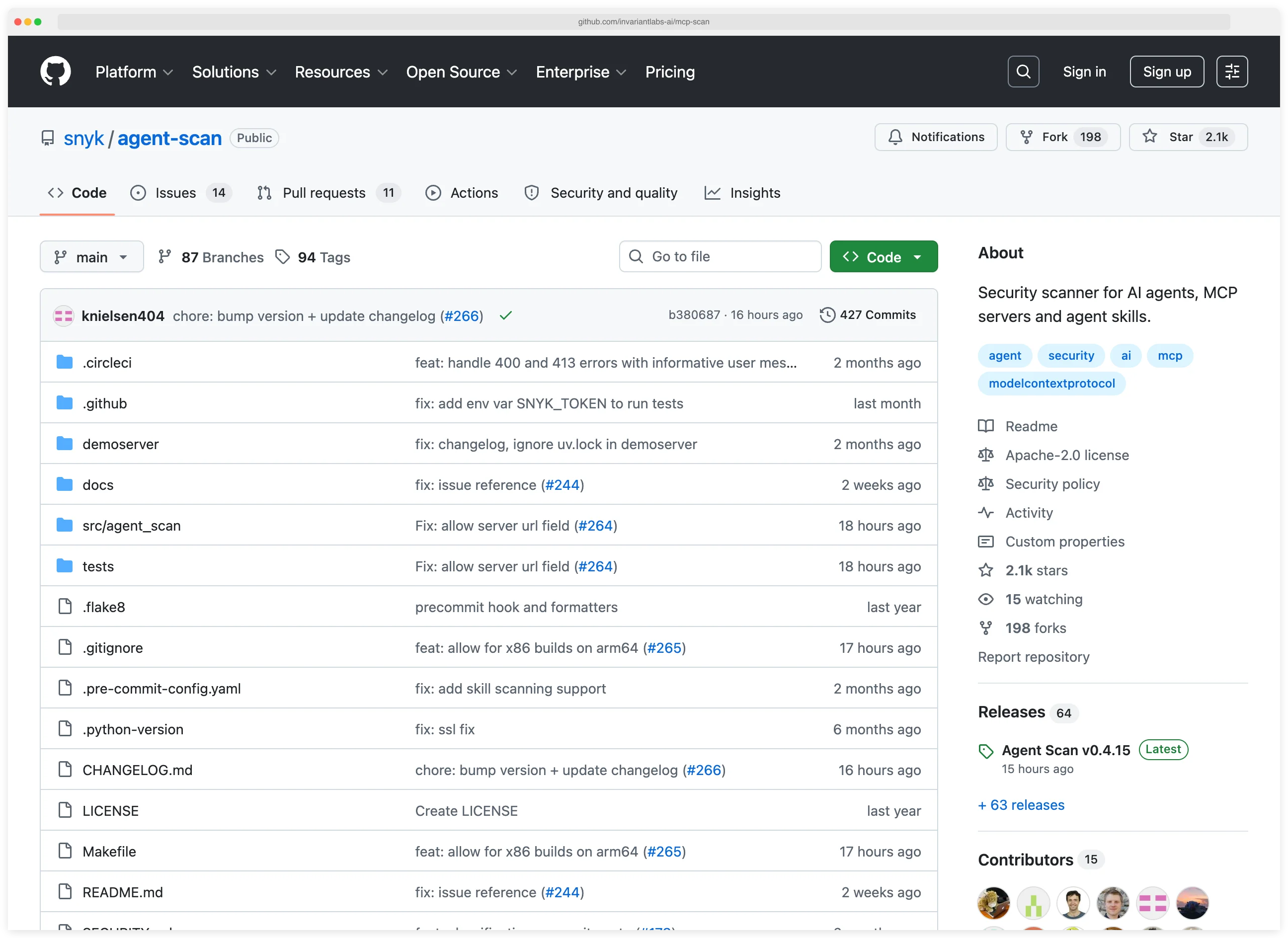
mcp-audit works one layer deeper still — it reads server configs and project files for structural risks. A remote endpoint exposed with no auth, a project config that auto-spawns servers on trust, a package name one edit away from a popular one.
A no-auth endpoint or an auto-spawning config is a fact the scanner reads directly, so this layer produces fewer false positives than pattern matching. It has its own blind spots, which I cover in the coverage comparison .
An important caveat: Cisco’s scanner uses pattern rules — regex-based pattern matching. Pattern-based scanning for MCP security works by comparing tool descriptions and parameter schemas against predefined text patterns associated with known threats like prompt injection, credential harvesting, and code execution.
The fundamental limitation is that pattern matching cannot understand semantic intent. It matches text patterns regardless of context, which means a tool description that says “You MUST call this function first” gets flagged as “coercive injection” even when it’s standard MCP tool documentation.
I break down the false positives below .
Three-scanner coverage#
This is a coverage comparison across three layers, not an accuracy ranking. The three scanners measure different things, and the original two ran on a different server set than mcp-audit, so asking which scanner is best misreads the setup.
What each layer can check, and what each one actually caught, is the comparison worth making.
Separate cohorts, separate denominators#
mcp-audit’s headline checks — remote auth, project-config auto-spawn — structurally cannot fire on local stdio servers. So I expanded the corpus with remote and project-config targets, chosen by predeclared surface rules before any scan ran.
Each cohort keeps its own denominator. There is no combined “servers scanned” number, because the cohorts were scanned under different conditions.
| Cohort | Count | Transport | Scanners run | Uniqueness claims |
|---|---|---|---|---|
| Local stdio | 33 | stdio (npx/uvx) | mcp-audit (June); Cisco + mcp-scan (April artifacts) | No — time-shifted, different runs |
| Remote HTTP/SSE | 10 | streamable-http | all three, co-run on identical input | Yes — within this cohort |
| Project-config repos | 2 | .mcp.json dotfiles | all applicable, co-run on identical input | Yes — within this cohort |
On the local-33 cohort I make no “mcp-audit caught what the others missed” claim. Its June run and the April Cisco/mcp-scan artifacts are not the same experiment.
Uniqueness claims are reserved for the remote and project-config cohorts, where all applicable scanners ran on the same frozen input.
What each layer checks#
| Layer | Cisco mcp-scanner | mcp-scan | mcp-audit | What surfaced |
|---|---|---|---|---|
| Tool-description injection / poisoning (pattern) | yes | no | partial | Cisco: 27 flags on 33 (~78% false positive) |
| Config drift: mutation / tool-name shadow | no | yes | partial | mcp-scan: 37 on 33 (mostly benign mutations) |
| Remote-server auth (AUTH-001/002) | connect-fail signal only | no | yes | mcp-audit: 7 AUTH-001 on 10 remote (4 genuinely open) |
| Project-config auto-spawn (TrustFall) | no | no | yes | mcp-audit: flagged both dotfile repos |
| Typosquat (edit-distance vs registry) | no | no | yes | mcp-audit: 1 flag — a false positive here |
| Cross-tool toxic-flow graph | no | no | yes | mcp-audit: 3 on the server-everything demo |
What mcp-audit surfaced on the co-run cohorts#
On the 10 remote servers, mcp-audit raised AUTH-001 (no authentication) on 7. After triage, 4 are genuinely open endpoints exposing tools with no auth at all — the finding that matters most on this layer.
The other 3 are config-versus-reality mismatches: the declared config had no auth, but the live server enforced it anyway. Correctly detected, lower real-world risk.
On the 2 project-config repositories, mcp-audit flagged COMM-033 on both — a project-level .mcp.json that auto-spawns MCP servers the moment a coding agent trusts the folder. Neither Cisco nor mcp-scan checks this surface at all.
It also flagged 3 toxic-flow combinations (file-read plus shell, shell plus network) on @modelcontextprotocol/server-everything, a demo package built to expose every capability. I read those as an illustration of the check, not a real-world catch.
Where mcp-audit was wrong#
mcp-audit is not a false-positive-free upgrade. It flagged mcp-server-time — an official MCP reference server — as a typosquat (SC-003). That is a clear false positive, the same kind of misfire that pattern matching produces.
Its npx hygiene flags across the 33 local servers are real but low-value — unpinned npx is simply how those servers ship. One separate flag, the auto-confirm -y my config generator injected, was a genuine harness artifact: the servers’ canonical install commands carry no -y, so I excluded it from any “mcp-audit surfaced X” count.
Disclosure
mcp-audit was submitted unsolicited by its maintainer, Adam Dudley, an executive at Nucleus Security; mcp-audit integrates with Nucleus FlexConnect. I received no compensation and the maintainer had no editorial control over this analysis. I expanded the corpus specifically so each scanner's applicable modes could run, choosing targets by predeclared surface rules — not by which produced favorable results. mcp-audit's own false positives are reported at the same rigor as the incumbents.
Detection breakdown#
The 27 pattern detections from Cisco’s scanner fall into six categories.
I’ve added a “likely accuracy” column based on review.
| Detection Type | Count | Severity | Servers Affected | After Review |
|---|---|---|---|---|
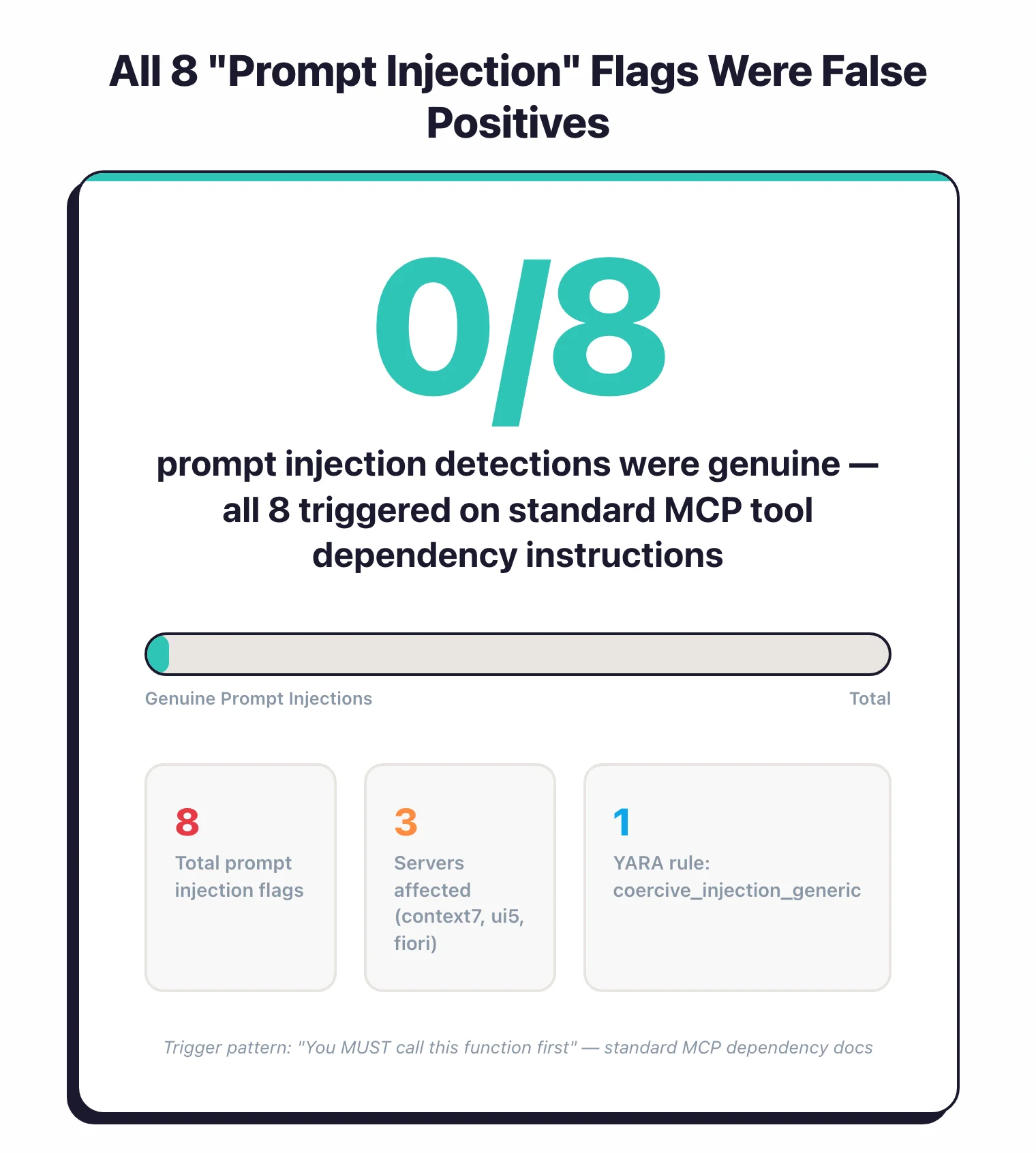
| Prompt Injection | 8 | HIGH | 3 | All 8 are standard MCP tool instructions, not actual injection |
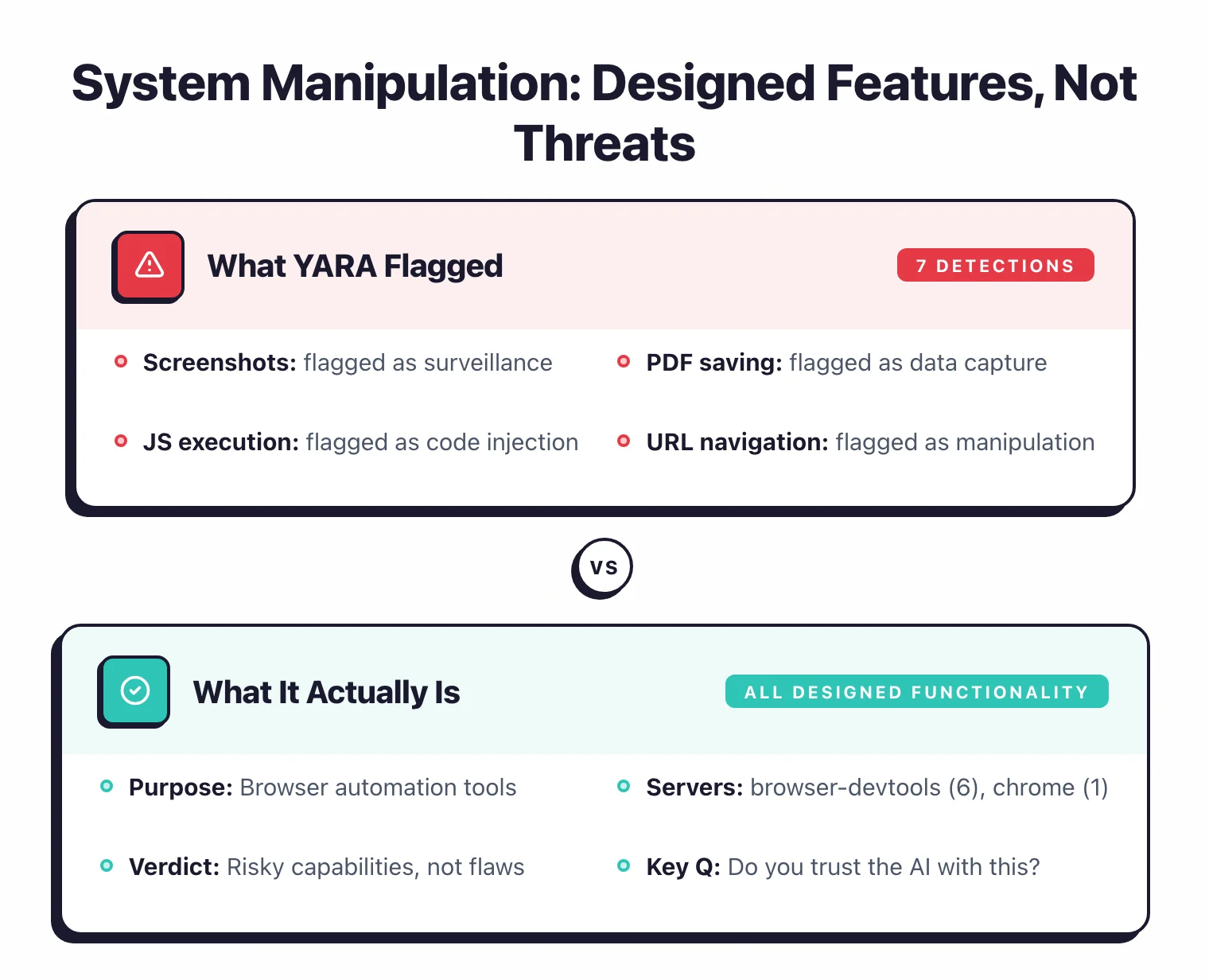
| System Manipulation | 7 | HIGH | 2 | All 7 are designed browser automation functionality |
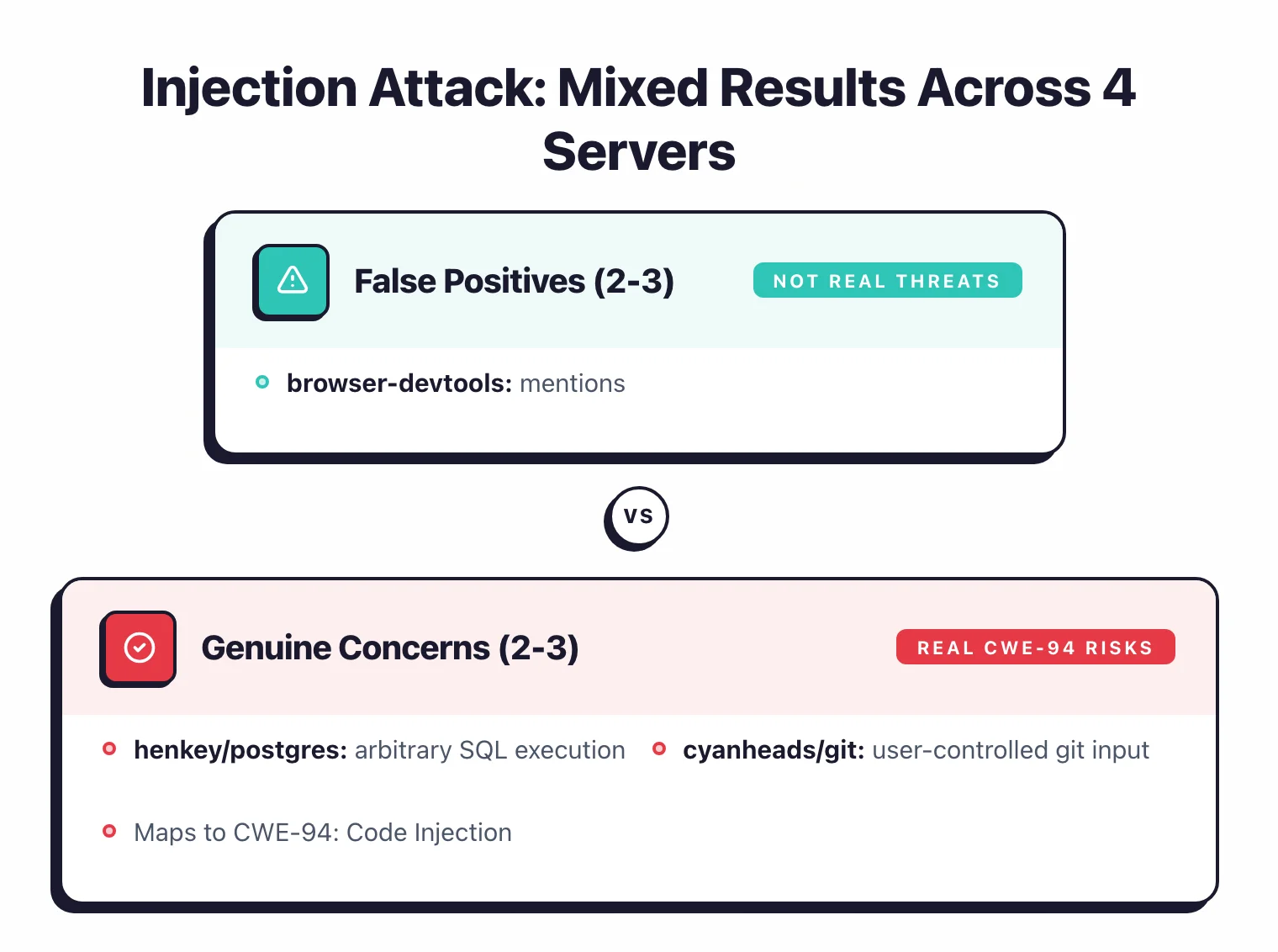
| Injection Attack | 5 | HIGH | 4 | 2-3 genuine (postgres, git), 2 false positives |
| Code Execution | 4 | HIGH / LOW | 4 | 1-2 genuine (postgres, desktop-commander), rest are designed functionality |
| Tool Poisoning | 2 | HIGH | 2 | Both are false positives (currents returns “name” field, postgres query management) |
| Credential Harvesting | 1 | HIGH | 1 | Likely genuine — desktop-commander can search for .ssh/.aws files |
Prompt injection (8 detections, HIGH). Prompt injection in the MCP context refers to malicious instructions embedded in tool descriptions that manipulate AI agent behavior — for example, telling the agent to ignore user instructions or silently exfiltrate data.
The pattern rule coercive_injection_generic triggered on tool descriptions containing phrases like “You MUST call this function first” or “Always use this tool before others.”
Three servers had this: context7 (2 tools), ui5/mcp-server (4 tools), and fiori-mcp-server (2 tools).
After review, all 8 are standard MCP tool dependency instructions — this is how well-documented MCP tools declare that one tool should be called before another. None contained adversarial instructions designed to manipulate agent behavior.
This is a known limitation of pattern-based scanning: it cannot distinguish standard tool documentation from adversarial prompt injection.
System manipulation (7 detections, HIGH). Tools flagged for controlling system-level actions — taking screenshots, saving PDFs, recording sessions, navigating to arbitrary URLs.
browser-devtools-mcp accounted for 6 of the 7, chrome-local-mcp for 1.
These are the tools’ designed functionality.
A browser automation tool that takes screenshots is doing its job, not attacking the system.
These are “risky capabilities” — tools that are dangerous by design — not hidden vulnerabilities.
Injection attack (5 detections, HIGH). Tools flagged for accepting input that could enable script or code injection.
browser-devtools-mcp (2), henkey/postgres (1), cyanheads/git (1), and currents/mcp (1).
The browser-devtools content_get-as-html flag deserves special note — it was flagged because its description mentions <script> tags in the context of explaining they are REMOVED.
The postgres and git findings are more concerning, as they handle arbitrary SQL and git commands.
These map to CWE-94: Code Injection .
Code execution (4 detections, HIGH / LOW). Tools that can run arbitrary code.
browser-devtools-mcp (1), henkey/postgres (1), desktop-commander (1), and eslint/mcp (1).
The eslint finding was LOW severity — it runs linting, which executes code in a constrained context.
The postgres pg_manage_functions finding is the most concerning — it handles PostgreSQL function creation and execution.
Tool poisoning (2 detections, HIGH). Tool poisoning is an MCP attack where a server embeds hidden instructions in tool descriptions that cause the AI agent to leak sensitive data or perform unauthorized actions without the user’s knowledge. The scanner flagged henkey/postgres’s pg_manage_query and currents/mcp’s currents-get-project.
After review, both are false positives.
The currents detection triggered because the tool returns “project details including name” — the pattern rule matched “name” as a PII indicator.
The postgres detection flagged a query management tool whose description accurately describes its capabilities.
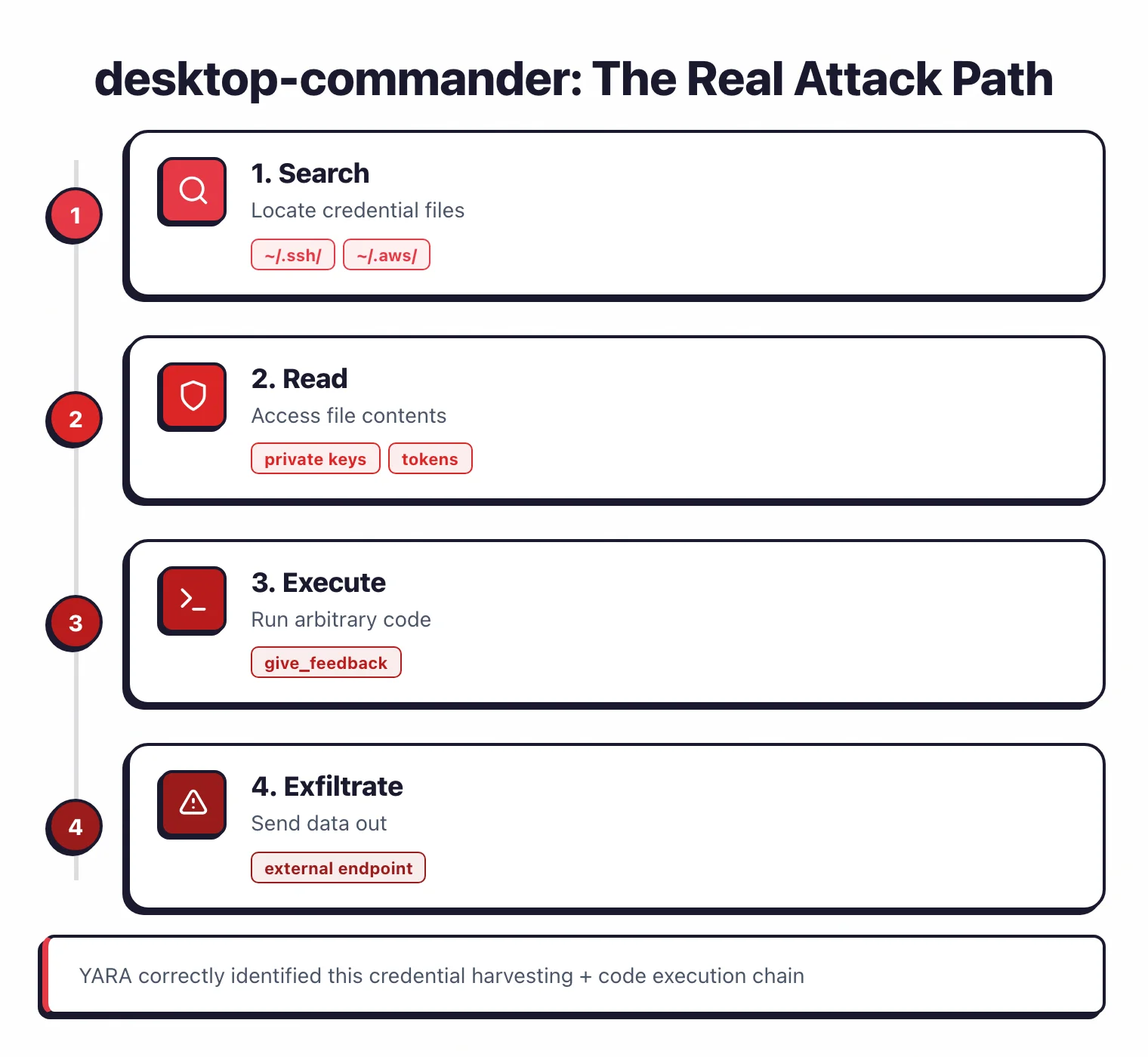
Credential harvesting (1 detection, HIGH). desktop-commander’s start_search tool.
This one is likely genuine.
The tool can search the local filesystem, which means it could locate credential files in .ssh/, .aws/, and similar directories.
Combined with a code execution finding in give_feedback_to_desktop_commander, this server has a real dual-threat profile: find credentials, then exfiltrate them.
False positive analysis#
After reviewing all 27 pattern detections, I categorized each one.
Not great if you’re relying on pattern-based scanning alone.
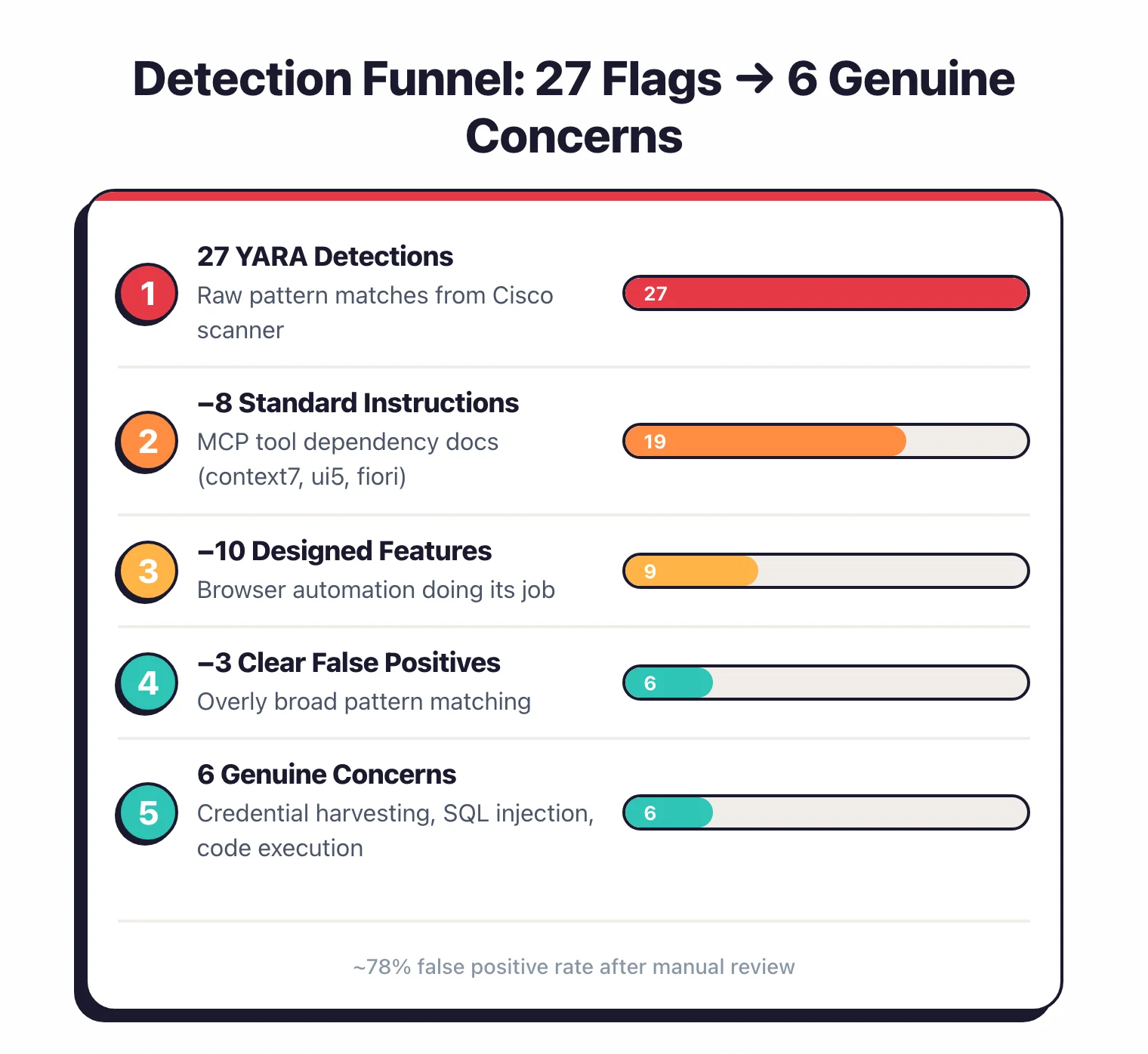
Standard MCP instructions flagged as injection (8 detections)#
All 8 “prompt injection” detections fall in this bucket.
context7’s tools say “You MUST call this function first.”
ui5/mcp-server’s tools have instructions like “Always use get_guidelines before creating apps.”
fiori-mcp-server follows the same pattern.
This is how MCP tools declare inter-tool dependencies.
The pattern rule coercive_injection_generic triggers on any “You must call/use this tool” language, which matches normal MCP documentation.
Pattern rule: coercive_injection_generic
Pattern: (You|User)\s+(must|need to|have to|should)\s+(use|execute|run|invoke|call)\s+this\s+(tool|function)
Match in context7: "You MUST call this function before 'Query Documentation' tool"
What Pattern Matching Flagged
"Prompt Injection — coercive injection detected in resolve-library-id"
What It Actually Is
Standard MCP tool dependency: "Call resolve-library-id before query-docs"
Servers: context7 (2), ui5/mcp-server (4), fiori-mcp-server (2)
Designed functionality flagged as threats (10 detections)#
All 9 browser-devtools-mcp detections plus chrome-local-mcp’s screenshot detection.
Taking screenshots, executing JavaScript, navigating URLs, saving PDFs, recording sessions — these are the tools’ stated purpose.
The scanner correctly identifies that these capabilities exist, but flags them as “threats” when they’re actually the product spec.
content_get-as-html was flagged for “script injection” because its description mentions <script> tags — in the context of explaining they are removed from output.
This is the opposite of injection.
Pattern rule: script_injection_in_description
Pattern: <script>|javascript:|eval\(
Match in browser-devtools-mcp: "Returns page HTML content with <script> tags REMOVED"
What Pattern Matching Flagged
"Injection Attack — script injection detected in content_get-as-html"
What It Actually Is
Security feature: the tool strips script tags from output — the description documents removal, not injection
Servers: browser-devtools-mcp (9), chrome-local-mcp (1)
Clear false positives (3 detections)#
currents/mcp
currents-get-project(tool poisoning): The tool “returns project details including name.” the pattern rule matched “name” as a PII indicator. This is a project management tool returning project metadata.currents/mcp
currents-find-run(injection attack): A CI/CD run search tool. The detection pattern is overly broad.eslint/mcp
lint-files(code execution, LOW): ESLint runs linting. Yes, it executes code — that’s what a linter does. LOW severity was appropriate.
Pattern rule: pii_exfiltration_tool_poisoning
Pattern: (name|email|phone|address|ssn|password|credential)
Match in currents/mcp: "Returns project details including name, status, and run history"
What Pattern Matching Flagged
"Tool Poisoning — PII exfiltration pattern detected in currents-get-project"
What It Actually Is
A project management tool that returns project metadata — "name" refers to the project name, not personal data
Genuine concerns (6 detections)#
These are the findings worth paying attention to:
desktop-commander
start_search(credential harvesting, HIGH): Filesystem search that could locate.ssh/,.aws/, and credential files. This is a real risk — the tool gives an AI agent the ability to find secrets on disk.desktop-commander
give_feedback_to_desktop_commander(code execution, LOW): Combined with the search capability, this creates a find-and-exfiltrate path.henkey/postgres
pg_manage_functions(injection + code execution, HIGH): Arbitrary PostgreSQL function creation and execution. A legitimate concern for any tool handling raw SQL.henkey/postgres
pg_manage_query(tool poisoning, HIGH): While I flagged the currents tool poisoning as false positive, the postgres query tool’s capabilities deserve more scrutiny given the SQL execution context.cyanheads/git
git_clean(injection, HIGH): Git operations with user-controlled input. Worth reviewing.
How accurate is pattern-based scanning for MCP security?#
Out of 27 pattern detections in this audit, 8 are standard MCP instructions, 10 are designed functionality, 3 are clear false positives, and 6 are genuine security concerns. That puts the false positive rate at approximately 78% and the real concern rate at roughly 22% of detections. The high false positive rate occurs because MCP tool descriptions inherently contain imperative language — phrases like “call this tool,” “execute this query,” and “navigate to URL” — which overlaps with the vocabulary pattern rules use to detect prompt injection and system manipulation threats.
Key Insight
Pattern-based scanning produces a ~78% false positive rate on MCP tool descriptions because imperative language ("call this tool," "execute this query") is both standard MCP documentation and threat-pattern vocabulary.
For context, Hasan et al. (2025) scanned 1,899 MCP servers with more sophisticated analysis methods and found a 5.5% tool poisoning rate.
Their larger sample and deeper analysis produced a lower — and likely more accurate — threat rate than raw pattern matching on a 33-server sample.
Top servers by detections#
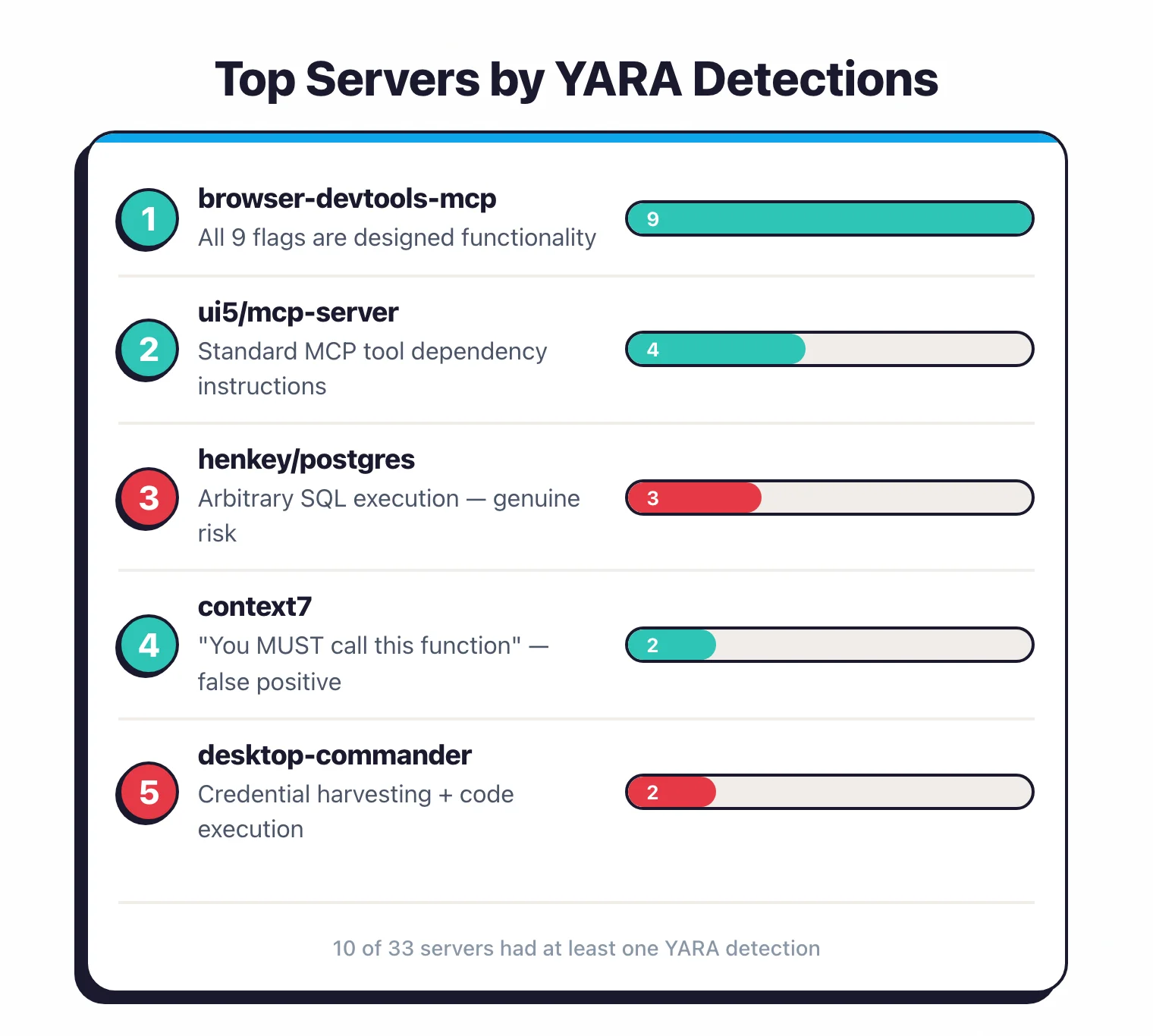
browser-devtools-mcp had the most detections: 9 across its 51 tools.
Every single one flags designed functionality.
The tool exists to give AI agents deep browser control — executing JavaScript, taking screenshots, navigating URLs, saving PDFs, recording sessions.
The scanner correctly identified these capabilities.
The question isn’t whether they’re “threats” — they’re features.
The question is whether you trust the AI agent enough to grant browser-level access.
ui5/mcp-server had 4 detections, all “prompt injection.”
All four are standard MCP tool instructions that tell the agent which tool to call first.
Not actual injection.
henkey/postgres-mcp-server had 3 detections: injection attack, code execution, and tool poisoning — all through its query and function management tools.
These are the most concerning findings in the audit because they involve arbitrary SQL execution.
context7 is worth discussing because of its popularity (~57.6K GitHub stars).
Both tools flagged for “prompt injection” because they say “You MUST call this function first.”
This is textbook MCP tool dependency documentation.
The pattern rule treats any imperative instruction in a tool description as coercive injection.
Until scanners can distinguish “call this tool first” (dependency) from “ignore previous instructions” (injection), these flags will keep appearing.
Severity breakdown#
25 out of 27 detections (92.6%) were rated HIGH severity.
The two LOW-severity detections were code execution in desktop-commander’s give_feedback_to_desktop_commander tool and eslint/mcp’s lint-files tool.
The severity ratings come from Cisco’s pattern rule definitions and use a binary HIGH/LOW classification.
They reflect the potential impact of the matched pattern, not the likelihood that the detection is a true positive.
A standard MCP instruction flagged as “prompt injection” gets rated HIGH because prompt injection is inherently high-impact — even when the detection is a false positive.
What does mcp-scan detect?#
mcp-scan v0.4.3 works on a different dimension: config-level issues rather than tool-level patterns.
One number needs care. Across all 96 servers mcp-scan scanned in the wider sweep, it produced 116 findings. On the 33-server set this audit focuses on, it found 37.
The rest of this section uses the 33-server numbers, to stay on the same universe as Cisco’s 27.
| Finding Type | Count (on 33) | What It Means |
|---|---|---|
| Server Mutation | 33 | Tool definitions changed between successive calls |
| Tool Name Shadow | 2 | Tool name matches another server’s tool name |
| Exfiltration Flag | 2 | Tool or server could send data to external endpoints |
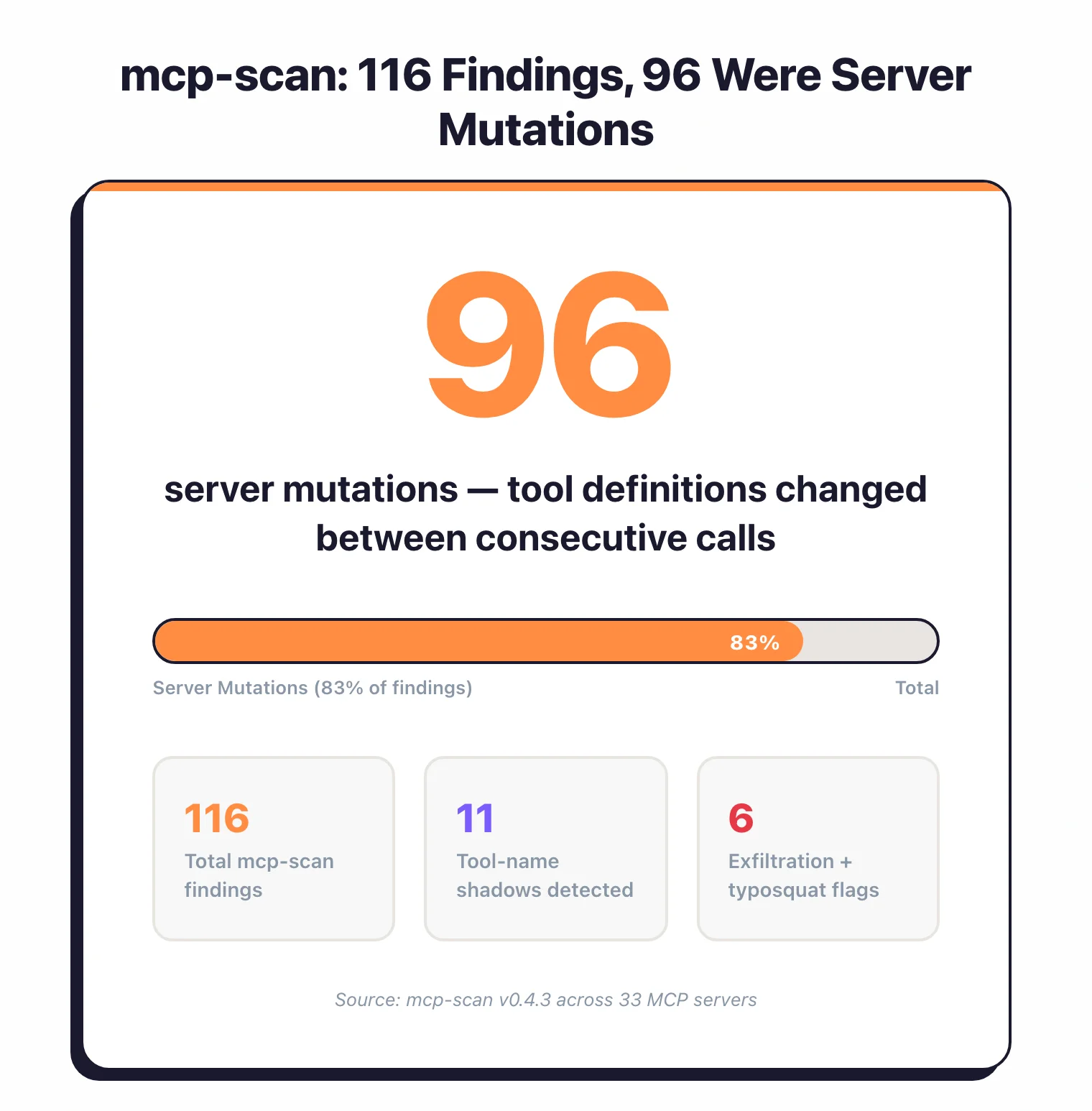
The 33 server mutations are the bulk of mcp-scan’s findings — one per scanned server.
An MCP server mutation occurs when a tool’s definition — its description, parameters, or schema — changes between two consecutive tools/list calls to the same server. This matters because a malicious server could present benign tool definitions during initial inspection, then switch to harmful definitions once the AI agent trusts it. However, server mutations can also be completely benign: config reloads, dynamic tool generation, or non-deterministic descriptions all produce the same signal.
After review, all 33 mutations look benign — uniform config-reload behavior, not a server swapping tools after inspection.
The 2 tool-name shadows are more interesting.
MCP tool-name shadowing happens when one MCP server exposes a tool with the same name as another server’s tool. If both servers are active in the same client, the AI agent might call the wrong tool — effectively a supply chain attack where a malicious server intercepts calls intended for a trusted tool.
These findings paint a picture of MCP ecosystem health, but they’re harder to act on than Cisco’s detections.
A server mutation requires investigation to determine intent.
The pattern and config-drift layers share a limit: they flag signals but can’t tell you whether the intent behind a signal is malicious.
mcp-audit’s structural layer sidesteps that gap. A remote endpoint with no auth, or a config that auto-spawns servers, is a fact the scanner reads directly instead of an intent it has to guess.
Notable findings#
Is context7 MCP server safe?#
context7 by Upstash has ~57.6K GitHub stars and is one of the most-installed MCP servers. Based on this audit, context7 appears safe to use. Cisco’s scanner flagged both of its tools — resolve-library-id and query-docs — for prompt injection (coercive injection pattern), but after review, both flags are false positives caused by standard MCP tool dependency documentation.
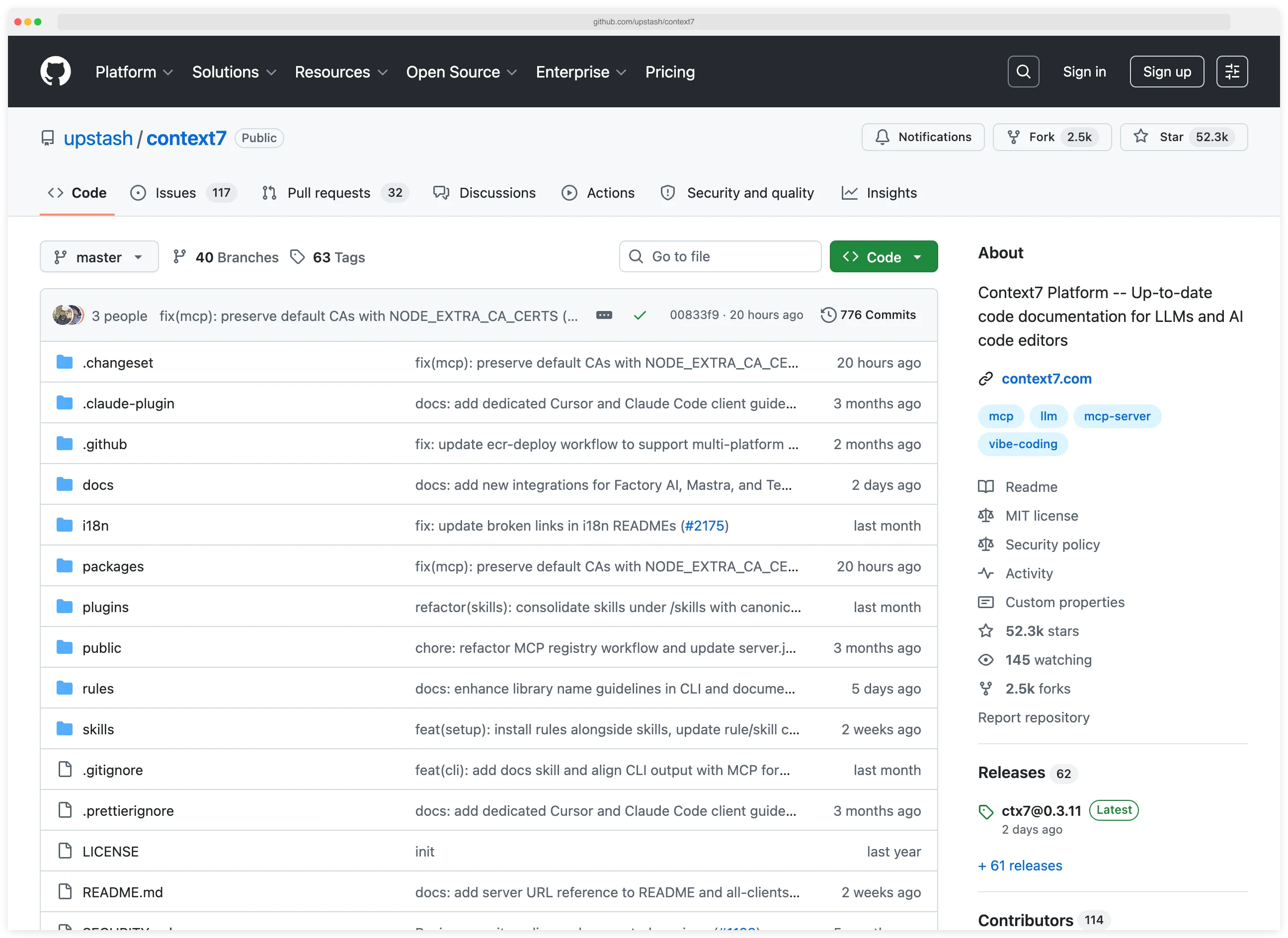
Here’s what actually triggered the flag: context7’s tool descriptions say “You MUST call this function first” to establish that resolve-library-id should run before query-docs. Every well-documented MCP server that has tools depending on each other uses similar language.
The pattern rule coercive_injection_generic triggers on any “You must call/use this tool” pattern. It cannot distinguish between a tool developer documenting normal usage flow and an attacker embedding instructions to hijack agent behavior.
This is a scanner limitation, not a context7 problem.
Is browser-devtools-mcp safe?#
9 detections across 51 tools.
This server gives AI agents deep browser control — and the scanner correctly identified that these capabilities exist.
But every single detection flags the tool’s stated purpose:
execute: runs JavaScript in browser context (flagged for injection + code execution)content_take-screenshot,content_save-as-pdf,content_start-recording: capture browser state (flagged for system manipulation)navigation_go-to,navigation_reload,navigation_go-back-or-forward: browser navigation (flagged for system manipulation)content_get-as-html: returns page HTML with scripts removed (flagged for “script injection” because the description mentions<script>tags — in the context of explaining they’re stripped)
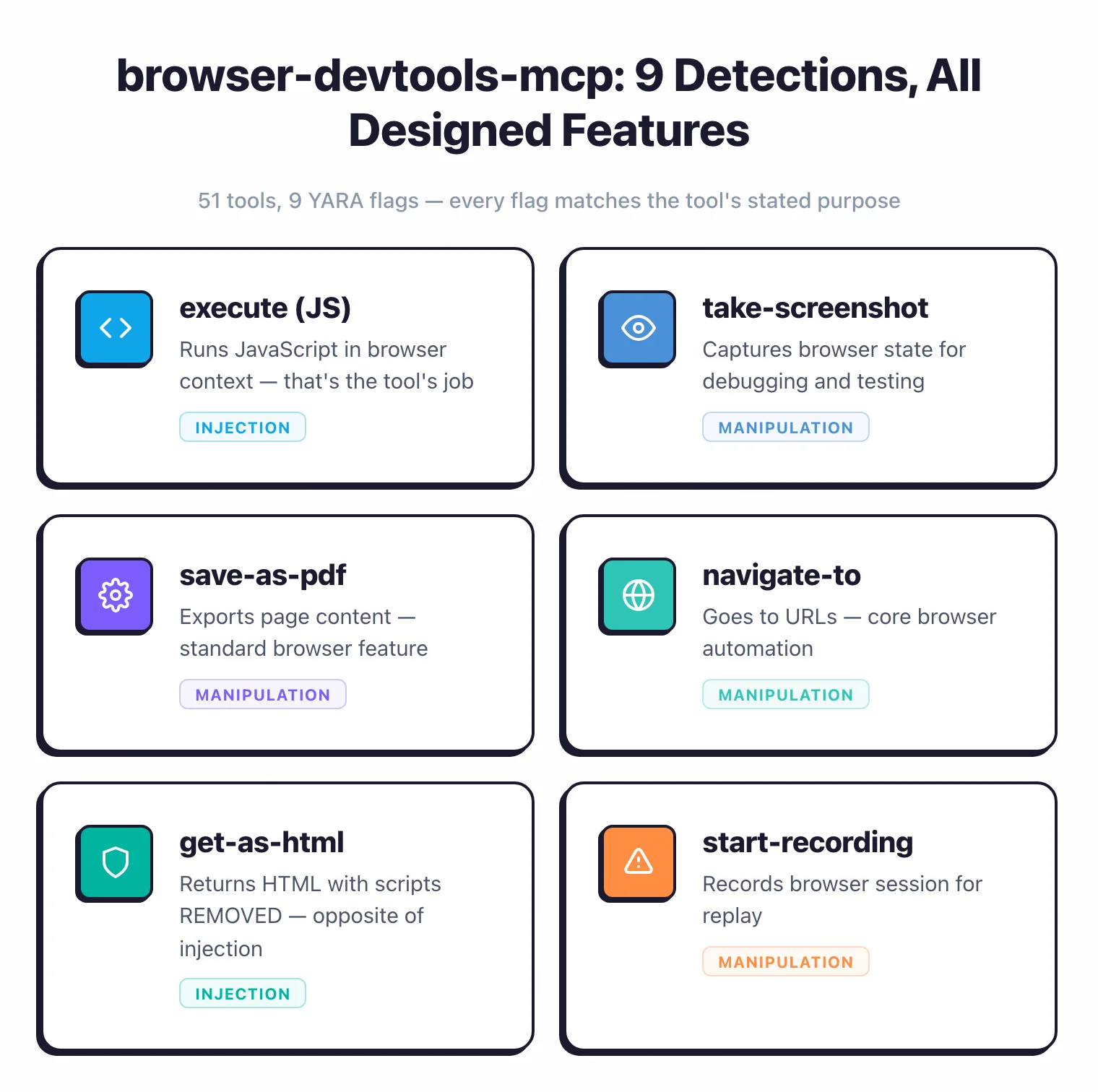
These are risky capabilities, not hidden vulnerabilities.
The distinction matters.
If you install browser-devtools-mcp, you’re deliberately granting browser control to an AI agent.
The risk is in the design decision, not in a flaw.
Is desktop-commander MCP server safe?#
desktop-commander was the most credible security finding in this audit — the only server flagged for credential harvesting.
desktop-commander’s start_search tool can search the local filesystem, which means it could locate credential files in .ssh/, .aws/, and other sensitive directories.
Combined with code execution in give_feedback_to_desktop_commander, this server has a real dual-threat profile: find credentials, then exfiltrate them.
Key Insight
desktop-commander is the one case where pattern-based scanning genuinely earns its keep — correctly identifying a credential harvesting + code execution combination that creates a real find-and-exfiltrate attack path.
This is exactly what pattern-based scanning is good at.
The pattern rule caught a capability that poses real risk to anyone who grants filesystem access to AI agents.
Is henkey/postgres MCP server safe?#
Three detections across two tools.
pg_manage_functions had both injection attack and code execution flags — it handles PostgreSQL function creation and execution, meaning arbitrary SQL can run.
This is a legitimate concern for anyone connecting an AI agent to a production database through this MCP server.
Key Insight
The genuine risks in this audit aren't injection vulnerabilities — they're tools with dangerous-by-design capabilities (filesystem search, arbitrary SQL, browser control) that an AI agent could misuse if prompted by a malicious input.
How to secure MCP servers#
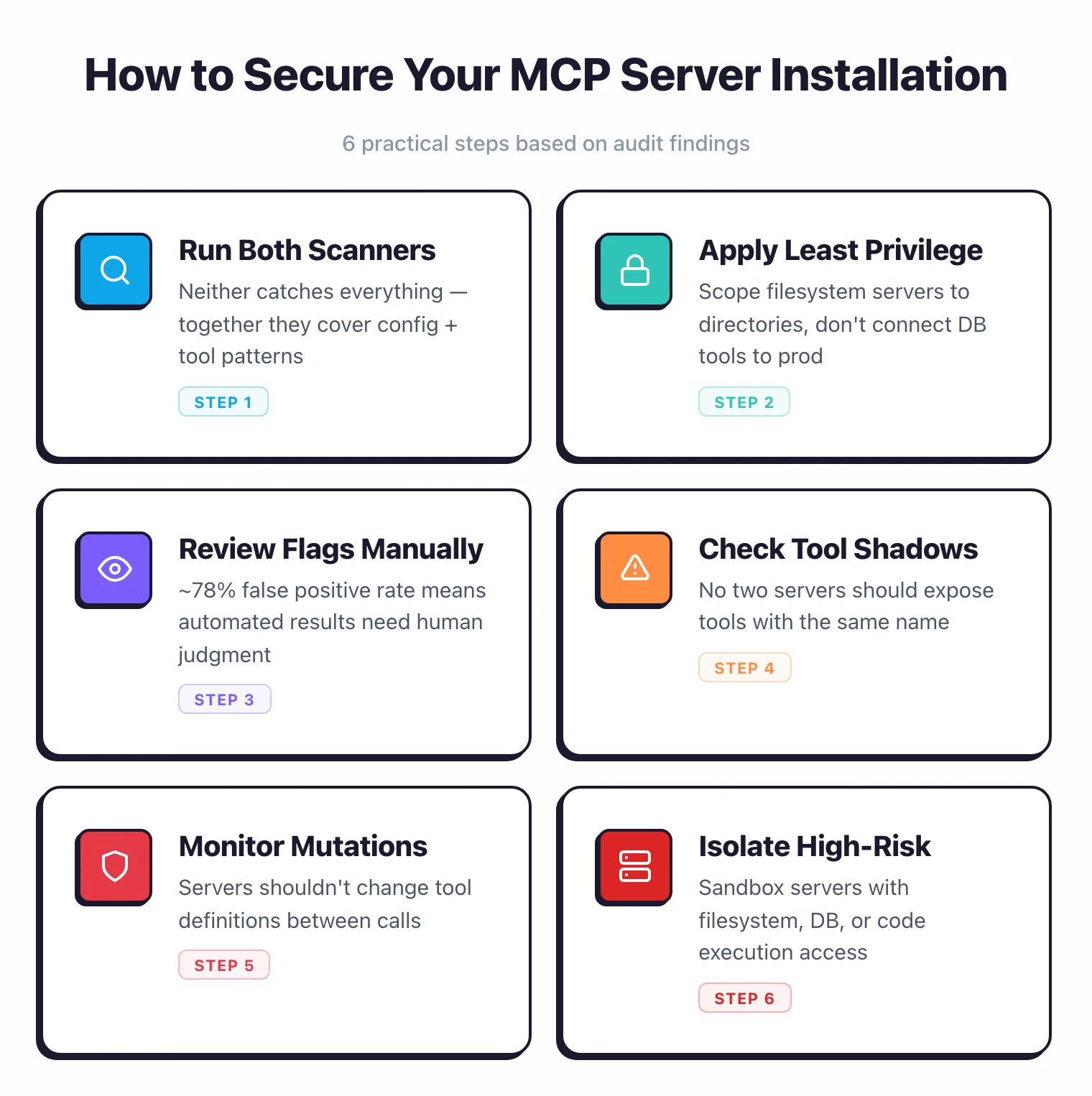
Based on the findings from this audit, here are the practical steps I recommend for securing MCP server installations:
Audit installed servers. Run Cisco mcp-scanner , mcp-scan , and mcp-audit against every MCP server in your configuration. No single tool catches everything, but together they cover tool-level patterns, config drift, and the supply-chain layer.
Apply least privilege. Only install MCP servers that need the capabilities they expose. A database MCP server that allows arbitrary SQL execution should not connect to production databases. A filesystem server should be scoped to specific directories, not root.
Review tool descriptions manually. Pattern-based scanning produces an ~78% false positive rate on MCP tool descriptions. After running scanners, review each flagged tool description to determine whether it represents designed functionality or a genuine risk.
Watch for tool-name shadowing. If you run multiple MCP servers, check that no two servers expose tools with the same name. Tool-name shadowing is a supply chain risk where a malicious server intercepts calls intended for a trusted tool.
Monitor for server mutations. Use mcp-scan’s mutation detection to check whether servers change their tool definitions between calls. Legitimate servers should return consistent tool definitions.
Isolate high-risk servers. MCP servers with filesystem search, code execution, or database access capabilities (like desktop-commander or henkey/postgres) should run in sandboxed environments when possible.
As the coverage comparison shows, mcp-audit is the useful complement to the two pattern/config scanners. It is a free, offline tool on the structural layer — config hygiene, credential exposure, typosquatting, and cross-tool toxic flows — where risks are concrete facts rather than fuzzy text matches, so it adds fewer false positives.
The MCP ecosystem lacks a centralized trust mechanism. Until semantic analysis tools mature beyond pattern-based matching, manual review remains the most reliable way to assess MCP server security.
Methodology#
The original audit tested 33 local MCP servers from npm and GitHub against two open-source scanners (mcp-scan v0.4.3 and Cisco mcp-scanner v4.3.0) in April 2026. The scanners discovered 433 tools across all servers.
I later added a third scanner, mcp-audit v0.14.1, on the config/supply-chain layer. Because its checks can’t fire on local stdio servers, I expanded the corpus with 10 remote servers and 2 project-config repositories. I co-ran all three on the remote servers; on the project-config repos only mcp-audit applies, since Cisco and mcp-scan can’t read a static repo config.
I reviewed all 27 pattern detections from Cisco’s scanner, triaged mcp-scan’s 37 findings on the 33-server set, and gave every mcp-audit finding a 4-way verdict.
Here’s how I ran the audit.
Server selection. I searched the npm registry and GitHub for MCP servers, filtering for packages with “mcp-server” in the name or description and repositories tagged with “model-context-protocol.”
I selected 33 servers across 10 categories: AI/ML, API integration, code execution, data processing, database, devtools, filesystem, system, web-browsing, and a catch-all “other” category.
These are servers that can run locally without external API keys or service credentials.
Scanner 1: mcp-scan v0.4.3. I ran mcp-scan (by Invariant Labs, now part of Snyk) against all 33 servers.
mcp-scan analyzes server configurations — it calls tools/list twice and compares results to detect mutations, checks tool names for shadowing and typosquatting, and flags exfiltration risks.
On the 33-server set it found 37 findings (across the wider 96-server sweep, 116).
Scanner 2: Cisco mcp-scanner v4.3.0. I ran Cisco’s mcp-scanner against the same 33 servers.
This scanner connects to each server via MCP protocol, discovers tools, and scans tool descriptions, parameter schemas, and response patterns using pattern rules.
It discovered 433 tools (average 13.1 per server) and flagged 27 patterns across 10 servers.
Scanner 3: mcp-audit
v0.14.1. I ran mcp-audit in the modes each cohort warranted: config scan on all local servers, --connect on the 10 remote servers, and scan --project on the 2 project-config repositories.
Each target was scanned on its own, never concatenated into one synthetic config — a combined config would fabricate cross-server toxic flows no real user has.
Review. I reviewed all 27 of Cisco’s detections and triaged mcp-scan’s 37 findings on the 33-server set.
For each detection I checked the actual tool description or config to see whether the matched signal was a genuine concern, designed functionality, or a false positive. Each mcp-audit finding got a 4-way verdict: detected correctly, security-relevant, exploitable, harness-artifact.
The results are documented in the false positive analysis and the coverage comparison .
Small sample caveat. 33 local servers is a small sample.
Hasan et al. (2025) scanned 1,899 MCP servers and found 5.5% tool poisoning with more sophisticated analysis methods.
My results should be read as “what these scanners catch on this corpus,” not as a definitive vulnerability rate for the MCP ecosystem.
Reproducible. The scanners are open source and the 33 local servers are public npm packages, so anyone can install them and re-run the local-server scan.
Limitations of this MCP security audit#
Every security audit has blind spots. These are the ones that matter most for interpreting these results.
33 servers analyzed. Only servers that run locally without external API keys or service credentials were included. MCP servers requiring cloud accounts (Slack, OpenAI, database connections, etc.) were excluded. These servers may have different security profiles.
Pattern matching, not semantic analysis. This is the biggest limitation. Cisco’s scanner uses pattern rules to detect known threat patterns in text. It catches “You MUST call this tool” whether it’s a normal instruction or adversarial injection. MCP-Guard (arXiv:2508.10991) demonstrates that static scanning needs additional layers — runtime monitoring, behavioral analysis, and semantic understanding.
High false positive rate. After review, roughly 78% of detections were false positives or designed functionality. Pattern matching is a blunt instrument for MCP tool descriptions, which inherently contain imperative language (“call this tool,” “execute this query,” “navigate to URL”).
Small sample size. 33 connected servers vs. 1,899 in Hasan et al.’s academic study. Per-category rates are based on even smaller samples (some categories had 1-2 servers). Take per-category numbers with a grain of salt.
mcp-scan’s server mutations may be benign. The 33 server mutation findings could indicate malicious behavior (a server changing its tools after initial inspection) or benign behavior (non-deterministic tool descriptions, config reloads). All 33 looked benign on review, but without repeated testing over time, it’s hard to be certain.
Cohorts were not scanned under identical conditions. The local-33 Cisco and mcp-scan data is from April; mcp-audit ran in June. So I make no “mcp-audit caught what the others missed” claim on that cohort — only on the remote and project-config cohorts, where all three ran on the same frozen input.
The expansion cohorts are tiny. 10 remote servers and 2 project-config repos are enough to exercise mcp-audit’s auth and TrustFall checks, not to estimate how common those risks are. Read them as case studies, not rates.
No adversarial prompt testing. I tested what scanners can detect about the servers themselves. I did not test whether an AI agent could be prompted to exploit the detected capabilities. The real-world risk depends on both the server’s capabilities and the AI model’s susceptibility to prompt injection.
Snapshot in time. Server packages update frequently. Some findings may already be fixed. The local data was collected in April 2026 (mcp-scan v0.4.3, Cisco mcp-scanner v4.3.0); the mcp-audit pass ran in June 2026 (v0.14.1).
npm/GitHub bias. I only selected servers from public registries. Enterprise MCP servers, private implementations, and servers distributed outside npm/GitHub are not represented.
References#
- Anthropic / AAIF. Model Context Protocol Specification . The protocol standard defining how AI agents communicate with tool servers.
- Invariant Labs / Snyk. MCP-Scan: Security Scanner for MCP Servers . Open-source scanner for MCP server configuration issues. v0.4.3, Apache-2.0 license.
- Cisco. mcp-scanner: MCP Server Security Scanner . Pattern-based detection for MCP servers. v4.3.0, Apache-2.0 license.
- Adam Dudley. mcp-audit-scanner . Config, supply-chain, and auth-layer scanner for MCP servers. v0.14.1, Apache-2.0 license. 2026.
- Hasan et al. Model Context Protocol (MCP) at First Glance: Studying the Security and Maintainability of MCP Servers . Scanned 1,899 MCP servers, found 5.5% tool poisoning. 2025.
- Hou et al. Model Context Protocol (MCP): Landscape, Security Threats, and Future Research Directions . Threat taxonomy and ecosystem analysis. 2025.
- MCP-Guard. A Multi-Stage Defense-in-Depth Framework for Securing Model Context Protocol in Agentic AI . Demonstrates that static scanning needs additional layers for MCP security. 2025.
- AgentSeal. We Scanned 1,808 MCP Servers. 66% Had Security Findings. (link may be outdated) Independent analysis of MCP server security risks. 2025.
- MITRE Corporation. Common Weakness Enumeration (CWE) . Used for vulnerability classification.
Related Research
I also tested 6 LLMs against OWASP Top 10 and found vulnerabilities in 25.7% of AI-generated code samples.
Read: AI-Generated Code Security Study 2026 →Explore the Tools
Looking for tools to secure AI agents, LLM applications, and ML pipelines? I track them all.
Browse AI Security Tools →