


Renovate is an open-source dependency update tool with 21.8k GitHub stars, 1,489 contributors, and over 5,000 releases. It monitors repositories for outdated packages and creates pull requests to keep dependencies current.
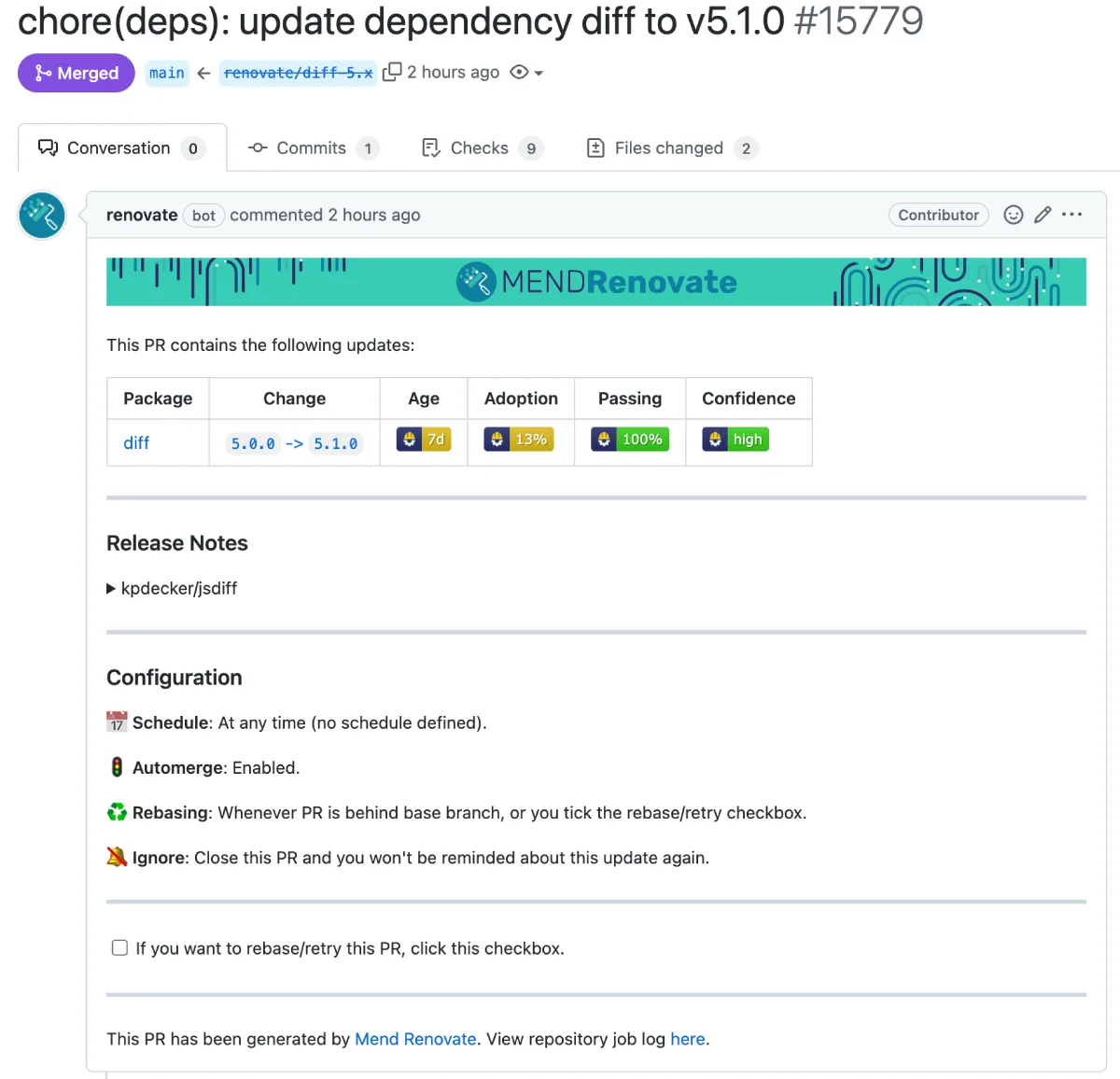
I treat Renovate as the Dependabot alternative for teams that need advanced scheduling, grouping, and automerge rules. It works on GitHub, GitLab, Bitbucket, Azure DevOps, and Gitea.
Recent releases in the v43.65 cycle added Bazel module lock file support, closing a gap for teams managing Bazel-based monorepos.
What is Renovate?
Renovate scans your project files, detects dependencies across all supported package managers, and creates pull requests when updates are available. Each PR includes changelogs, compatibility information, and (optionally) merge confidence scores.
The tool runs as a GitHub App (hosted by Mend for free), a self-hosted CLI, or a Docker container. Configuration lives in a renovate.json file in your repository root, and presets let you share settings across an organization. Renovate is a dependency-update-automation tool, not a vulnerability scanner — it opens PRs to bump versions; a paired Mend Renovate App or GitHub Security Advisories overlay adds the CVE/severity context when one is needed.
| Capability | Details |
|---|---|
| 90+ Package Managers | Supports npm, pip, Maven, Gradle, Cargo, Go modules, Composer, Bundler, Helm, Docker, Terraform, GitHub Actions, and 80+ more. Detects package files automatically and handles lockfile updates. |
| Merge Confidence | Adds badges to PRs showing how likely an update is to break your build. Uses aggregated CI data from millions of updates across the Mend Renovate user base. |
| Regex Managers | Define custom patterns to update versions in non-standard files (Dockerfiles, CI configs, Makefiles). If it has a version string, Renovate can probably update it. |
What are Renovate’s key features?
Package manager highlights
| Category | Managers |
|---|---|
| JavaScript | npm, yarn, pnpm, Bun, Bower |
| Python | pip, Poetry, Pipenv, uv, pip-compile |
| Java/Kotlin | Maven, Gradle, sbt |
| Go | Go modules |
| .NET | NuGet |
| Rust | Cargo |
| PHP | Composer |
| Ruby | Bundler |
| Swift | CocoaPods, Swift PM |
| Infrastructure | Docker, Helm, Terraform, Kubernetes |
| CI/CD | GitHub Actions, GitLab CI, CircleCI, Azure Pipelines |
| Custom | Regex managers for any version string |
Scheduling and grouping
Renovate supports scheduling beyond simple daily/weekly intervals. Use cron expressions, time windows, and timezone-aware scheduling.
Group updates by package name patterns, dependency type (production vs. development), or semver level to reduce PR noise.
Security updates
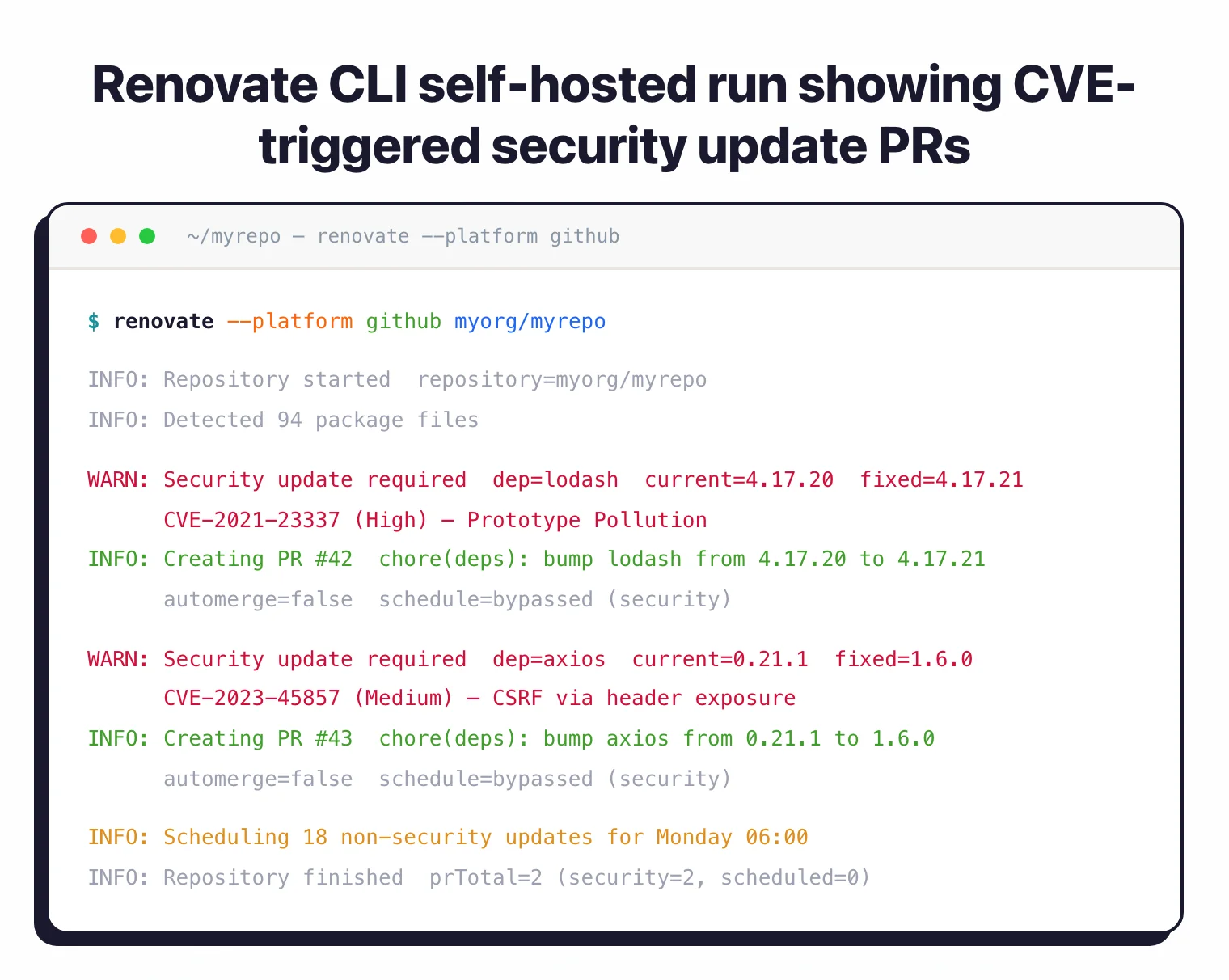
When a CVE is published for a dependency, Renovate creates a pull request immediately, bypassing normal scheduling rules. The PR includes vulnerability details and severity ratings. Security updates get priority treatment in the queue.
Automerge
Set up automerge for low-risk updates. Renovate can automatically merge patch and minor updates that pass CI checks, keeping your dependencies current without manual intervention. Configure conditions per package or update type.
Monorepo support
For monorepos with multiple packages, Renovate understands workspace structures and updates internal dependencies correctly. It groups related updates and respects package-specific version constraints.
Installation
- Install the GitHub App – Go to github.com/apps/renovate , click Install, and select your repositories. Renovate creates an onboarding PR with default configuration.
- Review the onboarding PR – The PR shows what Renovate will do and lets you customize settings before merging. Merge it to activate.
- Customize configuration – Edit
renovate.jsonin your repository root to set scheduling, grouping, automerge rules, and package-specific policies. - Monitor PRs – Renovate starts opening update PRs based on your schedule. Review, test, and merge.
GitHub App (Hosted)
The easiest option is the Mend-hosted Renovate GitHub App:
- Install from github.com/apps/renovate
- Select repositories to enable
- Renovate creates an onboarding PR with default configuration
Self-Hosted
Run Renovate on your own infrastructure:
# Install CLI
npm install -g renovate

# Run with GitHub token
export GITHUB_TOKEN=your-token
renovate --platform github --token $GITHUB_TOKEN owner/repo

# Docker
docker run --rm \
  -e GITHUB_TOKEN \
  -e RENOVATE_PLATFORM=github \
  renovate/renovate owner/repo
GitLab CI Runner
renovate:
  image: renovate/renovate:latest
  script:
    - renovate
  variables:
    RENOVATE_PLATFORM: gitlab
    RENOVATE_TOKEN: $GITLAB_TOKEN
    RENOVATE_AUTODISCOVER: "true"
Configuration
Renovate configuration lives in a renovate.json file at your repository root (or .renovaterc.json, or a renovate key inside package.json). The most common starting point is config:recommended, which enables sensible defaults for grouping, labels, and scheduling without overriding them.
The single most-searched Renovate config recipe is a Monday-morning schedule that keeps PR traffic out of the working week. The canonical form is:
{
  "$schema": "https://docs.renovatebot.com/renovate-schema.json",
  "extends": [
    "config:recommended",
    "security:openssf-scorecard"
  ],
  "schedule": ["before 6am on monday"],
  "timezone": "America/New_York",
  "labels": ["dependencies"],
  "packageRules": [
    {
      "matchUpdateTypes": ["minor", "patch"],
      "matchCurrentVersion": "!/^0/",
      "automerge": true
    },
    {
      "groupName": "linting",
      "matchPackagePatterns": ["eslint", "prettier"]
    },
    {
      "matchPackagePatterns": ["aws-sdk"],
      "enabled": false
    }
  ]
}
The schedule field accepts natural-language windows like "before 6am on monday", "after 10pm every weekday", or full cron expressions. packageRules let you group related dependencies, disable noisy ones (aws-sdk), and automerge low-risk patches once CI passes. prHourlyLimit and prConcurrentLimit cap PR volume so a large bump-cycle does not flood your review queue.
Common configurations
{
  "extends": ["config:recommended"],

  "prHourlyLimit": 5,
  "prConcurrentLimit": 10,

  "vulnerabilityAlerts": {
    "enabled": true,
    "labels": ["security"]
  },

  "lockFileMaintenance": {
    "enabled": true,
    "schedule": ["before 5am on monday"]
  },

  "customManagers": [
    {
      "customType": "regex",
      "fileMatch": ["Dockerfile"],
      "matchStrings": ["ENV NODE_VERSION=(?<currentValue>.*?)\\n"],
      "depNameTemplate": "node",
      "datasourceTemplate": "node"
    }
  ]
}
Presets like config:recommended, config:base, schedule:earlyMondays, and group:monorepos cover most common patterns. Browse docs.renovatebot.com/presets-default
for the full preset catalogue.
Renovate pricing and the Mend Renovate App
Self-hosted Renovate is free and open-source under AGPL-3.0. Run the CLI, the Docker image, or a GitHub Actions workflow and there is no vendor relationship involved.
The Mend Renovate App is the hosted GitHub App at github.com/apps/renovate . Mend (the vendor behind Renovate since its 2019 acquisition ) operates this app at no charge and it remains the easiest way to run Renovate on GitHub repos without managing infrastructure.
Mend also sells a commercial Renovate tier that layers in merge-confidence scoring, SSO, audit logging, and priority support. Mend does not publish pricing for that tier publicly — enquiries route through contact-sales. By contrast, Dependabot is free on GitHub and has no paid tier, which often makes the cost comparison a wash for small teams and only shows up at scale.
What does Renovate integrate with?
Renovate runs as a GitHub App, a GitLab CI job, a Bitbucket Pipeline, an Azure Repos pipeline, or a self-hosted daemon. The full supported-platform list lives at docs.renovatebot.com/modules/platform — Gitea and Forgejo are the other platform targets beyond the big four.
The “90+ package managers” claim in the page title reflects the current count in docs.renovatebot.com/modules/manager , which lists roughly 97 distinct managers and datasources. A representative slice covers npm, Yarn, pnpm, Bun, pip, Poetry, uv, Maven, Gradle, sbt, Go modules, Cargo, Composer, Bundler, CocoaPods, Swift PM, Terraform, Helm, Kubernetes, Dockerfile, docker-compose, GitHub Actions, GitLab CI, CircleCI, Azure Pipelines, and a regex-based custom-manager for anything else with a version string.
GitHub Actions (Self-Hosted)
name: Renovate
on:
  schedule:
    - cron: '0 3 * * *'
  workflow_dispatch:

jobs:
  renovate:
    runs-on: ubuntu-latest
    steps:
      - uses: actions/checkout@v4
      - uses: renovatebot/github-action@v46
        with:
          token: ${{ secrets.RENOVATE_TOKEN }}
          configurationFile: renovate.json
Automerge with GitHub Actions
# In renovate.json
{
  "packageRules": [
    {
      "matchUpdateTypes": ["patch"],
      "automerge": true,
      "automergeType": "pr",
      "platformAutomerge": true
    }
  ]
}
Slack Notifications
{
  "extends": ["config:recommended"],
  "hostRules": [
    {
      "matchHost": "hooks.slack.com",
      "encrypted": {
        "token": "encrypted-webhook-url"
      }
    }
  ]
}
When to use Renovate
Renovate suits teams that need fine-grained control over dependency updates. Its configuration flexibility handles complex scenarios like monorepos, custom version schemes, and organization-wide policies.
Strengths:
- 90+ package managers, far more than any competitor
- Works on GitHub, GitLab, Bitbucket, Azure DevOps, and Gitea
- Merge confidence scoring from aggregated CI data
- Regex managers for non-standard files
- Free and open-source (AGPL-3.0)
Limitations:
- Configuration complexity can be overwhelming for small teams
- No built-in vulnerability database (uses upstream advisories)
- Self-hosted mode requires infrastructure management
Best for: Teams that need advanced dependency update automation across multiple platforms, monorepos, or non-standard package files. The configuration power is worth the learning curve.
How it compares:
| vs. | Key difference |
|---|---|
| Dependabot | Dependabot is simpler and GitHub-only. Renovate supports more platforms, more package managers, and more configuration options. |
| Mend SCA | Mend SCA uses Renovate technology for remediation but adds vulnerability scanning, reachability analysis, and license compliance. |
For context on why dependency updates matter, see the guides on software supply chain security and SCA in CI/CD pipelines .
Renovate vs Dependabot
Renovate and Dependabot solve the same core problem — automated dependency-update PRs — but they trade off scope, configuration power, and platform support differently.
Package manager coverage is the most visible split. Renovate ships detectors for roughly 97 package managers and datasources (npm, pip, Poetry, Maven, Gradle, Go modules, Cargo, Composer, CocoaPods, Helm, Terraform, Docker, and the full set of CI and infrastructure languages). Dependabot covers around 20 ecosystems natively. For teams whose stack includes Terraform, Helm, Dockerfiles, or non-GitHub-Actions CI files, Renovate usually has a native manager where Dependabot does not.
Platform support is the second split. Renovate runs on GitHub, GitLab, Bitbucket, Azure DevOps, Gitea, and self-hosted Gerrit. Dependabot is GitHub-only. If your source of truth is not GitHub, Dependabot is not an option.
Configuration power is where Renovate’s learning curve shows up. renovate.json supports presets, packageRules with regex matching, custom managers for non-standard files, schedule windows, grouping, and automerge. Dependabot’s dependabot.yml is simpler — the configuration surface is narrower, which is often an advantage for small teams who do not want the knobs.
Dependabot wins when the repo lives on GitHub and the team wants zero-configuration security updates with no vendor relationship to manage. Renovate wins when the stack is heterogeneous, the workflow needs fine-grained scheduling or grouping, or the team hosts on GitLab / Bitbucket / Azure. For a deeper tool-by-tool breakdown, see our Renovate vs Dependabot comparison .