


Qodana is a SAST platform from JetBrains that brings its IDE inspections — 3,000+ by the vendor’s count — into CI/CD pipelines. It runs the same analysis engines that power IntelliJ IDEA, PyCharm, WebStorm, and other JetBrains IDEs, supporting 60+ languages.
The platform covers code quality, security vulnerabilities, and technical debt tracking. A free Community tier is available, with paid plans starting at $6 per active contributor per month.
| Capability | Details |
|---|---|
| 3,000+ Inspections | Runs the same inspections as JetBrains IDEs. What developers see in IntelliJ or PyCharm matches what Qodana flags in CI/CD — zero learning curve for JetBrains users. |
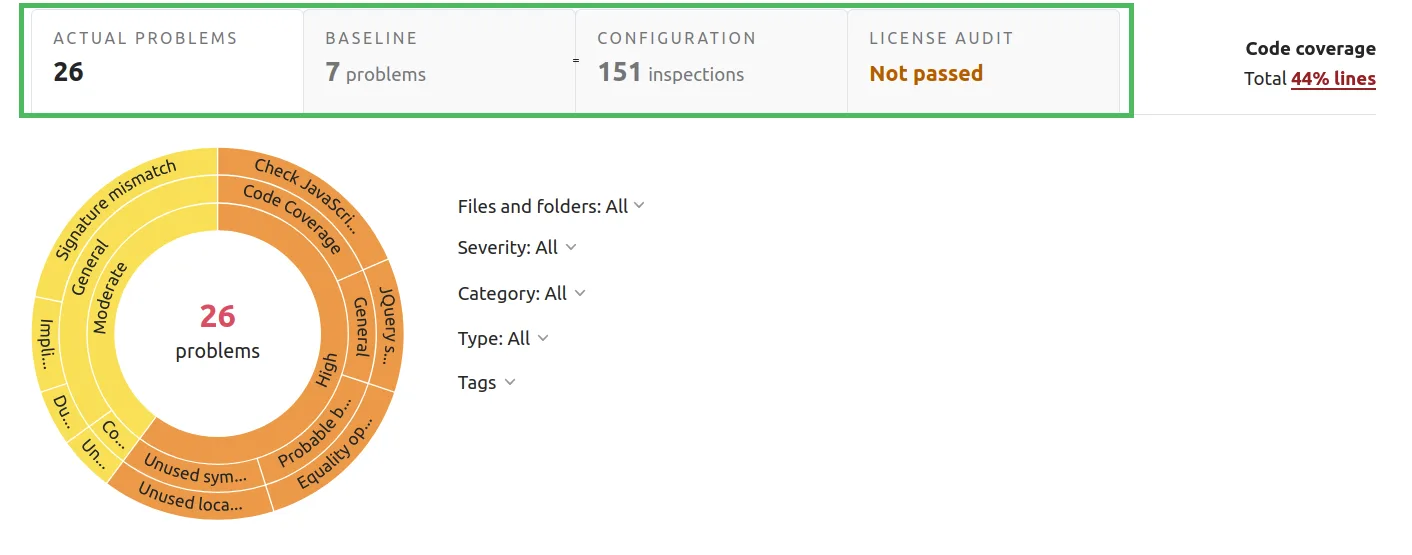
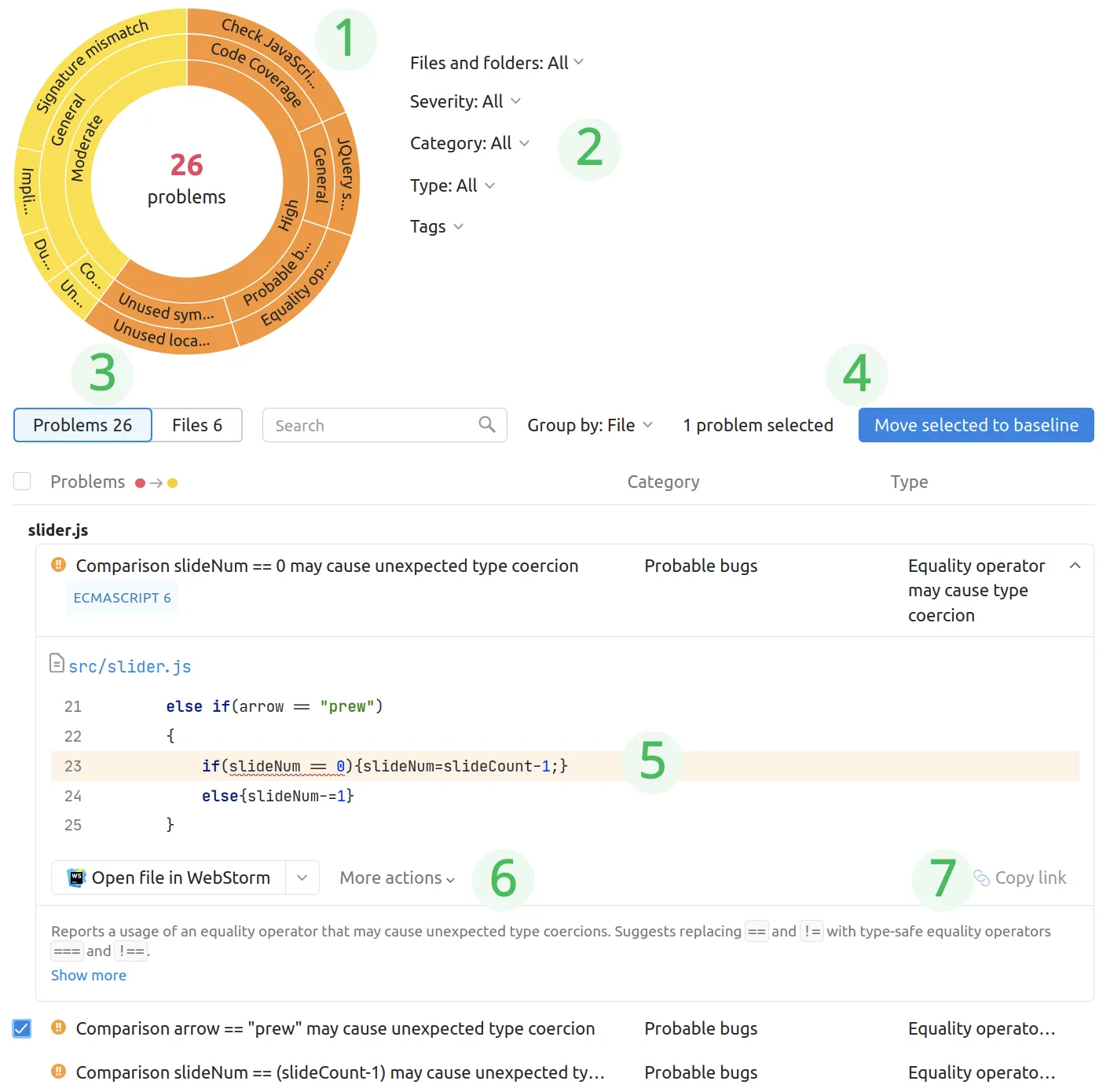
| Quality Gates & Baselines | Fail builds when new issues exceed a threshold. Baselines separate pre-existing technical debt from new problems, enabling gradual improvement without blocking on legacy code. |
| OWASP Taint Analysis | Traces untrusted input through code to detect SQL injection, XSS, command injection, and path traversal. Covers OWASP Top 10 categories A01, A03, A07, A08, and A10. Ultimate Plus tier. |
What is Qodana?
Qodana extends JetBrains IDE inspections beyond individual developer workstations into automated CI/CD workflows.
According to NIST’s Secure Software Development Framework (SSDF), organizations should use automated tools consistently across all development environments to maximize vulnerability detection.
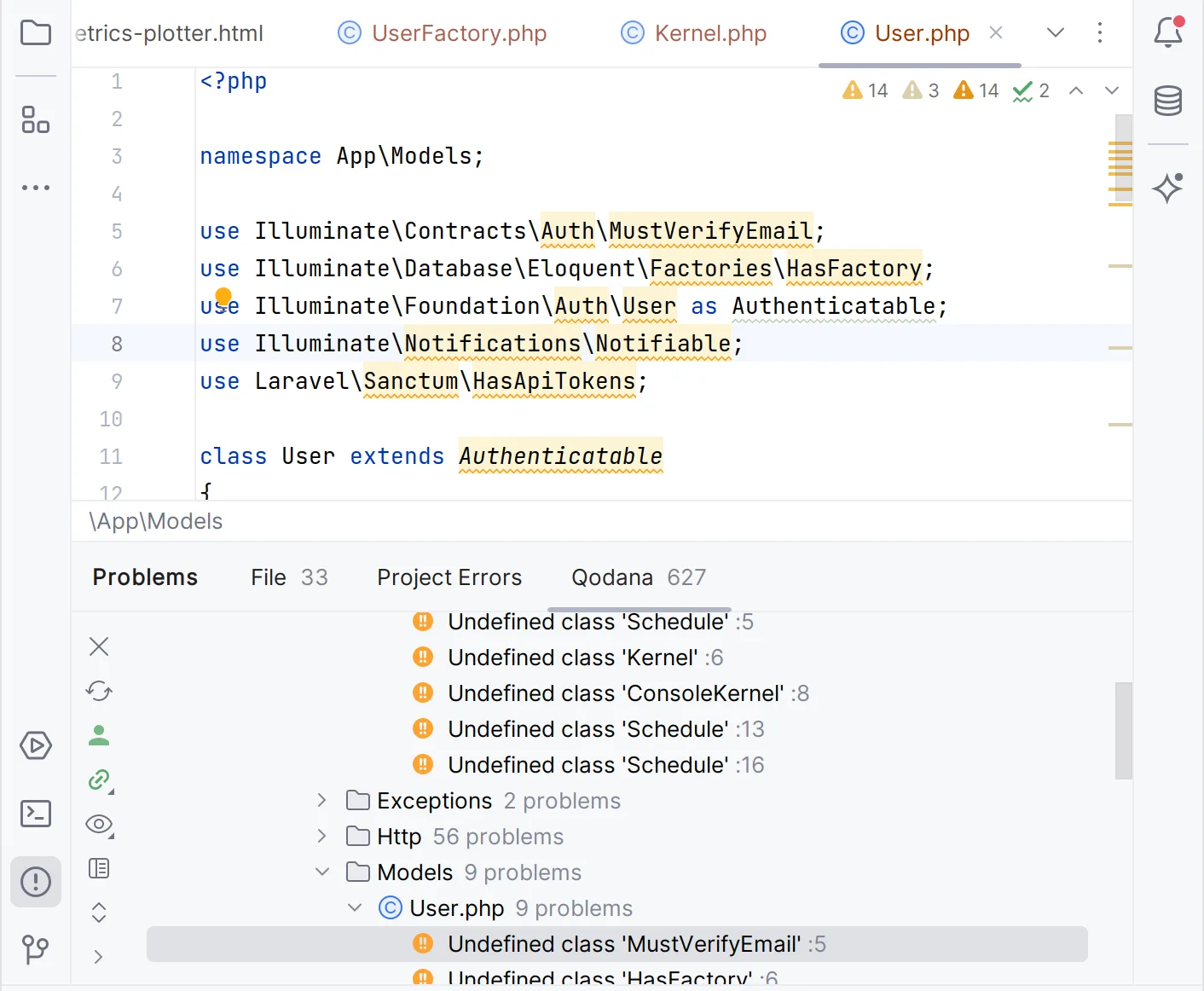
Qodana achieves this by running the same analyses in CI/CD that developers see in their JetBrains IDEs, catching issues that might be missed or ignored during local development.
Each language gets a specialized linter based on the corresponding JetBrains IDE: Qodana for JVM uses IntelliJ’s engine, Qodana for Python uses PyCharm’s, and so on. This means the same rules and the same accuracy in both places.
The current version is 2025.3. There are 15 linters available, including 4 free Community linters (JVM Community, Python Community, .NET Community, Clang).
How much does Qodana cost?
Qodana uses a contributor-based pricing model. An “active contributor” is anyone who committed to a Qodana Cloud project in the past 90 days.
| Tier | Price | Features |
|---|---|---|
| Community | Free | Java, Kotlin, Python, C#, C++, VB.NET. Limited linters and historical data. |
| Ultimate | $6/contributor/month | All languages. Quality gates, baselines, code coverage, FlexInspect, Quick-Fix. 180 days historical data. |
| Ultimate Plus | $15/contributor/month | Everything in Ultimate plus taint analysis, vulnerability checker, license audit, SSO, public API. Unlimited historical data. |
Minimum 3 contributors for paid plans. 60-day free trial available for both paid tiers.
What are Qodana’s key features?
Taint analysis (Ultimate Plus)
Qodana traces potentially harmful data through your application to identify paths where untrusted input reaches sensitive operations without validation. JetBrains reports 700+ built-in taint configuration entries for common frameworks and libraries, introduced in the 2025.1 release.
Performance benchmark: JetBrains reports Qodana can analyze 7 million lines of code in under 30 minutes for taint analysis as of the 2025.2 release — a vendor figure, not an independent benchmark.
Currently supported in the PHP and JVM linters.
Vulnerability checker (Ultimate Plus)
Uses the OSV tool to check Gradle, Maven, npm, and PyPI dependencies for known vulnerabilities. Available in the JVM, .NET, Python, Go, PHP, and JS linters.
Technical debt tracking
The baseline feature marks a project’s current state as a starting point, then tracks only new problems from that point forward. When combined with quality gates, only new issues count toward the threshold — pre-existing technical debt doesn’t block builds.
How do I get started with Qodana?
- Install the CLI — Run
curl -fsSL https://jb.gg/qodana-cli/install | bashorbrew install jetbrains/utils/qodanaon macOS. Windows users can usewinget install JetBrains.QodanaCLI. - Run your first scan — Execute
qodana scanin your project directory. Qodana auto-detects the language and selects the appropriate linter. Results open in a local HTML report. - Add to CI/CD — Use the official GitHub Action (
JetBrains/qodana-action@v2025.3) with aQODANA_TOKEN. Native integrations also exist for GitLab CI, Azure Pipelines, CircleCI, and TeamCity. - Configure quality gates — Add a
qodana.yamlto your project root withfailThresholdandbaselinesettings. New problems exceeding the threshold will fail the build.
When to use Qodana
Qodana is a natural fit for teams already using JetBrains IDEs. The consistency between editor warnings and CI/CD findings eliminates the “works on my machine” gap for code quality.
For teams not using JetBrains IDEs, SonarQube offers a broader plugin ecosystem. For focused security scanning, Semgrep or Snyk Code may provide deeper vulnerability coverage.
Qodana’s strength is combining code quality, security, and technical debt tracking with the same engine developers already use.
What are alternatives to Qodana?
Teams comparing CI-side static analyzers to Qodana usually evaluate:
- SonarQube — multi-language SAST and quality platform with deep CI integration; the most direct competitor to Qodana when you want quality gates plus security findings on the same dashboard.
- Semgrep — rule-driven SAST with a public ruleset and custom-rule support; preferred when security depth matters more than IDE parity and you want consistent rule syntax across languages.
- GitHub CodeQL — query-based SAST bundled with GitHub Advanced Security; a fit when GitHub is already your platform and you want a single vendor for code scanning.
- Snyk Code — developer-first SAST with AI-powered triage; chosen when Snyk’s SCA, container, and IaC products are already in use.
For a feature-by-feature view, the SAST tools hub lists the full active set.
How to use Qodana
A standard Qodana workflow runs in three steps. First, pick the right linter for your stack: Qodana for JVM covers Java and Kotlin, Qodana for Python covers Python, Qodana for .NET covers C# and VB.NET, and so on. Each linter is a separate Docker image, mirroring the matching JetBrains IDE engine, so the inspections you see in IntelliJ or PyCharm match what runs in CI.
Second, run the scan. Locally, qodana scan from the project root pulls the right image and produces an HTML report. In CI, the official Qodana action for GitHub, GitLab, Jenkins, and TeamCity wires the same scan into your pipeline and posts inline annotations on pull requests. Quality gates fail builds when new issues exceed a configured threshold.
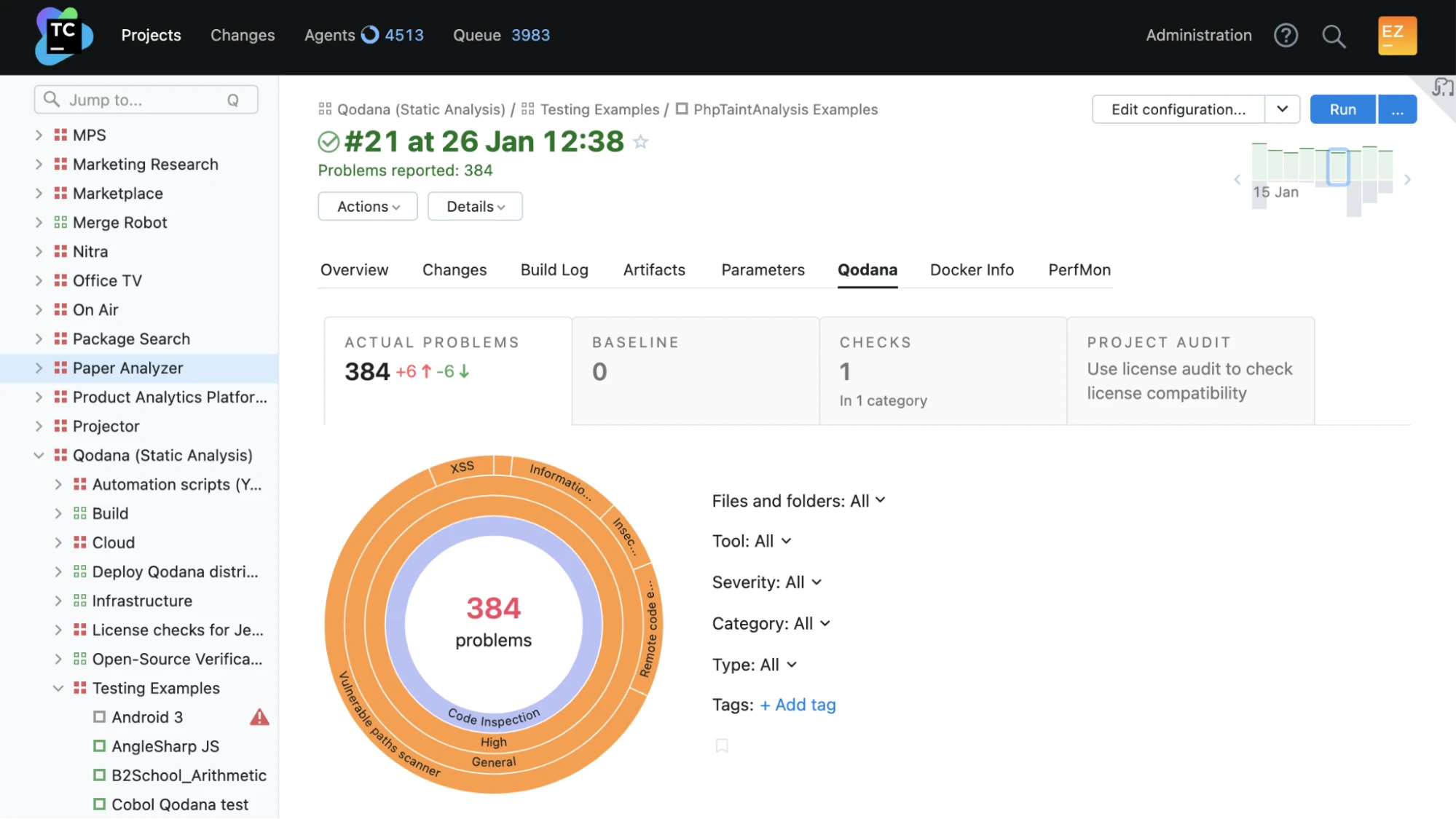
Third, manage technical debt with a baseline file. qodana scan --baseline qodana.sarif.json snapshots existing issues and only fails on new ones, which lets legacy projects adopt Qodana without rewriting history. The Qodana Cloud dashboard tracks inspection trends, baseline drift, and per-developer metrics over time.
Qodana vs SonarQube
Qodana and SonarQube are both server-mode static analysis platforms with a quality-gate model, and they end up on the same shortlist often enough that JetBrains positions Qodana directly against SonarQube in their marketing.
The honest split: SonarQube has broader language coverage and a more mature open-source community, with self-hosted Community, Developer, and Enterprise editions plus the SonarCloud SaaS option. Qodana wins for JetBrains IDE shops because every Qodana inspection runs on the same engine the developer sees in IntelliJ, PyCharm, PhpStorm, or Rider — there is no rule-engine drift between local IDE feedback and CI findings, which reduces the triage work of reconciling two different analyzers.
If your team is already JetBrains-licensed, Qodana plugs into the workflow with near-zero learning curve. If your stack is polyglot or you need a self-hosted security-first scanner, SonarQube vs Veracode and the SAST tools hub are better starting points.