

Psalm is a free, open-source PHP static analysis tool that detects both type errors and security vulnerabilities through built-in taint analysis. As a SAST tool originally built by Matt Brown at Vimeo and now maintained by Daniil Gentili, Psalm has 5,800+ GitHub stars and is licensed under MIT.
What separates Psalm from other PHP analyzers is its built-in taint analysis for detecting SQL injection, XSS, and command injection. Most PHP analyzers focus on type correctness.
Psalm goes further: it tracks user-controlled data from input sources ($_GET, $_POST, $_COOKIE) through your application to dangerous sinks (database queries, HTML output, shell commands). If tainted data reaches a sink without sanitization, Psalm flags it as a security vulnerability.
Psalm is one of the few free tools that combines PHP type analysis with actual security vulnerability detection, covering SQL injection, cross-site scripting (XSS), command injection, and more — a capability that PHPStan , the other major PHP analyzer, does not offer.
| Feature | Details |
|---|---|
| Original author | Matt Brown (Vimeo) |
| Current maintainer | Daniil Gentili |
| License | MIT (completely free, no paid tier) |
| Language | PHP only |
| Error levels | 8 (Level 1 = strictest, Level 8 = most lenient) |
| Security analysis | Built-in taint tracking (SQL injection, XSS, command injection, SSRF) |
| Auto-fixer | Psalter (adds type annotations, fixes common issues) |
| Config format | XML (psalm.xml) |
| Output formats | Text, JSON, SARIF (GitHub code scanning), checkstyle, JUnit |
| Framework plugins | Laravel, Symfony, PHPUnit |
| GitHub stars | 5,800+ |
Overview
Psalm performs two kinds of analysis on PHP code:
Type analysis checks for type errors, undefined methods, wrong argument types, missing return values, and other correctness issues. This is similar to what PHPStan does, though Psalm’s type inference takes a slightly more conservative approach that catches certain edge cases.
Taint analysis (security analysis) tracks the flow of user-controlled data through your application. Psalm builds a data flow graph from sources to sinks, identifying paths where untrusted data can reach dangerous operations. It traces data across function calls, through assignments, and into method parameters – not just surface-level pattern matching.
Both analyses run on the same codebase in a single pass. You can enable taint analysis with the --taint-analysis flag.
| Capability | Details |
|---|---|
| Taint Analysis | Tracks user input from $_GET, $_POST, $_COOKIE to dangerous sinks. Detects SQL injection, XSS, command injection, and more. Define custom sources, sinks, and sanitizers. |
| 8 Error Levels | Level 1 (strictest) to Level 8 (most lenient). Default is Level 2. Start lenient on existing projects and tighten over time. Baseline files let you ignore legacy issues. |
| Type-Safe PHP | Advanced type inference with generics, conditional return types, union/intersection types, and literal types. Catches errors PHP only surfaces at runtime. |
What are Psalm’s key features?
Taint analysis (security)
Psalm’s taint analysis is its standout feature. It detects security vulnerabilities by tracking how user-controlled data flows through your application.
Default taint sources — Psalm treats $_GET, $_POST, and $_COOKIE as tainted by default. Any data from these superglobals is tracked through the application.
Default taint sinks — Built-in sinks include:
| Sink Type | Examples |
|---|---|
| HTML output | echo, print, template rendering |
| SQL queries | PDO queries, mysqli, Doctrine DQL |
| Shell execution | exec(), shell_exec(), system(), passthru() |
| File inclusion | include, require |
| HTTP headers | header() |
| Unserialize | unserialize() |
Taint types — Psalm distinguishes between different types of tainted data:
TaintedSql— User input flowing to SQL queries (SQL injection)TaintedHtml— User input flowing to HTML output (XSS)TaintedShell— User input flowing to shell commands (command injection)TaintedInclude— User input flowing to file inclusionTaintedHeader— User input flowing to HTTP headersTaintedUnserialize— User input flowing to unserialize callsTaintedSSRF— User input flowing to server-side request URLs
Running taint analysis is straightforward:
# Run standard analysis + taint analysis
vendor/bin/psalm --taint-analysis
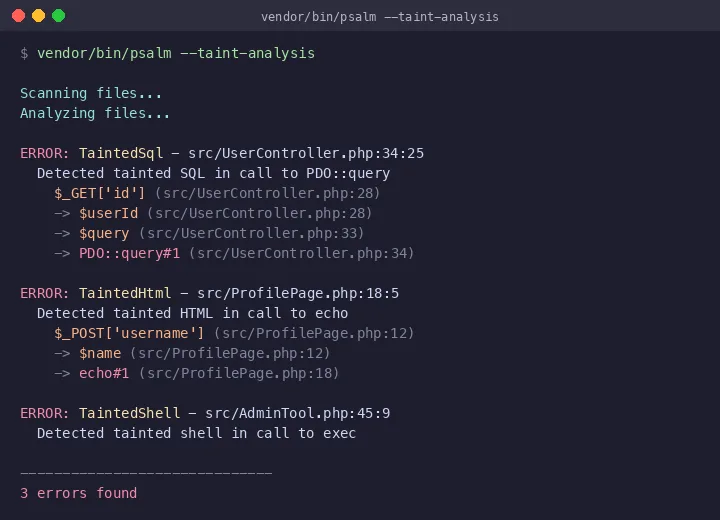
The output above shows Psalm tracing tainted data from $_GET['id'] through variable assignments all the way to a PDO::query call — a SQL injection vulnerability. Each step in the data flow is shown with file and line references, making it straightforward to trace how untrusted input reaches a dangerous sink.
Custom sources, sinks, and sanitizers — You can annotate your own code to extend Psalm’s taint tracking:
/**
 * @psalm-taint-source input
 */
function getApiInput(): string {
    return file_get_contents('php://input');
}

/**
 * @psalm-taint-sink sql $query
 */
function executeQuery(string $query): void {
    // ...
}

/**
 * @psalm-taint-escape sql
 */
function sanitizeForSql(string $input): string {
    return addslashes($input);
}
This matters because most PHP applications have custom input handling beyond the standard superglobals. Psalm lets you model your application’s actual data flow.
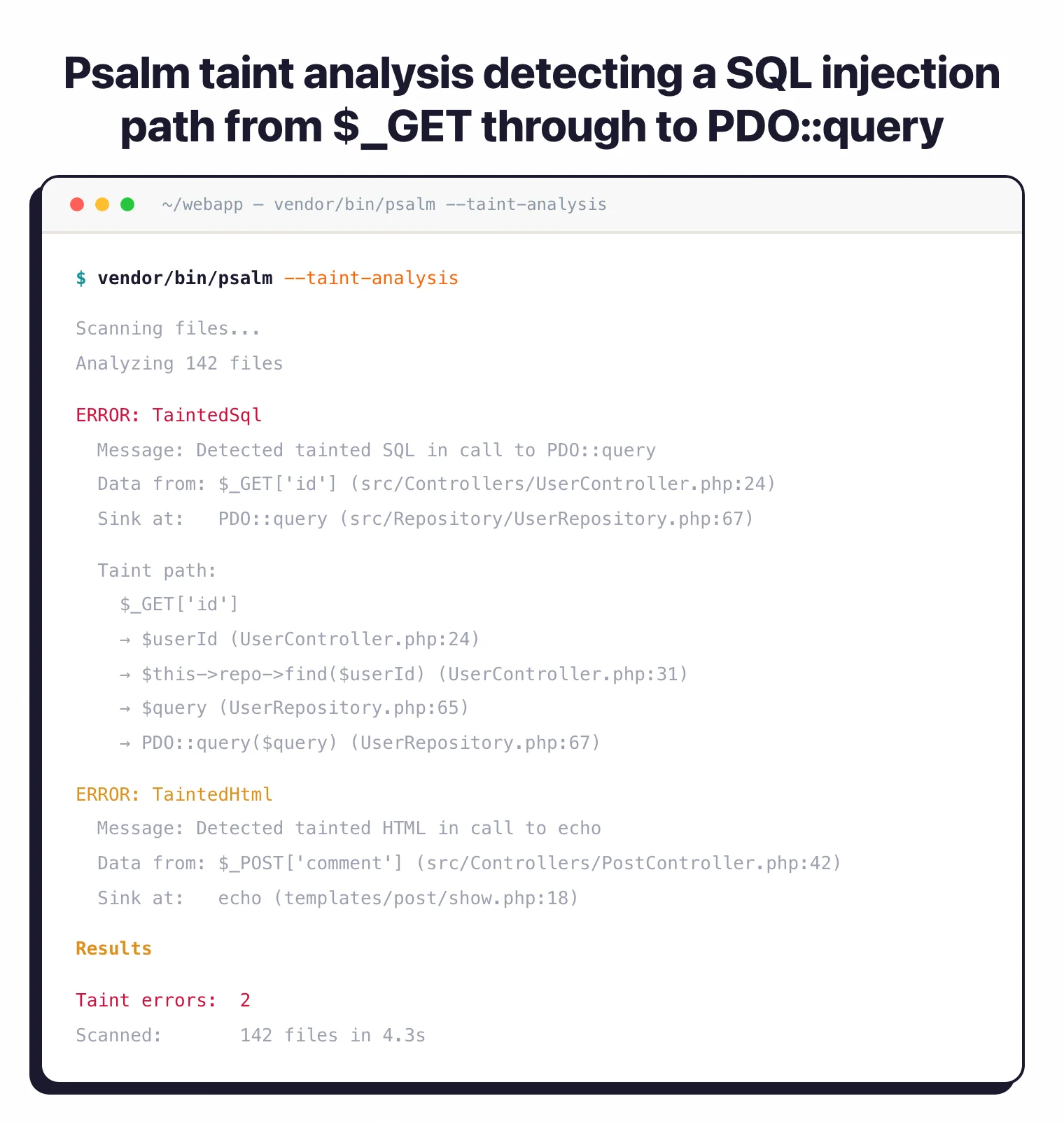
Error levels
Psalm uses 8 error levels, where Level 1 is the most strict and Level 8 is the most lenient. The default is Level 2.
| Level | Strictness | What It Allows |
|---|---|---|
| 1 | Maximum | All issues are errors, including uninferable types |
| 2 | Default | Ignores mixed type issues |
| 3 | Moderate | Allows missing param types, return types, property types |
| 4 | Relaxed | Ignores likely false positives that Psalm can’t verify |
| 5-6 | Lenient | Allows more non-verifiable code patterns |
| 7-8 | Minimal | Only catches the most obvious errors |
For existing projects, I recommend starting at Level 5 or 6 and decreasing the number (increasing strictness) as you fix issues. Psalm’s baseline file feature lets you record existing errors and only block on new ones.
Psalter (automatic fixer)
Psalter is Psalm’s built-in code transformation tool. It can automatically fix certain issues:
# Add missing return type declarations
vendor/bin/psalter --issues=MissingReturnType

# Add missing parameter type declarations
vendor/bin/psalter --issues=MissingParamType

# Fix multiple issue types at once
vendor/bin/psalter --issues=MissingReturnType,MissingParamType,MissingPropertyType
For legacy codebases, this saves hours of manual work. Run Psalter on a few files at a time, review the changes, and commit. Over weeks, your type coverage improves without dedicated refactoring sprints.
Type inference
Psalm’s type inference engine handles advanced PHP type features:
- Generics —
@template Twith type constraints - Conditional return types — Different return types based on argument types
- Assertions —
@psalm-assert !null $valuefor custom type narrowing - Type aliases —
@psalm-type StringArray = array<string, string> - Pure functions —
@psalm-pureannotation for functions without side effects - Immutable classes —
@psalm-immutablefor value objects
Psalm’s type inference is generally considered slightly more conservative than PHPStan’s, which means it may flag some patterns PHPStan allows — but those flags are often genuine issues that would cause runtime errors in edge cases.
When should you use Psalm?
Security-conscious PHP development — Psalm’s taint analysis detects SQL injection, XSS, and command injection through static data flow tracking — one of the few free tools that provides this capability for PHP. If your application handles user input (which is most PHP applications), taint analysis catches injection vulnerabilities that type checking alone would miss.
Legacy codebase hardening — Start at a lenient error level, generate a baseline, and gradually increase strictness. Psalter can auto-fix missing type declarations to accelerate the process.
API and web application security — Track user input from HTTP requests through your application to database queries and HTML output. Psalm catches the most common web vulnerability categories — SQLi and XSS — through static analysis rather than runtime testing.
Type safety enforcement — Psalm’s strict mode (Level 1) enforces complete type coverage, catching issues that PHP’s type system doesn’t require you to handle. Useful for libraries and packages where type safety matters for downstream consumers.
Strengths & Limitations
Strengths:
- Built-in taint analysis is rare among free PHP tools — detects SQL injection, XSS, command injection through data flow tracking
- Custom taint sources, sinks, and sanitizers let you model your application’s specific data flow
- Psalter automatically adds type annotations, accelerating type coverage improvement
- Conservative type inference catches edge cases that other tools may miss
- SARIF output integrates with GitHub code scanning
- Completely free under MIT — no paid tier or commercial version
Limitations:
- PHP-only — for multi-language projects, consider Semgrep or SonarQube alongside Psalm
- Smaller plugin ecosystem than PHPStan — fewer framework-specific extensions available
- Taint analysis can be slow on large codebases since it builds a full data flow graph
- Community is smaller than PHPStan’s, meaning fewer third-party resources and tutorials
- Error level numbering is inverted (1 = strict, 8 = lenient) which can be confusing coming from PHPStan (0 = lenient, 10 = strict)
- Configuration uses XML rather than the more developer-friendly NEON/YAML format
How do I get started with Psalm?
- Install via Composer — Run
composer require --dev vimeo/psalm. For framework support, add plugins:composer require --dev psalm/plugin-laravelfor Laravel orcomposer require --dev psalm/plugin-symfonyfor Symfony. - Initialize configuration — Run
vendor/bin/psalm --initto generate apsalm.xmlconfiguration file. This auto-detects your source directories and sets a starting error level based on your codebase. - Run type analysis — Execute
vendor/bin/psalmfor standard type checking. Review the errors and either fix them or generate a baseline withvendor/bin/psalm --set-baseline=psalm-baseline.xml. - Run taint analysis — Execute
vendor/bin/psalm --taint-analysisto check for security vulnerabilities. Review anyTaintedSql,TaintedHtml, orTaintedShellfindings and add proper sanitization. - Add to CI — Add Psalm to your CI pipeline. Run both standard analysis and taint analysis. Use the GitHub Action
psalm/psalm-github-actionsfor GitHub code scanning integration with SARIF output.
Psalm vs PHPStan
Psalm and PHPStan are the two main PHP static analysis tools. The right choice depends on your priorities. For a detailed breakdown, see the full PHPStan vs Psalm comparison .
Choose Psalm if you need security vulnerability detection (taint analysis for SQL injection, XSS, and command injection), you want automatic code fixes via Psalter, or you prefer more conservative type inference that catches edge cases.
Choose PHPStan if you want a larger plugin ecosystem with 200+ packages, better framework support (especially Laravel via Larastan), more gradual strictness levels (11 levels vs 8), or a commercial Pro tier with web UI and watch mode.
Psalm is better for teams that prioritize security analysis alongside type checking. PHPStan is better for teams that prioritize framework-aware type checking and ecosystem breadth. Running both in CI is a common practice — they catch different issues, and the overlap is smaller than you might expect.
For a dedicated security-focused PHP scanner that goes beyond what Psalm offers, consider pairing either tool with a DAST solution for runtime vulnerability testing.
Pro tip: PHP teams that need both type safety and security vulnerability detection in a single free tool. Psalm's taint analysis catches SQL injection, XSS, and command injection through static data flow analysis — a capability that most PHP static analysis tools don't offer without a commercial license.