

OpenGrep is a community-maintained, LGPL-2.1 fork of Semgrep CE — the popular open-source SAST engine — created in January 2025 after Semgrep moved cross-function taint analysis and other features behind its commercial platform. A consortium of 10+ application security vendors governs the project jointly.
The fork is licensed under LGPL-2.1. Governance is the main thing that sets it apart: a consortium of 10+ appsec companies maintains the project jointly, so no single vendor controls the roadmap.
OpenGrep restores the features that Semgrep removed from CE — taint analysis, inter-procedural scanning, fingerprinting, and Windows support — and keeps them free under LGPL-2.1.
The project has 2,700+ GitHub stars and stays backward compatible with Semgrep’s rule format, JSON output, and SARIF output. Existing rules and CI pipelines work without changes.
For a direct head-to-head, see the OpenGrep vs Semgrep comparison .
What Is OpenGrep?
OpenGrep is a community-maintained fork of Semgrep’s Community Edition, created in 2025 when Semgrep Inc. relicensed parts of the CE engine. Instead of a single-company project, OpenGrep is governed by a consortium of 10+ appsec vendors so no individual company can restrict features again.
It is a static code analysis engine written primarily in OCaml. It uses pattern-matching rules that look like the source code they scan — no regex or custom DSLs needed. The engine covers 30+ languages and runs locally.
| Feature | Details |
|---|---|
| Languages | 30+ including Python, JavaScript, TypeScript, Java, Go, C, C++, C#, Ruby, Rust, Kotlin, PHP, Swift, Visual Basic |
| Rule format | YAML-based, Semgrep-compatible |
| Output formats | JSON, SARIF 2.1.0, human-readable console |
| Taint analysis | Constructor tracking, inter-method propagation, higher-order function support across 12 languages |
| Platforms | Linux, macOS, Windows (including ARM) |
| License | LGPL-2.1 |
| Binary signing | Cosign-signed releases |
| Codebase | OCaml 75.0%, Python 13.1%, Java 3.8% |
| Contributors | 189 contributors, 9,400+ commits |
| Current version | 1.16.4 (March 2026) |
| Capability | Details |
|---|---|
| 30+ Languages | Covers Apex, Bash, C, C++, C#, Go, Java, JavaScript, TypeScript, Python, Ruby, Rust, Kotlin, PHP, Swift, Scala, Terraform, Dockerfile, Visual Basic, and more. Visual Basic support is exclusive to OpenGrep. |
| Taint Analysis | Tracks tainted data through constructors, field assignments, inter-method calls, higher-order functions, and collection operations like map, filter, and reduce. Available across 12 languages. |
| Semgrep Compatible | Backward compatible with Semgrep’s rule format, JSON output, and SARIF 2.1.0 output. Existing rules, CI pipelines, and integrations work without modification. |
OpenGrep vs Semgrep: Key Differences
OpenGrep is fully backward compatible with Semgrep’s rule format, JSON output, and SARIF output, so existing Semgrep rules and CI pipelines work without modification.
Three differences matter. The OpenGrep CLI is 100% open-source under LGPL-2.1. Features Semgrep moved behind its commercial platform — cross-function taint analysis, fingerprinting, tracking ignores — are free in OpenGrep. And Visual Basic is supported in OpenGrep but not in Semgrep.
Governance is the other split. OpenGrep is steered by a consortium of 10+ vendors, not a single company.
For the full head-to-head — including feature tables, detection benchmarks, and licensing trade-offs — see OpenGrep vs Semgrep .
What are OpenGrep’s key features?
Taint analysis
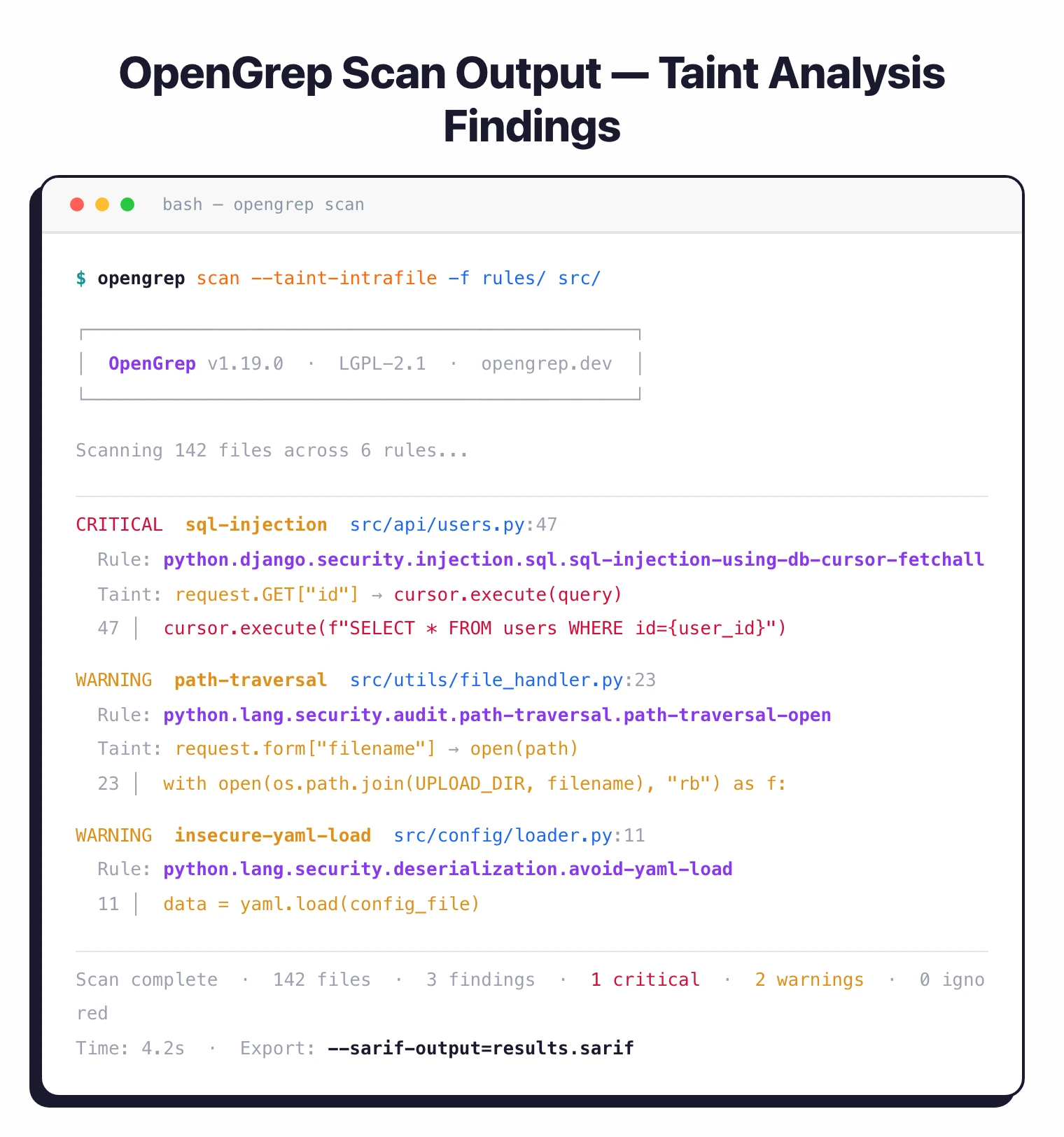
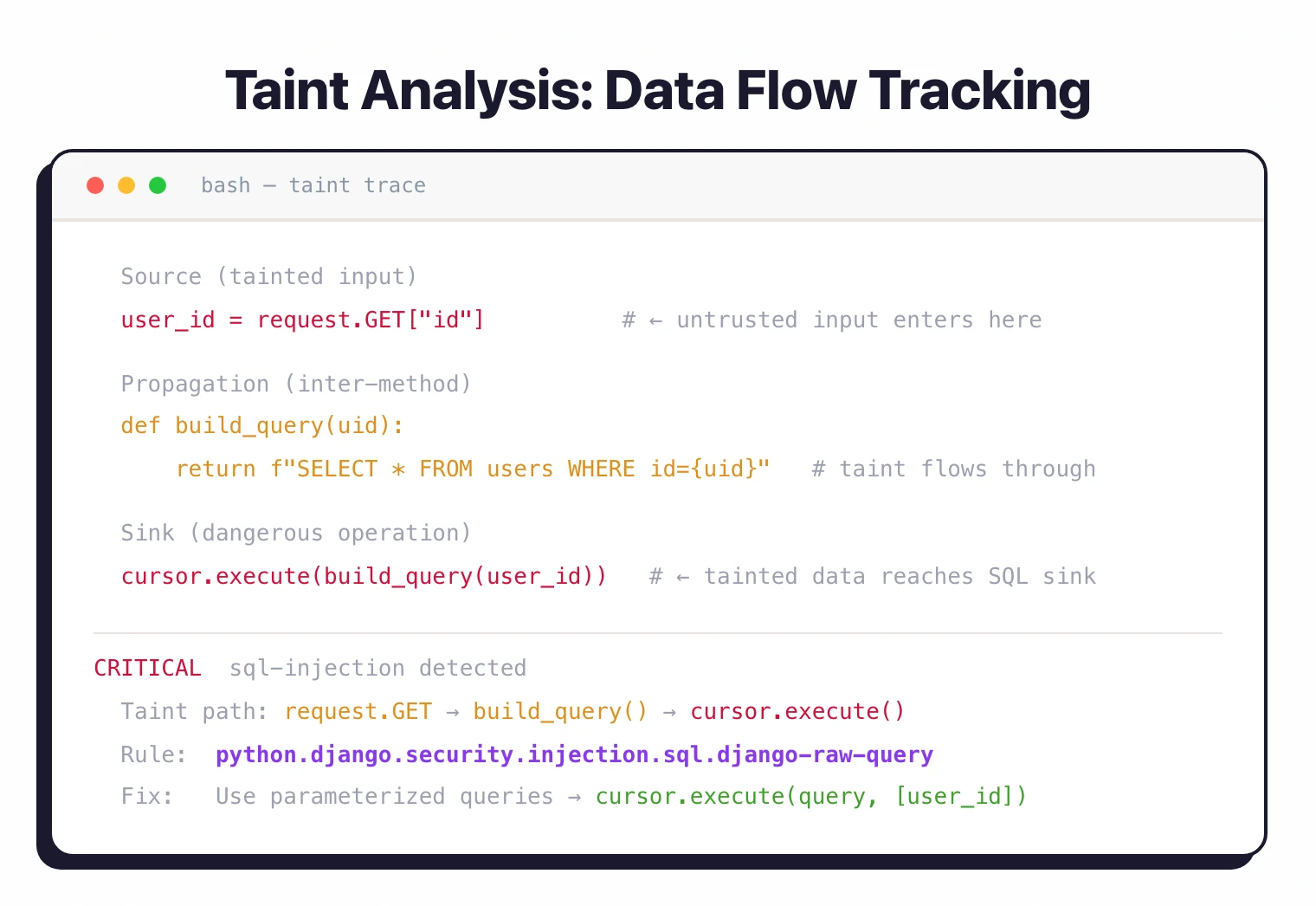
OpenGrep’s taint engine tracks data flow through code.
When user-controlled input reaches a vulnerable sink like a SQL query or OS command, the scanner flags it.
Taint tracking covers constructor and field assignment tracking, inter-method propagation, higher-order function support across 12 languages, and collection method tainting (map, filter, reduce). Enable it with the --taint-intrafile flag.
Pattern-matching rules
Rules resemble the source code they target. To find insecure YAML loading in Python, you write a rule that looks like yaml.load(...) rather than building a regex.
rules:
  - id: insecure-yaml-load
    pattern: yaml.load(...)
    message: "Use yaml.safe_load() instead of yaml.load()"
    languages: [python]
    severity: WARNING
Existing Semgrep community rulesets work as-is. Same YAML format with pattern, message, languages, and severity fields.
Language support
OpenGrep supports 30+ languages. Notable differences from the Semgrep CE baseline:
- Visual Basic: Exclusive to OpenGrep, not available in Semgrep CE or Semgrep Code
- Apex, Elixir: Restored from Semgrep’s restricted set
- C#: Improved support (version 14)
- PHP: Version 8.4 support
- Clojure: Added taint analysis support
- Generic mode: Handles ERB, Jinja, and other template formats
Windows support
OpenGrep runs natively on Windows alongside macOS and Linux. The Semgrep CE project dropped Windows support.
OpenGrep restored it, including ARM binaries and a PowerShell install script.
Consortium governance
The project is maintained by a consortium rather than a single company. Member organizations:
- Aikido Security, Arnica, Amplify, Endor Labs, Jit, Kodem, Legit, Mobb, Orca Security, Phoenix Security
A dedicated full-time development team builds the core engine. The stated plan is to move the project under foundation management.
Supported Languages
OpenGrep covers 30+ languages out of the box, including the full Semgrep CE baseline plus additions and restorations. The full list (from the project’s language manifest): Apex, Bash, C, C++, C#, Clojure, Dart, Dockerfile, Elixir, Go, HTML, Java, JavaScript, JSON, Jsonnet, JSX, Julia, Kotlin, Lisp, Lua, OCaml, PHP, Python, R, Ruby, Rust, Scala, Scheme, Solidity, Swift, Terraform, TSX, TypeScript, Visual Basic, XML, and YAML.
Compared to Semgrep CE, the notable differences are:
- Visual Basic — exclusive to OpenGrep; Semgrep has never shipped Visual Basic support
- Apex and Elixir — restored from the set Semgrep restricted
- C# — improved support (version 14)
- PHP — version 8.4 support
- Clojure — added taint analysis support
- Generic mode — handles ERB, Jinja, and other template formats
Taint tracking is available across 12 of these languages.
How to Install OpenGrep
| Method | Command |
|---|---|
| Linux/macOS | curl -fsSL https://raw.githubusercontent.com/opengrep/opengrep/main/install.sh | bash |
| Windows | irm https://raw.githubusercontent.com/opengrep/opengrep/main/install.ps1 | iex |
| Binaries | Download from GitHub Releases |
All release binaries are Cosign-signed.
How do I get started with OpenGrep?
- Install OpenGrep — Use the install script for your platform, or download a signed binary from GitHub Releases.
- Run a scan — Run
opengrep scan -f rules/ .whererules/points to your YAML rule directory. The scanner produces human-readable output with progress bars. - Use Semgrep rules — Any Semgrep-compatible ruleset works. Drop in your existing custom rules or community rulesets without changes.
- Export results — Use
--sarif-output=results.sariffor SARIF 2.1.0 output, or pipe JSON output into your existing CI/CD workflow.
Is OpenGrep Production-Ready?
Yes. The 10+ appsec vendors that back the consortium (Aikido Security, Arnica, Amplify, Endor Labs, Jit, Kodem, Legit, Mobb, Orca Security, and Phoenix Security) already run OpenGrep in production pipelines. The project has 189+ contributors and 9,500+ commits. A full-time OCaml team builds the core engine, and new releases ship on a roughly weekly cadence through 2026.
Release binaries are Cosign-signed for supply chain verification, and the engine runs on Linux, macOS, and Windows (including ARM). Because OpenGrep keeps Semgrep’s rule format and SARIF output, most teams can swap the binary into an existing CI workflow without changes.
When to use OpenGrep
OpenGrep fits teams that want Semgrep’s scanning engine without commercial licensing restrictions.
If you already have Semgrep community rules or custom rules, OpenGrep is a drop-in replacement that adds taint analysis, Visual Basic support, and Windows binaries.
The consortium governance model means no single vendor controls the project’s direction. If you’ve been burned by an open-source tool going commercial before, that’s the pitch here.
For a comparison with the Semgrep AppSec Platform, see the Semgrep review . For a broader SAST comparison, see SAST tools .