


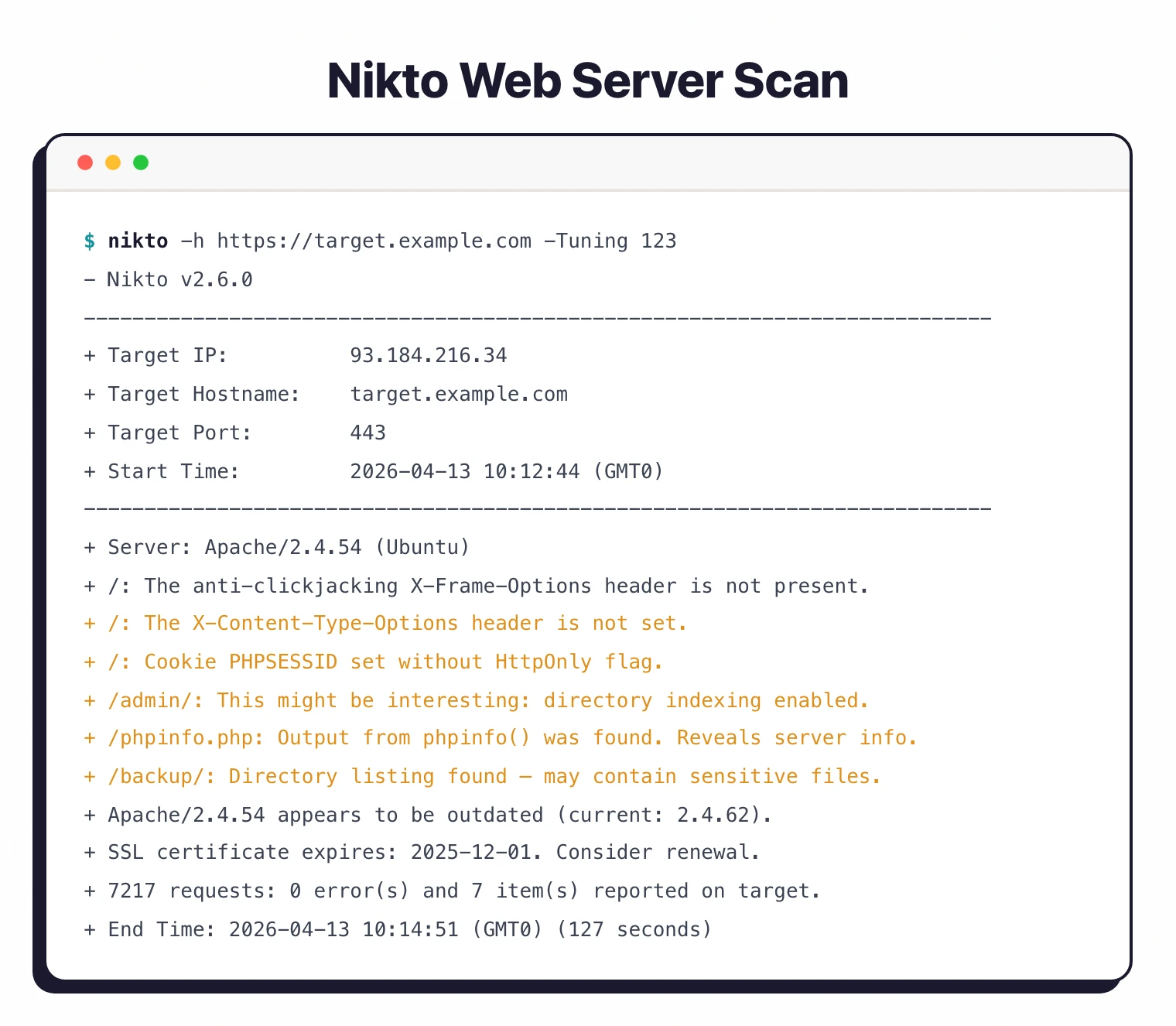
Nikto is a free, open-source Perl web server scanner that runs 8,000+ checks for dangerous files, outdated software, and server misconfigurations. The latest stable release is Nikto 2.6.0 (February 2026), licensed under GPL v3, and it targets the server layer rather than application logic.
Chris Sullo wrote Nikto in Perl in 2001, and David Lodge has co-maintained it for years. The project has 10,200+ GitHub stars, 1,400+ forks, and active commits through April 2026.
- License: GPL v3 (code) — database files have separate licensing
- Maintainers: Chris Sullo, David Lodge
- Repository: github.com/sullo/nikto
- Latest version: 2.6.0 (February 2026)
- Dependencies: Perl 5 with
Net::SSLeay,IO::Socket::SSL,LWP::UserAgent - Pre-installed on: Kali Linux, Parrot OS, BlackArch
| Feature | Details |
|---|---|
| Language | Perl |
| License | GPL v3 (code), separate for database |
| Checks | 8,000+ |
| Protocols | HTTP, HTTPS |
| Output formats | HTML, XML, JSON, CSV, SQL, Text |
| Authentication | HTTP Basic, cookies |
| Evasion modes | 10 techniques |
| Tuning categories | 13 test types |
| Docker image | ghcr.io/sullo/nikto |
| Included in | Kali Linux, Parrot OS |
What is Nikto?
Nikto is a command-line web server scanner that sends thousands of HTTP requests to a target and flags known problems. It checks for default install files (/phpinfo.php, /admin/), backup files (.bak, .old), outdated server software, weak SSL configurations, and insecure HTTP methods. First released in 2001 and maintained by Chris Sullo and David Lodge, it is pre-installed on Kali Linux, Parrot OS, and BlackArch.
Nikto is not a full DAST tool . It does not crawl applications, authenticate to login forms, execute JavaScript, or test business logic.
Think of Nikto as a fast reconnaissance pass before ZAP , Burp Suite , or template-based scanners like Nuclei .
The check database gets community updates covering Apache, Nginx, IIS, and dozens of other web servers. The CIS Benchmarks recommend checking for default files, unnecessary services, and server misconfigurations, which is the exact surface Nikto automates.
Nikto does not authenticate to applications, render JavaScript, or test custom functionality. It checks the server, not the app.
For authenticated application scanning, pair Nikto with a full DAST tool.
What are Nikto’s key features?
| Capability | Details |
|---|---|
| 8,000+ Server Checks | Tests for default files, backup files, vulnerable CGI scripts, server version-specific CVEs, insecure HTTP methods (PUT, DELETE, TRACE), and directory indexing. |
| SSL/TLS Assessment | Checks for expired or self-signed certificates, weak cipher suites, outdated protocol versions (SSLv2, SSLv3, TLS 1.0), missing HSTS headers, and certificate chain issues. |
| Plugin Architecture | Modular design with 7 hook phases (init, start, recon, scan, prefetch, postfetch, report). Write custom plugins for organization-specific checks. Ships with plugins for Apache users, CGI scripts, cookies, headers, and outdated software. |
| 13 Tuning Categories | Control exactly which tests run. Categories include interesting files, misconfigurations, info disclosure, XSS/injection, file retrieval, command execution, SQL injection, file upload, auth bypass, and software identification. |
| 10 Evasion Techniques | Bypass simple IDS rules with URL encoding, directory self-references, premature URL endings, fake parameters, TAB spacers, case changes, Windows directory separators, session splicing, and carriage-return injection. Modern app-aware WAFs will still catch most of these, but they remain useful against legacy intrusion-detection signatures. |
| 6 Output Formats | HTML for human review, XML for tool integration, JSON for scripting, CSV for spreadsheets, SQL for direct database import, plain text for quick checks. |
How to install Nikto
Nikto requires Perl 5 with Net::SSLeay, IO::Socket::SSL, and LWP::UserAgent. On Kali, Parrot, and BlackArch it ships pre-installed.
Kali Linux and Debian/Ubuntu
sudo apt update && sudo apt install nikto
nikto -Version
macOS (Homebrew)
brew install nikto
nikto -Version
Docker
The official image lives on GitHub Container Registry and carries the latest release.
docker pull ghcr.io/sullo/nikto:latest
docker run --rm ghcr.io/sullo/nikto:latest -h https://target.example.com

# Mount a volume so reports persist on the host
docker run --rm -v $(pwd):/tmp ghcr.io/sullo/nikto:latest \
  -h https://target.example.com -o /tmp/report.json -Format json
From source (git)
git clone https://github.com/sullo/nikto.git
cd nikto/program
./nikto.pl -Version
Windows
Nikto runs on Windows under Strawberry Perl or WSL2. I recommend WSL2, since the Perl SSL modules are fragile on native Windows, and the Docker image is a drop-in alternative.
How to use Nikto
The minimal Nikto invocation is nikto -h <target>. Everything else is tuning.
Common invocations
# Scan a single host over HTTP
nikto -h http://example.com

# Scan an HTTPS target (Nikto auto-detects SSL on port 443)
nikto -h https://example.com

# Scan multiple ports
nikto -h example.com -p 80,443,8080,8443

# Save an HTML report
nikto -h https://example.com -o report.html -Format html

# Save JSON for pipeline parsing
nikto -h https://example.com -o report.json -Format json

# Scan a list of hosts from a file
nikto -h targets.txt
Flag reference
| Flag | Purpose |
|---|---|
-h | Target host, URL, or file of targets |
-p | Port(s) to scan (comma-separated or range) |
-ssl | Force SSL mode (usually auto-detected) |
-Tuning | Restrict checks to specific categories |
-evasion | Apply WAF evasion technique (1–8) |
-o | Output file |
-Format | htm, xml, json, csv, sql, txt |
-useproxy | Route through an HTTP proxy |
-id | HTTP Basic auth credentials (user:pass) |
-timeout | Per-request timeout in seconds |
-maxtime | Max total scan time |
-Display | Control verbosity (1–4, V for verbose, D for debug) |
-update | Pull latest check database |
Tuning scans
# Only run misconfigurations and info disclosure
nikto -h https://example.com -Tuning 23

# Exclude DoS and command execution tests
nikto -h https://example.com -Tuning x68
Tuning categories: 1 interesting files, 2 misconfigurations, 3 info disclosure, 4 XSS/injection, 5 file retrieval (web root), 6 DoS, 7 file retrieval (server), 8 command execution, 9 SQL injection, 0 file upload, a auth bypass, b software ID, c remote source inclusion, x reverse (exclude listed).
Proxy and authentication
# Route through Burp or ZAP
nikto -h https://example.com -useproxy http://127.0.0.1:8080

# HTTP Basic auth
nikto -h https://example.com -id admin:password

# Static session cookie — set STATIC-COOKIE in nikto.conf
# Example: STATIC-COOKIE="session=abc123"
nikto -h https://example.com
Run Nmap first to discover web ports, then feed the results to Nikto. This catches web services on non-standard ports that a default Nikto scan would miss.
nmap -p- --open example.com -oG - | awk '/Ports:/ {print $2}'
Common Nikto use cases
Nikto fits a narrow slice of the pentest workflow well.
CTFs and bug bounty recon
Nikto surfaces default files, backup files, and exposed admin panels in seconds. On HackTheBox, TryHackMe, and PortSwigger labs, nikto -h <target> -Tuning 123 usually finds the first foothold before any manual probing. Bug bounty hunters run Nikto as a first pass across large asset lists to flag servers with obvious misconfigurations.
Internal pentest and red team recon
Internal networks are full of forgotten web admin panels: printers, NAS devices, legacy Jenkins boxes, Grafana with default creds. Nikto sweeps an internal subnet in minutes and flags these before a human operator has to click through them.
Continuous server hardening
A weekly Nikto scan against staging and production catches regressions: a new deployment that re-enables directory listing, a config drift that re-exposes /server-status, or an outdated Apache build after a failed upgrade.
Compliance baseline checks
Frameworks like PCI DSS and CIS Benchmarks require periodic server configuration checks. Nikto’s JSON output plugs into ticketing systems and compliance reports without additional tooling.
How do I get started with Nikto?
- Install Nikto — Use apt on Debian/Kali, brew on macOS, or pull the Docker image
ghcr.io/sullo/nikto. Perl 5 with SSL modules is required for source installs. - Run a basic scan —
nikto -h https://your-target.comruns all 8,000+ checks. Expect a few minutes per target depending on server response time. - Tune your scan — Use
-Tuningto focus on specific check categories.-Tuning 123covers interesting files, misconfigurations, and info disclosure without the noisier tests. - Export results — Add
-o report.html -Format htmlfor a readable report, or-Format jsonfor programmatic processing.
CI/CD integration
# GitHub Actions example
name: Web Server Security Scan
on:
  schedule:
    - cron: '0 2 * * 1'  # Weekly Monday 2am

jobs:
  nikto-scan:
    runs-on: ubuntu-latest
    steps:
      - name: Install Nikto
        run: sudo apt-get update && sudo apt-get install -y nikto

      - name: Run Nikto scan
        run: |
          nikto -h ${{ vars.TARGET_URL }} \
            -o nikto-report.html \
            -Format html \
            -Tuning 123
        continue-on-error: true

      - name: Upload report
        uses: actions/upload-artifact@v4
        with:
          name: nikto-security-report
          path: nikto-report.html
# GitLab CI example
nikto-scan:
  stage: security
  image: ghcr.io/sullo/nikto:latest
  script:
    - nikto -h $TARGET_URL -o nikto-report.html -Format html
  artifacts:
    paths:
      - nikto-report.html
    expire_in: 1 week
Inside the Nikto database: how the checks actually work
Nikto is not a single monolith. The scanner itself is a thin Perl wrapper around two directories on disk: program/databases/ and program/plugins/. Knowing how those two fit together is the difference between running Nikto and tuning it.
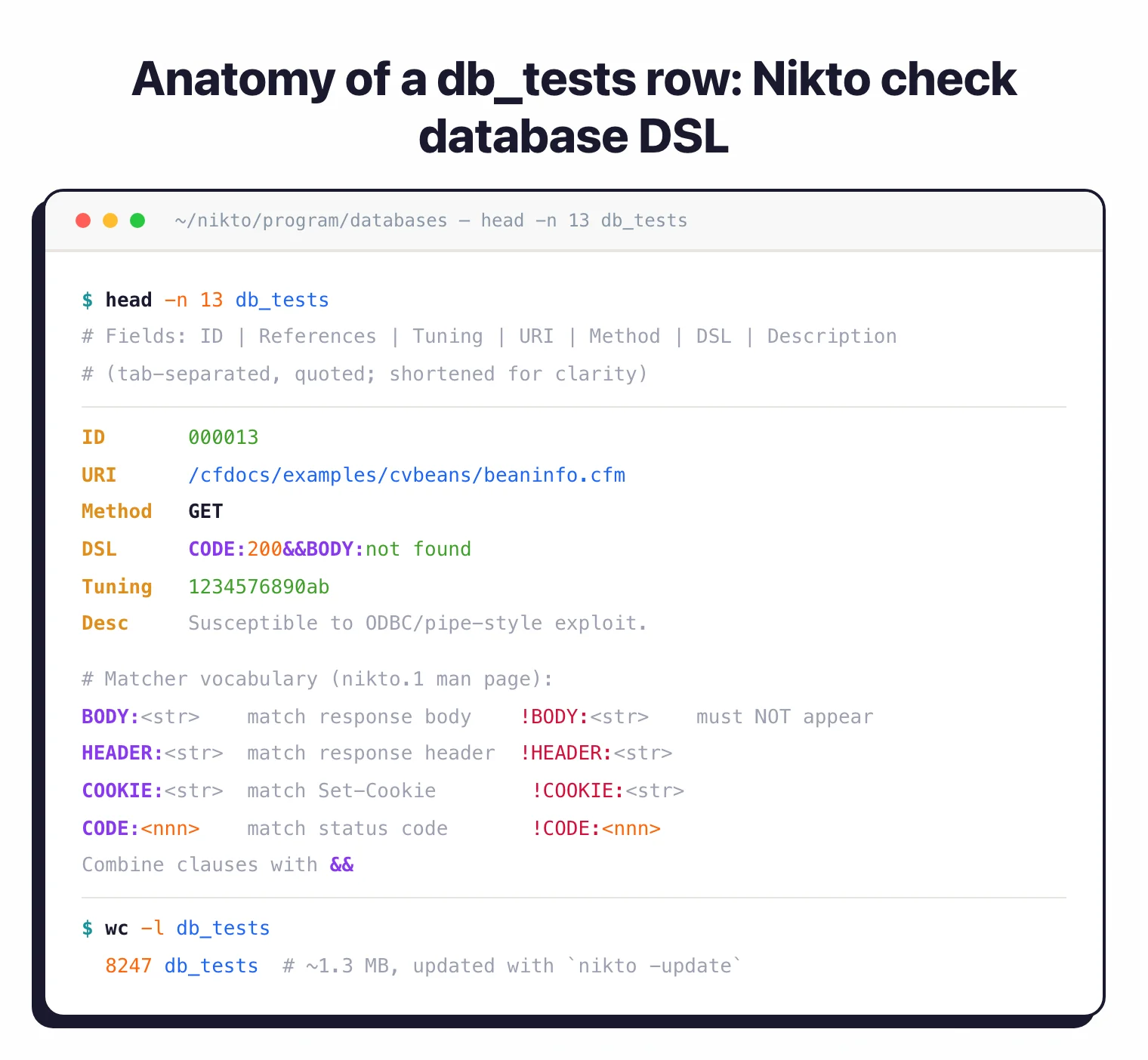
The databases/ directory holds flat text files that Nikto parses at startup. The largest is db_tests, a tab-separated file of every default path, header, and signature the scanner probes for (roughly 1.3 MB on the main branch), and it drives most of what users see as “a Nikto finding.”
Supporting files cover the rest: db_server_msgs maps banner strings to products, db_outdated (~130 KB) lists known-vulnerable server versions, db_headers_common and db_headers_suggested drive the header hygiene checks, db_favicon fingerprints admin panels by favicon hash, and db_404_strings teaches Nikto what a bogus “page not found” looks like on CDN-fronted targets.
Each row in db_tests ties a path to a matcher written in Nikto’s own mini-DSL: BODY:, HEADER:, COOKIE:, and CODE:, optionally negated with ! and combined with &&. That is what lets a single test line say “fire if the body contains login, the headers include X-Powered-By, and no logout link is present.” The syntax is documented in the upstream man page (man nikto.1, Dec 2025
).
The plugins/ directory decides what actually runs. nikto_core.plugin pulls db_tests and executes the bulk scan. Everything else is specialized: nikto_headers.plugin evaluates security headers, nikto_cookies.plugin audits Secure / HttpOnly / SameSite flags, nikto_favicon.plugin fingerprints the favicon, nikto_apacheusers.plugin enumerates ~user directories, nikto_dictionary_attack.plugin brute-forces HTTP Basic realms, and nikto_auth.plugin handles authenticated sessions.
You can turn plugins on and off with -Plugins. Listing what is installed on your box is a one-liner, which I run first on any system where I didn’t do the install.
nikto -list-plugins

# Run only header + cookie checks — no URL brute force, no CGI scan
nikto -h https://example.com -Plugins "headers;cookies;report_html"

# Reverse: exclude the noisy apacheusers + dictionary_attack plugins
nikto -h https://example.com -Plugins "@@ALL;-apacheusers;-dictionary_attack"
Writing a custom check rarely means writing Perl. For signature-style checks — “does /my-custom-admin/ exist on every host we own?” — I append a line to a user database (udb_tests) and load it with -Userdbs tests. Nikto treats user databases as first-class inputs.
For logic that goes beyond signature matching, say calling an internal asset inventory API before firing tests, you drop a .plugin file into plugins/, register the subs Nikto expects (nikto_myplugin_init, nikto_myplugin_scan), and the core loader picks it up on the next run. Academic evaluations like Doupé, Cova & Vigna (DIMVA 2010)
found this signature-first architecture makes Nikto fast and predictable, at the cost of missing anything that requires real crawling or stateful interaction. Worth knowing before you point it at a modern SPA.
Evasion techniques and when to actually use them
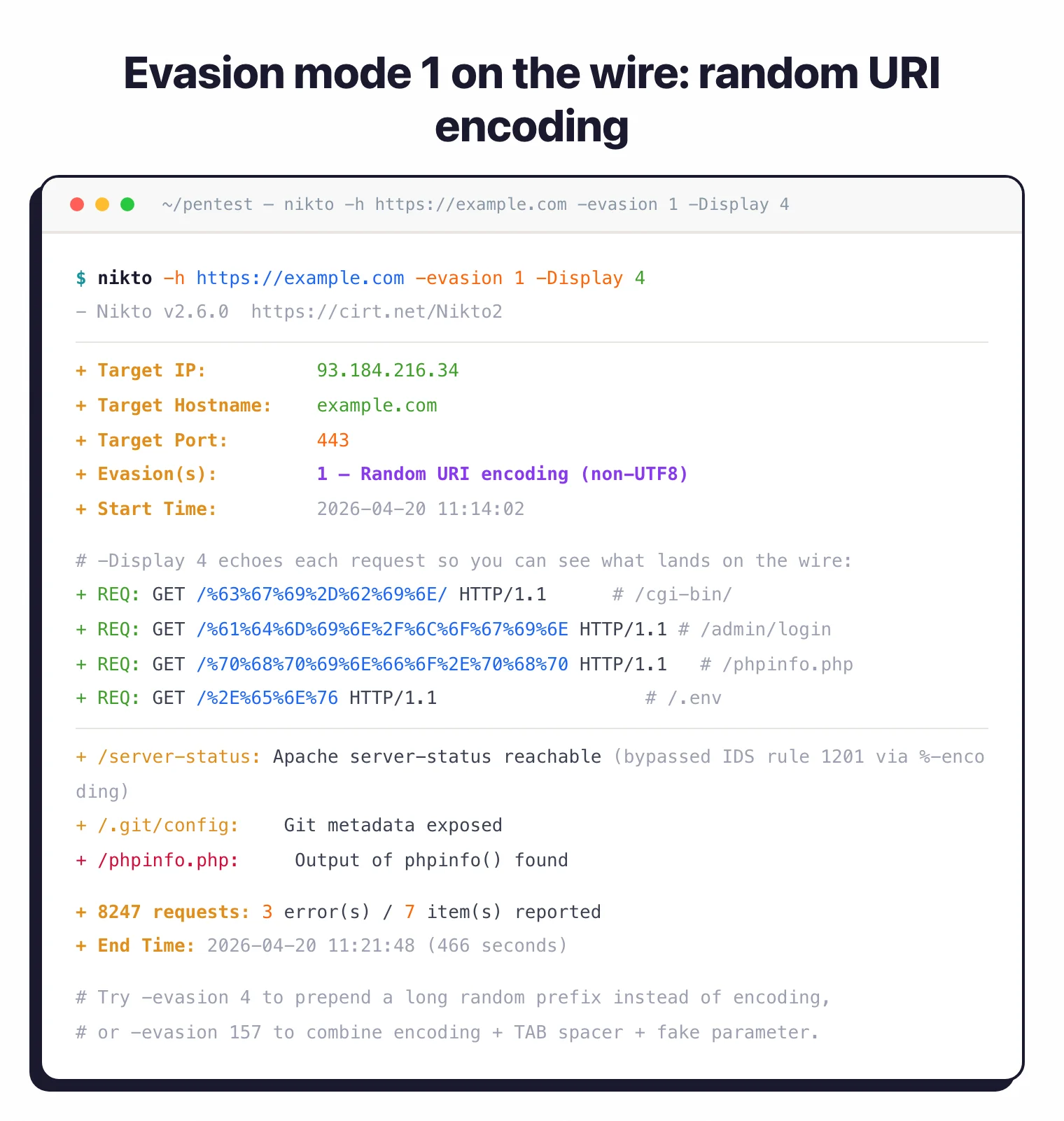
Nikto ships with ten IDS and WAF evasion modes via -evasion. They are not cosmetic. Each one counters a specific class of signature rule that intrusion-detection systems leaned on heavily in the 2000s and that many WAFs still inherit.
The full set, straight from the upstream man page (updated December 2025):
| ID | Technique | What it counters |
|---|---|---|
| 1 | Random URI encoding (non-UTF8) | Exact-string URL filters on signatures like /cmd.exe |
| 2 | Directory self-reference (/./) | Path-normalization rules that miss ./ before the token |
| 3 | Premature URL ending | Parsers that stop at the first space or HTTP/1.1 |
| 4 | Prepend long random string | Signatures anchored near the start of the URI |
| 5 | Fake parameter | Rules matching a literal pathname but not a query string |
| 6 | TAB as request spacer | Parsers that split on single space only |
| 7 | Change the case of the URL | Case-sensitive regex-based signatures |
| 8 | Use Windows directory separator (\) | Unix-centric path matchers on IIS targets |
| A | Carriage return as request spacer | Parsers that trust \r\n as the only line break |
| B | Binary 0x0b as request spacer | Rules that treat whitespace as ASCII-only |
Most defenders in 2026 have retired the single-pattern IDS rules these bypass. The techniques still earn their keep against a few targets: aging network IDS boxes on internal or OT segments (early-2010s Snort rulesets still ship on printers, NAS devices, and kiosks), cloud WAFs that block the Nikto user agent before it sends a real request, and rate-based defenses that ban the source IP mid-scan.
The standard pattern is -evasion 7 plus a tweaked -useragent to get past tool-fingerprint rules, with -evasion 4 -Pause 1 to stay under per-minute thresholds.
# Combine multiple techniques (encoding + case + fake parameter)
nikto -h https://example.com -evasion 157 -useragent "Mozilla/5.0"

# Single technique + pause to stay under per-minute WAF thresholds
nikto -h https://example.com -evasion 4 -Pause 1
Two honest caveats. None of the ten techniques evade a modern application-aware WAF that parses requests the way a backend would, which is a well-studied limit in the literature (Sadeghian et al., ICICM 2013
). And -evasion only obfuscates the request payload; Nikto still sends thousands of paths with a recognizable timing signature, so behavioral detection (anomaly scoring, tool fingerprinting) will flag the scan anyway.
For “can this get past a 2026 WAF?” the honest answer is usually no. Reach for Nuclei or an authenticated Burp/ZAP run instead. For a side-by-side, see Nuclei vs Nikto .
When to use Nikto
Nikto is a first-pass reconnaissance tool. Run it to check server hardening before any deeper application testing.
It answers “is this web server configured safely?” in a few minutes. That makes it useful for pre-pentest hardening checks, SSL/TLS validation, and weekly compliance scans.
It is not the right tool if you need full application testing, authenticated scanning, JavaScript execution, API testing, or business logic validation. For those, use a dedicated DAST scanner and keep Nikto for the server layer. For other no-cost options, see free DAST tools .
Frequently Asked Questions
What is Nikto used for?
Is Nikto safe and legal to use?
Does Nikto work on HTTPS?
-p 443.