What mobile security testing means#
Mobile Application Security Testing analyzes iOS and Android apps for security vulnerabilities. It covers the compiled binary, the app’s runtime behavior, its network traffic, and how it stores data on the device.
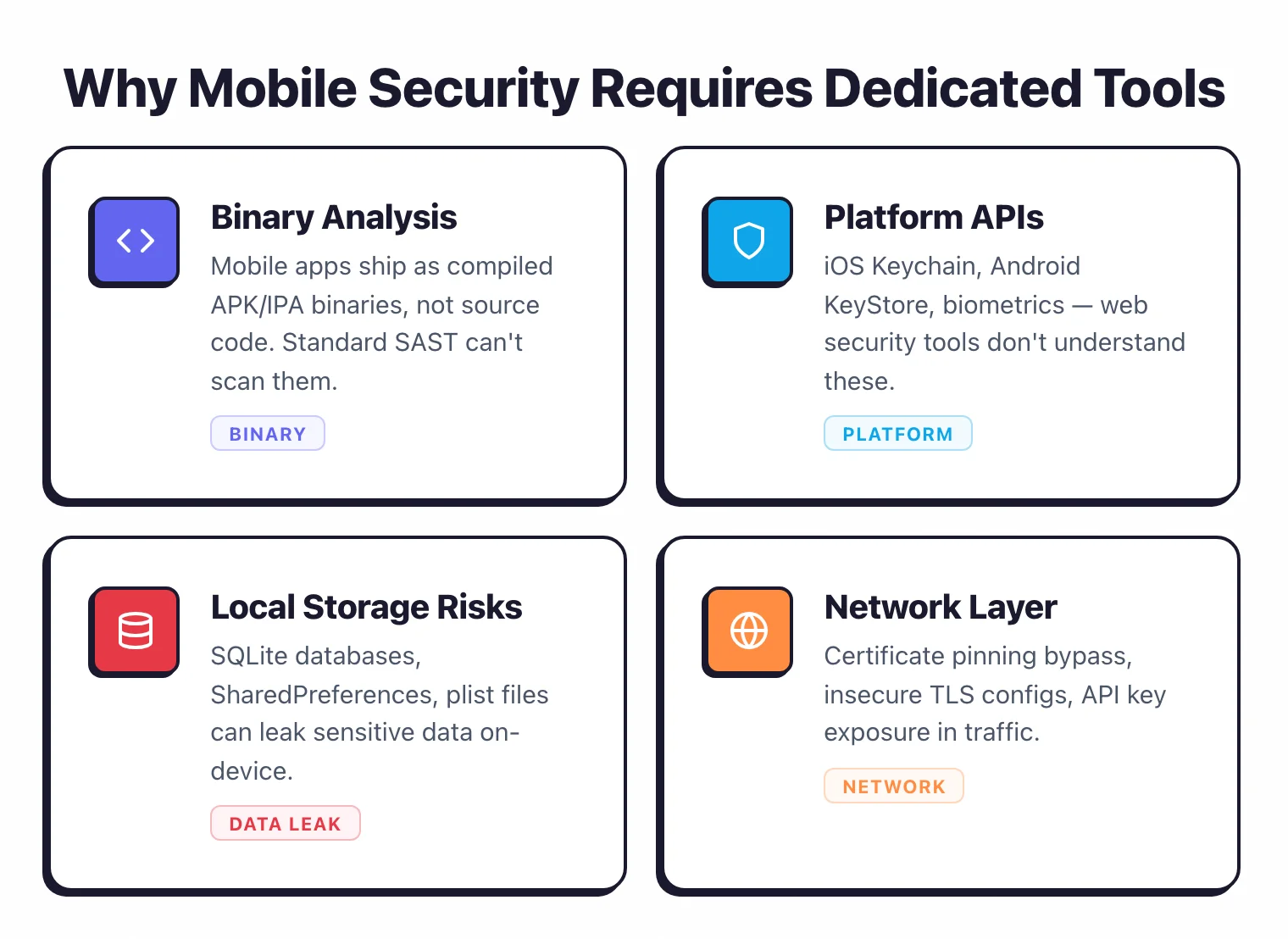
Unlike web application testing, MAST deals with code that runs on a device you do not control. The app binary ships to millions of phones.
Anyone with the right tools can decompile it, extract secrets, reverse-engineer the logic, and tamper with its behavior.
Once the APK or IPA leaves your build server, you cannot patch it without pushing an update through the app store.
That changes the threat model. A web application sits behind your firewall. A mobile app sits on the attacker’s device.
MAST tools deal with this by throwing multiple techniques at the problem. They decompile the binary and scan the resulting code.
They run the app on emulators or real devices and watch what it does. They intercept network traffic.
They check whether hardening controls like certificate pinning and root detection actually work or just look like they do.
Mobile apps now handle banking, healthcare, payments, and identity verification. That is why Gartner included mobile application security testing in their 2025 Hype Cycle for Application Security, and why OWASP maintains a dedicated Mobile Top 10 alongside the better-known web Top 10.
Why does mobile security matter?#
Mobile apps process sensitive data on hardware you do not own or control. The risks are different from web, and in some ways worse.
Reverse engineering is trivial. Android APKs can be decompiled back to readable Java or Kotlin code using freely available tools like jadx and apktool. iOS apps are harder to crack but not immune.
Any API key, encryption key, or business logic hardcoded in the binary is exposed to anyone willing to spend ten minutes decompiling it.
Local data storage is a minefield. Mobile apps store data in SharedPreferences, SQLite databases, plist files, Keychain , and the file system.
If the app stores authentication tokens, personal data, or encryption keys in unprotected locations, any app on a rooted device or any attacker with physical access can read them.
Regulatory pressure is increasing. GDPR, CCPA, PCI-DSS, and HIPAA all apply to mobile apps that handle personal or financial data.
App store reviews from Apple and Google are getting stricter about privacy disclosures and data handling. Google Play’s Data Safety section and Apple’s App Privacy labels force transparency.
Third-party SDKs are a blind spot. According to NowSecure research, the average mobile app includes 20 to 30 third-party SDKs for analytics, advertising, crash reporting, and social login.
Each SDK collects its own data and carries its own vulnerabilities.
You probably did not audit any of them. Data Theorem specifically targets this problem with third-party SDK analysis.
The attack surface is wider than web. Mobile apps talk to device hardware (camera, GPS, biometrics), communicate with other apps through inter-process channels, handle push notifications and deep links, and call platform-specific APIs.
Each one is a potential entry point that web applications simply do not have.
OWASP Mobile Top 10#
OWASP released the latest Mobile Top 10 in late 2023 (commonly referenced as the 2024 edition). It lists the most critical security risks in mobile applications.
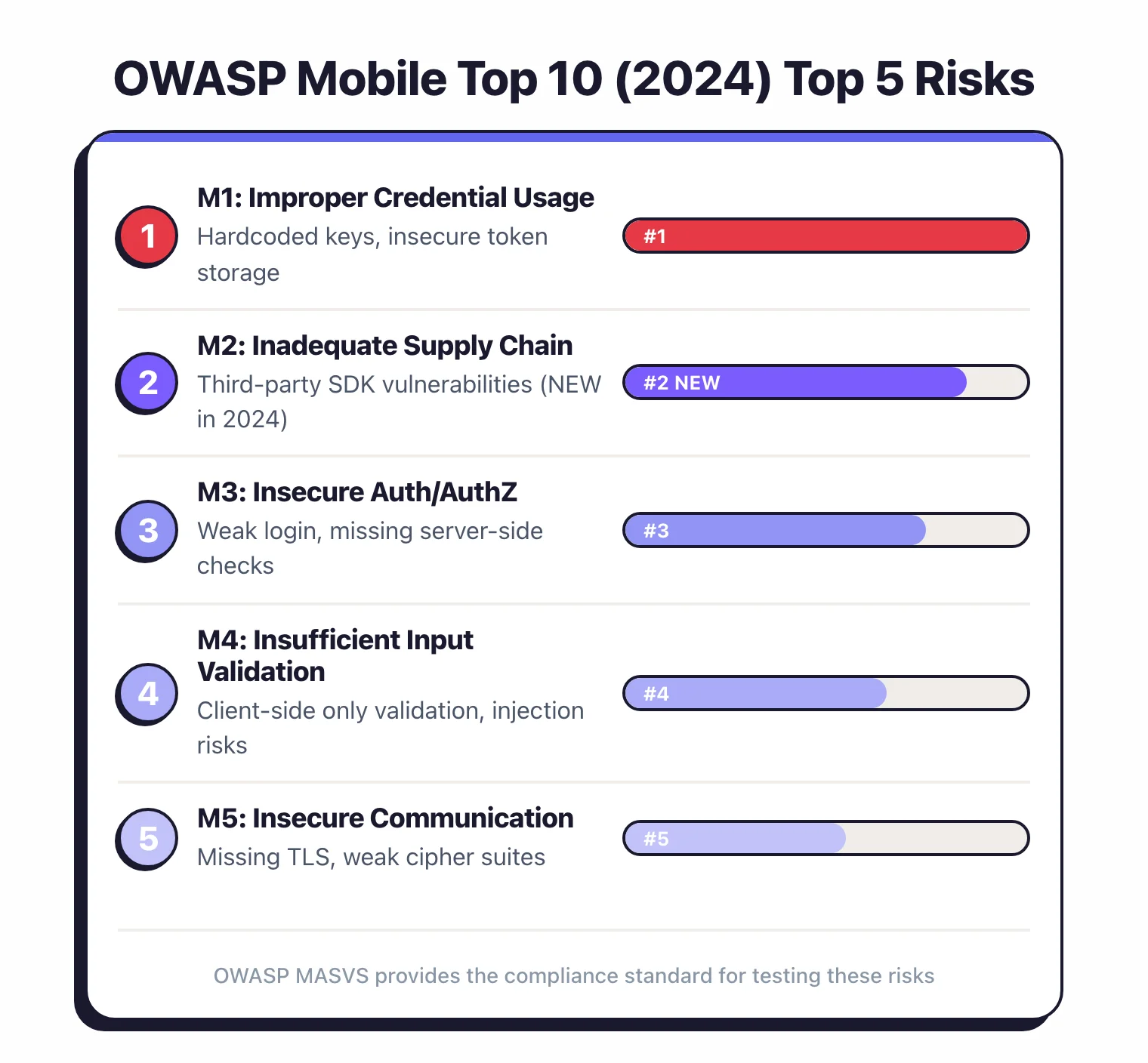
Most mobile security tools map their findings to these categories.
M1 — Improper Credential Usage. Hardcoded credentials, API keys, and secrets embedded in the app binary.
This is the most common finding in mobile security scans because developers frequently store keys in code rather than fetching them from a secure backend.
M2 — Inadequate Supply Chain Security. Third-party libraries and SDKs with known vulnerabilities or malicious behavior.
The mobile supply chain is harder to audit than web because SDKs often ship as pre-compiled binaries.
M3 — Insecure Authentication/Authorization. Weak authentication mechanisms, client-side authorization checks, and missing session management.
Mobile apps sometimes perform authorization logic on the device rather than the server, which is trivially bypassable.
M4 — Insufficient Input/Output Validation. SQL injection, path traversal, and injection attacks through local inter-process communication, deep links, and WebViews.
Mobile-specific inputs like Intent extras (Android) and URL schemes (iOS) are common attack vectors.
M5 — Insecure Communication. Missing or improperly implemented TLS, disabled certificate validation, cleartext HTTP traffic.
Certificate pinning bypass is a dedicated testing area for mobile security tools.
M6 — Inadequate Privacy Controls. Excessive data collection, insufficient user consent, and privacy-violating SDK behavior.
This category became more important with stricter app store privacy requirements.
M7 — Insufficient Binary Protections. Missing code obfuscation, no anti-tampering controls, no root or jailbreak detection.
Without binary protection, attackers can modify app behavior, bypass license checks, and inject malicious code.
M8 — Security Misconfiguration. Overly permissive app permissions, debug mode left enabled, backup allowed, insecure default settings.
These are easy to detect and easy to fix, yet they appear in most security scans.
M9 — Insecure Data Storage. Sensitive data stored in plaintext in SharedPreferences, SQLite databases, log files, or clipboard.
This overlaps with M1 but covers broader data handling beyond credentials.
M10 — Insufficient Cryptography. Weak algorithms, hardcoded encryption keys, improper key management.
Using AES with a key embedded in the binary provides no real protection.
Types of mobile security testing#
Mobile security testing is not one thing. It is several techniques stacked together, and most tools use all of them.
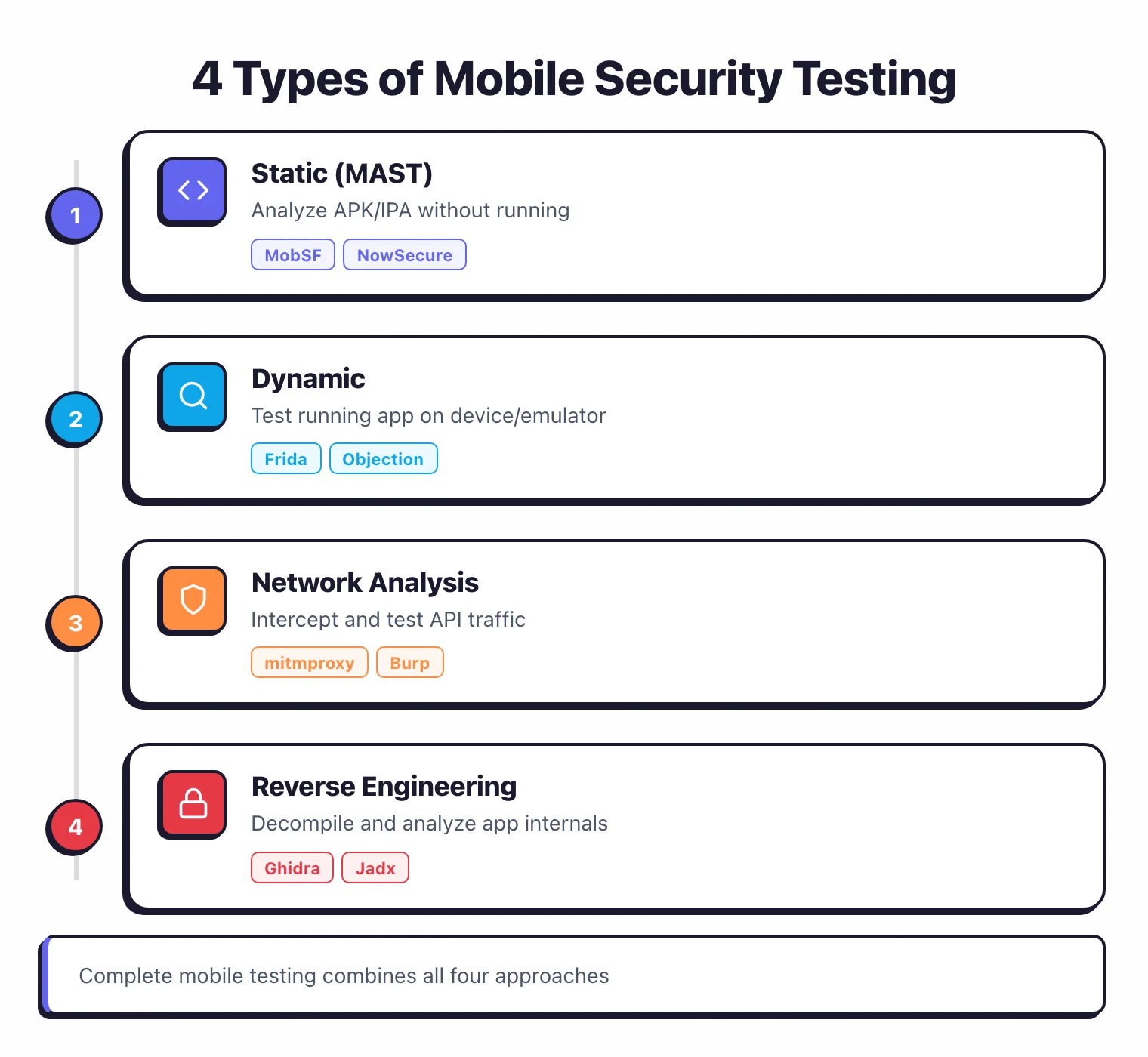
Static analysis (SAST for mobile)#
The tool decompiles the APK or IPA into readable code and scans it for vulnerabilities. This catches hardcoded secrets, insecure API calls, missing encryption, improper permission usage, and vulnerable third-party libraries. MobSF , Oversecured , and AppKnox all perform static analysis on compiled binaries.
Static analysis for mobile differs from traditional SAST because it works with decompiled code rather than original source. The analysis quality depends on how well the tool handles obfuscated code, ProGuard-shrunk classes, and cross-language apps (Kotlin calling Java, Swift calling Objective-C).
Dynamic analysis (DAST for mobile)#
The tool installs the app on an emulator or real device, interacts with it, and monitors its behavior at runtime. This catches insecure network communication, improper data storage during use, runtime permission issues, and authentication flaws. esChecker focuses specifically on dynamic and interactive testing.
Dynamic analysis reveals issues that static analysis misses: server-side responses, actual network traffic patterns, real data written to local storage during use, and behavior triggered by specific user actions.
Behavioral analysis#
Goes deeper than basic dynamic testing. The tool monitors system calls, file system changes, network connections, and inter-process communication while the app runs.
This is where you catch data leaking through logs, clipboard, screenshots, and background processes. NowSecure does particularly thorough behavioral and privacy analysis.
API backend testing#
Mobile apps are only half the picture. The APIs they communicate with are the other half.
Several mobile security tools test the backend endpoints the app calls, checking for broken authentication, excessive data exposure, and injection vulnerabilities in the API layer. Data Theorem extends mobile testing to cover the full API surface.
Binary protection assessment#
Checks whether your hardening measures actually work: code obfuscation, anti-tampering controls, root and jailbreak detection, debugger detection, certificate pinning. It is one thing to implement these controls.
It is another to verify that a determined attacker cannot bypass them in five minutes with Frida. Zimperium zScan specializes in this validation, and Talsec provides RASP-based runtime protection SDKs.
How do mobile security tools work?#
Whether you use MobSF or a six-figure enterprise platform, the workflow is broadly the same.
Binary upload and decompilation#
You upload an APK (Android) or IPA (iOS) file. The tool decompiles it using tools like jadx , dex2jar, or class-dump under the hood.
Android apps decompile reliably into Java or smali bytecode. iOS apps require more effort because of Apple’s code signing and encryption, though most commercial tools handle this automatically.
Static scanning#
The decompiled code gets analyzed for known vulnerability patterns. The tool checks for hardcoded API keys and secrets, insecure cryptographic implementations, improper platform API usage, overly broad permissions, and vulnerable third-party libraries. Oversecured covers 175+ Android and 85+ iOS vulnerability categories at this stage with a claimed 99.8% detection accuracy.
Dynamic analysis on emulator or device#
The tool installs the app on an Android emulator or iOS simulator (or a real device for deeper testing). It exercises the app’s functionality, either through automated interaction or instrumentation frameworks like Frida .
During this phase, the tool monitors network traffic for cleartext communication and certificate validation issues, local storage for sensitive data written to disk, log output for leaked information, and inter-process communication for exploitable handlers.
MobSF uses Frida for instrumentation during dynamic analysis. Commercial tools like NowSecure and Zimperium zScan run tests on real device farms for more accurate results.
Network traffic interception#
The tool proxies the app’s network traffic to see what data leaves the device and how it is protected. TLS implementation, certificate pinning enforcement, cleartext HTTP fallbacks, sensitive data in request headers or query parameters.
You would be surprised how many production apps still send authentication tokens over unencrypted connections or pass user IDs in URL parameters.
Reporting and compliance mapping#
Results get mapped to OWASP MASVS categories, compliance frameworks (PCI-DSS, GDPR, HIPAA), and severity ratings. Most tools generate PDF or HTML reports suitable for compliance audits. AppKnox maps findings to GDPR, PCI-DSS, HIPAA, NIST, and SAMA frameworks.
Mobile-specific vulnerabilities#
These are the issues that make mobile a different beast from web application security.
Insecure data storage. Apps store sensitive data in SharedPreferences (Android) or UserDefaults (iOS) without encryption. SQLite databases with plaintext credentials.
Cached web content containing authentication tokens. Log files with personal information.
Every mobile security tool checks for these, and they appear in nearly every scan.
Certificate pinning bypass. Certificate pinning prevents man-in-the-middle attacks by checking that the server’s certificate matches an expected value. Sounds solid in theory.
In practice, improper implementation makes it trivially bypassable. Frida and objection can disable most pinning implementations in a few commands. Security tools verify that your pinning actually holds up.
Root and jailbreak detection gaps. Apps that handle sensitive operations should detect rooted or jailbroken devices.
The problem is that detection methods are well-documented and bypass techniques are freely available on GitHub.
It is an arms race. Talsec takes a different approach with RASP-based runtime integrity monitoring rather than simple one-time detection checks.
Hardcoded secrets in binaries. API keys, encryption keys, OAuth client secrets, and Firebase configuration data embedded in the app binary. String extraction from a decompiled APK takes seconds.
This remains the single most common vulnerability in mobile security assessments because developers treat the binary as if it were a private container.
Insecure inter-process communication. Android Intents and iOS URL schemes that accept input from other apps without validation.
A malicious app on the same device can send crafted data through these channels.
Exported Android components (activities, services, broadcast receivers) without proper permission checks are a frequent finding.
WebView vulnerabilities. Mobile apps that use WebViews to display web content inherit every vulnerability a web browser has.
The real danger is JavaScript bridges that expose native functionality to web content.
An XSS in a WebView with a JavaScript bridge can give an attacker access to device APIs, contacts, and file storage.
It is worse than XSS on the web because the blast radius is the entire device.
Insecure deep links. Custom URL schemes and Android App Links that can be hijacked by malicious apps.
If the app does not properly validate deep link parameters, attackers can trigger unintended actions or steal authentication tokens through link interception.
Clipboard data leakage. Apps that copy sensitive data (passwords, tokens, account numbers) to the clipboard expose it to every other app on the device.
On older Android versions, any app could read the clipboard without restriction.
Getting started#
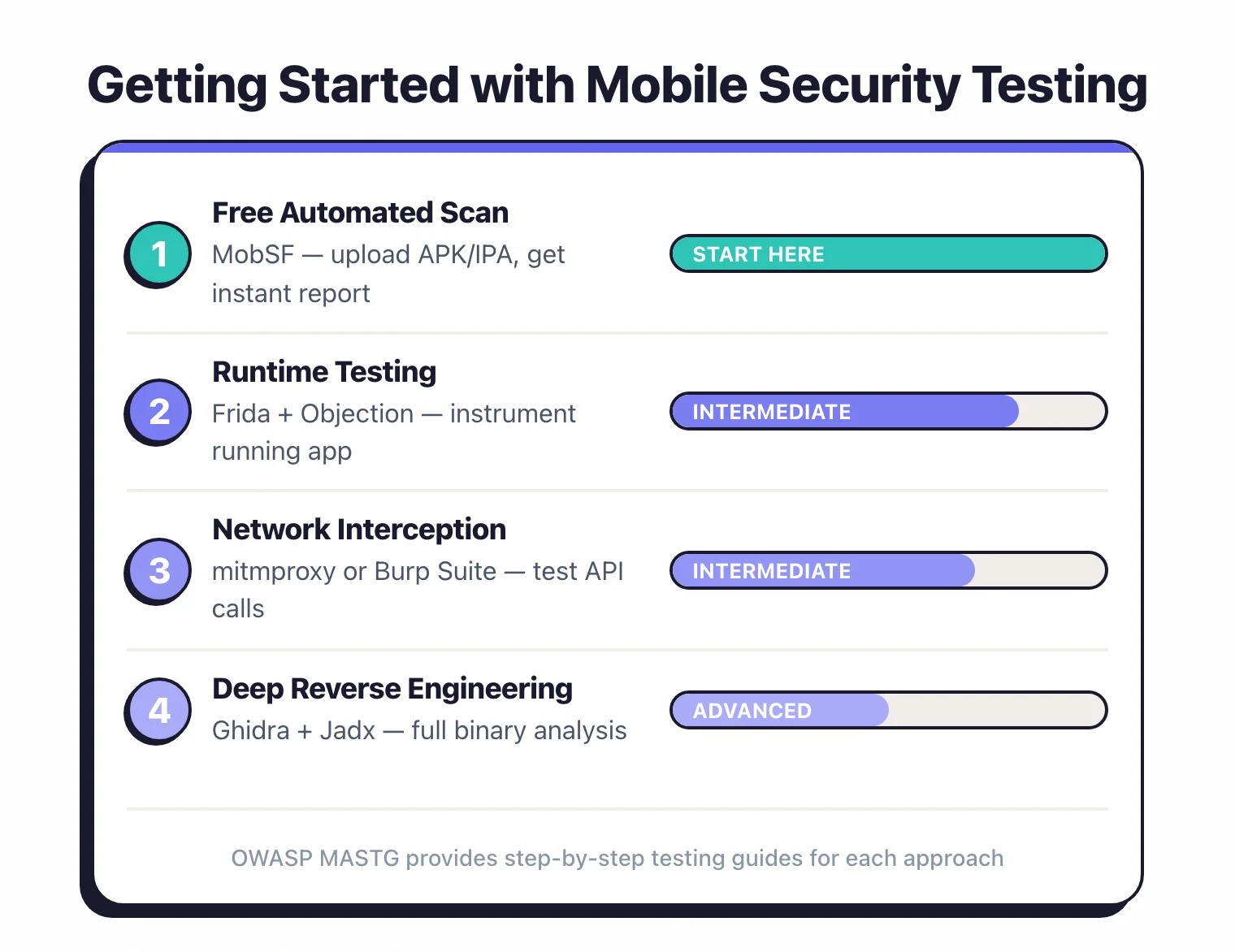
If you have never run a mobile security scan, here is a practical path.
Start with MobSF . Install it locally or use Docker.
Upload your APK or IPA and run a static scan. Within minutes you will have a report showing hardcoded secrets, insecure configurations, overly broad permissions, and vulnerable libraries.
This first scan always produces findings, even on apps you thought were secure.
Triage the results. Not everything MobSF flags is a real risk.
A debug certificate warning on a release build matters. A debug certificate warning on a development build does not.
Go through the findings, understand which ones apply to your threat model, and prioritize based on actual impact.
Run dynamic analysis. Static analysis cannot tell you what the app does at runtime.
Set up an Android emulator with MobSF or use a commercial tool to run the app and monitor its behavior.
Watch for sensitive data written to local storage, cleartext network traffic, and information leaked to logs.
Check your hardening controls. If your app handles sensitive data, verify that certificate pinning, root detection, code obfuscation, and anti-tampering measures are in place and working. Zimperium zScan and Talsec specialize in this.
Integrate into CI/CD. Add mobile security scanning to your build pipeline.
Most tools accept APK and IPA uploads via API. Block releases when critical vulnerabilities appear. Oversecured and AppKnox both support CI/CD integration that can fail builds on critical findings.
Test third-party SDKs. You are responsible for the behavior of every SDK in your app.
Run scans specifically looking at what data third-party libraries collect and transmit. Data Theorem and NowSecure provide detailed SDK analysis.
Consider runtime protection. Scanning catches vulnerabilities before release.
But the app still runs on devices you do not control. Runtime protection like Talsec freeRASP defends the app after it ships.
For apps handling financial or health data, both layers are worth having.