Mobile API security is the practice of protecting the backend APIs that mobile applications rely on from unauthorized access, data leaks, and abuse. For the broader landscape of scanners and runtime defenses, see the mobile security tools hub.
Why are mobile APIs different from web APIs?#
Every mobile app is an API client. The app on the user’s phone renders the UI; the real work happens on your backend through API calls. That architecture creates security problems that web applications avoid.
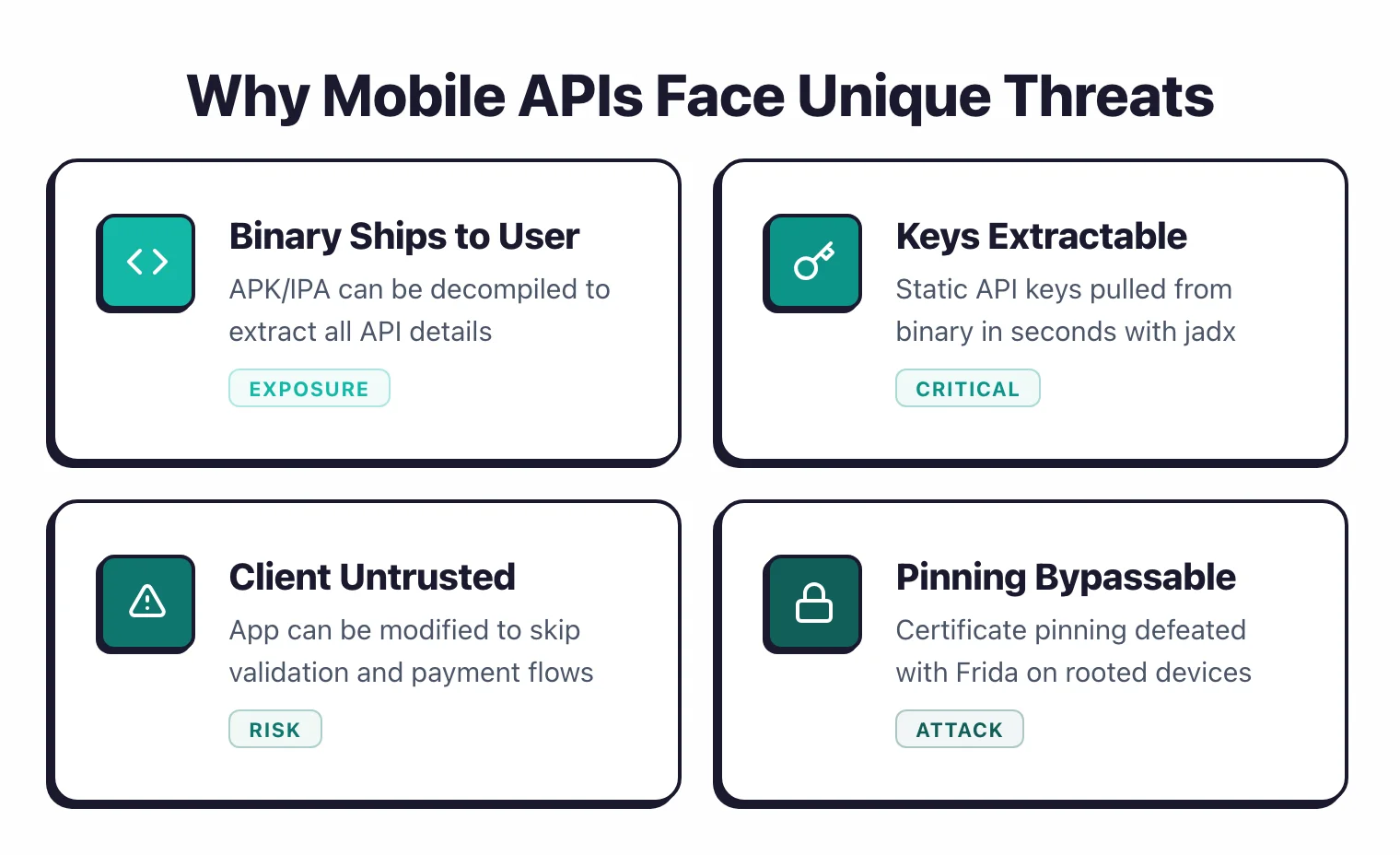
The fundamental issue is that the client is untrusted. With a web app, the browser is a sandboxed environment and users interact through the UI you provide.
With a mobile app, anyone can decompile the binary, extract every API endpoint, reconstruct every request format, and call your APIs directly from a script.
Your API is never really “private” — the app just makes it easier to discover.
This changes what you can trust. You cannot trust client-side validation.
You cannot trust that requests come from your app. You cannot trust that the user has not modified the app to remove rate limiting, change request parameters, or skip payment flows.
Web API security assumes the attacker sends requests over the network. Mobile API security assumes the attacker has also decompiled your client, extracted your keys, bypassed your certificate pinning, and is calling your endpoints from a Python script.
Your server-side defenses need to hold up under that assumption. This AppSec Santa guide covers the key techniques for hardening mobile API endpoints.
Authentication and token management#
Authentication is where most mobile API attacks start. Get the token, and you own the session.
OAuth 2.0 with PKCE#
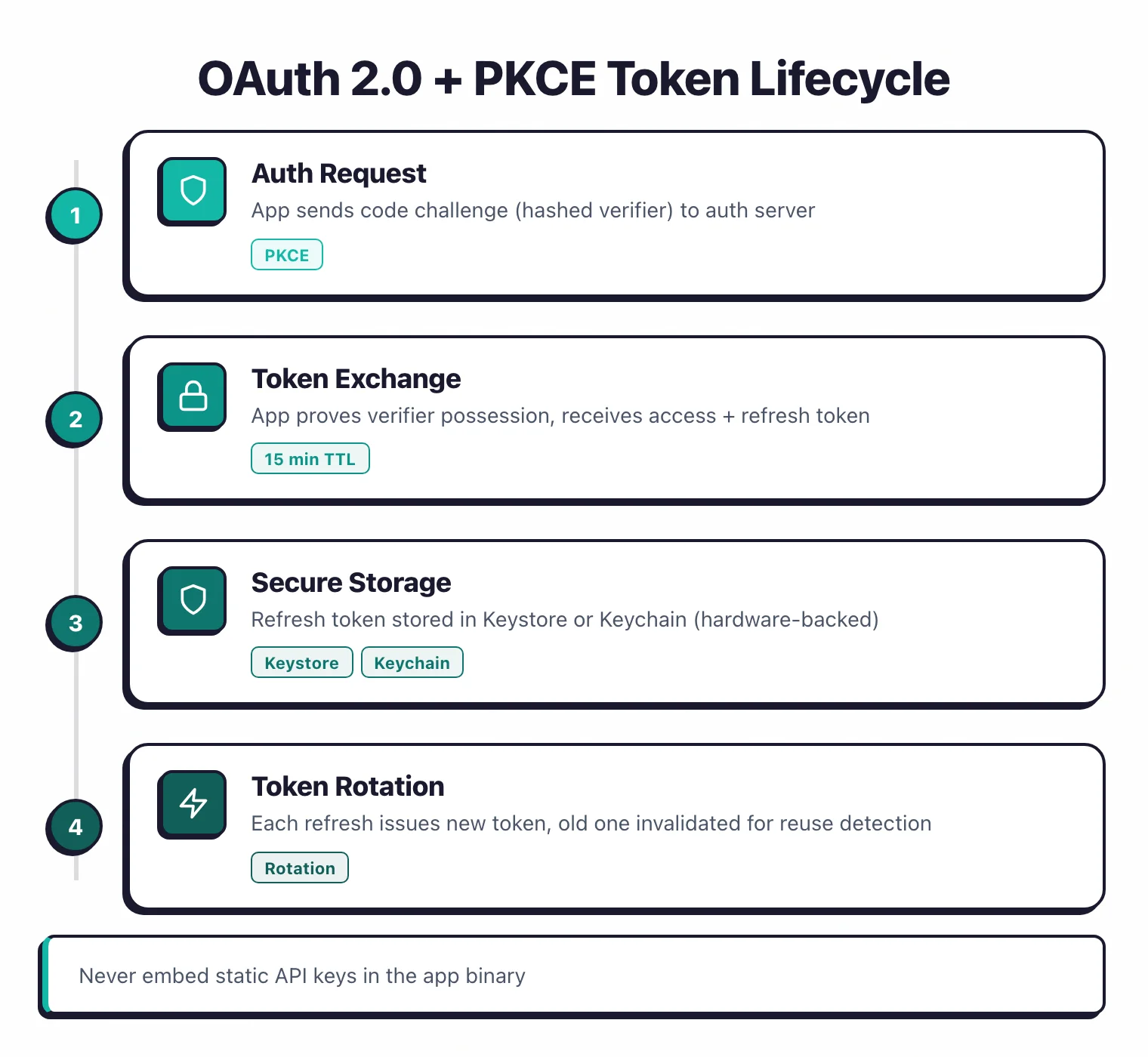
Use OAuth 2.0 with PKCE (Proof Key for Code Exchange) for mobile authentication. PKCE prevents authorization code interception attacks where a malicious app on the same device intercepts the OAuth callback.
The mobile app generates a random code verifier, sends its hash (code challenge) with the authorization request, and proves possession of the original verifier when exchanging the code for tokens.
Do not use the implicit flow for mobile apps. It was deprecated in the OAuth 2.1 draft because it exposes tokens in URLs and browser history.
Token lifecycle#
Issue short-lived access tokens (15 minutes or less) and longer-lived refresh tokens. Store refresh tokens in secure platform storage: Android Keystore-backed EncryptedSharedPreferences or iOS Keychain with kSecAttrAccessibleWhenUnlockedThisDeviceOnly.
When the access token expires, the app uses the refresh token to get a new one. If the refresh token is stolen, the attacker gets long-term access.
Mitigate this with refresh token rotation: every time a refresh token is used, issue a new one and invalidate the old one.
If both the legitimate app and the attacker try to use the same refresh token, the server detects the reuse and revokes the entire token family.
Biometric authentication#
Biometric auth (Face ID, Touch ID, fingerprint) should protect access to locally stored tokens, not replace server-side authentication. The biometric check confirms the user’s identity to unlock the keychain-stored token, which then authenticates to the server.
Never use biometric results as a direct authentication credential sent to the API.
What not to do#
Do not embed API keys in the binary. Do not store tokens in SharedPreferences (Android) or NSUserDefaults (iOS) without encryption.
Do not send credentials in URL query parameters. Do not implement custom “encryption” of tokens using a key that is also in the binary.
Each of these patterns appears regularly in mobile apps and is trivially exploitable.
Certificate pinning implementation and bypass prevention#
Certificate pinning goes beyond standard TLS trust. Instead of trusting any certificate signed by a trusted CA, the app checks that the server’s certificate matches a specific expected certificate or public key.
Why pinning matters#
Without pinning, anyone who can install a CA certificate on the device (corporate MDM, malware, the user themselves) can intercept TLS traffic between the app and your server.
Starting with API level 24 (Nougat), user-installed CAs are no longer trusted unless explicitly configured in the app’s network security config.
Even on newer versions, configuration mistakes can re-enable trust for user CAs.
Pinning prevents this by checking the server’s certificate against a hardcoded value in the app. Even if the attacker has a valid CA certificate, the app rejects the connection because the certificate does not match the pin.
Implementation approaches#
Public key pinning pins the SubjectPublicKeyInfo (SPKI) hash rather than the certificate itself. This survives certificate rotation as long as the same key pair is used. It is the recommended approach.
Certificate pinning pins the entire certificate hash. Simpler to implement but breaks when the certificate rotates, requiring an app update. Use this only if you control certificate rotation tightly.
On Android, use the Network Security Configuration in network_security_config.xml. It is declarative, supported by the OS, and does not require third-party libraries.
On iOS, use TrustKit or implement URLSession delegate methods to validate server certificates against pinned values.
Hardening against bypass#
Standard Frida scripts and objection bypass most pinning implementations by hooking the certificate validation callbacks. To resist bypass:
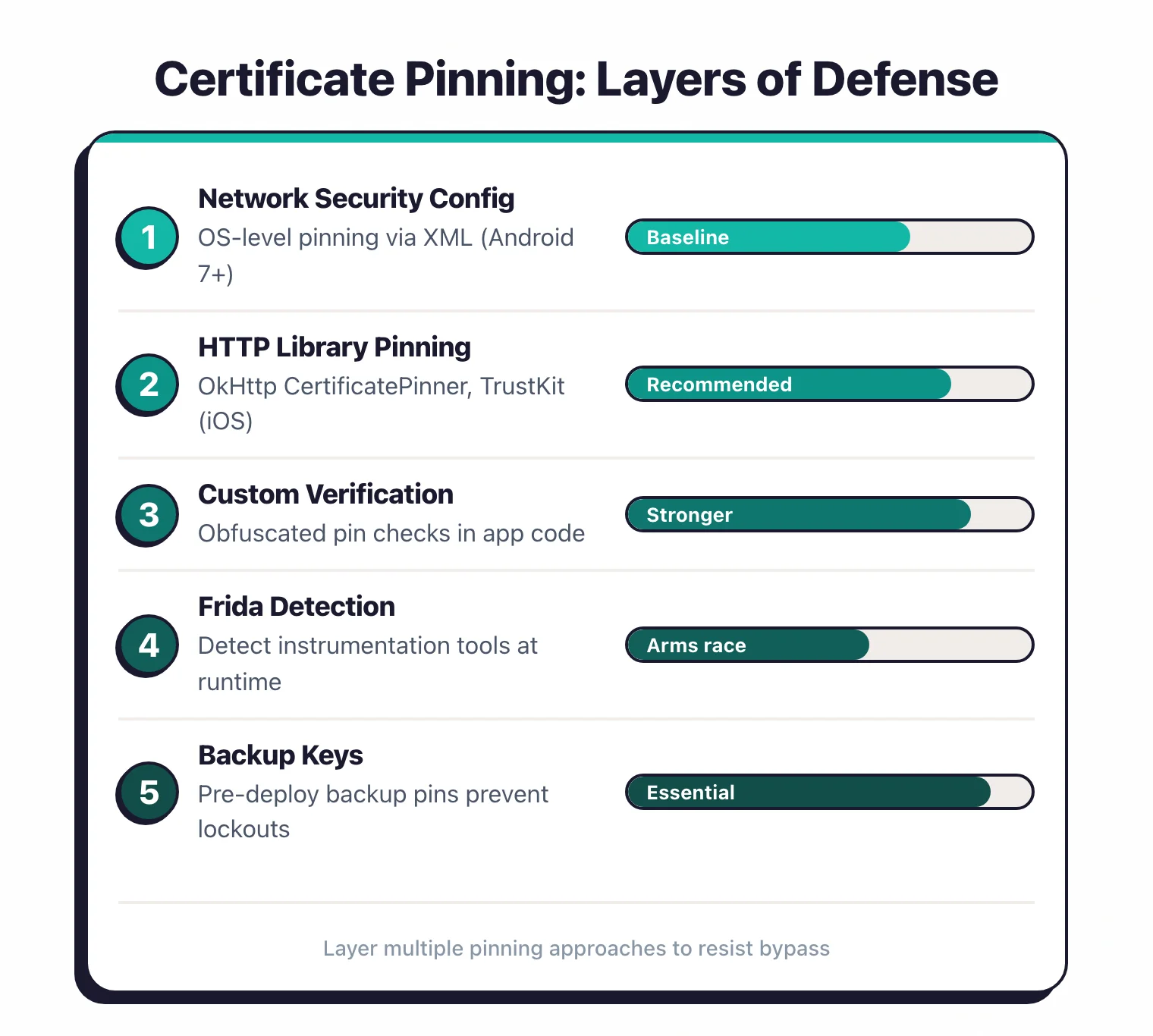
Pin at multiple layers. Implement pinning in both the network security config and the HTTP library (OkHttp, Alamofire). Bypassing one layer still leaves the other active.
Implement custom verification logic. Instead of relying solely on framework callbacks that Frida scripts target, add certificate checks in your own code where the pin values are obfuscated or computed at runtime.
Detect instrumentation. Check for Frida’s presence on the device (frida-server process, frida-agent libraries loaded in the process).
This is an arms race, but it raises the effort required. Talsec freeRASP includes Frida detection as part of its runtime protection.
Use multiple pins with backup keys. Pin your current certificate’s public key plus a backup key that you control but have not yet deployed.
This prevents you from locking users out if you need to rotate certificates unexpectedly.
API abuse and rate limiting for mobile#
Once someone reverse-engineers your API, they can script requests at machine speed. Rate limiting and abuse prevention keep that from being a practical attack.
Rate limiting strategies#
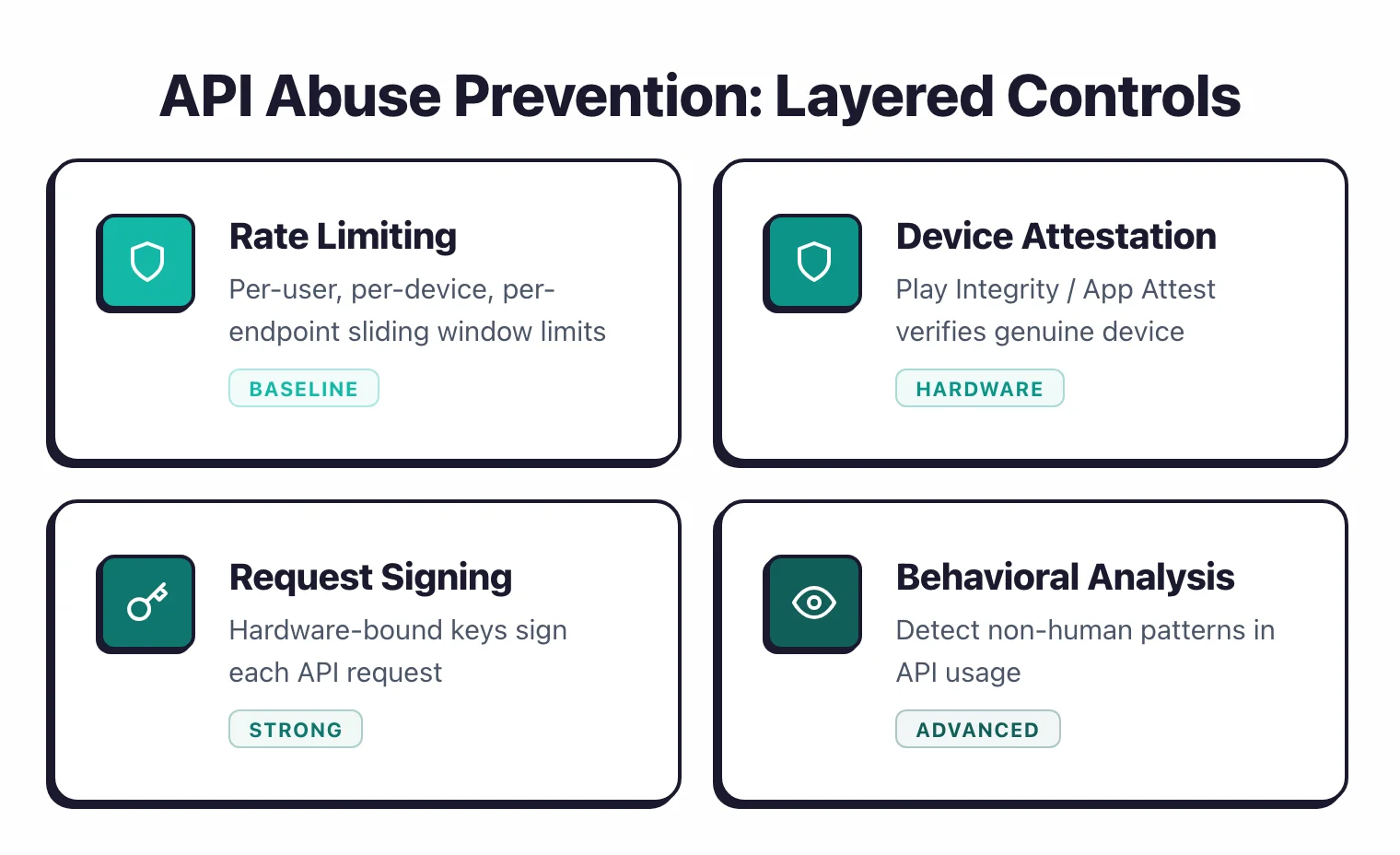
Apply rate limits at multiple levels: per IP address, per authenticated user, per device, and per endpoint. Different endpoints need different limits.
A login endpoint might allow 5 attempts per minute. A product search endpoint might allow 100 requests per minute. A payment endpoint might allow 3 requests per minute.
Use sliding window algorithms rather than fixed windows. Fixed windows have a burst problem at window boundaries — an attacker can make double the limit by timing requests around the window reset.
Device attestation#
Android’s Play Integrity API and Apple’s App Attest verify that requests originate from a genuine, unmodified app running on a real device.
The server receives a signed token from Google or Apple that attests to the device’s integrity.
This does not prevent all abuse — attestation tokens can be harvested from real devices — but it blocks the easy path of scripting API calls from a laptop.
Integrate attestation for sensitive operations: account creation, password changes, payment processing, and high-value data access. Requiring attestation for every API call adds latency and is overkill for low-risk endpoints.
Request signing#
Generate a device-specific key pair during app installation and store the private key in the hardware-backed keystore (Android Keystore, iOS Secure Enclave). Sign each API request with this key.
The server verifies the signature and associates the key with the user’s device.
This binds requests to a specific device. An attacker who extracts a session token still cannot forge requests from a different device without the hardware-bound private key.
The practical limitation is that sophisticated attackers can extract keys from rooted devices, but this raises the effort well beyond casual abuse.
Behavioral analysis#
Monitor API usage patterns for anomalies. Legitimate mobile apps have predictable request patterns: a login followed by profile fetch, then content browsing.
Automated abuse looks different: rapid sequential requests, unusual ordering, missing intermediate calls, or calls that the app UI would never generate.
Salt Security and Traceable AI specialize in API behavioral analysis, though their focus is broader than mobile-specific abuse. For mobile-specific patterns, build detection rules based on your app’s expected behavior.
Reverse engineering threats#
Your mobile app binary is a roadmap to your API. Attackers decompile it to understand how your API works, extract secrets, and build automated tools that impersonate your app.
API key extraction#
Any static value in the app binary — API keys, client secrets, encryption keys, internal endpoint URLs — can be extracted. Android APKs decompile cleanly with jadx.
Even obfuscated code reveals string literals and constant values. iOS binaries are harder to analyze but not immune.
The mitigation is straightforward: do not put secrets in the binary. Use server-issued tokens instead of static keys.
If you must ship a client identifier, treat it as public and enforce authorization server-side. Guardsquare offers code obfuscation that makes extraction harder but not impossible.
Request tampering#
Once the attacker understands your API format, they can modify requests. Change a price field from 99.99 to 0.01.
Change a user ID to access someone else’s data. Skip validation steps by jumping directly to the final API call in a multi-step flow.
Server-side validation catches all of this if implemented correctly. Never trust that the client sent valid, authorized data.
Re-validate every field, re-check authorization for every request, and enforce business logic server-side. The app is a convenience layer, not a security boundary.
Automated scraping and fraud#
Competitors scrape your data through reverse-engineered API calls. Fraudsters create fake accounts at scale.
Scalpers use bot scripts to buy limited inventory. Each of these attacks starts with decompiling your app to learn the API.
Layer defenses: device attestation proves the request comes from a real device, rate limiting constrains volume, behavioral analysis detects non-human patterns, and CAPTCHA (with something like Cloudflare Turnstile) adds friction to automated flows. No single defense is enough, but the combination raises the cost of abuse beyond what most attackers will invest.
How do you test mobile API security?#
Testing mobile API security means testing both the client-side implementation and the server-side enforcement. You need to verify that the app handles tokens and certificates correctly, and that the API rejects malicious requests even when the app is bypassed entirely.
Client-side testing#
Use Frida and Burp Suite to intercept the app’s API calls. Check how the app stores tokens, whether it properly handles token expiration and refresh, whether certificate pinning is implemented and how hard it is to bypass, and whether the app leaks API details through logs or error messages.
MobSF automates much of this. Its dynamic analysis mode monitors network traffic and local storage while the app runs. NowSecure provides deeper analysis with real device testing.
Server-side testing#
Once you can intercept traffic (after bypassing certificate pinning if needed), test the API directly. The OWASP API Security Top 10 provides a checklist. Key tests include:
- Broken Object Level Authorization (BOLA): Change IDs in requests to access other users’ data.
- Broken Authentication: Reuse expired tokens, test for missing rate limits on login.
- Excessive Data Exposure: Compare what the API returns with what the app displays. If the API sends full user profiles but the app only shows names, that excess data is available to anyone intercepting traffic.
- Mass Assignment: Send extra fields in creation or update requests to modify properties the app does not expose in its UI.
API-specific tools#
Burp Suite is the standard for interceptive API testing. 42Crunch provides API security auditing based on OpenAPI specifications. Salt Security and Traceable AI offer runtime API security monitoring. For mobile-specific API testing, Data Theorem covers the full stack from app binary to API backend.
A practical testing workflow: start with MobSF for automated scanning, use Burp Suite to manually test API endpoints, and run NowSecure or AppKnox for platform-specific analysis. Focus your manual effort on authorization testing — automated tools are weak at finding BOLA and business logic flaws.