
- Ghidra has a built-in decompiler that produces readable C-like pseudocode out of the box; radare2 relies on plugins (r2ghidra, r2dec) for decompilation, with less polished output.
- radare2 supports 60+ CPU architectures natively — more than any other open-source RE framework — and excels at lightweight, scriptable analysis via r2pipe.
- Ghidra’s collaborative server lets multiple analysts work on the same binary simultaneously; radare2 is designed for individual command-line workflows.
- radare2 is faster to install and launch (small C codebase, no JVM), making it ideal for quick triage, CTF challenges, and embedded device firmware analysis.
- Both tools are free and open source. Many reverse engineers use Ghidra for visual analysis and decompilation, and radare2 for scripting, debugging, and quick binary inspection.
Which Is Better: radare2 or Ghidra?#
radare2 and Ghidra are the two leading free, open-source reverse engineering frameworks, but they take fundamentally different approaches to binary analysis. Which one you pick depends on whether you prefer command-line scripting or a visual interface with built-in decompilation.
radare2 is a UNIX-philosophy framework built around composable command-line tools. It supports 60+ CPU architectures (more than any other open-source RE tool), runs with minimal resources, and excels at scripted analysis through r2pipe bindings in Python, JavaScript, Go, and Rust.
Ghidra is the NSA’s GUI-based framework with a built-in C decompiler that produces readable pseudocode, collaborative analysis features, and 67,000+ GitHub stars.
Ghidra is better for deep static analysis where decompilation and visual code flow matter. radare2 is better for quick binary triage, scripted automation, debugging, and exotic architectures. Most serious reverse engineers use both.
What Are the Key Differences?#
| Feature | radare2 | Ghidra |
|---|---|---|
| License | LGPL-3.0 (open source) | Apache 2.0 (open source) |
| GitHub Stars | 23,200+ | 67,000+ |
| Developed By | Community (Sergi Alvarez / pancake) | NSA (National Security Agency) |
| Latest Version | 6.1.0 (February 2026) | 12.1.2 |
| Primary Interface | Command-line (CLI) | Graphical (GUI, Java/Swing) |
| Built-in Decompiler | No (via r2ghidra, r2dec plugins) | Yes (C++ decompiler, high quality) |
| Architecture Support | 60+ (most of any open-source tool) | 30+ (x86, ARM, MIPS, PowerPC, RISC-V, etc.) |
| Debugging | Yes (native, local and remote) | Yes (since v10.0, via GDB/LLDB/WinDbg) |
| Scripting Languages | Python, JS, Go, Rust (via r2pipe) | Java, Python (Jython/Ghidrathon) |
| Headless Analysis | Yes (native CLI) | Yes (analyzeHeadless script) |
| Collaborative Analysis | No | Yes (Ghidra Server for shared projects) |
| Binary Patching | Yes (built-in hex editor) | Yes (via patch bytes) |
| Binary Diffing | Yes (radiff2 tool) | Yes (Version Tracking feature) |
| Startup Time | Instant (native C binary) | Slow (JVM startup + project import) |
| Memory Footprint | Low (~50-100 MB typical) | High (~500 MB-2 GB+ depending on binary) |
| GUI Option | iaito (Qt-based, separate project) | Built-in (Java Swing) |
radare2 vs Ghidra: How Do They Compare?#
Decompilation Quality#
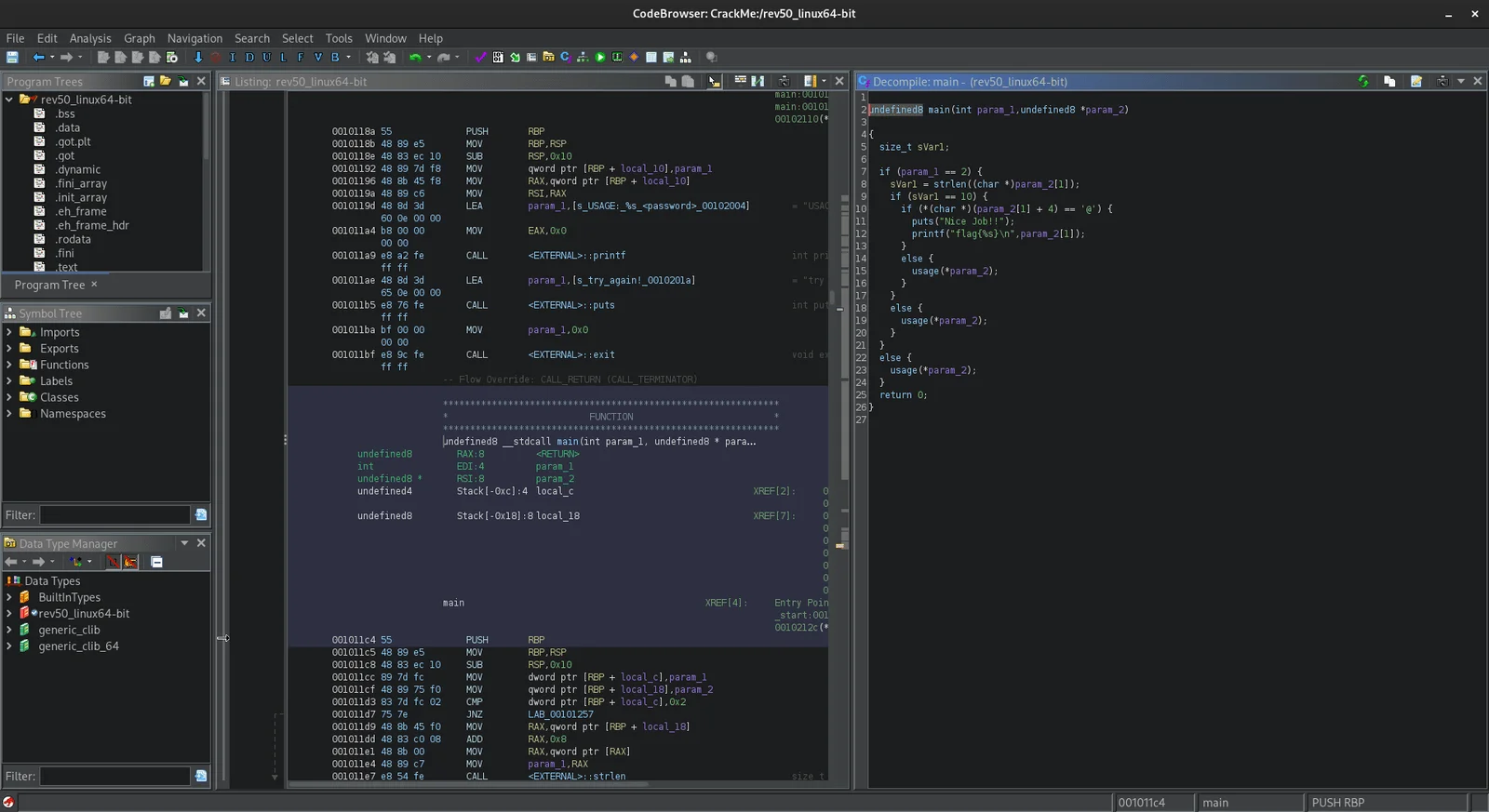
Ghidra’s built-in decompiler is the most significant advantage it holds over radare2. Written in C++, it converts assembly into C-like pseudocode that is often surprisingly readable.
Variable types are inferred, control flow structures are reconstructed, and the output looks close to what a human would write. The decompiler view sits alongside the disassembly view, and changes in one (like renaming a variable) automatically reflect in the other.
radare2 does not include a native decompiler. Instead, it relies on plugins. The most capable is r2ghidra , which embeds Ghidra’s decompiler engine directly into radare2 as a native plugin — no full Ghidra installation required.
The r2dec plugin offers a lighter alternative using JavaScript. However, because r2ghidra receives different analysis results than native Ghidra would, the decompilation output is not always as clean. For serious decompilation work, Ghidra running natively produces better results.
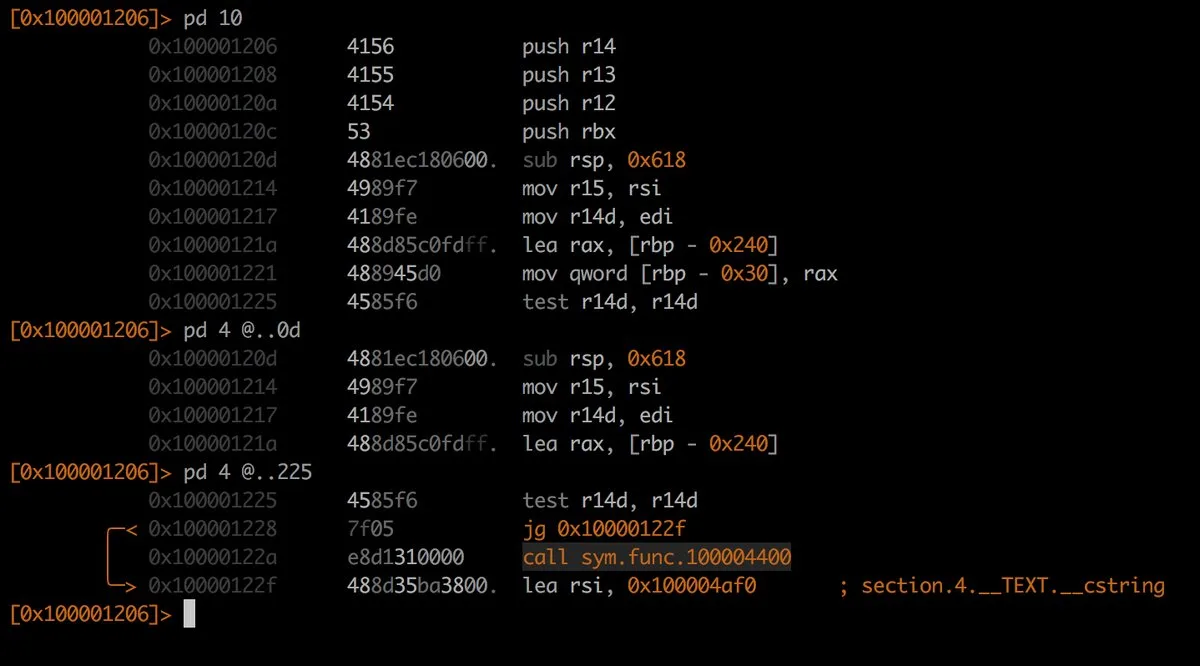
That said, radare2’s disassembly output is excellent. The tool provides detailed annotations, cross-references, and analysis metadata that make reading assembly practical for experienced analysts. If you are comfortable reading assembly directly, the lack of a first-party decompiler is not a blocker.
Architecture and Format Support#
radare2 supports over 60 CPU architectures out of the box — the widest coverage of any open-source RE framework. Beyond the common ones (x86, ARM, MIPS, PowerPC, RISC-V), it handles 6502, 8051, AVR, SPARC, Gameboy, Dalvik, WebAssembly, and many more.
If you work with embedded systems, IoT firmware, retro computing, or blockchain analysis (sBPF for Solana programs), this breadth matters.
Ghidra supports around 30+ processor families, which covers the vast majority of real-world reverse engineering use cases. x86 (32/64-bit), ARM (32/64-bit), MIPS, PowerPC, RISC-V, SPARC, and several others are all well-supported with high-quality processor modules.
Recent versions added NDS32 and RISC-V variants. For mainstream architectures, Ghidra’s support is mature and thoroughly tested.
If you regularly encounter exotic or embedded architectures, radare2’s broader coverage gives it an edge. For standard x86/ARM analysis, both tools handle the job well.
User Interface and Learning Curve#
Ghidra provides a full graphical interface with multiple synchronized views: listing (disassembly), decompiler, function graph, symbol tree, data type manager, and more.
Click on function calls to navigate, rename symbols with a keystroke, annotate code with comments, visualize call graphs. The interface uses Java Swing (looks dated, but functional and customizable).
Ghidra’s learning curve is moderate. A beginner can open a binary, let the auto-analysis run, and start browsing decompiled code within minutes. Mastering the full feature set (custom scripts, type definitions, processor modules) takes longer, but there’s solid built-in help and plenty of online training resources.
radare2’s interface
is the terminal. Everything is done through short, composable commands: aaa for analysis, pdf to print disassembly of a function, VV for visual mode with ASCII art graphs.
The command syntax is terse and has a steep learning curve. New users often describe it as cryptic. But once internalized, the command-line workflow is extremely fast — experienced r2 users can analyze binaries faster than GUI-based analysts for certain tasks.
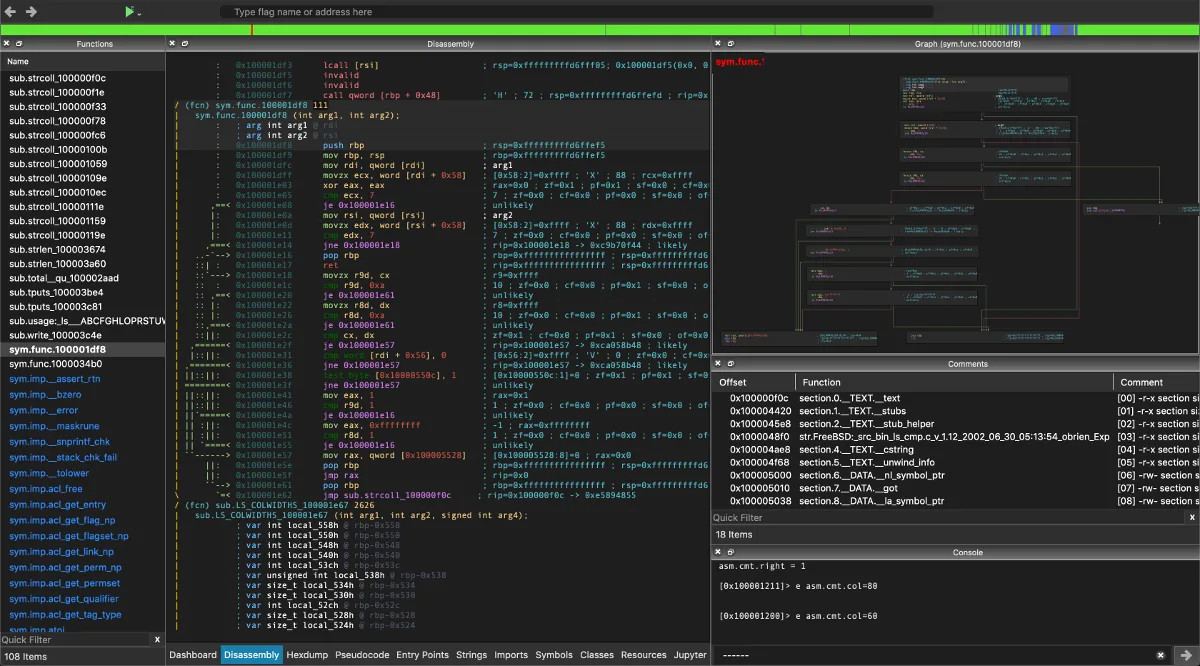
iaito (formerly Cutter) provides an optional Qt-based GUI for radare2 with decompiler integration, graph views, and a more approachable interface. It bridges the gap for analysts who want radare2’s engine with a visual frontend, though it does not match Ghidra’s GUI maturity.
Scripting and Automation#
radare2 was built with automation in mind. The r2pipe interface has bindings in Python, JavaScript, Go, Rust, Ruby, and other languages. Open a connection to a binary, send commands, parse results programmatically.
Building automated analysis pipelines, batch processing scripts, and custom tooling is straightforward. You can also script internally with r2 commands or JavaScript without leaving the tool.
Ghidra supports scripting through Java and Python (via Jython, or Ghidrathon
for CPython). The API covers a lot of ground: access analysis results, modify the program database, create custom analyzers, automate repetitive tasks. The headless analyzer (analyzeHeadless
) lets you run Ghidra scripts without the GUI, enabling CI-style batch analysis.
Both are scriptable, but radare2 is better for lightweight, pipeline-style automation (extract strings, find crypto constants, output JSON), while Ghidra is better for structured analysis tasks (decompile all functions, apply type information, generate call graph reports). radare2 is faster for quick one-liners;
Ghidra’s API provides more depth for complex automated analysis.
Debugging#
radare2 has had debugging capabilities since its early days. It supports native local debugging on Linux, macOS, Windows, and even Android/iOS devices. Remote debugging via GDB protocol is also supported.
Breakpoints, watchpoints, memory inspection, register manipulation, and step-through execution are all available from the command line. The debugger integrates tightly with the analysis engine, so you can switch between static and dynamic analysis seamlessly.
Ghidra added debugger support in version 10.0 (released 2021). It connects to GDB (Linux), LLDB (macOS), and WinDbg (Windows) as backends. The debugger GUI shows registers, memory, stack, and threads alongside the decompiler view.
While functional, Ghidra’s debugger is newer and less battle-tested than radare2’s. Some analysts still prefer to use separate debuggers (GDB, WinDbg) alongside Ghidra for static analysis.
If your workflow involves frequent switching between static and dynamic analysis (malware analysis, exploit development, embedded firmware testing), radare2’s tighter debugging integration is an advantage.
Collaboration and Team Use#
Ghidra’s collaborative analysis feature is unique among free RE tools. The Ghidra Server lets multiple analysts work on the same binary at the same time, sharing function names, type definitions, comments, and analysis results.
For large reverse engineering projects where a team splits work across modules or functions, this is a real advantage.
radare2 has no built-in collaboration features. It is a single-analyst command-line tool.
You can share r2 project files and scripts, but there’s no real-time collaborative analysis. For teams analyzing malware campaigns or large firmware images, Ghidra’s collaboration support is a clear differentiator.
Performance and Resource Usage#
radare2 is written in C and compiles to a small native binary.
It starts instantly, uses minimal memory (typically 50-100 MB for medium-sized binaries), and runs comfortably on low-spec machines, VMs, and even mobile devices. radare2 is the better choice for constrained environments — embedded test rigs, cloud VMs, CI runners.
Ghidra requires a JVM and typically uses 500 MB to 2+ GB of RAM depending on binary size and analysis depth. Startup involves JVM initialization and project database setup. For large binaries (firmware images, game executables), the initial auto-analysis pass can take several minutes.
Once loaded, navigation is responsive. But the upfront cost is noticeable, especially in CTF scenarios where speed matters.
When Should You Choose radare2?#
Choose radare2 if:
- You prefer command-line workflows and want maximum scripting flexibility through r2pipe
- You work with exotic or embedded CPU architectures that Ghidra does not support
- Quick binary triage and lightweight analysis are your primary use cases
- You need integrated debugging that flows naturally into your analysis workflow
- You are doing CTF competitions where startup speed and quick command-line analysis matter
- Resource constraints prevent running a JVM-based tool (embedded labs, CI runners, VMs)
When Should You Choose Ghidra?#
Choose Ghidra if:
- Decompilation to readable pseudocode is critical for your analysis
- You want a visual interface with synchronized views for code, graphs, and data types
- Your team needs collaborative analysis with shared annotations and function names
- You prefer structured scripting through a rich Java/Python API
- You are new to reverse engineering and need a lower learning curve
- You are analyzing large binaries where visual navigation saves time
Many reverse engineers keep both tools around. Ghidra is better for deep analysis sessions where decompilation and visual navigation matter, while radare2 is better for quick command-line inspection, scripted automation, and debugging. The r2ghidra plugin even lets you use Ghidra’s decompiler engine from within radare2 without switching contexts.
For more reverse engineering and mobile security tools, browse the AppSec Santa mobile security tools category.
Frequently Asked Questions
Is Ghidra better than radare2?
Can radare2 decompile binaries like Ghidra?
Which tool is better for CTF competitions?
Does Ghidra support debugging like radare2?
Can I use Ghidra's decompiler inside radare2?

Written & maintained by
Suphi CankurtEight years on the vendor side of application-security sales — thousands of evaluations and demos. I started AppSec Santa in 2022 to put that insider view to work for buyers. Independent of any vendor, paid by none, and honest about what fits whom.