
- Apktool decodes resources and disassembles to smali bytecode; Jadx decompiles DEX directly to readable Java source code. They solve different problems.
- Only Apktool can rebuild modified APKs — if you need to patch an app and repackage it, Apktool is the only option between the two.
- Jadx has a polished GUI (jadx-gui) with code search, cross-references, and navigation that makes understanding app logic significantly faster than reading smali.
- Both are free under Apache 2.0, cross-platform, and included in Kali Linux. Most Android security researchers use both tools together in their workflow.
- Apktool 3.0 (January 2026) brought aapt2 integration; Jadx 1.5.x added Kotlin scripting support and external plugins — both projects are actively maintained.
Which Is Better: Apktool or Jadx?#
Apktool and Jadx are both standard Android reverse engineering tools, but they solve different problems. Comparing them is a bit like comparing a screwdriver to a wrench — both useful, different jobs.
Apktool decodes APK resources to near-original form, disassembles DEX files to smali bytecode, and can rebuild modified APKs. It is the standard tool for APK modification, patching, and repackaging.
Jadx decompiles DEX bytecode directly to readable Java source code with a polished GUI that includes search, cross-references, and code navigation. Jadx is the fastest way to understand what an Android app actually does.
The short answer: Apktool is better for modifying and rebuilding APKs, Jadx is better for reading and understanding code. Most Android security researchers use both tools together.
What Are the Key Differences?#
| Feature | Apktool | Jadx |
|---|---|---|
| Primary Output | Smali bytecode + decoded resources | Java source code |
| License | Apache 2.0 (open source) | Apache 2.0 (open source) |
| GitHub Stars | 24,000+ | 49,100+ |
| Latest Version | 3.0.1 (February 2026) | 1.5.5 |
| GUI | No (CLI only) | Yes (jadx-gui with code browser) |
| CLI | Yes | Yes |
| APK Rebuild | Yes (decode → modify → rebuild) | No |
| Resource Decoding | Full (XML, drawables, strings, 9-patch) | Partial (AndroidManifest, resources.arsc) |
| Code Readability | Low (smali is register-based bytecode) | High (readable Java with variable names) |
| Code Search | No built-in search | Full-text search across decompiled sources |
| Input Formats | APK | APK, DEX, JAR, AAR, AAB, XAPK, APKM, class, smali, zip |
| Deobfuscation | No | ProGuard/R8 mapping file support |
| Export Format | Decoded project directory | Gradle project or individual Java files |
| Cross-References | No | Yes (method calls, field usage) |
| Pre-installed in Kali | Yes | Yes |
Apktool vs Jadx: How Do They Compare?#
Output Format and Readability#
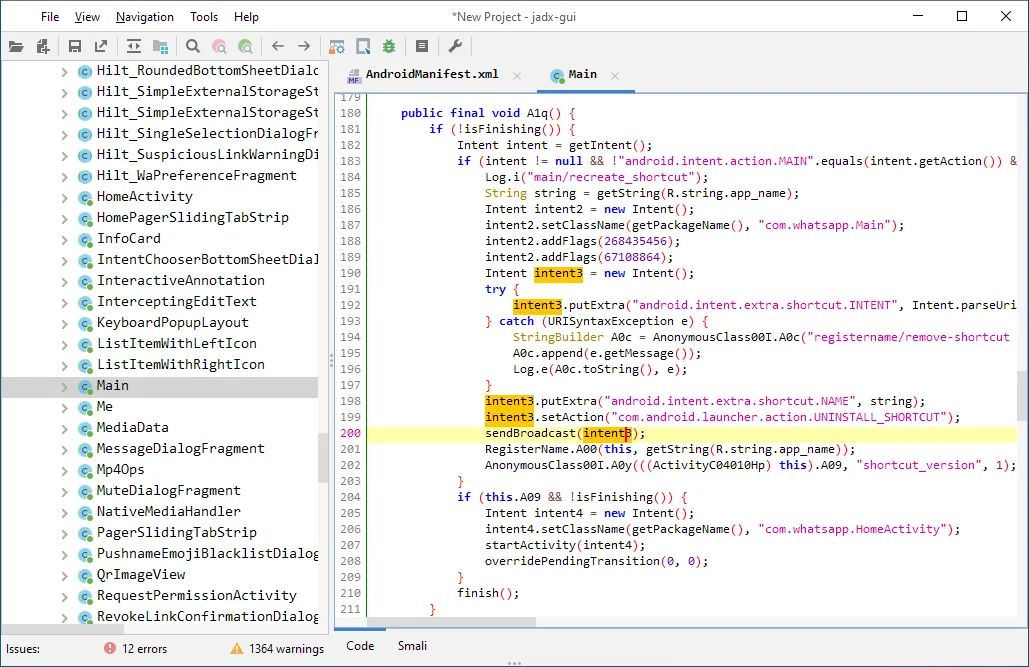

Output format is the biggest difference between Apktool and Jadx. Jadx decompiles Dalvik bytecode back to Java source code that closely resembles what the developer originally wrote.
Method names, control flow, string operations, and class hierarchies get reconstructed into readable code. When Jadx hits obfuscated code, it generates placeholder names and preserves the logical structure.
Apktool disassembles to smali, which is a textual representation of Dalvik bytecode. Smali uses registers (v0, v1, p0, p1), opcode mnemonics (invoke-virtual, move-result, const-string), and type descriptors.
Reading smali requires understanding the Dalvik instruction set. A simple getter method that is one line in Java becomes several lines of register loads and returns in smali.
For code comprehension and vulnerability hunting, Jadx wins by a wide margin. For precise understanding of what the runtime actually executes — and for making targeted patches — smali is more accurate because it is closer to the actual bytecode.
Resource Handling#
Apktool is better for resource handling, no contest. It decodes binary XML files (AndroidManifest.xml, layout files, string resources) back to their original readable XML format.
It handles 9-patch PNG images, framework resources, and the full resource table (resources.arsc). The decoded output preserves the original project directory structure, so navigation is straightforward.
Jadx decodes AndroidManifest.xml and can parse resources.arsc, but code decompilation is its main focus, not resource reconstruction. If you need to inspect or modify layout files, string resources, drawable configurations, or non-code assets, Apktool gives you a much more complete picture.
Decoded resources matter for security analysis. AndroidManifest.xml reveals exported components, permissions, intent filters, backup settings, and debuggable flags.
String resources sometimes contain API endpoints, keys, and configuration values. Apktool gives you the cleanest view of all of this.
APK Modification and Rebuilding#
Only Apktool can rebuild a modified APK — Jadx cannot. The workflow is: decode the APK (apktool d app.apk), make changes to smali code or resources, then rebuild (apktool b app/).
The output is an unsigned APK that you then sign with jarsigner or apksigner and align with zipalign before installing.
This rebuild capability is what makes dynamic testing possible. Security researchers routinely patch apps to disable SSL pinning, remove root detection, bypass integrity checks, or inject logging code. Without the ability to rebuild, you’re stuck with static analysis only.
Jadx is read-only. It decompiles code for analysis but cannot recompile Java source back into a working APK.
The Java output is a best-effort reconstruction and often contains decompilation artifacts that would prevent clean recompilation even if you tried.
Version 3.0.0 of Apktool (January 2026) improved the rebuild pipeline with aapt2 integration, replacing the older aapt1 toolchain.
This resolved many resource compilation issues that previously caused rebuild failures with newer APKs.
User Interface and Workflow#
Jadx ships with jadx-gui, a desktop application with a file tree, tabbed code viewer, full-text search, cross-reference navigation, and deobfuscation mapping support.
Click on a method call to jump to its definition, search for string literals across the entire codebase, browse the class hierarchy. It works like a lightweight IDE for reverse engineering.
Apktool is a command-line tool with no GUI. You run decode and build commands from the terminal, then use your preferred text editor to inspect the output. Third-party projects like APKToolGUI exist, but the core tool is CLI-only.
For quick analysis (“what does this app do, where does it send data, what permissions does it use”), Jadx’s GUI is much faster. For patching workflows where you decode, modify, rebuild, test, and iterate, Apktool’s CLI fits naturally into scripts and automated pipelines.
Input Format Support#
Jadx accepts a wider range of input formats: APK, DEX, JAR, class files, AAR, AAB (Android App Bundle), XAPK, APKM, smali files, and even jadx.kts script files. This flexibility makes it useful beyond Android — you can decompile Java JARs and inspect library code.
Apktool is focused on APK files. It does not natively handle AAB format, so you would need to use Google’s bundletool to convert app bundles to APK sets before processing.
For standard APK analysis, this is not a limitation. For teams working with app bundles from the Play Store, the extra conversion step is worth noting.
Plugin and Extension Ecosystem#
Jadx 1.5 introduced a plugin system with Kotlin scripting support and external plugin loading. You can write custom analysis passes, modify output formats, and integrate with other tools.
The plugin ecosystem is still young but growing.
Apktool’s extensibility comes from its role in larger toolchains rather than an internal plugin system.
It integrates with signing tools (apksigner, jarsigner), alignment tools (zipalign), and commonly pairs with Frida for dynamic instrumentation after rebuilding patched APKs.
When Should You Choose Apktool?#
Choose Apktool if:
- You need to modify an app and rebuild a working APK (SSL pinning bypass, root detection removal, logging injection)
- Resource inspection is your primary goal — layouts, strings, drawables, AndroidManifest.xml
- You are building automated APK patching pipelines or batch processing workflows
- You need smali-level precision for understanding exactly what the Dalvik VM executes
- You are localizing or translating an app and need editable resource files
When Should You Choose Jadx?#
Choose Jadx if:
- You need to quickly understand what an app does by reading Java source code
- Searching across the entire codebase for strings, API calls, or vulnerability patterns is your priority
- You want a GUI with code navigation, cross-references, and deobfuscation support
- You are analyzing app bundles (AAB), JARs, or other non-APK formats that Apktool does not support
- You are doing initial triage of an app before deeper analysis with other tools
In practice, the answer is almost always “use both.” Jadx is better for understanding code logic and finding vulnerabilities quickly, while Apktool is better for resource inspection and APK modification. Together, Apktool and Jadx form the foundation of most Android reverse engineering workflows.
For more mobile security tools, browse the AppSec Santa mobile security tools category.
Frequently Asked Questions
Can Jadx replace Apktool?
Should I use Apktool and Jadx together?
Which tool is better for finding security vulnerabilities?
Is smali harder to read than decompiled Java?
Do Apktool and Jadx support Android App Bundles (AAB)?

Written & maintained by
Suphi CankurtEight years on the vendor side of application-security sales — thousands of evaluations and demos. I started AppSec Santa in 2022 to put that insider view to work for buyers. Independent of the vendors I review, paid by none of them, and honest about what fits whom.