


Mend is an enterprise application security platform that bundles SCA, SAST, container scanning, and DAST into one console. The company rebranded from WhiteSource in May 2022 and sells the products as one developer subscription rather than as separate SKUs.
The two flagship products share the same dashboard, reachability engine, and policy controls. Mend SCA uses Renovate technology for automated remediation, with merge confidence scoring that predicts build compatibility from aggregated CI data.
Mend SAST scans 25 languages with taint analysis and ships an MCP server. It plugs into agentic IDEs like Cursor, Claude Code, and GitHub Copilot to catch vulnerabilities in AI-generated code before it enters the repository.
Forrester named Mend a Strong Performer in The Wave: SCA Q4 2024 and The Wave: SAST Q3 2025 — the only vendor with that recognition on both lists at time of writing.
The company was founded in 2011 in Israel and acquired DefenseCode and Xanitizer to add SAST capabilities to the SCA platform that the WhiteSource business was built on.
Mend SCA
What is Mend SCA?
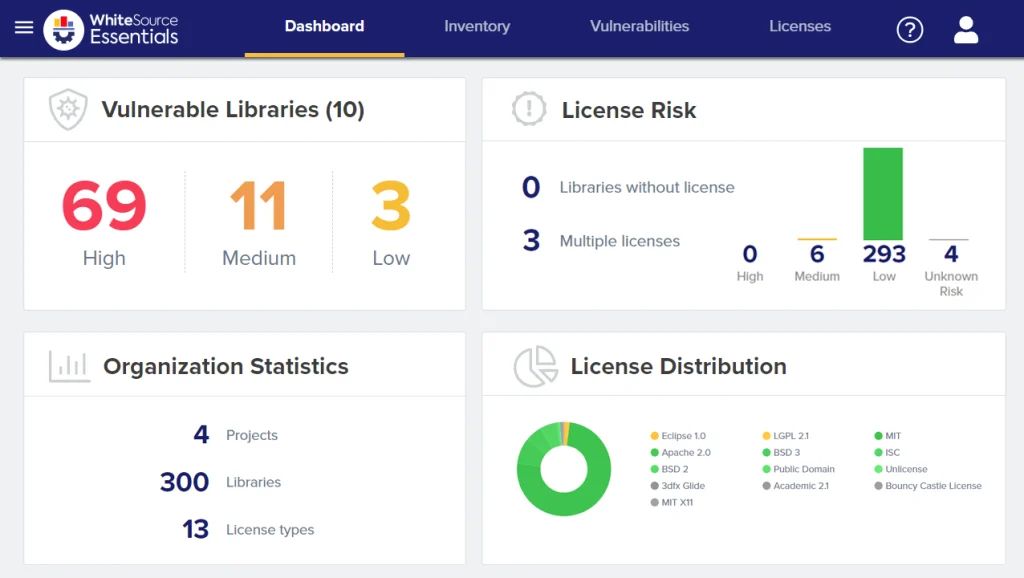
Mend scans applications to discover all open-source components, checks them against vulnerability databases and license registries, and then does something most scanners skip: it tells you which vulnerabilities actually matter and fixes them for you.
| Capability | Details |
|---|---|
| Automated Remediation | Renovate technology generates pull requests that upgrade vulnerable dependencies. Groups related updates, respects semver constraints, and includes merge confidence scores predicting build compatibility. |
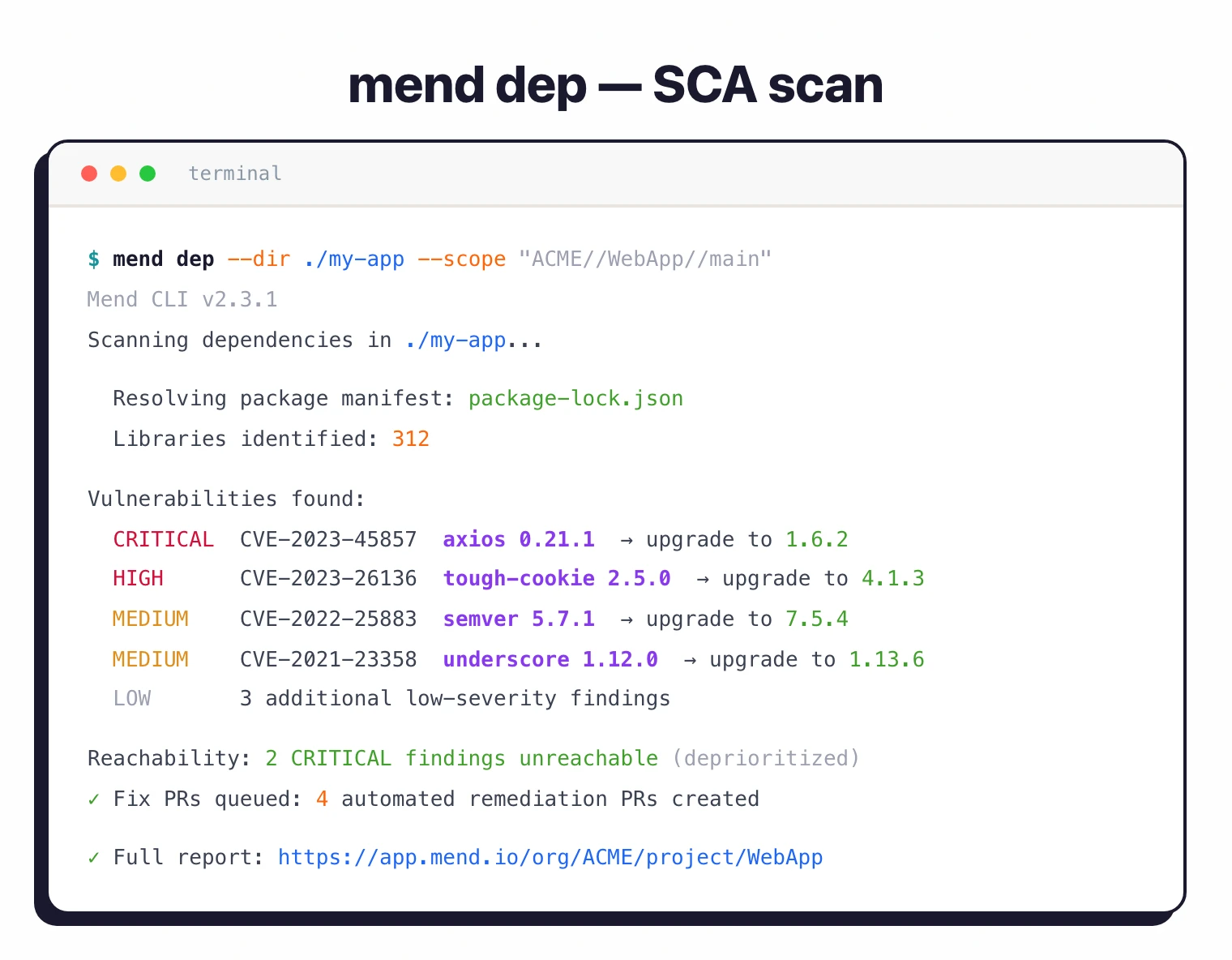
| Reachability Analysis | Traces call graphs to determine whether vulnerable functions are actually called by your application. Unreachable vulnerabilities get deprioritized, reducing alert fatigue while maintaining visibility. |
| License Compliance | Identifies all component licenses, flags conflicts (e.g., GPL in proprietary code), and enforces custom policies. Handles dual-licensed packages and complex compatibility rules. |
Key features
Supported ecosystems
| Ecosystem | Package managers |
|---|---|
| JavaScript | npm, yarn, pnpm, Bower |
| Python | pip, Poetry, Pipenv, Conda |
| Java/Kotlin | Maven, Gradle, sbt |
| Go | Go modules |
| .NET | NuGet, Paket |
| Ruby | Bundler |
| PHP | Composer |
| Rust | Cargo |
| Swift | CocoaPods, Swift PM |
| Scala | sbt, Maven |
| Containers | Docker, OCI images |
| IaC | Terraform, Kubernetes |
Automated remediation
Mend’s Renovate technology automatically generates pull requests to update vulnerable dependencies. Unlike simple version bumps, Renovate groups related updates, respects semantic versioning constraints, and schedules updates to minimize disruption.
Merge confidence scores predict whether an update will break your build based on aggregated data from millions of updates.
Reachability analysis
Mend examines call graphs and code paths to identify whether vulnerable functions are reachable from application entry points. Unreachable vulnerabilities are flagged but deprioritized, letting teams focus on genuine risks.
License compliance
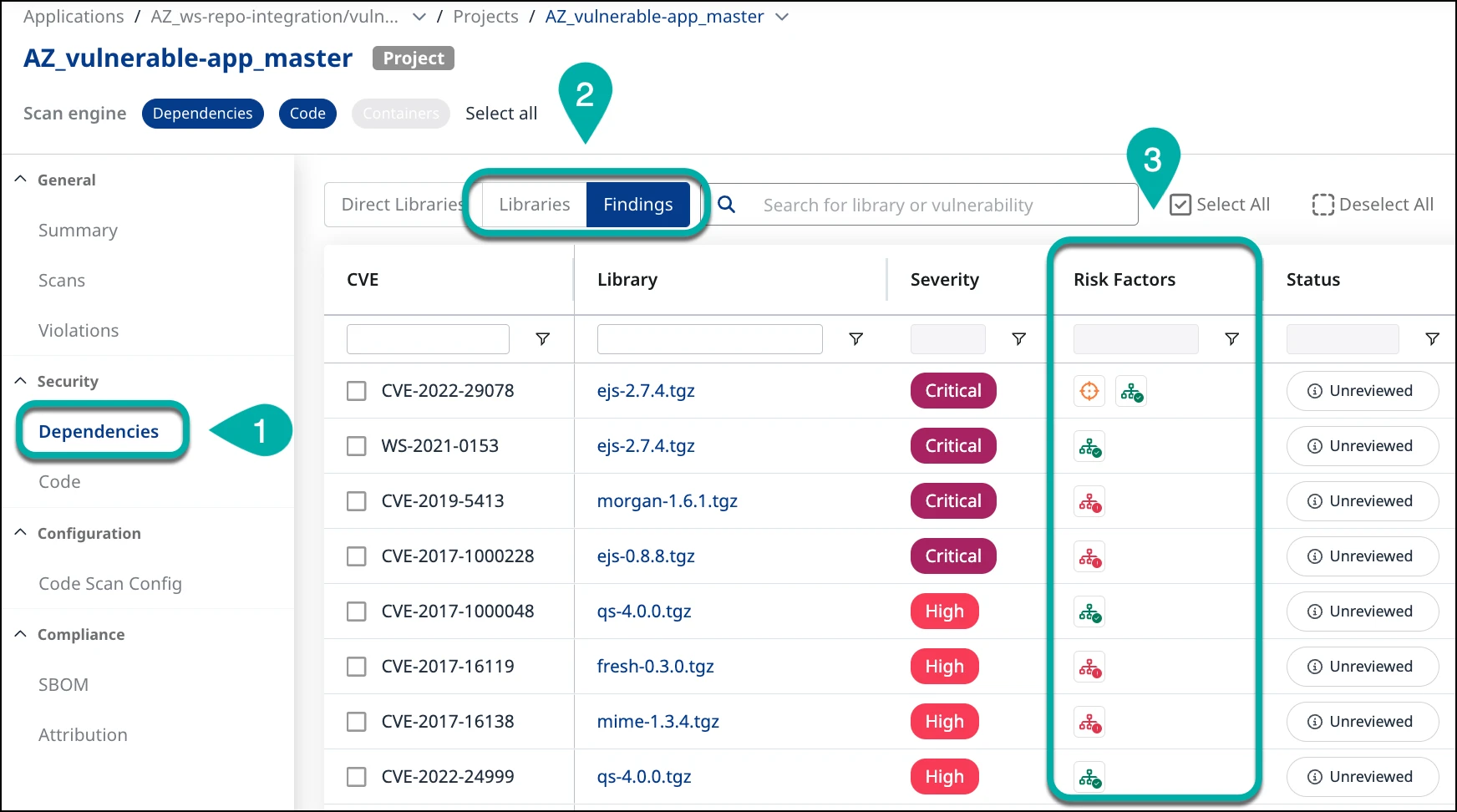
Mend identifies all component licenses and flags conflicts with organizational policies. The platform understands compatibility rules and detects situations where combining components with incompatible licenses creates compliance issues.
Policies automatically approve or block specific license types across all projects.
Container scanning
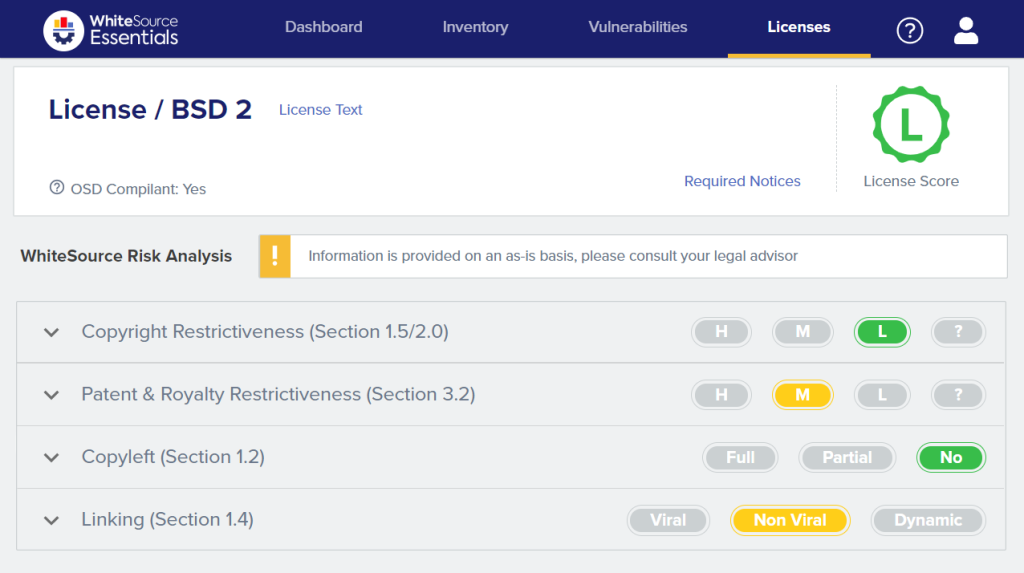
Mend extends beyond application dependencies to scan container images, Kubernetes configurations, and IaC files. Container scanning examines base images, OS packages, and application dependencies at every layer.
SBOM generation and transitive dependency analysis
Mend exports SBOMs in both SPDX and CycloneDX formats, and every scan type — application dependencies, container images, Kubernetes manifests — feeds into the same inventory that the SBOM draws from. Teams that need SBOMs for compliance obligations (Executive Order 14028, FedRAMP, regulated-industry contracts) can export per-project or per-organization artifacts without running a separate generator.
Transitive dependency analysis is where most of the interesting work happens. Mend walks the full dependency tree beyond what is declared in your lockfile, resolving indirect packages that ship as part of direct dependencies’ own dependency graphs. A vulnerability pulled in three levels deep still surfaces as a finding, with the introduction path made explicit so you can tell whether the CVE comes from something your team controls or from a library several maintainers removed.
Reachability analysis, described in the Key features section above, layers on top of the transitive walk — it is what lets Mend flag a transitive finding as unreachable even when the component itself is technically present. The combination cuts the raw “CVE is in your tree” finding list down to the subset that your application actually exercises, without losing the underlying inventory for audit.
Installation
CLI Installation
# Install via npm (globally)
npm install -g @mend/cli

# Verify installation
mend --version
Running Scans
# Configure API credentials
export MEND_API_KEY="your-api-key"
export MEND_USER_KEY="your-user-key"

# Scan current directory
mend dep

# Scan specific project
mend dep --dir ./my-project --scope "ORG//APP//PROJ"

# Scan container image
mend image my-registry/my-image:latest
Repository Integration
Mend provides native integrations for GitHub, GitLab, Bitbucket, and Azure DevOps that require minimal configuration:
# .mend configuration file (place in repository root)
settingsInheritedFrom: organization/mend-config

# Override specific settings
vulnerabilityAlerts:
  enabled: true
  severity: HIGH

licenseAlerts:
  enabled: true
  allowedLicenses:
    - MIT
    - Apache-2.0
    - BSD-3-Clause

autoRemediation:
  enabled: true
  maxPRs: 5
Integration
GitHub Actions
name: Mend SCA Scan
on:
  push:
    branches: [main]
  pull_request:
    branches: [main]

jobs:
  security-scan:
    runs-on: ubuntu-latest
    steps:
      - uses: actions/checkout@v4

      - name: Setup Node.js
        uses: actions/setup-node@v4
        with:
          node-version: '20'

      - name: Install dependencies
        run: npm ci

      - name: Install Mend CLI
        run: npm install -g @mend/cli

      - name: Run Mend SCA scan
        env:
          MEND_USER_KEY: ${{ secrets.MEND_USER_KEY }}
          MEND_API_KEY: ${{ secrets.MEND_API_KEY }}
        run: mend dep --dir . --scope "ORG//APP//PROJ"
GitLab CI
stages:
  - build
  - security
  - deploy

variables:
  MEND_API_KEY: $MEND_API_KEY
  MEND_USER_KEY: $MEND_USER_KEY

mend-sca:
  stage: security
  image: node:20
  before_script:
    - npm install -g @mend/cli
  script:
    - npm ci
    - mend dep --dir . --scope "ORG//APP//PROJ" --strict
  artifacts:
    reports:
      sast: mend-report.json
  rules:
    - if: $CI_PIPELINE_SOURCE == "merge_request_event"
    - if: $CI_COMMIT_BRANCH == "main"

container-scan:
  stage: security
  image: node:20
  before_script:
    - npm install -g @mend/cli
  script:
    - mend image $CI_REGISTRY_IMAGE:$CI_COMMIT_SHA
  rules:
    - if: $CI_COMMIT_BRANCH == "main"
Azure DevOps Pipeline
trigger:
  - main

pool:
  vmImage: 'ubuntu-latest'

stages:
  - stage: Security
    jobs:
      - job: MendScan
        steps:
          - task: NodeTool@0
            inputs:
              versionSpec: '20.x'

          - script: npm install -g @mend/cli
            displayName: 'Install Mend CLI'

          - script: npm ci
            displayName: 'Install Dependencies'

          - script: |
              mend dep --dir . --scope "ORG//APP//PROJ"
            displayName: 'Mend SCA Scan'
            env:
              MEND_API_KEY: $(MEND_API_KEY)
              MEND_USER_KEY: $(MEND_USER_KEY)
IDE Integration
Mend provides extensions for developer IDEs:
- VS Code: Real-time vulnerability alerts as you code
- IntelliJ IDEA: Integrated scanning and remediation suggestions
- Visual Studio: .NET-specific vulnerability detection
Mend CLI and container scanning
The @mend/cli package is the primary scan vector — it handles application dependency scans, container image scans, and the upload to the Mend platform in the same binary. CVE detection in dependencies happens inside the CLI: it resolves each component, queries Mend’s aggregated vulnerability database (NVD plus proprietary research), and attaches the reachability verdict before syncing findings to the SaaS console. The container mode (mend image <registry>/<image>:<tag>) extends the same CVE-detection pipeline to base-image OS packages and application layers, which is where the “mend container scanning” query volume is coming from.
Ticketing, policy, and dependency update automation
Beyond scanning, Mend integrates with Jira for automated ticket creation on policy violations and syncs with GitHub Enterprise, GitLab, Bitbucket, and Azure DevOps for repository-level findings. Dependency update automation is handled through the Renovate engine Mend.io maintains — Renovate’s continuous dependency-refresh loop is Mend’s differentiator from security-only SCA tools, because update PRs arrive on a cadence rather than only when a CVE is disclosed. Merge confidence scoring plugs into both the security fix PRs and the Renovate refresh PRs, so the build-break prediction applies to every upgrade the platform proposes.
Setup
- Install the CLI – Run
npm install -g @mend/cli. - Configure credentials – Set
MEND_API_KEYandMEND_USER_KEYenvironment variables. - Run a scan – Execute
mend depin your project directory to identify vulnerabilities and license risks. - Enable auto-remediation – Configure repository integration for automated fix PRs with merge confidence scoring.
When to use Mend SCA
Mend SCA fits teams that want automated remediation and reachability-based prioritization from a single platform.
Strengths:
- Automated fix PRs powered by Renovate technology
- Merge confidence scoring from aggregated CI data
- Reachability analysis reduces alert noise
- License compliance with policy enforcement
- Container and IaC scanning included
Limitations:
- Commercial only, no free tier; pricing is contact-sales (Mend does not publish list prices)
- SaaS-first; limited self-hosted options
- Newer SAST capabilities less mature than dedicated SAST tools
How it compares:
| vs. | Key difference |
|---|---|
| Snyk Open Source | Snyk has a broader developer ecosystem and free tier. Mend has merge confidence scoring and Renovate-powered remediation with deeper grouping controls. |
| Renovate | Renovate handles dependency updates. Mend SCA adds vulnerability scanning, reachability analysis, license compliance, and merge confidence on top of Renovate technology. |
| Black Duck | Black Duck has deeper license compliance and binary scanning. Mend is more developer-friendly with automated remediation workflows. |
For more on integrating SCA into your pipeline, see the guides on SCA in CI/CD and software supply chain security .
Mend SCA alternatives
A few SCA tools compete directly with Mend, each from a different angle.
Snyk Open Source
Snyk Open Source is the developer-first default with a real free tier and broader ecosystem coverage. Pick Snyk when fast onboarding and per-developer self-serve pricing matter more than Renovate-style update cadence. See also the Snyk vs Mend comparison for a side-by-side.
Black Duck
Black Duck is the closest enterprise-parity alternative, with deeper licence analysis and binary/snippet scanning that matter for M&A due diligence. Mend is more developer-friendly; Black Duck is more legal-audit-ready.
Aikido
Aikido publishes predictable per-developer pricing that some teams prefer over Mend’s contact-sales model. Aikido bundles SCA, SAST, container, IaC, and secrets under one subscription — similar scope to Mend’s platform with a smaller, developer-priced footprint.
Socket
Socket focuses on malicious-package detection through behavioural analysis of install scripts and runtime behaviour. Pick Socket when supply-chain-attack prevention matters more than broader CVE and licence coverage; most teams run it alongside a full SCA rather than instead of one.
Endor Labs
Endor Labs pushes reachability further than Mend’s call-graph model, focusing on function-level analysis across 40+ languages. Endor competes most directly with Mend on the “only exploitable CVEs” pitch for reachability-heavy workflows.
For a broader view, see the Mend alternatives guide , open-source SCA tools , and the SCA tools overview .
Mend SCA pricing
Mend does not publish SCA pricing on mend.io. The pricing page routes every request through a contact-sales flow and there is no self-serve checkout or published plan table. As of 2026-04-24, no free developer tier exists — the legacy WhiteSource free community edition was retired during the Mend rebrand.
Packaging generally follows two shapes. On the legacy WhiteSource side, customers paid by seat with SCA, licence compliance, and container scanning bundled together. On the newer Mend platform, the company sells a per-developer platform subscription that bundles SCA, SAST, and container into one price rather than breaking them out as separate SKUs. Expect to negotiate on developer count, deployment model (SaaS-first with limited self-hosted options), and whether you also take the Mend SAST and container modules.
Per site policy I do not publish a fixed list price here because Mend does not publish one publicly. For a buyer-side view of typical contract sizes across multiple SCA vendors, see the AppSec tools pricing guide .
Mend SAST
Mend SAST is the static-analysis half of the platform. It scans 25 programming languages using taint analysis and ships with an MCP server that plugs directly into AI coding assistants like Cursor, Claude Code, and GitHub Copilot. Findings live in the same console as Mend SCA, with shared policy enforcement and ASPM correlation.
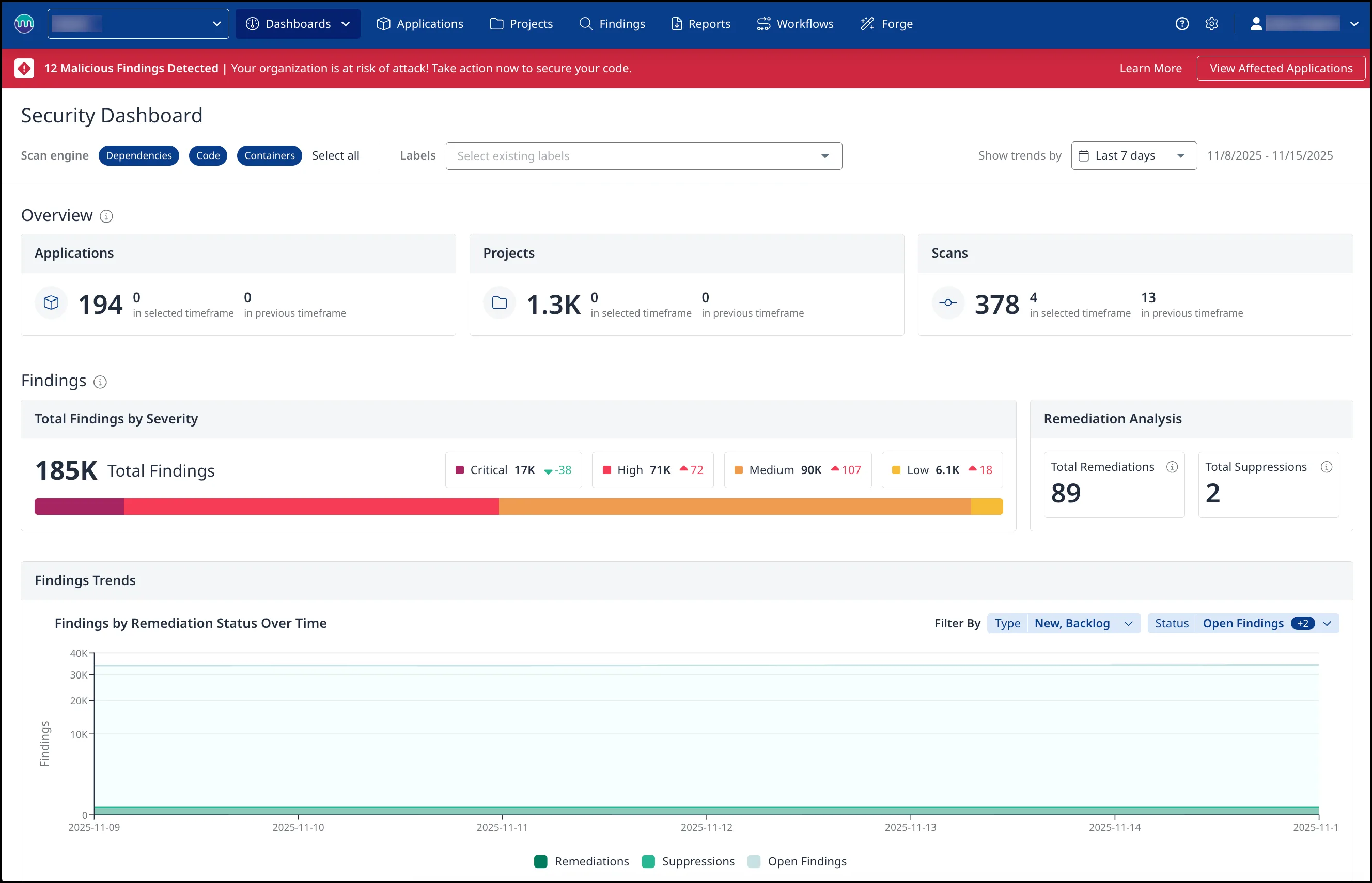
What is Mend SAST?
Mend SAST uses taint analysis to trace the flow of untrusted data through your code.
It tracks three things: where tainted data enters (sources like HTTP parameters and file reads), where it gets cleaned (sanitizers), and where unsanitized data could cause damage (sinks like SQL queries or command execution).
The tool runs two engine generations. Gen 1 covers all 25 languages.
Gen 2 adds deeper cross-file analysis for Java, C#, Python, JavaScript/TypeScript, and C/C++.
Gen 2 engines offer three scan profiles: Fast (prioritizes speed), Balanced (optimizes between speed and detection), and Deep (no analysis limits, longest duration).
The “Agentic SAST” capability is the main differentiator. As developers use AI coding assistants, Mend’s MCP server scans generated code before it hits the repository.
The MCP server exposes two tools: mend-code-security-assistant for SAST and mend-dependencies-assistant for SCA.
| Capability | Details |
|---|---|
| Agentic SAST | MCP server integrates with Cursor, Windsurf, Claude Code, GitHub Copilot, Amazon Q, and Gemini CLI. Scans AI-generated code for CWEs and dependencies for CVEs. The agent can iterate up to 3 times to fix issues. |
| Dual-Engine Scanning | Gen 1 covers 25 languages. Gen 2 adds deeper cross-file data flow analysis for Java, C#, Python, JS/TS, and C/C++. Three scan profiles let you trade speed for depth. |
| Unified Platform | SAST findings correlate with Mend SCA, DAST, and container security in a single dashboard. Source code never leaves your environment — scanning runs locally. |
Key features
| Feature | Details |
|---|---|
| Languages | 25 (Java, C#, Python, JS/TS, Go, Kotlin, PHP, Ruby, Rust, Swift, C/C++, ABAP, APEX, COBOL, and more) |
| Analysis type | Taint analysis (source → sanitizer → sink tracking) |
| Engine generations | Gen 1 (all languages) and Gen 2 (Java, C#, Python, JS/TS, C/C++) |
| Scan profiles | Fast, Balanced, Deep (Gen 2 only) |
| CWE coverage | 70+ CWE types |
| Scan types | Full, Incremental, Secrets detection |
| Report formats | SARIF, HTML, PDF, JSON, CSV, XML |
| Compliance | OWASP 2017/2021/2025, PCI DSS 3.2/4.0, HIPAA, HITRUST, NIST, SANS, MISRA C/C++ |
| CLI command | mend code (replaces legacy mend sast) |
| Timeouts | 480 min per language, 60s–1800s per file |
Taint analysis and data flow tracking
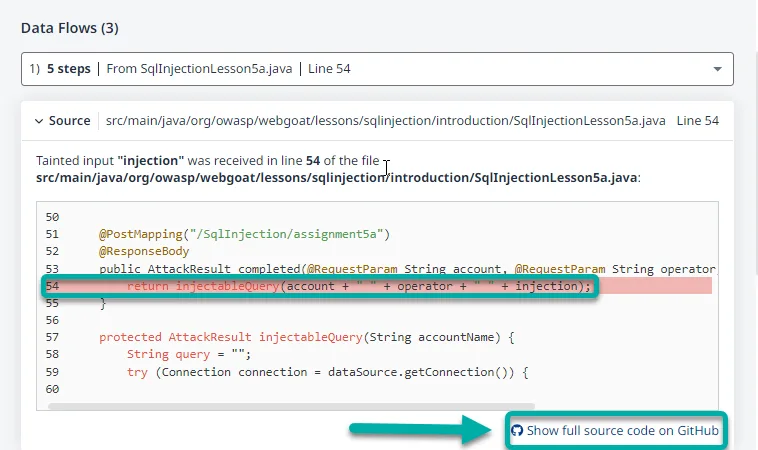
Mend traces tainted data from entry points through your codebase. Sources include HTTP request parameters, file reads, command-line arguments, and network services.
Predefined sanitizers are built in, and you can add custom ones for your own validation functions.
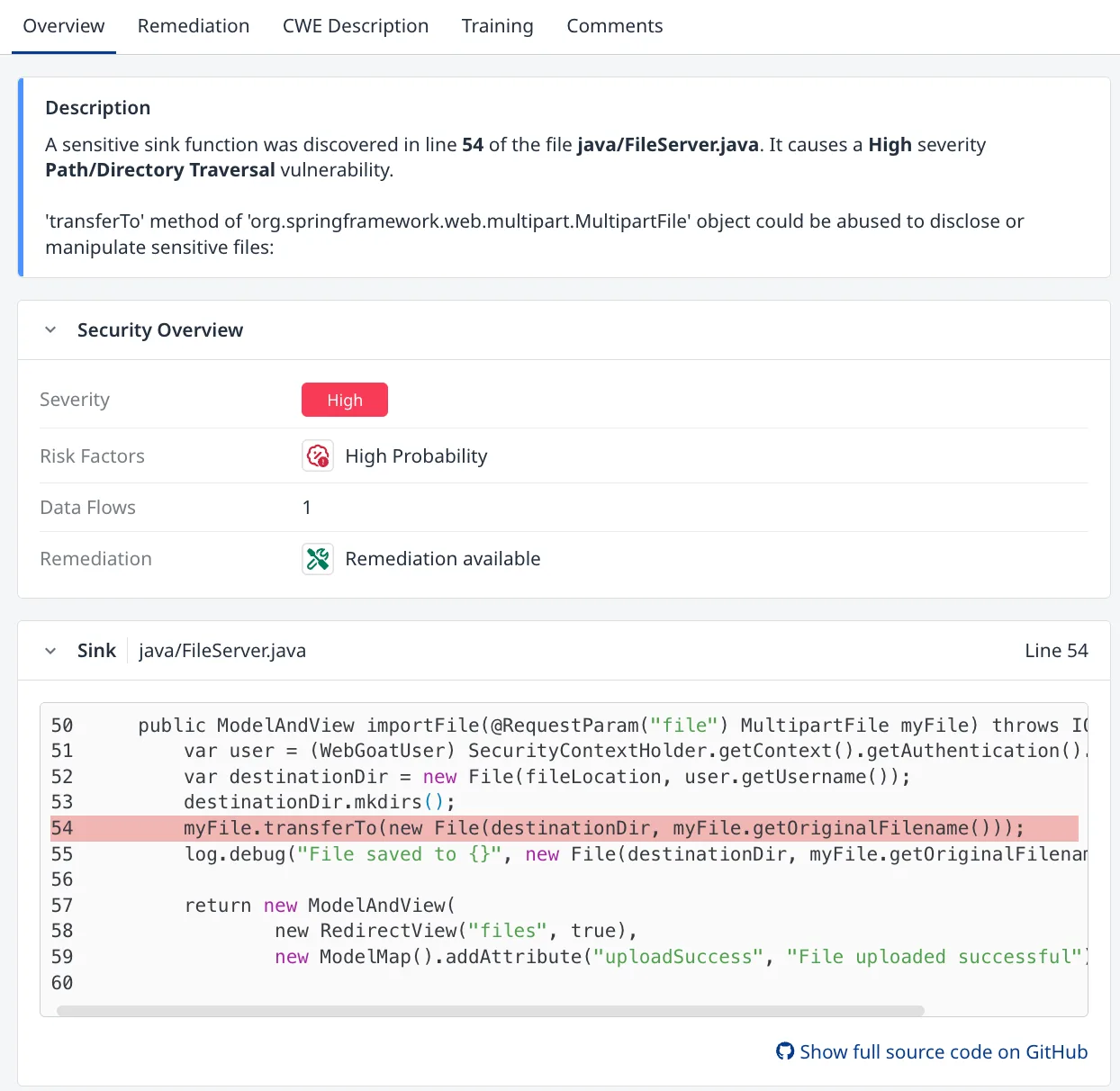
Reachability analysis filters out findings where vulnerable code paths are not actually exercised in your application. This helps separate exploitable issues from theoretical ones.
Finding triage and remediation
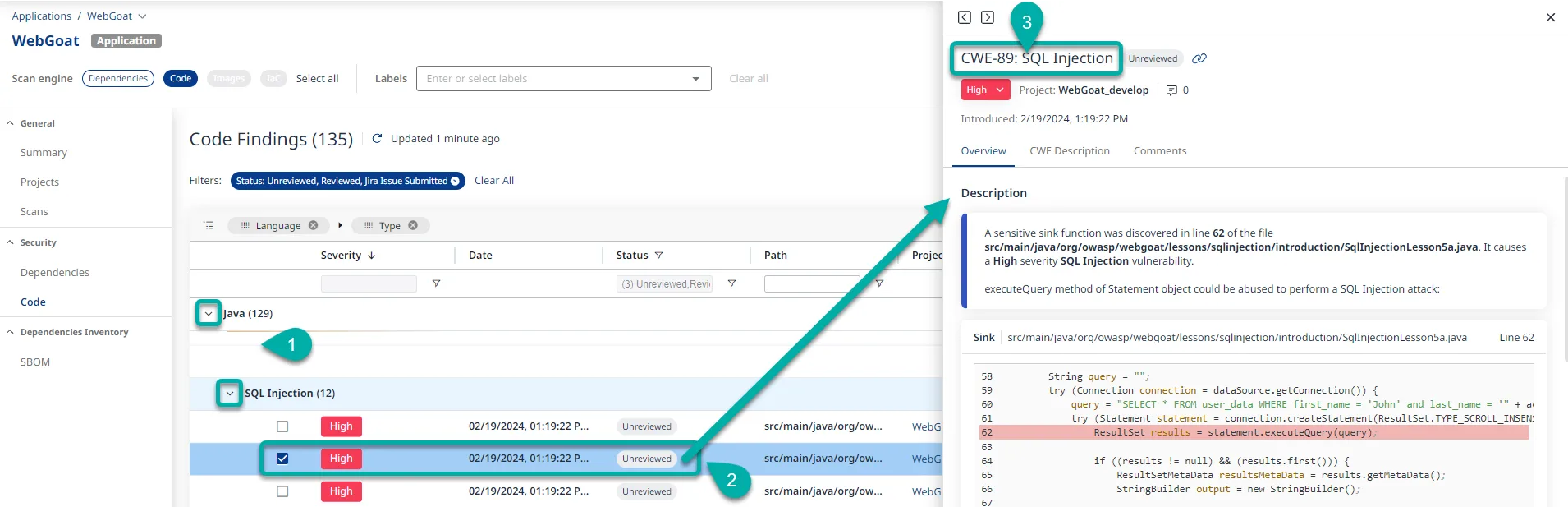
Each finding includes CWE classification, severity rating, data flow paths, and the exact source code location. The platform tracks remediation status across findings and lets you filter by severity, language, CWE type, or status.

SAST and DAST correlation
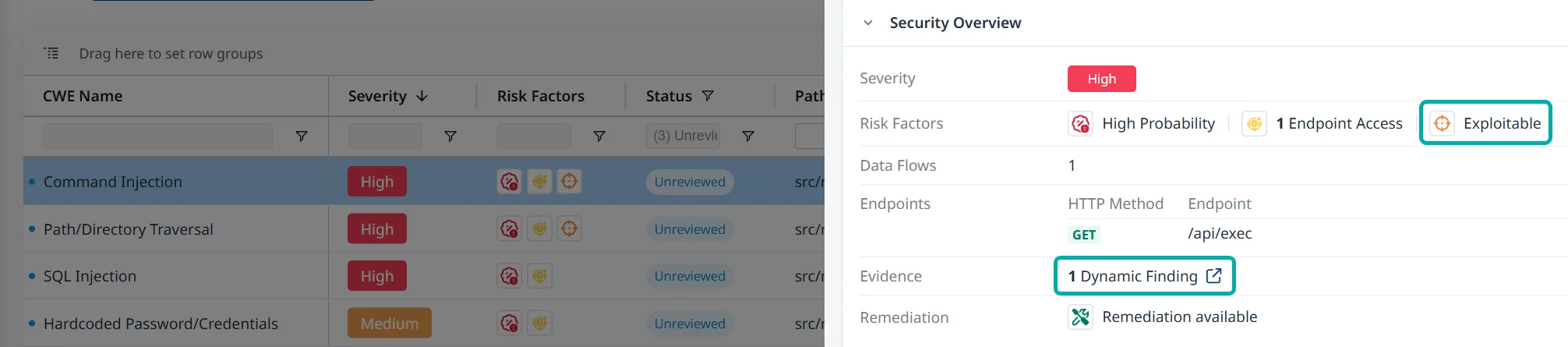
When you run both Mend SAST and DAST against the same application, findings correlate automatically. A static code vulnerability confirmed by dynamic testing gets marked as “Exploitable,” which helps prioritize what to fix first.
Agentic IDE integration
The MCP server is what sets Mend apart from most SAST tools right now. It works with:
- Cursor
- VS Code (via Copilot)
- Claude Code
- Windsurf
- Amazon Q Developer
- Gemini CLI
- Gemini Code Assist
- Antigravity
When an AI agent generates code, the MCP server checks it for security issues and returns remediation guidance. The agent can iterate up to three times to produce secure code.
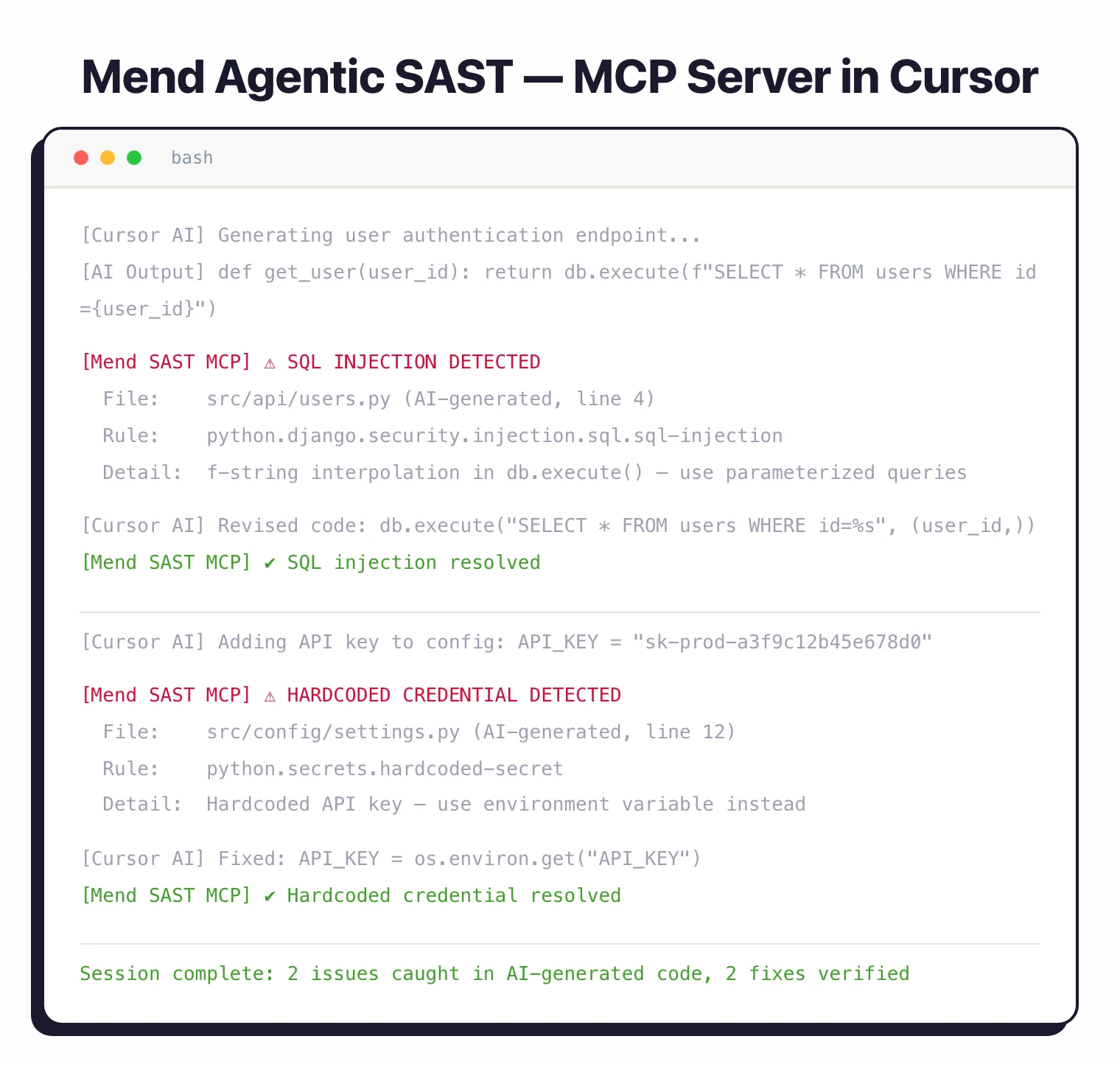
For dependencies, it checks CVEs but only flags direct dependencies, not transitive ones.
For traditional IDE use, Mend offers the Advise Code plugin for JetBrains IDEs (IntelliJ IDEA, PyCharm, WebStorm). VS Code and Visual Studio extensions exist but only cover SCA, not SAST.
Scan types
Three scan modes are available:
- Full scan — Analyzes the entire codebase. Use this for initial baselines and periodic deep checks.
- Incremental scan — Only checks changes since the last baseline. Requires a prior full scan with
--upload-baseline. Faster for CI/CD pipelines. - Secrets detection — Pattern-matching for hardcoded credentials, API keys, and tokens in config files (JSON, YAML, XML, .properties, .config). Covers CWE-798 and CWE-260.
Compliance and reporting
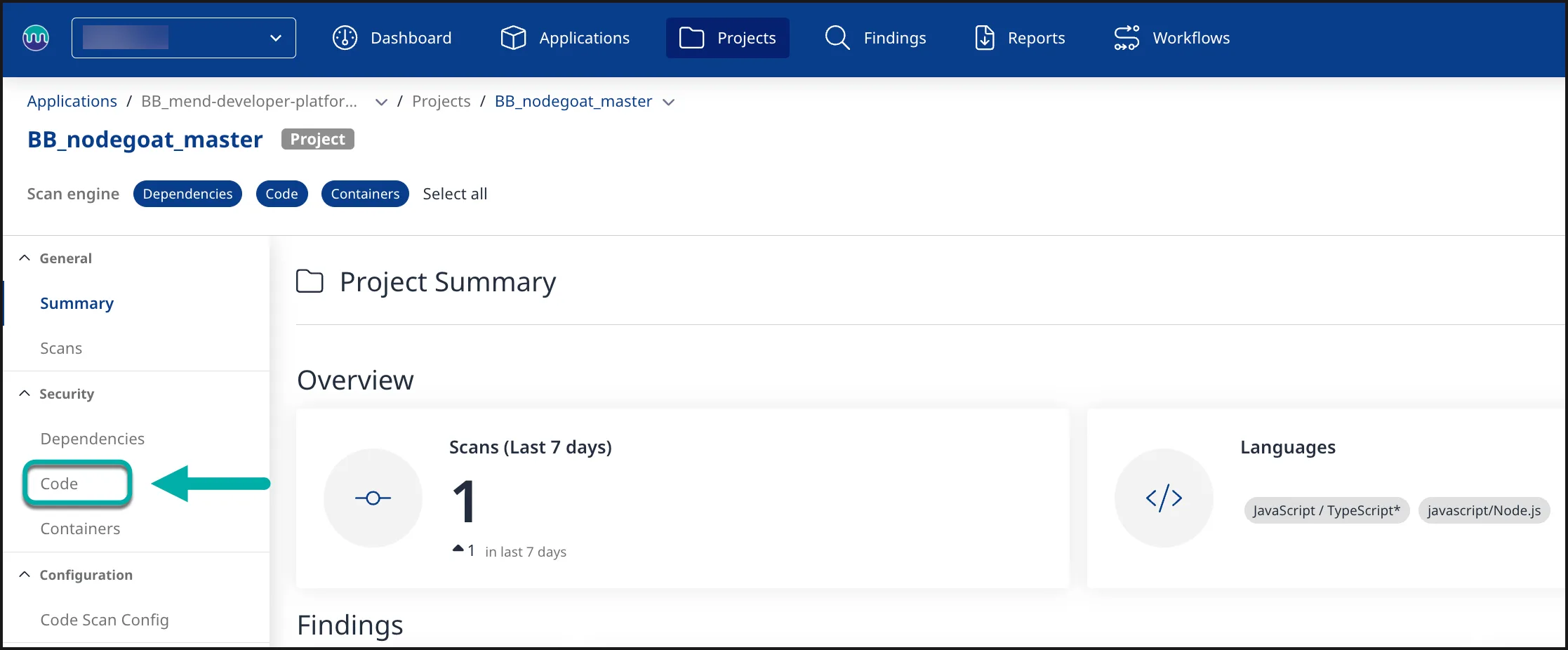
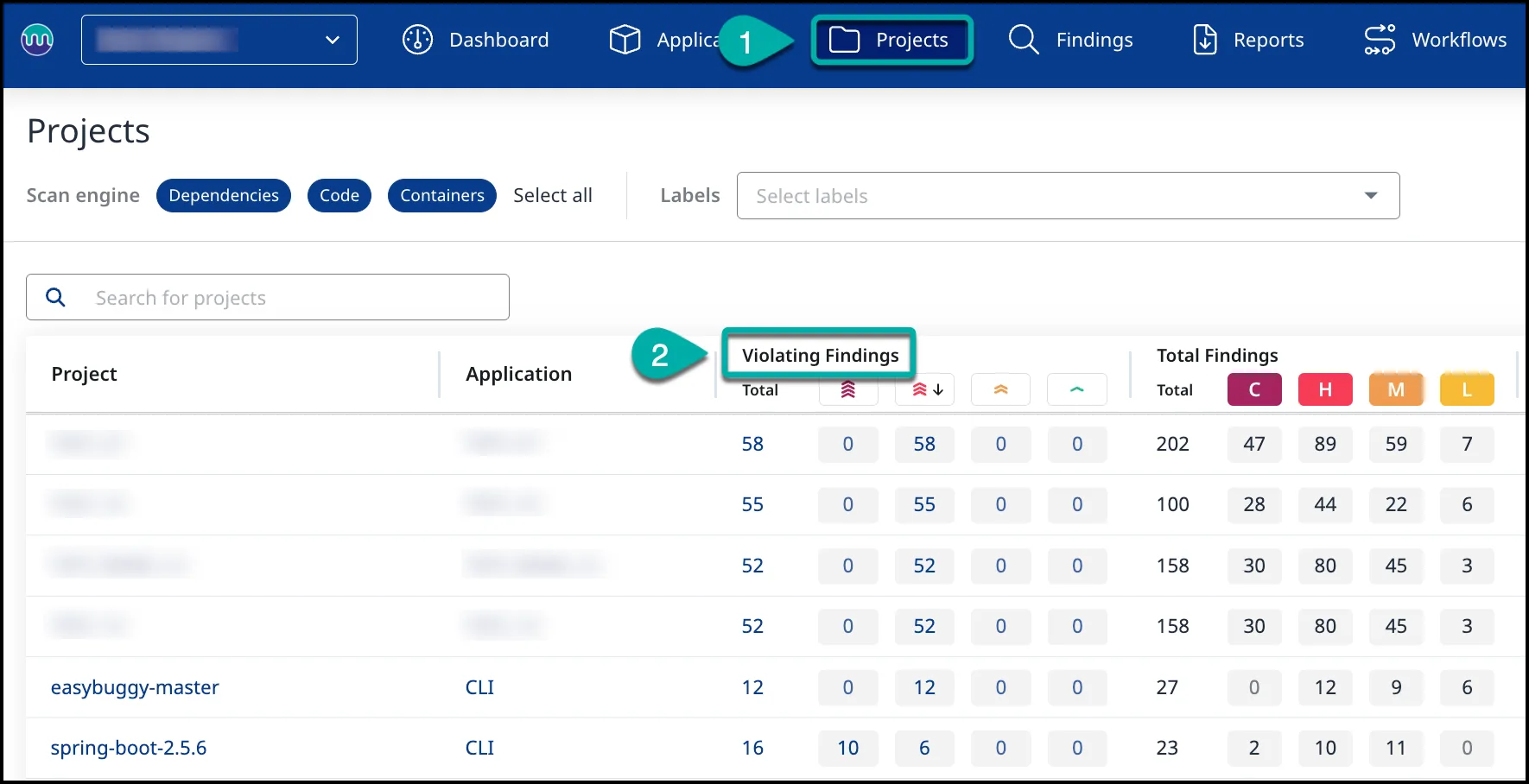
Reports map findings to specific compliance frameworks. You can generate reports in SARIF, HTML, PDF, JSON, CSV, or XML format.
Supported standards: OWASP Top 10 (2017, 2021, 2025), PCI DSS (3.2 and 4.0), HIPAA, HITRUST, NIST, CAPEC, SANS Top 25, and MISRA (C:2025, C++:2023).
Integrations
 GitHub
 GitLab
 Bitbucket
 Azure DevOps
GitHub Actions
Azure Pipelines
Bitbucket Pipelines
Azure DevOps
GitHub Actions
Azure Pipelines
Bitbucket Pipelines CircleCI
 Jenkins
 Jira
Azure DevOps
GitHub Issues
Jira
Azure DevOps
GitHub Issues Redmine
 ServiceNow
Getting started
- Install the Mend CLI — The CLI is the primary scanning tool. Authenticate with environment variables (
MEND_EMAIL,MEND_USER_KEY,MEND_URL) or command-line parameters. - Run a full scan — Execute
mend codein your project directory. For a specific path, usemend code --dir /path/to/project. Add--secrets-detectionto include credential scanning. - Set up CI/CD — Add the Mend CLI to your pipeline. GitHub Actions, Azure Pipelines, Bitbucket Pipelines, CircleCI, and Jenkins are all supported. Use
--scopeto organize findings by org, app, and project. - Configure agentic SAST — For AI coding assistants, configure the MCP server in your IDE settings. The server exposes
mend-code-security-assistant(SAST) andmend-dependencies-assistant(SCA).
When to use Mend SAST
Mend SAST fits teams that use AI coding assistants and want security scanning wired into the code generation loop. The MCP server integration with Cursor, Claude Code, and Copilot is something most SAST tools do not offer yet.
Teams already on Mend SCA get a unified dashboard where first-party code vulnerabilities sit next to third-party dependency issues.
The hybrid architecture keeps source code on-premises while using cloud analysis for reporting and policy enforcement.
For teams that want open-source SAST or don’t use AI coding assistants, Semgrep CE or SonarQube are better starting points.
If you need a SAST tool that runs entirely in your own infrastructure with no cloud dependency, look at Checkmarx or Fortify .
Mend SAST alternatives
For teams comparing SAST-plus-SCA bundle platforms, the closest substitutes for Mend SAST are:
- Snyk — developer-first SAST and SCA with AI-powered fixes and IDE integrations; the most direct competitor on the bundled-platform shape.
- Checkmarx One — enterprise ASPM with SAST, SCA, DAST, and IaC bundled into one console; preferred when compliance reporting and policy governance dominate.
- Veracode — binary-analysis SAST plus SCA and DAST in one platform; chosen for regulated industries with strict procurement workflows.
- GitLab Ultimate — built-in SAST and SCA on top of the GitLab platform; a fit when the codebase already lives on GitLab and a single vendor is preferred.
Mend’s edge sits in unified first-party (SAST) and third-party (SCA) vulnerability management on one platform — the SAST product is strongest when paired with Mend SCA. The SAST tools hub lists the broader set.
Mend SAST pricing
Mend.io publishes “request a quote” on mend.io/pricing — there is no public price list, no free tier for Mend SAST, and no per-developer rate card. The platform is sold through contact-sales, with quotes scaled to developer seats, repo count, and which Mend products you bundle (SAST, SCA, AI-Powered Remediation, Container, Renovate Enterprise).
Mend SAST is most often purchased alongside Mend SCA — the two share the same console, ASPM dashboard, and policy engine, and the bundle pricing is where customers see the strongest commercial terms. Free trials and proof-of-concept access are available on request through mend.io.