


mcp-audit is a free, open-source security scanner for Model Context Protocol (MCP) server configurations. It reads the MCP configs on your machine, inspects what each server exposes to an AI agent, and flags security issues across individual servers and dangerous cross-server combinations.
MCP servers connect AI coding agents to your files, APIs, and databases. A misconfigured or malicious one can exfiltrate credentials or poison tool behavior without anything appearing in the editor UI.
It is released under the Apache 2.0 license by maintainer Adam Dudley, with no paid tier and no license keys. Every feature ships in a single binary, and scans run entirely offline with no telemetry.
What is mcp-audit?
mcp-audit is a command-line scanner for MCP server configurations. It closes a specific gap: MCP servers are easy to install from community sources, but there is no standard way to verify a server’s configuration is safe before an agent starts using it.
The scanner auto-discovers MCP configuration files across eight client scopes, parses each server entry, and runs it through analyzers for poisoning, credentials, transport security, and supply-chain risk. Every finding gets a severity, an OWASP MCP Top 10 code, and any matching CVE.
Unlike single-pattern scanners, mcp-audit also reasons about the whole config at once. It tags each server with capability labels (file read, network out, shell exec, database, secrets) and looks for combinations that become dangerous together even when no single server looks risky.
What are mcp-audit’s key features?
| Capability | Details |
|---|---|
| Config + poisoning analysis | Scans MCP configs for tool-poisoning markers (hidden instructions, XML injection tags, zero-width Unicode), credential exposure across AWS, GitHub, OpenAI, Anthropic, Stripe, Slack, and database URLs, and unpinned runtime package fetches — 20+ detection patterns in total. |
| Cross-server attack paths | Tags every server by capability and detects 7 categories of toxic flow (file-read plus network, secrets plus network, shell-exec plus network, and more), then builds an attack-path graph with hitting-set remediation showing the minimum servers to remove. |
| CI-native output | Emits SARIF for the GitHub Security tab, JSON, CycloneDX SBOM, and a self-contained HTML dashboard. Ships a GitHub Action, a pre-commit hook, and a PR-comment diff mode for team adoption. |
| Capability | Details |
|---|---|
| Client auto-discovery | Claude Desktop, Cursor, VS Code, Windsurf, Claude Code (user + project), GitHub Copilot CLI, Augment Code |
| Tool poisoning | 11 patterns across 5 severity tiers, validated against 6 published exploit PoCs |
| Credential exposure | 9 patterns (AWS, GitHub, OpenAI, Anthropic, Stripe, Slack, database URLs) |
| Supply chain | Typosquatting vs 83 known-legit servers, offline CVE check, SHA-256 verification, CycloneDX SBOM |
| Rug-pull detection | SHA-256 baseline comparison of tool descriptions across scans |
| Toxic flows | 7 dangerous cross-server capability pairs plus multi-hop attack paths |
| SAST rule pack | 89 Semgrep rules (46 Python, 43 TypeScript) for MCP server source code |
| Output formats | Terminal, JSON, SARIF, CycloneDX, Nucleus FlexConnect, HTML dashboard |
| License | Apache 2.0, no paid tier, 2,484 tests |
What MCP clients does mcp-audit scan?
 Claude Desktop
 Cursor
 VS Code
 Windsurf
 Claude Code
 GitHub Copilot CLI
 Augment Code
For each client, mcp-audit reads the command, args, environment variables, and stored tool descriptions. With the --connect flag it goes further and queries running servers over the MCP protocol for their live tool definitions — catching a clean-looking config that points at a server serving poisoned descriptions.
How does mcp-audit detect cross-server attack paths?
mcp-audit detects cross-server attack paths by analyzing how servers combine, not each server in isolation. It flags pairs whose capabilities turn dangerous together even when neither server looks risky alone. This is what separates it from single-server scanners.
One server that reads files is not dangerous. Another that makes HTTP requests is not dangerous. Together, a prompt injection can read your SSH keys with the first and POST them to an attacker with the second.
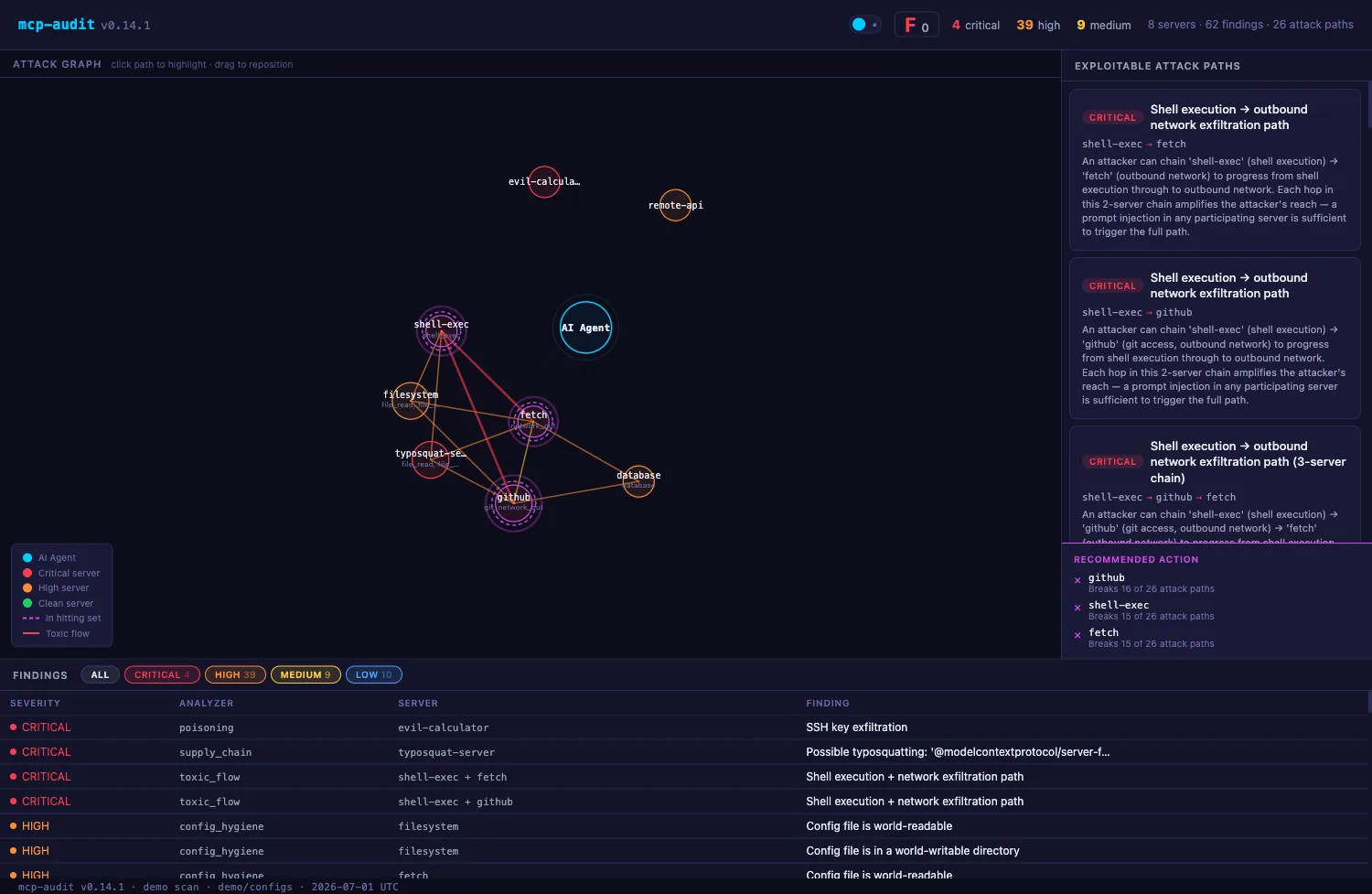
To do this, mcp-audit tags each server with capability labels and checks every pair against seven known-dangerous combinations, from file-read plus outbound network (HIGH) to secret-store access plus outbound network (CRITICAL).
It then builds an attack-path graph and computes a hitting set — the minimum set of servers you can remove to break every path at once. The interactive dashboard (mcp-audit dashboard) renders this as a force-directed graph you can click through in the browser.
mcp-audit vs MCP-Scan
mcp-audit is offline, deterministic, and config-structural; MCP-Scan (Snyk) is runtime and injection-focused. The two are complementary, not competing.
MCP-Scan , built by Invariant Labs and now part of Snyk, is the best-known MCP scanner and the tool that popularized “tool poisoning” and “rug pull.” Its strengths are tool-description prompt-injection analysis via the Invariant Guardrails API and a runtime proxy mode that monitors live MCP traffic.
mcp-audit takes a different approach. It is fully offline and deterministic (no API call, no account), and it adds config-structure analysis, cross-server attack-path graphs, 89 Semgrep source-code rules, and OWASP MCP Top 10 mapping in every output.
Pick MCP-Scan if you want runtime proxy monitoring and Guardrails-backed injection analysis. Pick mcp-audit if you want an offline, CI-native config auditor with toxic-flow graphs and SARIF output. They overlap little enough that running both is reasonable.
mcp-audit vs pattern-matching scanners
Pattern-matching scanners match tool-description text and flag many false positives; mcp-audit checks configuration structure and cross-server capability pairs. The two cover different layers.
When I audited 33 MCP servers with a pattern-matching scanner (Cisco’s mcp-scanner), the core problem was that its rules could not tell intent from syntax — a normal instruction like “You MUST call this tool first” gets flagged as coercive injection, producing roughly 78% false positives.
mcp-audit does not solve semantics either, but it attacks a different layer: the structure of the configuration and the relationships between servers. Typosquatted package names, credential strings, unpinned npx/uvx fetches, and toxic capability pairs are structural facts, not fuzzy text matches, so they flag with less noise.
The honest framing is that these are complementary. Pattern scanners inspect what a tool description says; mcp-audit inspects how servers are configured and how they combine. For the false-positive problem specifically, structural checks are the more reliable half.
How much does mcp-audit cost?
mcp-audit is free under the Apache 2.0 license. There is no paid tier, no license key, and no gated command — the scanner, dashboard, SAST rule pack, governance engine, and enterprise Nucleus output all ship in the same binary.
The project is funded through optional GitHub Sponsors , and the maintainer is explicit that there is no legal entity and no commercial upsell. Adoption is simple as a result: there is nothing to purchase and nothing to license.
How do I get started with mcp-audit?
- Install the scanner — Run
pip install mcp-audit-scanner(Python 3.11+). The PyPI package ismcp-audit-scanner; the CLI command ismcp-audit. Standalone binaries are also on GitHub Releases. - Run a one-command check — Run
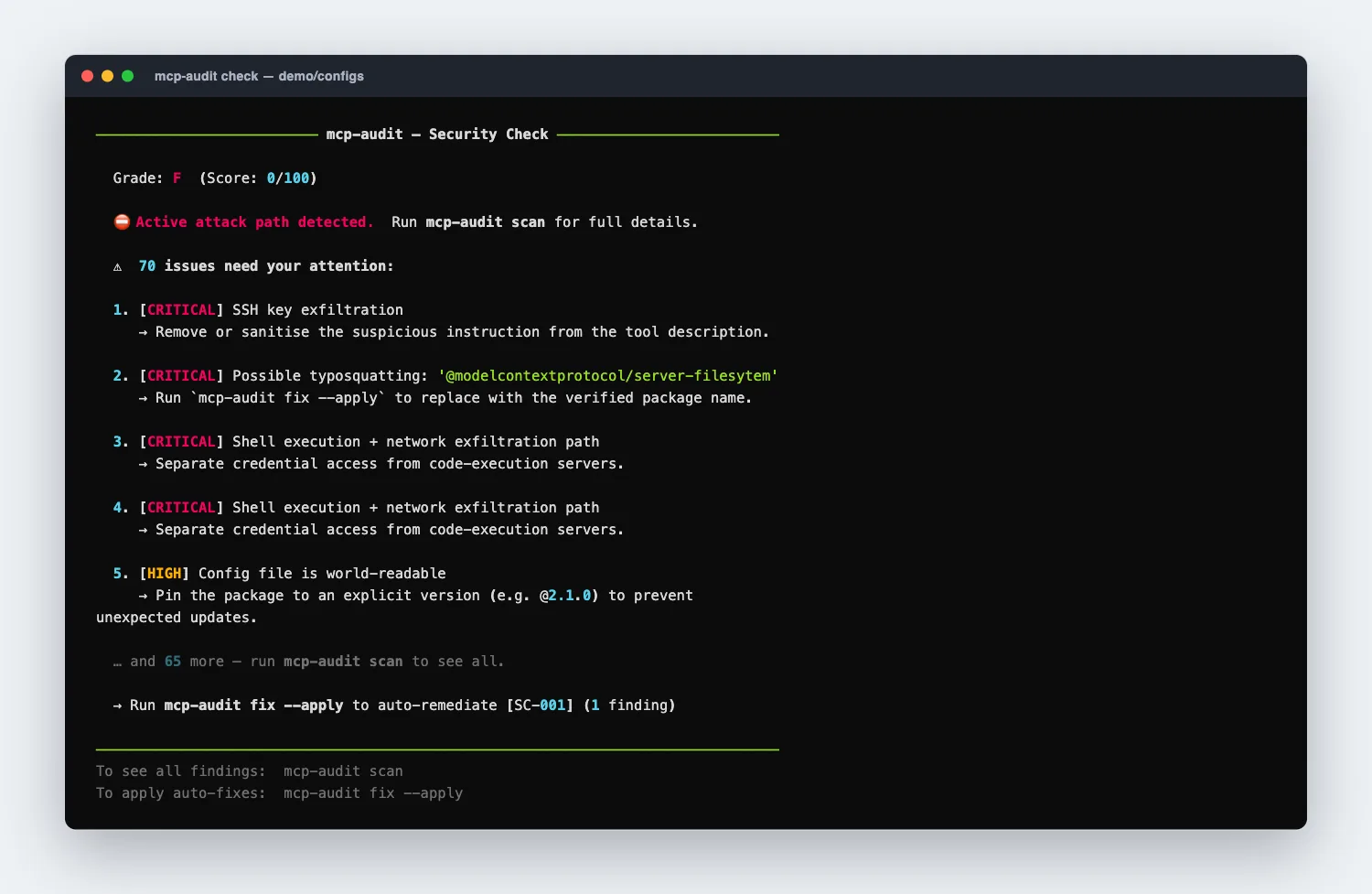
mcp-audit checkfor a graded A–F verdict with the top findings and fix hints. It auto-detects your MCP clients — no config needed. - See every finding — Run
mcp-audit scanfor the full report, ormcp-audit scan --connectto also query running servers for their live tool definitions. - Wire it into CI — Add the GitHub Action or pre-commit hook, and export SARIF with
mcp-audit scan --format sarif -o results.sarifto surface findings in the GitHub Security tab. - Track drift — Run
mcp-audit pinto record a trusted baseline, then future scans flag rug pulls when a server silently changes its tool descriptions.
mcp-audit vet @scope/server-name gives a pre-install verdict — registry status and known CVE count — before you add a new MCP server to your config. It is the fastest habit to adopt if you install community servers regularly.When to use mcp-audit
Best for developers and security teams running MCP servers with AI coding assistants who want an offline, no-account way to audit their configuration and gate it in CI.
It is especially useful when you install community-contributed MCP servers, since most ship without formal security review, and when you run several servers at once and need to understand how their capabilities combine into attack paths.
What are alternatives to mcp-audit?
mcp-audit’s wedge is offline, CI-native MCP config auditing with cross-server attack-path analysis. When the threat model points elsewhere, these are the closest alternatives:
- MCP-Scan — The best-known MCP scanner, with Guardrails-backed injection analysis and a runtime proxy. Pick it for live traffic monitoring; pair it with mcp-audit rather than swap.
- Agentic Radar — Maps an agent’s full tool graph and flags excessive-agency risk. Choose it when the question is “what can this agent reach” rather than “is this config safe.”
- Garak — NVIDIA’s LLM vulnerability scanner. Use it when the underlying model is the target rather than the MCP transport.
- PyRIT — Microsoft’s red-teaming framework for multi-turn adversarial agent tests, better when you want to actively probe agent loops.
For the wider catalog grouped by sub-category, see the AI security tools hub .
What are mcp-audit’s limitations?
mcp-audit is early-stage software and says so — the repository ships a GAPS.md documenting known detection gaps and untested areas. Its detection is deterministic, so it will not reason about the semantic intent of a tool description the way an LLM-based analyzer might.
Static analysis also has an inherent ceiling: a config can look clean while the server behind it serves poisoned descriptions at runtime. The --connect mode narrows this by querying live servers, but it is best-effort and depends on servers responding. For live-traffic and semantic coverage, mcp-audit is best paired with a runtime tool like MCP-Scan
rather than used alone.
Frequently Asked Questions
What is mcp-audit?
Is mcp-audit free?
What does mcp-audit detect?
How is mcp-audit different from MCP-Scan?
Which MCP clients does mcp-audit support?
Does mcp-audit send my data anywhere?
Is mcp-audit safe to run?
check and scan only read your config files — nothing is modified and no server code runs. Two modes are opt-in. mcp-audit fix --apply rewrites config files (dry-run by default), and mcp-audit scan --connect launches each stdio server’s configured command to read its live tool definitions, so use --connect only on servers you already trust enough to run. It sends no telemetry and its Apache-2.0 source is auditable.