


Kubescape is an open-source Kubernetes security platform. It scans clusters, manifests, and container images for misconfigurations and vulnerabilities.
You can run it as a CLI tool or deploy it as an in-cluster operator.
ARMO created Kubescape and donated it to the CNCF. It entered the CNCF Sandbox in November 2022 and was promoted to an incubating project in February 2025. 11.5k GitHub stars, 957 forks.
The CNCF names Intel (security prioritization), AWS (security education material), and Bitnami (Helm chart security) among its adopters.
What is Kubescape?
It started life as a misconfiguration scanner. Now it validates configurations against CIS Benchmarks, NSA-CISA hardening guidance, and the MITRE ATT&CK framework for containers — plus image scanning, runtime detection, and network policy generation.
Kubescape works in three modes:
- CLI scanning — scans YAML manifests, Helm charts, Kustomize directories, and container images before they reach a cluster, caching controls locally for offline use.
- In-cluster operator — microservices deployed via Helm that provide continuous scanning, runtime threat detection via eBPF, and network policy recommendations.
- Auto-remediation — the
fixcommand corrects misconfigurations in YAML files, and thevapcommand generates Validating Admission Policies to block non-compliant resources at deploy time.
What are Kubescape’s key features?
| Feature | Details |
|---|---|
| Compliance frameworks | CIS Kubernetes Benchmark , NSA-CISA , MITRE ATT&CK , SOC 2 |
| Policy engine | Open Policy Agent (OPA) with Rego controls from public Regolibrary |
| Image scanning | Grype-based CVE detection in base images and dependencies |
| Image patching | Copacetic rebuilds images with updated packages without changing the application layer |
| Runtime monitoring | eBPF via Inspektor Gadget — watches system calls, network connections, file access |
| Network policies | Observes real traffic patterns and generates least-privilege NetworkPolicy resources |
| Risk scoring | 0–100 per control, with severity threshold flags for CI/CD gating |
| Output formats | Pretty-printed tables, JSON, JUnit XML, SARIF, HTML, PDF |
| IDE support | VS Code, Lens |
| CI/CD integrations | GitHub Actions, GitLab CI, Jenkins, CircleCI, pre-commit hooks |
Architecture
Kubescape runs in two modes. The CLI is a standalone binary for pre-deployment scanning.
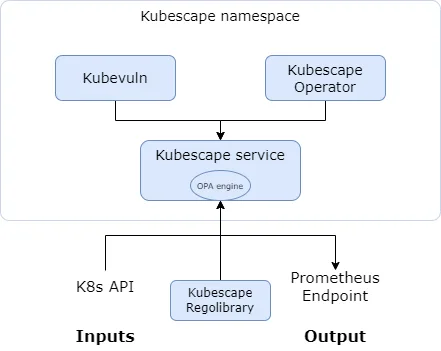
The operator is a Helm-deployed set of microservices for continuous in-cluster monitoring.
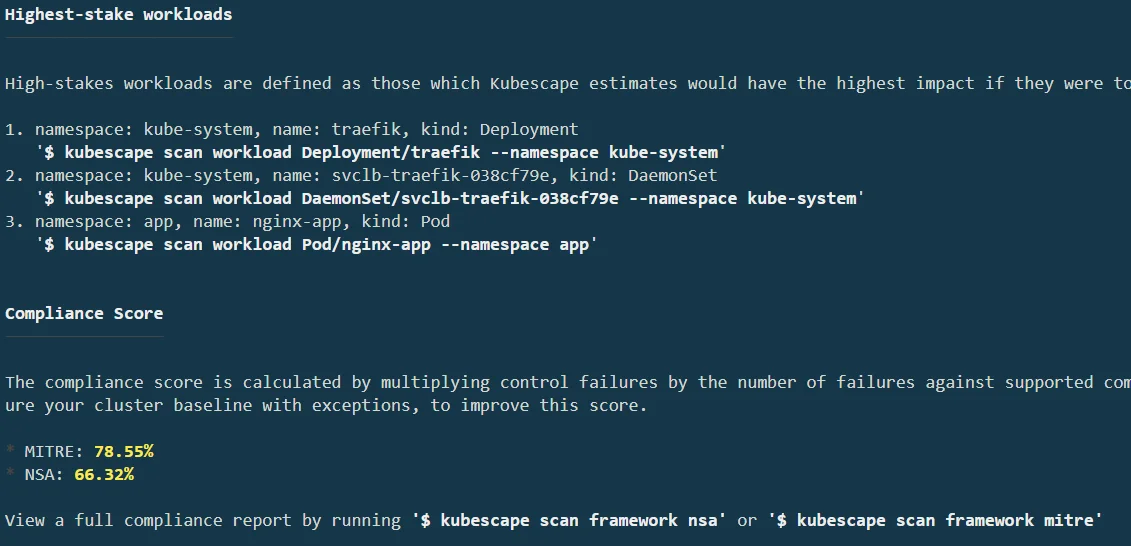
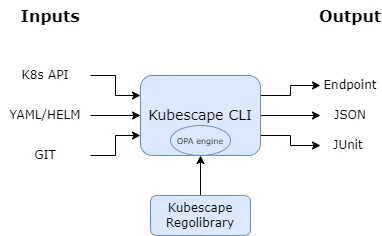
Open Policy Agent runs the policy engine. Controls are written in Rego and live in a public repo called Regolibrary.
After the first run, the CLI caches controls locally — scans work offline from that point.
Operator components
The operator has four main pieces:
- kubescape — misconfiguration scanning (same engine as the CLI)
- kubevuln — image vulnerability scanning using Grype
- storage — exposes scan data as Kubernetes API objects
- synchronizer — exports data to external providers
An optional node agent DaemonSet deploys to every node for host scanning and runtime vulnerability relevancy calculations.
Note: The node agent monitors running workloads via eBPF and feeds data into relevancy calculations. This lets teams focus on vulnerabilities that are actually reachable in production rather than chasing theoretical risks across every image layer.
Image scanning and patching
Image scanning wraps Grype to find CVEs in base images and dependencies. Each scan produces an SBOM and maps vulnerabilities to specific packages.
Copacetic handles automatic patching: it rebuilds images with updated packages without touching the application layer. Run kubescape patch to patch a vulnerable image directly.
Network policy generation
Network policy generation watches real traffic patterns in your cluster and recommends NetworkPolicy resources for least-privilege segmentation. If you’ve ever tried writing network policies by hand, you know why this matters.
Compliance and output
Supported frameworks: CIS Kubernetes Benchmark (multiple versions), NSA-CISA, MITRE ATT&CK for containers, and SOC 2. Custom frameworks can be defined using Rego.
Each control gets a risk score from 0 to 100. The CLI supports namespace filtering with --include-namespaces and --exclude-namespaces, exception rules for risk acceptance, and a severity threshold flag that fails the scan when the score gets too high.
IDE integration
The VS Code extension scans YAML files in the editor and shows findings in the Problems tab. Frameworks download locally for offline scanning. Scans trigger automatically on file save by default.
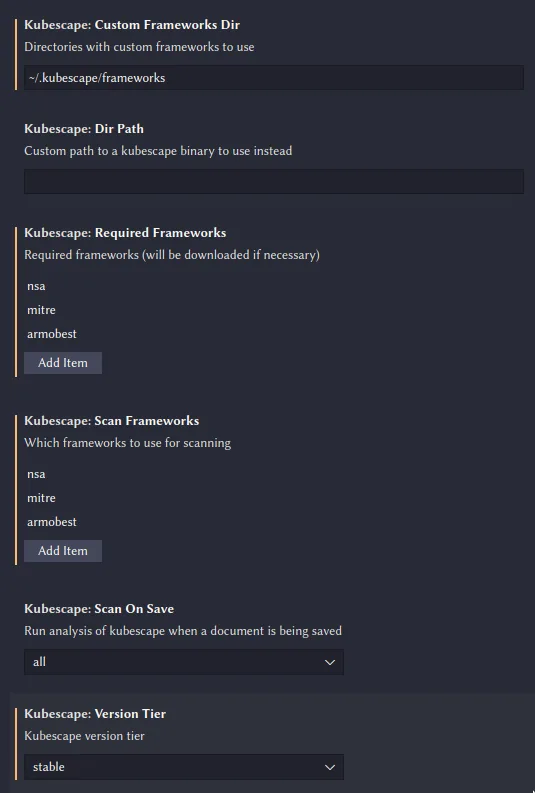
Pro tip: Both the CLI and VS Code extension cache compliance frameworks locally after the first download. Useful for air-gapped environments or when you want consistent results across runs without network calls.
What does Kubescape integrate with?
 GitHub Actions
 GitLab CI
 Jenkins
 CircleCI
 VS Code
 Lens
LensHow do I get started with Kubescape?
Install the CLI with curl -s https://raw.githubusercontent.com/kubescape/kubescape/master/install.sh | /bin/bash, or use Homebrew, Krew, Chocolatey, or Scoop. Then run kubescape scan against your current kubeconfig context, adding framework nsa or framework cis-v1.23 to target a specific standard.
Check the risk score and per-control breakdown in the output. Use --format json --output results.json for machine-readable output, or --format sarif for GitHub code scanning.
For continuous scanning, runtime detection, and network policy generation, deploy the in-cluster operator with helm install kubescape kubescape/kubescape-operator -n kubescape --create-namespace.
When to use Kubescape
Kubescape fits teams whose security concerns center on Kubernetes. Misconfigurations, image vulnerabilities, runtime threats, compliance — it handles all of these in one open-source tool.
Pick it when you need compliance validation against CIS, NSA-CISA, or MITRE ATT&CK. The in-cluster operator is worth deploying if you want continuous monitoring beyond pre-deployment checks.
For a broader view of Kubernetes security strategy, see the cloud infrastructure security guide . For broader IaC security coverage that includes Terraform and CloudFormation, pair Kubescape with Checkov or Terrascan .
If you want a commercial platform with enterprise support, Snyk IaC offers similar Kubernetes scanning inside a larger security suite.