


What is Kingfisher?
Kingfisher is an open-source secret scanner built in Rust by MongoDB that finds, validates, and revokes leaked credentials across codebases, Git history, cloud storage, and developer platforms.
It ships 1,051 detection rules, performs live API validation for 516 of those detectors, and maps each confirmed credential to the cloud resources it can actually reach.
The project was created by Mick Grove , a Staff Security Engineer at MongoDB. He started Kingfisher in July 2024 as a personal project, and MongoDB open-sourced the result on June 16, 2025 under Apache 2.0.
Frustrated by the performance issues, limited flexibility, and high false positive rates of existing open source secret scanners, I started building my own tool in July 2024.
Mick Grove, Staff Security Engineer, MongoDB — creator of Kingfisher
Kingfisher began as a fork of Praetorian’s Nosey Parker but has since been re-engineered around Intel’s Hyperscan SIMD regex engine, Tree-sitter parsers for 16 programming languages, and a multi-stage pipeline that chains regex matching, parser context verification, entropy filtering, checksum verification, and live API validation.
The result is a scanner that answers the harder triage question — not “does this look like a secret” but “is it real, who owns it, and what can an attacker do with it.”
Maintainer: MongoDB — primary author Mick Grove
Repo: github.com/mongodb/kingfisher — 1,142+ stars, 87 releases
Detection: 1,051 rules (516 with live validation) across 16 programming languages
Scan sources: 18+ targets — Git, GitHub, GitLab, Docker, S3, GCS, Jira, Confluence, Slack, Teams, Hugging Face, and more
I have been tracking secret scanners since the original Nosey Parker release, and Kingfisher is the first OSS scanner I have seen that ships every layer of the find-validate-revoke loop in a single binary.
Most teams currently stitch this together from TruffleHog (validation), a custom AWS access-key auditor (blast radius), and a cloud IAM script (revocation).
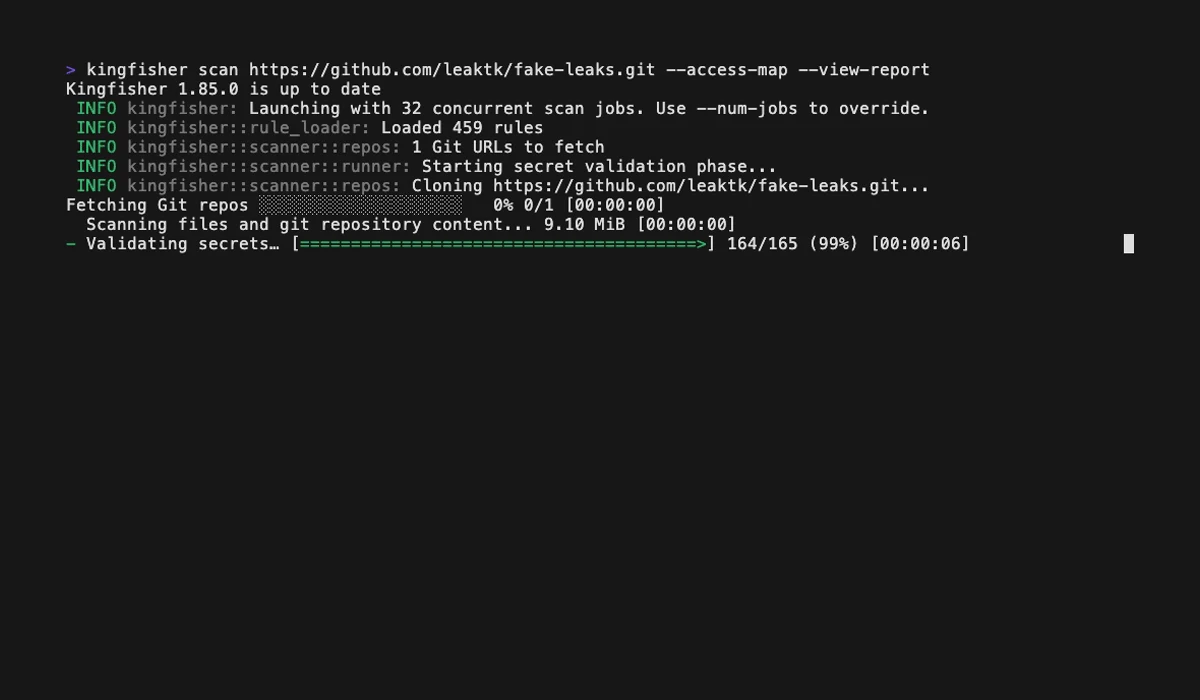
| Capability | Details |
|---|---|
| Live Credential Validation | 516 of the 1,051 detectors call the issuing provider’s API to confirm the secret is still active, separating real incidents from historical noise |
| Access Map Blast Radius | Maps each validated credential to its cloud identity, accessible resources, and permission scopes across 43 providers — answering “what can an attacker do with this” |
| Direct Revocation | kingfisher revoke invalidates leaked credentials for supported platforms (GitHub, GitLab, Slack, AWS, GCP, and more) from the same CLI that found them |
What are Kingfisher’s key features?
Kingfisher’s feature set covers detection, validation, blast-radius mapping, and revocation in a single Apache 2.0 binary — the four capabilities that other OSS scanners typically split across multiple tools.
| Feature | Details |
|---|---|
| Detection rules | 1,051 rules with parser-based context verification |
| Live validators | 516 detectors that call the issuing provider’s API |
| Languages parsed | 16 programming languages via Tree-sitter |
| Access Map | Blast-radius mapping for 43 cloud and SaaS providers |
| Revocation | Direct token invalidation for supported platforms (GitHub, GitLab, Slack, AWS, GCP, Heroku, Cloudflare, and more) |
| Scan targets | 18+ — Git, GitHub, GitLab, Azure Repos, Bitbucket, Gitea, Hugging Face, Docker images, S3, GCS, Jira, Confluence, Slack, Teams |
| Output formats | JSON, JSONL, SARIF, HTML, TOON |
| Cross-tool import | Report viewer imports Gitleaks and TruffleHog JSON |
| Custom rules | YAML-based rules with confidence levels and dependency chains |
| Installation | Homebrew, PyPI (uv tool), Docker (ghcr.io), curl installer, source |
| Platforms | Linux, macOS, Windows |
| License | Apache 2.0 |
Live credential validation
Live credential validation is what separates Kingfisher from regex-only scanners. 516 of the 1,051 detectors call the issuing provider’s API to confirm a discovered credential still works, after a regex match has already passed parser context verification and entropy checks.
An AWS access key triggers an STS call, a GitHub token hits the user endpoint, a Slack token tries auth.test. Only credentials that authenticate successfully are flagged as validated.
Use --only-valid to drop everything that did not pass this step, which produces a list of confirmed live secrets rather than a triage backlog of regex matches.
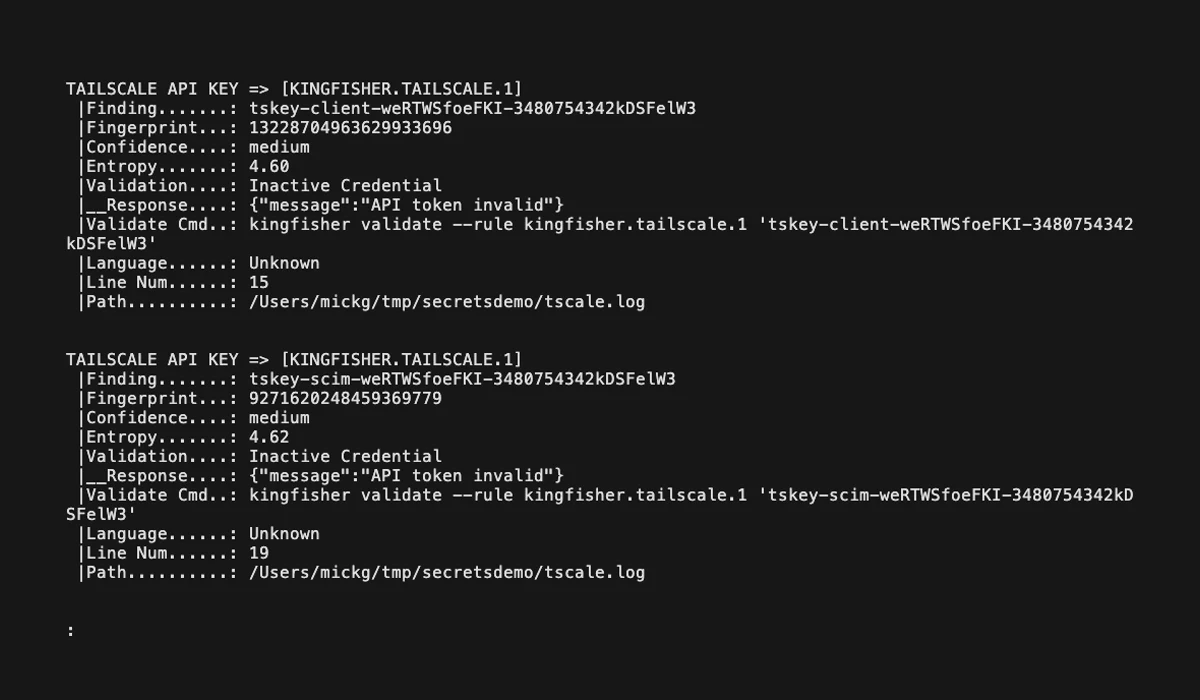
Validation runs entirely on your infrastructure. Discovered secrets never leave the environment — Kingfisher only sends the credential to the provider that issued it, never to MongoDB or any third party. This matters for regulated workloads where shipping potentially-live credentials to an external SaaS is itself a compliance event.
Access Map: blast-radius mapping
Access Map is the feature that separates Kingfisher from every other open-source scanner. For each validated credential, Kingfisher queries the provider’s API to enumerate three things — the identity behind the key, the resources it can access, and the permission scopes it carries.
Coverage spans 43 providers as of August 2026 including AWS, GCP, Azure, GitHub, GitLab, Stripe, Jira, Slack, Airtable, CircleCI, and Shopify.
For an AWS key this means Kingfisher tells you the IAM principal, the policies attached, and the resources reachable through those policies. For a GitHub token it returns the user, the org memberships, and the repo permissions.
# Generate an Access Map and open the visual report
kingfisher scan /path/to/code --access-map --view-report
This shifts triage from “is this real” to “what can an attacker do with this.” A validated AWS key with s3:GetObject on a single bucket is a different incident from the same key with iam:CreateAccessKey on the root account, and Access Map surfaces that difference automatically.
Direct credential revocation
Kingfisher includes a revoke subcommand that invalidates a leaked credential directly through the issuing provider. Supported platforms include GitHub, GitLab, Slack, AWS, GCP, Heroku, and Cloudflare, with the full list documented in the project’s REVOCATION_PROVIDERS reference.
# Revoke a leaked GitHub personal access token
kingfisher revoke --rule github "ghp_xxxxxxxxxxxxxxxxxxxxxxxxxxxxxxxxxxxx"
For multi-step providers Kingfisher chains the revocation calls — for example, a Heroku token revocation issued in v1.92.0 walks through the OAuth authorization endpoints rather than a single delete.
This collapses the find-validate-rotate loop into a single CLI session, which matters when a token is already in a public commit and the clock is running.
Multi-source scanning
Kingfisher scans 18+ targets in a single tool — local files, Git history, GitHub, GitLab, Azure Repos, Bitbucket, Gitea, Docker images, AWS S3, Google Cloud Storage, Jira, Confluence, Slack, Microsoft Teams, and Hugging Face.
| Target type | Sources |
|---|---|
| Source control | Local Git, GitHub (cloud + Enterprise), GitLab (cloud + self-hosted), Azure Repos, Bitbucket, Gitea |
| Cloud storage | AWS S3, Google Cloud Storage |
| Containers | Docker images (via ghcr.io image or local registry) |
| Collaboration | Slack, Microsoft Teams, Jira, Confluence |
| ML platforms | Hugging Face |
| Local | Files, directories, compressed archives, SQLite databases |
# Scan an entire GitHub organization
KF_GITHUB_TOKEN="ghp_..." kingfisher scan github --organization my-org

# Scan a Docker image directly
kingfisher scan docker --image alpine:latest

# Scan an S3 bucket
kingfisher scan s3 --bucket my-bucket
Korean archive formats (HWPX, HWP, EGG) landed in v1.96.0 alongside 18 new HTTP validators across 15 providers.
Detection rules and language-aware parsing
The 1,051 detection rules span the categories you would expect from a modern scanner:
| Category | Example providers |
|---|---|
| Cloud | AWS, GCP, Azure, Cloudflare, Heroku, DigitalOcean |
| CI and developer platforms | GitHub, GitLab, CircleCI, Docker Hub, npm, PyPI, Terraform |
| Databases | PostgreSQL, MySQL, MongoDB, Redis, Firebase, Supabase |
| Messaging | Slack, Discord, Teams, Telegram, Twilio, SendGrid |
| Observability | Datadog, Grafana, New Relic, Sentry, Honeycomb |
| Payments | Stripe, PayPal, Square, Plaid, Coinbase |
| Crypto | PEM keys, SSH keys, PGP/GPG, JWTs |
The AI/ML coverage is unusually deep — 35+ providers including OpenAI, Anthropic, Google Gemini, Mistral, Cohere, Groq, and Stability AI. This category is where false positives bite hardest because LLM tokens have lower entropy than older AWS-style keys, so context-aware parsing is doing real work.
That parsing layer is the second-stage filter. Kingfisher uses Tree-sitter parsers for 16 programming languages to confirm a regex match actually appears in a string literal, not a comment, type definition, or test fixture.
The parser-based context verifier introduced in v1.95.0 trimmed the binary by ~19MB and added another ~15% performance gain.
Writing custom YAML detection rules
Kingfisher rules live in YAML files with confidence levels and dependency rules — “rule A only fires if rule B matches within N lines” is closer to Semgrep’s tainted-flow semantics than to the flat regex lists older scanners ship.
A custom rule sketch for an internal API key looks roughly like this:
rules:
  - name: internal-api-key
    pattern: '\bAPP_KEY_[A-Z0-9]{32}\b'
    confidence: high
    validation:
      type: http
      method: GET
      url: https://api.internal.example.com/v1/auth
      success_status: 200
The exact field names, dependency-rule schema, and rules path are documented in the project’s RULES.md reference — that file is the source of truth and worth reading before you ship a rule set into CI. Custom rules merge with the 1,051 built-in rules at load time.
The validation block lets you wire any HTTP-callable provider — including internal services — into the same live-validation pipeline that ships with the built-in 516 validators.
A rule that confirms a successful response from the issuing service marks a finding as validated, so internal credentials get the same “is it real” treatment as cloud SaaS keys.
For multi-token detection (an AWS access key paired with its secret, for example), the dependency rule system reduces false positives by requiring related context to match nearby.
Compliance and audit-ready scanning
Kingfisher targets the workflows that compliance teams ask about — SLSA v3 provenance for the binary itself, baseline reports that suppress known findings without losing them, audit-trail outputs in JSON and SARIF, and on-prem-only validation that keeps secrets inside your infrastructure.
Baseline management is the feature that scales scan adoption. Run a first pass against a legacy repo with --manage-baseline to capture the current findings, then subsequent scans use --baseline-file to suppress that known set and surface only NEW findings.
# Capture the current findings as a baseline
kingfisher scan /path/to/code \
  --confidence low \
  --manage-baseline \
  --baseline-file ./baseline-file.yml

# Subsequent scans skip everything in the baseline
kingfisher scan /path/to/code \
  --baseline-file ./baseline-file.yml
This collapses the “we have 4,000 historical findings, where do we even start” problem into a clean newer-than-baseline gate that fits PR-level CI budgets.
Audit trails are emitted in SARIF for upload to GitHub Advanced Security, JSON for SIEM ingestion, and HTML for stakeholder reporting.
Validation traffic is logged with timestamps and provider responses, which gives compliance auditors the “here is exactly what was checked, when, and what came back” record they need to sign off on the control.
TOON output for LLM and agent workflows
Kingfisher introduced TOON output in v1.89.0 specifically for LLM and agent pipelines. TOON is a token-efficient layout that compresses scan findings into a format that fits more rows inside a model’s context window than verbose JSON.
# Emit findings as TOON for an LLM remediation agent
kingfisher scan /path/to/code --format toon --output findings.toon
This matters when an automated remediation agent is reading the scan report, deciding which credentials to rotate, and then calling kingfisher revoke itself. Standard JSON eats context windows fast on monorepos with hundreds of findings, and TOON gives the agent more room to reason.
Alongside TOON the scanner emits standard JSON, JSONL, SARIF (for GitHub Advanced Security), and HTML.
The browser-based report viewer accepts Kingfisher, Gitleaks, and TruffleHog JSON, which lets you triage findings from all three scanners in one UI.
Report viewer for cross-tool triage
The hosted report viewer at mongodb.github.io/kingfisher/viewer/ accepts Kingfisher, Gitleaks, and TruffleHog JSON in the same UI.
This is the only OSS scanner viewer I have found that imports findings from competitors — useful when you inherit a repo with old scan reports from a previous tool and want a single triage surface instead of three tabs.
When Kingfisher enriches a finding from a Gitleaks or TruffleHog import (live validation result, Access Map data, fingerprint deduplication), the row gets an “Enriched by Kingfisher” callout. This keeps the original tool’s audit trail intact while layering Kingfisher’s extra metadata on top.
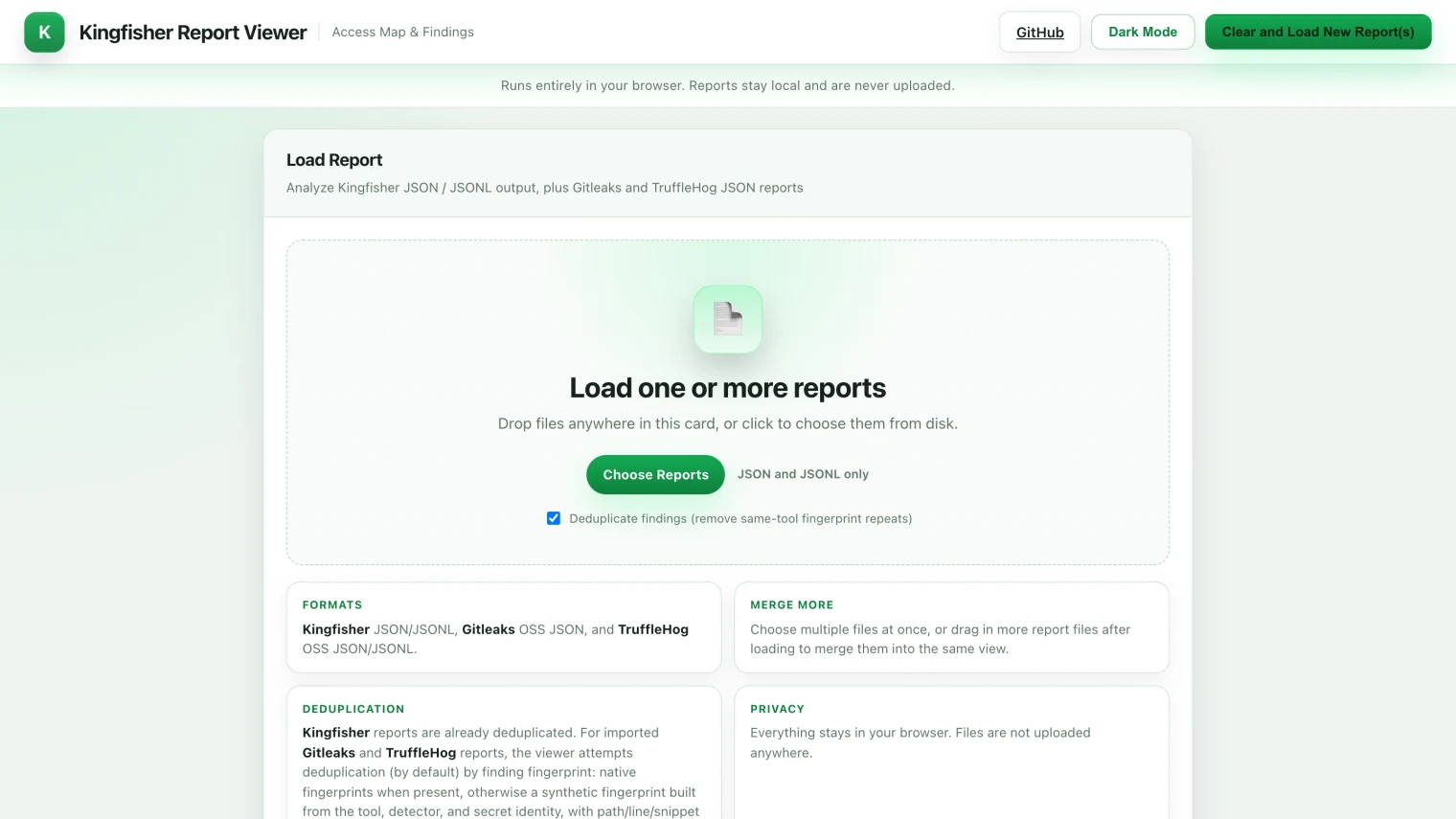
The same viewer runs locally — no data leaves your machine:
# Open any Kingfisher, Gitleaks, or TruffleHog JSON in the local viewer
kingfisher view ./report.json
kingfisher view boots a transient web server, opens the report in your browser, and shuts down on exit. For air-gapped environments where the hosted viewer is off-limits, the local mode is the only practical way to triage hundreds of findings without piping JSON through jq.
Architecture: how Kingfisher gets fast and accurate
Kingfisher is built in Rust on top of Intel’s Hyperscan SIMD-accelerated regex engine, with a multi-stage pipeline that chains five filters in sequence.
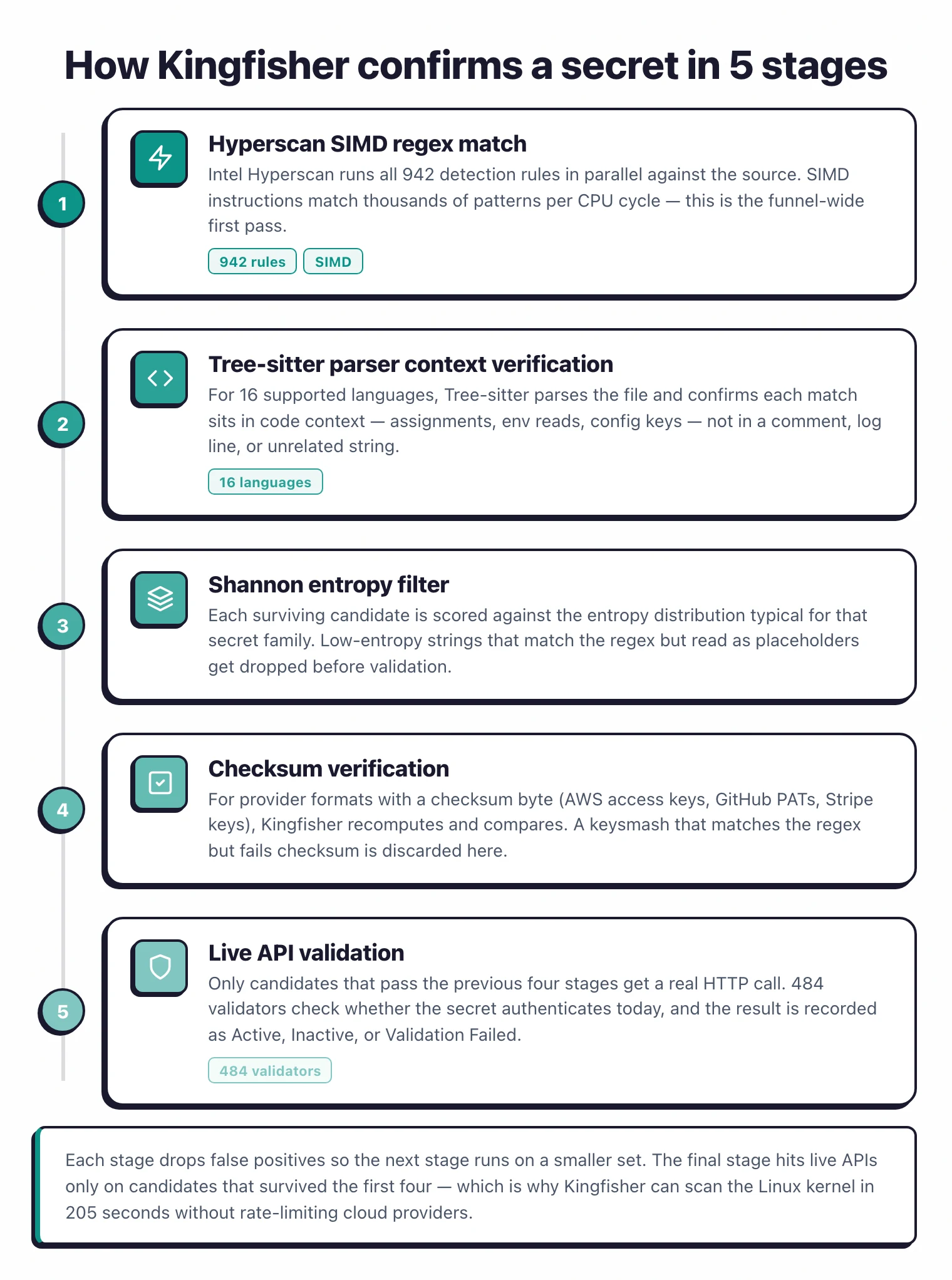
| Stage | Purpose |
|---|---|
| 1. Hyperscan regex | SIMD-accelerated parallel matching across the corpus |
| 2. Parser context verification | Tree-sitter confirms the match sits in a string literal in 16 languages |
| 3. Shannon entropy | Drops low-entropy regex matches that are obviously not credentials |
| 4. Checksum verification | Modern token formats with embedded checksums (Stripe, GitHub) get an offline check |
| 5. Live API validation | 516 detectors hit the issuing provider to confirm the secret still works |
Each stage is cheap relative to the next, so the pipeline does the bulk of false-positive elimination before any HTTP request is made.
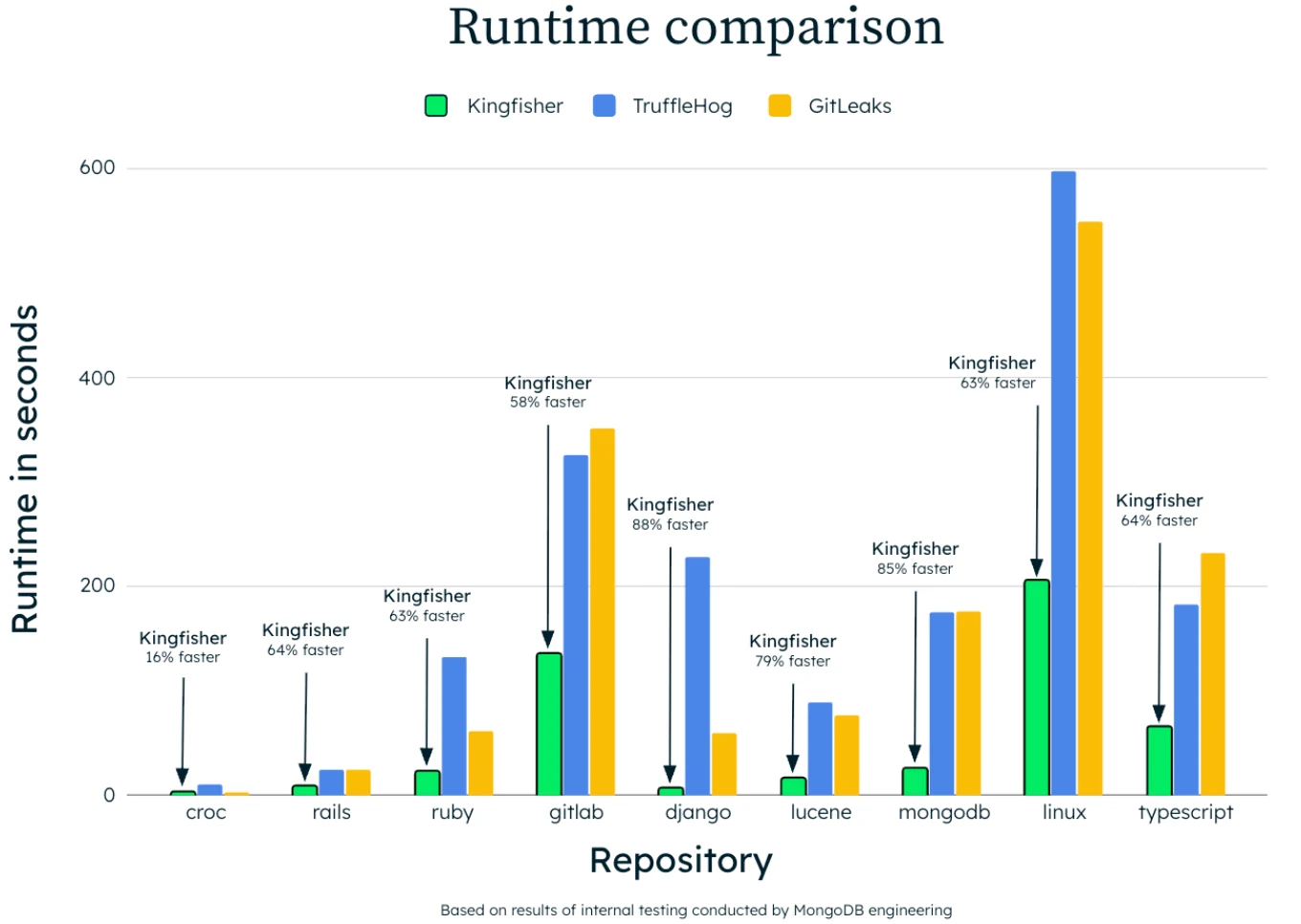
The dependency rule system means a validation call only fires when context strongly suggests it will succeed — MongoDB’s published example is a GitLab monorepo scan that issued only 17 HTTP validation requests end to end. A naive validate-everything design would generate orders of magnitude more network traffic.
The scanner is multi-threaded by default and ships a full Linux kernel scan in 205 seconds on the docs benchmark. MongoDB’s blog includes a runtime comparison chart against TruffleHog and Gitleaks across multiple language profiles, with Kingfisher posting the shortest runtime in every case.
How to install Kingfisher
Kingfisher ships as a single Rust binary with packages for every common installation path.
# macOS / Linux via Homebrew
brew install kingfisher

# Python toolchain via uv
uv tool install kingfisher-bin

# Docker (no local install needed)
docker run --rm -v "$PWD":/src ghcr.io/mongodb/kingfisher:latest scan /src

# One-line installer
curl -sSL https://raw.githubusercontent.com/mongodb/kingfisher/main/scripts/install-kingfisher.sh | bash
Pre-built binaries are available for Linux, macOS, and Windows on the GitHub releases page. The release cadence is unusually fast — 87 releases between June 2025 and April 2026, averaging roughly two releases per week, which signals the project is under active investment rather than coasting on its launch.
Verifying releases (GitHub attestations and SLSA provenance)
Every Kingfisher release on GitHub ships with build attestations, and SLSA v3 provenance generation was integrated into the release workflow in v1.92.0.
For a tool that revokes credentials and queries cloud APIs on your behalf, this is the difference between “trust the download” and “verify the supply chain” — security teams in regulated environments need the second.
Verify a downloaded release artifact before running it:
# Verify the GitHub build attestation
gh attestation verify kingfisher-linux-x64.tgz --repo mongodb/kingfisher
The SLSA v3 attestation maps the binary back to the exact GitHub Actions workflow that built it, the source commit, and the build steps. This satisfies SLSA Build Level 3 requirements, which most enterprise security controls reference for third-party binaries entering production.
The Homebrew, Docker, and PyPI packages all consume the same signed artifacts, so the verification chain extends through the package-manager installs as well.
How to use Kingfisher
The CLI organizes scans by source. You pick a source (scan, scan github, scan docker, scan s3, etc.) and Kingfisher chains the detection pipeline automatically.
# Scan a local repository or directory
kingfisher scan /path/to/code

# Show only validated secrets (drop unverified regex hits)
kingfisher scan /path/to/code --only-valid

# Generate an Access Map and view it in the browser
kingfisher scan /path/to/code --access-map --view-report

# JSON output for CI pipelines
kingfisher scan /path/to/code --format json --output findings.json

# Scan a whole GitHub organization
KF_GITHUB_TOKEN="ghp_..." kingfisher scan github --organization my-org

# Validate a single credential without scanning anything
kingfisher validate --rule opsgenie "12345678-9abc-def0-1234-56789abcdef0"

# Revoke a discovered token
kingfisher revoke --rule github "ghp_xxxxxxxxxxxxxxxxxxxxxxxxxxxxxxxxxxxx"

# Open a Kingfisher, Gitleaks, or TruffleHog JSON report in the viewer
kingfisher view ./report.json
The --only-valid flag is the one to reach for first. It filters out everything that didn’t authenticate, leaving a list of credentials that are live right now — usually a single-digit number even on repos where the raw match count is in the hundreds.
Wire --access-map in next when the validated list is non-empty, then use revoke for anything in the supported provider set.
Kingfisher vs TruffleHog vs Gitleaks
Kingfisher overlaps with TruffleHog on live validation and with Gitleaks on git scanning, but it stakes out distinct ground on Access Map and revocation.
| Capability | Kingfisher | TruffleHog | Gitleaks |
|---|---|---|---|
| Language | Rust + Hyperscan | Go | Go |
| Detection rules | 1,051 | 800+ | ~150 built-in |
| Live validation | 516 detectors | 800+ detectors | None (regex only) |
| Blast-radius mapping | 43 providers (Access Map) | 20+ identity-mapping detectors | Not available |
| Direct revocation | Supported platforms (GitHub, GitLab, AWS, GCP, Slack, …) | Not available | Not available |
| AI/ML token coverage | 35+ providers | Partial | Custom rules required |
| Output formats | JSON, JSONL, SARIF, HTML, TOON | JSON, SARIF | JSON, CSV, JUnit, SARIF |
| License | Apache 2.0 | AGPL-3.0 | MIT |
| First release | June 2025 | 2017 | 2018 |
| GitHub stars | 1,142 | 25,700 | 25,900 |
TruffleHog still wins on ecosystem maturity, raw star count, and breadth of validated detectors.
Kingfisher wins on architecture (Rust + Hyperscan beats Go on raw scan speed in MongoDB’s benchmarks), on the unique Access Map and revocation features, and on the AGPL-vs-Apache license question that matters to commercial vendors who do not want to ship AGPL components.
For git-only scanning where speed and simplicity dominate, Gitleaks is still the easiest single binary to drop into CI. For multi-source scanning with verification, the choice is between TruffleHog’s mature ecosystem and Kingfisher’s modern stack with blast-radius and revocation features that no other OSS scanner currently ships.
Origin story: from Nosey Parker to MongoDB production
Kingfisher started as a Mick Grove side project in July 2024. Grove forked Praetorian’s Apache 2.0 Nosey Parker — at the time the strongest Rust+Hyperscan secret scanner — and rebuilt it around the missing layers.
What landed in the open source release on June 16, 2025 had moved well past the original Nosey Parker codebase. Live validation was added inside the rule system, hundreds of new detection patterns shipped, and baseline management for known findings was built in.
Parser-based context verification was layered on top of Hyperscan. New scan targets — cloud storage, Slack, Confluence, Hugging Face — were added. Cross-platform builds for Linux, macOS, and Windows were stabilized.
MongoDB itself runs Kingfisher in four ways, per the announcement post — pre-commit hooks on developer machines, CI/CD integration on every push, historical Git-history audits for legacy exposures, and live cloud and database validation.
The 87 releases that have shipped since June 2025 — averaging two per week — suggest MongoDB treats Kingfisher as production infrastructure rather than a one-time donation to the community.
How do I get started with Kingfisher?
- Install — Run
brew install kingfisheron macOS, or pull the Docker image fromghcr.io/mongodb/kingfisher:latest. Pre-built binaries with cross-platform support are on the GitHub releases page. - Scan a repository — Run
kingfisher scan /path/to/repoto scan files, directories, and Git history. Add--only-validto drop everything that didn’t authenticate. - Map the blast radius — When the validated list is non-empty, rerun with
--access-map --view-reportto see which cloud identities and resources each leaked credential can reach. - Revoke or integrate — Use
kingfisher revoke --rule <provider> <secret>for supported providers, or wire--format sarifinto your CI for GitHub Advanced Security.
When to use Kingfisher
Kingfisher is the right choice when you need more than detection — when the question is “what can an attacker actually do with the secrets we found, and how fast can we revoke them.” The Access Map and revocation features close the loop that other OSS scanners leave open.
It is also the strongest fit for regulated workloads where AGPL is off the table. Apache 2.0 makes Kingfisher safe to embed in commercial products and internal platforms without the AGPL service-clause that complicates TruffleHog deployments.
For pure git-only scanning where blast-radius analysis is overkill, Gitleaks is still the lighter option.
The project is young — 1,142 GitHub stars at time of writing, against TruffleHog’s 25,700 — but the engineering velocity and MongoDB’s operational backing make it the most credible new entrant in the secret-scanning space since TruffleHog itself launched in 2017.
Frequently Asked Questions
What is Kingfisher?
Who built Kingfisher?
Is Kingfisher free?
How is Kingfisher different from TruffleHog and Gitleaks?
What is the Access Map feature?
Can Kingfisher revoke leaked secrets directly?
kingfisher revoke command invalidates a discovered secret directly through the issuing provider, with support for GitHub, GitLab, Slack, AWS, GCP, Heroku, Cloudflare, and other supported platforms. This collapses the find-validate-rotate loop into a single CLI session, which matters when a token is already in a public commit.