


JFrog Xray is a binary-level SCA tool
that scans compiled artifacts stored in JFrog Artifactory — Docker images, JAR files, and installed packages — rather than source manifests like package.json or pom.xml.
It ships only as an add-on to Artifactory on the Pro X, Enterprise X, or Enterprise+ subscriptions, with no standalone or free-tier option.
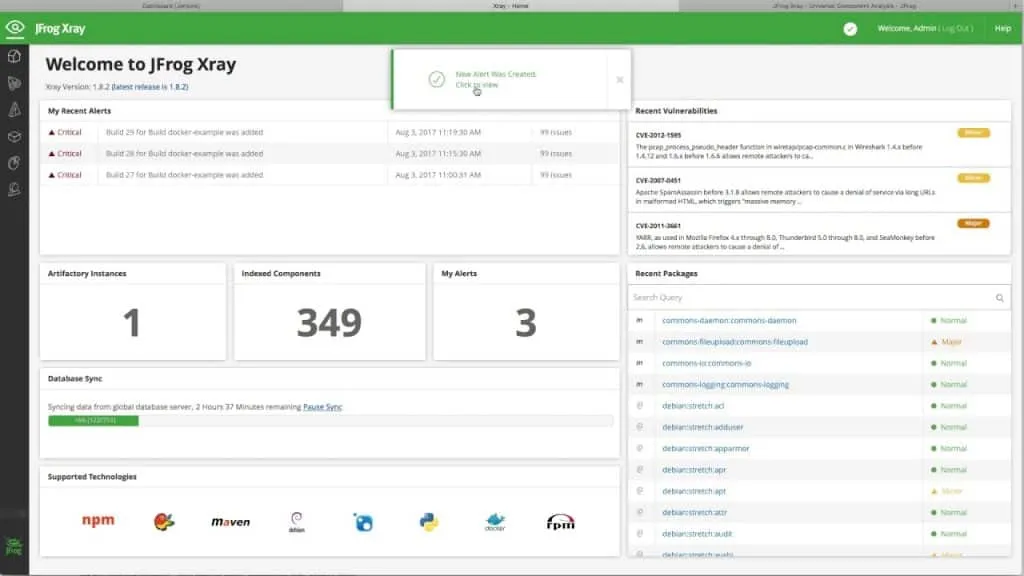
Sonatype’s 9th Annual State of the Software Supply Chain report (2023) found that one in eight open-source downloads carries known and avoidable risks, which makes scanning what you actually deploy a meaningful control.
The binary-level distinction matters: source-level scanners read manifests like package.json or pom.xml at build time and can miss what actually ends up in a compiled artifact.
Xray scans the artifact itself — for a Docker image that means the base image, every build layer, and all installed packages; for a Java application it traces through nested JARs and their transitive dependencies.
That depth catches vulnerabilities that source-level scanners never see.
I come across JFrog Xray in teams that already run Artifactory. It scans binaries at the repository level for known CVEs and license issues, and the policy engine can block a build promotion when a new vulnerability lands.
The value is the Artifactory tie-in.
As a standalone SCA I would reach for something else, but if you are already on the JFrog Platform, Xray is the sensible way to get supply-chain coverage without adding another tool to the stack.
What is JFrog Xray?
JFrog Xray is a software composition analysis (SCA) tool built into the JFrog Platform that scans compiled artifacts in JFrog Artifactory — Docker images, JAR files, npm packages — for known vulnerabilities, license risks, and malicious components.
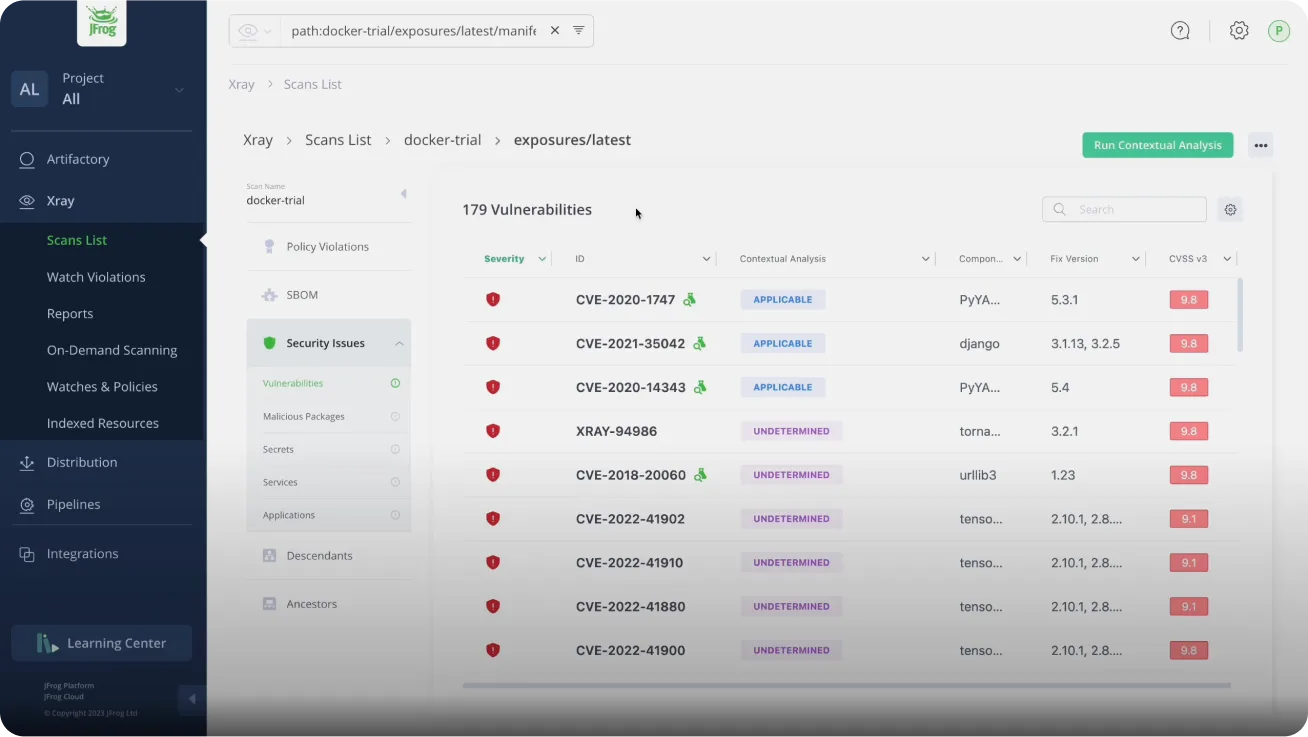 Xray’s Scans List ranks each CVE by severity and flags whether Contextual Analysis found it applicable.
Unlike source-level SCA tools that read manifest files at build time, Xray analyzes the binary artifact itself, so it sees what actually ships instead of what the manifest claimed.
Xray draws on the NVD, GitHub Advisories, and JFrog’s own Security Research data.
JFrog reports its malicious-package catalog has passed 2.8 million artifacts — a self-reported count from the vendor’s own research team, not an independently audited benchmark, and JFrog’s public research pages now describe the total as continuously growing rather than pinning a figure.
It covers the package types most shops care about: Docker, npm, Maven, PyPI, NuGet, Go, Cargo, Composer, RubyGems, and Conan.
What are JFrog Xray’s key features?
Supported artifact types
| Artifact type | Package formats |
|---|---|
| Java | Maven (JAR, WAR, EAR), Gradle |
| JavaScript | npm, yarn |
| Python | PyPI (wheel, sdist) |
| Go | Go modules |
| .NET | NuGet |
| Ruby | RubyGems |
| PHP | Composer |
| Rust | Cargo |
| C/C++ | Conan |
| Containers | Docker, OCI, Helm charts |
| OS packages | Alpine (APK), Debian (DEB), RPM |
| Generic | ZIP, TAR, binaries |
Deep recursive scanning
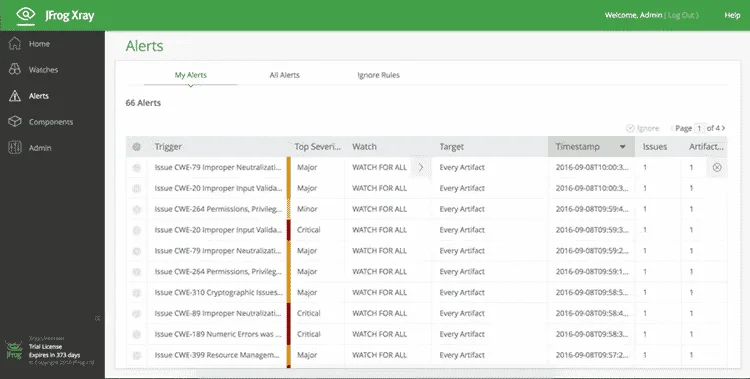
Xray analyzes the complete dependency graph of every artifact. For Docker images it examines the base image, each build layer, and all packages installed at each stage; for Java applications it traces through nested JARs and their transitive dependencies.
A common scenario: a direct dependency that itself pulls in a vulnerable library two levels deep. Without recursive scanning, that stays hidden until someone exploits it.
Impact analysis
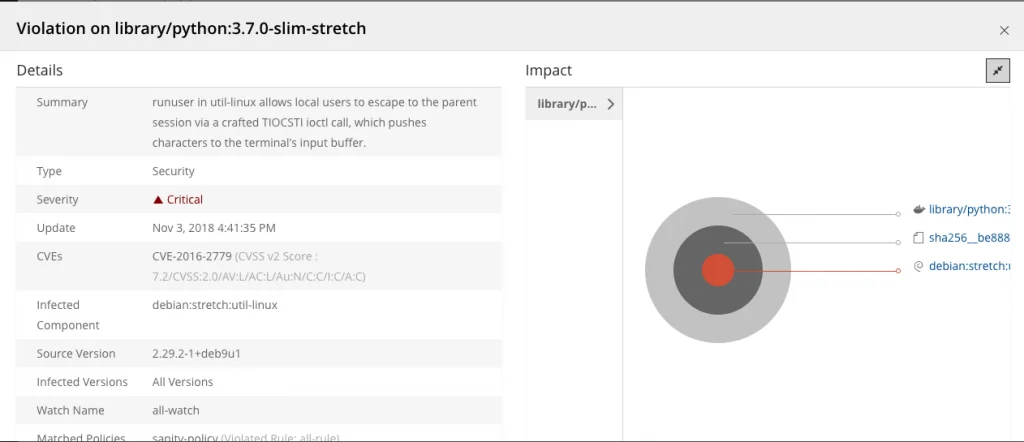
When a new CVE is disclosed, Xray’s impact analysis returns every affected artifact, build, release, and deployment across your entire Artifactory instance in a single query.
It turns what would otherwise be a day of log archaeology into one lookup against the dependency graph Xray has already built.
Policy-based security gates
Xray policies let you express your security standards as rules the platform actually enforces.
You can gate on CVE severity thresholds, specific CVE IDs (block Log4Shell by ID, not just CVSS), license types (no GPL in commercial products), CVSS scores, or component age.
When an artifact trips a rule, Xray can block the download, fail the build, trigger an alert, or fire a webhook.
License compliance
Xray identifies licenses on every component in your software so legal and compliance teams know their open-source obligations before a release ships.
Policies can block accidental inclusion of incompatible licenses at the artifact stage, which is cheaper than finding them during a pre-release legal review.
Installation
JFrog Xray runs as part of the JFrog Platform and requires JFrog Artifactory.
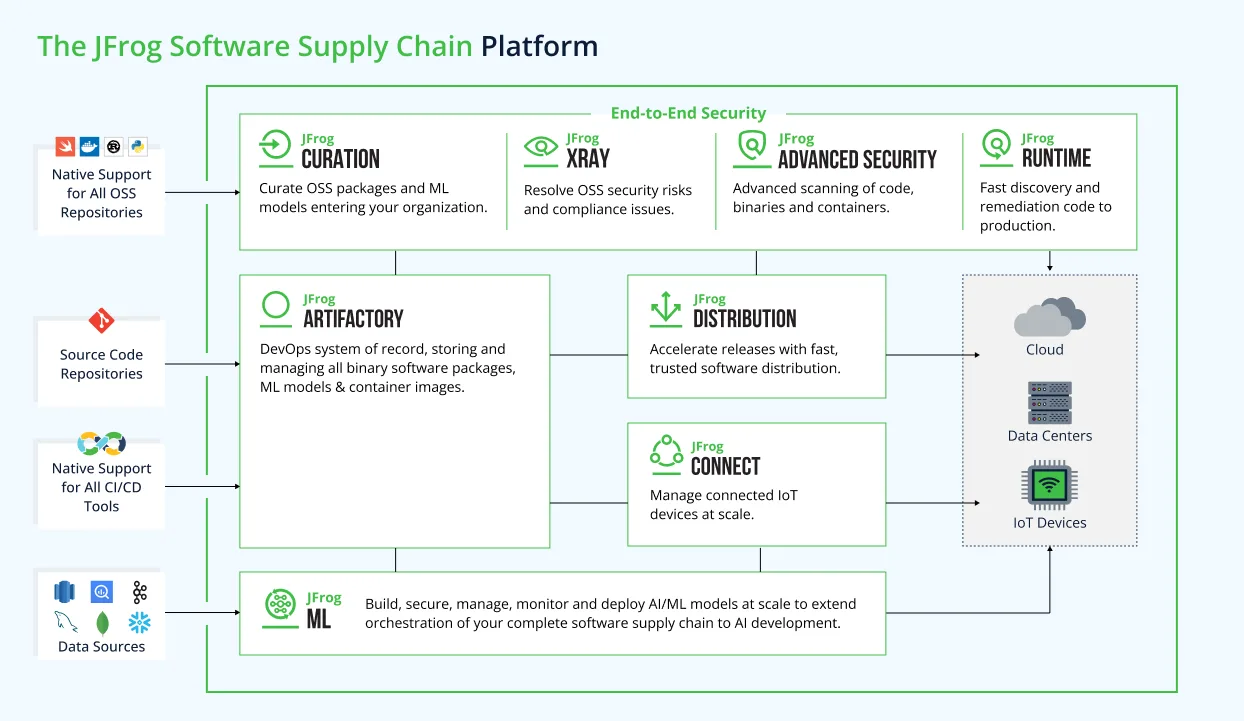 Xray runs inside the JFrog Platform’s security layer, scanning the artifacts that Artifactory stores.
Deployment options include:
Cloud (JFrog SaaS)
The fastest path — JFrog manages infrastructure, updates, and scaling.
# No installation required - configure via UI or API
# Access at https://your-instance.jfrog.io
Self-Hosted (Docker)
# Pull the Xray Docker images
docker pull releases-docker.jfrog.io/jfrog/xray-server:latest
docker pull releases-docker.jfrog.io/jfrog/xray-indexer:latest
docker pull releases-docker.jfrog.io/jfrog/xray-analysis:latest
docker pull releases-docker.jfrog.io/jfrog/xray-persist:latest

# Run using Docker Compose (recommended)
# Download docker-compose.yaml from JFrog documentation
docker-compose -f docker-compose.yaml up -d
Helm (Kubernetes)
# Add JFrog Helm repository
helm repo add jfrog https://charts.jfrog.io
helm repo update

# Install Xray (requires existing Artifactory)
helm upgrade --install xray jfrog/xray \
  --namespace jfrog \
  --set xray.joinKey=<your-join-key> \
  --set xray.jfrogUrl=https://artifactory.example.com
What does JFrog Xray integrate with?
GitHub Actions
name: Build and Scan
on: [push, pull_request]

jobs:
  build-scan:
    runs-on: ubuntu-latest
    steps:
      - uses: actions/checkout@v4

      - name: Setup JFrog CLI
        uses: jfrog/setup-jfrog-cli@v4
        with:
          version: latest
        env:
          JF_URL: ${{ secrets.JF_URL }}
          JF_ACCESS_TOKEN: ${{ secrets.JF_ACCESS_TOKEN }}

      - name: Build and publish
        run: |
          jf rt build-add-dependencies my-build 1 "target/*.jar"
          jf rt upload "target/*.jar" libs-release-local/
          jf rt build-publish my-build 1

      - name: Scan for vulnerabilities
        run: |
          jf audit --watches "prod-security-policy"

      - name: Scan Docker image
        run: |
          jf docker scan myapp:${{ github.sha }}
GitLab CI
stages:
  - build
  - scan
  - deploy

variables:
  JFROG_CLI_BUILD_NAME: "my-app"
  JFROG_CLI_BUILD_NUMBER: "$CI_PIPELINE_ID"

scan:
  stage: scan
  image: releases-docker.jfrog.io/jfrog/jfrog-cli-v2:latest
  script:
    - jf config add --url=$JF_URL --access-token=$JF_ACCESS_TOKEN
    - jf rt download "libs-snapshot-local/*.jar" ./target/
    - jf audit --fail=true --min-severity=High
  rules:
    - if: $CI_PIPELINE_SOURCE == "merge_request_event"
Jenkins Pipeline
pipeline {
    agent any

    stages {
        stage('Build') {
            steps {
                rtServer (
                    id: "ARTIFACTORY_SERVER",
                    url: "${ARTIFACTORY_URL}",
                    credentialsId: "artifactory-credentials"
                )
                rtMavenDeployer (
                    id: "MAVEN_DEPLOYER",
                    serverId: "ARTIFACTORY_SERVER",
                    releaseRepo: "libs-release-local",
                    snapshotRepo: "libs-snapshot-local"
                )
                rtMavenRun (
                    pom: 'pom.xml',
                    goals: 'clean install',
                    deployerId: "MAVEN_DEPLOYER"
                )
            }
        }

        stage('Xray Scan') {
            steps {
                xrayScan (
                    serverId: "ARTIFACTORY_SERVER",
                    buildName: "${JOB_NAME}",
                    buildNumber: "${BUILD_NUMBER}",
                    failBuild: true
                )
            }
        }
    }
}
When to use JFrog Xray
Xray makes sense when you’re already running Artifactory and want security scanning that lives next to your artifact management instead of as a separate CI step.
Strengths:
- Binary-level analysis of actual deployment artifacts
- Malicious-package catalog JFrog reports at 2.8M+ artifacts (vendor figure)
- Impact analysis across your entire artifact repository
- Policy gates that block vulnerable downloads
- Broad package-type support (Docker, Maven, npm, PyPI, NuGet, Go, Cargo, Composer, RubyGems, Conan, Alpine, Debian, RPM)
Limitations:
- Requires JFrog Artifactory (not standalone)
- Commercial only, no free tier
- Heavier setup compared to CLI-based scanners
How much does JFrog Xray cost?
JFrog Xray is sold as a capability inside three JFrog Platform subscriptions: Pro X, Enterprise X, and Enterprise+. There is no standalone Xray SKU and no free tier; Artifactory is a prerequisite for every tier.
Pro X is the entry point for small and mid-market teams that need universal artifact management with basic Xray scanning.
Enterprise X adds high availability, advanced security scanning, and 24/7 support with defined SLAs — this is the tier most growing SaaS and product companies land on.
Enterprise+ targets large organisations with multi-site needs, distribution, stricter uptime guarantees, and assigned support contacts.
Public list pricing for Pro starts at $150/month and Enterprise X at $950/month per the JFrog pricing page , but those are entry numbers that include only 25 GB and 125 GB of consumption respectively.
Real contracts scale with repository count, storage, data transfer, and edge nodes. For a buyer-side view of typical JFrog Platform contract sizes, see the AppSec tools pricing guide .
Free trial paths exist (cloud and self-hosted), but any production deployment requires a paid subscription. Teams that only want CVE detection without committing to the JFrog Platform usually pick Grype , Trivy , or OWASP Dependency-Check instead.
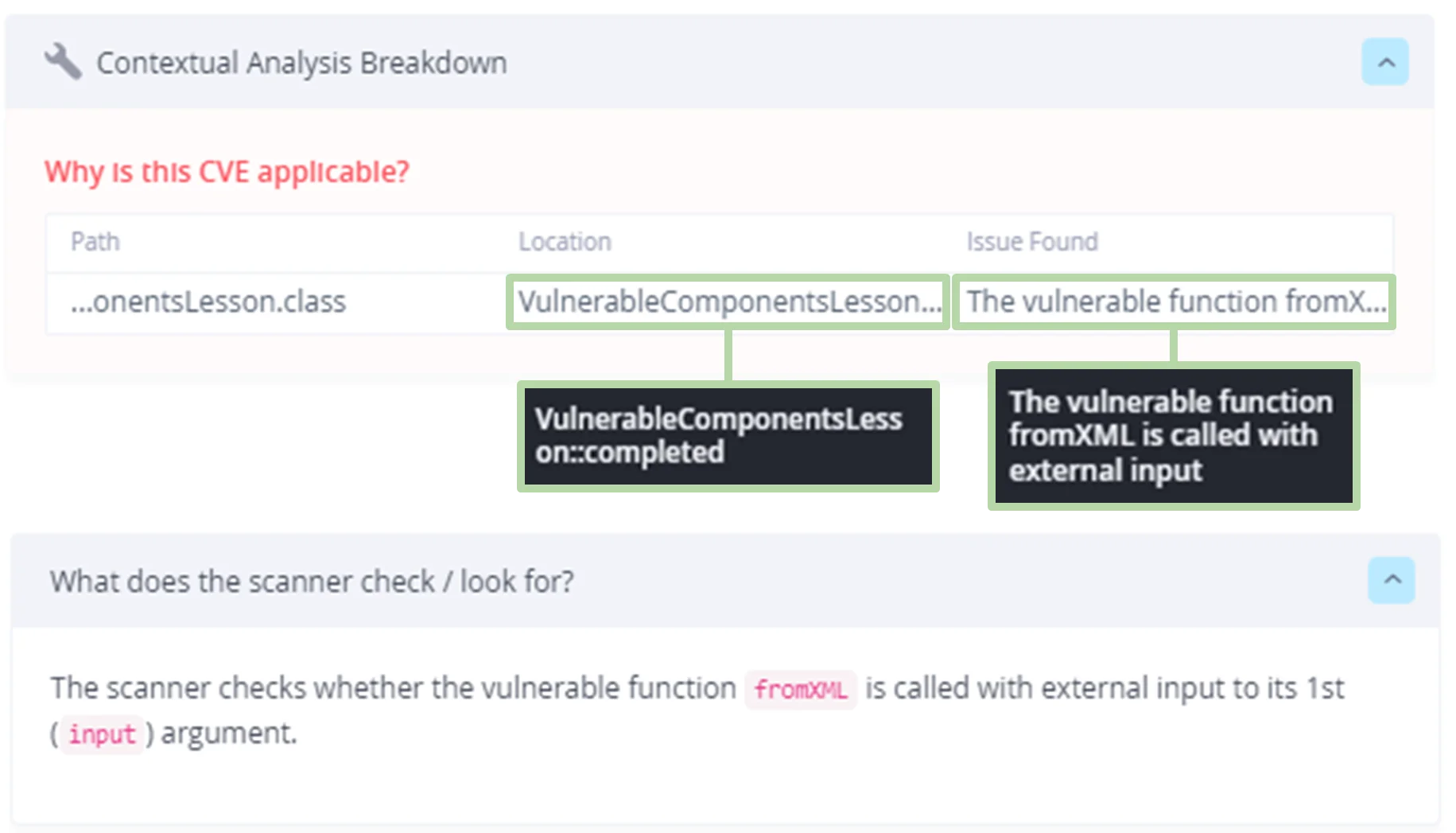
Contextual Analysis: which CVEs actually matter in your code
Most of the CVE noise from a binary SCA scan is not exploitable. The vulnerable class is pulled in transitively, but nothing in your application ever calls the vulnerable sink.
Contextual Analysis is Xray’s answer to that, and on a large monorepo it tends to be the feature engineers judge the tool on.
JFrog’s documentation describes Contextual Analysis as determining “whether a detected CVE is truly exploitable based on how dependencies are used within first-party code” (JFrog Advanced Security docs ).
Under the hood, JFrog’s Security Research team writes per-CVE applicability rules that look for specific vulnerable function invocations, configuration flags, or import paths in your code.
If the rule does not match, the finding is marked Not Applicable and deprioritised rather than dropped.
The academic case for this approach is solid.
Ponta, Plate, and Sabetta showed in their ICSME 2018 study that only a fraction of metadata-flagged vulnerable dependencies are actually reachable from application code, and that a code-centric analysis materially reduces false positives (Ponta et al., 2018 ).
A more recent empirical evaluation of six SCA tools on 21,130 Maven modules found average F1-scores of 0.890 for dependency detection (build scan) and just 0.475 for vulnerability accuracy.
Proper dependency-resolution support alone cut vulnerability false positives by 18.28% (Zhao et al., 2023 ).
The tradeoffs are real. Rules are maintained by JFrog’s research team, so coverage is best on CVEs they have triaged and thinner across the rest of the NVD.
Call-graph analysis also misses reflection, dynamic dispatch into vulnerable methods, and runtime classloading, which is a known limit of static reachability and not specific to Xray.
I still turn it on — the false-positive drop on Log4j-style findings pays for the residual uncertainty — but I do not treat “Not Applicable” as “safe forever”; I re-scan whenever the app changes.
Impact analysis across Artifactory: from a new CVE to every affected artifact
The moment Xray earns its keep is the hour after a critical CVE drops.
Instead of grepping build logs and pinging every team to ask whether their service depends on the affected version, you run one query against the dependency graph Xray has already built.
Because Xray indexes every artifact as it enters Artifactory and records each Build-Info manifest produced by the JFrog CLI, it has a dependency graph that spans repos, package types, and build numbers.
When a new CVE matches a component in that graph, impact analysis walks the edges and returns every Docker image, JAR, npm tarball, Helm chart, and release bundle that transitively includes it.
JFrog’s product page frames it as “complete visibility into all dependencies involved in a specific build” because the scan is tied to a binary identity, not a best-guess manifest re-parse.
That graph-centric model is what separates Xray from a CI-time scanner. A pipeline scan tells one team whether the image they just built is vulnerable.
Xray answers the org-wide version of the same question: which release bundle you promoted to prod last quarter carries the affected component, and which downstream services pulled from it.
The binary repository is already the source of truth for what shipped, so the graph is there to query.
Recent empirical work on SCA for Java shows build-time scans resolve dependencies more accurately than pre-build (manifest-only) scans — average F1 of 0.890 vs 0.692 across 21,130 Maven modules — which aligns with Xray’s binary-first ingestion model (Zhao et al., 2023 ).
The caveats are real. Impact analysis is only as good as the ingest discipline of your Artifactory instance.
Artifacts built outside the platform, third-party images pulled without indexing, or repos excluded from watches are invisible to the graph — so “zero hits” can mean “no matches” or “nothing scanned”, and those look the same on the dashboard.
In my experience the first week after a Log4Shell-class event is mostly spent closing those gaps, not triaging what Xray surfaced.
For the full head-to-head with Snyk, see the dedicated JFrog Xray vs Snyk comparison .
Learn more in my guides on What is SCA? and software supply chain security .