


HCL AppScan IAST monitors application runtime behavior during functional and QA testing to detect security vulnerabilities. It uses patented algorithms for Java and .NET to track data flow and validate findings, reducing false positives compared to traditional IAST scanners.
The technology originated from IBM Security AppScan before HCL Technologies acquired the product line from IBM in 2019 . It is available through AppScan on Cloud (SaaS) and AppScan Enterprise (on-premises).
What is HCL AppScan IAST?
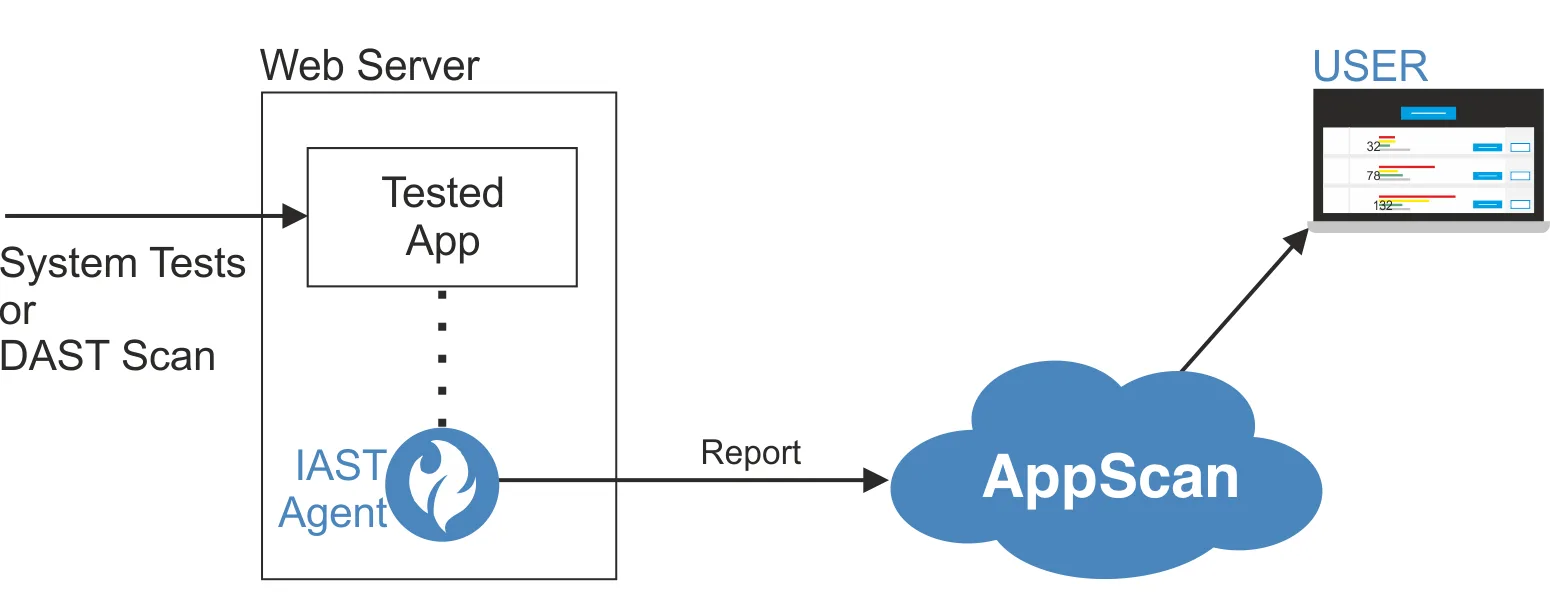
The IAST agent deploys on your application’s web server and monitors traffic passively.
As system tests or DAST scans send requests, the agent watches what happens inside the application — requests, call stacks, variables — and reports vulnerabilities it finds.
Unlike a DAST scanner that only sees HTTP responses, the agent sees inside the application, providing code locations, URLs, and specific vulnerable entities like parameters, headers, or cookies.
Sessions run indefinitely until manually stopped or the agent disconnects.
| Capability | Details |
|---|---|
| Patented Algorithms | Uses patented algorithms for Java and .NET to trace data flow from input sources to dangerous sinks. Validates whether tainted data actually reaches vulnerable operations without sanitization. |
| Hot Attach/Detach | Java agent supports attaching to running applications without restart. Enable instrumentation during test windows, detach when done. Reduces disruption in shared staging environments. |
| Auto-Issue Correlation | Uses heuristics to find correlations between IAST, DAST, and SAST findings. Groups related vulnerabilities into single issues to cut the remediation count. |
What are HCL AppScan IAST’s key features?
| Feature | Details |
|---|---|
| Java Support | Tomcat 7+, WebSphere 8.5+, JBoss/WildFly 10+, WebLogic 12+, Jetty, Quarkus (JRE 1.8.144+) |
| Java Frameworks | Spring 5/6, Struts, Resteasy, Vert.x 3/4 |
| .NET Support | Framework 4.5-4.8, .NET 5-9, Core 3.1 on IIS 7+ or Kestrel |
| Node.js Support | Express 4 with ECMAScript 6 |
| PHP Support | 7.4, 8.1, 8.2, 8.3 |
| System Requirements | Minimum 2 CPUs, 8 GB RAM (recommended: 4 CPUs) |
| Deployment Models | AppScan on Cloud (SaaS) and AppScan Enterprise (on-premises) |
| Session Duration | Indefinite (runs until manually stopped) |
Passive Runtime Monitoring
The agent monitors traffic sent to the application and reports vulnerabilities as they occur. It doesn’t generate its own test traffic.
You drive the application through system tests, manual exploration, or DAST scans, and the agent catches vulnerabilities in the code paths exercised.
This means IAST adds no extra time to your testing. The security monitoring happens alongside whatever testing you already do.
Managed Code Execution for .NET
The .NET agent runs entirely in managed code without disabling JIT optimizations. This keeps performance impact low while maintaining full visibility into both custom application code and framework interactions.
API Discovery
The IAST agent catalogs all APIs exercised during testing. This helps security teams maintain accurate API inventories and catch undocumented endpoints.
How do I get started with HCL AppScan IAST?
- Choose deployment model — AppScan on Cloud (SaaS) or AppScan Enterprise (on-premises). Download the IAST agent for your language from the AppScan portal.
- Deploy the agent — For Java, add the agent as a JVM argument or use hot attach to a running process. For .NET, install as a NuGet package or standalone installer. Node.js and PHP have their own agent packages.
- Run your tests — Execute system tests, manual testing, or DAST scans against the instrumented application. The agent monitors passively in the background with indefinite sessions.
- Review correlated findings — Results appear in the AppScan dashboard. Findings are automatically correlated across IAST, DAST, and SAST to reduce duplicate tickets.
When to Use HCL AppScan IAST
HCL AppScan IAST fits enterprises with established Java and .NET portfolios, particularly those already using AppScan for SAST or DAST. The auto-correlation across testing types is a major draw for reducing remediation workload.
The broad Java server support (Tomcat, WebSphere, JBoss, WebLogic, Jetty, Quarkus) makes it a good fit for complex enterprise environments.
If you need support for languages like Python, Go, or Ruby, consider Contrast Assess or Seeker IAST .
How does HCL AppScan IAST fit into a pipeline?
AppScan IAST observes code paths exercised by functional tests, manual sessions, or DAST. The IAST product page describes passive monitoring, API discovery, and correlation with other AppScan results.
I would run it in a long-lived QA environment with realistic authentication and test data. A useful sequence is:
- Instrument one service and verify the agent reports to the correct AppScan application.
- Run existing integration tests before adding new security-specific traffic.
- Review which routes and APIs were exercised, then close obvious coverage gaps.
- Correlate IAST findings with SAST and DAST before opening developer tickets.
This makes test coverage visible. If a route never executes, the absence of an IAST finding says nothing about that route’s security.
How is AppScan IAST deployed and updated?
HCL offers IAST through AppScan on Cloud and AppScan 360. The product page says Java can attach after startup and detach without another restart.
The AppScan on Cloud changelog shows active agent releases. July 2026 entries list Java 1.23.1, .NET 1.17.2, Node.js 1.15.3, and Python 1.0.2.
The same changelog lists IAST for Kubernetes 1.0.16 with automatic Python-agent installation. AppScan on Cloud agents can also detect and download an updated agent version automatically.
What are HCL AppScan IAST’s limitations?
IAST only analyzes executed code. Weak tests, failed authentication, missing roles, and unexercised background jobs all reduce coverage without necessarily producing an error.
Instrumentation adds a component inside the application runtime. Teams should measure CPU, memory, latency, startup behavior, and compatibility in their own frameworks before expanding deployment.
Support varies by language and runtime version. The current public matrix is more specific than the headline language list, so legacy servers and new framework releases both need verification.
Finally, AppScan IAST is commercial and tied to the wider AppScan workflow. Teams seeking a small standalone agent should include platform overhead and licensing in the decision.