


HCL AppScan is an enterprise application security platform that includes SAST , DAST, IAST, SCA, and API security testing.
It supports 30+ languages and is one of the longest-running enterprise AppSec platforms, with the free CodeSweep IDE extension as a unique offering in the enterprise tier.
What is HCL AppScan?
AppScan is a suite of security testing tools offered in cloud, on-premises, and desktop variants. The SAST component (AppScan Source) scans source code for vulnerabilities.
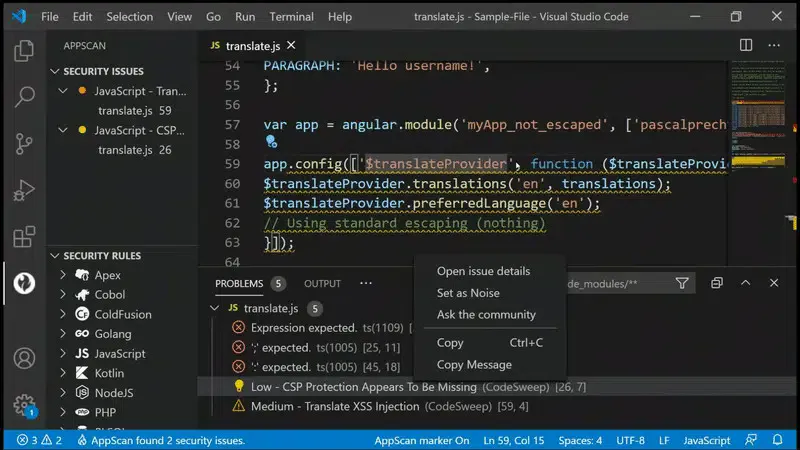
AppScan CodeSweep provides a free VS Code extension with the same detection engine, limited to single-file scanning.
| Capability | Details |
|---|---|
| 30+ Languages | Covers Java, .NET, C/C++, JavaScript, Python, PHP, Go, Ruby, Kotlin, Swift, COBOL, ABAP, Apex, Dart, Scala, Perl, and more. |
| Free CodeSweep | Free VS Code plugin with detection capabilities equivalent to AppScan Source. Single-file scanning for developers who want to try AppScan SAST. |
| AI-Powered Features | RapidFix for remediation suggestions, Intelligent Code Analytics (ICA) for automated setup, and Intelligent Findings Analytics (IFA) for finding consolidation. |
Product components
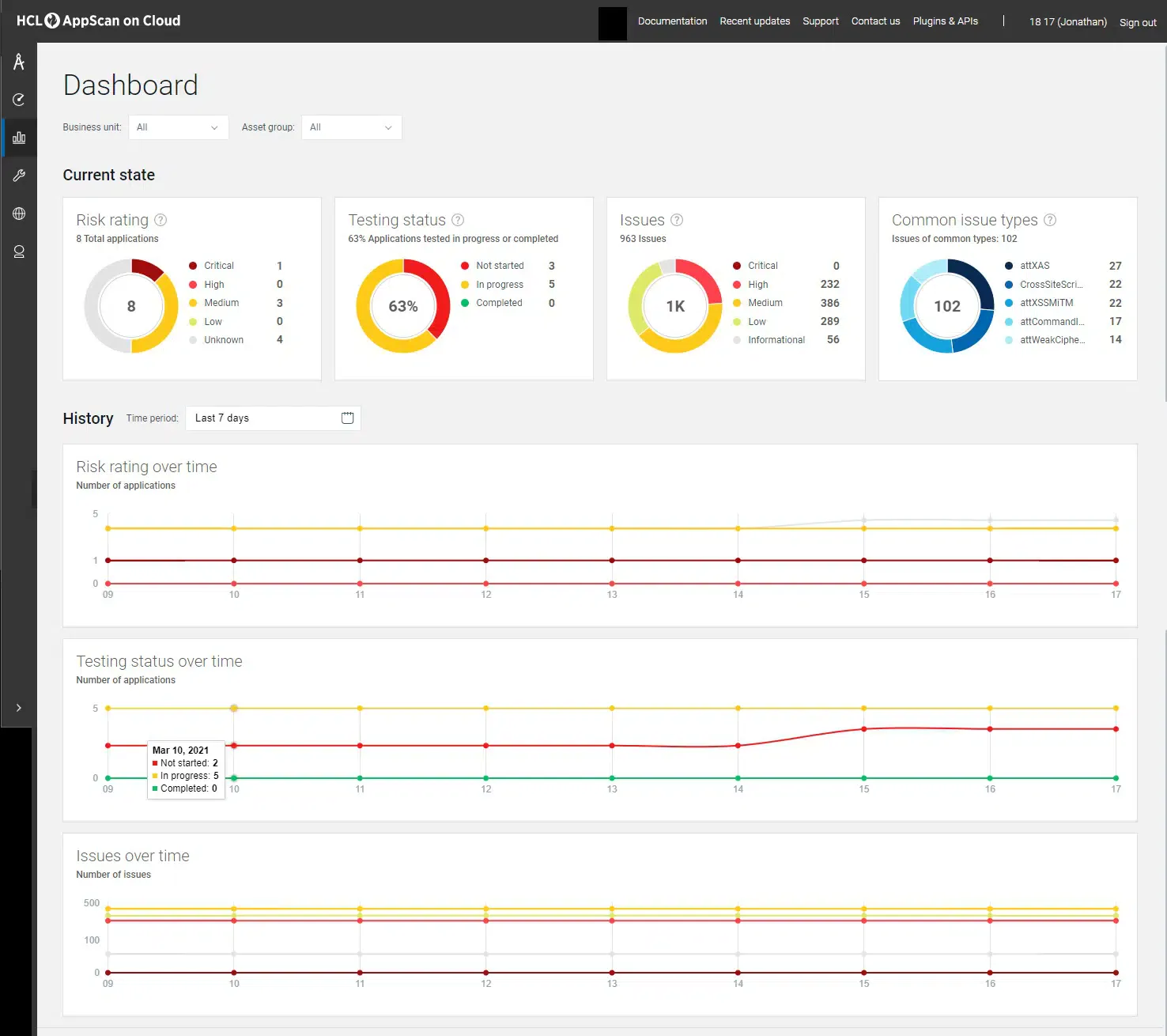
AppScan on Cloud
Cloud-based scanning for teams wanting managed infrastructure.
AppScan Enterprise
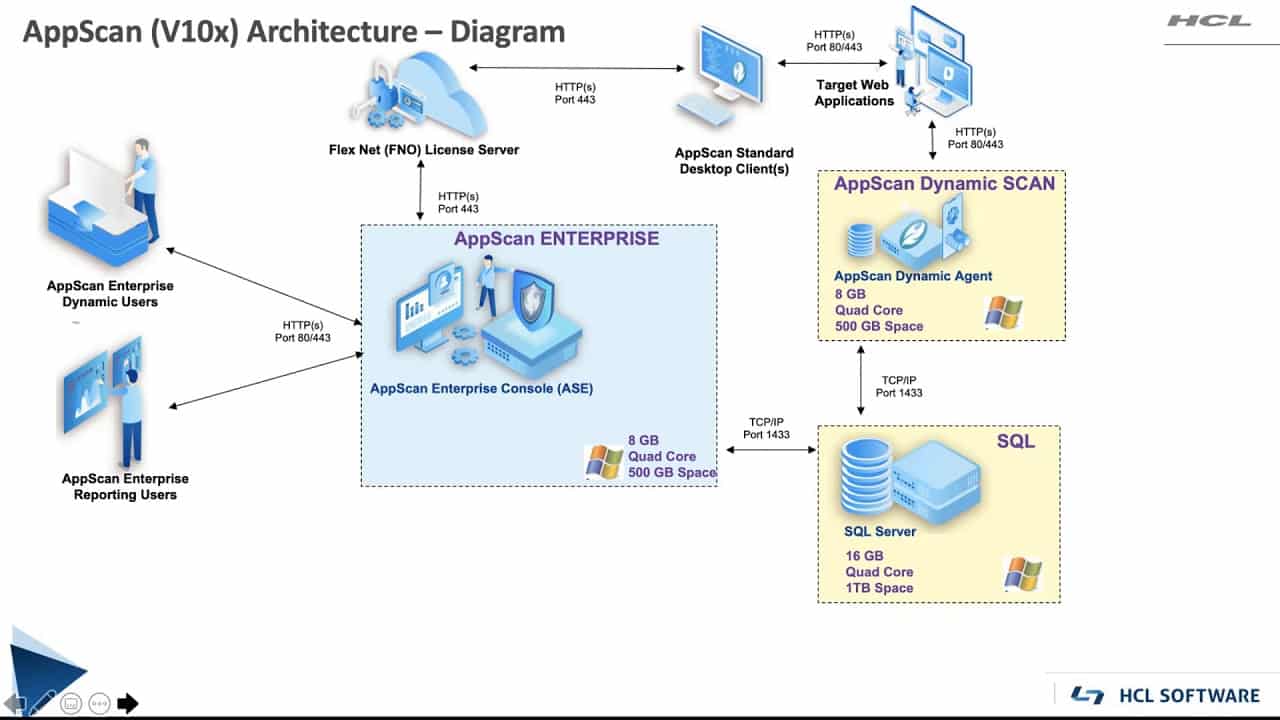
On-premises solution with DAST scanning, a dashboard console that consolidates static scan data and IAST results, and the ability to distribute scanning across multiple servers.
AppScan Source
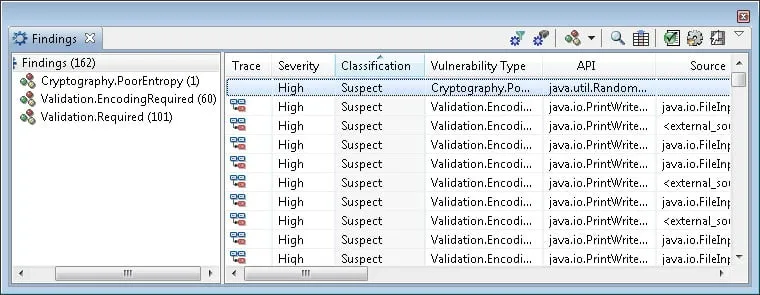
The SAST component for static code analysis on desktop systems or within CI/CD pipelines.
AppScan CodeSweep
Free VS Code extension with detection capabilities equivalent to AppScan Source, limited to single-file scanning.
How do I get started with HCL AppScan?
- Try CodeSweep — Install the free AppScan CodeSweep extension in VS Code to test the SAST detection engine on your code.
- Choose deployment — Select between AppScan on Cloud, AppScan Enterprise (on-premises), or AppScan Source (desktop). Contact HCL for pricing.
- Configure scanning — Connect repositories and configure which languages and frameworks to scan. ICA automates initial setup.
- Review and triage — Use IFA to consolidate findings into manageable groups. RapidFix provides AI-powered remediation suggestions.
When to use HCL AppScan
AppScan is built for enterprises that need SAST, DAST, IAST, and SCA in a single platform with flexible deployment options. The free CodeSweep extension lets developers try the detection engine before committing to the full platform.
What are alternatives to HCL AppScan?
For teams evaluating enterprise multi-engine SAST/DAST/IAST platforms, the closest substitutes for HCL AppScan are:
- Veracode — binary-analysis SAST plus DAST and SCA in one cloud platform; usually picked when compliance reporting matters more than on-prem flexibility.
- Checkmarx One — unified ASPM with SAST, SCA, DAST, IaC, and API security; a fit when teams want one console covering most scanners.
- OpenText Fortify — long-running enterprise SAST with deep on-prem support; comparable to AppScan Enterprise’s posture.
- Synopsys Coverity — established enterprise SAST with C/C++ depth, often picked for embedded and regulated industries.
For IBM-legacy customers, AppScan is often the path of least resistance after the 2017 HCL acquisition. For greenfield procurement, the SAST tools hub lists the full active set.
How much does HCL AppScan cost?
HCL now publishes self-service options on its AppScan marketplace . A 14-day SaaS trial includes five SAST, DAST, or SCA scans, with private-site and regulatory reports excluded.
Professional SaaS is listed at $29.99 per scan with a one-year subscription. Enterprise SaaS remains custom-priced, while CodeSweep and the on-premises GitHub extension are listed as free downloads.
How does HCL AppScan fit into a pipeline?
AppScan Source runs as a desktop application, IDE plugin, or automation tool. HCL also documents integrations with build tools, defect trackers, version control, and continuous-integration pipelines.
I would separate developer feedback from centralized policy:
- Use CodeSweep or an IDE plugin for fast, local findings.
- Run AppScan Source on pull requests or protected branches.
- Send accepted results into AppScan on Cloud or AppScan 360 for policy and reporting.
- Add DAST, IAST, and SCA only where each testing method has an owner.
The cloud product also exposes APIs and an automation framework. That supports custom workflows when an out-of-box integration does not match the delivery process.
How is AppScan deployed and updated?
AppScan on Cloud is hosted and managed by HCL, with continuous platform updates. AppScan 360 is containerized and supports on-premises, cloud, sovereign-cloud, air-gapped, and hybrid deployments.
The current update log records multiple changes each month. July 2026 entries include AI-component discovery, new AI tests, and updated IAST agents.
Self-managed buyers should plan platform upgrades separately from scanner-engine and agent updates. AppScan on Cloud receives continuous updates, giving buyers less control over timing.
What are HCL AppScan’s limitations?
AppScan is a large suite rather than one scanner. Licensing, deployment, policy design, and ownership can become heavier than the technical scan for small teams or a single-language portfolio.
The free CodeSweep path is intentionally limited. It provides in-editor SAST, but it does not reproduce the centralized governance, multi-engine coverage, reporting, or deployment controls of the commercial platform.
Different engines also have different coverage conditions. SAST needs a supported build context, DAST needs reachable authenticated paths, and IAST only sees code exercised during testing.
I would validate one representative application end to end before committing to broad consolidation. The test should include setup effort, scan time, triage volume, developer routing, and upgrade ownership.