


Harbor is an open-source cloud native container registry that stores, signs, and scans container images and OCI artifacts. It is a CNCF graduated project (since June 2020) and the most widely adopted open-source container registry, with 28.7k GitHub stars and 5.1k forks.
What is Harbor?
Harbor is a self-hosted container registry that adds vulnerability scanning, content trust, multi-registry replication, and role-based access control on top of the Docker Distribution registry. VMware open-sourced it in 2016, it joined the CNCF in July 2018, and it graduated in June 2020 — making it the first open-source registry to reach CNCF graduated status.
I would reach for Harbor when a team needs a private registry with security controls that hosted registries charge for or do not offer.
Air-gapped environments, regulated industries, and multi-cloud setups are the typical use cases.
How does Harbor scan for vulnerabilities?
Harbor scans container images for known vulnerabilities using pluggable scanner backends. Trivy is the default scanner since Harbor v2.2 (it replaced Clair as the default in 2021).
Clair and Anchore Enterprise also work through Harbor’s scanner adapter framework, letting organizations choose the scanning engine that fits their existing toolchain. Scanner choice is set per project, so different teams on the same Harbor instance can use different engines.
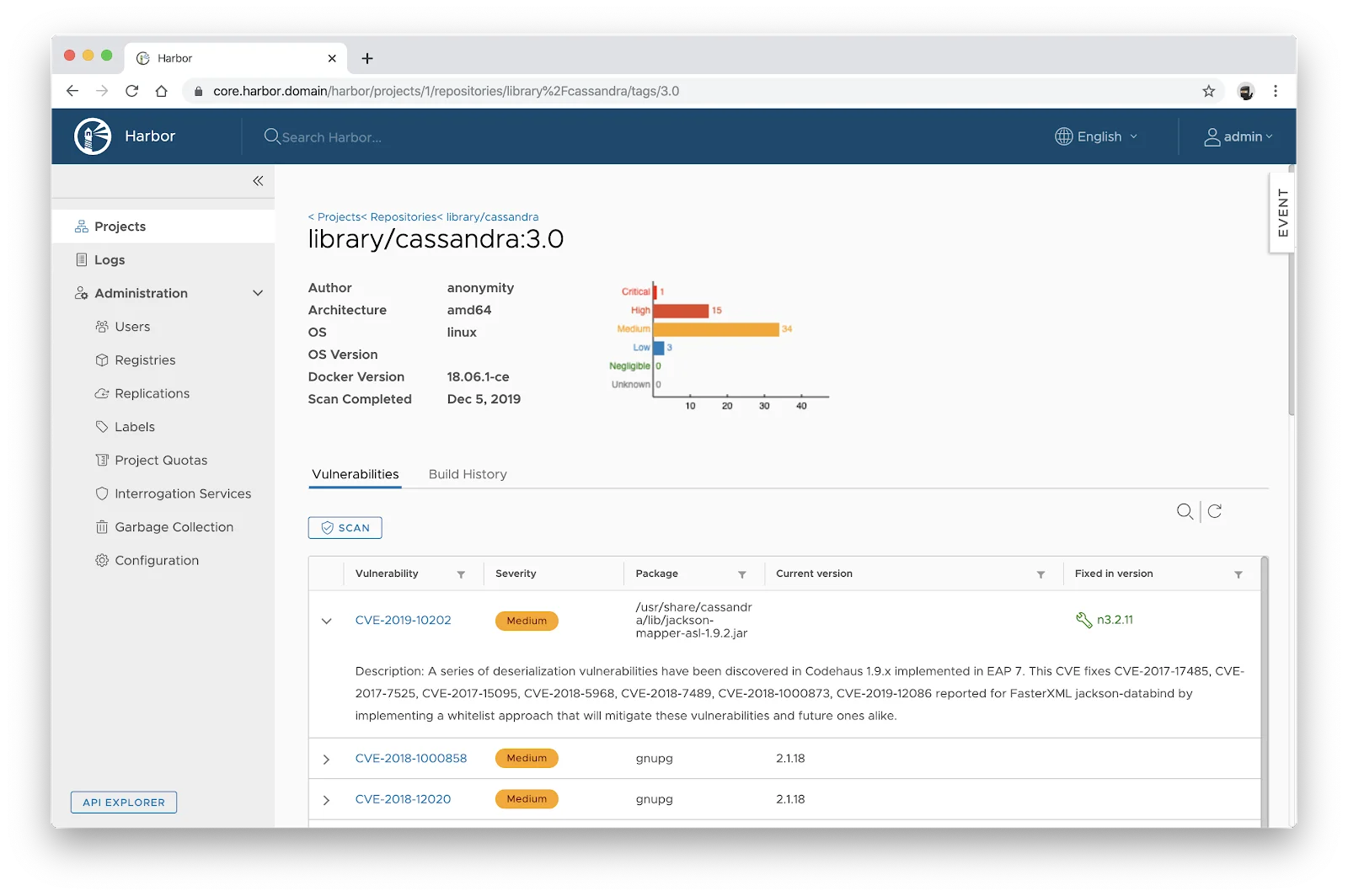
Scan-on-push policies automatically scan every image when it hits the registry. Reports show CVE IDs, severity levels, affected packages, and fixed versions, all aligned to the project’s selected scanner.
Projects can set a CVE allowlist to ignore known-but-accepted vulnerabilities, plus a severity threshold (e.g. “Critical”) that blocks pulls when the threshold is exceeded. That turns the registry into a deploy-time gate — vulnerable images never make it out of Harbor and into a running cluster.
Does Harbor support image signing?
Harbor supports artifact signing through Cosign (part of the Sigstore project) and Notation. The legacy Notary v1 path is deprecated — Cosign + Sigstore is the recommended stack on modern Harbor.
When content trust is enabled on a project, only signed artifacts can be pulled. Unsigned or tampered images get blocked, preventing compromised images from reaching production.
Signing policies live at the project level, so different projects can enforce different verification rules. Cosign supports keyless signing through OIDC and Sigstore Fulcio, which lets CI pipelines sign images using short-lived workload identities instead of long-lived signing keys checked into a vault.
Signatures replicate alongside their associated artifacts. When a replication rule covers a signed image, Harbor copies the signature too, so the chain of trust holds across registries. Verification on pull is typically enforced via a Kubernetes admission controller (Cosign policy controller, Kyverno, or OPA Gatekeeper) so untrusted images cannot land on a cluster even if Harbor’s content-trust setting is misconfigured.
Replication and multi-site deployment
Harbor replicates images between registry instances based on configurable policies. You can filter by repository, tag, or label. Replication runs on a schedule or triggers on push.
Replication targets include other Harbor instances, Docker Hub, AWS ECR, Google GCR/GAR, Azure ACR, and any OCI-compliant registry. This handles multi-datacenter deployments, disaster recovery, and hybrid cloud workflows.
Access control and multi-tenancy
Harbor organizes content into projects. Each project gets its own RBAC policies, scan settings, quota limits, and tag retention rules.
Authentication plugs into LDAP, Active Directory, OIDC providers, or the built-in database.
Robot accounts give CI/CD pipelines non-human access with scoped permissions and expiration dates. Audit logs track who pushed, pulled, deleted, or scanned artifacts.
Who should use Harbor?
Harbor is designed for organizations that need a self-hosted container registry with enterprise security controls.
Platform teams running Kubernetes in production, companies with data residency requirements, and teams operating in air-gapped or classified environments are typical users.
Harbor is free under the Apache 2.0 license with no commercial tiers.
If you only need a hosted registry and your security requirements are basic, Docker Hub or your cloud provider’s registry (ECR, GCR, ACR) may be simpler. Harbor makes sense when you need vulnerability scanning, content trust, RBAC, and replication under your own control.
What are Harbor’s limitations?
Harbor is self-hosted, meaning you provision and maintain the infrastructure: PostgreSQL database, Redis, storage backend, the core service, and the chosen scanner. That is more operational work than a managed registry like ECR or Artifactory SaaS.
Image promotion and staging workflows are basic compared to JFrog Artifactory. Harbor handles project-to-project copying via replication rules, but it does not have first-class “build → staging → prod” promotion pipelines, immutable tag promotion, or release-train tooling out of the box.
Helm chart hosting is intentionally minimal. Harbor v2.8+ stores Helm charts as OCI artifacts (which is the modern recommendation), but if you need ChartMuseum-style chart management, browsing, or release notes, you will likely run a separate tool.
Harbor handles image storage and security only — it does not include CI/CD pipelines or build capabilities, and there is no built-in vulnerability auto-remediation. For runtime container security, pair it with Falco or NeuVector .
Recent releases
Harbor v2.15.0 (March 2026) adds tag deletion options in garbage collection, a UI for limiting upstream registry connections, and backend storage improvements. This is a notable release for teams managing large registries where garbage-collection efficiency and upstream connection control matter.
Harbor v2.14 (late 2025) shipped robot account scope improvements and audit log enhancements that make CI integration easier to lock down. Harbor v2.13 (mid-2025) was the last release to broaden scanner adapter coverage and OCI artifact handling.
For the current stable tag at any time, check the Harbor releases page on GitHub — Harbor follows a roughly quarterly release cadence and 2.x is still the active major as of April 2026 (no 3.x GA). Production users should track the latest 2.15.x patch release for security fixes.