


Gitleaks is an open-source secret scanner designed to detect and prevent hardcoded secrets in git repositories. Maintained by Zach Rice and the Gitleaks community, it has over 27,769 GitHub stars and is one of the most widely adopted SAST tools for secret detection.
The maintainer has declared Gitleaks feature-complete; future releases will be security patches only, with active development moving to a successor project called Betterleaks .
According to the 2025 Verizon Data Breach Investigations Report, stolen credentials remain one of the top initial access vectors for breaches. Security teams pick Gitleaks for its speed, accuracy, and low false positive rate compared to entropy-only scanners.
What is Gitleaks?
Gitleaks scans git repositories, files, directories, and stdin to find exposed API keys, passwords, tokens, and other sensitive data. The tool uses regex patterns and entropy detection to identify secrets that developers accidentally commit to version control.
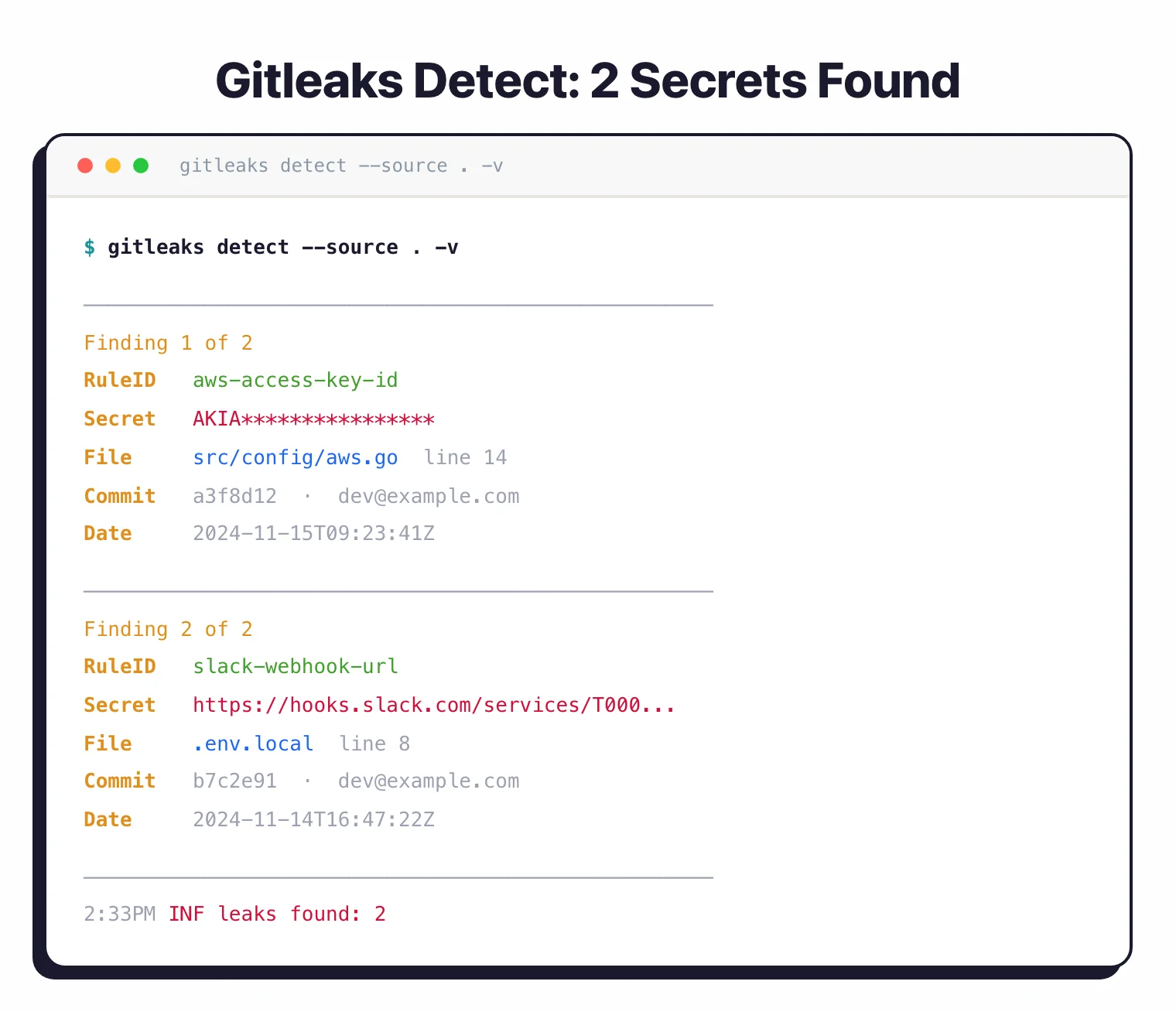
Unlike full-featured SAST platforms, Gitleaks focuses exclusively on secret detection. This specialization makes it faster and easier to integrate into existing development workflows.
You can run it locally as a pre-commit hook, in CI/CD pipelines, or as a GitHub Action to scan pull requests automatically.
Gitleaks generates reports in multiple formats including JSON, CSV, JUnit, and SARIF. The SARIF output integrates with GitHub Advanced Security, allowing you to view findings directly in GitHub’s security tab and block pull requests that introduce secrets.
| Capability | Details |
|---|---|
| Git History Scanning | Scans entire git history or specific commits to find secrets introduced at any point in your repository’s lifetime |
| Flexible Reporting | Generate reports in JSON, CSV, JUnit, or SARIF formats, or create custom templates using Go text/template |
| CI/CD Integration | Official GitHub Action plus Docker images for easy integration with GitLab CI, Jenkins, and other automation platforms |
What are Gitleaks’s key features?
| Feature | Details |
|---|---|
| CLI commands | git (scan repos), dir (scan directories), stdin (pipe input) |
| Configuration | TOML format (.gitleaks.toml), env vars, or --config flag |
| Output formats | JSON, CSV, JUnit, SARIF, custom Go templates |
| Installation | Homebrew, Docker (DockerHub + ghcr.io), binary releases, from source |
| Composite rules | Primary + auxiliary rules with proximity constraints (v8.28.0+) |
| Baseline support | Skip known findings via baseline reports |
| License | MIT |
| GitHub Action | gitleaks/gitleaks-action@v2 |
Configurable detection rules
Gitleaks ships with built-in rules for common secret patterns (AWS keys, GitHub tokens, Slack webhooks, etc.). Customize rules or add your own regex patterns in a .gitleaks.toml configuration file.
The tool supports allowlists at both rule-specific and global levels to exclude false positives.
Since v8.28.0, composite rules let you combine a primary rule with auxiliary rules that must match within a specified proximity (withinLines, withinColumns). This reduces false positives for patterns that only matter when they appear near related identifiers.
Pre-commit hook protection
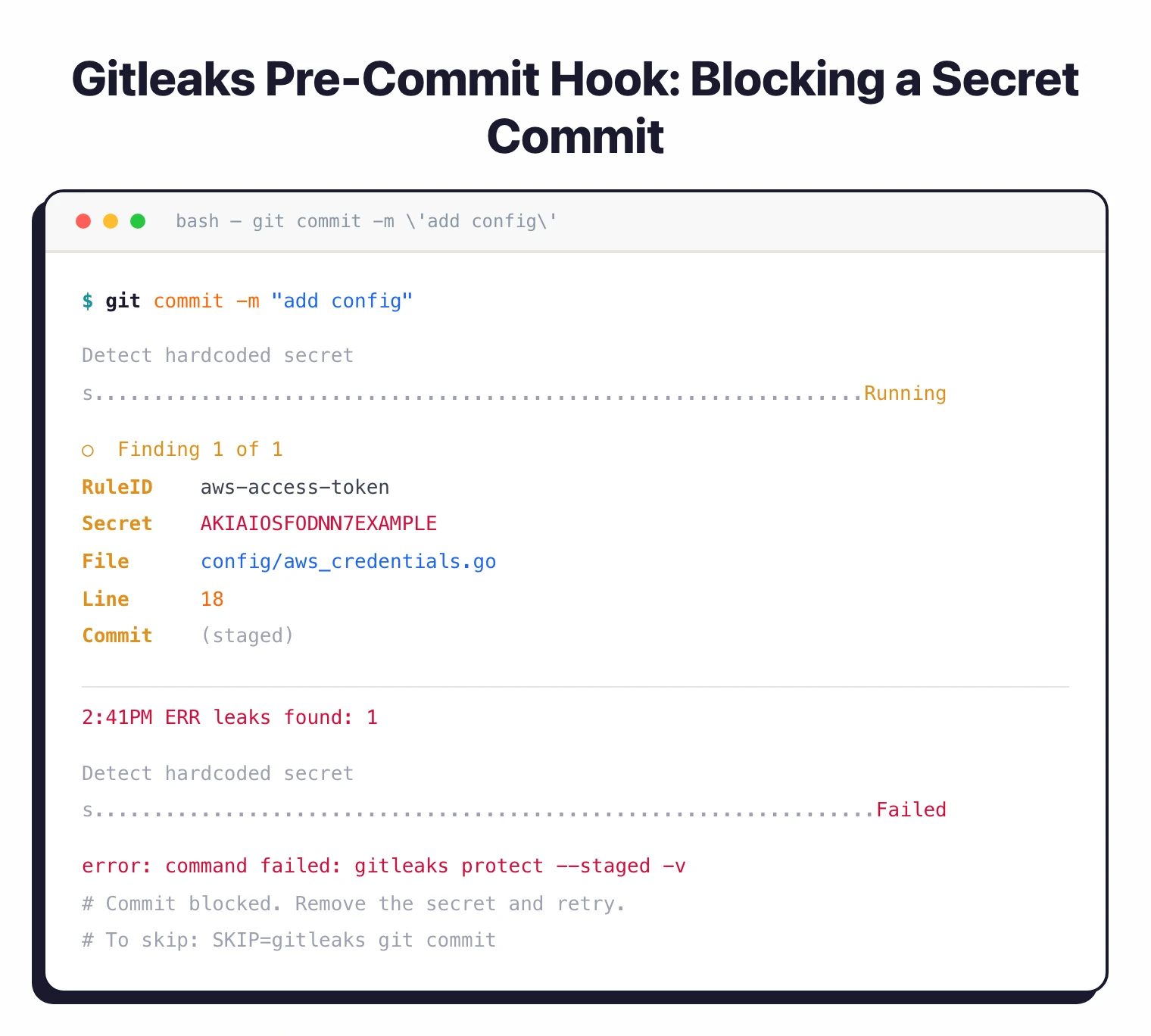
Install Gitleaks as a pre-commit hook to block secrets before they reach your repository. When a developer attempts to commit code containing secrets, Gitleaks stops the commit and displays the offending lines.
Skip the hook temporarily with SKIP=gitleaks git commit when needed.
GitHub Action
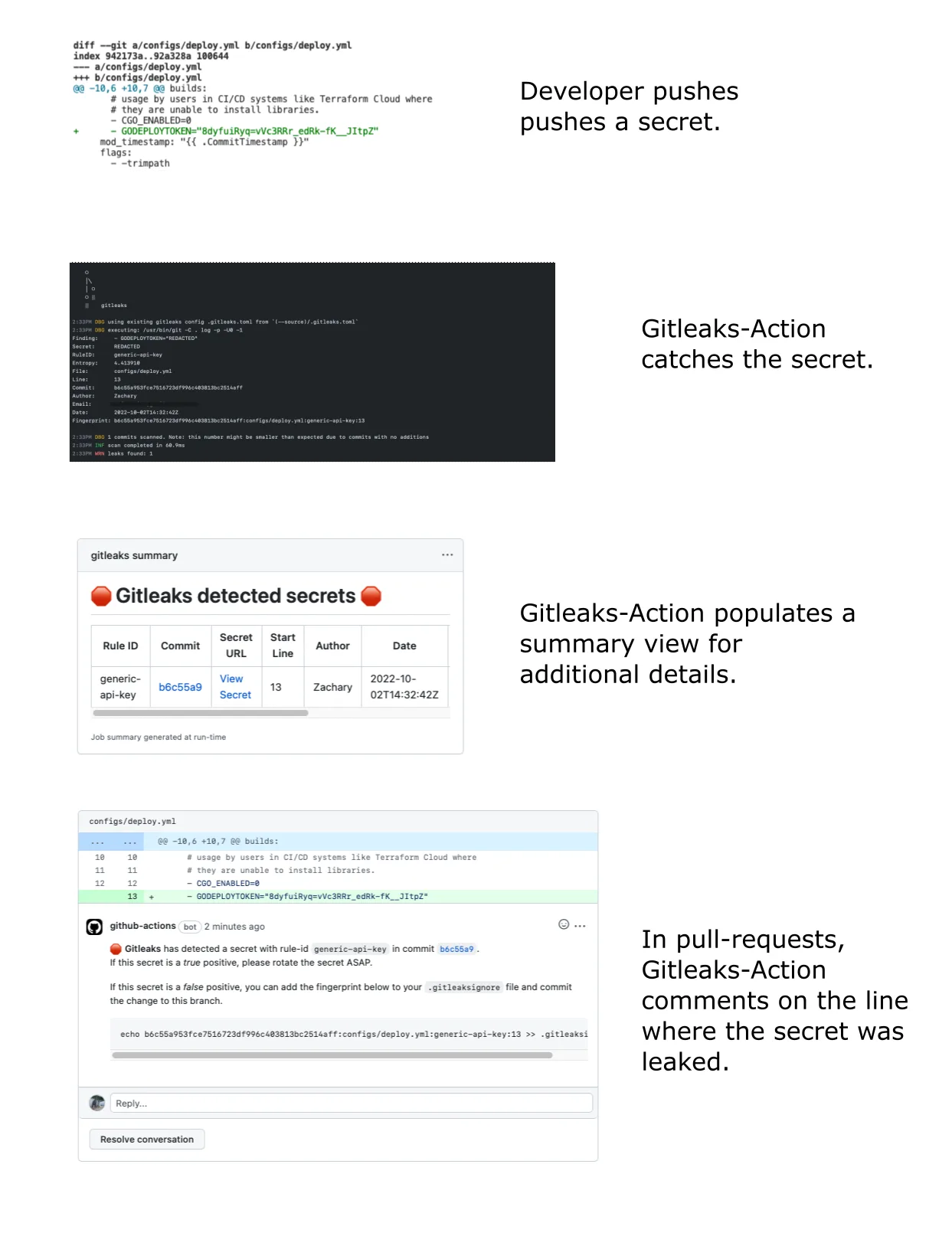
The official gitleaks/gitleaks-action@v2 runs on pull requests and pushes. For organization repositories, a GITLEAKS_LICENSE secret is required.
The action scans changed files and blocks merges when secrets are found.
SARIF output for GitHub integration
Export findings in SARIF format to populate GitHub’s security tab. This puts secret findings alongside CodeQL and Dependabot results in a single view.
Archive and encoding scanning
Gitleaks can scan nested archives (zip, tar, etc.) via --max-archive-depth and recursively decode encoded content with --max-decode-depth. Both default to 0 (disabled) and can be tuned based on your scanning needs.
How do I get started with Gitleaks?
- Install — Run
brew install gitleakson macOS, or pull the Docker image withdocker pull zricethezav/gitleaks:latest. Binary releases are available for Linux, macOS, and Windows. - Scan a repository — Run
gitleaks git -s /path/to/repoto scan git history for secrets. Usegitleaks dir -s /path/to/dirfor non-git directories. - Set up pre-commit — Add Gitleaks to
.pre-commit-config.yamlwithrev: v8.24.2. Developers get instant feedback before commits reach the repository. - Review findings — Use
--report-path results.json --report-format jsonto save findings. Upload SARIF output to GitHub Advanced Security with--report-format sarif.
Gitleaks tutorial: install and first scan
The full first-scan loop takes about three minutes on a clean macOS or Linux box.
Install. On macOS, brew install gitleaks is the lowest-friction path. On Linux or in a CI runner, grab the static binary from the GitHub releases page or pull ghcr.io/gitleaks/gitleaks if you prefer a container. The binary is self-contained — no Go runtime, no system libraries.
Scan a repository. Point Gitleaks at any local clone:
gitleaks git -s /path/to/repo -v
The -v flag prints each finding inline so you can see what was caught without opening a report. To walk the entire commit graph including unreachable commits, add --all --full-history. For a one-off scan of an uncommitted working tree, gitleaks dir -s . works without a .git directory.
Add a pre-commit hook. Install pre-commit
once, then add Gitleaks to .pre-commit-config.yaml:
repos:
  - repo: https://github.com/gitleaks/gitleaks
    rev: v8.24.2
    hooks:
      - id: gitleaks
Run pre-commit install and every subsequent git commit triggers a scan against the staged diff. New secrets fail the commit before they reach the repo.
Read the report. Add --report-path results.json --report-format json for machine consumption, or --report-format sarif to upload findings into GitHub’s Security tab via the official gitleaks/gitleaks-action@v2. The SARIF route is the path most teams settle on because it puts Gitleaks findings next to CodeQL and Dependabot in one dashboard.
When to use Gitleaks
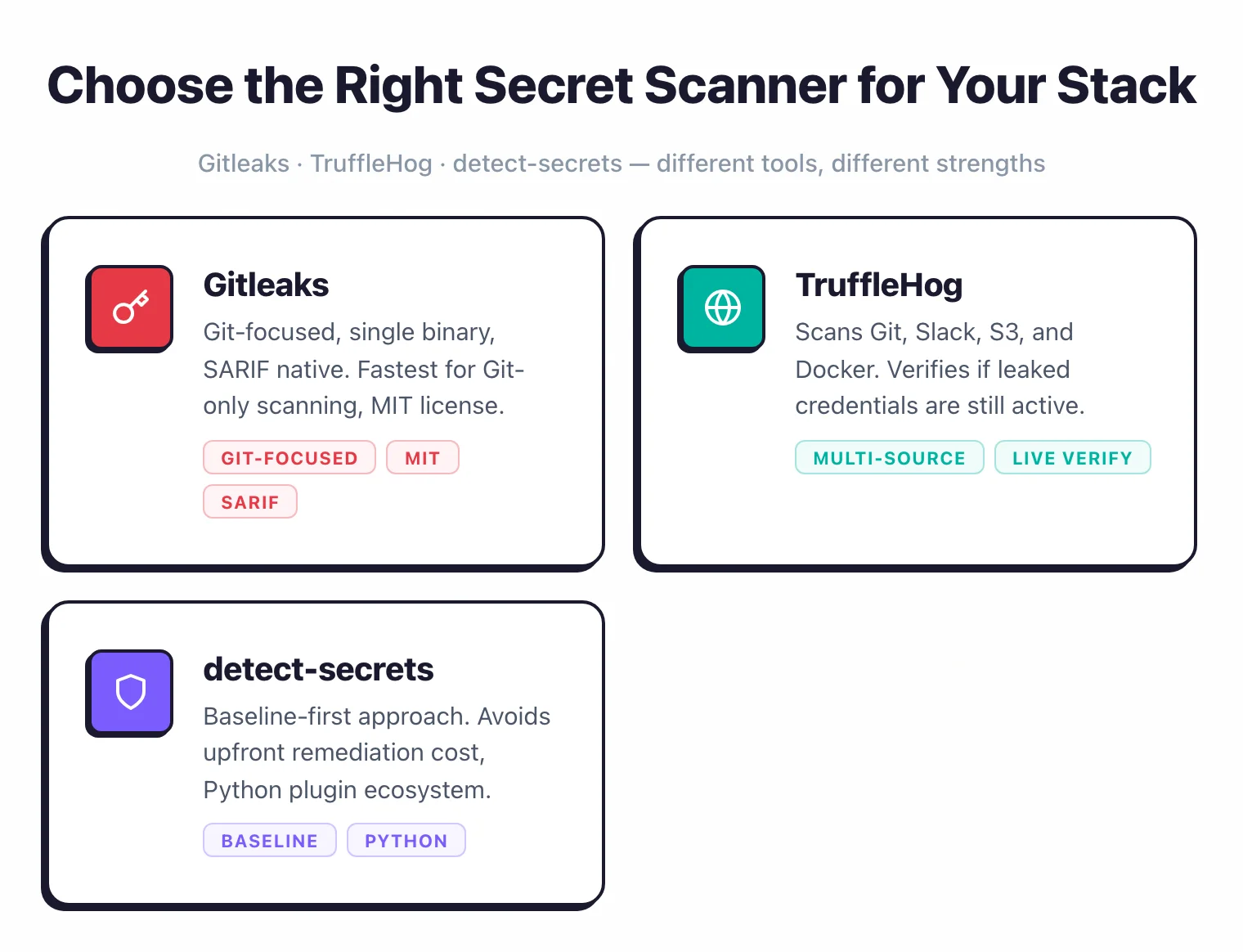
Gitleaks is the go-to choice for teams that want fast, no-frills secret scanning in git repositories. It runs offline, installs as a single binary, and integrates with GitHub Actions out of the box.
For scanning beyond git (Slack, S3, Docker images), TruffleHog covers more ground. For enterprise environments with legacy codebases, detect-secrets offers a baseline approach that avoids upfront remediation.
Gitleaks vs TruffleHog
Gitleaks and TruffleHog are the two most-used open-source secret scanners, and the right pick depends on what you are scanning and how false-positive-tolerant you are.
Speed and scope. Gitleaks is a single Go binary that runs regex and entropy detection against git history, files, and directories. TruffleHog v3 (also Go) ships 800+ detectors and scans Docker images, S3 buckets, GCS buckets, Slack workspaces, CircleCI logs, and more. If the surface is git-only, Gitleaks finishes faster on a clean repo because it skips the verification step. If the surface includes anything off-disk, TruffleHog is the only option of the two.
Verification. TruffleHog’s defining feature is live API verification — when it finds an AWS key, it calls the AWS API to confirm whether that key is still active. Gitleaks does not verify; it only reports the regex match. Verification is what drives TruffleHog’s lower false-positive rate but also adds runtime cost and outbound network calls some teams cannot allow.
Pre-commit fit. Both ship pre-commit hooks. Gitleaks’s tighter scope and faster startup make it the more common pick for blocking commits in seconds; TruffleHog’s verification step adds latency that most teams disable for the pre-commit path.
For the full feature-by-feature breakdown including rule formats, license, and configuration patterns, the Gitleaks vs TruffleHog comparison walks through every column.