


GitLab SAST provides built-in static application security testing for GitLab repositories. Unlike external SAST tools that require integration, GitLab SAST runs automatically in your CI/CD pipelines with minimal configuration.
For teams already using GitLab, SAST offers a zero-friction security scanning solution with AI-powered features in Ultimate tier.
What is GitLab SAST?
GitLab SAST scans source code for security vulnerabilities on every commit. According to GitLab’s DevSecOps surveys, organizations that shift security left by integrating scanning into CI/CD pipelines detect vulnerabilities significantly earlier in the development lifecycle.
The system uses analyzer containers — Docker images that wrap third-party scanners like Semgrep — to detect issues across multiple programming languages.
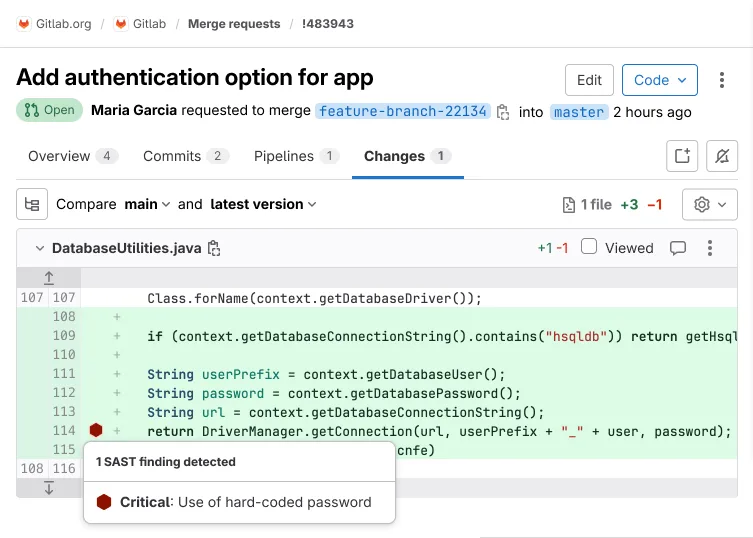
When a scan completes, GitLab displays findings directly in merge requests, security dashboards, and vulnerability reports. Developers see security issues alongside other code review feedback without switching tools or platforms.
GitLab Advanced SAST represents the next generation of GitLab’s scanning technology. It provides faster scanning with multi-core support, more accurate detection, and is gradually replacing the legacy Semgrep-based analyzers for all supported languages.
| Capability | Details |
|---|---|
| Zero-Config Scanning | Enable SAST by including a template in .gitlab-ci.yml—no external tools, API keys, or complex configuration required |
| AI False Positive Detection | GitLab Duo automatically identifies likely false positives in Critical and High severity findings (Ultimate tier) |
| Automated Fix Generation | Agentic SAST creates merge requests with context-aware code fixes for High and Critical vulnerabilities (Ultimate tier) |
What are GitLab SAST’s key features?
| Feature | Details |
|---|---|
| Languages (Advanced SAST) | C, C++, C#, Go, Java, JavaScript, Python, Ruby, TypeScript |
| Languages (Standard) | Apex, Elixir, Groovy, Kotlin, Objective-C, PHP, Scala, Swift |
| Analyzers | Advanced SAST, Semgrep, SpotBugs, Kubesec, PMD Apex, Sobelow |
| CI template | include: template: Jobs/SAST.gitlab-ci.yml |
| Default excluded paths | spec, test, tests, tmp |
| Search depth | 20 (Semgrep), 4 (others) |
| Runner requirement | Linux (Docker or Kubernetes executor, amd64 only) |
| FIPS support | Available via -fips image suffix |
Automatic scanning on every commit
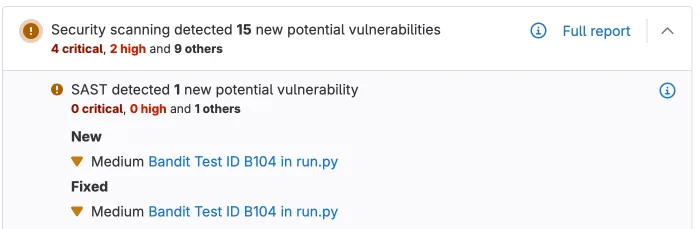
Add GitLab SAST to your project by including the SAST.gitlab-ci.yml template in your .gitlab-ci.yml file. GitLab automatically runs scans on every commit and merge request.
The scanner detects which languages exist in your repository and runs the appropriate analyzers. You don’t configure language-specific settings.
Tier-based feature availability
| Feature | Free | Premium | Ultimate |
|---|---|---|---|
| Basic SAST scanning | Yes | Yes | Yes |
| JSON report download | Yes | Yes | Yes |
| Advanced SAST engine | No | No | Yes |
| MR widget with findings | No | No | Yes |
| Vulnerability management | No | No | Yes |
| Ruleset customization | No | No | Yes |
| AI false positive detection | No | No | Yes (Duo add-on) |
| Agentic fix generation | No | No | Yes (Duo add-on) |
GitLab Advanced SAST
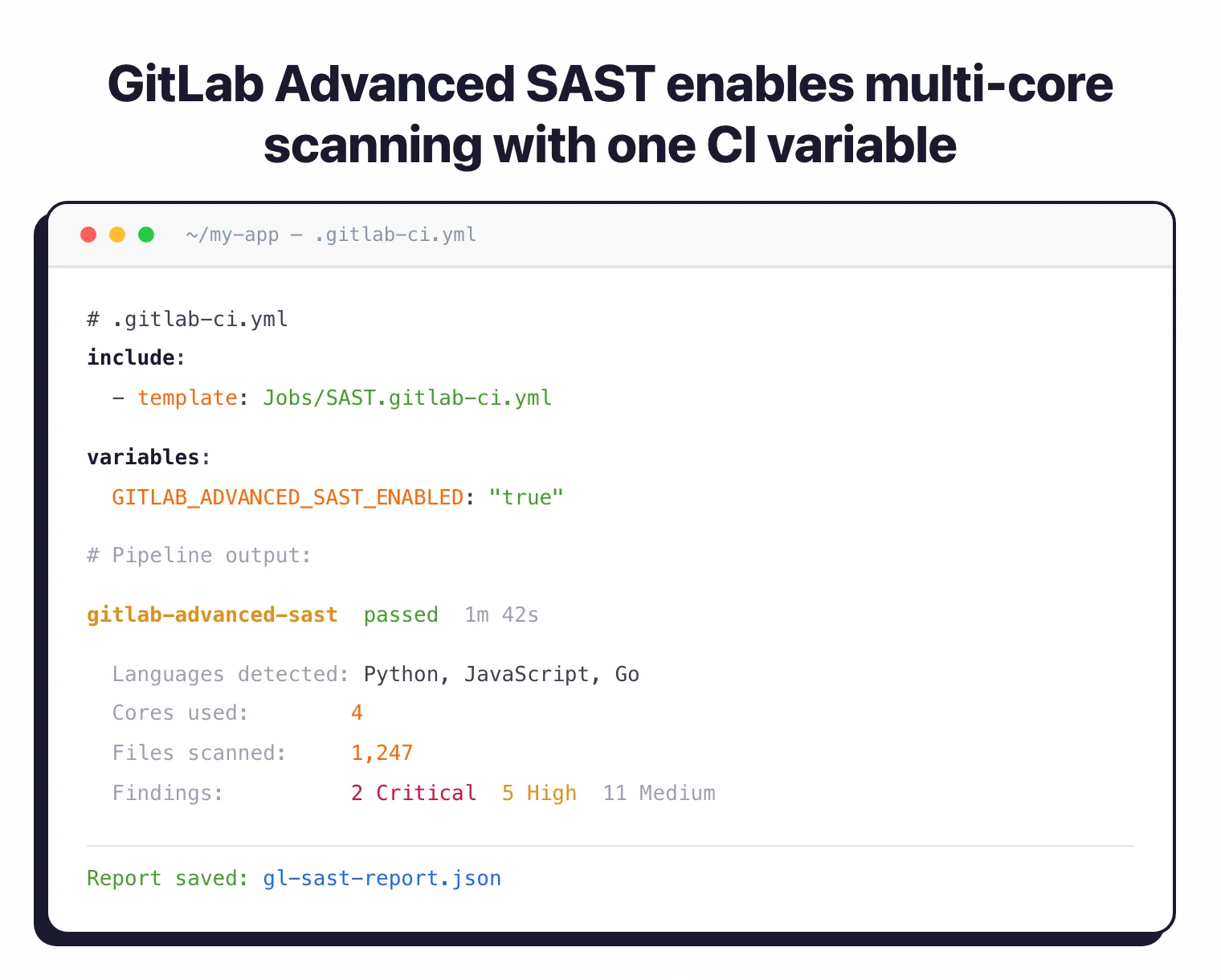
Advanced SAST is GitLab’s proprietary scanning engine with multi-core scanning enabled by default. Enable it with GITLAB_ADVANCED_SAST_ENABLED: "true" in your CI variables.
It currently supports C, C++, C#, Go, Java, JavaScript, Python, Ruby, and TypeScript. Other languages fall back to the Semgrep-based analyzer.
AI-powered false positive detection
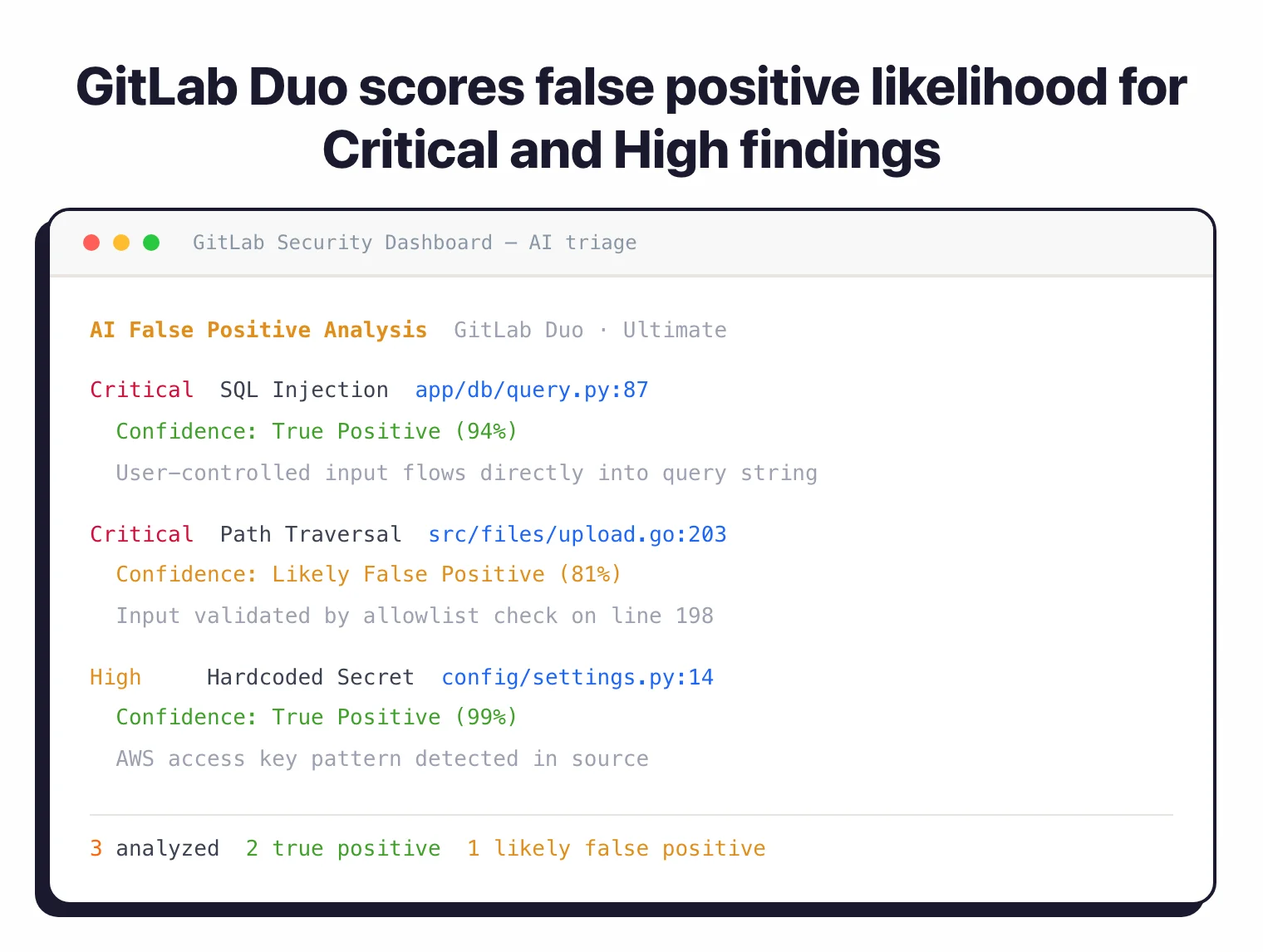
For Ultimate tier users with the GitLab Duo add-on, AI analyzes Critical and High severity SAST vulnerabilities to flag likely false positives. Each finding gets a confidence score and explanation, reducing manual triage time.
Agentic SAST vulnerability resolution
Also in Ultimate tier with GitLab Duo, agentic SAST automatically generates merge requests that fix High and Critical severity vulnerabilities. The AI uses multi-shot reasoning to understand code context and create fixes that preserve functionality.
Vulnerability tracking
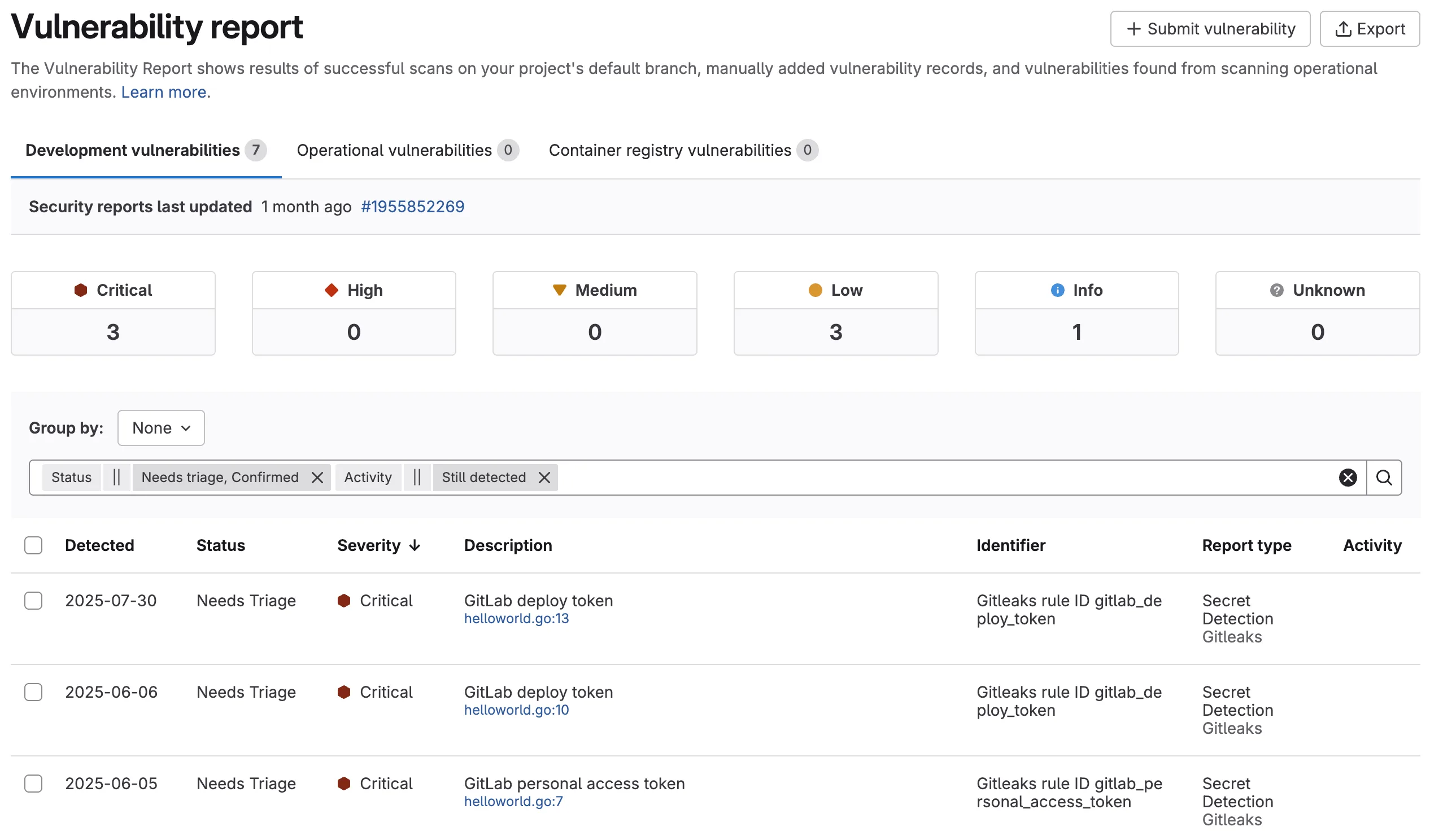
GitLab tracks vulnerabilities across refactoring. If code moves to a different file or line, the vulnerability follows it rather than creating a duplicate. Vulnerabilities also auto-resolve when their associated rules are disabled.
Note: GitLab SAST runs in air-gapped environments with locally-mirrored analyzer images. Configure SECURE_ANALYZERS_PREFIX to point to your internal registry.
How do I get started with GitLab SAST?
- Enable SAST — Add
include: - template: Jobs/SAST.gitlab-ci.ymlto your.gitlab-ci.yml. Make sure you have ateststage defined. - Push a commit — GitLab detects your project languages and runs the right analyzers automatically. No API keys or external tools needed.
- Review findings — View results in the pipeline Security tab, merge request widget (Ultimate), or download the JSON report artifact.
- Customize rules — Exclude paths with
SAST_EXCLUDED_PATHS, pin analyzer versions withSAST_ANALYZER_IMAGE_TAG, or enable Advanced SAST withGITLAB_ADVANCED_SAST_ENABLED.
GitLab SAST configuration
Most teams adopt GitLab SAST through the CI template. Add a single line to .gitlab-ci.yml and SAST runs on every pipeline:
include:
- template: Jobs/SAST.gitlab-ci.yml
The template registers analyzer jobs for every language GitLab detects in the repository. You don’t pick analyzers manually — the framework chooses them. Override behavior with CI variables: set SAST_EXCLUDED_PATHS to skip generated code, SAST_EXCLUDED_ANALYZERS to drop a specific scanner (e.g. spotbugs if Java byte-code uploads are restricted), or SECURE_ANALYZERS_PREFIX to pull analyzer images from an air-gapped registry.
For Java projects you can force Semgrep instead of SpotBugs by excluding the byte-code analyzer:
variables:
  SAST_EXCLUDED_ANALYZERS: "spotbugs"
The two configuration models matter for buyer comparisons. The vendored model ships analyzer images alongside the GitLab Runner — convenient and air-gap-friendly, but version pinning lags upstream. The CI-templated model pulls analyzer images at job time from registry.gitlab.com/security-products, which keeps rule packs current at the cost of egress to GitLab’s registry. Most regulated environments mirror the analyzer images locally and pin tags via SAST_ANALYZER_IMAGE_TAG.
How much does GitLab SAST cost?
GitLab publishes list pricing on about.gitlab.com/pricing, so the SAST tier mapping is straightforward to verify before procurement:
- Free — Semgrep-based SAST scanning runs on every pipeline, with the JSON report artifact available for download. Findings do not appear in the merge request widget or vulnerability dashboard.
- Premium ($29/user/month at list price) — adds CI/CD compliance dashboards and team-level controls, but the SAST feature set is broadly the same as Free; the Vulnerability Report and MR widget remain Ultimate-only.
- Ultimate ($99/user/month at list price) — unlocks the Advanced SAST engine, MR widget integration, the Vulnerability Report, ruleset customization, and the GitLab Duo add-on (AI false-positive triage and agentic vulnerability fix generation).
Verify the current per-user/month figure on the GitLab pricing page before committing — list prices update periodically and discounted multi-year contracts are common at the Ultimate tier.
What are alternatives to GitLab SAST?
For teams comparing platform-native SAST options or evaluating standalone scanners alongside GitLab, the closest substitutes are:
- GitHub Advanced Security with CodeQL — query-based SAST built into GitHub Enterprise; preferred when the codebase already lives on GitHub and a single vendor is the goal.
- Bitbucket Pipelines + Semgrep — works for teams committed to Bitbucket; Semgrep CE provides the analyzer and Bitbucket runs it as a pipeline step.
- Snyk Code — commercial SAST with the DeepCode AI engine that integrates as a CI job in any platform; chosen when developer-first UX and free-tier access matter more than platform consolidation.
- Checkmarx One — enterprise SAST with broader language coverage and on-prem/air-gapped deployment; a fit when governance, compliance reporting, and a 35+ language matrix are required.
Browse the SAST tools hub for the full active set.
When to use GitLab SAST
GitLab SAST is the obvious choice if you’re already on GitLab and want security scanning without adding external tools. The zero-config setup means you can go from nothing to scanning in a single commit.
The real value shows up at the Ultimate tier with GitLab Duo, where AI triage and automatic fix generation cut manual work significantly. Free tier users still get basic scanning and JSON reports, but miss the MR integration and vulnerability management features.
For more customizable scanning outside GitLab, standalone tools like Semgrep or Snyk Code work with any CI/CD system. See our what is SAST guide for a broader overview of static analysis testing.