


GitGuardian is the #1 security app on the GitHub Marketplace. It monitors source code repositories for exposed secrets in real-time, detecting API keys, hardcoded passwords, certificates, and other credentials that developers accidentally commit to version control.
Secret exposure is a leading supply chain attack vector, and GitGuardian treats it as a first-class problem.
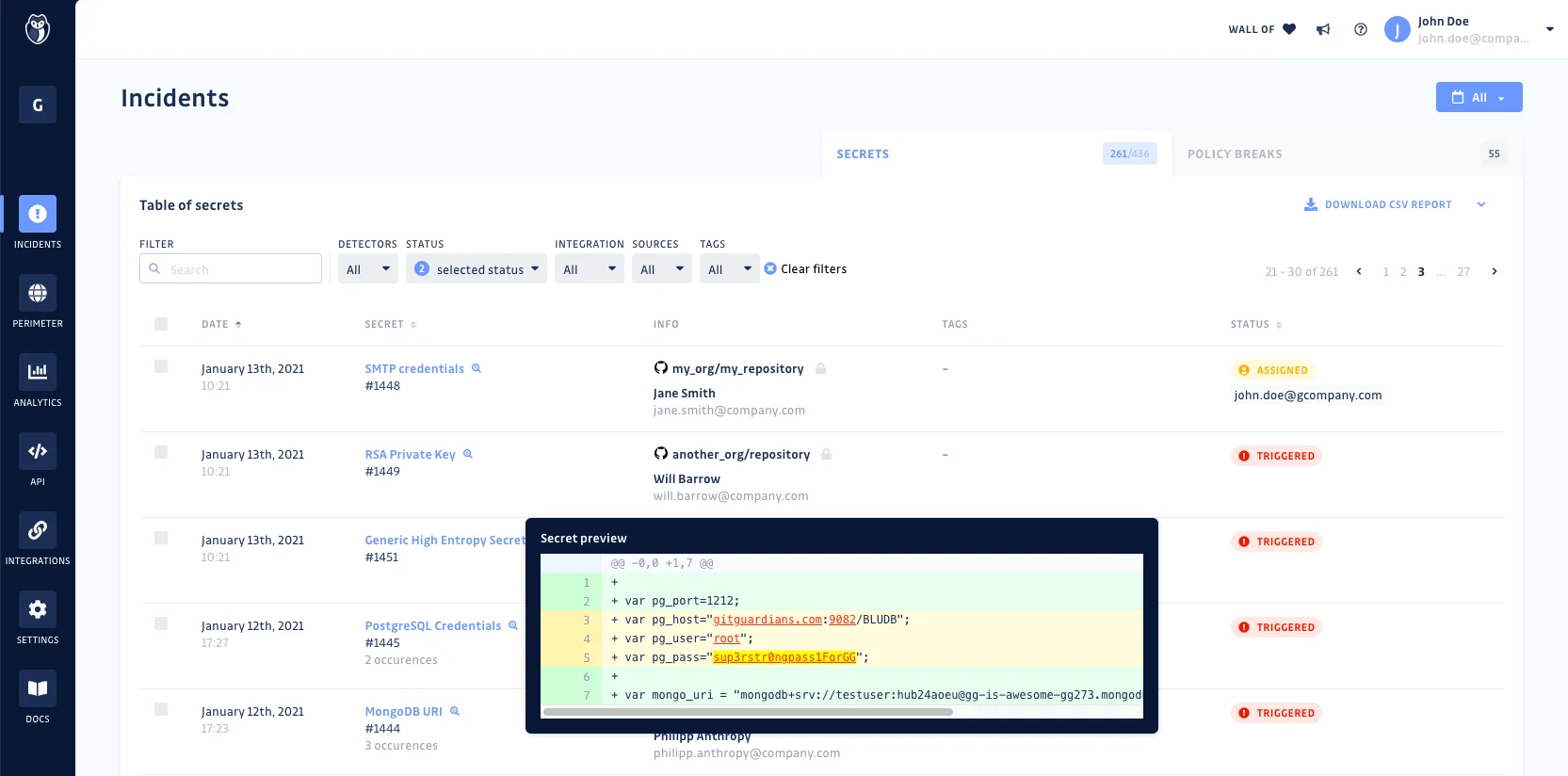
The platform ships 450+ specific detectors plus generic secret detectors, and scans across GitHub, GitLab, Bitbucket, and collaboration tools like Slack, Jira, and Confluence. GitGuardian validates whether detected secrets are still active, so teams can prioritize live credentials over expired ones.
What is GitGuardian?
GitGuardian catches secrets before they become incidents. When a developer commits an AWS key, database password, or API token to a repository, GitGuardian detects it within seconds and triggers an alert.
The platform also scans git history, catching secrets that were committed and later deleted but remain in the repository’s commit log.
Beyond detection, GitGuardian now offers Non-Human Identity (NHI) governance and honeytoken intrusion detection. The ggshield CLI tool runs as a pre-commit hook to block secrets before they ever reach the remote repository.
| Capability | Details |
|---|---|
| 450+ Secret Types | Detects API keys, database credentials, private keys, OAuth tokens, certificates, and custom patterns using regex and validation checks. Validates whether secrets are still active. |
| Pre-Commit Protection | The ggshield CLI runs as a pre-commit hook or CI/CD gate. Blocks secrets before they reach the remote repository, preventing incidents rather than just detecting them. |
| NHI Governance | Tracks machine identities (service accounts, API keys, tokens) across your organization. Maps which secrets are used where, by whom, and flags over-privileged or stale credentials. |
What are GitGuardian’s key features?
Secret categories
| Category | Examples |
|---|---|
| Cloud providers | AWS, Azure, GCP keys and credentials |
| Version control | GitHub, GitLab, Bitbucket tokens |
| Databases | PostgreSQL, MySQL, MongoDB, Redis URIs |
| Payment | Stripe, PayPal, Square API keys |
| Communication | Slack, Twilio, SendGrid tokens |
| Infrastructure | Docker, Kubernetes, Terraform secrets |
| Authentication | JWT secrets, OAuth tokens, SAML keys |
| Certificates | Private keys, TLS certificates, SSH keys |
| Custom | Organization-defined patterns via regex |
Secrets detection engine
GitGuardian uses pattern matching combined with validation to detect 450+ specific secret types plus generic credentials. Each finding is checked against the issuing service when possible to confirm the secret is still valid.
This reduces false positives and helps teams focus on credentials that are actually exploitable.
ggshield CLI
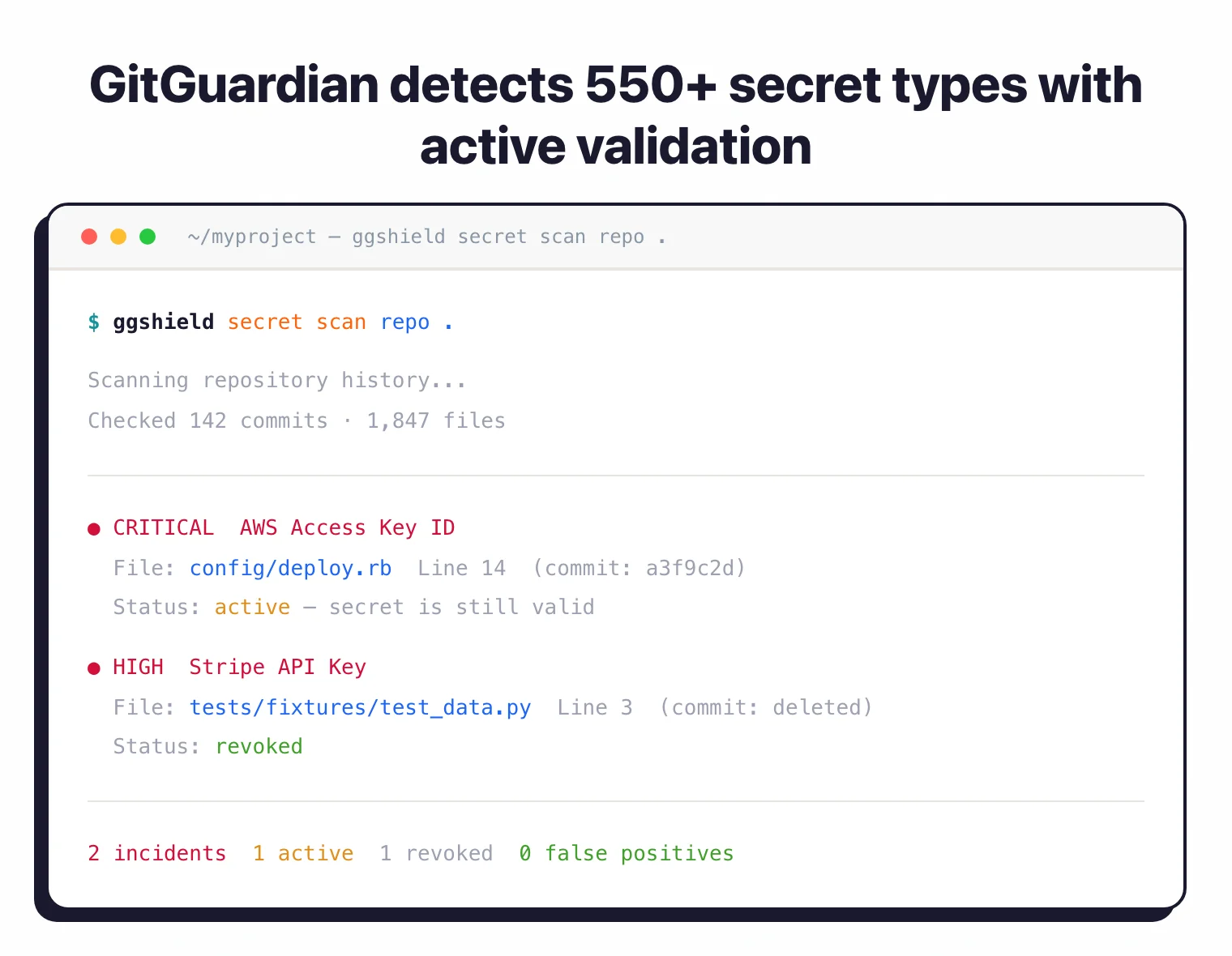
The open-source CLI tool plugs into pre-commit hooks, GitHub Actions, GitLab CI, Bitbucket Pipelines, and other CI systems. It scans commits on each push and blocks merges if secrets are found.
# Install ggshield
pip install ggshield

# Set up pre-commit hook
ggshield install --mode local

# Scan a repository
ggshield secret scan repo .

# Scan in CI
ggshield secret scan ci
Honeytoken detection
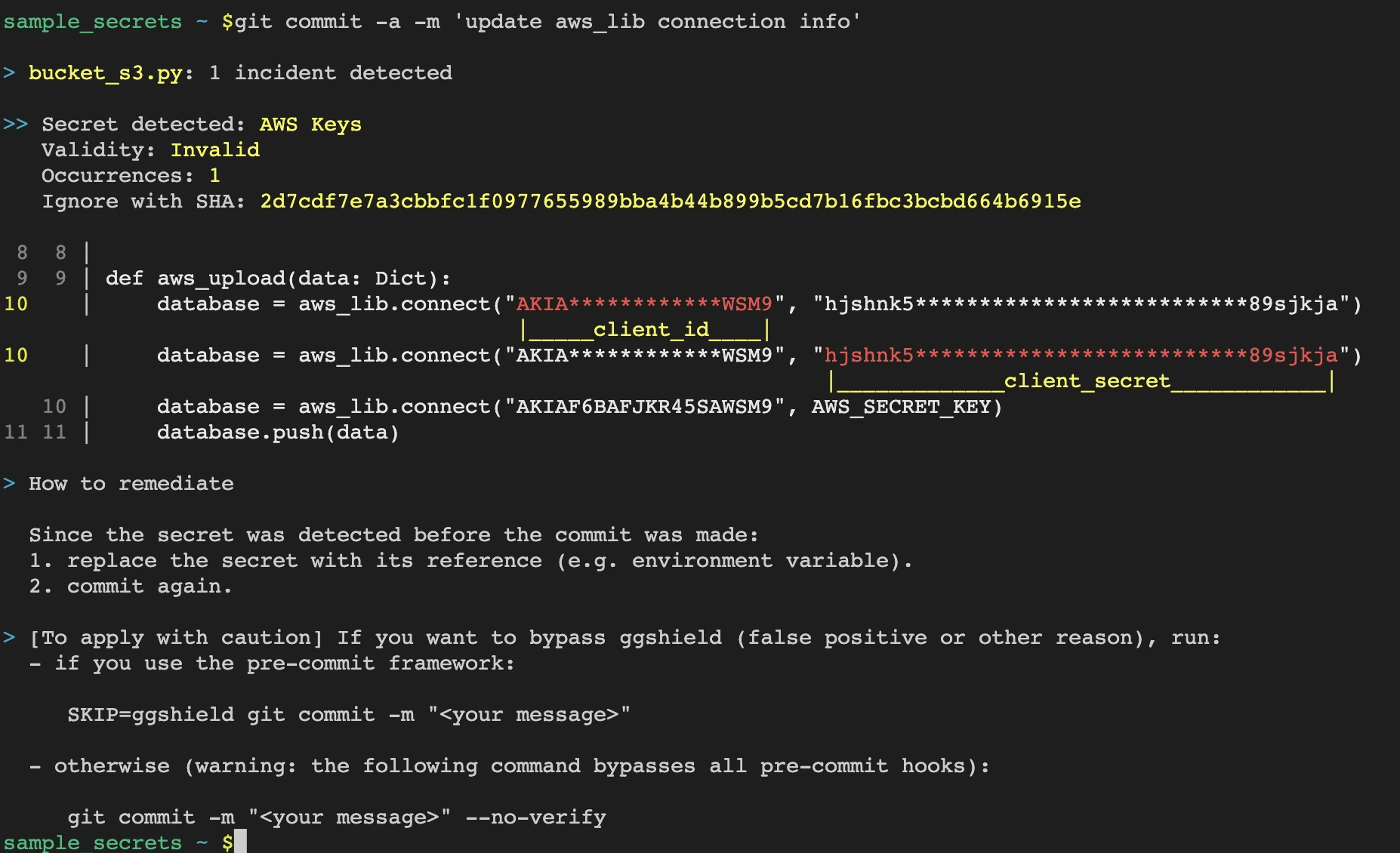
GitGuardian can generate honeytokens (fake credentials) that you plant in repositories, cloud environments, or internal systems. When someone uses a honeytoken, GitGuardian alerts you immediately, providing early warning of unauthorized access or a breach.
Historical scanning
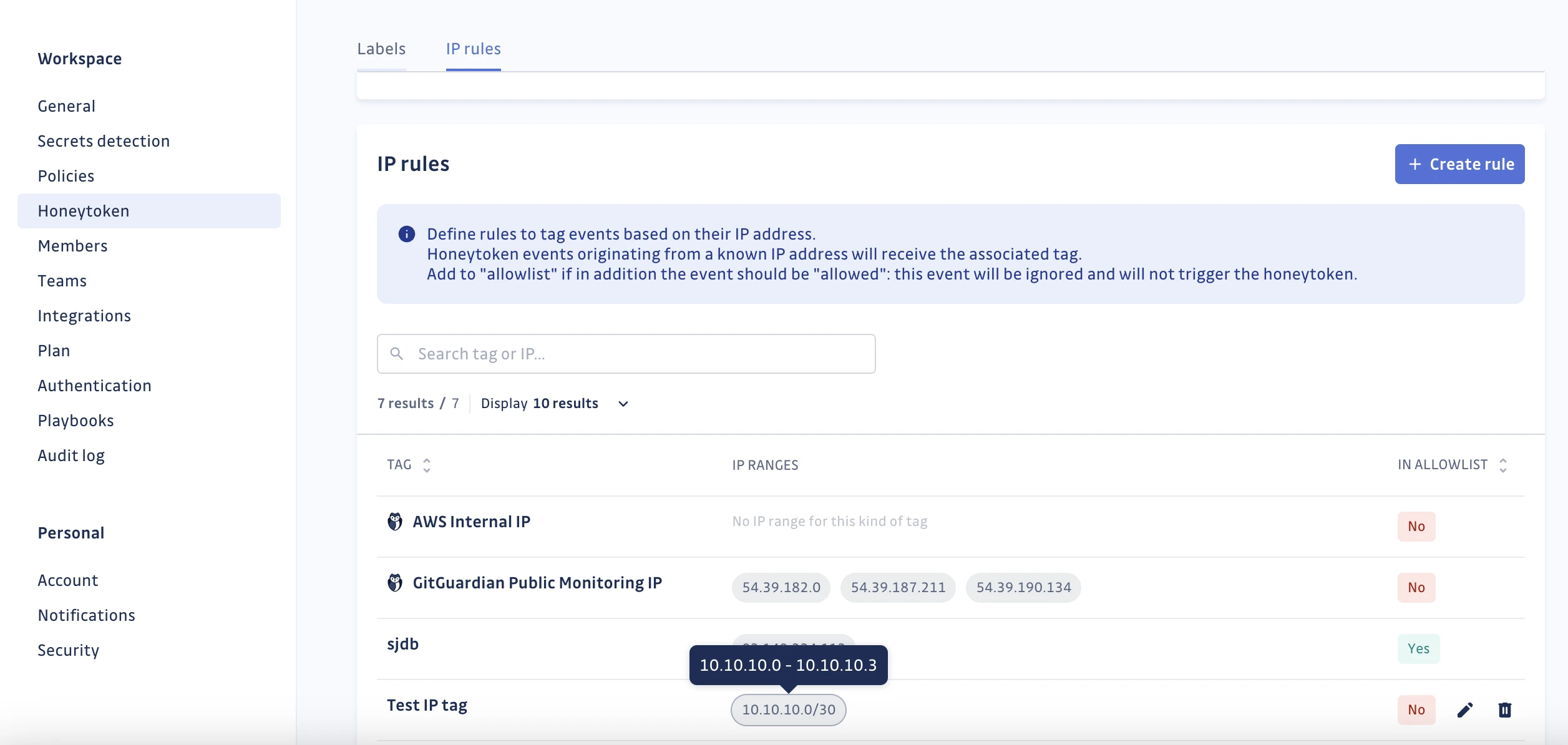
Scanning is not limited to new commits. GitGuardian checks the full git history of a repository, finding secrets that were committed months or years ago.
Even if the secret was “deleted” in a later commit, it remains in git history and can be exploited.
Collaboration tool scanning
Beyond code repositories, GitGuardian scans Slack messages, Jira tickets, and Confluence pages for exposed credentials. Developers often paste secrets into chat or documentation without thinking about the security implications.
Setup
- Install the GitHub App – Add GitGuardian from the GitHub Marketplace. Select which repositories to monitor. Free for individual developers.
- Configure ggshield – Install the CLI with
pip install ggshieldand runggshield install --mode localto set up pre-commit hooks. - Review findings – Check the GitGuardian dashboard for detected secrets. Each finding shows the secret type, file location, whether it’s still valid, and remediation steps.
- Set up CI scanning – Add ggshield to your CI pipeline to scan every commit automatically.
CI/CD integration
GitHub Actions
name: GitGuardian Secrets Scan
on: [push, pull_request]

jobs:
  scanning:
    runs-on: ubuntu-latest
    steps:
      - uses: actions/checkout@v4
        with:
          fetch-depth: 0
      - name: GitGuardian scan
        uses: GitGuardian/ggshield-action@v1
        env:
          GITGUARDIAN_API_KEY: ${{ secrets.GITGUARDIAN_API_KEY }}
GitLab CI
ggshield-scan:
  image: gitguardian/ggshield:latest
  script:
    - ggshield secret scan ci
  variables:
    GITGUARDIAN_API_KEY: $GITGUARDIAN_API_KEY
  rules:
    - if: $CI_PIPELINE_SOURCE == "merge_request_event"
    - if: $CI_COMMIT_BRANCH == $CI_DEFAULT_BRANCH
When to use GitGuardian
GitGuardian is the go-to choice for secrets detection. If you have developers committing code to repositories, you almost certainly have leaked secrets somewhere in your git history.
Strengths:
- 450+ secret types with active validation
- Pre-commit blocking via ggshield prevents incidents
- Historical scanning catches old secrets still in git history
- Slack, Jira, Confluence scanning beyond code
- Free tier for individual developers
Limitations:
- Primarily focused on secrets detection, not general SCA
- NHI governance and advanced features require paid plans; pricing is contact-sales
- Enterprise features (SSO, custom detectors) are commercial only
How much does GitGuardian cost?
GitGuardian uses a freemium model with a free plan for individual developers and paid tiers for teams and enterprises. The free plan covers personal and public repositories, ggshield CLI, and pre-commit hooks at no cost.
Paid tiers are quoted per seat and per monitored developer. GitGuardian does not publish list prices on its website — pricing is contact-sales for the Business tier (SSO, custom detectors, incident workflows) and the Enterprise tier (NHI governance, honeytokens, premium support). Actual pricing depends on seat count, repository volume, and which add-ons you enable. For a buyer-side view of typical secret-scanning contract sizes, see the AppSec tools pricing guide .
For individual developers and small open source projects, the free plan is usually enough. I’d only talk to sales once the org has more than 25 engineers or regulated data in scope.
GitGuardian vs TruffleHog
GitGuardian is a managed SaaS platform; TruffleHog is a free open-source CLI you self-host. That single difference drives most of the trade-offs between them.
TruffleHog has broader raw detector coverage at 800+ verified detectors and runs anywhere you can install a binary. It scans git history, S3 buckets, Docker images, and CI logs, and the open-source engine verifies live credentials against issuing services. The cost is zero, but someone on the team has to own the pipeline, triage findings, and build the incident workflow.
GitGuardian ships with the workflow included. It covers 450+ specific detectors plus generic secrets, but adds a hosted dashboard, incident assignment, policy controls, Slack and Jira scanning, and Non-Human Identity governance. Active secret validation, honeytokens, and SSO come in the paid tiers. That is the part TruffleHog does not ship out of the box.
Cost frames the choice. TruffleHog is free, and a motivated platform team can run it at scale. GitGuardian is a commercial SaaS that replaces the “someone has to own secrets response” headcount cost — actual pricing is contact-sales. I pick TruffleHog when engineering wants full control, and GitGuardian when security owns the program and needs audit-ready reports on day one.
GitGuardian vs GitHub Secret Scanning
GitGuardian covers more secret types and more surfaces than GitHub Secret Scanning, but GitHub’s scanner is free on public repositories and tightly integrated with the platform where most code already lives.
GitHub Secret Scanning runs natively on GitHub and detects partner-registered token types plus generic secrets via GitHub Advanced Security. It is free for public repositories. Private repositories require a GitHub Advanced Security license, which is billed per committer and tied to GitHub Enterprise. Scope is limited to GitHub: pull requests, pushes, and issues on repos inside a GitHub organization.
GitGuardian is multi-platform. It scans GitHub, GitLab, Bitbucket, Azure DevOps, and non-code surfaces like Slack, Jira, and Confluence where developers paste credentials into chat and tickets. Detector coverage is broader at 450+ specific types plus generic detectors, and every finding is validity-checked against the issuing service so the triage queue only shows live credentials.
Enterprise features are where the gap widens. GitGuardian adds Non-Human Identity governance, honeytokens, custom detectors, incident workflows, and remediation playbooks. GitHub Advanced Security focuses on code security and covers SAST, dependency review, and secret scanning inside one license, which is efficient if the org is already all-in on GitHub Enterprise.
For a GitHub-only shop with a GHAS license, GitHub Secret Scanning is the zero-friction choice. For teams on multiple VCS platforms or that need incident workflow, validation, and coverage of Slack and Jira, GitGuardian is the stronger fit.
Further reading: Supply Chain Attacks Guide | Software Supply Chain Security