


Dynatrace Application Security is a runtime protection module built into the Dynatrace observability platform. It uses the same OneAgent that handles APM to detect vulnerabilities and block attacks in running applications.
No separate security agent needed.
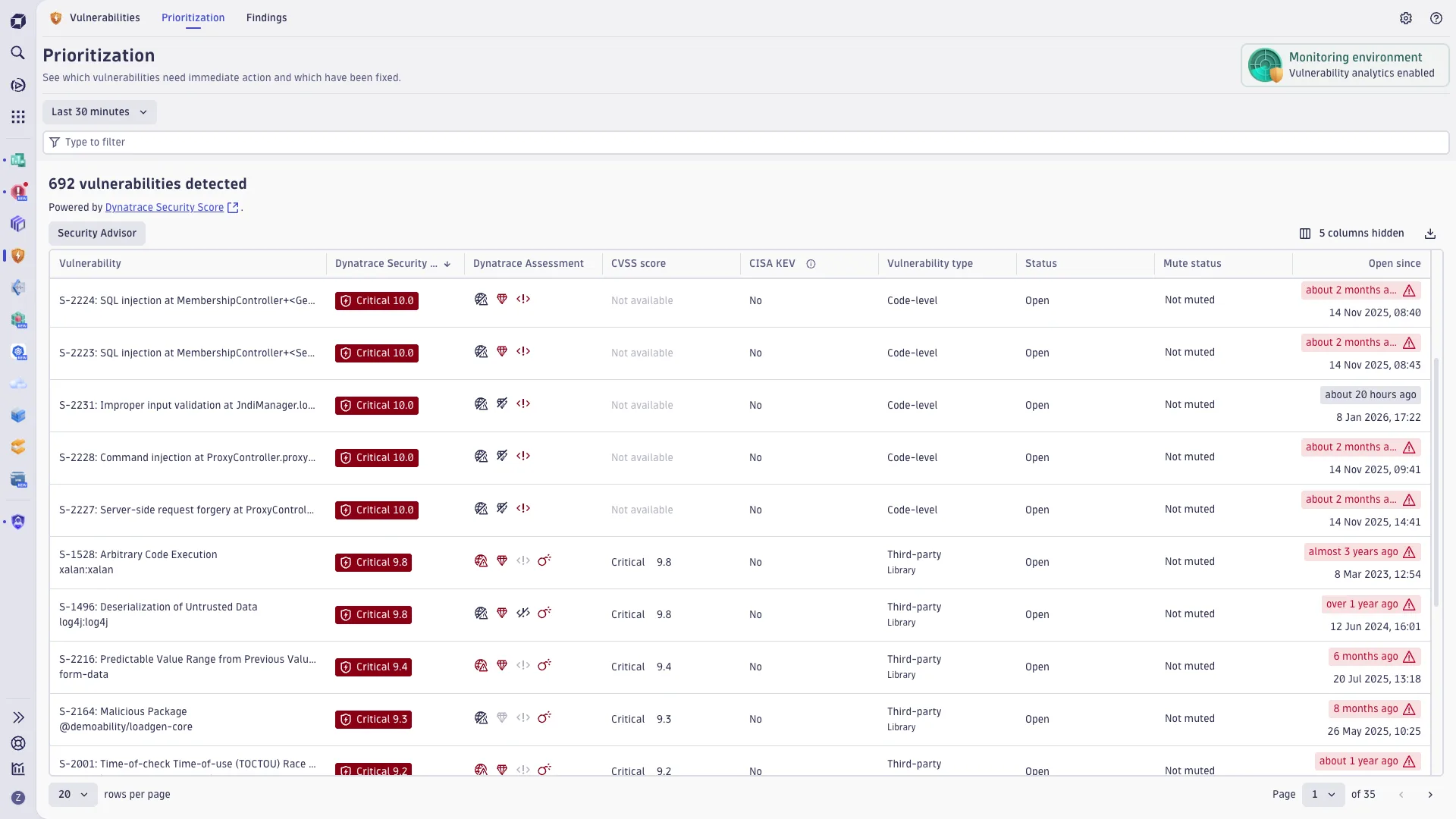
Davis AI correlates security findings with performance data, topology maps, and runtime context to prioritize vulnerabilities based on actual exposure rather than theoretical severity scores.
| Feature | Details |
|---|---|
| Platform | Dynatrace Software Intelligence Platform |
| Agent | OneAgent (shared with APM) |
| Languages | Java, .NET, Node.js, PHP, Go |
| Detection | Runtime vulnerability detection + attack blocking |
| AI Engine | Davis AI for risk prioritization |
| Deployment | SaaS, Managed, On-premises |
| Compliance | CIS, NIST, DORA mapping |
| Attack types | SQLi, command injection, JNDI (Log4Shell), path traversal |
| Container support | Kubernetes, OpenShift, ECS |
What is Dynatrace Application Security?
Dynatrace Application Security uses the same OneAgent technology that powers performance monitoring to detect security issues in running applications. One agent handles APM, infrastructure monitoring, and security — no separate deployment.
The platform continuously monitors application code, third-party libraries, container images, and Kubernetes configurations for known vulnerabilities.
When it finds something, Davis AI checks whether the vulnerable component is actually reachable at runtime and exposed to the internet, then adjusts the priority accordingly.
Beyond detection, Dynatrace can block attacks in real time. SQL injection, command injection, JNDI injection (the Log4Shell vector), and path traversal attacks are caught and stopped at the application layer.
| Capability | Details |
|---|---|
| Davis AI Prioritization | Correlates security findings with topology, runtime context, and actual exposure. A critical CVE in a library that is loaded but never called gets deprioritized. One that sits in a public-facing code path gets flagged immediately. |
| OneAgent Architecture | Single agent for APM, infrastructure monitoring, and security. Deploy once, get vulnerability detection and attack blocking alongside performance data. No additional agents or network appliances. |
| Runtime Attack Blocking | Detects and blocks SQL injection, command injection, JNDI injection (Log4Shell), and path traversal at the application runtime level. Works inside the process, not at the network perimeter. |
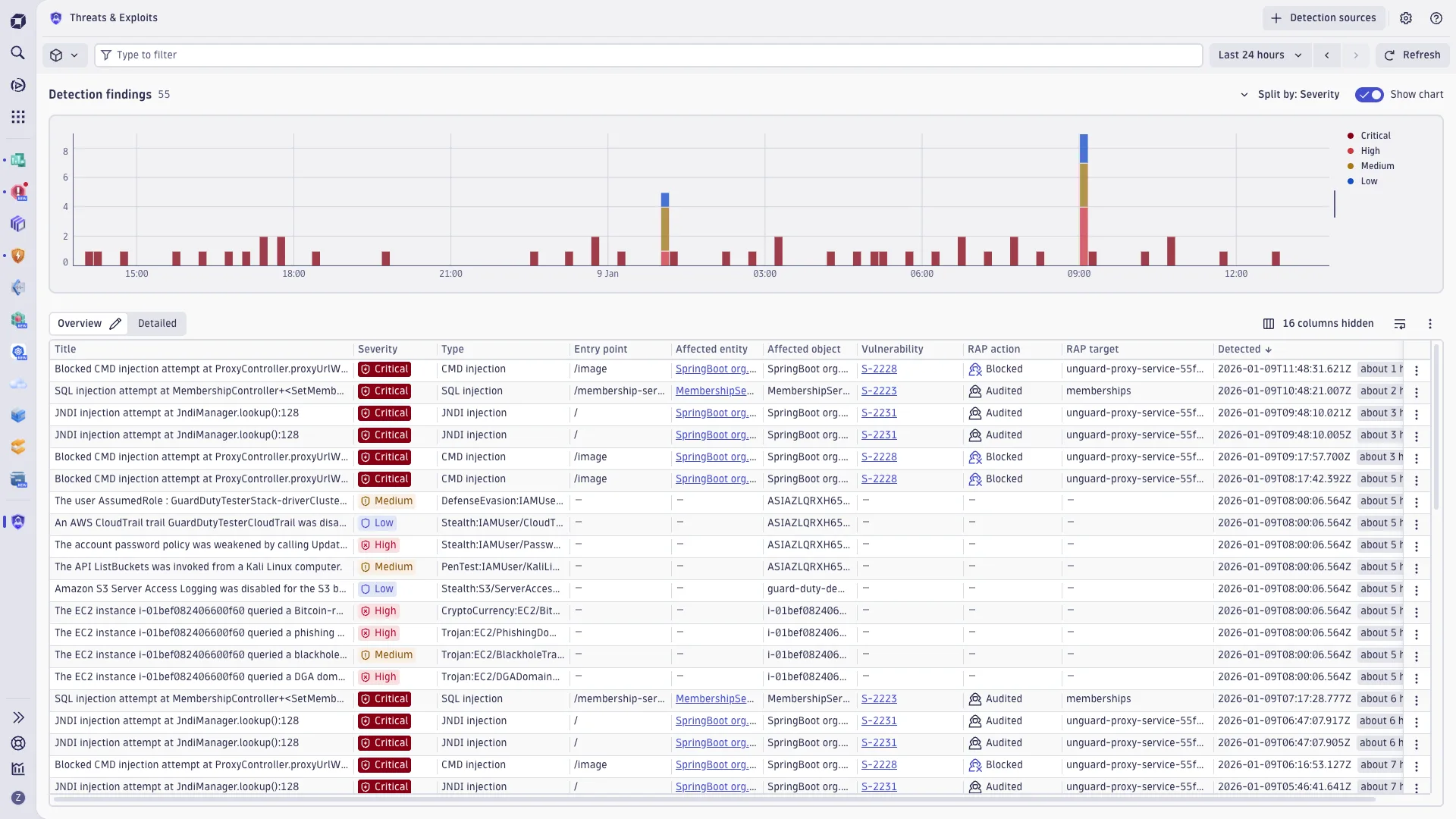
Dynatrace is one of the few platforms where security and observability share the same agent and data model. Security teams see the full distributed trace when investigating an attack.
DevOps teams see vulnerability context when deploying. Both work from the same dashboard.
What are Dynatrace’s key features?
Runtime Vulnerability Detection
Dynatrace continuously monitors for vulnerabilities in:
- Application code
- Third-party libraries and dependencies
- Container images
- Kubernetes configurations
Attack Detection and Protection
The platform detects and blocks common attack types:
- SQL injection
- Command injection
- JNDI injection (Log4Shell)
- Path traversal attacks
Compliance Mapping
Continuous compliance monitoring with mappings to CIS benchmarks, NIST frameworks, and DORA requirements. Automated evidence collection for audit preparation.
How do I get started with Dynatrace?
- Deploy OneAgent — Install OneAgent on your hosts or Kubernetes clusters. The agent auto-discovers applications and starts monitoring immediately. Application Security is a module you enable in the Dynatrace UI.
- Enable Application Security — Turn on the Runtime Vulnerability Analytics and Runtime Application Protection modules in your Dynatrace environment settings.
- Configure protection rules — Set attack blocking policies for your applications. Choose between monitoring mode (detect and alert) and blocking mode (detect and prevent) per application or environment.
- Review findings — Check the Security Overview for prioritized vulnerabilities. Davis AI shows which issues are reachable, exposed, and worth fixing first.
What does Dynatrace integrate with?
 Jenkins
 GitLab
 Azure DevOps
 Splunk
 ServiceNow
 Jira
Jira Kubernetes
 Amazon ECS
When to Use Dynatrace
Dynatrace Application Security fits organizations that already use or plan to adopt Dynatrace for observability. If you want APM and security in one agent with AI-driven prioritization, this is the play.
It is less suited for teams that want standalone RASP without an observability platform, or organizations looking for a free or open-source option.
Dynatrace is an enterprise platform with enterprise pricing.
Dynatrace Application Security language coverage
| Language | Status |
|---|---|
| Java | Mature — instrumented via OneAgent JVM injection |
| .NET | Mature — OneAgent CLR profiler |
| Node.js | Stable — OneAgent Node.js module |
| PHP | Supported — OneAgent PHP integration |
| Go | Supported — OneAgent Go injection |
| Python | Not supported by Application Security as of 2026 |
| Ruby | Not supported |
Five languages covered is good — but Python is the gap to flag honestly. If your stack is Python-heavy, evaluate Datadog Application Security (seven languages including Python) or Contrast Protect (six languages including Python) instead.
Dynatrace Application Security vs alternatives
Five realistic alternatives, ordered by how cleanly they replace Dynatrace’s positioning:
- Datadog Application Security — the closest peer. Same APM-coupled, single-agent architecture, broader seven-language coverage including Python and Ruby. The default head-to-head if you are not already on Dynatrace APM.
- Contrast Protect / ADR — six-language coverage, deeper data-flow tracing rooted in IAST-adjacent telemetry. The right pick if you want a standalone RASP without an APM tie-in.
- Imperva RASP — Java/.NET, WAF-coupled. Note: Imperva has communicated an end-of-sale path through 2025; do not start a procurement here in 2026.
- Waratek — Java-only, virtual-patching first. Strong fit for Java compliance use cases (PCI DSS, GDPR) but useless if your stack is polyglot like Dynatrace’s.
- OpenRASP — open-source Java/PHP RASP. Project inactive since January 2022; only viable if you can fork-and-maintain.
For the broader RASP-vs-WAF distinction, see RASP vs WAF . For the wider field, see the RASP tools directory and What is RASP? .
How I evaluated Dynatrace Application Security
I reviewed the Dynatrace Application Security product page , the Application Security docs and Application Security overview , the Dynatrace blog post on application security monitoring, and the DPS capabilities documentation explaining how the Application Security module is licensed under the Dynatrace Platform Subscription. Pricing for the Application Security module is sales-gated under DPS — Dynatrace publishes the DPS rate card on its pricing page but the Application Security module’s specific consumption rate is typically scoped per host and per application during the procurement conversation, so this review does not include per-host pricing. Author: Suphi Cankurt.