


Docker Scout is Docker’s built-in security analysis tool for container images. It scans images for vulnerabilities, generates SBOMs, and suggests fixes.
I see Docker Scout as the lowest-friction option when the team already lives in Docker Desktop, Docker Hub, or the Docker CLI.
Scout builds an inventory of every package and dependency inside a container image (the Software Bill of Materials), then matches those components against a vulnerability database that pulls from 23 advisory sources.
How does Docker Scout scan images?
Docker Scout scans container images by decomposing image layers, identifying OS packages and application dependencies, and matching them against 23 advisory database sources.
Results include CVE IDs, severity scores (CVSS v4 when available), affected versions, and remediation steps.
The scanning happens automatically when you push an image to Docker Hub, or on-demand through the CLI and Docker Desktop.
Most scanners rely on broad CPE (Common Product Enumeration) matching, which produces false positives when package names overlap. Scout uses Package URLs (PURLs) instead, which ties vulnerabilities to specific packages more precisely.
In practice, this means fewer false positives compared to CPE-based scanners.
| Capability | Details |
|---|---|
| Vulnerability Detection | Scans container image layers and dependencies against 23 advisory sources including NVD, GitHub Advisory Database, CISA KEV catalog, and distribution-specific security trackers. |
| SBOM Generation | Produces Software Bill of Materials in CycloneDX and SPDX formats for compliance, audit, and supply chain visibility purposes. |
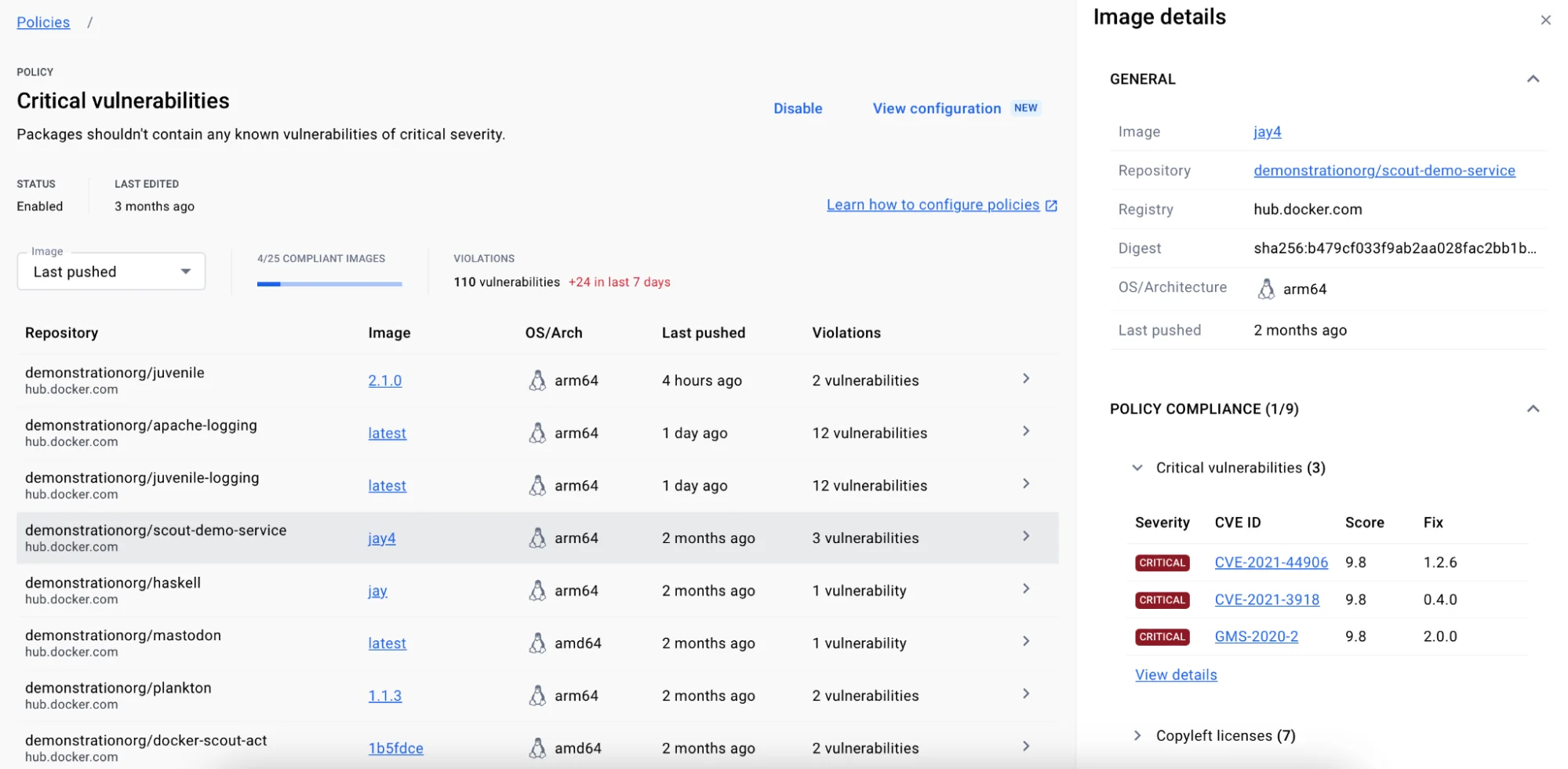
| Policy Evaluation | Defines and enforces security policies across images. Evaluate compliance before deployment and track policy violations across your image portfolio. |
What are Docker Scout’s key features?
| Feature | Details |
|---|---|
| Advisory sources | 23 databases including NVD, GitHub, GitLab, CISA KEV, EPSS, and distribution trackers |
| SBOM formats | CycloneDX, SPDX |
| Severity scoring | CVSS v4 preferred, falls back to v3, vendor scores prioritized over NIST |
| Matching method | Package URL (PURL) matching instead of broad CPE matching |
| VEX support | Vulnerability Exploitability eXchange for suppressing non-applicable findings |
| Integration points | Docker Desktop, Docker Hub, Docker CLI, CI/CD platforms, third-party registries |
| Free tier | 1 repo with continuous analysis (Docker Personal) |
Docker Desktop integration
Scout is built into Docker Desktop. Pull or build an image, and vulnerability information shows up in the Desktop UI without any extra setup.
CVEs, affected packages, and remediation suggestions are right there in the same interface you use for container management.
Policy evaluation
The policy evaluation engine lets security teams set standards that images must meet before deployment. You can check for severity thresholds, required base image versions, outdated packages, and compliance with organizational baselines. Policy results plug into CI/CD pipelines to gate deployments.
VEX support
Scout supports VEX (Vulnerability Exploitability eXchange) statements. When a CVE exists in a package but is not exploitable in your specific context, you attach a VEX statement to suppress it from results.
This keeps the noise down so your team focuses on vulnerabilities that actually matter.
CLI scanning
The docker scout CLI commands work with any locally available image:
# Quick vulnerability overview
docker scout quickview myapp:latest

# Detailed CVE listing
docker scout cves myapp:latest

# Compare two image versions
docker scout compare myapp:latest --to myapp:previous

# Generate SBOM
docker scout sbom myapp:latest --format spdx-json > sbom.json
Who should use Docker Scout?
Docker Scout is best suited for teams already working within the Docker ecosystem.
If your workflow runs through Docker Desktop, Docker Hub, and Docker CLI, Scout adds vulnerability scanning without bringing in another tool or vendor. It requires zero additional installation or configuration for Docker Desktop users.
The free tier (Docker Personal) provides continuous vulnerability analysis for 1 repository, making it accessible for individual developers. Docker Pro includes 2 Scout-enabled repos.
Larger organizations on Docker Team or Business plans get unlimited Scout-enabled repositories for continuous monitoring across all their images.
What are Docker Scout’s limitations?
Scout only does container image analysis. It does not scan IaC files, Kubernetes clusters, source code, or running workloads.
If you need broader coverage, pair it with Trivy (IaC and Kubernetes), Falco (runtime), or Kubescape (Kubernetes posture).
Scout is cloud-backed, meaning image analysis data goes through Docker’s infrastructure. If you have strict data residency requirements, check whether that works for your compliance posture.
Scanning depth depends on Docker’s advisory database. The 23 sources provide solid coverage, but matching is only as good as the SBOM extraction from image layers.
Heavily customized or distroless images may have gaps in package identification.
Two more honest trade-offs worth surfacing.
The free Docker Personal plan caps continuous vulnerability analysis at 1 repository, with a 3 GB image size limit. Docker Pro raises that to 2 repos, and only Docker Team and Business unlock unlimited Scout-enabled repos. Production teams with more than a handful of images will pay sooner rather than later — verify the current limits on docker.com/pricing before you build a workflow around the free tier.
The policy engine is shallower than Snyk Container’s or Aqua’s. Scout ships sensible default policies (severity thresholds, AGPL license blocking, EOL base image detection), but it does not yet support custom OPA-style rules or arbitrary conditions on metadata. If your security team needs policy-as-code with full expressiveness, Scout will feel constraining.
How does Docker Scout compare to Snyk Container, Trivy, and Grype?
Docker Scout’s three obvious alternatives are Snyk Container, Trivy , and Grype . They overlap on the basics — find CVEs in container images, suggest fixes — but the buying decision usually comes down to where the rest of your workflow already lives.
Snyk Container has the broader CVE database and the strongest auto-remediation story (it can open pull requests with base-image upgrades). It is the natural pick if your team already uses Snyk Open Source or Snyk Code, and the ecosystem-wide policy story is the value-add. The trade-off is paywall: meaningful Snyk Container usage requires a paid plan, and pricing is sales-led.
Trivy is the open-source workhorse — single binary, zero cost, scans containers, IaC, code, Kubernetes clusters, and generates SBOMs. It is the right pick when you want one CLI for everything and do not need a managed dashboard. The trade-off is no built-in policy engine, no auto-remediation, no Docker Hub integration.
Grype , maintained by Anchore, is the SBOM-first cousin of Trivy. It pairs with Syft for inventorying. The workflow assumes you generate an SBOM once at build, then re-evaluate it against new CVE data without re-scanning the image. Strong fit for teams already invested in CycloneDX/SPDX pipelines.
Docker Scout wins when the rest of your stack is Docker. Built into Docker Desktop, native Docker Hub integration, recommendations engine, no separate install. If your developers already type docker push ten times a day, Scout meets them where they are. For a deeper Trivy-vs-everyone-else view, the Trivy vs Snyk
comparison covers the open-source-vs-commercial trade-off in detail.
For other container security options, browse the container security tools category.