What shift-left actually means
Shift-left security means testing for vulnerabilities earlier in the development process. Instead of waiting until a release candidate is ready and then handing it to a security team, you embed security testing into the daily workflow of developers.
The name comes from a timeline. If you draw the software development lifecycle from left (requirements, design, coding) to right (testing, staging, production), traditional security testing sits on the far right. Shift it left.
In practice, this translates to three things: give developers security tools that run while they code, automate security scanning in CI/CD pipelines, and build a culture where developers own the security of their code rather than throwing it over the wall.
The shift started gaining traction around 2018-2019 when SAST tools became fast enough to run in CI pipelines without blocking deployments for hours.
Before that, a full SAST scan could take 8-12 hours on a large codebase.
Modern tools like Semgrep and Snyk Code scan a repository in seconds to minutes, which makes pull request scanning practical.
Shift-left is not about eliminating later-stage security testing. You still need DAST against running applications, penetration testing, and runtime protection.
It is about catching the 60-80% of issues that have clear code-level patterns before they reach those later stages.
Shift-left vs DevSecOps vs SecDevOps
These three terms get used interchangeably, and the overlap is real. DevSecOps is the umbrella practice of integrating security into the DevOps lifecycle. Shift-left is the timing principle inside that practice — moving testing from the right (post-deployment) toward the left (design and code).
SecDevOps is the same idea reordered to put security first in the name; in practice the workflow is identical to DevSecOps. Palo Alto Networks and most vendor glossaries treat “shift left security” and “DevSecOps” as functionally equivalent.
I treat shift-left as the what (move testing earlier) and DevSecOps as the how (integrate security into the developer workflow continuously, with shared ownership).
What are the economics of early detection?
The cost of fixing a vulnerability increases at every stage of the SDLC. This has been measured repeatedly, and the numbers are consistent.
IBM’s Systems Sciences Institute found that fixing a bug during design costs about $100. During implementation, $1,000.
During testing, $10,000. After deployment, $100,000 (IBM Systems Sciences Institute, frequently cited but original publication date unclear).
The exact numbers vary by organization, but the exponential curve holds.
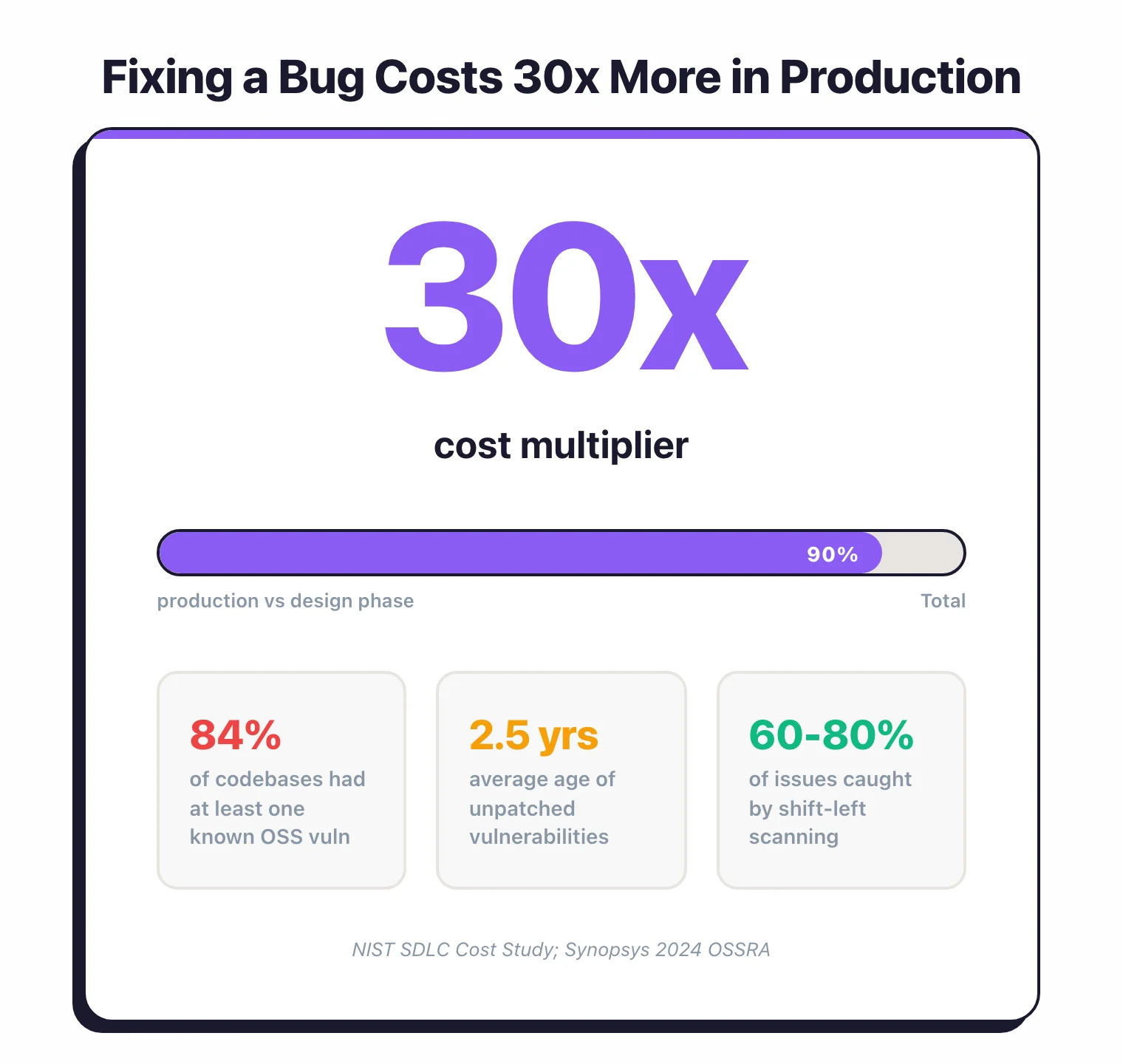
NIST published similar data: fixing a software defect in production costs 30 times more than fixing it during design (NIST SDLC Cost Study; also cited in IBM Systems Sciences Institute research). The cost is not just the code change.
It includes emergency patch cycles, security reviews, compliance notifications, customer communication, and regression testing under time pressure.
A 2024 Synopsys study of more than 1,000 codebases found that 84% contained at least one known open-source vulnerability. The average age of those vulnerabilities was over 2.5 years.
These were not zero-days — they were known issues that could have been caught by SCA scanning in the build pipeline the day the dependency was added.
The financial argument for shift-left is rarely the hard part. The execution is.
Shift-left in the IDE
The earliest point where you can catch vulnerabilities is while the developer is writing code. IDE plugins provide real-time feedback, similar to how a spell-checker underlines words as you type.
Real-time feedback
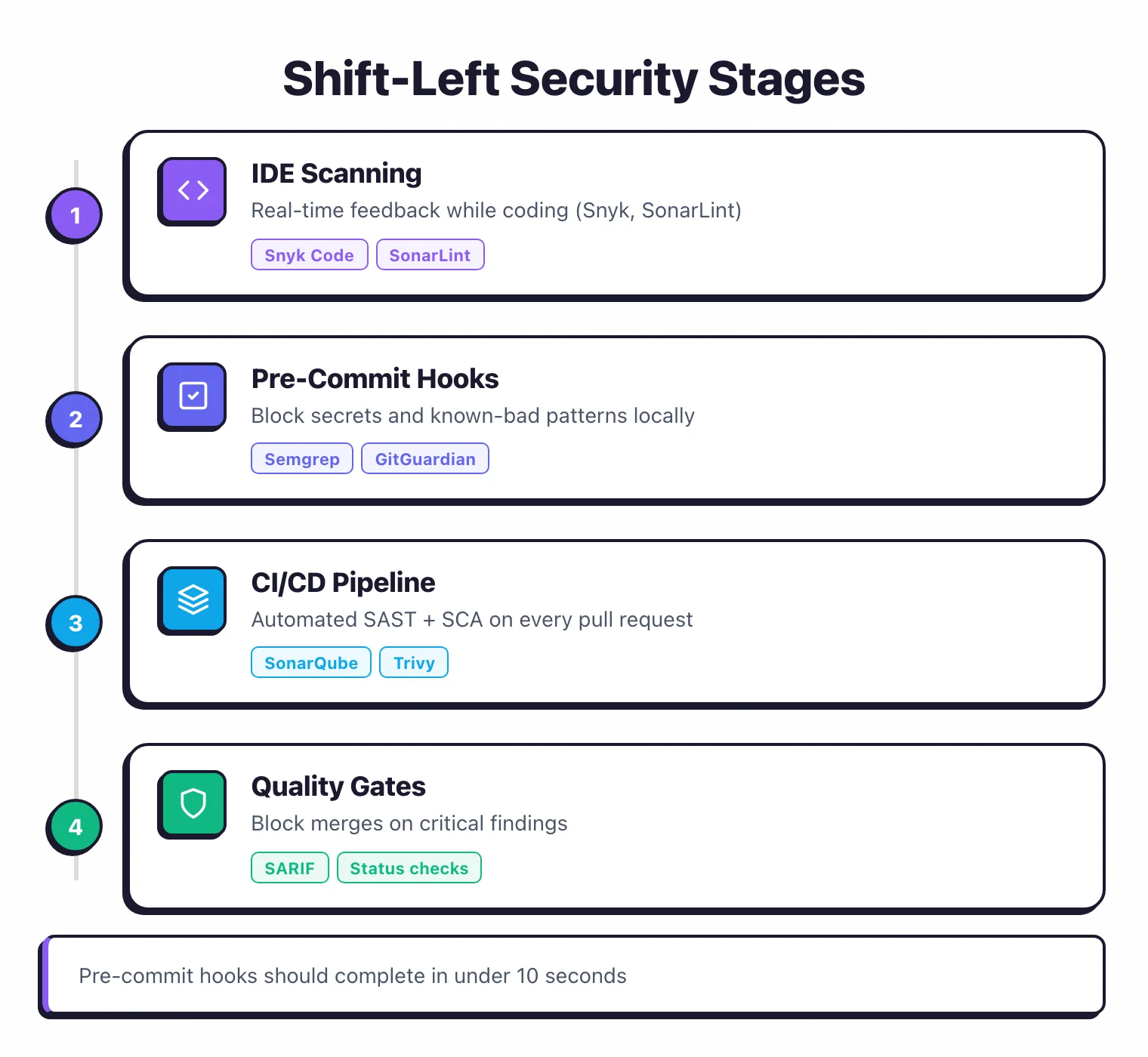
Snyk Code and SonarLint both offer IDE extensions for VS Code, IntelliJ, and other editors. As a developer writes code, the plugin scans in the background and highlights potential vulnerabilities with inline annotations.
The developer sees the issue before they even save the file.
This is the fastest possible feedback loop. No waiting for CI.
No context switching. The developer is already looking at the code and thinking about the logic.
Pre-commit hooks
Semgrep CE and Bandit run as pre-commit hooks, scanning changed files before the commit goes through. If the tool finds a high-severity issue, the commit is blocked until the developer fixes it.
Pre-commit hooks add friction, and that is intentional. The friction is small — a few seconds of scan time — but it prevents known-bad patterns from entering the repository in the first place.
Hardcoded API keys, SQL injection patterns, and disabled security features get caught at the source.
The risk with pre-commit hooks is developer frustration. If the hooks are slow (more than 10 seconds) or produce too many false positives, developers will find ways to skip them. Keep pre-commit scans fast and focused on high-confidence rules.
Secrets detection
Secrets scanning is one of the highest-value shift-left investments. GitGuardian and TruffleHog scan for API keys, passwords, and tokens in code. An AWS key committed to a public repository can be compromised within minutes — bots scrape GitHub continuously looking for exactly this.
Run secrets detection both as a pre-commit hook and in CI. The pre-commit hook catches most cases, but CI scanning catches secrets that slip through (for example, when a developer commits with --no-verify).
Shift-left in CI/CD
CI/CD scanning is the most common shift-left implementation. It is the practical middle ground between IDE-level scanning (fast but optional) and late-stage testing (thorough but slow).
Pull request scanning
Run SAST and SCA on every pull request. Post findings as PR comments so developers see them in context. SonarQube, Checkmarx, Semgrep, and Snyk all integrate with GitHub, GitLab, and Bitbucket to do this.
The key decision is whether to block merges on findings. Start with blocking only critical-severity issues.
Warn on high and medium. This gives the team time to build confidence in the tool without grinding development to a halt.
Container scanning
If you ship containers, scan images in the build pipeline. Snyk, Trivy, and Grype all check container images for known vulnerabilities in OS packages and application dependencies. A container image built from an outdated base can carry dozens of known CVEs even if your application code is clean.
Infrastructure as Code scanning
Checkov, KICS, and Snyk IaC scan Terraform, CloudFormation, Kubernetes manifests, and Dockerfiles for misconfigurations. An S3 bucket set to public, a Kubernetes pod running as root, a security group open to 0.0.0.0/0. These are configuration errors that automated scanning catches reliably.
Quality gates
The shift-left scan is only valuable if it has teeth. Quality gates define the conditions under which a build passes or fails. SonarQube quality gates are the most widely adopted implementation: define thresholds for vulnerability count, severity, and code coverage, and block deployments that do not meet them.
Without quality gates, SAST findings become suggestions. Suggestions get ignored.
Shift-left in culture
Tools are necessary but not sufficient. Shift-left fails when developers view security scanning as someone else’s responsibility or as an obstacle to shipping.
Developer ownership
The mindset shift is from “security team finds bugs, developers fix them” to “developers find and fix their own security bugs, security team sets policy and builds tooling.” This only works if developers have the tools, training, and time to do it.
Give developers access to the same security dashboards the security team uses. Let them see the full findings, not just the filtered list.
Treat security findings like any other type of code quality issue — part of the definition of done, not a separate workflow.
Security champions
Designate one developer per team as a security champion. They attend security team meetings, review security-related pull requests, and act as the first point of contact when teammates have security questions.
This creates a distributed security network without requiring every developer to become a security expert.
Google and Microsoft both run security champion programs at scale. Google’s “Security Champions” program assigns trained developers across product teams.
The investment per champion is roughly one day per month of security-focused work.
Developer training
Training needs to be specific and practical. “OWASP Top 10 awareness” is a starting point, not a destination.
Developers need training on the specific tools your team uses, the specific vulnerability patterns in your stack, and the specific process for triaging and fixing findings.
Hands-on labs beat slide decks. OWASP WebGoat and Secure Code Warrior provide interactive exercises where developers exploit and fix real vulnerabilities.
One afternoon of hands-on training is worth a week of reading about security theory.
Tools at each shift-left stage
Here is what maps to each stage of the development workflow.
IDE and pre-commit
| Tool | What it does |
|---|---|
| Snyk Code | Real-time SAST in IDE (VS Code, IntelliJ) |
| SonarLint | Real-time code quality + security in IDE |
| Semgrep CE | Pre-commit SAST, custom rules |
| Bandit | Pre-commit Python security scanning |
| GitGuardian | Pre-commit secrets detection |
CI/CD pipeline
| Tool | What it does |
|---|---|
| SonarQube | SAST + code quality with quality gates |
| Checkmarx | Enterprise SAST with PR integration |
| Snyk | SCA + SAST + container + IaC scanning |
| Trivy | Container and IaC scanning (free) |
| Checkov | IaC security scanning (free) |
Post-merge and staging
| Tool | What it does |
|---|---|
| OWASP ZAP | DAST against staging environments |
| Invicti | Proof-based DAST with automated verification |
| Contrast Assess | IAST during integration testing |
| StackHawk | DAST in CI/CD pipelines |
For full tool comparisons, see the application security tools directory, or browse by category: SAST tools, SCA tools, and DAST tools.
Why do you still need shift-right runtime security?
Shift-left catches vulnerabilities with known code-level patterns. It does not catch everything.
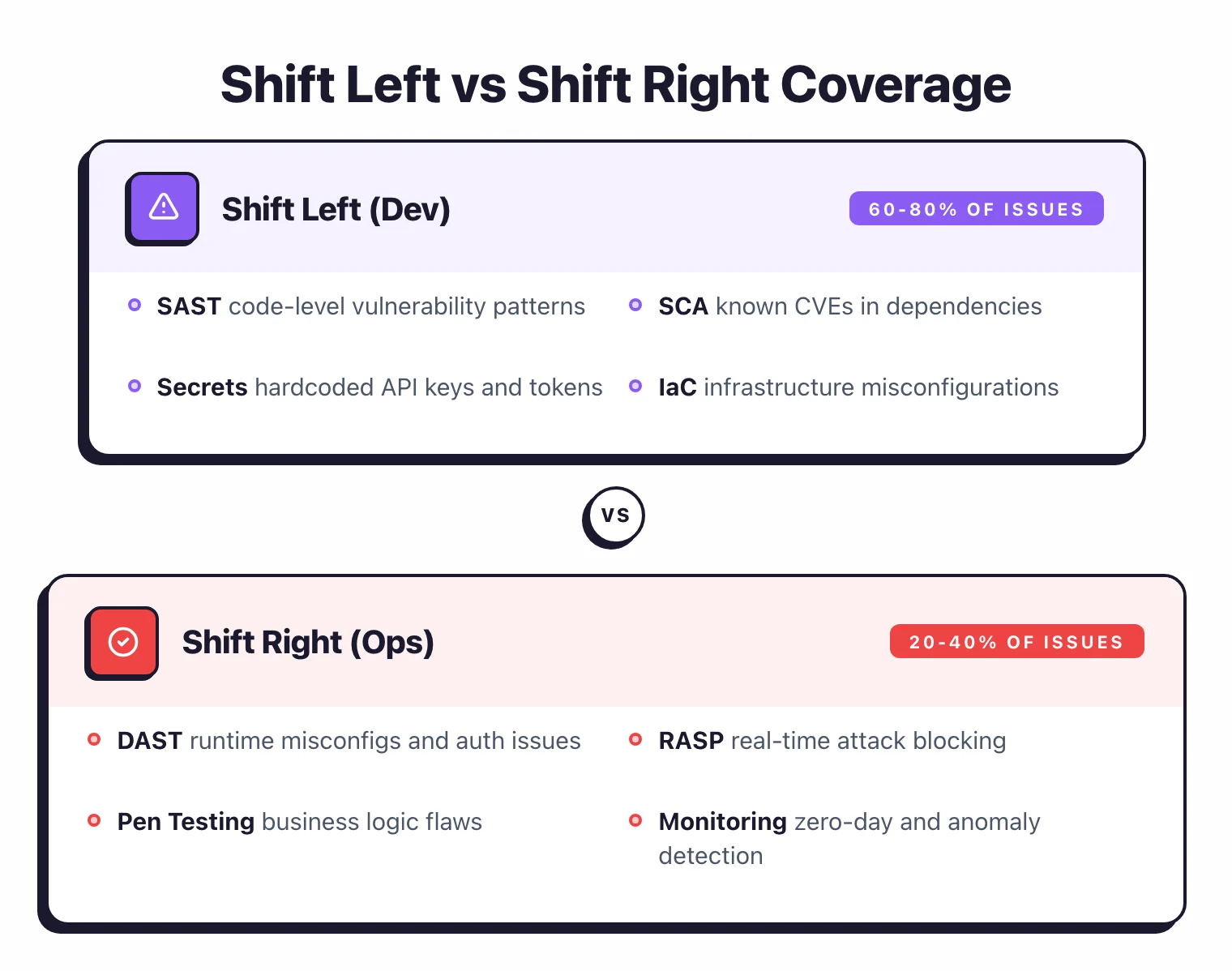
Server misconfigurations, authentication bypass through configuration errors, business logic flaws, and zero-day exploits in dependencies all require runtime testing or monitoring. These are shift-right concerns — security testing and monitoring that happens after deployment.
DAST scanners test running applications from the outside, finding issues that depend on server configuration and runtime behavior. RASP tools protect applications in production by blocking attacks in real time. Security monitoring tools watch for anomalous behavior that static analysis can never predict.
A complete application security program covers both directions. Shift-left for developer-facing automation that catches the majority of known vulnerability patterns.
Shift-right for runtime validation and production protection that catches what static analysis misses.
The practical split for most teams: 70-80% of vulnerabilities caught during development through SAST, SCA, and secrets scanning. The remaining 20-30% caught by DAST, penetration testing, IAST, and runtime monitoring. Neither side replaces the other.
For more on building a complete program, see the guides on DevSecOps implementation and application security testing.