

What is Secure SDLC?#
A Secure Software Development Lifecycle embeds application security practices into every phase of development, from initial planning through production monitoring. Instead of treating security as a final checkpoint before release, teams make security testing continuous and automated.
The payoff is straightforward. Vulnerabilities found during coding cost significantly less to fix than those found in production, according to commonly cited IBM/NIST research on defect cost curves.
Catching a SQL injection in a pull request means a developer fixes it in five minutes. Catching it in production means an incident, a hotfix, a post-mortem, and potentially exposed customer data.
This guide maps each phase of the SDLC to the application security tool categories that belong there, with specific recommendations from the AppSec Santa catalog of 230 tools.
NIST SSDF, Microsoft SDL, OWASP SAMM: which framework should you follow?#
Three mature frameworks define what a secure SDLC actually contains. They overlap heavily — pick one as the primary reference and treat the others as supplementary.
- NIST SSDF (NIST SP 800-218). The Secure Software Development Framework is the practical baseline for any team that sells software to a US Federal customer or to a vendor in their supply chain. SSDF organises practices into four groups — Prepare the Organization (PO), Protect the Software (PS), Produce Well-Secured Software (PW), and Respond to Vulnerabilities (RV). Executive Order 14028 turned SSDF self-attestation into a procurement gate, which is why it now shows up in nearly every enterprise AppSec roadmap.
- Microsoft Security Development Lifecycle (SDL). The original published-in-public SDLC framework, born inside Microsoft after the 2002 Trustworthy Computing memo. Twelve practices spanning training, requirements, design, implementation, verification, release, and response. Microsoft no longer markets SDL as a paid product; the documentation is freely available as a reference model and remains the cleanest mapping of phases to specific activities.
- OWASP SAMM (Software Assurance Maturity Model). The vendor-neutral counterpart, organised into five business functions — Governance, Design, Implementation, Verification, Operations — each with three security practices and four maturity levels (0-3). SAMM is the right framework when a team needs to assess their current state and pick the next concrete improvement.
For the broader vendor-neutral assessment landscape, BSIMM (now under Black Duck after the 2024 spin-off from Synopsys) measures real-world practice adoption across observed organisations rather than prescribing what to do.
Use SSDF as the contractual reference, SAMM as your maturity yardstick, and Microsoft SDL or BSIMM as supplementary detail when a specific practice needs more depth. The phase-by-phase tool mapping below works against any of them.
If a full framework is more ceremony than your team is ready for, the 50-point application security checklist covers the same ground at audit-walkthrough depth.
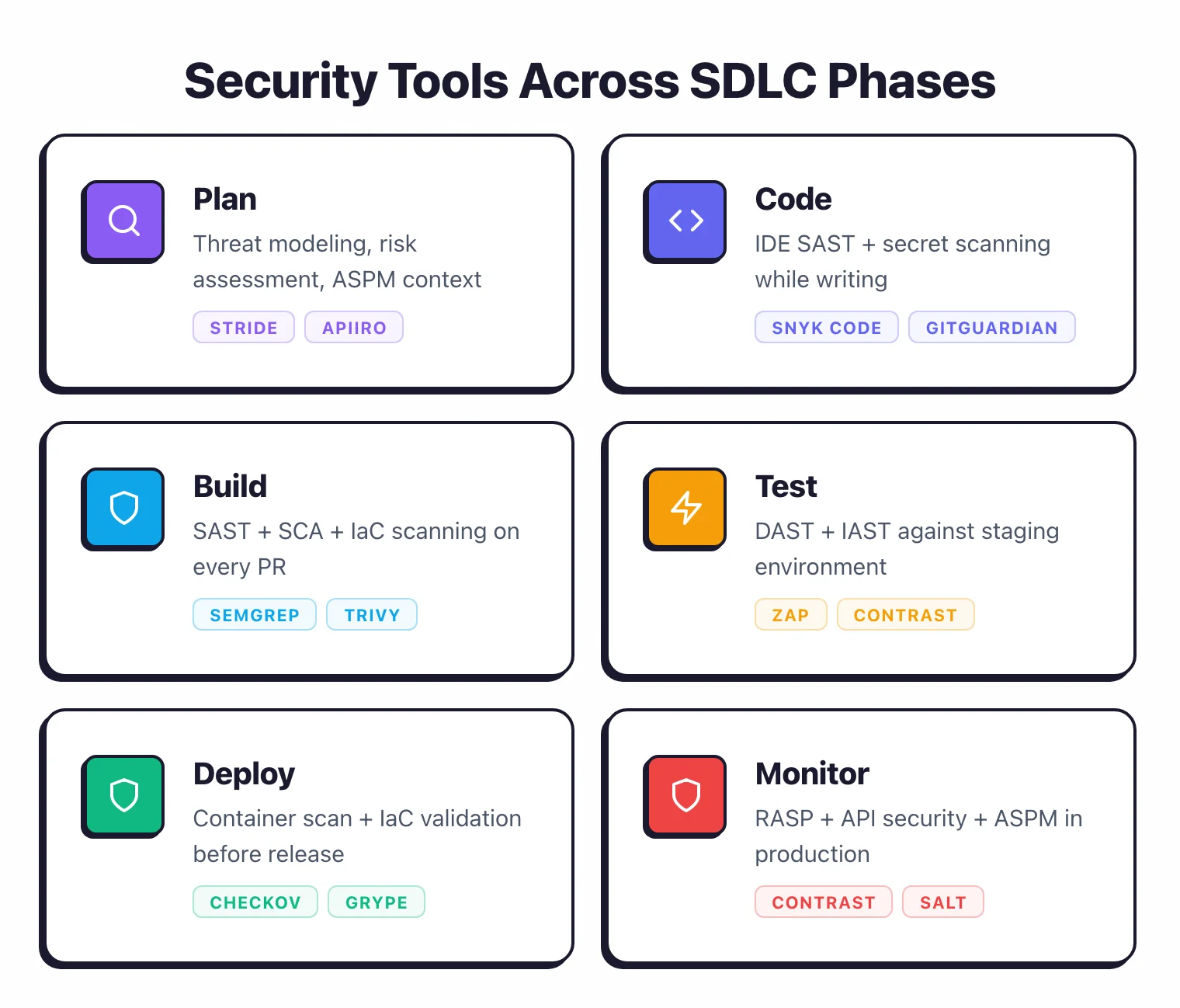
Tool mapping across SDLC phases#
| SDLC Phase | Tool Categories | When It Runs | What It Catches |
|---|---|---|---|
| Plan | Threat Modeling, ASPM | Before coding starts | Architectural risks, missing security requirements |
| Code | SAST (IDE), Secret Scanning | As developers write code | Injection, crypto issues, hardcoded secrets |
| Build | SAST (CI), SCA, IaC Security | On every pull request / merge | Vulnerable dependencies, code flaws, IaC misconfigurations |
| Test | DAST, IAST | In staging / QA environments | Runtime vulnerabilities, authentication issues, misconfigurations |
| Deploy | IaC Security, Container Scanning | Before/during deployment | Infrastructure misconfigurations, container vulnerabilities |
| Monitor | RASP, API Security, ASPM | In production | Active attacks, API abuse, vulnerability posture tracking |
Plan phase#
The goal here is identifying security risks before a single line of code gets written.
Activities#
- Threat modeling. Map data flows, identify trust boundaries, list potential threats. Use STRIDE, PASTA, or lightweight attack trees depending on the project scope.
- Security requirements. Define authentication, authorization, encryption, and logging requirements alongside functional requirements.
- Risk assessment. If you are modifying an existing application, review its current vulnerability posture before planning changes.
Plan-phase tools#
Threat modeling is still largely manual, but ASPM tools can provide context:
- Apiiro - Risk scoring based on code changes, developer behavior, and application context
- ArmorCode - Aggregates historical vulnerability data to inform planning
- Invicti ASPM - Proof-based scanning with multi-scanner orchestration
- DefectDojo - Open-source vulnerability management showing current risk posture
Most threat modeling is done with general-purpose tools (diagrams, whiteboards, spreadsheets) rather than security-specific software. The value is in the conversation, not the tool.
Code phase#
The goal is immediate feedback on security issues while developers write code.
This is the least disruptive place to catch vulnerabilities. Developers are already in the codebase, they have full context, and fixing something takes minutes instead of hours.
Code-phase tools#
SAST in the IDE gives real-time security feedback:
- Snyk Code - Scans in real time inside VS Code, IntelliJ, and other IDEs. Results appear as inline annotations while typing.
- Semgrep - IDE extension with custom rules. Semgrep CE runs locally and Semgrep Code adds cross-file analysis and organization-wide policies.
- SonarQube (via SonarLint) - IDE plugin that applies SonarQube rules locally before committing.
- Checkmarx (via CxCodebashing) - IDE integration for Checkmarx customers.
Secret scanning catches hardcoded credentials before they reach the repository:
- GitGuardian - Detects secrets in commits with high accuracy
- Gitleaks - Open-source secret scanner for git repositories
- GitHub Secret Scanning - Built into GitHub for all public repositories
Code-phase integration pattern#
IDE extensions should be configured to show results without blocking the developer. Warnings, not errors.
The goal at this phase is awareness, not enforcement. Enforcement happens in the Build phase.
Build phase#
The goal is automating security checks in the CI/CD pipeline so nothing insecure merges without review.
This is where most organizations get the best return. Scans run automatically, results appear in pull request comments, and security gates can block merges for critical findings.
Build-phase tools#
SAST in CI runs full or incremental analysis on every pull request:
- Semgrep - Scans in seconds, integrates with GitHub Actions, GitLab CI, Jenkins
- Checkmarx - Full SAST scan in CI with incremental scanning for speed
- Veracode Static Analysis - Pipeline scan with quick-turnaround results
- Fortify - CI integration with Fortify on Demand (cloud) or Fortify SCA (self-hosted)
- SonarQube - Quality gates that block merges based on security findings
- CodeQL - GitHub-native SAST, free for public repositories
SCA in CI scans dependencies for known vulnerabilities:
- Snyk Open Source - Fix PRs generated automatically for vulnerable dependencies
- Trivy - Scans container images, filesystems, and IaC in one tool
- Grype - Fast vulnerability matching, pairs with Syft for SBOM generation
- OWASP Dependency-Check - Maven/Gradle integration for Java projects
- Dependabot - Built into GitHub, creates update PRs automatically
- Renovate - Highly configurable dependency update bot
IaC Security in CI validates infrastructure configurations:
- Checkov - Policy-as-code for Terraform, CloudFormation, Kubernetes
- Trivy - IaC scanning alongside container and dependency scanning
- Terrascan - OPA-based policy engine for IaC
- KICS - Broad IaC platform support
- Snyk IaC - Integrated with Snyk’s developer-first platform
Build-phase integration pattern#
Configure scans to run on pull requests and report results as PR comments or status checks. Set security gates to block merges only for critical and high-severity findings.
Start permissive and tighten over time as false positives are tuned out.
Test phase#
The goal is finding runtime vulnerabilities by testing the running application in staging or QA.
DAST and IAST tools belong here because they need a deployed, running application to test against.
Test-phase tools#
DAST tools scan the application from the outside, simulating how an attacker would probe it:
- Burp Suite - Manual and automated web application testing (~$475/year per user for Pro)
- ZAP - Free, full-featured automated scanner (14,700 GitHub stars)
- Invicti - Proof-based scanning that confirms vulnerabilities with evidence
- Nuclei - Template-based scanning with 8,000+ community templates
- StackHawk - DAST built for CI/CD, developer-friendly output
- Acunetix - DeepScan for JavaScript-heavy SPAs
- Nikto - Lightweight web server scanner
IAST tools instrument the application from the inside, watching how it processes requests during testing:
- Contrast Security - Assess module provides IAST during QA
- Seeker IAST - Runtime analysis during functional testing
- HCL AppScan - Combined DAST and IAST capabilities
Test-phase integration pattern#
DAST scans can be triggered automatically after deployment to a staging environment. Run a baseline scan on every deployment and a full scan on a scheduled basis (weekly or before releases).
IAST agents are deployed alongside the application in staging and monitor all traffic from QA testing.
Deploy phase#
The goal is verifying that the deployment itself is secure and that infrastructure configurations meet your policies.
Deploy-phase tools#
IaC Security runs a final check before infrastructure changes go live:
- Checkov - Pre-deployment policy validation
- Kubescape - Kubernetes security posture assessment (11,200 GitHub stars)
- Trivy - Final container image scan before deployment
Container scanning verifies that the images being deployed are clean:
- Trivy - Scans container images in registries and CI pipelines
- Grype - Container vulnerability scanning
Deploy-phase integration pattern#
Add a container image scan as a deployment gate: if the image has critical vulnerabilities, the deployment is blocked. Kubernetes admission controllers (e.g., OPA Gatekeeper) can enforce that only scanned images are deployed.
Monitor phase#
The goal here is detecting and blocking attacks against running applications while tracking your overall security posture.
Monitor-phase tools#
RASP tools protect applications at runtime by detecting and blocking attack attempts:
- Contrast Protect - RASP module blocks attacks in production
- Imperva RASP - Application-level threat prevention
- Hdiv - Runtime protection for Java and .NET
API Security tools monitor API traffic for abuse and vulnerabilities:
- Salt Security - API traffic analysis and threat detection
- Wallarm - API security with runtime protection
- 42Crunch - API conformance testing and firewall
ASPM tools aggregate findings from all phases into a single view of your security posture:
- ArmorCode - Correlates findings from all scanners
- Apiiro - Risk-based prioritization
- Invicti ASPM - Proof-based DAST with multi-scanner orchestration
- OX Security - Pipeline security and finding management
- DefectDojo - Open-source finding aggregation (4,500 GitHub stars)
Where do security tools integrate in the SDLC?#
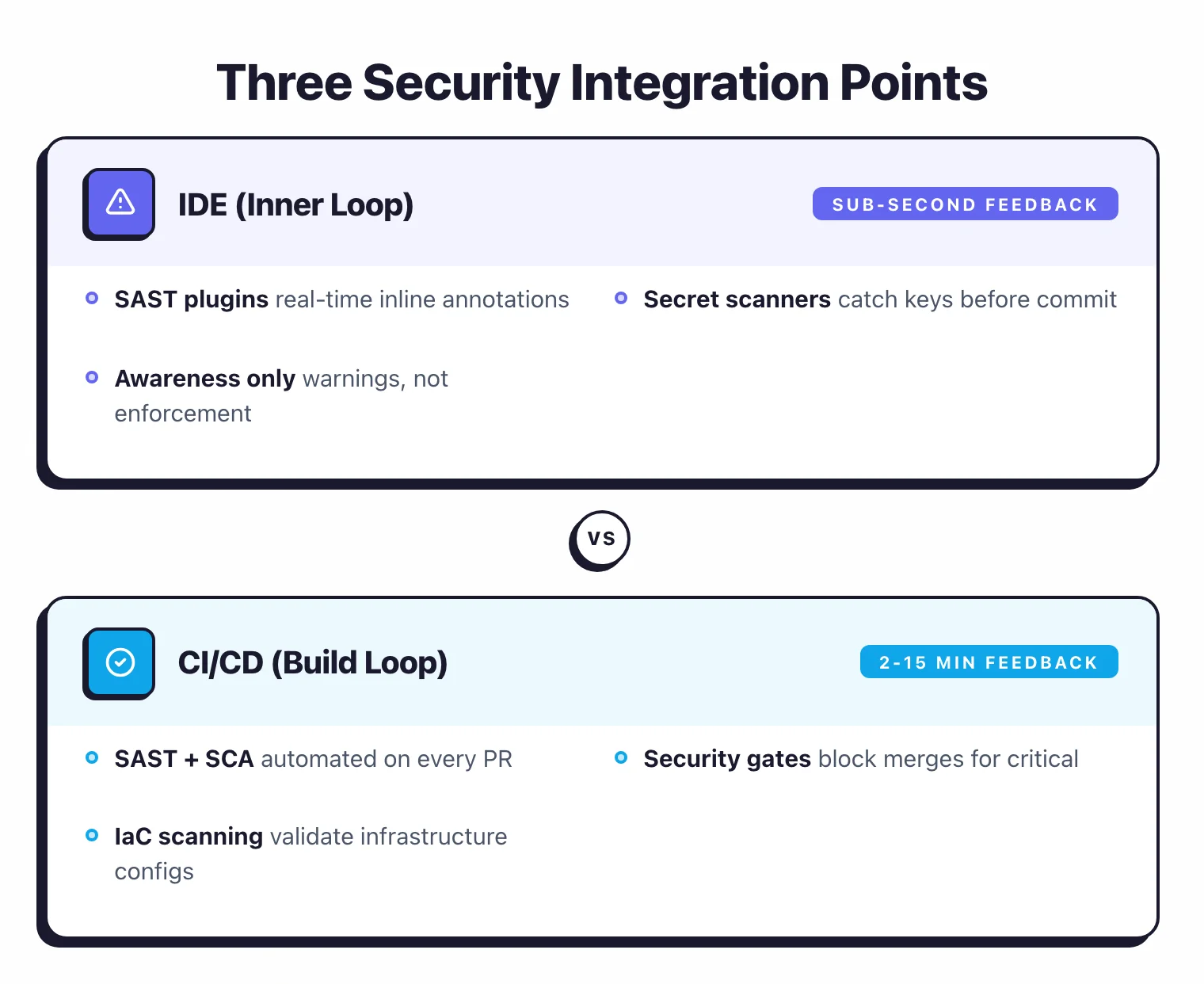
Security tools integrate at three levels. The right level for each tool depends on when the feedback is most useful.
IDE (innermost loop)#
SAST tools with IDE plugins (Semgrep, Snyk Code, SonarLint) and secret scanners (GitGuardian, Gitleaks) run here. Feedback is instant, sub-second to a few seconds.
This is where developers fix issues while they still have full context.
CI/CD pipeline (build loop)#
SAST, SCA, and IaC Security scans triggered by pull requests, plus container image scanning before deployment. Security gates block merges for critical findings.
Feedback comes in minutes (2-15 for most scans). This is where you enforce policy automatically.
Staging/production (outer loop)#
DAST scans against deployed environments, IAST agents monitoring test traffic, RASP agents protecting production, and API security monitoring. Scheduled scans take hours to days; RASP operates in real time.
This is where you catch runtime-only issues and block active attacks.
How do you progress from one tool to full coverage?#
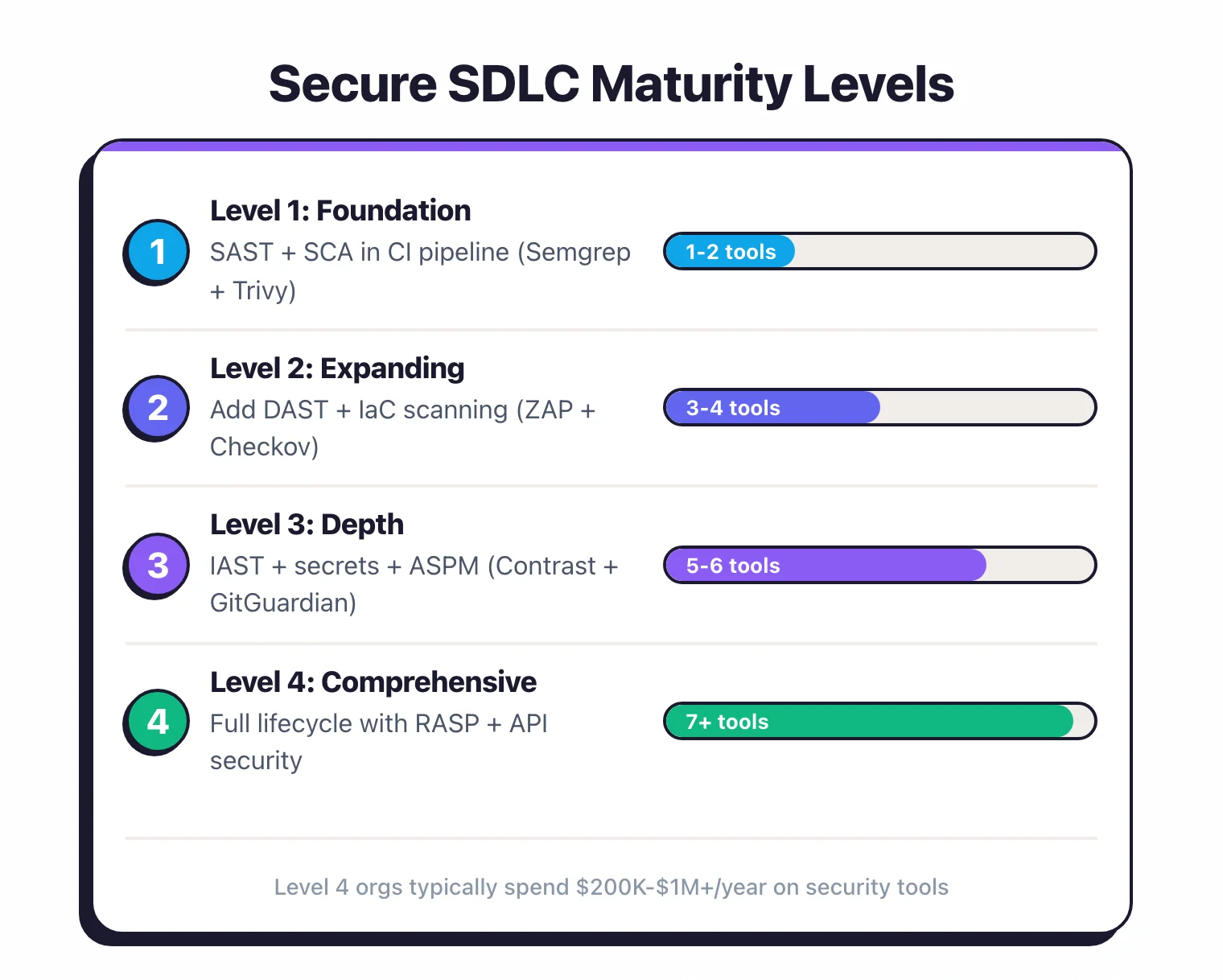
Level 1: Foundation (1-2 tools)#
Start here. Pick one SAST tool and one SCA tool, and integrate them into your CI pipeline.
Recommended: Semgrep CE (free SAST) + Trivy (free SCA)
At this level, you catch the most common code vulnerabilities and vulnerable dependencies. This covers OWASP Top 10 items A03 (Injection), A06 (Vulnerable Components), and partially covers A02, A08.
Level 2: Expanding coverage (3-4 tools)#
Add DAST and IaC scanning. Now you are testing the running application and validating infrastructure.
Add: ZAP or Nuclei (free DAST) + Checkov (free IaC)
This brings coverage to A01 (Broken Access Control), A05 (Security Misconfiguration), A07 (Authentication Failures), and A10 (SSRF), in addition to Level 1 coverage.
Level 3: Depth (5-6 tools)#
Add IAST, secret scanning, and consider ASPM. You are now catching issues at multiple points in the lifecycle.
Add: Contrast Security (IAST) + GitGuardian (secrets) + DefectDojo (finding management)
At this level, you have overlapping coverage across most OWASP Top 10 items, centralized finding management, and multiple feedback loops for developers.
Level 4: Comprehensive (7+ tools)#
Full lifecycle coverage with RASP, API security, and enterprise ASPM. This is where large enterprises operate.
Full stack: Enterprise SAST + SCA + DAST + IAST + RASP + API Security + IaC + ASPM
Organizations at this level typically spend $200,000-$1M+/year on security tools. See our AppSec Pricing Guide for budget planning.