

How should you use this checklist?#
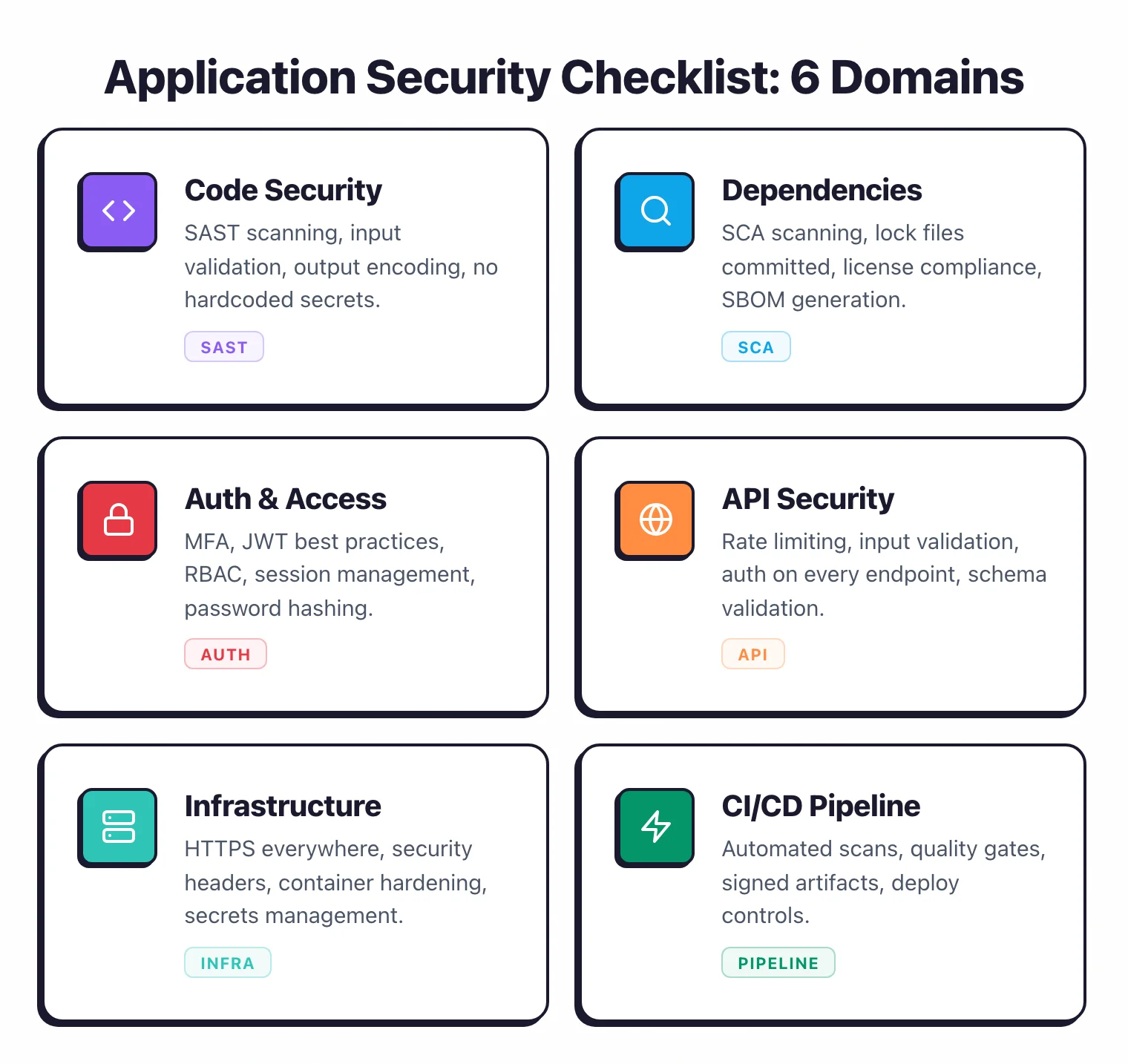
An application security checklist is a structured audit framework that development teams use to verify their applications meet security standards across code, dependencies, infrastructure, authentication, and deployment.
This AppSec Santa 50-point audit is designed for development teams running web applications and APIs. Work through it section by section.
For each item, mark it as pass (implemented and verified), fail (not implemented or not verified), or N/A (does not apply to your stack).
Items marked as fail need a remediation owner and a deadline. Set deadlines by severity: critical gaps (authentication, secrets management, injection prevention) should be fixed within 30 days. Lower-risk items can be scheduled within a quarter.
Run the full audit quarterly. Between audits, automated scanning handles most of the continuous checks (SAST, SCA, secrets scanning).
The quarterly review catches configuration drift, access control changes, and process gaps that automation misses.
If your team scores below 30 out of 50 on the first pass, do not try to fix everything at once. Start with Code Security and Authentication — those two sections address the vulnerabilities that cause the most damage.
How does this checklist map to OWASP ASVS and the OWASP Top 10?#
Every domain in this audit lines up with a chapter of the OWASP Application Security Verification Standard (ASVS) and at least one of the OWASP Top 10 risks. Use this map when you need to defend the checklist to an auditor or roll it up to a compliance framework.
| Checklist domain | OWASP ASVS chapter | OWASP Top 10 (2021) risk |
|---|---|---|
| Code security | V5 Validation, Sanitization & Encoding | A03 Injection, A08 Software & Data Integrity Failures |
| Dependency management | V14 Configuration | A06 Vulnerable & Outdated Components |
| Authentication & authorization | V2 Authentication, V3 Session, V4 Access Control | A01 Broken Access Control, A07 Identification & Authentication Failures |
| API security | V13 API & Web Service | A04 Insecure Design, A05 Security Misconfiguration |
| Infrastructure & deployment | V14 Configuration | A05 Security Misconfiguration |
| CI/CD pipeline security | V14 Configuration, V10 Malicious Code | A08 Software & Data Integrity Failures |
| Monitoring & incident response | V7 Logging & Error Handling | A09 Security Logging & Monitoring Failures |
| Compliance & governance | V1 Architecture | cross-cutting |
If you are running a fresh audit, finish the checklist first. Then walk the table top to bottom and tag each pass/fail item with the matching ASVS requirement number — that gives you the ASVS evidence trail SOC 2 and ISO 27001 auditors expect without forcing you to run a separate ASVS pass.
Code security#
1. SAST scanning runs on every pull request. A SAST tool like Semgrep , SonarQube , or Snyk Code runs automatically when developers open a PR.
Findings appear inline in the code review interface. Developers see issues before code merges.
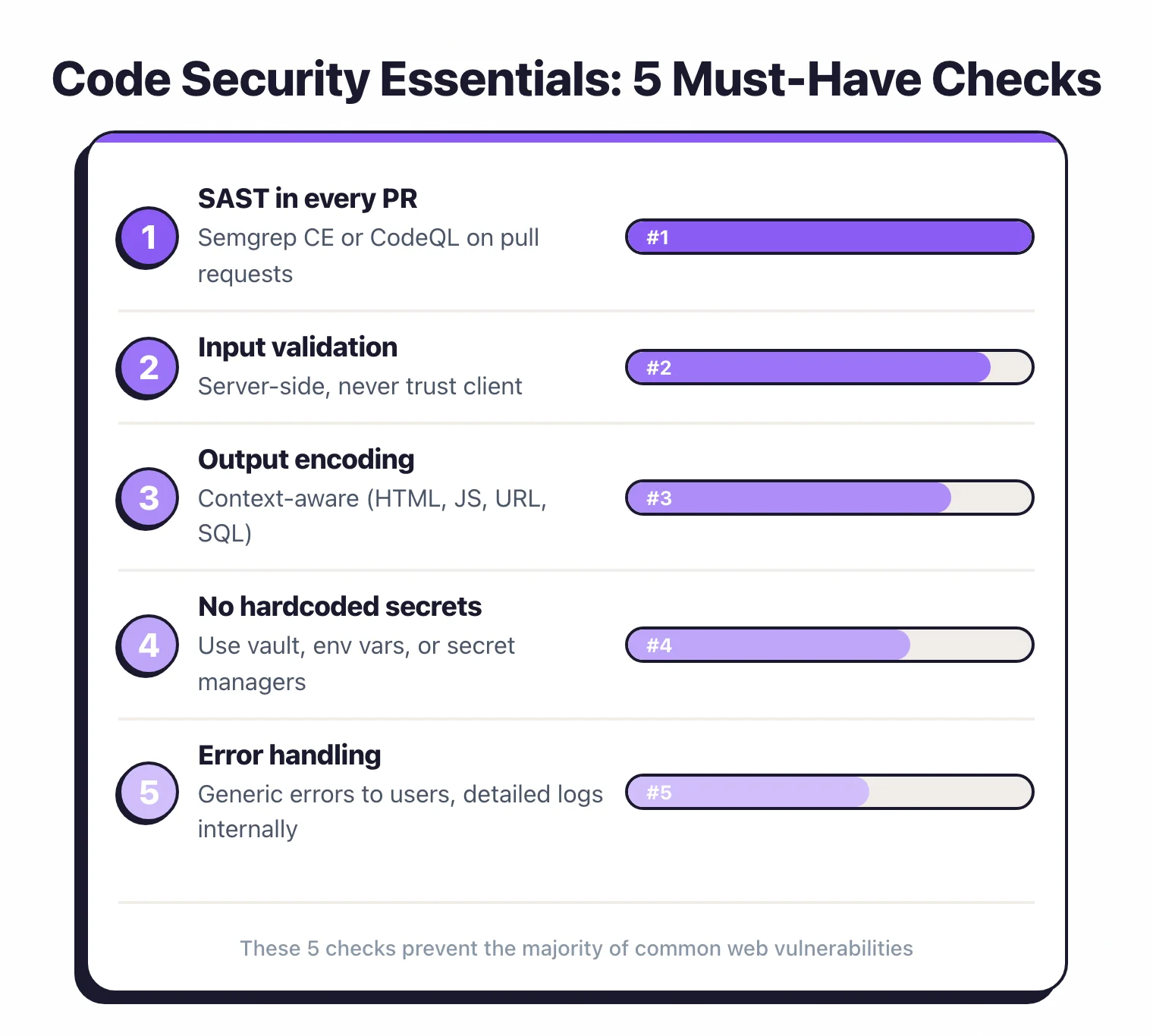
2. SAST rules are tuned to reduce false positives below 20%. Out-of-the-box rulesets produce noise.
Review your SAST findings monthly and disable or adjust rules that consistently flag false positives. A noisy scanner gets ignored.
3. Code review includes security-focused checks.
At least one reviewer on high-risk PRs (authentication, authorization, data handling, cryptography) evaluates security implications. Security champions fill this role.
4. Input validation is enforced at all trust boundaries.
User input, API payloads, file uploads, URL parameters, and headers are validated on the server side.
Client-side validation exists for UX but is never the only check.
5. Output encoding prevents injection attacks.
All data rendered in HTML, SQL, OS commands, and LDAP queries is encoded or parameterized using your framework’s built-in mechanisms.
No string concatenation for SQL queries. No raw HTML rendering of user content.
6. Secrets scanning blocks commits containing credentials.
A pre-commit hook or CI check using GitGuardian , Gitleaks , or TruffleHog prevents API keys, passwords, and tokens from reaching the repository.
7. No secrets exist in the current codebase or git history.
Run a full repository scan (including git history) to find and rotate any previously committed secrets.
Use git filter-repo or BFG Repo-Cleaner to remove them from history.
Dependency management#
8. SCA scanning runs on every build.
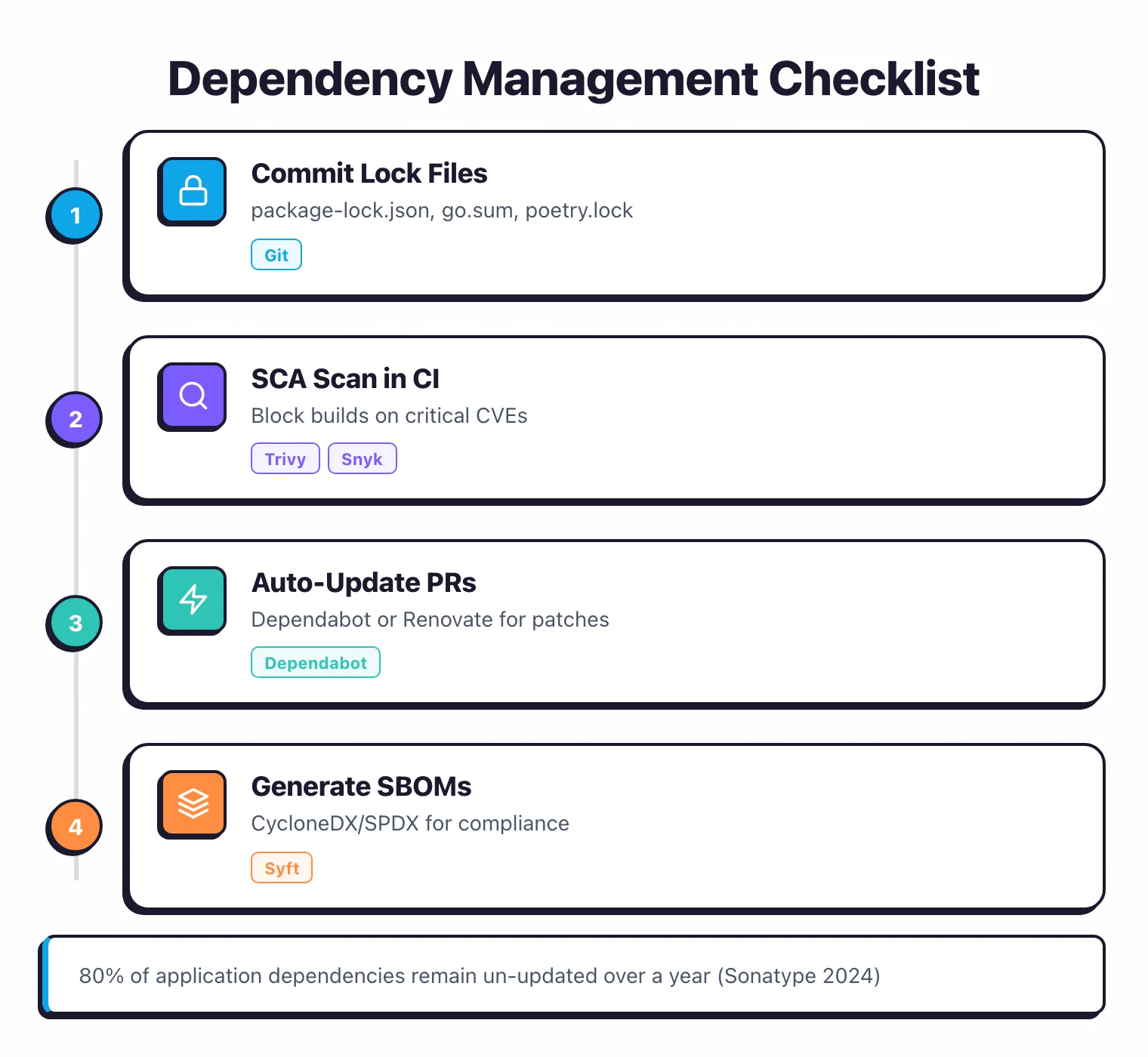
A software composition analysis tool like Trivy , Grype , Snyk , or Dependabot scans dependencies during CI. Known vulnerable packages are flagged before deployment.
9. Critical dependency vulnerabilities block the build.
Your CI pipeline fails when SCA detects a critical or high-severity vulnerability with a known exploit. This prevents deploying applications with actively exploited dependencies.
10. Dependencies are updated at least monthly. Automated PR tools like Dependabot or Renovate create pull requests for dependency updates.
Review and merge them within a week. Stale dependencies accumulate vulnerabilities.
11. An SBOM is generated for each release. A Software Bill of Materials in CycloneDX or SPDX format is produced during the build.
This lets you respond quickly when a new CVE affects a library — you can immediately identify which applications use it. Read more about SBOMs .
12. Unused dependencies are removed. Dead dependencies increase your attack surface for zero benefit.
Audit your dependency tree quarterly and remove packages that are imported but unused.
13. License compliance is checked. SCA tools flag licenses that conflict with your usage (GPL in a commercial SaaS product, for example).
Define an approved license list and fail the build on violations.
14. Dependency pinning is enforced.
Lock files (package-lock.json, Pipfile.lock, go.sum) are committed and CI installs from lock files, not floating version ranges. This prevents supply chain attacks via compromised new releases.
Authentication and authorization#
15. Passwords are hashed with bcrypt, scrypt, or Argon2id. Never use MD5, SHA-1, or SHA-256 alone for password storage .
Use a slow, salted hashing algorithm with a work factor that takes at least 100ms on your hardware.
16. Multi-factor authentication is available for all user accounts. At minimum, TOTP (time-based one-time password) support.
For sensitive applications, support hardware keys via WebAuthn/FIDO2. For admin accounts, MFA should be mandatory, not optional.
17. Session tokens are cryptographically random and expire. Use your framework’s built-in session management.
Tokens must be at least 128 bits of entropy. Set absolute session timeouts (e.g., 24 hours) and idle timeouts (e.g., 30 minutes for sensitive apps).
18. Failed login attempts are rate-limited. After 5-10 failed attempts, introduce progressive delays or temporary lockouts.
Log failed attempts for monitoring. Avoid revealing whether the username or password was wrong (“Invalid credentials” not “User not found”).
19. Authorization checks happen on every request. Do not rely on UI hiding to enforce access control.
Every API endpoint and server-side action checks whether the authenticated user has permission. Test for IDOR (insecure direct object reference) vulnerabilities .
20. JWT tokens are validated correctly.
If you use JWTs: verify the signature, check the iss and aud claims, enforce expiration, and reject the none algorithm.
Store signing keys securely. Prefer short-lived access tokens (15 minutes) with refresh token rotation.
21. OAuth/OIDC state parameter is validated.
If your application uses OAuth, generate a unique state parameter per authorization request and validate it on callback. This prevents CSRF attacks against the OAuth flow.
22. Admin interfaces have separate access controls. Admin panels should require additional authentication, IP restrictions, or VPN access.
Never expose admin interfaces on the same URL as the public application without extra protection.
API security#
23. All API endpoints require authentication. Unless explicitly public (health checks, documentation), every endpoint requires a valid authentication token.
Audit your routes quarterly to ensure new endpoints did not accidentally ship without auth.
24. API rate limiting is implemented. Set rate limits per user, per IP, and per endpoint.
Unauthenticated endpoints need stricter limits. Monitor and adjust based on legitimate traffic patterns. Read more about API security tools .
25. API input is validated against a schema.
Use OpenAPI schemas, JSON Schema, or your framework’s validation layer to reject malformed requests before they reach business logic. Validate types, lengths, ranges, and formats.
26. API responses do not leak internal details. Error responses return generic messages, not stack traces, SQL queries, or internal file paths.
Set Content-Type headers correctly. Never return more data than the client needs (no unnecessary fields in JSON responses).
27. CORS is configured restrictively. Do not use Access-Control-Allow-Origin: * for authenticated endpoints. Allowlist specific origins. Do not reflect the Origin header without validation.
28. GraphQL endpoints have depth and complexity limits.
If you use GraphQL, enforce query depth limits, complexity scoring, and field-level rate limiting to prevent denial of service via deeply nested queries.
29. File uploads are validated and sandboxed.
Check file type by magic bytes, not just the extension. Limit file sizes. Store uploads outside the web root.
Scan uploaded files for malware. Never serve user-uploaded files with executable content types.
Infrastructure and deployment#
30. HTTPS is enforced everywhere. TLS 1.2 or higher on all endpoints.
HSTS headers with a minimum max-age of one year. No mixed content.
Redirect HTTP to HTTPS at the load balancer or CDN level.
31. Security headers are set. At minimum: Content-Security-Policy, X-Content-Type-Options: nosniff, X-Frame-Options: DENY (or Content-Security-Policy: frame-ancestors 'none'), Strict-Transport-Security, and Referrer-Policy. Test with securityheaders.com.
32. Container images are scanned before deployment. Trivy , Grype , or your registry’s built-in scanner checks images for OS-level and library vulnerabilities. Block deployment of images with critical unpatched vulnerabilities.
33. Container images use minimal base images. Use distroless images, Alpine, or Chainguard images instead of full OS distributions.
Fewer installed packages means a smaller attack surface and fewer vulnerabilities to patch.
34. Infrastructure as Code is scanned. IaC scanners like Checkov , KICS , or Trivy check Terraform, CloudFormation, Kubernetes manifests, and Dockerfiles for misconfigurations before deployment.
35. Production secrets are stored in a secrets manager. Use AWS Secrets Manager, HashiCorp Vault, Azure Key Vault, or GCP Secret Manager.
Never store secrets in environment variables baked into container images, config files in git, or plaintext databases.
36. Network segmentation limits blast radius. Production databases are not accessible from the public internet.
Internal services communicate over private networks. Security groups and network policies enforce least-privilege access between services.
37. Cloud accounts follow least-privilege IAM. No *:* policies.
Service accounts have only the permissions they need. Human admin access requires MFA and is logged. Review IAM policies quarterly and remove unused permissions.
CI/CD pipeline security#
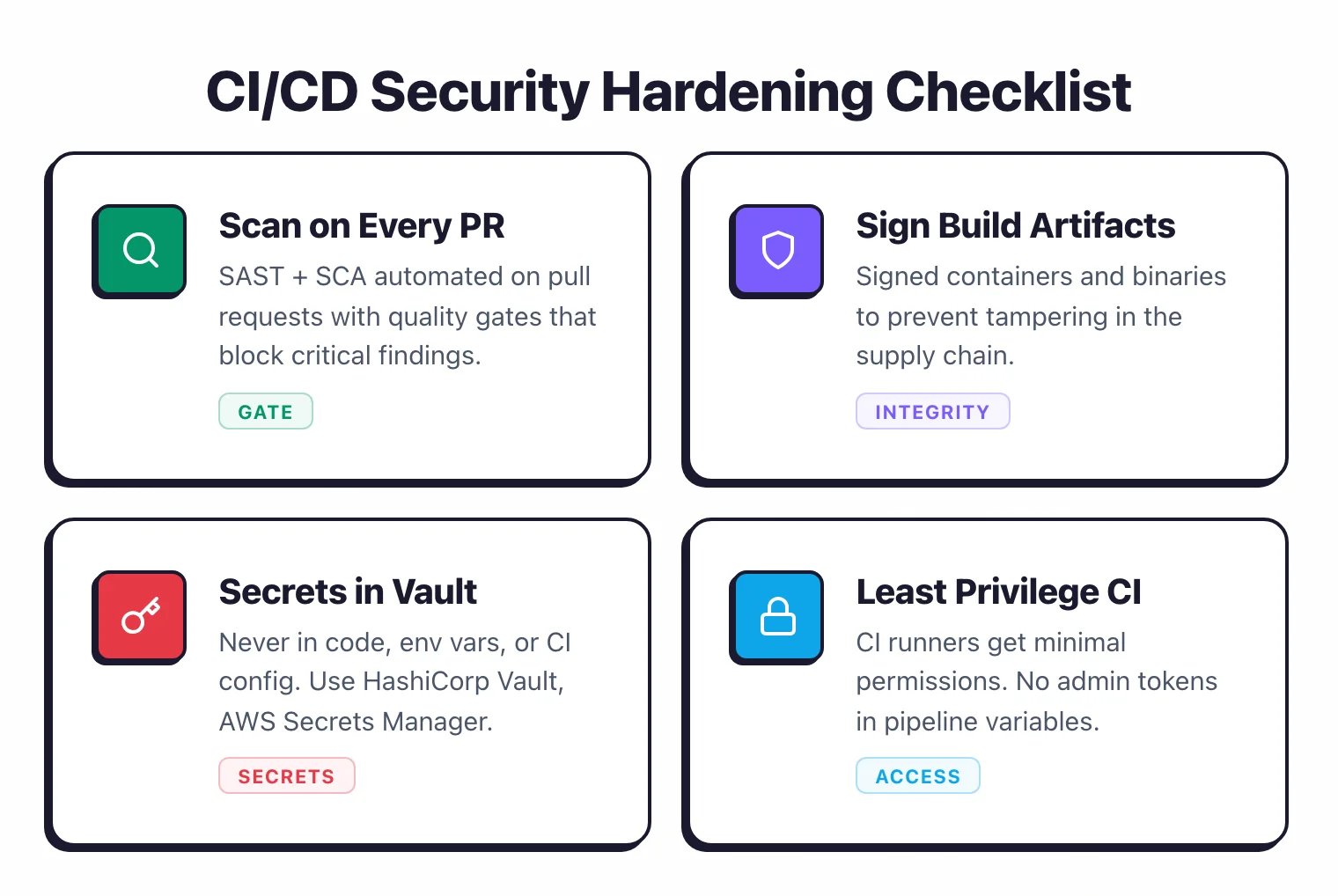
38. CI/CD pipelines run with least-privilege permissions.
Build agents do not have production deployment credentials unless they are running a deployment job. Separate build, test, and deploy permissions.
39. Pipeline definitions are code-reviewed. Changes to CI/CD configuration files (Jenkinsfile, .github/workflows, .gitlab-ci.yml) go through the same review process as application code.
A malicious pipeline change can exfiltrate secrets or deploy backdoored code.
40. Third-party CI/CD actions and plugins are pinned to SHA.
Do not use @latest or @v1 for GitHub Actions, Jenkins plugins, or other third-party pipeline components.
Pin to a specific commit SHA and review updates manually.
41. Build artifacts are signed. Sign container images and release binaries so that downstream consumers can verify integrity, in line with SLSA supply chain provenance levels .
Use Cosign for container images or GPG for binary releases.
42. Pipeline secrets are not exposed in logs. Audit your CI/CD logs to ensure secrets, tokens, and credentials are masked.
Test by searching recent build logs for known secret patterns.
43. Merge protections prevent unauthorized deployments.
Require at least one code review approval, passing CI checks (including security scans), and branch protection rules before merging to main. No direct pushes to production branches.
Secrets management#
Secrets — API tokens, database credentials, signing keys, cloud access keys — are the highest-leverage finding in any audit, and secure secret handling is a core practice in the NIST Secure Software Development Framework (SSDF) . A leaked secret often hands the attacker exactly the privilege you spent the rest of the program defending. Five audit points carry most of the weight here:
- No secrets in source control. Run a secrets scanner (Gitleaks, GitGuardian, TruffleHog) over the full git history, not just the current tree. Block new commits with a pre-receive or pre-commit hook.
- Secrets live in a manager, not env files. Use AWS Secrets Manager, GCP Secret Manager, HashiCorp Vault, or your platform’s equivalent. Local .env files are acceptable for development only and must be in .gitignore.
- Rotation is automated and tested. Every secret has a rotation cadence. High-blast-radius secrets (root keys, signing keys) rotate at least quarterly. Run a rehearsal — if rotation breaks production, the rotation policy is theatre.
- CI/CD tokens are scoped and short-lived. Pipeline credentials use OIDC or short-lived tokens, never long-lived service-account keys checked into a runner. Each token has the minimum permissions needed for the job.
- Access is logged. Every read of a sensitive secret produces an audit log entry. Anomalies (a service reading a secret it has never read before) page someone.
If any of these five fail, treat it as a critical-severity item — fix within seven days, not within a quarter.
What should you monitor for incident response?#
44. Security events are logged centrally.
Authentication events (login, logout, failed attempts, MFA challenges), authorization failures, input validation rejections, and administrative actions are logged with timestamps, user IDs, and source IPs.
Logs are shipped to a central system (ELK, Datadog, Splunk).
45. Alerts fire on suspicious patterns. Set alerts for brute-force login attempts, unusual API traffic spikes, authentication from unexpected geolocations, and privilege escalation events.
Tune thresholds to reduce false alarms without missing real threats.
46. An incident response plan exists and is tested.
Your team has a written plan covering: who gets paged, how to contain a breach, how to communicate with users, and how to perform a post-mortem.
Run a tabletop exercise at least annually to test it.
47. DAST scans run against staging or production. A DAST scanner like ZAP , Nuclei , or Invicti runs regular scans against your deployed application.
This catches runtime issues that static analysis misses: misconfigured headers, exposed admin panels, and server-side injection.
Compliance and governance#
48. A vulnerability management policy defines SLAs. Written policy stating maximum remediation timelines by severity: critical (7 days), high (30 days), medium (90 days).
The policy names who is responsible for enforcement and what happens when SLAs are missed.
49. Third-party penetration testing is conducted annually. At least once per year, an external firm performs a penetration test against your production applications.
Findings are tracked in the same vulnerability management system as scanner results. Fix critical findings within the defined SLA.
50. Security training is required for developers. All developers complete security awareness training annually.
This can be a half-day workshop, an online course (OWASP, SANS, Secure Code Warrior), or an internal session run by the security team. Track completion rates per team.
Scoring your audit#
After completing all 50 items, calculate your score by counting items marked “pass.” Here is a rough guide to interpreting the result:
| Score | Assessment | Priority |
|---|---|---|
| 40-50 | Strong security posture | Address remaining gaps and maintain |
| 30-39 | Good foundation with gaps | Close high-risk gaps within 30 days |
| 20-29 | Significant risk exposure | Focus on Auth and Code Security sections first |
| Below 20 | Immediate action needed | Start with items 1, 6, 8, 15, 19, 30, 35 |
Revisit quarterly. Track your score over time to measure program improvement.
For guidance on building a broader application security program around this checklist, see the DevSecOps & AppSec Programs hub . To understand how scanning tools fit together, read What is ASPM? and compare ASPM tools .
For tool-specific comparisons, browse SAST tools , SCA tools , and DAST tools .